1
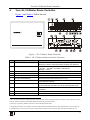
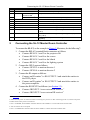
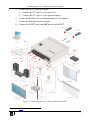
Connecting the SL-12 Master Room Controller 5. Connect the RS-232 ports as follows: Connect RS-232 port 1 to the projector Connect RS-232 port 3 to the plasma display 6. Connect the RS-485 to several Kramer matrices, for example1. 7. Connect the Ethernet port to a network. 8. Connect the K-NET port to any RC device with K-NET. Figure 2: Connecting the SL-12 Master Room Controller 1 Not shown in Figure 2 7