1
TH3VODAFONE_UM_GB_27-07-04
27/07/04
14:50
Page 1
Introduction ..........................................................
Table of contents ..................................................
Alcatel would like to thank you for purchasing this mobile.
Introduction ......................................................................................................1
Safety and Use ..................................................................................................5
General Information ........................................................................................8
1. Your mobile ................................................................................................9
Your camera: photo and video clip
Play a video clip with sound with your mobile. Save it in your multimedia album “My Items” and use it to
personalise the screen saver. You can also associate a video with a contact so when your contact calls you,
the video is played. Capture and share your favourite moments with the camera. You can zoom and record
sound while taking your photos, or add funny frames and stamps. It is easy and a lot of fun!
Say it with colours using MMS
Your phone includes the Multimedia Message Service enabling you to send video clips, colour pictures and
sounds in your messages. You can create expressive messages to match your mood, thanks to the embedded
and downloaded multimedia content.
A style of your very own
Personalise your handset with your own special touch. Either choose the colour and texture of the screens
from the embedded skins, or pick a video clip, a wallpaper or melody from the rich multimedia content.
Your game companion
Get ready for a new intense gaming experience with a large choice of downloadable games and applications.
1
1.1 Keys ..................................................................................................................................................................10
1.2 Main screen icons ........................................................................................................................................11
2. Getting started ........................................................................................13
2.1 Set-up ..............................................................................................................................................................13
2.2 Switching on your telephone......................................................................................................................15
2.3 Switching off your telephone......................................................................................................................15
3. Calls ..........................................................................................................16
3.1
3.2
3.3
3.4
3.5
Making a call....................................................................................................................................................16
Calling your voicemail ..................................................................................................................................17
Receiving a call ..............................................................................................................................................17
During the call ..............................................................................................................................................18
Conference calls ............................................................................................................................................19
4. Menu ..........................................................................................................20
5. Contacts ....................................................................................................22
5.1
5.2
5.3
5.4
5.5
5.6
5.7
5.8
5.9
5.10
5.11
Contact list ....................................................................................................................................................22
Creating a contact file .................................................................................................................................23
Available options ...........................................................................................................................................24
Creating a new contact list ........................................................................................................................25
Using voice tag ..............................................................................................................................................25
Assigning a ringtone to a contact list ......................................................................................................25
Assigning an image, an animation or a video to a contact ..................................................................26
Call logs ..........................................................................................................................................................26
Speed dial list..................................................................................................................................................27
My Numbers ..................................................................................................................................................27
My e-mail ........................................................................................................................................................28
2
TH3VODAFONE_UM_GB_27-07-04
27/07/04
14:50
Page 3
6. Messages....................................................................................................29
6.1
6.2
6.3
6.4
6.5
6.6
12. My Items....................................................................................................61
Receiving and reading messages ................................................................................................................30
Creating and sending messages..................................................................................................................33
Speed writing system....................................................................................................................................37
Parameters ......................................................................................................................................................38
Deleting messages ........................................................................................................................................41
Memory status ..............................................................................................................................................41
12.1
12.2
12.3
12.4
12.5
12.6
12.7
12.8
7. Camera......................................................................................................42
7.1
7.2
7.3
7.4
7.5
7.6
7.7
Taking a picture ............................................................................................................................................42
Burst shots......................................................................................................................................................43
Taking a photo with sound ........................................................................................................................43
Photo settings ................................................................................................................................................44
Options available just after taking the photo ........................................................................................48
Modifying images ..........................................................................................................................................48
Direct access to the photo capture or to “My Items” from MMS composition ..........................49
13. Application ................................................................................................66
13.1
13.2
13.3
13.4
13.5
13.6
13.7
8. Games & more ........................................................................................50
8.1
8.2
8.3
8.4
8.5
Launch an application ..................................................................................................................................50
Available options ..........................................................................................................................................51
Download an application ............................................................................................................................51
Java™ Push ....................................................................................................................................................52
Settings ............................................................................................................................................................52
Consulting your calendar ............................................................................................................................54
Creating an appointment and programming an alarm..........................................................................55
Creating a task ..............................................................................................................................................55
Configure the calendar ................................................................................................................................55
More about your calendar ..........................................................................................................................56
10. SIM card Services ....................................................................................57
11. Vodafone live!............................................................................................58
11.1
11.2
11.3
11.4
Access WAP menu ......................................................................................................................................58
Programming your access ..........................................................................................................................58
GPRS function ................................................................................................................................................60
WAP browser options ................................................................................................................................60
3
Alarms ..............................................................................................................................................................66
Calculator........................................................................................................................................................66
Converter........................................................................................................................................................67
Voice recorder ..............................................................................................................................................67
Tone maker ..................................................................................................................................................68
Infrared (IrDA) ..............................................................................................................................................69
Alarms list ......................................................................................................................................................69
14. Settings......................................................................................................70
14.1
14.2
14.3
14.4
14.5
14.6
14.7
9. Calendar ....................................................................................................54
9.1
9.2
9.3
9.4
9.5
Pictures ............................................................................................................................................................61
Games & more ..............................................................................................................................................62
Sounds..............................................................................................................................................................62
Videos ..............................................................................................................................................................63
Managing sounds, images and videos ......................................................................................................63
Download new videos, photos, sounds ..................................................................................................65
Formats and compatibility ..........................................................................................................................65
My Shortcuts ..................................................................................................................................................65
15.
16.
17.
18.
19.
20.
Profiles .............................................................................................................................................................70
Phone ...............................................................................................................................................................75
Call settings ....................................................................................................................................................77
Connectivity....................................................................................................................................................81
Internet ............................................................................................................................................................82
Network ..........................................................................................................................................................82
Security ............................................................................................................................................................83
Call logs ....................................................................................................85
PC suite ....................................................................................................86
Characters and symbols table ................................................................87
Telephone warranty ................................................................................88
Accessories................................................................................................90
Troubleshooting........................................................................................92
4
TH3VODAFONE_UM_GB_27-07-04
27/07/04
14:50
Page 5
Safety and Use ......................................................
We recommend that you read this chapter carefully before using your phone. The manufacturer disclaims any liability for
damage, which may result as a consequence of improper use or use contrary to the instructions contained in this manual.
• TRAFFIC SAFETY:
Given studies, which show that using a mobile phone while driving a vehicle constitutes a real risk, even when the handsfree kit is used (car kit, headset...), drivers are requested to refrain from using their mobile when the vehicle is not parked.
When switched on, your phone emits electromagnetic waves that can interfere with the vehicle’s electronic systems such
as ABS anti-lock brakes or airbags. To ensure that there is no problem:
- do not place your phone on top of the dashboard or within an airbag deployment area.
- check with your dealer or car manufacturer to make sure that the car electronics is well insulated.
• CONDITIONS OF USE:
Always treat the phone with care and in a clean and dust-free place.
Switch off the phone before boarding an aircraft to avoid prosecution.
Switch off the phone when you are in health care facilities, except in designated areas. As with other types of equipment
now in regular use, mobile phones can interfere with the operation of other electric, electronic or radio frequency devices
in their vicinity.
When the telephone is on, it should not come closer than 15cm to any medical device (i.e. cardiac pacemaker, hearing aid,
insulin pump, etc.). When making or receiving a call, make sure you place the phone against the ear that is furthest away
from the pacemaker or the hearing aid (if there is only one).
Switch the phone off when you are near gas or flammable liquids. Strictly obey the rules relating to the use of mobile phones
at fuel depots, petrol stations, chemical plants or in any potentially explosive atmosphere.
Do not allow children to use your mobile phone without supervision.
Do not open or attempt to repair your mobile phone yourself.
Move the handset away from your ear while using the “handsfree” option because the amplified volume might cause
hearing damage.
Only use your telephone with Alcatel batteries, chargers and accessories compatible with your model (see page 90). The
manufacturer disclaims any liability for damage caused by the use of other chargers or batteries. Do not allow your mobile
phone to be exposed to adverse weather or environmental conditions (dampness, rain, infiltration, dust, sea air, etc.). The
minimum and maximum temperatures recommended by the manufacturer are between -10°C and +55°C. Beyond 55°C,
the legibility of the display may be impaired, but this is temporary and not serious.
5
• PRIVACY:
Please note that you must respect the laws and regulations in force in your country regarding taking photographs and
recording sounds using your mobile telephone. Pursuant to such laws and regulations, it may be strictly forbidden to take
photographs and/or to record the voices of other people or any of their personal attributes, and reproduce or distribute
them, as this may be considered to be an invasion of privacy. It is the user's sole responsibility to ensure that prior
authorisation be obtained, if necessary, in order to record private or confidential conversations or take a photograph of
another person; the manufacturer, the seller or reseller of your mobile phone (including the operator) disclaim any liability
which may result from the improper use of the mobile phone.
• BATTERY:
Before removing the battery from your phone, please make sure that the phone is switched off. Observe the following
precautions for battery use: do not attempt to open the battery (due to the risk of toxic fumes and burns), do not puncture,
disassemble or cause a short-circuit, do not burn batteries or dispose of them in household rubbish, and do not expose to
temperatures in excess of 60°C. Batteries must be disposed of in accordance with locally applicable environmental
regulations. Only use the battery for the purpose for which it was designed. Never use damaged batteries or not
recommended by Alcatel.
• CHARGERS
Mains powered chargers will operate within the temperature range: 0°C to 40°C.
The chargers designed for your mobile phone meet with the standard for safety of information technology equipment and
office equipment use. They should be used for this purpose only.
• RADIO WAVES:
Proof of compliance with international standards (ICNIRP) or with European Directive 1999/5/EC (R&TTE) is required of
all mobile phone models before they can be put on the market. The protection of the health and safety for the user and
any other person is an essential requirement of these standards or this directive.
THIS MOBILE PHONE COMPLIES WITH INTERNATIONAL GUIDELINES AND (EU) EUROPEAN REQUIREMENTS
REGARDING EXPOSURE TO RADIO WAVES.
6
TH3VODAFONE_UM_GB_27-07-04
27/07/04
14:50
Page 7
Your mobile phone is a radio transmitter/receiver. It was designed and manufactured to comply with the radiofrequency
(RF) exposure thresholds recommended by international requirements (ICNIRP) (1) and by the Council of the European
Union (Recommendation 1999/519/EC) (2). These limits are part of a set of requirements and establish authorised
radiofrequency levels for the public. These limits were established by groups of independent experts on the basis of regular
and detailed scientific assessments. They include a significant safety margin intended to ensure the safety of all, regardless
of age or state of health.
The exposure standard for mobile phones is determined by a measurement unit known as the Specific Absorption Rate or
“SAR”. The SAR limit is set by international requirements or by the Council of the European Union at 2 watts/kilogram
(W/kg) averaged over ten grams of body tissue. The tests used to determine SAR levels were carried out on the basis of
standard usage modes with the phones transmitting at their maximum power level over the entire range of frequency bands.
Although the SAR was established at the highest certified level, the actual SAR level for the mobile phone during use is
generally much lower than the maximum values. In fact, since mobiles phones are designed to operate at many different
power levels, they only use the minimum level of power required to provide a connection to the network. In theory, the
closer you are to a base station antenna, the lower the power level required by the mobile phone.
The highest tested SAR value for this mobile phone for use at the ear and compliance against the standard is 0.43 W/kg.
While there may be differences between the SAR levels on various mobile phones and at various positions, they all meet
the relevant International guidelines and EU requirements for RF exposure.
General Information ............................................
Your telephone is equipped with a built-in antenna. For optimal operation, you should avoid touching it or degrading it (see
page 14).
Protection against theft
The World Health Organisation (WHO) considers that present scientific information does not indicate the need for any
special precautions for use of mobile phones. If individuals are concerned, they might choose to limit their own or their
children’s RF exposure by limiting the length of calls, or using “hands-free” devices to keep mobile phones away from the
head and body. (fact sheet n° 193). Additional WHO information about electromagnetic fields and public health are available
on the following site: http://www.who.int/peh-emf.
(1)
(2)
The ICNIRP requirements are applicable in the following regions: Central America (except Mexico),
South America, South and North Africa, Pacific Asia (except Taiwan and Korea), Australia.
The European recommendation (1999/519/EC) is applicable in the following regions: Western Europe,
Eastern Europe, Israel.
7
• Internet address: www.alcatel.com - Wap address: wap.alcatel.com
• Alcatel Hot Line Number: see the “Alcatel Services” leaflet (calls charged at applicable local rates in
your country)
An electronic version of this user guide is available in English and other languages according to availability on
our Alcatel Server: www.alcatel.com
Your telephone is a transceiver that operates on GSM networks with 900, 1800 and 1900 MHz bands.
The
marking indicates that your telephone complies with "1999/5/EC (R&TTE)" directive and that the
accessories concerned comply with current EC directives. The entire copy of the Declaration of Conformity
for your telephone can be obtained through Alcatel website: www.alcatel.com.
Your mobile phone has an identification number called IMEI (phone serial number) shown on the packaging
label and in the product’s memory. We recommend that you note this number the first time you use your
telephone by entering
,
,
,
,
and keep it safely. It may be requested by the police or
Vodafone if your telephone is stolen. This number allows your mobile telephone to be blocked, preventing
a third person from using it, even with a different SIM card.
January 2004
8
TH3VODAFONE_UM_GB_27-07-04
1
27/07/04
14:50
Page 9
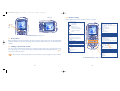
1.1 Keys
Your mobile ....................................................
Navigation key
Confirm an option (central press)
Delete (short keypress)
Return to the previous screen (short
2 side keys
Left softkey
Pickup/Send call
Call logs
Voice tag
Scroll key:
Menu/Confirm an option
SIM card services
Contact list
Inbox
Calendar
keypress)
Camera key
Switch on/Switch off the telephone from
main screen (long keypress)
End call
Return to the main screen
Right softkey
Switch on/Switch off
End call
Voicemail
Keypad lock/unlock
Edit mode
Return to the main screen (long keypress)
Pick up
Send a call
Access call list (Redial) (short keypress)
Use voice tag features (long keypress)
Camera key
Clear
Back
Left softkey
Access the symbols table
Vibrator
Right softkey
Consult your voicemail (long keypress)
9
10
From the main screen:
Keypad lock/unlock
In Edit mode:
- Short keypress: upper case, lower case,
digits
- Long keypress: switch from normal to
predictive mode
From the main screen:
- Short keypress: dial #
- Long keypress: activate/deactivate the
vibrator.
In edit mode:
Access the symbols table
Side keys :
- Set the ringtone volume from the main
screen
- Take a photo (short press up or down)
- Take a burst shot (long press up)
- Take a photo with sound (long press
down)
- Set the volume during a call
- Scroll in the menu
TH3VODAFONE_UM_GB_27-07-04
1.2 Main screen icons
27/07/04
14:50
Page 11
(1)
Keypad locked.
Battery charge level
Roaming within your home country.
Vibrator mode: your phone only vibrates and neither rings nor beeps except for the alarms (see
page 71).
Infrared: infrared link activated.
Silence mode: your phone neither rings, beeps nor vibrates except for the alarms (see page 71).
Download in progress/immediate reception of an incoming MMS.
Message unread
Sending an MMS.
GPRS context activated.
Message list is full (SMS): your phone cannot accept any new SMS. You must access the message
list and delete at least one message on your SIM card (see page 41).
Voicemail message arrived.
Missed calls.
WAP alert.
Call forwarding activated: your calls are forwarded (see page 77).
Timer or alarm clock programmed (see page 66).
Level of network reception.
Preferred tariff areas (2).
(1)
(2)
The icons and illustrations in this guide are provided for informational purposes only.
Contact Vodafone to check service availability.
11
12
TH3VODAFONE_UM_GB_27-07-04
27/07/04
14:50
Page 13
Charging the battery
2
Getting started ..............................................
• A short beep will sound when charging begins.
• The animation may take several minutes to start and may emit a
slight whistling sound if the battery is flat.
• Be careful not to force the plug into the socket.
• The battery icon will take 2 minutes to indicate the correct charge
level.
• Make sure the battery is correctly inserted before connecting the
charger.
• The mains socket must be near to the phone and easily accessible
(avoid electric extension cables).
2.1 Set-up
Inserting and removing your Vodafone SIM card
(1)
1
2
You must insert your SIM card in order to use your phone.
1
2
Place the SIM card with the chip facing downwards and slide it into its
housing. Make sure that it is correctly inserted.
Connect the battery charger
The charge is complete when the animation stops. Only use ALCATEL chargers.
Installing and removing the battery
Precautions during use
2
2
1
Do not place you hand on the upper part of the mobile phone.
1
Your telephone is equipped with a built-in antenna. For optimal
operation, you should avoid touching it or degrading it.
Unclip the cover, then the battery and remove it.
Insert and engage the battery, then close the
telephone cover.
(1)
OK
For better radio reception and optimum operation, do not touch the
upper part of your telephone.
Check with Vodafone to make sure that your SIM card is 3V compatible. The old 5 Volt cards can no
longer be used.
13
14
TH3VODAFONE_UM_GB_27-07-04
27/07/04
14:50
Page 15
Change the front belt
Open the front belt
3
Close the front belt
3.1 Making a call
1
2
Calls ............................................................
Dial the desired number then press the
key to place the call. To hang up, press the
a mistake, you can delete the incorrect digits by pressing the
key.
1
2
3
Make a long keypress on the
key until the telephone comes on, type in your PIN code if necessary and
then confirm with the
key. The main screen is displayed.
If you don’t know your PIN code or if you have forgotten it, contact Vodafone. Do not leave your
PIN code near your telephone.
key to browse through them in full or press the
While the phone is searching for a network, the <<<->>> symbol is displayed (???-??? is displayed if your SIM
card is rejected by the network, in this case please contact Vodafone).
In the switch on screen, you also have access to a video clip demo function: select the left icon with the
navigation key
. Even if no SIM card inside, you will have access to the video clips list.
If your phone is in network coverage, dial 112 and press the
key to make an emergency call (or any
other number provided by Vodafone). This works even without a SIM card and without typing the PIN code
or unblocking the keypad.
Making a call with a prefix
To access the various prefixes, make a long keypress on
, stop at “+” sign and use the
key.
• To make an international call, go to
, select the country, finish dialling the number and send the call.
• If you already know the prefix you want, go directly to the
icon and enter the prefix directly followed
by the number of the person you are calling.
• In some companies, telephone numbers all begin with the same digits. By using the “Prefix” feature
, you can save the shared digits, but you will need to enter the variable part. You must create the
prefixes yourself.
2.3 Switching off your telephone
Press the
key (the following
Making an emergency call
2.2 Switching on your telephone
If cell broadcast messages are displayed, use the
key to return to the main screen.
To enter characters “+” or “P” (pause), make a long keypress on the
characters will scroll by: 0, +, P, •).
key. If you make
key from the main screen (long keypress).
15
16
TH3VODAFONE_UM_GB_27-07-04
27/07/04
14:50
Page 17
Phone autoredial
Rejecting a call
If this feature is activated and supported by the network (see page 79), the person you called will be called
back automatically until they can be reached.
Press the
key once or the
key twice, or select “Options”.
3.4 During the call
3.2 Calling your voicemail
Available functions
Your voicemail is provided by Vodafone to avoid missing calls. It works like an answering machine and you
can consult it at any time. To access your voicemail, make a long keypress on the
key.
During a call, you can use your contact list, short messages, etc. without losing your correspondent by
pressing the
key.
If the access number for your voicemail service does not work, dial the number that you were given. To
change this number at a later date, refer to “My Numbers” (see page 27).
To use your voicemail service from abroad, contact Vodafone before leaving.
3.3 Receiving a call
When you receive an incoming call, press the
key to talk and then hang up using the
key.
When you have an incoming call, your telephone rings quietly at first and then gets louder. If the
icon
is displayed, the vibrator is activated and there is no ringtone. If the
icon is displayed, the phone neither
rings nor vibrates.
The caller’s number is displayed if it is transmitted by the network (contact Vodafone to check
service availability).
Call on hold
Contact list
Ongoing call
Messages
Handsfree
WARNING: move the handset away from
your ear while using the “handsfree”
option because the amplified volume might
cause hearing damage.
Calendar
key once while the telephone is ringing. Answer the call by pressing the
Voice recorder (record your current call).
Display notes
You can adjust the sound level during a call using the navigation key
key, or select
(1)
17
(1)
Adjusting the volume
Muting the ringtone
Press the
“Options”.
Services
Contact Vodafone to check service availability.
18
or the side keys.
TH3VODAFONE_UM_GB_27-07-04
27/07/04
14:50
Page 19
Handling two calls
• Call waiting (1)
If a second call comes in while you are already on line, you will be notified by a tone. You can then accept
the call by pressing the
key.
Your current call will be automatically put on hold. You can then switch between your two
correspondents using the
key and then
.
• Making a second call
To call a second party during a call, dial the number directly.
3.5 Conference calls
(1)
Your phone allows you to talk to several people at the same time (up to 5). If you are on a double call, press
, select “Conference” then confirm with the
key. If a third call comes in, answer it by pressing the
key and speak with your new correspondent.
This correspondent becomes a member of the conference if you press
confirm by pressing
. Pressing
disconnects the current call.
To end the conference call, press
(1)
and select “End conf.”.
, select “Add conf.”, and then
4
Menu................................................................
• GAMES & MORE
- Games
- Settings
• VODAFONE LIVE !
- Vodafone live!
- News (URL)
- Sport (URL)
- Chat (URL)
- My Vodafone (URL)
- Search (URL)
- What’s New? (URL)
- More Sounds (URL)
- More Pictures (URL)
- More Games (URL)
- Video & Audio (URL)
- Media Album (URL)
- Vodafone Mail (URL)
- Messenger (URL)
- Bookmarks
- Enter URL
- Profiles
• APPLICATION
- Alarms
- Calculator
- Converter
- Voice recorder
- Tone maker
- Infrared
- Alarms list
• MESSAGES
- Create message
- Inbox
- Outbox
- Voicemail
- My messages
- Media Album (URL)
- Vodafone Mail (URL)
- Messenger (URL)
- Parameters
- Memory
- Delete
Contact Vodafone to check service availability.
19
20
TH3VODAFONE_UM_GB_27-07-04
• CAMERA
- Take a picture
- Pictures
- Videos
• MY ITEMS
- Pictures
- Games & more
- Sounds
- Videos
- My Shortcuts
- Bookmarks
- My messages
27/07/04
14:50
Page 21
• SETTINGS
- Profiles
- Phone
- Call settings
- Connectivity
- Internet
- Network
- Security
• SERVICES
• CALL LOGS
• RINGTONES
• CALENDAR
5
Contacts......................................................
5.1 Contact list
You can customize a quick access to your contacts with the “Speed dial list” function (see page 27).
To access the contact list from your main screen, press the
navigation key, press
again and select “Contact list”.
key, select “Contacts” with the
You have 4 contact lists:
SIM directory:
The SIM card’s capacity depends on the type of SIM you have. It is not possible to assign more than
one number to a name.
General list:
Contains all contacts saved on the phone. The SIM card contacts are not created automatically in the
general list, but they can be copied to it.
• CONTACTS
- Contact list
- Call logs
- Speed dial list
- My Numbers
- My e-mail
Personal list:
You can store your personal contacts in this list (relatives, friends, etc.).
Professional list:
You can store your professional contacts in this list (companies, etc.).
In addition to the lists already provided, you can create your own lists (see page 25).
Searching for a name by its first letter
You can search for the person’s name by pressing the key associated with the first letter of his/her name.
For some languages that have a specific entry mode, you should use the “Search name” option.
21
22
TH3VODAFONE_UM_GB_27-07-04
27/07/04
14:50
Page 23
Read a contact file
5.3 Available options
Select a name from your contact list and confirm with the
key. Select “View” and confirm.
Making the call
From the contact list, you can access the following options via the right softkey:
View
Press the
key when the name is selected. If several numbers are associated with the name to be called,
you must then choose the number from the list (Mobile, Home, Office, etc.) using the
key. Press the
key to make the call.
Information in the contact list and the calendar may be shared with a computer using the Alcatel
One Touch PC suite (see page 86).
5.2 Creating a contact file
You can move from one field to another using the
key.
Create list
• Create your own list.
Empty list
• Delete all contacts in a list.
Create contact• Create a contact (name,
Delete list
numbers, address, e-mail, etc.) in
the desired list.
• This list and its contacts will
disappear completely (created
list only).
Write
message
• Send an SMS or MMS to a
contact.
Modify
• Edit a contact.
• Copy all contacts to the SIM or
telephone list in one go if there
is sufficient memory.
Image
• Select a video/photo/image in
Voice tag
the album and assign it to the
current file (not valid for the SIM Send
list).
• Record a voice tag command
(not available in the SIM list).
Delete file
• Delete the selected contact.
Classify file
• Move a contact from one list to
another.
• Get information and tricks about
the current menu function.
Dir. ringtone
• Assign a ringtone to all contacts
in the current list.
Select the contact list in which you wish to create a file, press the right softkey, select “Create contact”
then
. You can save the data you have entered at any time by pressing the left softkey “Save”. Go to
the following field by pressing the
key or by using the navigation key .
When you create a new contact in the phone list, at least one of the following fields must be filled in:
Identity card,
Birthday,
Nickname,
URL,
Numbers,
Image,
E-mail,
Address,
Notes,
Pers. info. 1...4.
• View a complete contact: name,
address, e-mail, etc.
Copy all->
SIM/Phone
Tips & Tricks
When the field “Birthday” is filled in, an alarm is automatically created in the Calendar.
If you use your phone abroad, store the numbers in your contact lists in international format “+”
followed by the country code (see page 16).
23
24
• Exchange data via infrared (see
page 69) or MMS.
TH3VODAFONE_UM_GB_27-07-04
27/07/04
14:50
Page 25
5.4 Creating a new contact list
5.7 Assigning an image, an animation or a video to a contact
From the product contact list, press the right softkey and select “Create list”, confirm using the
key,
then name your new contact list. You can create up to 13 new lists. You can delete only those lists that you
created, by selecting “Delete list”.
Select a contact from the contact list, press the right softkey and select “Image”.
5.5 Using voice tag
When you receive a call from that contact, the picture, animation or video clip that you have chosen will be
displayed on the screen. It is possible to assign either an image or a video but not both for the same contact.
5.8 Call logs
Voice tag allows you to place your call by pronouncing the party’s name without using your contact list.
Select a contact from the phone list and press the “Options” softkey. Then select “Voice tag” and confirm
once again. Three different beeps will signal the start of recording, its failure or its success. After recording,
you can “Listen to”, “Replace” or “Delete” a recorded voice tag.
You can access your call memory by pressing the
appropriate icon:
Last dialled calls
The contacts for which a voice tag has been recorded are indicated by the
icon. The number
of names accessible through voice tag is limited. This feature can be used in all lists except the SIM
card list.
Activate voice tag by a long keypress on the
the screen.
key from the main screen, then follow the instructions on
key from the main screen. You must first choose the
Missed calls
Received calls
The icons that may be displayed to the left of the person’s name show the type of telephone
number recorded in the contact list (Home, Office, Mobile Phone).
Available options
From the stored number, you can access the following options using the right softkey:
5.6 Assigning a ringtone to a contact list
Select a contact from the phone list, press the right softkey and select “Dir. ringtone”.
When you receive a call from a contact classified in that list, the ringtone will be the one assigned to the list.
View
• Consult call details (number,
date, time, etc.).
Delete
number
• Delete the selected number.
Write
message
• Send an SMS or MMS to
the selected number.
Clear list
• Clear the entire list.
To contact list • Store the selected number in
one of your lists.
25
26
TH3VODAFONE_UM_GB_27-07-04
27/07/04
14:50
Page 27
5.9 Speed dial list
5. 11 My e-mail
By customising your keys, you can call someone or access a function directly from the main screen.
Access this feature by selecting “Contacts” from the main menu, press
Access this feature by selecting “Contacts” from the main menu, press
and select “Speed dial list”.
You can also access this function in the “Settings”, then select “Profiles” then “Speed dial list”.
Enter your own e-mail address to be able to more easily send pictures, images, video clips, sounds... by MMS
to your PC.
Choose the key that you wish to programme. Then select:
You can do it also directly from the options while writing an MMS.
- “Contact list” activate this option if you want to access directly from the main screen to the contact
whose first letter corresponds to the first letter of the key for instance
key for “PETERSON John”.
- “Custom keys”: direct access to the numbers or functions you have programmed. If you want to change
them, press the “Options” softkey, select “Modify”; then choose the first key you wish to program, and
select one of following options:
• “Numbers” to programme a direct call to a specific phone number from this key from the main screen,
• “Function” to assign a specific function to the selected key,
Repeat this operation key by key.
5.10 My Numbers
Access this feature by selecting “Contacts” from the main menu, press
and select “My Numbers”.
My Number
Save your mobile phone number. Type in the number and confirm by pressing
.
Voicemail
Modify the number to access your voicemail. This will usually have already been entered for you by
Vodafone.
27
28
and select “My E-mail”.
TH3VODAFONE_UM_GB_27-07-04
6
27/07/04
14:50
Page 29
Messages ..................................................
From your telephone, you can read, write, send and receive short “SMS” messages and “MMS” and share
them with other mobiles.
MMS messages are messages whereby you can send videos, images, photos, animations, sounds, voice
messages (or Voice MMS: simplified MMS that allows you to send a voice memo as a message), appointments
(V.CAL) or contact files (V.CARD) to other compatible mobiles and e-mail addresses.
To access the messages from the main screen, press the
key and confirm with the
key.
The following list is displayed:
- Create message
- Inbox
- Outbox
- Voicemail
- My messages
- Media Album (URL)
- Vodafone Mail (URL)
- Messenger (URL)
- Parameters
- Memory
- Delete
key, select “Messages” with the navigation
When viewing your messages, you will find the following status icons, depending on:
- the type of message:
SMS message,
MMS message,
MMS notification,
MMS sending in
progress,
MMS message with a sound,
MMS with video clip,
MMS with copyright elements
which cannot be forwarded.
- Storage:
messages stored on your SIM card (SMS only),
messages stored in the phone’s
memory (MMS notifications).
6.1 Receiving and reading messages
6.1.1
SMS
When a new SMS arrives, the following message is displayed: “New message!”, a beep sounds, the
icon
shows up, a line with the number of messages appears on the screen. Select this line and press
to read
it directly from the main screen. To modify or deactivate the audible signal, see page 71.
6.1.2
MMS
You have three ways of managing the reception of MMS: immediate, deferred or restricted reception. From
“Parameters/MMS parameters”, confirm your choice in the “Mode” option (see page 39).
• “Immediate” reception: when in idle mode, the
icon will indicate that a new MMS is being
downloaded. The message “New message!” appears, a beep sounds, the
icon shows up, a line with
the number of messages appears on the screen. Select this line and press
to select and open the MMS.
To access the menu from the idle screen, and you do not want to open incoming MMS, press
to
delete the idle screen notification. The messages are kept in the “Messages/Received/Not read”
folder.
• “Deferred” reception: you will receive a notification with the name and number of the sender and the
title of the message if there is one. You can download the MMS at any time in order to read it. You can
also delete it without reading it; in this case the sender of the MMS will be informed that it has been
rejected (only in National mode).
• “Restricted” reception: same behavior as “Deferred” mode but you will not receive any notification,
only the
icon (only in International mode).
29
30
TH3VODAFONE_UM_GB_27-07-04
27/07/04
14:50
Page 31
You can receive videos, photos, images, or sounds by MMS. If you select “Options/Save items” you can
save the videos, images or sounds or all of them. If you want to save more than one item, save the first item
displayed, then select the “Next” softkey to save the second item, etc. They are all saved in “My Items”.
6.1.3
Options while receiving or viewing messages in Inbox/Outbox
Generally, the common following options are proposed:
Open
• Open and read the content of
your message.
Send
• For unsent messages in Outbox.
Modify
• For unsent messages in Outbox. Forward
Delete
• Delete the message.
Reply
• Reply by SMS, MMS or by Voice
MMS.
Archive
- when selecting an MMS in the inbox/outbox list (1):
Open/Retrieve • Read the selected message
(“Retrieve” if the deferred
mode has been selected).
• Save your message in the
“Archive” folder (phone
memory).
Details
• Forward the message to other
people.
- when reading an MMS:
Sort by date/ • Sort the read messages by date
Sort by size
or by size: by date is the default
sorting.
The following options depend on the context (receiving a message, reading in the Inbox or Outbox, an MMS
or an SMS):
SMS additional options:
Move
MMS additional options:
• Cut /paste SMS from SIM to
product memory.
Save template • Save the message as a predefined
message.
Save picture
• Save a picture contained in the
message.
Save
animation
• Save an animation contained in
the message.
Save number • Save a number or an e-mail
address contained in the
message.
Save melody
• Save a melody contained in the
message.
Restart
Reply all
• Reply to all MMS recipients.
Save no./e-mail• Save the senders’ number or email address in your contact list.
• Go to MMS details: local date,
title, size, class, priority, mailing
list, ack. of receipt.
• View the message again.
Save items
With sound/ • View your MMS with or without
Without sound sound.
(2)
• Save video clips, images, sounds
received in MMS current page.
In addition:
- If the MMS includes a wap address, an e-mail address, or a telephone number, you have the 2 possibilities:
select the “Options”, to save and/or access the link displayed (launch wap link, send e-mail, or call
number displayed).
- If the MMS contains several pages, it will scroll automatically. To launch the viewing again, select the
option “Restart” or use the navigation key .
Launch WAP • Go to the WAP address
contained in the message.
(1)
(2)
31
Options available according to the reception mode chosen.
- For one object press
to save.
- For several objects press “Options”, choose the objects one by one using the option “Next”, and
press
to save.
32
TH3VODAFONE_UM_GB_27-07-04
27/07/04
14:50
Page 33
6.2 Creating and sending messages
Options for sending your message
6.2.1
Contact list
• To a person or e-mail address
whose contact is stored in one
of your contact lists.
My favourite
• To your favourite contact.
Creating SMS
From the main menu, select “Messages/Create message”, select “SMS” and press
modify a predefined message selecting “My messages”.
. You can also
Customise your messages adding pictures, sounds or mood icons available in your telephone. While writing
a message, select the “Options” softkey:
Send
• Send the message.
Add melody
Edit as MMS
• If your SMS is long or if you
want to add pictures or sounds.
Add bookmark• Add a website to your message.
Symbols
• Go to the symbols table.
• Add a mood icon to your
message.
Predictive
• Switch to the predictive mode.
Preview
• View your message.
Save
• Save the message (outbox/
unsent) and send it later.
Add mood
Add image
• Add an icon to your message.
Several
recipients
• To different people by manually
entering the numbers or
selecting them from the contact
list.
Distribution
list
• To a group of people that you
have pre-set in the sending
parameters (“Distribution list”
option).
• Add a sound to your message.
Select “Preview” to see the whole message: the icons, sounds and mood icons are represented by the
,
or
symbol. You can also download new sounds and images over WAP (see page 86).
A message of more than 160 characters, or a message containing icons, sounds, or mood icons
may be billed as more than one message.
The person receiving the message must be equipped with an EMS compatible mobile phone in
order to display the objects or listen to the sounds in your message.
If the acknowledgement of receipt (“Rpt.”) is activated in “Sending/Parameters/SMS parameters”,
(see page 38), when you consult your sent messages, the following symbols will show:
Msg.received: message sent and delivery report received.
Not received: message sent and waiting for delivery report, or message not received: you should
send the message again.
Other options are available if you choose the predictive entry mode (see page 37).
6.2.2
Creating MMS
From the main menu, select “Messages/Create message/MMS” and press
mode. You can also modify a predefined message selecting “My messages”.
. By default, you are in edit
Your MMS may contain several pages (maximum memory allocated: 100 KB) ; as you create the MMS you
will be informed of the memory used (for all pages).
With the option “My e-mail”, you can send images, video clips, sounds, ... to your own preset e-mail
address.
If the acknowledgment of receipt (“Rpt.”) is activated in “Sending/Parameters/MMS Parameters”, you
can consult it in the option “Information” when selecting a message (see page 39).
33
34
TH3VODAFONE_UM_GB_27-07-04
27/07/04
14:50
Page 35
You may also attach special files to your MMS such as: a contact from your contact list (Vcard), or an
appointment from your calendar (Vcal). They will be displayed in a separate page (select option
“Attachments”).
Depending on whether your MMS is empty or not, with no file or at least one file attached, you will be given
the following options:
Send to one
• Send to one recipient from your Add bookmark•
Contact list or dial the
number or e-mail or select “My
favourite” or “My e-mail”.
Text options •
Send to many • Send to several persons by
dialling the numbers (Dial), or
selecting the numbers, or the
group (“Add group”) from the
Contact list.
Replace
•
Add image
Insert a bookmark (URL) from
the list of your favourite sites
(see page 58).
- “->Directory”: insert a
contact number.
- “Symbols”: insert a symbol.
- “Predictive”: switch between
normal and predictive mode.
Change an item in your MMS.
• Add a picture or an animation
from the “Image album”
function, or create it directly
from the “Take a picture”
function.
Remove object• Remove an item in your MMS.
Add video
• Add a video from the “Videos”
function.
Next page
• Go to the next page of your
MMS.
Add sound
• Add a sound from the
“Sounds” function, or a voice
message.
Delete page
• Delete the current page.
Add text
• Write your text.
Add title
• Give a title to your MMS.
Add page
Reply to an MMS by sending an MMS, an SMS or a Voice MMS message. To send text only, it is advisable to
use an SMS.
To send your MMS later on (after sending other items or photos for instance) save your MMS (“Save”) as
a draft stored in your “Outbox/Unsent” folder. Then select it and use the function “Options” to replace
or remove items before sending it.
icon is displayed on the
If the message is not sent, the mobile will try to re-send it automatically (1). The
screen and in the “Outbox/Unsent” folder, indicating the automatic sending procedure is activated. If it
fails completely, you will be notified by a message and the
icon in your “Unsent” folder indicates that
the MMS could not be sent. Select it and press
to send it again, modify it or delete it.
6.2.3
From the main menu, select "Messages/Create Message/MMS Postcard". Select the photo you want to
send (only photos with VGA format can be sent), press
and then Choose to insert it. Type the message
to be printed on the postcard and follow the instructions to complete the details for the address (use
to advance). A real postcard will be sent automatically by post to the contact you entered. You can also
take a picture and send it by postcard just after selecting "Send/Send by/MMS Postcard".
• Add a page to your MMS.
Previous page • Go to the previous page of your
MMS.
Creating a postcard from your mobile phone
You can only send a postcard with a VGA format picture (see page 45).
6.2.4
Creating Voice MMS (Voice recorder)
From the main menu, select “Messages/Create message/Voice MMS”. This function allows you to send
a message quickly without having to type. The recipient simply receives a normal MMS (2). You can reply to
any message using a “Voice MMS”.
Attachments • Add a Vcard or Vcal.
Preview
• Preview the MMS you created.
Save
• Save your message if you do not
want to send it immediately.
Save canned
• Save your message as a
predefined one.
35
(1)
(2)
Contact Vodafone to check service availability.
This Voice MMS being a normal MMS which contains an AMR type sound, you can only listen to it with
an AMR IETF compatible phone or a computer equipped with an adequate sound decoder.
36
TH3VODAFONE_UM_GB_27-07-04
27/07/04
14:50
Page 37
6.3 Speed writing system
The “Predictive” mode allows to speed the writing of your SMS or MMS. When you want to write a
message, press the “Options” softkey, select “Predictive” for SMS, or select “Text options” then
“Predictive” for MMS and begin to type ; for instance for “hello” type on the following keys
,
,
,
,
once. The letter or word displayed may not always correspond to the desired one but
continue typing and the system will make better suggestions as you continue to input letters.
When in predictive mode, type the first letter:
- if it corresponds to a single word (for instance a), the letter will be displayed,
- if it does not exist as a single word (for instance h), the symbol “*” will be displayed.
The cursor shape varies depending on the input mode selected:
mode.
To confirm a word and insert a space, press the
press the
key.
in normal
key downwards or
Specific keys Normal mode / Predictive mode
Short keypress: Move between automatic capitals
, upper case
.
Long keypress: Switch between the normal and predictive mode.
Normal
• Switch to the normal mode.
Other words
• View other possible words.
Languages
Add word
• Add a word to your personal
dictionary.
• Use the dictionary in another
language.
Save
• Save the message.
Add numbers • Go to the numeric mode.
You have a personal dictionary which allows you to add, modify or delete words. While writing a message,
you can add a word by pressing the “Options” softkey and by selecting “Add word”, then
.
6.4 Parameters
in predictive input mode,
key to the right or press the
Confirm word • Confirm the selected word.
, lower case
, digits
Normal: Insert a “+”, “0” or “•”.
Predictive: View other words in the dictionary.
From the main menu, select “Messages” and using the navigation key to the right, select the
6.4.1 SMS Parameters
• Service centre (“SC”) (1): phone number of Vodafone’s service centre (it may be provided
automatically).
• E-mail centre (“EC”) (1): the number of the server for sending e-mails (it may be provided
automatically).
• Delivery report (“Rpt:”): request for acknowledgement of receipt for each message sent.
• Message validity (“Val:”): the time period during which attempts to send the message to the recipient
will be repeated in case of failure.
• Format (“Typ:”): format to be used for delivery of message to recipient (SMS, fax, etc.).
• Memory (“Mem:”): product or SIM (see page 39).
Normal: Display the symbols table.
Available options
In addition to the available options in the normal entry mode, you will also find the following choices:
(1)
37
icon.
Contact Vodafone for details to fill in these fields.
38
TH3VODAFONE_UM_GB_27-07-04
27/07/04
14:50
Page 39
6.4.2 MMS Parameters
• MMS profiles (“Profile”) (1): To set your MMS profile, follow the same procedure as for setting your
WAP connection (see page 58).
• Mode: choose between immediate, deferred or restricted reception for national and international
network coverage (see page 30).
• Delivery report (“Rpt:”): request for acknowledgement of receipt for each message sent.
• Message validity (“Val:”): the time period during which attempts to send the message to the recipient
will be repeated in case of failure.
• Memory (“Mem:”): to store your sent messages.
• Timer: sets the speed at which the pages scroll through: the recipient will see the message at this speed.
• Filters: Anonymous MMS filtering: to receive or not anonymous messages
• Layout configuration: choose between display: image first then text or text then image.
- Sent MMS are stored by default on the product:
Select “MMS parameters” and “Mem:” to choose “Phone memory” or “Not saved”.
For information:
- Received SMS are always in the SIM card,
- Received MMS are always in the phone.
You can always save your messages in the “Archive”. They will then be stored in the phone.
6.4.4
In the “Parameters” folder, select “Distribution list”, confirm with
key, then name the group. You
can now enter the phone numbers for the members of your new distribution list.
6.4.5
6.4.3
My favourite
Saving parameters
You can change the saving parameters for your messages:
- Sent SMS are saved by default in the phone memory:
Select “SMS parameters” and “Mem:” to choose “SIM memory” or “Phone memory”, or “Not
saved”.
(1)
Create a distribution list
Enter the number or email of your favourite contact. Then, when you want to send a message, select
“Send” and “My favourite” directly without searching in the contact list.
6.4.6
My e-mail
Enter your own e-mail address (if not entered yet under the option “My e-mail” of the “Contacts” menu,
see page 28) to be able to easily send images, pictures, sounds, ... by MMS to your computers.
Contact Vodafone for details to fill in these fields.
39
40
TH3VODAFONE_UM_GB_27-07-04
27/07/04
14:50
Page 41
6.5 Deleting messages
To delete all messages on your SIM card or in the phone, select the
icon and then the following options:
- “Delete SIM msg”: delete all messages received and sent from the SIM.
- “Delete phone msg”: delete all messages stored in the phone’s memory.
The
icon appears when the SIM card is full. To receive new SMS, delete some old ones.
6.6 Memory status
View available memory space.
Your telephone’s memory is shared between several functions: contact list, calendar, messages, voice
messages, voice tag, images and melodies, games and applications, video clips. For example, if you use a lot
of memory for your voice memos, you will have less memory available for the contact list.
Do not forget to delete large items such as voice memos, MMS, images, photos, recorded sounds,
applications, video clips..., in order to free up memory space.
7
Camera ....................................................
Your phone is fitted with a camera allowing you to take photos, short animations that you can use in
different ways :
- store them in your “My Items”,
- send them in a multimedia message (MMS) to a mobile phone or an e-mail address (see page 35),
- customise your main screen (see page 72),
- assign them to a contact (see page 26),
- transfer them by IRDA to your computer using Alcatel One Touch PC Suite,
- modify your photos adding frames, stamps, etc (see page 48).
7.1 Taking a picture
Your phone must be switched on to take a photo. To access this function from the main screen, press the
key. The screen acts as viewfinder. Position the object or landscape in the viewfinder. The lens is
situated on the back of the phone. Please do not touch it. Just next to the lens there is a mirror to make
sure you are well placed if you want to take a photo of yourself.
You can take a photo in Portrait or in Landscape mode
- Portrait mode: short keypress on
;
- Landscape mode: short press on one of the side keys.
41
42
TH3VODAFONE_UM_GB_27-07-04
27/07/04
14:50
Page 43
Side keys
7.4 Photo settings
Before taking the photo, you can adjust a number of settings.
Selected options bar:
Shoot
key
and
key
Key
:
- Short keypress: take photo
- Long keypress: take a photo + sound
- Exposure:
Left: underexposure
Right: overexposure
- Zoom:
Up: zoom in
Down: zoom out
photo quality
white balance
capture mode
Options
Shoot
Options
Exposure (over/under)
number of photos taken (for
animation and mosaic)
Timer
IFA BILDERTEAM/Agenceimages.com
7.2 Burst shots
Make a long keypress on the upperside key. The shots are taken as long as the press on the key is maintained
(maximum number of pictures in a burst: 15). Then, by using the options menu, you can send this burst in
an MMS.
7.3 Taking a photo with sound
Side keys:
- short keypress up or down: take a
photo
- long keypress up: burst shot
- long keypress down: take a photo
+ sound
Options
Right softkey: Options
Key
:
- From idle: access to camera
- In Framing mode:
short keypress: shoot
long keypress: take a photo with sound
Left softkey: Shoot
Quality:
Key
Colour mode: colour or
black&white
Key
You can record a background sound, while you are taking a picture (long press on the lower side key). A
screen will ask you to record your sound. If you release your finger, the recording will stop. Press
to
return to the photo shot screen.
Shoot
: High -
Capture mode
key
: Economy -
key
: Single
: Animation x 4
Key
: White balance
: Mosaic
Key
Image size:
- Panoramic
- VGA
- XL/L/M/S
Please use your camera sensibly. Respect others and observe current regulations in your country.
IFA BILDERTEAM/Agenceimages.com
43
key
: Standard -
44
TH3VODAFONE_UM_GB_27-07-04
27/07/04
14:50
Page 45
Access the settings from the Menu before taking the photo: select the “Camera” item from the main menu,
select “Take a picture” then press the “Options” softkey:
Quality
Select “Quality” in the list of options or access it directly by pressing the
Image size
: High quality: excellent quality to be sent to a PC,
Select “Image size” in the list of options or press the
key until you reach the size you require: VGA
(640x480) and Panoramic (360x640) are optimised to be sent to a PC, XL (128x160) and L (128x128) are
for local use or MMS, M (64x64) is used to assign the image to a contact for instance, S (32x32) is used to
create your very own stamps (see page 48).
: Standard quality: balance between size and quality,
,
keys:
: Economy quality: memory space is optimized.
Warning: the higher the quality, the more memory is required. For example, if you have 1 MB of
free memory, you may store the following number of photos:
Capture mode
Select “Capture mode” in the options list or keep pressing the
following modes:
,
Format
VGA
128 x 160
key to choose from one of the
High quality
10 photos*
146 photos*
Low quality
20 photos*
340 photos*
Single: a single photo; this is the default mode.
Animation x 4: in this mode, you can take 4 consecutive photos like a small slide show. The number
at the top right of the screen shows you which photo your are on: 1/4, 2/4, ....4/4. When you have
taken the 4th photo, the animation will start automatically.
Mosaic: in this mode, you will get an image made up of 4 thumbnails. To do this, proceed as for the
animation, once the “Mosaic” has been selected (see above).
The burst shoot mode is available by a long keypress on the upperside key.
Timer
The photo will be taken 10 seconds after pressing
your telephone is in Sound mode).
. A sound will be emitted when you take a photo (if
White balance
By pressing the “Options” function key, you can choose from 5 settings:
Auto: the settings adjust automatically (no icon will be displayed on your screen),
Frame
sunny,
Choose a frame from the list offered and press
. The frame will be placed in your photo shot screen; if
the image is to your liking, press on the
key to take the photo. You will also find this option in the
“Modify” function (see page 48).
cloudy,
night time,
indoors/artificial light.
In a dark atmosphere, select “Night” to improve the picture quality.
*
45
These estimations are only given as an indication.
46
TH3VODAFONE_UM_GB_27-07-04
27/07/04
14:50
Page 47
Colour
7.5 Options available just after taking the photo
You can choose the colour effects. You can access this option directly from the photo shot screen by
pressing the
key.
Once you have taken a photo or an animation, you can access the following options:
Send
Direct access to “Pictures”
Access the “Pictures” folder directly (to create a folder for instance) to put your picture.
Default folder
Save and send • Save your photo and send it.
Save
• Save your photo.
Discard
• Delete the photo you have just
taken.
Modify
• Reduce size, add stamps or
frames.
You can change the folder where your photos will be stored automatically.
You can create your own folders using the “Pictures” option. Press
softkey and select “Create folder”.
, then the “Options”
• Send your photo without saving
it in “My Items”.
Attach sound • Save a sound and assign it to the
photo.
Pictures
• Access your album of images
directly.
Set as
• Select what you want to do with
your picture.
Other direct access options from the photo shot screen
7.6 Modifying images
Exposure: adjust the contrast of your photo with the navigation key: to the left = underexposure, to the
right = overexposure.
This option enables you to “Reduce” image size, to “Add stamp” or “Add frame”. You have two
possibilities for accessing images in order to modify them:
Zoom: activate the zoom with the up/down navigation key: up: zoom in, down: zoom out (depending on
the image size).
- Via the “My Items/Pictures” menu:
Choose an image, press
and select “Options” then “Modify”.
- Via the “Camera” menu (1):
Just after taking the photo, press the right softkey to access “Options” and select “Modify”.
(1)
47
The multimedia content (melodies, images, drawings, etc.) in this phone is for private use only, and may
not be used for commercial purposes. Any illegal use is liable to prosecution against the perpetrator.
48
TH3VODAFONE_UM_GB_27-07-04
27/07/04
14:50
Page 49
7.7 Direct access to the photo capture or to “My Items” from MMS
composition
With the option “Add image”, you can also access the photo function or “My Items” (picture/image/
video/sound) directly while you are writing a Multimedia Message (MMS) (see page 35).
8
Games & more ..........................................
Your Alcatel phone may include some Java™ applications and games. You can also download new
applications and games to your phone from Vodafone live!.
You have two ways to insert a photo in an MMS:
• Either by adding an existing photo to your MMS taken from “My Items/Pictures”:
when you are in the “Messages” menu, select successively “Create message”, “MMS”, press
press the “Options” softkey, select “Add image”, then “Image album” album and select a photo.
• Or by taking a new photo:
same process, but instead of selecting the “Image album” album, select “Take a picture”.
The “Games & more” menu allows you to manage the Java™ applications installed in your phone. It
includes the following folders:
,
General: contains all applications and games,
Settings: contains your sound, backlighting and network settings.
8.1 Launch an application
Select the application. Press the “Launch” softkey or
49
50
then “Launch”.
TH3VODAFONE_UM_GB_27-07-04
27/07/04
14:50
Page 51
8.2 Available options
8.4 Java™ Push
Launch
• Launch the application.
You may receive Java™ Push messages inviting you to launch new applications.
Information
• This option gives information on the application.
Download
• Download an application.
8.5 Settings
Delete
• Deletes the application. If you delete a pre-installed application in your phone, you
may, depending on the application, be able to download it again from Vodafone live!
However, some applications cannot be re-downloaded.
- Sound off/ Switch sound ON/OFF for all applications.
Sound on
8.3 Download an application
You can download new Java™ applications in the “Games & more” menu by selecting the “Download”
softkey. The list of available WAP bookmarks dedicated to the application download will then be displayed.
Select the appropriate bookmark to go to the desired WAP page.
The downloaded applications can be saved either in the Games folder or Application folder.
- Backlight Activate or deactivate the backlight.
- Networks List of network profiles available for Games & more. This list comprises the current WAP
profiles and specific profiles for Games & more. To select a profile, go to the list, press
and select “Confirm”. To modify a specific profile for Games & more, go to the list, press
and select “Modify”. To create a profile, go to the list, press
and select “Create”.
For the options available, see page 58.
- Memory View memory available. Applications use shared memory (see page 41).
While an application is running
- Short keypress on
: pause
- Long keypress on
: exit the application
Authorisation for network access: some applications require network access or the sending of an SMS. In
this case, select the authorisation profile required with the navigation key , press
then validate the
selection then press “Confirm” to validate everything.
51
52
TH3VODAFONE_UM_GB_27-07-04
27/07/04
14:50
Page 53
Disclaimer
Downloading or running applications will not damage or alter any software already in your mobile telephone
designed to support Java™ technology.
Alcatel waives any responsibility and refuses to guarantee applications that are subsequently used, as well as
for all applications not embedded in the handset upon purchase.
The purchaser alone bears the risk of loss, damage or defect of the handset, or of applications/software, and
generally of any damage or consequence resulting from the use of the said applications/software. In the event
the said applications/software, or the later setup of any function are lost due to technical reasons if the
handset has been replaced/repaired, the mobile phone owner should repeat the operation and download or
set up again. Alcatel grants no guarantee and waives any responsibility if the operation cannot be repeated
or cannot be performed without incurring some cost.
9
Calendar......................................................
Your phone has a sophisticated calendar that will help you to manage your daily schedule. You can also save
“to do” lists.
9.1 Consulting your calendar
Three views are possible. You must first choose the appropriate icon:
Daily view
Weekly view
Monthly view
“To Do” list.
Parameters
You can scroll through the dates by pressing the
key.
According to the view you can read, create, modify or send an item.
Java™ and all Java™ based trademarks and logos are trademarks or registered trademarks
of Sun Microsystems, Inc. in the U.S. and other countries.
Information in the contact list and the calendar may be shared with a computer using the Alcatel
One Touch PC suite (see page 86).
Powered by JBlend™ - Copyright 1997-2003 - Aplix Corporation. All rights reserved.
JBlend™ and all JBlend™-based trademarks and logos are trademarks or registered
trademarks of Aplix Corporation in Japan and other countries.
53
54
TH3VODAFONE_UM_GB_27-07-04
27/07/04
14:50
Page 55
9.2 Creating an appointment and programming an alarm
Activate or deactivate a setting by pressing
When you create an appointment (“Create” option), you can also activate an alarm. You can set the desired
alarm activation time to coincide with your appointment time.
9.5 More about your calendar
.
Graphic view
9.3 Creating a task
Scroll to the
icon using the
key, and confirm using the
key. Select “Select type”, then confirm
once again using the
key and enter the type of task to be performed (“to do” or call appointment), then
enter the purpose.
This list can be arranged by deadline or by priority. To do this, scroll to the
then confirm using the
key.
icon using the
9.4 Configure the calendar
Scroll to the
icon using the
Alarm
• Set a default time for the alarm
to sound before the scheduled
appointment.
Wed. 4th December 02
2 Events
Wed. 4th December 02
2 Events
M T WT F S S
Create
Options
Daily view
Create
Options
Weekly view
A single appointment recorded.
key, to access the following options:
Two or more appointments recorded during this time slot.
“To Do”
• Sort your tasks by priority or by
due date.
Week number.
Delete
• Delete all tasks or calendar
items or only those items that
have expired.
An appointment was recorded after this time slot.
• Program the start time for your
day, your first day of the week
and your first week of the year.
Privacy:
The data in your calendar can be protected (see option “Privacy” page 79).
55
December 2002
M T W T F S S
key,
You can set an alarm for a task for which you have set a due date. This alarm will sound on the chosen day
at the time that you entered.
Calendar
. Exit the configuration function by pressing
An appointment was recorded prior to this time slot.
Monthly view
Blue background
Meeting scheduled
White background
No meeting scheduled
In the various views, the current day, week and month flash.
56
Create
Options
Monthly view
TH3VODAFONE_UM_GB_27-07-04
27/07/04
14:50
Page 57
10 SIM card Services ..................................
11 Vodafone live! ........................................
Access to the services menu proposed by your operator in your SIM card.
11.1 Access WAP menu
Vodafone live! is a service that allows you to access the mobile Internet, where you can obtain information
such as weather conditions, news, sport and download new ringtones, wallpapers, etc.
- “Vodafone live!” launches the Vodafone live! portal homepages.
- “Bookmarks” gives access to the list of your favourite sites or add new sites to them.
- “Enter URL” allows you to directly access the WAP page for which you enter the URL address.
- “Profiles” lists the Wap profiles.
11.2 Programming your access
Vodafone has already pre-configured your phone, however, you can select a profile from the “Profiles” list
and access the following options by pressing the
key:
57
Launch
• Launch WAP with this profile
even if another one has been
selected as default one.
Activate
• Select the current profile as
default one (this option is not
displayed if it is already
selected).
Create
• Enter the parameters of a new
profile.
Modify
• Modify the parameters of a
profile.
Delete
• Delete the selected profile.
58
TH3VODAFONE_UM_GB_27-07-04
27/07/04
14:50
Page 59
To “Create” or “Modify” a profile, you are required to replace the following parameters:
- Profile name
- Homepage
- IP address
- Security
- Bearer choice
- Confirm
11.3 GPRS function
In the “Bearer choice” item you can choose the transmission mode: GPRS/GSM, GPRS or GSM.
11.4 WAP browser options
When you select the GPRS/ GSM transmission mode, GSM mode is activated if GPRS mode is not
available.
Your mobile phone has an efficient high-speed modem based on GPRS technology. With this modem you
will be able to surf faster on the WAP and send your MMS more quickly. This service may be billed at a
different rate (contact Vodafone for more information).
The
icon appears when the GPRS context is active.
Once you have launched the Wap browser, while reading a page, you can access to the options by selecting
the right softkey “Options”, or press
(long keypress).
If you select the GPRS transmission mode, select a GPRS bearer and then fill in the following parameters:
- Authentication (user name and password)
- APN
Home
• Access the homepage directly.
Go To URL
Bookmarks
• Access your favourite sites
(bookmarked sites).
• Access the WAP site directly by
entering the address.
Show URL
If
-
Alert Inbox
• View information sent over
WAP.
• Display the URL address of the
current page.
Reload
• Refresh the current page.
Snapshot
• Save the whole of your screen.
Settings
• Customise your WAP access.
Save Items
• Save images or sounds.
About...
• Display the browser version.
Send Link
• Send an SMS with the URL
address of the visited page.
History
• Display the list of the last visited
URL.
Exit
• End your WAP session and
return to the main screen.
you select the GSM transmission mode, select a GSM bearer and then fill in the following parameters:
User name
Password
Telephone number
Access type
If you select the GPRS/GSM transmission mode, select a GPRS bearer and then a GSM bearer; fill in the
required parameters for each one.
At any time during your navigation, a long keypress on the
mode.
59
60
key allows you to exit the WAP
TH3VODAFONE_UM_GB_27-07-04
27/07/04
14:50
Page 61
12 My Items ................................................
To access “My Items” from the main screen, press the navigation key to the left or to the right
or
press
and select the
icon. “My Items” is a function that groups together all visual and sound items
in your telephone, regardless of whether they are embedded, downloaded, recorded or composed.
For easier searching, the images/photos are displayed on the screen in reduced size. To view one image at
a time, select an image, press
and click on “View”.
Then, from this view you can scroll through the images by making a short keypress on
will start the slide show (or press the right softkey “Options” then “Slideshow”).
12.2 Games & more
12.1 Pictures
See page 50.
You can select an image or a photo and use it as the main screen wallpaper or the ON/OFF screen
wallpaper. You may change it, send it by MMS or assign it to a contact in the contact list using the “Image”
option (see page 26).
12.3 Sounds
The “Pictures” album is made up of the following folders (1):
Choose a sound for the ON/OFF screen, for an incoming call, a message alert or an alarm (see page 70).
The “Sounds” album is made up of the following folders (1):
General, contains all sound items (built-in or created) from all album folders,
General: list of all images (built-in or created) from all album folders.
Melodies,
Photos: default folder for pictures taken with the camera.
Crazy sounds,
Pictures: contains all images not belonging in one of the other folders.
Recorded sounds (only contains recordings made with the “Record” function and the “Memo->
Album” function),
Icons: contains EMS, stamps...
Frames: contains frames for enhancing your images.
(1)
. A long keypress
The embedded folder names cannot be modified. However, in certain cases, you can modify, delete and
add items included in these folders.
61
Composed sounds (only contains compositions made using “Compose”).
(1)
The embedded folder names cannot be modified. However, in certain cases, you can modify, delete and
add items included in these folders.
62
TH3VODAFONE_UM_GB_27-07-04
27/07/04
14:50
Page 63
12.4 Videos
View
• View the image selected. If you
want to view all the pictures of
your folder in a slideshow press
on the current picture.
The “Videos” album is made up of the following folders (1):
General, contains all the items from all the folders (created and embedded)
Crazy clips,
Listen to
• Listen to the sound selected.
Video trailers.
Play
• Play the video selected.
While playing a video, you can adjust the volume with the
key or the side keys.
You can search any Image, Sound or Video files by pressing the key bearing the first character of
the filename.
Send
(1)
Delete
Set as
12.5 Managing sounds, images and videos
According to the item chosen, you can access some of the following functions:
Ringtones
Modify
(1)
The embedded folder names cannot be modified. However, in certain cases, you can modify, delete and
add items included in these folders.
63
(1)
(2)
Download
• Access to your bookmark sites
to download new items.
Rename
• Rename image/video/sound.
Classify file
• Move an image/video/sound
from a folder to another.
Create folder • Create folders grouping together
a series of images or sounds (for
example: “Holidays” or
• Delete image/sound/video
“Birthday”).
selected (Not for built-in items).
Delete folder • Delete a folder.
• - Image->main screen, switch
ON/OFF, assign it to a contact. Rename folder • Rename a folder that you
created.
- Sound->ringtone, switch
ON/OFF, assign it to a contact. Empty folder • Empty the contents of a folder.
- Video->to a contact.
Sort by size/ • Sort the images by size or by
• Choose a melody for an
Sort by name alphabetical order.
incoming call ringtone.
Camera access• Access the photo taking mode
• Modify sound/image/video (2).
directly.
• Send sound/image/video.
Files marked with
cannot be forwarded.
Only applies to composed sounds, images and videos that can be edited.
64
TH3VODAFONE_UM_GB_27-07-04
27/07/04
14:50
Page 65
12.6 Download new videos, photos, sounds, ...
With the “Download” option, you can access your favourite sites saved in your bookmarks list, and
download new items that you will be able to save in the “My Items” menu.
13 Application..............................................
13.1 Alarms
12.7 Formats and compatibility
List of audio, image and video formats compatible with your telephone:
- Audio: AMR (.amr) (1); Midi (.mid); iMelody (.imy); Smaf (.mmf, .spf, .saf)
- Image: JPEG (.jpg) (2); GIF (.gif); PNG (.png); BMP (.bmp)
- Video: 3GP (.3gp) (H263 (3) + AMR (1) or MPEG-4 (4))
MP4 (.mp4) (MPEG-4 (4))
- You can convert large image and sound files using the PC software suite so that they are compatible with
your terminal.
12.8 My shortcuts
Alarm clock
First set the alarm frequency (daily or only once), then enter the time and date and confirm by pressing the
key. You can also enter the purpose of the alarm and then confirm with the
key.
Timer
Set the amount of time desired before the alarm is to sound and confirm with the
Options
When the alarm is set, the
icon is displayed on the main screen. The alarm will sound whether the
handset is switched on or off and can be shut off by pressing the
key.
Access the own shortcuts already programmed.
To programme new shortcuts, select “Set my shortcuts” if you want to have a quick access to a function
or a telephone number.
If you have chosen the “Snooze” option, the alarm will sound at regular 10 minute intervals.
13.2 Calculator
Calculator
Enter a number and confirm with the
key, then select the type of operation to be
performed using the
key and confirm again.
Enter the second number and press
.
Select the “=” sign to display the result.
To return to the main screen, press the
(1)
(2)
(3)
(4)
key.
AMR-NB.
Except for progressive Jpeg. The phone uses the “Independent Jpeg Group” code.
H263 profile 0, level 10.
MPEG-4 simple visual profile, level 0.
65
66
key (long keypress).
TH3VODAFONE_UM_GB_27-07-04
27/07/04
14:50
Page 67
13.3 Converter
13.5 Tone maker
The currency converter allows you to:
• Convert a currency directly into euros and vice versa (1).
• Convert a sum of money into another currency (e.g. dollars to pounds).
Access this feature by selecting “Application” for the main menu, then “Tone maker”.
For a conversion into euros, you can modify the default currency by selecting “Set up”.
Select “Compose” then use the keypad as shown below:
13.5.1 Compose
Go to the
options
If converting between international currencies, both currencies must be selected. You must also enter the
appropriate exchange rate.
From the main screen, enter the amount in euros to be converted into the programmed currency,
then press the
key and select “Converter”.
Add
a sharp
The voice memo feature enables you to record personal messages. To record a voice memo, select “Voice
recorder”, then “Record”, and begin speaking after the beep. Once the voice memo has been created, you
can access the following options:
• Listen to a recorded voice
memo.
Send
• Send your memo by MMS or
infrared.
Hands-free/
Discreet
• Switch between hands-free and
discreet mode.
(1)
Change the
length of a note
or a pause
Change
octave
13.4 Voice recorder
Listen to
Delete
a note
Key 1 to 7:
basic notes of an
octave (C, D, E,
F, G, A, B)
An exchange rate value is pre-set for each currency. You can change this value by selecting “Set up”.
Title
• Modify the name of the memo.
Memo->Album• Copy the memo to your
“Sounds” album (to send it by
MMS or use it as a ringtone).
Delete
Add
a pause
13.5.2 Record
Select “Record” to record a sound of your own.
In both cases, you can use these sounds to use them as a melody. If you want to listen to a sound (composed
or recorded), select the desired one and press the “Options” softkey.
• Delete the selected memo.
For the former european national currencies, the currency converter uses the final Euro conversion
rates set on 31/12/1998, which are used in accordance with official conversion rules.
67
68
TH3VODAFONE_UM_GB_27-07-04
27/07/04
14:50
Page 69
13.6 Infrared (IrDA)
Access this feature by selecting “Application” from the main menu, then “Infrared”.
14 Settings ....................................................
Your phone’s infrared feature allows you to exchange contacts, calendar data, images, videos, melodies via
an infrared link with an other mobile or a PC. The infrared port is located on the top of your phone.
From the main screen, select the icon menu
to customise your telephone.
Sending data
To send data, select the contact file, then select the “Data transfer” option. It is not necessary to activate
the infrared feature before sending.
, press
and select the function of your choice in order
14.1 Profiles
14.1.1 Ringtones
Receiving data
Available functions
To receive data, you must activate the infrared feature. A message will advise you of the arrival of data; you
then save the data by pressing the
key or reject it using the
key.
To modify the sound settings, select the different options using the
Once you have selected the option, the
icon appears on your screen. Infrared will be deactivated
automatically after a short while (1). The connection will cut off if you have an incoming call. You can receive
up to three calling cards (V.Card) or appointments (V.Cal) at the same time.
Select a melody in the list using the
key then confirm by pressing
.
You can also select in this list the random melody function called “Surprising melody” (see page
71).
Mode (normal, discreet, vibrator...).
13.7 Alarms list
Adjust the volume using the
Access this feature by selecting “Application” from the main menu, then “Alarms list”.
Select the type of key beep.
You can view all the alarms that you have set (Appointment, To Do, Alarm clock). The
icon will appear
on your main screen if the alarm clock or the timer have been set, or if the alarm is set for the current day
or the following day.
Select a melody for a new incoming message.
key.
Select a melody for an appointment.
Select a melody for an alarm.
Select the type of network beep.
(1)
If you use infrared often, we advise that you set a quick access to it from the keypad (see page 27).
69
key:
70
TH3VODAFONE_UM_GB_27-07-04
27/07/04
14:50
Page 71
Mode
Normal
• Normal ringtone (increasing
volume).
Vibrate and
ring
• Vibrator and the normal
ringtone at the same time.
Discreet
• Normal ringtone (increasing
volume) preceded by beeps.
Vibrate then
ring
Vibrate
• Activate the vibrator and mute
all sounds (ringtone, message
beep, appointment alarm, low
battery alert). The
icon will
be displayed.
• Vibrator followed by beeps then
the normal ringtone (increasing
volume).
Beep and
vibrate
• Warning beep followed by the
vibrator.
Silence
• No sound or beep except for
alarms. The
icon will be
displayed.
4 visual items:
-
ON screen image/animation
OFF screen image/animation
Main screen image/animation
Skins and colours
3 sound items:
- 1 melody for incoming calls
- 1 melody when the telephone is switched on
- 1 melody for notification of incoming messages
When using the telephone for the first time, a default Theme is activated.
Even if you choose a Theme, you can still modify the elements in it one by one. You can reactivate a Theme
at any time.
When changing a Theme, an installation screen appears until the 7 elements are installed.
Some of these modes may be deactivated when using certain accessories (full duplex hands-free
car kit, ...).
Surprising melody
The installation of the Theme can be stopped and cancelled if you receive an incoming call or if
you press the
key ; the previous choice of Theme is kept.
14.1.3 Screen
In the top of the list of melodies, access the item “Surprising melody”; choose all the melodies you want.
Then, at each incoming call, one of the melodies you have choosen will be played randomly.
Access this feature by selecting “Settings” from the main menu, then “Profiles” and “Screen”.
14.1.2 Themes
Main screen
Access this feature by selecting “Settings” from the main menu, then “Profiles” and “Themes”.
The main screen is displayed after your telephone has been switched on and/or when no functions have been
used for a short time (calls, sending of short messages...).
This menu allows you to customise your telephone to suit your own taste. You can modify 7 customisable
items at the same time. A Theme comprises:
You can lock and unlock the keypad by making a long keypress on the
You can access the main functions directly from the main screen with the
71
72
key.
key.
TH3VODAFONE_UM_GB_27-07-04
27/07/04
14:50
Page 73
By selecting the “Pictures” you can customise it by replacing the default image or animation displayed on
your telephone. If you receive an event (incoming call, SMS/MMS, notifications, etc.) the icon, type and
quantity of events will be displayed on your main screen allowing you to consult them directly.
Contrast
Set the contrast of your screen.
14.1.4 Keys
Screen saver
If you activate this option, the screen saver will be displayed a little while after the main screen. You can
choose a picture, an animation, a slideshow, or a videoclip as your screen saver.
In both cases, Main screen or Screen saver, the eco-mode screen will appear after a little while:
only the battery and network levels and the time or an envelope (for incoming event) will be
displayed.
Colours
This function enables you to customise the skin and the colours of your telephone (menu screens, entry
screens, etc.)
By customising your keys, you can call someone or access a function directly from the main screen (see page
27).
14.1.5 Voice tag
Voice tags allow you to access one of the menu functions by pronouncing the name of that function.
Recording a voice tag
In order to record a voice tag for one of the menu functions, select “Voice tag” and the desired function
and then follow the instructions.
ON/OFF screens
The functions for which a voice tag has been recorded are indicated by the
accessible through voice tag.
You can customise your welcome message, animation, melody or image that appears when you switch on
your telephone.
Using a voice tag
icon. There are 10 functions
You can also customise your OFF screen with an image or animation.
You activate “voice tag” by a long keypress on the
the instructions on the screen.
Zoom
After recording, you can “Listen to”, “Replace” or “Delete” a recorded voice tag command.
(1)
key from the main screen. To use a voice tag, follow
Two character sizes are available for your telephone screen. Large characters is selected by default. If you
wish to display more information select “Zoom”.
(1)
Depending on the language.
73
74
TH3VODAFONE_UM_GB_27-07-04
27/07/04
14:50
Page 75
14.2 Phone
14.2.3 Dictionary
Access this feature by selecting “Settings” from the main menu, then “Phone”
Access this feature by selecting “Settings” from the main menu, then “Phone” and “Dictionary”.
14.2.1 Clock
Access this feature by selecting “Settings” from the main menu, then “Phone” and “Clock”.
You have a dictionary to which you can add your own words in addition to those suggested by the predictive
input system. When you consult your dictionary, you can add, modify or erase words by using the options
accessed by the
key.
You can display two clocks (local and remote) at the same time.
14.2.4 Input mode
Go first to the “Clock type” icon
and select the “2 clocks” option. Then go back to the “Clock set
up”, select “Local clock”, choose a city and confirm. The automatic transition to daylight saving time is
activated. Repeat the same operation for the “Remote clock”.
Access this feature by selecting “Settings” from the main menu, then “Phone” and “Input mode”.
Display format
You can display your clock in analogue or digital format and the date in the following formats:
day/month/year, month/date/year or year/month/day in digits or using the first three letters for the day and
month.
14.2.2 Languages
In addition to the specific character table for Arabic, Cyrillic, Chinese, other data input modes are also
available in your phone. This feature allows you to write short messages and enter names into your contact
list.
14.2.5 Keypad lock
Access this feature by selecting “Settings” from the main menu, then “Phone” and “Keypad lock”.
Activate/deactivate the automatic keypad lock.
(1)
If the telephone is plugged in using a car kit accessory or the charger, it will be unlocked
automatically.
Access this feature by selecting “Settings” from the main menu, then “Phone” and “Languages”.
Display language for messages (select using
the subscription network (if available).
(1)
). The “Automatic” option selects the language according to
14.2.6 Extension display
Access this feature by selecting “Settings” from the main menu, then “Phone” and “Extensions”.
This function allows you to choose whether to display the file name extensions of your photos, videos and
sounds, files.
(1)
Contact Vodafone to check service availability.
(1)
75
Depending on the language.
76
TH3VODAFONE_UM_GB_27-07-04
27/07/04
14:50
Page 77
14.3 Call settings
14.3.3 Diverts
Access this feature by selecting “Settings” from the main menu, then “Call settings”.
Access this feature by selecting “Settings” from the main menu, then “Call settings” and “Diverts”.
Outgoing calls
14.3.1 Filtering
Activate/deactivate the call barring. This option is applied as follows:
• Except SIM dir. Outgoing calls to numbers not included in your SIM contact list are barred.
Access this feature by selecting “Settings” from the main menu, then “Call settings” and “Filtering”.
• All
All outgoing calls are barred.
Inconditional forward of the incoming calls on the voicemail box.
• International
Outgoing international calls are barred.
14.3.2 Call forward
• Except->Home Outgoing international calls except those to your country of subscription are barred.
(1)
Access this feature by selecting “Settings” from the main menu, then “Call settings” and “Call forward”.
Voice
• Except FDN
Dir.
Barring of outgoing calls in accordance with a specific “FDN” directory contained in the
SIM card.
Activate/cancel call forwarding to a specified number (type in the number, confirm by
pressing
). The following configurations are possible:
Activate/
Deactivate
All calls not beginning with one of the numbers recorded in the “FDN” directory are
barred.
• All calls
Systematic forwarding of all your calls. The
Change
• Conditional
If your line is busy, if you don’t answer or if you are outside the network range.
If the “Except FDN Dir.” feature has been activated, after entering PIN2, you can
update the “FDN” directory (update “FDN” directory by pressing
).
• If busy
Only if your line is busy.
Incoming calls
• If no reply
Only if you don’t answer.
Activate/deactivate the barring of incoming calls. The following configurations are
possible:
icon is displayed.
• If unreachable
Only if you are outside the range of the network.
• Except SIM dir. Incoming calls to numbers not included in your SIM contact list are barred.
Data
Your data reception calls are systematically forwarded to a specified number.
• All
Fax
Your fax reception calls are systematically forwarded to a specified number.
• If abroad
Incoming calls are barred when you are abroad.
Status
List of call forwarding options activated on this telephone.
Status
List of incoming call barring options activated on this phone.
Cancel all
Cancellation of all activated call forwarding options.
(1)
All incoming calls are barred.
Contact Vodafone to check service availability.
77
78
TH3VODAFONE_UM_GB_27-07-04
27/07/04
14:50
Page 79
14.3.4 Calls
14.3.7 Billing
Access this feature by selecting “Settings” from the main menu, then “Call settings” and “Calls”.
Access this feature by selecting “Settings” from the main menu, then “Call settings” and “Billing”.
Call waiting
Activate/deactivate the notification of a second incoming call by a beep.
Amount
Hide my
number (1)
Activate/deactivate the option making your calls anonymous (your number is no longer
transmitted by the network to the party you are calling).
Total cost
Total cost of charged calls.
Caller ID
(CLIP)
Activate/deactivate the display of your caller’s number (or name if found in the contact
list) for each call.
Available
credit
Remaining credit as compared with “Maximum credit” amount.
(1)
(1)
(1)
Management of call charges.
Answer mode
Choose your answer mode: “Off hook Key” or “Any key”.
Maximum
credit
Credit limit beyond which any billable call is barred (enter credit, then confirm by
).
Phone
autoredial
Enables automatic callback by the network of the last dialled busy number.
Reset
Reset total cost of charged calls.
Cost unit
Cost of a Telecom Unit in the currency of your choice (Select the “Other?” option for
a new currency and use the
key to enter a decimal point).
(1)
• Activate/
deactivate
Activate/deactivate automatic callback of your party if the first call did not go through.
• See list
List of numbers for which automatic callback was not successful (10 unsuccessful
attempts).
Duration
Call duration management.
Total duration
Total duration of all outgoing calls.
Delete the list.
Avail. duration Time credit still available in relation to the duration provided by the “Set duration”
(provided for informational purposes only).
• Clear list
14.3.5 Network autoredial
Set duration
Contract duration (enter the duration then confirm by
Access this feature by selecting “Settings” from the main menu, then “Call settings” and “Network
autoredial”.
Reset
Reset to zero (immediately or periodically) the cumulative duration for outgoing calls.
GPRS
counters
Management of the volume of data communications charged for (in kilobytes).
This function enables automatic callback by the network of the last dialled busy numbers.
Global counter Total charges for data volume exchanged.
14.3.6 Privacy
Access point
Charges for data volume exchanged per access point.
Access this feature by selecting “Settings” from the main menu, then “Call settings” and “Privacy”.
Select “Activate” in this option in order to protect your calendar or contact data. This option is useful if
you use PC synchronisation.
(1)
Contact Vodafone to check service availability.
(1)
79
Contact Vodafone to check service availability.
80
).
TH3VODAFONE_UM_GB_27-07-04
27/07/04
14:50
Page 81
• Access point 1-2 Charges for data volume exchanged through access point 1 or 2.
Cumulated
Charges for data volume exchanged through all access points 1 or 2.
Last counter Charges for data volume exchanged through last access point 1 or 2.
Reset
• Other
Cumulated
Reset
Choose the answer mode: off hook key, automatic or any key.
Reset to zero data volume exchanged through all access points 1 or 2.
14.5 Internet
Charges for data volume exchanged through other access points.
Choose your access modem and the GPRS settings (see page 58).
Charges for data volume exchanged through all access points.
Last counter Charges for data volume exchanged through the last access point.
Delete
14.4.2 Car kit
14.6 Network
Reset to zero data volume exchanged through all access points.
Access this feature by selecting “Settings” from the main menu, then “Network”.
Reset all counters to zero.
SMS CB
Cost summary
(1)
Messages broadcast over the network (weather forecast, traffic conditions, etc.) are
automatically displayed on the main screen.
• Reception
Depending on the option selected, the phone displays messages broadcast over the
network.
(1)
Last call
Duration and cost of the last call.
Total cost
Duration and cost of all calls.
Beep duration Activate (or cancel) the beep emitted during a call with a specified frequency (enter the
frequency and confirm by
Partial
The phone receives messages intermittently and displays them according to your list (see
“CB list” option).
Complete
The phone continually receives messages and displays them according to your list (see
“CB list” option).
).
14.4 Connectivity
Access this feature by selecting “Settings” from the main menu, then “Connectivity”.
None
• CB list
The phone does not receive any messages.
List of codes for messages to be displayed.
14.4.1 Headset answers
Off hook Key
Only by pressing the
Automatic
Automatically without any keypress, after approximately 2 ringtones (this option is
operational only if your mobile phone is connected to an audio kit or handsfree kit).
Any key
By pressing any key from the keypad (keys 1 to #).
Audio mode
Choose to ring in headset, or both on telephone and headset.
(1)
key.
Contact Vodafone to check service availability.
(1)
81
Contact Vodafone to check service availability.
82
TH3VODAFONE_UM_GB_27-07-04
27/07/04
14:50
Page 83
Search
Search for a network connection.
• Available
List of networks available in your radio environment.
• Mode
Depending on the option selected, the network search mode is:
Automatic
The first network searched for is the network you used last.
Manual
The choice of the connection network is left up to the user.
• Preferred list
List of networks to which you wish to be connected in order of priority (update this list
using
).
Band
Select the frequency band.
14.7 Security
Menu code
A protection code for certain MENU options (services, settings, language) will be
requested if accessed while the code is activated.
Activate/
deactivate
Activate (or cancel) this code.
Change
Update code (between 4 and 8 digits).
Telephone
code
A telephone protection code will be requested each time the phone is switched on, if
this code is activated.
Activate/
deactivate
Activate (or cancel) this code.
Change
Update code (between 4 and 8 digits).
Access this feature by selecting “Settings” from the main menu, then “Security”.
PIN code
The SIM card protection code is requested each time the phone is switched on if this
code is activated.
Activate/
deactivate
Activate/deactivate this code.
Change
Update code (between 4 and 8 digits).
PIN 2 code
Protection code for certain SIM card features (Billing/Cost/FDN, etc.) requested during
their use when this code is activated.
Change
Update code (between 4 and 8 digits).
Network
code
Password requested for network “Diverts” options.
83
84
TH3VODAFONE_UM_GB_27-07-04
27/07/04
14:50
Page 85
15 Call logs ........................................................
16 PC suite ........................................................
Access this feature by selecting “Settings” from the main menu, then “Call logs”.
Depending on your model, your packaging box may contain a PC suite. Otherwise, you can download it for
free from the “Alcatel” Website. The PC suite includes:
You can access your call memory by pressing the
appropriate icon:
Last dialled calls
key from the main screen. You must first choose the
Missed calls
Received calls
The icons that may be displayed to the left of the person’s name show the type of telephone
number recorded in the contact list (Home, Office, Mobile Phone).
Available options
From the stored number, you can access the following options using the right softkey:
View
• Consult call details (number,
date, time, etc.).
Delete
number
• Delete the selected number.
Write
message
• Send an SMS or MMS to
the selected number.
Clear list
• Clear the entire list.
- Multimedia Studio:
• customise your mobile with sounds, melodies, images, animations and videos.
• transfer to your PC the photos taken with your camera.
- One Touch Sync:
• synchronise your mobile phone with: MS Outlook 98 / 2000 / 2002 / 2003, Outlook Express 5.0 / 6.0,
Lotus Notes 4.6 / 5.0 / 6.0 / 6.5, Lotus Organiser 5.0 / 6.0
- Data Connection Wizard:
• use your mobile phone to connect your PC to the internet.
Supported Operating Systems
- Windows 2000 with Service Pack 4 (SP4) or later
- Windows XP with Service Pack 1 (SP1) or later
To contact list • Store the selected number in
one of your contact lists.
85
86
TH3VODAFONE_UM_GB_27-07-04
27/07/04
14:50
Page 87
17 Characters and symbols table....................
18 Telephone warranty ....................................
To enter a word in normal mode, press the key corresponding to the desired letter several times until the
letter appears.
Congratulations on choosing this mobile phone - we hope that you will be totally satisfied with it.
Notwithstanding any other applicable statutory warranties, this mobile phone is guaranteed against any manufacturing defect
for a period of ONE (1) year from the date of purchase shown on your invoice. Nevertheless if the statutory warranty in
force in your country exceeds ONE (1) year, the statutory warranty is not affected by the manufacturer’s warranty.
The present warranty terms also apply to the battery and accessories but for a period of SIX (6) months from the date of
purchase shown on your invoice.
Under the terms of this warranty, you must inform your phone dealer or any maintenance centre approved by Alcatel (see
list of maintenance centres at our web site www.alcatel.com) without delay of any defects and present the invoice given to
you at the time of purchase. The phone dealer or the maintenance centre will decide, as appropriate, to replace or repair
all or part of the telephone or the accessory found to be defective. This warranty covers parts and labour but excludes all
other costs. Repair or replacement may be carried out using reconditioned products offering features equivalent to new
products.
Any operations under this warranty, especially repair, modification or replacement of products, will be covered by a
warranty of three months, unless other statutory provisions apply.
This warranty shall not apply to damage or defects (to your telephone and/or accessory) caused by:
1) Non-compliance with instructions for use or installation,
2) Non-compliance with technical and safety standards in force in the area where the phone is used,
3) Improper maintenance of power sources and of overall electrical facilities,
4) Accidents or the consequences of theft (of the vehicle), acts of vandalism, lightning, fire, humidity, infiltration of liquids,
atmospheric influences,
5) Using the phone in conjunction with or connected to hardware not provided nor recommended by Alcatel, without
Alcatel’s explicit consent.
Press the
key to display the symbols table; the
cursor is positioned in the centre. Use the navigation
key to move it.
Symbols table
Displays the symbols table
,
,
,
(see p. 37)
87
88
TH3VODAFONE_UM_GB_27-07-04
27/07/04
14:50
Page 89
6) Any service, modification or repair by persons not authorised by the manufacturer, the phone dealer or an approved
maintenance centre,
7) Use for a purpose other than that for which the products were intended,
8) Normal wear,
9) Deterioration caused by external causes (e.g.: RF interference produced by other equipment, fluctuations in mains
voltage and/or voltages on telephone lines, etc.),
10)Modifications made, even if unavoidable, due to changes in regulations and/or changes in network parameters,
11)Connection problems resulting from unsatisfactory radio transmission or caused by the absence of radio-relay coverage.
Telephones or accessories from which markings and or serial numbers have been removed or modified, as well as
telephones from which the labels are missing or damaged are excluded from this warranty.
The above provisions constitute the only claims, which can be made against the manufacturer and dealer on the grounds of
equipment defects, this warranty excludes any other explicit or implied warranty except the statutory warranty in force in
the user’s country.
19 Accessories
(1)
................................................
The latest generation of Alcatel GSM mobile phones offers a built-in hands-free feature that allows you to
use the telephone from a distance, placed on a table for example. For those who prefer to keep their
conversations somewhat confidential, an earpiece is also available known as the headset.
Battery
BB08832
Travel charger
C57
Cigar lighter charger
C56
Headset
M13
Basic car kit
MP79
Full duplex handsfree
car kit
MPC-10305
Comfort headset
M16
Removable covers
FPB-10062-A*
Only use your telephone with ALCATEL batteries, chargers and accessories compatible with your
model. These are available from Vodafone.
You can buy ALCATEL accessories on www.alcatel.com or from your Vodafone dealer.
(1)
89
Depending on availability.
90
TH3VODAFONE_UM_GB_27-07-04
27/07/04
14:50
Page 91
20 Troubleshooting
..........................................
Before contacting the after-sales service, we advise you to perform the following checks:
My mobile phone does not switch on
• Press
until the screen comes on
• Check the battery charge level
• Check the battery contacts, remove and reinstall your battery, then turn your telephone back on
My phone has not responded for several minutes
• Press the
key
• Remove the battery and re-insert it, then switch the phone back on
My screen is difficult to read
• Clean your screen
• Use your mobile phone in accordance with the recommended conditions of use
My mobile phone turns off by itself
• Check that your keypad is locked when you are not using your mobile phone
• Check the battery charge level
My mobile phone has a short battery life
• Make sure you respected the complete charge timing (minimum 3 hours)
• After a partial charge, the battery level indicator may not be exact. Wait for 20 minutes minimum after you remove the
charger to obtain an exact indication
My mobile phone does not charge properly
• Make sure that your battery is not completely discharged; the battery charge indicator can take several minutes and may
be accompanied by a quiet whistling sound
• Make sure charging is carried out under normal conditions (0°C +40°C)
• Make sure your battery is inserted. It must be inserted before plugging in the charger
• Make sure you are using an ALCATEL battery and charger
• When abroad, check that the electrical current is compatible
91
92
TH3VODAFONE_UM_GB_27-07-04
27/07/04
14:50
Page 93
My mobile phone does not connect to a network
• Try connecting in another location
• Verify the network coverage with Vodafone
• Check with Vodafone that your SIM card is valid
• Try selecting the available network(s) manually (see page 83)
• Try connecting at a later time if the network is overloaded
SIM card error
• Make sure the SIM card was correctly inserted (see page 13)
• Verify with Vodafone that your SIM card is 3V compatible; the old 5V SIM cards cannot be used
• Make sure the chip on your SIM card is not damaged or scratched
Unable to make outgoing calls
• Make sure you have dialled a valid number and press the
key
• For international calls, check the country and area codes
• Make sure your mobile phone is connected to a network, and that the network is not overloaded or unavailable
• Check your subscription with Vodafone (credit, SIM card valid, etc.)
• Make sure you have not barred outgoing calls (see page 78)
Unable to receive incoming calls
• Make sure your mobile phone is switched on and connected to the network (check for overloaded or unavailable
network)
• Check your subscription with Vodafone (credit, SIM card valid, etc.)
• Make sure you have not forwarded incoming calls (see page 77)
• Make sure that you have not barred certain calls
The caller’s name or number does not appear when a call is received
• Check that you have subscribed to this service with Vodafone
• Your caller has concealed his/her number
The sound quality of the calls is not optimal
• You can adjust the volume during a call by means of the
• Check the radio reception icon level
key
I am unable to use the features described in the manual
• Check that your subscription includes this service
• Check to be sure this feature does not require an ALCATEL accessory.
93
When I select a number from my contact list, the number is not dialled
• Make sure that you have correctly recorded the number in your file
• Make sure that you have selected the country prefix when calling a foreign country
I am unable to create a file in my contact list
• Make sure that your SIM card list is not full; delete some files or save the files in the product list (i.e. your professional
or personal lists)
• Check the “Diverts” option for “Incoming calls” to be sure that the “Except SIM Dir.” feature is not activated
My callers are unable to leave messages on my voicemail
• Contact Vodafone to check service availability
I can’t access my voicemail
• Make sure Vodafone’s voicemail number is correctly entered in “My Numbers”
• Try later if the network is busy
I am unable to send and receive messages MMS,Voice MMS
• Check your phone memory available as it might be full (see page 41)
• Contact Vodafone to check service availability and check MMS parameters (see page 39)
• Verify the server centre number or your MMS profile with Vodafone
• The server centre may be saturated; try again later
The
icon is displayed on my main screen
• You have saved too many short messages on your SIM card; delete some of them or archive them in the product memory
The << - >> icon is displayed
• You are outside of the network coverage area
I have already entered 3 incorrect PIN codes
• Contact Vodafone to obtain the PUK code (Personal Unblocking Key)
I am unable to connect my telephone to my computer
• Install first of all Alcatel’s PC suite
• Use “Install the connection” and perform the installation
• If you use the infrared port, check that it is correctly activated (see page 69)
• If you use infrared often, we advise that you set a quick access to it from the keypad (see page 27).
• Check that your computer meets the requirements for Alcatel’s PC Suite installation
94
TH3VODAFONE_UM_GB_27-07-04
27/07/04
14:50
Page 95
English - 3DS10219AAAA 01
© ALCATEL BUSINESS SYSTEMS 2004.
All rights reserved. Alcatel reserves the right to alter material
or technical specification of its products without prior notice.