1
TH3VODAFONE_UM_GB_27-07-04
27/07/04
14:50
Page 41
6.5 Deleting messages
To delete all messages on your SIM card or in the phone, select the
icon and then the following options:
- “Delete SIM msg”: delete all messages received and sent from the SIM.
- “Delete phone msg”: delete all messages stored in the phone’s memory.
The
icon appears when the SIM card is full. To receive new SMS, delete some old ones.
6.6 Memory status
View available memory space.
Your telephone’s memory is shared between several functions: contact list, calendar, messages, voice
messages, voice tag, images and melodies, games and applications, video clips. For example, if you use a lot
of memory for your voice memos, you will have less memory available for the contact list.
Do not forget to delete large items such as voice memos, MMS, images, photos, recorded sounds,
applications, video clips..., in order to free up memory space.
7
Camera ....................................................
Your phone is fitted with a camera allowing you to take photos, short animations that you can use in
different ways :
- store them in your “My Items”,
- send them in a multimedia message (MMS) to a mobile phone or an e-mail address (see page 35),
- customise your main screen (see page 72),
- assign them to a contact (see page 26),
- transfer them by IRDA to your computer using Alcatel One Touch PC Suite,
- modify your photos adding frames, stamps, etc (see page 48).
7.1 Taking a picture
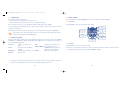
Your phone must be switched on to take a photo. To access this function from the main screen, press the
key. The screen acts as viewfinder. Position the object or landscape in the viewfinder. The lens is
situated on the back of the phone. Please do not touch it. Just next to the lens there is a mirror to make
sure you are well placed if you want to take a photo of yourself.
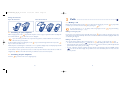
You can take a photo in Portrait or in Landscape mode
- Portrait mode: short keypress on
;
- Landscape mode: short press on one of the side keys.
41
42