1
TH3VODAFONE_UM_GB_27-07-04
27/07/04
14:50
Page 19
Handling two calls
• Call waiting (1)
If a second call comes in while you are already on line, you will be notified by a tone. You can then accept
the call by pressing the
key.
Your current call will be automatically put on hold. You can then switch between your two
correspondents using the
key and then
.
• Making a second call
To call a second party during a call, dial the number directly.
3.5 Conference calls
(1)
Your phone allows you to talk to several people at the same time (up to 5). If you are on a double call, press
, select “Conference” then confirm with the
key. If a third call comes in, answer it by pressing the
key and speak with your new correspondent.
This correspondent becomes a member of the conference if you press
confirm by pressing
. Pressing
disconnects the current call.
To end the conference call, press
(1)
and select “End conf.”.
, select “Add conf.”, and then
4
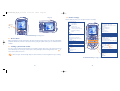
Menu................................................................
• GAMES & MORE
- Games
- Settings
• VODAFONE LIVE !
- Vodafone live!
- News (URL)
- Sport (URL)
- Chat (URL)
- My Vodafone (URL)
- Search (URL)
- What’s New? (URL)
- More Sounds (URL)
- More Pictures (URL)
- More Games (URL)
- Video & Audio (URL)
- Media Album (URL)
- Vodafone Mail (URL)
- Messenger (URL)
- Bookmarks
- Enter URL
- Profiles
• APPLICATION
- Alarms
- Calculator
- Converter
- Voice recorder
- Tone maker
- Infrared
- Alarms list
• MESSAGES
- Create message
- Inbox
- Outbox
- Voicemail
- My messages
- Media Album (URL)
- Vodafone Mail (URL)
- Messenger (URL)
- Parameters
- Memory
- Delete
Contact Vodafone to check service availability.
19
20