1
WALL MOUNT
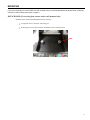
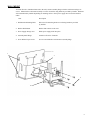
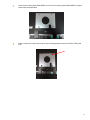
To mount EverServ 7000 Panel POS unit to the wall, connect assembly hinge to bracket wall mount using 8-32
screws. Mount bracket wall mount assembly to wall in 4 locations using hardware provided by installer. Hardware
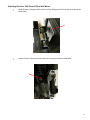
will be determined by installer depending on mounting surface. Place power supply into area shown and dress
cables.
Item
Description
1. Wall Bracket Mounting Holes
Holes used for mounting bracket to wall using hardware provided
by installer.
2. Bracket Wall Mount
Bracket that connects to the wall.
3. Power Supply Storage Area
Holds power supply brick into place.
4. Assembly POS7 Hinge
Attaches to EverServ 7000 unit.
5. Screw PHP w/Cap 8-32x3/8
Screws to attach bracket wall mount to assembly hinge.
2
1
3
5
4
9