1
7. Data Privacy Option for Oracle E-Business Suite
7.1.1 Data Privacy Implementation Architecture
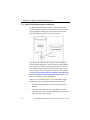
To implement the Data Privacy option, extract data from your
production database and mask sensitive data as you insert it into
your target database. During the insert process, Optim uses the
provided Data Privacy definitions to mask your data.
In this approach, you must first set up your test environment. If
you are using the Data Privacy option with the Test Data Management Solution, you will have already created a database clone of
the production database and run scripts to truncate tables, reorganize table spaces, and reset sequences in your new target database.
See Section 1.2 Creating an Oracle E-Business Target Environment and Appendix B. Truncating Target Tables for more information on setting up your test environment.
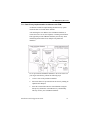
With the test environment in place, you can mask data using the
Data Privacy option. To do this, perform the following steps:
56
1.
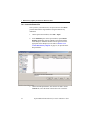
Extract the production data you will mask using an Extract
Request.
2.
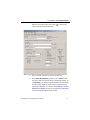
Insert the extracted data into the target database using the
Data Privacy definitions provided in the Data Privacy Column
Map. This step masks your data.
Optim TDM and DP Solutions for Oracle E-Business Suite