1
USER MANUAL
Published July 2014
Software Version 1.25
ERX2TCD
ZaxNet Audio &Time Code Receiver
1
KNOWING YOUR ERX .................................................................................................................................... 3
ERX CONTROL KEYS .................................................................................................................................................... 4
ERX RECEIVE ANTENNAS ............................................................................................................................................. 4
ERX MAIN DISPLAY .................................................................................................................................................... 5
EXTENDED MENU.......................................................................................................................................... 6
ACCESSING AND NAVIGATING THE EXTENDED MENU ........................................................................................................ 6
EXITING THE EXTENDED MENU ..................................................................................................................................... 6
MAXIMUM VOLUME SET ............................................................................................................................................. 6
TIME CODE FRAME RATE SET ....................................................................................................................................... 6
AUTO FRAME RATE ENABLE ......................................................................................................................................... 6
IFB RECEIVE FREQUENCY SET ....................................................................................................................................... 7
AUDIO DELAY SET ....................................................................................................................................................... 7
SOFTWARE UPDATE .................................................................................................................................................... 7
AUTO SCAN ENABLE .................................................................................................................................................... 8
GROUP ID SET ........................................................................................................................................................... 8
IFB VOTING ENABLE ................................................................................................................................................... 8
TIME CODE OUTPUT ENABLE ........................................................................................................................................ 9
TIME CODE DELAY SET ................................................................................................................................................ 9
TIME CODE JAM MUTE ................................................................................................................................................ 9
BACKLIGHT TIMEOUT SET ........................................................................................................................................... 10
LED BRIGHTNESS SET ................................................................................................................................................ 10
1K NOTCH FILTER ENABLE.......................................................................................................................................... 10
1K NOTCH FILTER FREQUENCY ADJUST ........................................................................................................................ 10
ZAXNET OUTPUT ENABLE........................................................................................................................................... 11
TIME CODE OUTPUT LEVEL ADJUST ............................................................................................................................. 11
VOLUME KNOB MODE............................................................................................................................................... 11
ALTERNATIVE IFB FREQUENCY SET .............................................................................................................................. 12
Listening to the alternative frequencies .......................................................................................................... 12
ENCRYPTION CODE SET .............................................................................................................................................. 12
Setting the encryption code............................................................................................................................. 12
QUICK START GUIDE.....................................................................................................................................13
INTERFACING YOUR ERX WITH A NOMAD ..................................................................................................................... 13
FIRMWARE ..................................................................................................................................................14
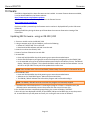
UPDATING ERX FIRMWARE - USING AN IFB 100 / 200 .................................................................................................. 14
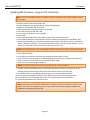
UPDATING ERX FIRMWARE - USING AN TRX TRANSMITTER ............................................................................................. 15
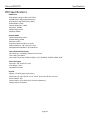
ERX SPECIFICATIONS ....................................................................................................................................16
PRODUCT SUPPORT .....................................................................................................................................17
ZAXCOM WARRANTY POLICY AND LIMITATIONS...........................................................................................18
2
Zaxcom ERX2TCD
ERX Layout
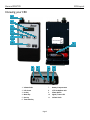
Knowing your ERX
1
2
3
4
5
6
7
8
9
10
11
.
1.
2.
3.
4.
5.
6.
Volume knob
LCD Screen
Inc Key
Menu key
Dec Key
Time Code key
7.
8.
9.
10.
11.
Page 3
Battery Compartment
1/8” Headphone Jack
Power Switch
Signal / Power LED
Volume Knob
Zaxcom ERX2TCD
ERX Layout
ERX Control Keys
• MENU - Holding the menu key while powering up will open the extended menu.
When in extended menu it is used to advance to the next menu item.
When alternative IFB frequency is enabled it is used to get into the menu to change receive
frequencies.
• INC (Up Arrow) - Used to increase the parameter of a menu item.
In the home screen it is used to toggle between time code, scene, take and user bits embedded in the
Meta data and toggle through the alternative IFB frequency.
• DEC (Down Arrow) – Used to decrease the parameter of a menu item.
In the home screen it is used to toggle between time code, scene, take and user bits embedded in the
Meta data and toggle through the alternative IFB frequency.
• TIME CODE - Alternately freezes/unfreezes the displayed time code.
ERX Receive Antennas
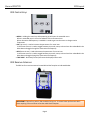
The ERX has four receive antennas located behind the faceplate as indicated below.
IMPORTANT: If placed in a pocket, ERX should be facing out. To ensure better performance don’t
place anything in front of these areas that could block reception.
Page 4
Zaxcom ERX2TCD
ERX Layout
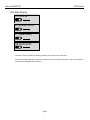
ERX Main Display
01:02:03:04
S: (SCENE INFO)
T: (TAKE INFO)
UB 00:00:00:00
The main screen of the ERX will display TC battery level and receive audio level.
If you are receiving signal from a Zaxcom recorder you can also display the Scene, Take and User-Bits by
pressing and holding the INC or DEC key.
Page 5
Zaxcom ERX2TCD
Extended Menu
Extended Menu
All settings that are changed are saved into the ERX’s flash Rom and are remembered.
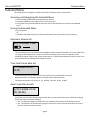
Accessing and Navigating the Extended Menu
• Press and hold the MENU key while powering up the unit.
• Pressing the MENU key will advance to the next menu item.
• At any time if you press and hold the menu key you will be taken back to the top of the extended
menu.
Exiting the Extended Menu
• Cycle the power.
Or
• Hold down the MENU key to get to the extended menu home screen then press the INC key.
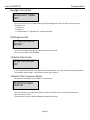
Maximum Volume Set
MAX VOLUME: 23dB
This menu allows you to set the maximum headphone output volume of the ERX. This can be useful if you
are using the ERX mounted on a camera to feed audio and you want to set a level that will not be
accidently changed. If you set the volume mode menu to “fixed” the ERX audio will be the level set in this
menu and will not be affected by the headphone knob.
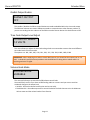
Time Code Frame Rate Set
TC FRAME RATE:
23.98
This menu allows you to manually set the time code frame-rate of the ERX’s internal TC
Reader/Generator. The ERX can support all standard time code frame rates.
The frame rate options are: 23.98, 24, 25, 29.97DF, 29.97DF, 30 DF, 30 NDF
Auto Frame Rate Enable
AUTO FRAME RATE:
ON (23.98)
Auto frame rate sets if the ERX will automatically adjust its time code frame rate to match the incoming
frame rate of the transmitter feeding it.
• ON - The ERX will change time code frame rate automatically to match the incoming fame rate.
• OFF - The ERX will not automatically change its frame rate, you will need to adjust the frame rate in
the time code frame rate set menu.
Page 6
Zaxcom ERX2TCD
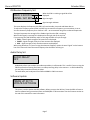
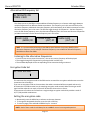
IFB Receive Frequency Set
FREQ: 2.403 RX
SIGNAL: A01 B01
Extended Menu
When the ERX is receiving a signal RX will be
displayed.
Signal strength.
Signal strength indicator
This menu displays the frequency the ERX’s will receive audio, time code and Meta data on.
To adjust the frequency press the INC and DEC keys to match the frequency your transmitter is set to.
You can choose any frequency form 2.403 to 2.475 – we recommend using even numbered frequencies.
The signal represents the strength of the ZaxNet signal that the ERX is receiving.
When a valid signal is received, RX is displayed on the right side of the top line.
If you pressing the TIME CODE key while on this page the ERX will cycle through:
• FREQ – Overall signal strength of all antennas are displayed.
• FRONT – Signal strength of only the front antennas are displayed.
• SIDE – Signal strength of only the side antennas are displayed.
When using AutoScan or if you are using the alternate frequency option the word “signal” on the bottom
line of this menu will show the actual frequency that the ERX is receiving on.
Audio Delay Set
AUDIO DELAY:
OFF
Audio delay allows you to adjust the audio output delay in milliseconds. This is useful if you are using the
ERX for personal monitoring and there is a video processing delay in the monitors – so with audio delay
you can delay the audio to match the video.
The audio delay can be adjusted from 5MS to 400MS in 5MS increments.
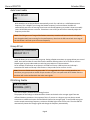
Software Update
PRESS UP 5X TO
UPDATE SOFTWARE
This menu is used to update the ERX software. When you press the INC key 5 times the ERX will start to
look for software being transmitted from an IFB100/200 or TRX transmitter. See the firmware section at
the end of this manual for more information.
Page 7
Zaxcom ERX2TCD
Extended Menu
Auto Scan Enable
AUTO SCAN:
ON
With AutoScan set to ON the ERX will automatically search for, and lock to, a valid ZaxNet transmit
frequency. This is helpful if you change the ZaxNet frequency on the transmitter the ERX will
automatically search for the new signal and tune to that new frequency so you don’t have to manually
retune all the ERX receivers on the set. If AutoScan is set to OFF you will have to manually adjust the
frequency on the ERX.
Note: If the ERX goes out of range of the ZaxNet transmitter, AutoScan will assume that the frequency
was changed and will start scanning for the new frequency. But when the ERX comes back into range of
the transmitter it will lock up to the correct frequency.
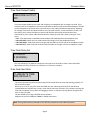
Group ID Set
REMOTE CONTROL
GROUP ID =1
Group ID allows you to set your ERX to a group. Setting a ZaxNet transmitter to a group allows you to send
audio, time code and data to some ERX receivers without affecting others. So for an ERX to receive a
ZaxNet signal its group code needs to match the group code set on the transmitter.
So for example a transmitter set to Group 1 will send to all Group 1 ERX receivers and a Group 2
transmitter will send to all Group 2 ERX receivers. Group codes can be set from 1 to 99
Note: Since most ZaxNet users use group code “1” it is suggested that if you are using AutoScan you
should set your group code to another unique number so if you cross paths with other ZaxNet users the
AutoScan will not be confused with the other users signals.
IFB Voting Enable
IFB VOTING:
NORMAL (OFF)
This menu enables / disables the IFB Voting function.
The purpose of the voting is to allow the ERX to choose and switch to the stronger signal from two
different ZaxNet transmitters. One purpose of this is if you are on a large set you can place a second
transmitter at a different location and the ERX will choose the stronger signal. To use the IFB voting just
set the second transmitting frequency a minimum of 2MHz higher than the first unit. Then the ERX will
automatically choose the stronger signal and change the frequency automatically.
Page 8
Zaxcom ERX2TCD
Extended Menu
Time Code Output Enable
TIMECODE OUTPUT
OFF
Time code output enable lets you send, and configure, the headphone jack to output time code. If you
send time code to a headphone out the time code will override the audio to the selected output. The ERX
can be configured to send audio only, time code only or time code and audio simultaneously. Adjusting
the settings in this menu will allow the ERX to act as an audio monitor, a time code device or both. The
later allows you to mount the ERX on a camera and feed the camera both audio and time code
simultaneously. Your output cable should be wired to match the time code / audio routing set in this
menu.
• OFF - Time code output is disabled and only audio will be outputted from the headphone jack.
• ON: OUT BOTH -Sends only time code to both left and right out of the headphone output.
• ON: OUT RIGHT - Sends time code to the right side and audio to the left side of the headphone output.
• ON: OUT LEFT - Sends time code to the left side and audio to the right side of the headphone output.
Time Code Delay Set
TC DELAY
0 (NORMAL)
This menu allows you to advance or delay the time code out of the ERX to create a time code offset.
Adjustments are from -50 frames to +50 frames in 0.5 frame increments.
Time Code Jam Mute
TCJAM MUTE TIME:
0MS (DEFAULT)
This menu sets how long the time code output will be muted when the time code is being jammed, or if
the time code changes.
When this is set to on, any value other than 0MS, the time code output will mute for the duration
selected whenever the ERX sees a jump in time code of more than 2 frames. This simulates removing the
time code completely from a device and plugging it back in so that the receiving device recognizes that
there is new time code.
This was added to fix a bug in the RED camera software.
Adjustments are from 500MS to 2000MS in 500MS increments.
Note: If using a Red camera you would set this will likely need to be set to 1000 milliseconds.
Page 9
Zaxcom ERX2TCD
Extended Menu
Backlight Timeout Set
BACKLIGHT TIMER:
OFF
This menu will allow you to adjust how long the LCD backlight will remain on after the last key press.
The options are:
• Always Off
• Always On
• 1 to 29 seconds in – adjustable in 1 second increments
LED Brightness Set
LED BRIGHTNESS:
BRIGHT
This menu will adjust the brightness the top mount indicator LED.
You can set the LED to DIM or BRIGHT.
1K Notch Filter Enable
1K NOTCH FILTER
OFF
If set to ON the ERX will notch out audio at the 1 kHz frequency. This way if someone is monitoring audio
from the ERX and you send a 1 kHz tone the listener will not hear it.
1K Notch Filter Frequency Adjust
This menu will only appear if you enable the 1K notch Filter
1K NOTCH FREQ
1000 HZ
This menu allows you to adjust the frequency of the notch filter if the tone generator feeding the
ERX isn’t exactly at 1 kHz.
The notch filter can be set between 960Hz to 1040Hz in 2Hz steps.
Page 10
Zaxcom ERX2TCD
Extended Menu
ZaxNet Output Enable
ZAXNET OUTPUT
OFF
This enables / disables the ERX to output ZaxNet commands embedded within the time code output.
The ERX time code out can contain ZaxNet commands to communicate to other Zaxcom products. If
you are not sending the time code out of the ERX to another Zaxcom device this should be set to OFF.
Time Code Output Level Adjust
TC OUTPUT LEVEL:
1.0 VOLTS
This menu allows you adjust the time code voltage level to accommodate cameras that need different
time code levels to lock time code.
The options are: .001, .003, .005, .010, .031, .062, .125, .250, .500, 1.000, 2.000, 3.000
IMPORTANT: When supplying time code to certain Red cameras, you should set the output level to 1.0
VOLT. Individuals have experienced problems with the RED One not being able to reboot while it is
receiving too hot a TC signal.
Volume Knob Mode
VOLUME MODE:
VARIABLE
This menu will allow you to override the ERX volume control knob.
You would likely use this if you have an ERX feeding audio to a camera and you want to avoid an
accidental change to the output level.
• Variable - allows the volume knob function and act normally.
• Fixed Max Gain - the audio output will be set and locked to the level that was set in the Maximum
Volume menu and the volume knob will not function.
Page 11
Zaxcom ERX2TCD
Extended Menu
Alternative IFB Frequency Set
ALTERNATE IFB
FREQ: 2.420
This allows you to set the ERX to receive additional ZaxNet frequency so a listener could toggle between
multiple frequencies from different ZaxNet transmitters. The frequency set in this menu will be the first
alternative frequency. Additional alternative frequency will automatically be in 2MHz increments from the
alternative frequency set in this menu. The ERX can toggle through 12 frequencies – the base frequency
set in the IFB receive frequency menu, the alternative frequency set in this menu and 10 more frequencies
(at 2MHz increments from the alternate frequency set in this menu.
CHAN: 2.405
(BASE) 00
CHAN 2.420
(ALT) 01
CHAN 2.422
(ALT) 02
NOTE: It is recommended at keeping at least 2MHz space between the primary (BASE) and the
alternative frequency. So for example if the base frequency is set to 2406 the alternate frequency
should be no closer than 2408.
Listening to the alternative frequencies
• From the home screen press the menu key - the current receive frequency will be displayed.
• Then toggle through the frequencies by pressing the INC and DEC keys.
• The metadata displayed will be corresponding to the transmitter being monitored.
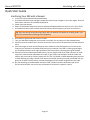
Encryption Code Set
ID1:000 ID0:000
This menu sets the encryption code on the ERX receiver to match the encryption code that was set on the
transmitter that is feeding it.
If you set an encryption code on the transmitter the audio transmitted will be encrypted and can only
be listened to if the ERX receiver has the matching encryption code entered. When receiving an audio
signal and the codes do not match, all that will be heard is white-noise or silence.
These two sets of numbers are formed into a single six-digit encryption code which provides a total of
16,777,216 possible combinations.
Setting the encryption code
1. Momentarily press the MENU key to advance to the next character.
2. To change the designated character, press the INC or DEC key.
3. To exit this page, press and hold the MENU key for 1 second.
NOTE: Both of these codes should always be set to 000 for normal un-encrypted operation
Page 12
Zaxcom ERX2TCD
Interfacing with a Nomad
Quick Start Guide
Interfacing Your ERX with a Nomad
1. In the main menu of Nomad select ZaxNet Setup
2. Scroll down and select Input Configure. Make sure that the input configure is set to 8 or higher. Press the
back button and return to the ZaxNet Setup Menu.
3. Power cycle your Nomad
4. Return to the ZaxNet setup menu scroll up and select IFB Mode. Make sure that it is set to TX or TX+RX
5. Scroll down and select your transmit channel and choose which frequency you’d like to transmit on.
Tip: There are several smart phone apps which will scan what Wi-Fi frequencies are being used in your
area. This can be useful in selecting a clear frequency.
6. Scroll down to group code and choose a number.
7. Turn your ERX while holding the menu button on the ERX. This will take you to the extended menu.
8. Advance to the time code frame-rate menu and set the frame rate to the same frame rate that Nomad is
set to.
9. Press menu again to enter the IFB frequency menu. Make sure that the frequency is the same as the
frequency you selected in the ZaxNet setup menu of your Nomad. If the ERX is receiving a good signal,
you should see two bars on the right hand side of the screen which is displaying the signal strength.
10. Advance to the time code output enable menu. If you’re using the ERX as an IFB for a director or script
supervisor, leave the time code output set to OFF. If you’d like to use the ERX to send time code and
audio or just time code to a camera, select OUT LEFT TIP, OUT RIGHT or BOTH depending what you want
to send and how your cable is wired. If the camera has trouble receiving time code, proceeded until you
get to the TC OUTPUT LEVEL menu. Increase the voltage until the camera recognizes the time code.
11. On your Nomad go to the BUS MENU and select TAPE / IFB Out and select what audio you would
like to send to the ERX. You can use any combination of card tracks, outputs or returns.
Page 13
Zaxcom ERX2TCD
Firmware
Firmware
Each ERX is shipped with the latest firmware version installed. As newer firmware becomes available,
it can be downloaded from the Zaxcom website:
http://www.zaxcom.com/software-updates
Newer version of Beta software may be found on the Zaxcom Forums:
http://www.zaxcom.com/forum
Each time an ERX is powered up, the firmware version number is displayed briefly on the LCD screen
(VER X-XX).
Pressing the DEC key during the boot up will slow down the screen to allow easier viewing of the
information.
Updating ERX Firmware - using an IFB 100 / 200
1. Format a micoSD card in the IFB 100 / 200.
2. Using a computer with a SD card adapter, perform the following:
• Delete the “DELETE.ME” file on the card.
• Download the ERX software and load it into the card.
3. Insert the card into the IFB 100 / 200.
4. Insert a fresh set of batteries into each ERX.
5. At each ERX:
• Press and hold the MENU key while powering up to enter the extended menu.
• Set the ERX IFB frequency and group ID to the same frequency and group ID as the IFB100 / 200.
• In the extended menu go to the software update menu and press the INC Key 5 times. The ERX will
display “Waiting For Program”. This indicates the ERX is ready to receive the new software. You can
do this for all your ERX’s so they will all be updated at the same time.
NOTE: Place the ERX within 3 feet of the IFB100 / 200 and away from any Wi-Fi or Bluetooth devices
6. At the IFB100 / 200:
• Press and hold the MENU key while powering up to enter the extended menu.
• Advance to the “Send ERX Program” Menu and press the INC Key.
• The IFB100 / 200 will indicate that it found the program and has started sending it.
NOTE: The IFB100 / 200 will continue to transmit the program until manually stopped.
7. The ERX screen should indicate that it is receiving the program. If there is a reception error, the
affected receiver automatically restarts the process with the start of the next cycle.
8. For the ERX’s that have completed reprogramming, the screen will display “SUCCESS”.
9. Once all units have displayed SUCCESS, at the IFB100 / 200 press the MENU key to stop the process.
10. At each ERX unit cycle the power and verify it is running the new version of software.
Page 14
Zaxcom ERX2TCD
Firmware
Updating ERX Firmware - using an TRX Transmitter
NOTE: You need a TRX-900 that has an IFB option and the TRX needs to be running software version
7.02 or higher.
1. Format a micoSD card in the IFB 100 / 200.
2. Using a computer with a SD card adapter, perform the following:
• Delete the “DELETE.ME” file on the card.
• Download the ERX software and load it into the card.
3. Insert the card into the IFB 100 / 200.
4. Insert a fresh set of batteries into each ERX.
5. At each ERX:
• Press and hold the MENU key while powering up to enter the extended menu.
• Set the ERX IFB frequency and group ID to the same frequency and group ID as the IFB100 / 200.
• In the extended menu go to the software update menu and press the INC Key 5 times. The ERX will
display “Waiting For Program”. This indicates the ERX is ready to receive the new software. You can
do this for all your ERX’s so they will all be updated at the same time.
NOTE: Place the ERX within 3 feet of the IFB100 / 200 and away from any Wi-Fi or Bluetooth devices
6. At the TRX transmitter:
• In the TRX go to the factory menu (go the lock page and press down 5 times).
• Press the menu key once to get to the IFB MODE page press the INC key change to IFB mode to TX
• Press the Menu key twice to get to the Send ERX Program page.
• Press UP to start transmitting the program.
NOTE: The TRX will continue to transmit the program until manually stopped.
7. The ERX screen should indicate that it is receiving the program. If there is a reception error, the
affected receiver automatically restarts the process with the start of the next cycle.
8. For the ERX’s that have completed reprogramming, the screen will display SUCCESS.
9. Once all units have displayed SUCCESS, at the TRX press the menu key to stop the process.
10. At each ERX unit cycle the power and verify it is running the new version of software.
11. Change the IFB mode on the TRX back to “RX”
NOTE: Some older versions of TRX software will not power up if you try to power on while the IFB
mode is set to TX. If that happens you can force the IFB mode to OFF by holding the MENU and
DOWN key while powering up the TRX.
Page 15
Zaxcom ERX2TCD
Specifications
ERX Specifications
IFB Receiver
RF Frequency Range: 2.403 to 2.475 GHz
RF Modulation: Digital Spread Spectrum
RF Frequency Step: 0.001 GHz (1 MHz)
RF Bandwidth: 1 MHz
Channel Separation: 2 MHz
Sensitivity: -96 dBm
DAC Bit-depth: 24 bit
DAC Rate: 48 kHz
Receiver Audio
System Group Delay: 10 ms
Dynamic Range: 96 dB
Distortion: 0.01%
Frequency Response: 60 Hz to 12 kHz
Output Connector: 1/8” Stereo (3.5 mm)
Compatible HP Impedance: 32 to 200 ohms
Time Code Reader/Generator
Clock Accuracy: 1.54 PPM (1 frame out in 6 hours)
Time Code Type: SMPTE
Time Code Frame-rates: 23.98 (23.976), 24, 25, 29.97NDF, 29.97DF, 30NDF, 30DF
Time Code Output
Connector: 1/8” Stereo (3.5 mm)
Level Range: 1 V P-P
Impedance: 32 ohms
Physical
Weight: 2.3 Oz (65 grams) w/o battery
Dimensions: (H x W x D) 4.56” x 2.37” x 0.63” (116 mm x 60 mm x 16 mm)
External Power: N/A
Internal Power: Up to 20 hours (2 AA Lithium batteries)
Display Graphic: LCD panel
Page 16
Zaxcom ERX2TCD
Support
Product Support
Register your product with Zaxcom:
Download the latest Firmware from:
Download the latest User Manuals from:
Submit Technical Questions at:
Submit information for Repair Services at:
Join the Zaxcom Forum at:
http://www.zaxcom.com/product-registration
http://www.zaxcom.com/software-updates
http://www.zaxcom.com/instruction-manuals
http://www.zaxcom.com/submit-a-technical-question
http://www.zaxcom.com/repairs
http://www.zaxcom.com/forum
Page 17
Zaxcom Warranty Policy and Limitations
Zaxcom Inc. values your business and always attempts to provide you with the very best service.
No limited warranty is provided by Zaxcom unless your ERX2TCD (“Product”) was purchased from an authorized distributer or authorized reseller.
Distributers may sell Product to resellers who then sell Product to end users. Please see below for warranty information or obtaining service. No warranty
service is provided unless the Product is returned to Zaxcom Inc. or a Zaxcom dealer in the region where the Product was first shipped by Zaxcom.
Warranty Policy
The Product carries a Standard Warranty Period of one (1) year.
NOTE: The warranty period commences from the date of delivery from the Zaxcom dealer or reseller to the end user.
There are no warranties which extend beyond the face of the Zaxcom limited warranty. Zaxcom disclaims all other warranties, express or implied,
regarding the Product, including any implied warranties of merchantability, fitness for a particular purpose or non-infringement. In the United States, some
laws do not allow the exclusion of the implied warranties.
Troubleshooting & Repair Services
No Product should be returned to Zaxcom without first going through some basic troubleshooting steps with the dealer you purchased your gear from.
To return a product for repair service, go to the Zaxcom Repair Services page http://www.zaxcom.com/repairs and fill in your information; there is no
need to call the factory for an RMA. Then send your item(s) securely packed (in the original packaging or a suitable substitute) to the address that was
returned on the Repair Services page. Insure the package, as we cannot be held responsible for what the shipper does.
Zaxcom will return the warranty repaired item(s) via two-day delivery within the United States at their discretion. If overnight service is required, a FedEx
or UPS account number must be provided to Zaxcom to cover the shipping charges.
*Please note a great resource to troubleshoot your gear is the Zaxcom Forum: http://www.zaxcom.com/forum.
Warranty Limitations
Zaxcom’s limited warranty provides that, subject to the following limitations, each Product will be free from defects in material and workmanship and will
conform to Zaxcom’s specification for the particular Product.
Limitation of Remedies
Your exclusive remedy for any defective Product is limited to the repair or replacement of the defective Product.
Zaxcom may elect which remedy or combination of remedies to provide in its sole discretion. Zaxcom shall have a reasonable time after determining that
a defective Product exists to repair or replace a defective Product. Zaxcom’s replacement Product under its limited warranty will be manufactured from
new and serviceable used parts. Zaxcom’s warranty applies to repaired or replaced Product for the balance of the applicable period of the original
warranty or thirty days from the date of shipment of a repaired or replaced Product, whichever is longer.
Limitation of Damages
Zaxcom’s entire liability for any defective Product shall, in no event, exceed the purchase price for the defective Product. This limitation applies even if
Zaxcom cannot or does not repair or replace any defective Product and your exclusive remedy fails of its essential purpose.
No Consequential or Other Damages
Zaxcom has no liability for general, consequential, incidental or special damages. These include loss of recorded data, the cost of recovery of lost data, lost
profits and the cost of the installation or removal of any Product, the installation of replacement Product, and any inspection, testing or redesign caused
by any defect or by the repair or replacement of Product arising from a defect in any Product.
In the United States, some states do not allow exclusion or limitation of incidental or consequential damages, so the limitations above may not apply to
you. This warranty gives you specific legal rights and you may also have other rights, which vary from state to state.
Your Use of the Product
Zaxcom will have no liability for any Product returned if Zaxcom determines that:
•
•
•
•
•
•
The Product was stolen.
The asserted defect.
Is not present.
Cannot reasonably be fixed because of damage occurring when the Product is in the possession of someone other than Zaxcom, or
Is attributable to misuse, improper installation, alteration, including removing or obliterating labels and opening or removing external covers (unless
authorized to do so by Zaxcom or an authorized Service Center), accident or mishandling while in the possession of someone other than Zaxcom.
The Product was not sold to you as new.
Additional Limitations on Warranty
Zaxcom’s warranty does not cover Product, which has been received improperly packaged, altered or physically abused.
Page 18