1
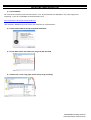
5) Customize EA setting according your own strategy or use provided settings:
If you need to CHANGE lot volumes from MINI to MICRO, please use our presets by clicking LOAD:
You will see your settings changed with micro lots:
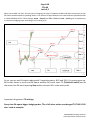
6) Smiling FACE at up-right corner of a chart means that EA is set up and ready to trade:
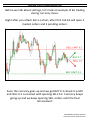
7) Right after you click OK, EA will open 2 orders:
!!! IF AFTER INSTALLATIONS EXPERT DOES NOT TRADE,
PLEASE LOOK AT OUR “EA does not trade” SECTION
TO FIND THE REASON!!!
FXPROMAKER Trading Solutions
www.fxpromaker-advanced.com