1
Camera Setting
5. 7 IR cut filter
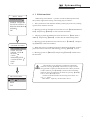
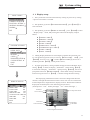
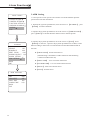
MAIN MENU
SYSTEM SETTING
CAMERA SETTING
FUNCTION SETTING
WINDOW BLANKING
ALARMS
EXIT
1、The system enters into the main menu by calling 95 preset or by
calling 9 preset twice within 3 seconds.
2、Operate joystick, move the cursor to 【CAMERA SETTING】 to
enter submenu.
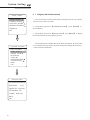
3、 Operate joystick, move the cursor to 【ADVANCE SETTING1】;
press 【OPEN】, there will be a sign
in the front of【ADVANCE
SETTING1】, the cursor jumps to right, move joystick to“ IR cut filter”,
choices as follow, 【AUTO】is default.
● 【AUTO】IR cut filter mode, it means the PTZ automatically
transfers according to sensitivity.
● 【COLOR】set as color mode
● 【BLACK】 set as black and white mode
● 【TIME】 set ON time and OFF time of black and white mode
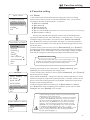
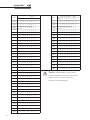
CAMERA SETTING
ZOOM SPEED
HIGH
DIGITAL ZOOM
ON
BLC MODE
OFF
SLOW SHUTTER
ON
LINE SYNC
OFF
WDR MODE
ON
ADVANCE SETTING1
ADVANCE SETTING2
BACK
EXIT
4、Press 【OPEN】 to save.
When user choose 【TIME】, 【IR CUT ON TIME 】and 【IR
CUT OFF TIME】will be effective. User may set ON time and OFF
time of black and white mode, as follow:
1.Operate joystick, move the cursor to 【IR CUT FILTER】, tilt up/down
joystick to choose【 TIME】 mode, press 【OPEN】to save;
2.Operate joystick, move the cursor to【 IR CUT FILTER】, tilt up/down
joystick to set the beginning time of black and white mode; move joystick
to【IR CUT OFF TIME】 to set the finish time of black and white mode,
the same as setting the beginning time;
3 .Operate the joystick and move the cursor to【 MAX GAIN】 which is
the max limits of automatic gain and ranges from 8 to 28dB. As the ray
is dark, the more smaller value of 【MAX GAIN】, the more darker, the
noise of image is less; The more bigger value of 【MAX GAIN】, the more
brighter, but the noise of image is much.
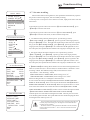
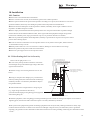
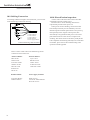
ADVANCE SETTING 1
IR CUT FILTER
AUTO
IR CUT ON TIME N/A
IR CUT OFF TIME N/A
THRESHOLD
10dB
MAX GAIN
28dB
EXPOSURECOMP OFF
MIRROR
OFF
FLIP
OFF
SHARPNESS
00
BACK
EXIT
【THRESHOLD】:sensitive of IR cut filter, the range from 0 to 28dB.
【EXPOSRUECOMP】:exposure compensation function.
【MIRROR】: image mirroring function.
【FLIP】: 180° inversion imaging function of image.
【SHARPNESS】: Image sharpness (Range:00-15)
4. Press【 OPEN 】to save.
OPERATION KNACKS
IR cut filter function uses color in day; use black and white at
night. This function not only guarantees the quality of image, but
also saves the room of storage.
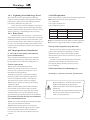
NOTICE
24
This function depends on the models and parameters
of built-in camera in PTZ, if the camera haven't this
function, then this function is invalid.(N/A)