1
-14-
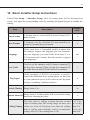
Description
Default
value
Remote Control
Used to add the remote controller or delete remote
controller,[0]:delete remote control;[1]:add remote
control.
0
Staircase Light
staircase light can be set.[0]:don't light on at any
time when receive calling;[1]:light on at night only
when receive calling;[2]light on at any time when
receive calling.Note that this item should be set on
master monitor(user code=1),for slave monitors,this
item is invalid.
0
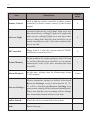
BDU installed
Range from 0~1.when the system install VT-BDU
module,this item must set to 1.
0
Picture Memory
Set the numbers for capture pictures, only 1/4/8 can
be set.Note that this item should be set on master
monitor(user code=1),for slave monitors,this item
is invalid.
1
Album Playback
Set the max. playing time for album,range frome
1~999 minutes.
10 mins
Item
Restore parameter settings to default value,touch
Recover Settings icon,an information of "Y/
N" will be asked,touch Recover Settings icon
Recover Settings...
again,restore setting will be performed immediately.
Please note that the recover setting will not change
time format,date format and user code item.
_
Online Search...
Search the devices connected to the system
_
Back
Return last page
_