1
User manual
ITEMS
OPTIONS
Language
English /Chinese
PIP
Small, Medium, Large, PBP, POP
In small, medium and large interface
can adjust the source, position, and
swap;
In PBP and POP interface can adjust
the source and swap.
Input Format OSD
5s、10s、15s
LOGO
ON/ OFF
Freeze Input
ON/ OFF
Peaking
Mono/ Color
Assistant Func.
Manual/ Auto
Manufacturer
Default
OK/Cancel(Reverse the SAT / ADJ kno
b to select "OK")
ISP
For program upgrades (Please reboot
your computer if press accidentally!)
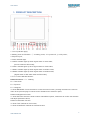
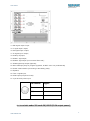
Function of buttons and knobs can be customized by users’ needs.
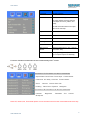
Functions of F1-F4 buttons can also be customized:
·Aspect Ratio·Check Field ·Freeze Input ·Center Marker
·Underscan ·H/V delay ·Color Bar ·Screen Marker
·Zoom
·Camera ·Pixel-to-Pixel ·PIP
·Peaking ·False Color ·Exposure ·Histogram.
Functions of R1-R4 buttons can also be customized:
·Contrast
·Brightness
·Sharpness
·Saturation ·Tint
·Volume
Note: Off, camera, X2, X4 and X8 options can be set when zoom function customized as shortcut key.
9
www.newhank.com