1
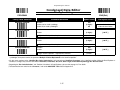
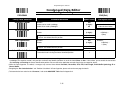
Programming the Scanner
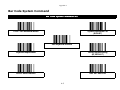
Operation Control
♦ Trigger Mode, Buzzer Tone, Scanning Tolerance ♦
PROGRAM
END(Exit)
Family Code Selection
Operation Mode
Buzzer Tone Adjust
Scanning Tolerance
(Printing Quality Control)
Parameter Selection
Option Code
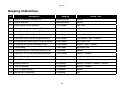
Low Power mode (Low Power triggering)
0
Manual trigger (External triggering) u
1
Level mode (Auto power off)
2
Alternative mode (Periodic power off)
3
Presentation mode (Pulse driven reading)
4
Auto trigger mode (Continued power on)
5
Toggle mode (Repeat reading)
6
Diagnostic mode (Test reading)
7
Buzzer tone - mute
0
Buzzer tone - low
1
Buzzer tone - medium u
2
Buzzer tone - high
3
Buzzer tone - extremely high
4
Good-read beep before data transmission u
5
Good-read beep after data transmission
6
Power-on beep u
7
No power-on beep
8
Regular (standard) printing quality u
0
Poor (critical) printing quality
1
Please note that if you select “Poor printing quality,” you should limit “Readable Bar
Code Symbology” and “Minimum & Maximum Reading Length” of each symbology
to avoid error reading.
§ The “Scanning Tolerance” is specially designed for the most popular symbologies, such as Code 39, UPC, and EAN.
3-29