1
DIVERSITY WIRELESS BY ANCHOR AUDIO
FEEDBACK
Anchor Audio UHF wireless is a 16 channel, diversity wireless system that utilizes two independent antennae
to receive signals. The diversity feature means the receiver will process the stronger of the two antenna signals,
effectively minimizing dropouts and interference from other transmitting sources. The antennae are mounted
internally so there are no obstructions or risk of damage.
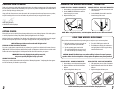
Feedback is a howling noise or shrill sound that is self-generated by the sound system. It is caused by a microphone picking up the sound coming from the speaker and then being re-amplified. Once a feedback loop is
started it will continue until the system is adjusted.
CHANNEL SELECTION - BUILT-IN RECEIVER
Before you can use your UHF wireless system, you will need to select a wireless frequency, set the built-in receiver,
and microphone transmitter, to that channel.
1. Choose from any of the 16 available wireless channels
2. Set the wireless channel selector knob “CHANNEL” to the channel/frequency you have chosen
If you have two wireless receivers repeat above for the second receiver. Remember each receiver/transmitter pair
must be set to different channels to work properly.
FEEDBACK CAUSES
• Microphone too close, pointing towards or in
front of the speaker
AVOIDING & ELIMINATING FEEDBACK
• Point the microphone in a different direction
• Volume setting too loud for room
• Keep the microphone away from the speaker;
position speaker in FRONT of microphone
• Sound reflections from hard surfaces, walls, etc.
• Reduce the sound system volume levels
CAUTION: Feedback can damage your equipment & may be hazardous to hearing.
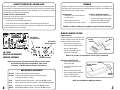
WIRELESS REMOTE CONTROL
UHF WIRELESS
VOLUME CONTROL
UHF WIRELESS
CHANNEL SELECTION
REMOTE OPERATION
Point the red Mute button towards the front of the
CA-130U1, aiming the remote at the red window
located near the Volume and Tone controls.
VOLUME
DOWN
MUTE
• Raise volume by pressing Volume Up
• Lower volume by pressing Volume Down
• Mute system by pressing Mute
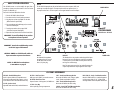
CA-130U1
BUILT-IN UHF WIRELESS
RECEIVER CONTROLS
NOTE: If the system is not responding be sure the signal is not blocked.
RX INDICATOR LIGHTS
NOTE: If you experience ongoing interference with your wireless system,
the selected frequency may be incompatible w/ other systems
in the area. Try different channels to find a clear frequency.
UHF WIRELESS ACCESSORIES
WH-6000: 16 channel wireless handheld microphone/transmitter
WB-6000: 16 channel wireless body-pack transmitter for hands free microphone
(microphone not included – see below)
6
VOLUME UP
• Stop mute by pressing Mute again or
pressing either volume button
CM-60:
Lightweight, low-profile collar microphone – works w/ the WB-6000 transmitter
EM-60:
UltraLite “Over-the-Ear” hands free microphone – works w/ the WB-6000 transmitter
LM-60:
Lightweight, clip-on lapel microphone – works w/ the WB-6000 transmitter
HBM-60:
Ultra-lightweight headband microphone – works w/ the WB-6000 transmitter
REPLACING THE REMOTE BATTERY
1. Locate the latch on the bottom of the
remote, near the back
2. Gently pull the latch towards the center
of the remote
REMOTE CONTROL
BOTTOM
BATTERY
3. Slide out the battery holder carefully
4. Place a new battery in holder with positive
symbol on the battery facing up
BATTERY
HOLDER
5. Carefully re-insert the battery holder
NOTE: Use only CR2025 or CR2032 type batteries.
3