1
Controlling the VP-437
7.2.1
The MAIN MENU
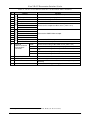
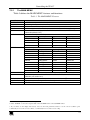
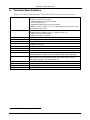
Table 3 defines the MAIN MENU features and functions.
Table 3: The MAIN MENU Features
Mode
CONTRAST
Function
Set the contrast (0 to 100, default 25)
BRIGHTNESS
Set the brightness (0 to 100, default 47)
FINETUNE
COLOR
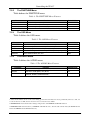
Set the hue, saturation, sharpness and noise reduction (see section 7.2.2)
Set the red, green and blue shades (0 to 100, default 48, 49 and 50 respectively)
SIZE
Select the size of the display: FULL, OVERSCAN, UNDERSCAN, LETTER BOX,
PANSCAN (default, FULL)
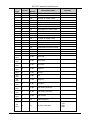
Select the source: (default CVBS)
SOURCE
Appears as:
Source input
Appears as:
Source input
CVBS
CV
PC
VGA
SVIDEO
YC
HDMI1
HDMI 1
YPBPR1
COMP 1
HDMI2
HDMI 2
YPBPR2
COMP 2
1
OUTPUT
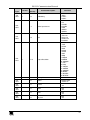
Select the output resolution from the menu (default 720P60):
Appears as:
Output resolution:
Appears as:
1080I60
1080i @60Hz
NATIVE2
Output resolution:
1080P60
576I
1080p @60Hz
576i
VGA
SVGA
576P
576p
XGA
1024x768
720P50
720p @50Hz
SXGA
1280x1024
1080I50
1080i @50Hz
UXGA
1600x1200
1080P50
1080p @50Hz
480I
480i
640x480
800x600
WXGA
1366x768
480P
480p
WSXGA
1680x1050
720P60
720p @50Hz
WUXGA
1920x1200
AUDIO
See section 7.2.4
OSD
Set the OSD parameters: H POSITION, V POSITION, TIMER, BACKGROUND and
DISPLAY (see section 7.2.3)
FACTORY RESET
Resets to the default parameters (resolution is set to XGA or 720p3)
INFORMATION
EXIT
Displays the source, the input resolution, the output resolution and the software version
Select to exit the menu
1 CVBS means Composite Video Baseband Signal
2 Select “NATIVE” to select the output resolution from the EDID of the connected HDMI monitor
3 If you cannot see the display after factory reset, use the front panel Res. button to set the correct resolution: press
continuously for 2 seconds to reset to XGA, or continuously for 5 seconds to reset to 720p
13