1
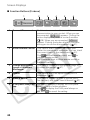
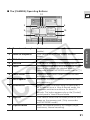
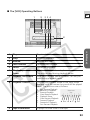
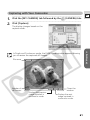
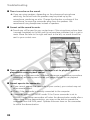
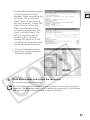
■ The [CAMERA] Operating Buttons
12
E
3
4
5
10
6
9
8
1
Zoom to wide-angle
Click here to zoom out (the subject becomes
smaller).
2
Zoom to telephoto
Click here to zoom in (the subject becomes
bigger).
3
Wide End
Click here to zoom out to maximum wide angle.
4
Tele End
Click here to zoom in to maximum telephoto.
5
Focus
Switches between auto focus and manual focus.
(Manual focus cannot be selected when a
camcorder without NETWORK mode is set to [.)
6
Focus closer
Moves the focus point closer. (Cannot be used
with autofocus).
7
Focus farther
Moves the focus point farther. (Cannot be used
with autofocus.)
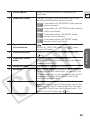
8
OneShot AF
When you click this button while the camcorder is
set to manual focus in View & Record mode, the
camcorder switches to autofocus for about 10
seconds. This button appears only on the [Contact]
control panel in View & Record mode.
9
Capture
Click here to record the live video picture as a still
image on the memory card. (Only camcorders
with NETWORK mode.)
10
Capture mode
Select the capture mode of still images (single,
continuous, interval recording).
51
DV Messenger
7