1
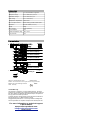
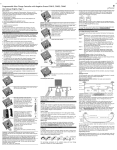
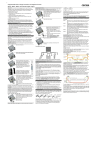
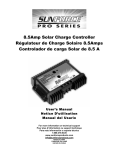
Fasten the strain relieves. Menu 7: Buzzer on/off You can turn ON/turn OFF the buzzer in this menu. Menu 9: Individual / factory settings You can save your current menu setting or reset to default factory setting in this menu. Close the terminal lid. Now you have successfully connected your 50 Amp Pro Series Charge controller. Grounding the Solar System When you exit programming menu, the controller displays the state of charge (available energy) of the battery. Mind that once you have entered the programming menu you can exit it at the last item only. We therefore recommend that you first note down your required settings in the check boxes beside the menu structure and then do the programming in one go. This makes programming easier and avoids errors. All programming settings are stored in a non-volatile memory and remain stored even if the controller was disconnected from the battery. Error Description Error condition Display Reason Remedy Battery is not being charged during daytime No up-moving bars Solar array faulty or wrong polarity Check Solar array and wiring Battery wrong polarity Permanent sound Battery is connected with reverse polarity Remove reverse polarity Solar array exceeds nominal current of controller Check solar array current Controller limits solar current Be aware that the 50 Amp Pro Series Charge Controller is negative grounding and the negative terminals of the 50 Amp Pro Series Charge Controller are connected internally and therefore have the same electrical potential. If any grounding is required, always do this on the negative wires. Starting up the Controller Self Test As soon as the controller is supplied with power either from the battery or the solar array, it starts a self test routine. This is indicated first by running LCD bars for approx. 0.5s, and then the firmware version is displayed in coded symbols for about another second (this is for service purposes only). Then the display changes to normal operation. System Voltage The controller adjusts itself automatically to 12V or 24V system voltage. As soon as the voltage at the time of start-up exceeds 20.0V, the controller implies a 24V system. If the battery voltage is not within the normal operation range (approx. 12 to 15.5V or approx. 24 to 31V) at start-up, a status display according to the section ERROR DESCRIPTION occurs. Battery Type The controller is preset to operate with lead acid batteries with liquid electrolyte. If you intend to use a VRLA battery (GEL type) you can adjust the controller in Programming Menu 1 (see back page). The equalization charge is activated then. In case of any doubts consult your dealer. Display Functions and Acoustic Signals LCD Displays In normal operation mode the controller displays the state of charge (available energy) of the battery. Any change of the state of charge (SOC) to a lower status is additionally signalled acoustically. Disconnect in relation to a fully charged battery. As long as the solar array supplies enough voltage to charge the battery, this is indicated by up-moving bars alternately to the state of charge display. Acoustics Signals The controller has an acoustic signal which indicates the change of the state of charge. This function can be deactivated in Programming Menu 7. Programming Lock-out By pushing the programming button for 8s in normal operation mode the programming lock-out is activated to prevent any accidental settings change. Another 8s push releases the lock-out. Optional Functions External Temperature Sensor With the optional temperature sensor the 50 Amp Pro Series Charge Controller can measure the battery temperature and adjust the charging voltage accordingly to extend the battery life span. Programming your50 Amp Pro Series Charge controller You enter the programming mode with a long push (2s-8s) on the button. The programming menu structure is described as below. Menu 1: Battery type In this menu, you can select the proper battery type - liquid electrolyte or GEL (VRLA) according to your PV system to get better charge of your battery. The default battery type is GEL. Safety Features The controller is protected against wrong installation or use: At the solar terminal At the battery terminal Battery connected with correct polarity Unrestricted Normal operation Battery connected with wrong polarity Unrestricted Unrestricted. Acoustic Warning Reverse polarity Yes, not at 24V system voltage. Yes, if only the battery is connected. Acoustic Warning Short circuit Unrestricted Unrestricted. CAUTION: Battery must be protected by fuse. Overcurrent Controller limits current. -------------------- No connection Unrestricted Unrestricted Reverse current Unrestricted -------------------- Overvoltage Varistor 56V, 2.3J Max. 40V Undervoltage Normal operation -------------------- General Safety and Usage Recommendations Intended Use The charge regulator is intended for use in photovoltaic systems with 12V or 24V nominal voltage. It shall be used with vented or sealed (VRLA) lead acid batteries only. Safety Recommendations Batteries store a large amount of energy. Make certain to never short circuit a battery under any circumstances. We recommend connecting a fuse (slow acting type, according to the nominal regulator current) directly to the battery terminal. Batteries can produce flammable gases. Avoid making sparks, using fire or any naked flame. Make sure that the battery room is ventilated. Avoid touching or short circuiting wires or terminals. Be aware that the voltages on specific terminals or wires can be up to double the battery voltage. Use isolated tools, stand on dry ground and keep your hands dry. Keep children away from batteries and the charge regulator. Please observe the safety recommendations of the battery manufacturer. If in doubt, consult your dealer or installer. Liability Exclusion The manufacturer shall not be liable for damages, especially on the battery, caused by use other than as intended or as mentioned in this manual or if the recommendations of the battery manufacturer are neglected. The manufacturer shall not be liable if there has been service or repair carried out by any unauthorised person, unusual use, wrong installation, or bad system design. Opening case voids warranty.