1
Newer Technology Guardian MAXimus
Chapter 1 - Introduction
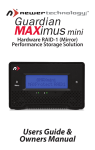
1.5 Front Status Lights
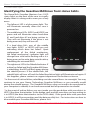
Identifying the Guardian MAXimus front status lights.
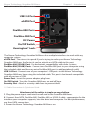
The NewerTech Guardian Maximus has 4 LED
status lights on the front of the case to visually
display what it is doing and to warn you of any
errors.
• The leftmost LED is a blue power light. This
will illuminate normally when the case is
powered on.
• The middle two LEDs (HDD1 and HDD2) are
green and will illuminate when hard drive
#1 and hard drive #2 are being written to.
They will not illuminate if the drive is not
being accessed; they will turn off.
• If a hard drive fails, one of the middle
two lights (HDD1 or HDD2) will turn red,
indicating which drive has failed*. Upon
replacement of the failed mechanism,
the failed mechanism’s indicator light will
change from solid red to flashing red as it is
being accessed to write data onto the drive,
rebuilding the mirrored RAID.
• The rightmost LED is the Rebuild indicator. If
a drive has failed and the Guardian MAXimus
is rebuilding, the LED will flash green during
the rebuild process. If the rebuild fails, the
rebuild light will turn off and the failed hard drive light will illuminate red again. If
this happens, please contact our support department for further assistance.
* In the event of a drive failure, rebuilding can take several hours to overnight. You may
continue to use your Newer Technology Guardian MAXimus as you normally would
during the rebuild process. The Guardian MAXimus does not need to be connected to
your computer to rebuild, it can be disconnected but left powered on to rebuild.
* In the event of a drive failure, you must make sure the good drive with your data is in
HDD1 (the drive that attaches to the bridge card) and the new drive you are writing to
is in HDD2 (the drive that attaches to the SATA cable). If the good drive with your data
is in HDD2, it will be overwritten and the data possibly lost. For instructions on how to
disassemble your Guardian MAXimus, please visit:
http://eshop.macsales.com/tech_center/index.cfm?page=/manuals/item/nwtgmax.html