1
5.
Press ALT+R.
ALT+R
The Type Lite then searches your file. When the
specified text is found, the following options are
available:
•
Press R to replace the currently found instance
of text.
•
Press S to skip the currently found instance of
text.
•
Press A to replace all further instances of the
specified text.
•
Press ALT+C to hear/display the line in which
the text was found.
Case Sensitive Searches
The Type Lite find feature is not case sensitive by
default, but this can be enabled in the Status menu.
1.
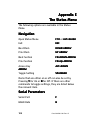
Press F10 to open the Status menu.
2.
Press SHIFT+1 to move to Distinguish Case
During Find.
3.
Press Y to set this option to On.
4.
Press ESC to exit the Status menu.
Note:
Note
While case sensitive searches are
sometimes very useful, they may seriously
reduce the number of matches when
performing a find operation.
Part # 440001-001 Rev. B
33