1
Chapter 2
Setting Up the Chassis
Installing Hard Drives
Note
Use only Cisco approved hard drives in the chassis.
Removing a Hard Drive Tray from the Chassis
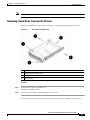
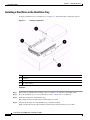
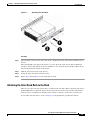
To remove a hard drive from the chassis, see Figure 2-2 and perform the procedure that follows.
Figure 2-2
Removing a Hard Drive Tray
1
Drive tray
2
Dummy drive retaining screws
3
Dummy drive
4
Release button
Procedure
Step 1
Press the release button on the drive tray.
The drive tray handle extends.
Step 2
Use the drive tray handle to pull the drive out of the chassis.
To replace the drive tray, push it into the chassis and press the drive tray handle to lock it in place.
Cisco Physical Security Multiservices Platform User Guide
OL-17301-02
2-3