1
Preface
Overview
This document describes how to install the Cisco Multi Services Platform devices and how to perform
the initial set up of these devices. It provides information for the following Multi Services Platform
models:
•
CIVS-MSP-1RU—1 rack unit (RU) chassis with motherboard, 300 W power supply, and CPU.
(Drives and option cards are available separately.)
•
CIVS-MSP-2RU—2 RU chassis with motherboard, RAID controller, 900 W power supply, and
CPU. (Drives and option cards are available separately.)
•
CIVS-MSP-4RU—4 RU chassis with motherboard, RAID controller, 900 W power supply, and
CPU. (Drives and option cards are available separately.)
This document it is intended for experienced system integrators and technicians.
Organization
This document is organized as follows:
Chapter 1, “Overview”
Provides information about the Multi Services
Platform features, chassis, and system interface
Chapter 2, “Setting Up the Chassis”
Describes how to perform a variety of set up and
hardware maintenance procedures for Multi Services
Platform
Chapter 3, “Mounting the Multi Services
Platform in a Rack”
Explains how to install the Multi Services Platform in
a rack
Appendix A, “System Specifications”
Provides general and power supply specifications for
the Multi Services Platform
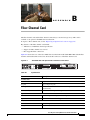
Appendix B, “Fiber Channel Card”
Provides information about the optional fiber channel
card, which enables fibre channel connectivity to
external storage arrays
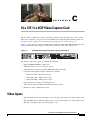
Appendix C, “16 x CIF / 4 x 4CIF Video
Capture Card”
Provides information about the optional 16 x CIF / 4
x 4CIF video capture card, which enables capturing
and compressing analog video streams
Cisco Physical Security Multiservices Platform User Guide
OL-17301-02
v