1
Mechanical adjustment
◆Tools:
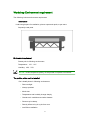
Dial indicator and Minpad (others needed)
◆ Operation:
Dial indicator: Fix dial indicator on slide. According to reads in
dial indicator, push or pull screws (under plate), until the reads on
the left, middle and right of work plate are all same.
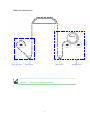
Minpad: Put two minpads between printhead plate and work
plate (two sides’ measure). To adjust the distances between
printhead plate and work plate are all just minpad’s thickness 3 MM
in every pieces of work plate, permit error 0.5 MM. That’s OK.
◆ Importance:
Levelness of work plate will influence directly the resolution of
images. Such as : The resolution in right and left sides will be
different in same print mode. The pleats in media caused by media
hold rings forcing unevenly, maybe scrape carriage.
NOTICE!Mechanical adjustment must be done after new installation
NOTICE!Mechanical adjustment must be done after media hold rings installation finished
☆Tips
Work plate is horizontal means printhead plate is perpendicular to
linear rail
41