1
User Manual
Rev E / Firmware V1.3
Document PN: 50378
ALEPH 2 ET
6 COLOUR LED LIGHT BAR FOR ENTERTAINMENT
300mm/600mm/900mm/1200mm
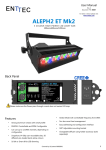
Back Panel
Please make sure the Power pass-through current does not exceed 10 Amps
Features
•
Strong aluminium chassis with small profile
•
DMX512 Controllable and RDM Configurable
•
Can use up to 12 DMX channels, depending on
configuration
•
7 different simple colour stand-alone modes
•
16-bit or Smart 8-bit LED dimming
•
Strobe Mode with controllable frequency from DMX
•
Advanced heat management
•
Easy addressing and configuration interface
•
180° Adjustable mounting bracket
1
User Manual
Rev E / Firmware V1.3
Document PN: 50378
Cleaning
Main Menu
It is important to clean the ALEPH2 ET to maintain a
long service life. Make sure the unit is unplugged before
you attempt any cleaning.
Press MENU key to enable the display
•
Surface dust should be removed with an air
compressor, please make sure you do not blow
compressed air directly onto the fan or inside
the unit.
•
Optics can be cleaned with a glass cleaner or
IPA with a soft cloth
•
Make sure the unit is dry and there is no
cleaning fluid residue before powering the unit
after cleaning.
Press UP or DOWN Key to scroll through the top menu
adr → tst → per → deg
|
-----------←-----------|
Safety
Display
Function
adr
tst
per
deg
DMX Address
Self Test
Personality
Temperature
•
Do not expose this the ALEPH2 ET to rain or
moisture, doing this will void your warranty.
Press the MENU key to get in the desired mode.
•
Do not spill water or other liquids into or onto
your unit.
The display will turn off when the buttons have not been
operated within a 15 seconds time-out whist in one of the
•
Do not look directly into the LEDs, doing so may
damage your eyes
top level menus: “
adr”, “tst”, “per” or “deg”.
Please pre ss the MENU key to turn the display on.
•
Check that the local power outlet matches that
of the required voltage (120 → 240V AC)
•
Make all the connections before you plug in the
main power.
To see the current DMX start address press the MENU key
•
Do not remove the cover under any condition.
There are no user serviceable parts inside.
“
•
Never operate this unit when it’s cover is
removed.
•
Never plug this unit in to a dimmer pack
•
Always be sure to mount this unit in an area
that will allow proper ventilation. Allow about 6”
(20 cm) between this device and a wall.
•
Make sure ventilation holes are clean and
unobstructed
•
Do not attempt to operate this unit, if it
becomes damaged.
•
This unit is intended for indoor use only, use of
this product outdoors voids all warranties.
•
Always mount this unit in safe and stable
matter.
•
•
Power-supply cords should be routed so that
they are not likely to be walked on or pinched
by items placed upon or against them, paying
particular attention to the point they exit from
the unit and the hanger.
The appliance should be situated away from
heat sources.
“adr” Menu
when displaying “
adr”,
by default the light will show
001”. To change the start address press MENU again; the
cursor indicated by the “.” (dot) will appear on the digit to
be changed using the UP or DOWN keys. To move the
cursor to the new position press MENU again. Once you
have selected the last digit the menu will prompt you to
YES” Press MENU again to save or
scroll “UP” or “DOWN” to display “NO” and press MENU to
save the new address “
cancel.
“tst” Self Testing Menu
ch1→ch2... ch6→all→fan
|
------------←----------|
Display
Function
Ch1 – ch6
all
fan
Test channels 1 to 6
Test all 6 Channels
Test Fan
To use the testing functions press the MENU key when
tst
displaying “
” and scroll through the test menu using
the UP or DOWN keys. The LEDs and fan will turn on as
you scroll. Press the MENU key to go back to the top menu
2
User Manual
Rev E / Firmware V1.3
Document PN: 50378
To use the 7 different colour stand-alone modes, simply
set the desired colour ether channels 1 to 6 or all the
channels, then press the MENU key to exit.
E.g.#1 to turn all the channels to full intensity, set all the
channels to 255 value:
“per” Personality Menu
To see the current personality press the MENU key when
per”, by default the light will show “001”.
displaying “
To change the personality press MENU again; the cursor
.
indicated by the “ ” (dot) will appear
where you can select out of the
personalities using the UP or DOWN
MENU key and the menu will prompt
on the last digit
three available
keys. Press the
you to save the
E.g.#2 to turn only the red group colour to full intensity,
set the first channel to 255 value:
YES” Press MENU again to save or scroll
“UP” or “DOWN” to display “NO” and press MENU to
new address “
cancel.
Display
Function
001
002
003
8bit 6Channel mode
The smart dimming in this personality follows an “s” curve
resulting in a smooth LED output all along the 8 bits range.
16bit 12channel mode
Extended 9channel mode
Please refer to Operation Modes section to see a
detailed description of each personality.
“deg” Temperature Menu
To show the current temperature press the MENU key
deg
when displaying “
” and the display will show the
current bar temperature in degrees Celsius. Press the
MENU key to go back to the top menu.
Operation Modes (Personalities)
The Aleph2 ET has 3 different personalities which can
ether be selected remotely from any standard RDM
controller tool or locally using in-built menu. The light
behaves
different on each mode, since the DMX
channel distribution changes according to the desired
working personality. These three modes are described
bellow.
8BIT 6CHANNEL PERSONALITY (FACTORY DEFAULT)
This basic mode will allow to drive each colour using 8
bits resolution setting the values from one of the 6 DMX
channels where 000->OFF, 255->Full intensity, as
described in the following chart.
1st Channel
2nd Channel
3rd Channel
RED GROUP
GREEN GROUP
BLUE GROUP
4th Channel
5th Channel
AMBER GROUP WHITE 1 GROUP
6th Channel
16BIT 12CHANNEL PERSONALITY
This mode will allow to drive each colour using 16 bits
resolution; setting the values from one of the 12 DMX
channels from 000 to 255 where the first channel of each
group will be the higher word and the following channel the
lower one, as described in the following chart.
1st Channel
RED GROUP
(HIGH)
7th Channel
AMBER
(HIGH)
2nd Channel
RED GROUP
(LOW)
8th Channel
AMBER
(LOW)
3rd Channel
GREEN GROUP
(HIGH)
9th Channel
WHITE1
(HIGH)
4th Channel
GREEN GROUP
(LOW)
10th Channel
WHITE1
(LOW)
5th Channel
BLUE GROUP
(HIGH)
11th Channel
WHITE 2
(HIGH)
6th Channel
BLUE GROUP
(LOW)
12th Channel
WHITE 2
(LOW)
This personality gives the user full control on the output
dimming, so any colour combination can be generated.
EXTENDED 9CHANNEL PERSONALITY
This extended mode offers a wide variety of output effects,
turning the Aleph2 ET into a very versatile unit, using 9
DMX channels, as described in the following chart.
1st Channel
2nd Channel
3rd Channel
4th Channel
5th Channel
6th Channel
RED GROUP
GREEN GROUP
BLUE GROUP
AMBER GROUP
WHITE1 GROUP
WHITE2 GROUP
7th Channel
STROBE
FREQUENCY
8th Channel
MASTER
DIMMER
9th Channel
TRUE CCT
MODE
COLOUR GRUP INTENSITY (CH1-CH6) operate as
described in the 6-Channel personality plus they can be
modified or affected by the “strobe frequency” or “Master
dimmer channel” as described further in this section.
Although this 6 channels have no effect when the “true
CCT mode” is activated (9th channel > 010)
STROBE FREQUENCY (CH7) will turn the Aleph2 ET bar
into a versatile multi-colour strober with user adjustable
frequency.
WHITE 2 GROUP
The strobe feature can be activated by setting the channel
to a value between 011 and 252. Between the same range,
3
User Manual
Rev E / Firmware V1.3
Document PN: 50378
the strobe frequency can be adjusted by varying the
channel value, being 011 the lowest frequency and 252
the highest one. Any other value between 000-010 or
253-255 will stop the strobe feature.
The strobe channel can be used in conjunction with all
the other channels, so you can change the current
output colour or the master intensity whilst strobing at
the selected frequency, all at the same time.
MASTER DIMMER (CH8) drives the general intensity,
merging with all other current output channels, being
000 the lowest intensity 0% (light will be OFF,
regardless other channel values) and 255 the highest,
allowing 100% whatever other channels are demanding.
TRUE CCT MODE (CH9) will turn the Aleph2 ET bar
into a true colour temperature adjustable fitting,
simulating a tungsten light behaviour.
The white colour feature can be activated by setting the
channel to a value between 011 and 255. In this range,
the colour temperature can be adjusted by varying the
channel value, being 011 the warmest white and 255
the coolest one. Values between 000-010 will stop the
true CCT feature.
The true CCT mode channel can be used in conjunction
with strobe frequency and master dimmer channels, so
you can strobe and/or dim the the current white output
set by this channel.
The Aleph2 ET has been laboratory calibrated to closely
follow the black body Locus curve along. With this 8 bits
resolution allows the light to travel from TRUE warm to
cool whites (12000K to 1500) keeping a high CRI for
natural colours.
RDM Capabilities
The Aleph2 ET has full RDM capabilities and you can
read/write them by using any standard RDM tool.
Alternatively the “ENTTEC RDM Controller” software can be
downloaded for free from ENTTEC website and be used in
combination with a USB PRO, RDM USB PRO or a PRO MK2
DMX widget.
The Aleph2 ET supported RDM parameters are:
Read only fields
• RDM Protocol Version
• Device Model ID
• Software Version ID
• Sensor Value
• DMX Footprint
• Sensor Count
• Manufacturer Label
• Supported Parameters Count
User configurable fields
• Lamp On Mode
◦ [OFF] Stays off until instructed
◦ [DMX] Strikes upon receiving DMX
◦ [ON] Strikes Auto at Power Up
• DMX Personality
◦ 8 Bit 6-Channel Mode
◦ 8 Bit 9-Channel Mode
◦ 16 Bit 12-Channel Mode
• DMX Start Address
• Identify Device
• Factory Defaults
Firmware Update
Updating the firmware to the Aleph2 ET requires an
ENTTEC USB Pro or a Pro Mk2 widget plugged in to a PC
USB port and to the Aleph2 ET through a standard 5 pin
DMX cable.
Please download and install the ET_Update_Firmware
application from www.alephlighting.com website, connect
the widget to the unit, power it up and run the application.
Whilst performing the updating process the display will be
turned OFF and fan will be fully ON for about 35 seconds.
ADR
Then the display should show “
” and the light goes to
its original state once the process has finalised.
To make sure the process has been successful and check
the firmware version, please look at the “Software Version
ID” field using an RDM tool such us “ENTTEC RDM
4
User Manual
Rev E / Firmware V1.3
Document PN: 50378
Controller” software which can be downloaded for free
from the ENTTEC website.
Colour Gamut
Specifications
Due to continuous improvements and innovations of all
ENTTEC products, specifications and features are subject
to change without notice.
Item
300mm
600mm
Input Voltage
900mm
1200mm
110 – 240V AC
Input Frequency
50/60Hz
Maximum Input Power
90 Watts
180 Watts
270 Watts
360 Watts
Light Output (all leds)
3100 lumens
6200 lumens
9300 lumens
12400 lumens
Lumens/Watt
34.44
CRI
90
CREE XP-E Leds Quantity 30
60
Colours
90
120
Red, Green, Blue, Amber, Cool White, Cool White
Lens
Clear Acrylic
Beam Angle
25°
Control Input
DMX512 & RDM E1.20
Personalities
3 different DMX distributions: 6, 9 and 12 channels
Smart Dimming
14 bit internal dimming mapped to 8 bit S curve
Weight (Kg)
3.7
4.9
8.5
11
Weight (Pounds)
8.2
10.8
18.7
24
Cooling Method
Forced air (temperature-regulated for low noise)
Ambient Temperature
5° to 40° C
Surface Temperature
Maximum Surface
Temperature
Steady state (full intensity output), Ta=45° C: 69° C
70°C. Dimmed down (error mode) enables when T>70°C
and disables after a 5°C drop
Protection Rating
Connectors
IP20
1x 5-Pin Male XLR for DMX input
1x 5-Pin Female XLR for DMX output
1x IEC C13/C14 IN/OUT Socket 10Amps for mains
Dimensions
Ordering Information
Item
A
B
C
300mm
341mm
406mm
100mm 3
D
600mm
641mm
706mm
200mm 3
900mm
941mm
1006mm 200mm 5
Item
Part Number
Aleph2 ET 300mm
73500
Aleph2 ET 600mm
73501
Aleph2 ET 900mm
73502
Aleph2 ET 1200mm
73503
ENTTEC PTY LTD
ENTTEC AMERICAS
Head office: 17/5 Samantha Court
604A Cornerstone Ct.
Knoxfield VIC 3180 Australia
Hillsborough NC 27278 USA
Tel: +61 3 9763 5755
Tel & Fax: (888) 454-5922
Fax: +61 3 9763 5688
email: [email protected]
www.enttec.com
www.alephlighting.com
1200mm 1241mm 1306mm 250mm 5
5