1
Troubleshooting
Symptom Charts/Keyboard and Trackpad - 31
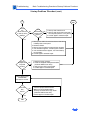
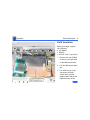
Cursor moves on screen with external mouse
connected, but clicking or double-clicking the mouse
has no effect
1.
2.
3.
If the mouse is connected to an external USB keyboard,
connect the mouse to the USB port on the computer.
Try an Apple mouse with no other USB devices connected.
Boot off the CD that came with the computer. If the mouse
works, perform a clean installation of the system software.