1
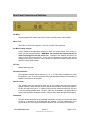
Front Panel Controls and Switches
Input jack:
Plug your guitar in here and you are ready to rock!
Bright switch:
This switch, when enabled in the “up” position, make the amp brighter for a more
“shimmery” treble response.
Gain switch:
This switch, when enabled in the “up” position, gives the amp approximately a 10dB gain
boost, which drives it into the smooth, singing distortion range. This switch can also be
remotely activated using the rear panel footswitch jack, so it can be used as a boost for
solos. Note that the front panel switch will override the footswitch, so if the footswitch is
to be used, the front panel switch should be left in the “up” position.
Volume:
The volume control adjusts the overall level and amount of gain the amplifier has. For
cleaner tones, set the volume lower, for more drive and distortion, set the volume higher.
When used in conjunction with the attenuator, the amplifier can be set for any desired
amount of clean or distortion tone.
Tone:
The tone control adjusts the ratio of high frequency to low frequency equalization.
the clockwise end of rotation, the tone is bright and at the other end the tone is dark.
At
Cut:
The cut control rolls of the highs after the phase inverter, giving a darker, smoother tone.
TomcatMKIIManual.doc
12/08/11
Copyright 2003-2011, Aiken Amplification, Inc.
Page 5 of 14