1
English
3. THE MENU OSD INSTRUCTION
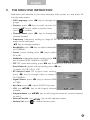
Modulator will initialize to the main interface after power on, and press OK
into the main menu.
• OSD Language: press AB key to change language.
• Country: press AB key to enter country list,
and use YZ key to select a country, then
press OK to confirm.
• Channel Name: press AB key to change the
channel number.
• Frequency: frequency setting in range of 50~860MHz, press AB key to
move cursor and press
YZ key to change numbers.
• BandWidth: press AB key to select bandwidth
of 6/7/8MHz.
• Carrier: carrier setting, press AB key to select
2K or 8K.
• Modulate: modulation mode setting, press AB
key to select QPSK, 16QAM or 64QAM.
• FEC: FEC code rate setting, press A B key to select 1/2, 2/3, 3/4, 5/6 or 7/8.
• Guard Interval: guard interval setting, press AB key
to select 1/4, 1/8, 1/16 or 1/32.
• RF Output Level: RF output level setting,
press AB key to change value in range of
70~100dBuV.
• Signal Source: press AB key to choose HDMI
or CVBS.
• Key Tone: press AB key to ON/OFF key tone.
• LCN: use YZAB key to edit logical channel
number.
• Program Name: use YZAB key to edit program name of current frequency point.
• Service Provider: use YZAB key to edit operator name.
• Factory Set: press OK to confirm factory reset.
5