1
MedBASE Lite User’s Manual - Page 1
Introduction:
MedBASE Lite is a simple yet versatile billing system designed for the Apple Macintosh
and IBM-compatible PC's. The MedBASE Lite program is designed for the physician who is
accustomed to billing via OHIP card and through a simple and intuitive OHIP-card-like interface,
the user is able to take full advantage of the attributes of computerized billing. MedBASE Lite is
similar to the full-featured MedBASE program with respect to claim entry, error-checking,
computerized billing and reconciliation. The "Lite" version does not offer certain advanced
features such as multiple provider capabilities, magnetic card reader data entry, sophisticated
database functions, appointment scheduling or accounting functions but should these features
prove desirable to the user, then an upgrade path to the full-featured MedBASE program is
available. MedBASE Lite makes full use of many of the intuitive tools characteristic of mousebased systems with the aim of providing a user-friendly environment for the operator. A
minimum of operator training is necessary for using the program, and the layout is designed to
maximize efficiency and minimize operator error.
This manual is intended for those using the Macintosh MedBASE Lite application. The
manual assumes that you are familiar with basic Macintosh operation and are acquainted with the
use of the mouse and menu-driven commands. For new users unfamiliar with this environment,
we recommend reviewing the Macintosh User's Manual. Proper operation of the program
requires that MedBASE Lite be properly installed as described below. The application is
compatible with Systems 6.0 or 7.0.
Because of the potential memory demands of a large database system, we recommend at
least 2 MBytes of RAM with System 6.0 and preferably 4 MBytes of RAM with System 7.0. A
hard disk with a capacity of at least 20 MBytes is recommended. MedBASE is compatible with
all Macintosh computers from the older Mac Plus and SE to the newer PowerBook and Mac
Quadra systems.
Getting Started:
Installing the Program:
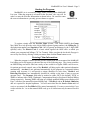
To install MedBASE Lite, insert the diskette entitled "MedBASE Lite
Program" into the floppy disk drive. This disk contains a file of the
compressed code of the MedBASE Lite application and related files. When
the MedBASE Lite.comp icon is double clicked, a dialogue box appears as shown below,
prompting you to select a destination for the decompressed files. Click on the Drive button (in
System 7.0, click the Desktop button and select the Hard Disk) to save the decompressed files
to the hard disk.
Click Extract
to
decompress the MedBASE files.
When
decompression is complete a new folder
entitled "MedBASE Lite Billing Folder" will
be present on the hard disk and will contain
the MedBASE Lite application as well as the
MedBASE Databases and Submissions
folders. Your MedBASE Lite program is
now installed.
MedBASE Lite User’s Manual - Page 2
Starting the Program:
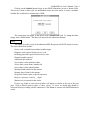
MedBASE Lite is accessed by simply double clicking on the MedBASE
Lite icon. When the program is accessed for the first time, the user will be
asked to enter the Provider Information as shown below. Be careful to enter
the correct information as you only get one chance to register.
To register, simply enter the Provider Name (format - 'DR. JOHN SMITH, the Group
No. ('0000' for a solo provider or the 4 digit OHIP registered group number), the Billing No. (6
digit physician number) and Specialty Code ('00' for general practitioners or the 2 digit OHIP
specialty code). The District Code is a letter which signifies the OHIP office to which you
submit your computerized billings ("N" for Toronto). Make sure that the dot beside Paytype is
next to Pay Provider by clicking it with your mouse then click the Done button to exit.
Entering Claim Information:
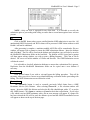
When the program is started and the provider information has been entered, the MedBASE
Lite billing screen will appear as shown at the top of the following page. The screen resembles
an OHIP billing card and is filled out exactly as one would for a regular OHIP card. However,
for patients previously entered, entry of the Health # will bring up the other patient information
automatically. Account #'s are generated automatically by the program in a sequential fashion
(starting with Account # 1) and provide a unique identifier for each claim. Health # and
Referring Physician # are automatically checked for validity at the time of entry to prevent
operator error. The Payment field must be marked as either 'HCP' (the default), 'WCB' or
'RMB' to indicate either OHIP, Workmens' Compensation Board or Reciprocal Medical Billing
claims respectively. Entering 'RMB' will bring up a slightly modified billing screen (displayed on
Page 7) similar to the manual Reciprocal billing card. A Facility # and an In Patient Admission
date are required for hospital inpatients. You will notice that after the Service Code and # of
services are entered, the Fee Billed will be entered automatically. You may overwrite this if you
wish to edit the fee. As on the manual OHIP card, up to 10 claim items may be entered for each
card.
MedBASE Lite User’s Manual - Page 3
Several buttons are present at the bottom of the screen and are accessed by clicking on
them with the mouse, Their functions are briefly described below:
New
This allows you to save the current card and bring up a new blank card. If there are no
service codes entered on the card, the account will be deleted.
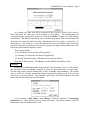
Select
This brings up the Claim Select… screen as shown below allowing you to select a
previously saved but unsubmitted claim for editing.
Type in the Account #, the 10 Digit Health #, or all or part of the Surname, First Name
to select a patient. If Return is hit without entering any search criteria, then the full list of
unsubmitted claims will be displayed in a browse window (see below). If more than one claim
matches the search criteria, then a partial list of claims will appear in the browse window. Select
the claim you wish to edit and close the window by clicking the mouse in the top left corner of
the Claim Select… or press Escape to exit.
Submit
MedBASE Lite User’s Manual - Page 4
Clicking on the Submit button brings up the OHIP Submission screen as shown below.
This screen is used to both verify all unsubmitted claims for errors and/or to create a machinereadable file on diskette for submission to OHIP.
The current date will appear as the default in the Submit Date field. To change this date,
simply enter a different date. This date will entered on the submission diskette.
Verify
This button is used to verify all unsubmitted OHIP, Reciprocal and WCB claims for errors.
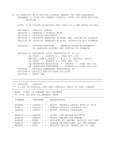
The errors checked for include:
Service code excluded from machine-readable input;.
Diagnosis code required for this service code.
Referring physician required for this service code.
Hospital number required.
Admission date required.
Service date is after submission date.
Service date is more than 6 months old.
Service date is after admission date.
Missing Health number for this patient.
Missing date of birth for this patient.
Reciprocal Claims require a specified province.
Reg# for <province> must be __ digits
Manual review required for this claim.
If errors are found an error report window will appear as shown at the top of the next
page. Click on Print to print a report of these errors. If errors are found, they should be
corrected before proceeding with the submission. Click Done to return to the OHIP Submission
screen.
MedBASE Lite User’s Manual - Page 5
NOTE - Only one error is reported for any claim item. It is advisable to reverify the
submission prior to proceeding with billing to ensure that a second unrecognized error was not
present.
Bill
Click on the Bill button when you are satisfied that the OHIP submission is error-free. All
unsubmitted OHIP, Reciprocal and WCB claims will be processed. OHIP claims without a valid
Health # will not be submitted.
After processing is complete, a machine-readable ASCII file will be created and a file save
window will appear with a prompt to insert the OHIP submission diskette. Insert the diskette
and click Save. The file will be saved on the diskette and a duplicate copy will also be saved in
the MedBASE Submissions folder on the hard disk. The diskette will be ejected and a prompt
will then appear asking whether you wish to print a Billing Summary. Click Yes or No as
desired. Be sure to record the number of Claims and Records. The OHIP Submission screen
will then be exited.
It is advisable to check all submission diskettes to ensure that a submission file is present.
Duplicates from the MedBASE Submissions folder can be copied onto a new diskette if
necessary.
Cancel
Click on this button if you wish to exit and bypass the billing procedure. This will be
necessary when you wish to correct errors identified during verification before proceeding with
billing. The OHIP Submission screen will then be exited.
Reconcile
The Reconcile button is used to reconcile previously billed claims from a OHIP
Remittance Advice (RA) Diskette. After selecting Reconcile , a file selection window will
appear. Insert the OHIP RA diskette and select the RA file (should begin with a “P” as per the
new OHIP format). Click Open to continue or Cancel to abort the reconciliation. If you select
a file which is not an OHIP remittance advice file an error message will appear. If a proper file
has been selected the file will be read, the diskette ejected and the OHIP Reconciliation screen
will appear as shown at the top of the next page.
MedBASE Lite User’s Manual - Page 6
As a default, the claim item will be reconciled if the fee paid is within $1.00 of the fee
billed. Otherwise, the claim item will be marked as a discrepancy. The underpayment and
overpayment limits may be edited as desired. Click the Continue… button to proceed with the
reconciliation. The OHIP Reconciliation screen will show the progress of the reconciliation both
in the form of a status bar and in the table, indicating the total # of records, # reconciled, # of
discrepancies, # not found (ie - on the RA diskette but not in the database) and # previously
processed. When the reconciliation is completed a prompt will appear asking whether you wish
to print the Reconciliation Summary reports.
These reports include:
(1) Reconciliation Totals and List of Discrepancies.
(2) Summary of Claim Items 'Not Found' (if applicable).
(3) Message from the Ministry of Health (if present on RA diskette).
Click Yes or No as desired. Click Done to exit the OHIP Reconciliation screen.
Summary
Clicking on the Summary button brings up the Claim Summary screen as shown below.
This function is useful for printing a summary of claims in a given date range or account range.
The date range can be used for detailed daily, weekly or monthly claim summaries. The account
range is useful for verifying entered data against original data (keeping track of the accounts
entered in a given time period). The generated report details all of the mandatory claim and
patient data for each claim item as well as totals.
You can specify a Date Range, Acct # Range or limit the summary to Outstanding
Claims only (ie - claims which have not yet been reconciled). To print the summary, click the
Print button. Click the Done button to exit.
MedBASE Lite User’s Manual - Page 7
Reciprocal Medical Billing:
If 'RMB' is entered under the Payment field on the MedBASE Lite billing screen, then a
slightly altered Reciprocal Medical Billing screen will appear as shown below. This screen is
identical to the usual billing with the exception of 6 fields. These are listed below:
Prov: Enter the 2 letter abbreviation for the province to be billed as done with manual
Reciprocal Medical billing.
Registration #: Enter up to 12 alpha-numeric characters as required for the specific
province (will be verified prior to billing).
Patient Address: Enter the street address, city and province in the 3 field at the bottom of
the screen.
Postal Code: Enter the postal code (format - A9A 9A9).
Reciprocal claims will be submitted and reconciled in an automated machine-readable
manner as with other OHIP claims.
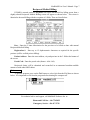
Quit
To quit the program, press on the Quit button or select Quit from the File Menu as shown
below. It is important to exit from the program before shutting the computer off.
For technical advice and support, call MedBASE Software Inc. at:
Phone and FAX line - 416-778-5852
Emergency Service - 416-417-2743
MedBASE Lite User’s Manual - Page 8
MedBASE LICENSE AGREEMENT
MedBASE Software Inc. will assume that in purchasing this software package, you have agreed to be bound by
the terms of this license agreement. If you do not accept the terms of this license agreement, you may return the
package to MedBASE Software Inc. within 30 days of purchase for a full refund.
MedBASE Software Inc. grants to you and you accept a Software License to use the program and documentation
delivered with this Software License Agreement.
MedBASE Software, Inc. retains the copyright protection of the program and documentation. Under copyright
laws, you agree not to transfer the program and documentation in any form to any party without prior written consent
of MedBASE Software, Inc. Further, you agree that copies of the program shall be made only for backup and archival
purposes. These archival copies must be retained in your possession.
Except, as provided in this Agreement, you may not transfer, sub-license, lease or rent, time-share or lend the
program and documentation, your copies of such ot any of your rights under this License Agreement except by prior
written consent from MedBASE Software, Inc.
You may not alter, decompile, reverse engineer, disassemble, reverse translate, or in any other way derive any
source code from this program. You may not remove or obscure MedBASE Software, Inc.’s copyright notices in either
hardcopy or machine-readable portions of the program and documentation.
MedBASE Software Inc. shall not be liable for any tort, indirect, special or consequential damages such as loss
of profits or loss of goodwill that may result from improper use of this software. The liabilities of MedBASE Software
Inc. shall be limited to a refund of the product’s price.
The program supplied by MedBASE Software Inc. may be installed and used on only one computer terminal.
MedBASE Software Inc. agrees to provide “Ongoing Support” in the form of telephone assistance, on-site
technical maintenance as required, as well as updates to the program and documentation. An annual fee will be
charged for this Ongoing Support, as agreed upon at purchase. Default of payment of annual support fee will result in
suspension of all Ongoing Support.
This is the only agreement between you and MedBASE Software, Inc. It cannot and shall not be modified
unless in writing and signed both by you and an authorized officer of MedBASE Software, Inc. You agree to be bound
by this mutual agreement between you and MedBASE Software, Inc.