1
INTRODUCTION
DATECS FP-550F is a compact thermal printer with fiscal memory, which prints cash
receipts and daily reports on two separate paper rolls 58 mm wide. It is compatible to
most European and World fiscal legislation systems.
The functions of the device are controlled with the help of buttons, located on its frontal
part as well as commands, sent via the serial interface. The couplings for the cable
connections are conveniently located for fast access and easy manipulations. The printing
devices have low noise emission levels and high printing speeds - 50 mm/sec.
The printer has an automatic paper cutter. Optionally, it can support a display and a
cash drawer.
Contemporary commercial activities and the demands of acting fiscal legislation systems
demand a comparatively good knowledge on the ways to operate fiscal devices of
different kinds - cash registers, electronic scales, different types of printing devices. It
is for this reason, that the careful reading of this manual before starting work with the
printer may save you lots of time and trouble later on.
Working with the FP-550F fiscal printer
The over 40 different commands which the printer can execute may initially create the
impression that learning to work with it is a difficult job. Most of these commands,
however, are related to the starting initialization, diagnostics and the generating of
reports thus decreasing greatly the number of commands directly engaged with the
issuing of receipts and other user’s operations.
As an example may serve the commands which must be sent to the printer to make it
generate a fiscal and a non-fiscal receipt. Only the order numbers of the commands will
be presented and the data there related without getting into the details of the contents of
the special symbols which guarantee the viability of the data and ensure the correct
communication between the printer and the personal computer.
Opening a fiscal receipt
Command:-48 (30h)
Data: “1,000000,12”
The first digit is the operator’s number (maximum nine), the second is the operator’s
password while the third is the order number of the point of sale (department or location).
In a newly purchased printer the six zeros are the operator’s default password - you
may, naturally, enter your own. The third digit is suitable only in commercial centers
FP-550F
1
with many points of sale (departments). After entering this command the printer will print
out several “header” lines which will contain the text registration number and the name and
individual number of the operator.
Free fiscal text
Command 49 (37h)
Data: Chocolate bar “Milka”
The text, sent for printing, comes out directly. Within the receipt, the command may be used
an indefinite number of times - for a clearer description of the sold item or for other reasons.
Registering a sale
Command: 49 (37h)
Data: 2 x 120 <TAB>B2.40”
A text of 25 symbols is printed /prior to the symbol there is a space - 09h/, the price of the
item and its relevant tax group, which is in the 40th position on the line. The commentary
may be of only two lines, in which case the lines will be divided with an <LF>(10h).
Payment
Command: 53(35h)
Data:”<TAB>P2.50”
The command is used for receiving the payment on the registered sales , after which they are
forbidden. Before the symbol the s[pacing might also have a descriptive text of two lines,
which have not been presented in the example. Symbol “P” shows the type of payment
employed - in this particular case “ in cash” - after which the sum due is printed out. The
payment can be performed several times but the closing of the receipt is possible only if the
overall, paid sum is equal or greater than the sum of the sales.
Closing a fiscal receipt
Command:56(38h)
Data: “empty string”
The command print a maximum of two lines of text - usually an advertisement “footer”- the
reg.number of the document. the quantity of the sales registered and the compulsory elements
of any fiscal receipt: fiscal logo, date and hour, serial No. of the printer
and the reg. number of the fiscal memory. After sending the command the paper is unrolled
to the extent to make it easier the cutting off of the receipt and the printing of a new document.
A detailed client’s receipt can also be printed - it has the validity of an official tax receipt
which contains a print out of the sums registered within each tax group as well as the
personal data of the buyer. As a difference from usual fiscal receipt the detailed
client’s receipt:
-Sends an additional parameter indicating that a tax receipt is being printed. An
example of such a string is “1,000000,12,I” - the printer automatically prints a ten digit
number on the receipt.
2
FP-550F
-When entering the “pay” command for the first time the accumulated sum
(arranged according to the tax groups) is also printed. With the entering of a free text
the receipt continues with the name, the address and other data on the buyer (a space
for placing the client’s signature must also be foreseen). The document is closed with
the command 56 - the result is a fully valid tax receipt.
Non-fiscal receipt
Non-fiscal receipts print information, which does not illustrate the registering of sales.
For example, they may offer information on the orders made in a restaurant before the
payment of the final bill - this final bill must be a fiscal receipt.
Opening a non-fiscal receipt
Command: 38 (26h)
Data: “ “ empty string
The command initiates the printing of a header - after which a new command is
anticipated.
Free, non-fiscal text
Command - 42(2Ah)
Data: Free text
A freely entered text is entered within a framework of 30 symbols per line. The command
can be executed an indefinite number of times.
Closing a non-fiscal receipt
Command - 39 (27h)
Data - ” ” empty string
The date and hour are printed as well as the non-fiscal logo and the order number of the
printer. The printer is then ready for accepting new commands.
PROGRAM SUPPORT
To function normally the program for operating the fiscal printer must be able to control
the execution of the commands, which often fail mainly due to the lack of paper, the
sending of invalid commands or simply because of some minor cable problem. The
current status of the printer is monitored by 5 bytes, returned by the command. Part of
the bits are informative /opened non-fiscal receipt for instance/, others indicate error
/no paper, invalid command, etc./. The program must inform of existing errors or - if
possible - react to these errors.
FP-550F
3
There are commands with the help of which the control program can acquire the whole
needed information on the current status of the printer. The printer saves this info in the
memory as well as the accumulated sums (during the day or only within the current
receipt) even after it has been switched of from the power feed. If the device is in the
“document opened” mode it cannot close down automatically but only from the control
program.
In support of the lower level of the protocol there is a DOS driver for installing in
CONFIG.SYS. This driver is “responsible “ for the correct transfer of the commands
and the receiving of the results from their execution. Using this driver restricts the
process of operating the printer down to the saving and the simple reading of a file also possible under Windows.
Another possible shortening of the control operations of the FP- 550F is the 16-bit
library-type file FPLIB.DLL, which contains all existing commands for the printer and
where the initial processing of the data, returned by the printer.
Together with the printer DATECS offers a Windows-based program called
FPSERV.EXE, which generates all fiscal reports demanded by the local fiscal legislation.
Some basic adjustments and settings to the printer can be performed under this program
too, like: setting the clock, entering new “headers and footers”, editing the number and
size of the tax rates when legislative changes appear.
4
FP-550F
GENERAL DESCRIPTION OF THE FP-550F
Control panel
The functional control of the printer is performed with the help of buttons, located on
its frontal part and commands, sent via the serial interface. The coupling of the cable
connections are located in such a way as to make them easily connectable and the
whole device fast to set up for normal operation. The pruinting devices are of the low
sopund emission, fast operating type - 50 mm/sec.
The printer has an automatic paper cutter. It can support a display and a cash drawer.
Prior to using this device please read these instructions and the descriptions of the
application programs carefully and make sure that you have really learned how to operate the FP-550F.
Upon delivery, the DATECS package will contain:
-Paper rolls - 2 pieces;
-AC-DC adapter;
- Serial cable for connecting to a PC;
- User’s Manual;
- Instructions for the taxation authorities;
- Passport of the device.
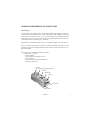
Rear cover
Window for journal report paper strip
Front cover
Magnetic tray
Coin tray
Control panel
ON/OFF switch
FP-550F
5
Control panel indicators
- “Power” indicator
Lights in green when the printer is on and does not execute commands. When the light
is out this is an indication that the printer is “engaged” with a job.
- “Cash recepits” button
Moves the cash receipts papre roll foreward. When the button is kept pressed down,
the printer generates and prints out diagnostic information on both paper rolls.
- “Journal paper roll” button
Moves foreward the electronic journal paper roll. When pressed down continuously
prints out the dailuy report without clear. This can be also generated through a separate
command.
When both buttonÿ are pressed down continuously The printer generates a short periodic report for the whole period of exploitation if (and when) the printer is a non-fiscal
device. The job will also be done throughn a special command.
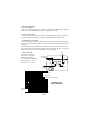
- “Error” indicator
Activated continuously
when there is no paper in
the device and blinks at
the overheating of one\both
printing devices. Goes out
when the error is cleared.
Error
(orange)
Power feed
(green light)
Cash
receipts
El. Journal
Configuration keys
RS 232 interface
Cash drawer cable coupling
Couplings and
cable connections
Power feed
cable
Grounding
cable
6
FP-550F
Configuration keys
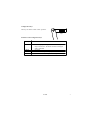
The keys are shown in their “OFF” positions.
+
Key 1
Functions of the configuration keys
Key
SW 1
SW 2
SW 3
SW 4
Function
Automatic paper cutting. The status of the key is read
only at switch ON - the mode can later be changed
with a command.
Not used
Sets to the “Transparent display” mode.
Baud rate: OFF=19200 bps; ON=9600 ps.
FP-550F
7
4
8
FP-550F
CHAPTER 1
STARTING WORK
• Cables and connections
• Consumables; changing the
paper rolls
FP-550F
9
Cables and connections
Connecting the serial interface cable
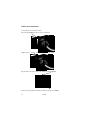
Plug into the coupling as shown on the illustration
Tighten the two screws of the socket firmly to the device:
Plug the other end of the cable to the RS port of the computer:
Lock the socket against accidental decoupling with the two clamps.
10
FP-550F
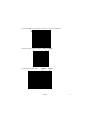
Connect the cable for opening the cash drawer as shown on illustration:
Connect the cable of the AC adapter - printer coupling:
Connect the AC adapter cable -
coupling - adapter:
FP-550F
11
Changing the paper rolls
An active “Error” indicator during a printing session indicates that the paper roll has
finished.
Replacing the cash receipts paper roll:
ATTENTION! Immediately after print the headsof the thermal nechanisms as well as the automatic paper-cutter are hot.
Let them cool of several minutes before replacing the paper
rolls.
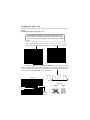
1. Swich the printer ON - both the “Power” and “Error” indicators are active.
2. Take off the front cover and place the paper roll as shown on the illustration:
3. Raise the little lever of the printing mechanism to position the printing head
down. Place paper roll as shown in the illustration; be sure that the direction of the
unrolling of the paper is right /the end of the paper must be evenly cut/ as well as the
correct direction of the movement of the mechanism:
paper roll
yes
no
Direction
Wrong
lever
printing
mechanism
12
FP-550F
Right
Electronic journal paper roll
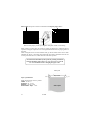
Open the front cover. The opening of this cover is impossible if the front cover isn’t
opened too /illustration/. Take the spool out and place the plastic paper plate backward /illustration/
front cover
spool
plate
Place the paper roll in and raise the lever as shown in the illustration and place the
end of the paper in the mechanism:
Move about 30 cm of paper through the printing mechanism and push the plate back
in place.
FP-550F
13
Disassemble the spool as shown in illustration and clip the paper end on.
Roll on some paper, put the spool together and place it back in its housing.
When rolling on some paper be careful to follow the direction in which the device
operates. The paper strip must be we well tightened between the two paper-guides on
the plate.
After closing the front cover the indicator must go out and if this doesn’t occur check
wheather the paper is accurately placed through the printer mechanism and for the
correct position of the lever, which must be in its intial position.
ATTENTION! Immediately after print the printing mechanism
and the automatic paper-cutter are very hot. Leave to cool off
for several minutes before changing the paper rolls.
Printing area
Paper width
Paper specification:
Type: Termal paper rolls for printers
Width: 58 +0/-, ìì
Thickness: 60 - 75 mm
Diameter: 83 mm or less
Heat-sensitive layer: outer
14
Area of print
FP-550F
CHAPTER 2
THE PROGRAM
INTERFACE
A detailed description
FP-550F
15
Description of the FP-550F program interface
Version 3.00 xx, where xx is the code of the country, where the device will operate:
EN - England
BG - Bulgaria
UA - The Ukraine
RU - Russia
LT - Lithuania
RO - Rumania
INTRODUCTION
The fiscal device operates under the control of an application program, with which it
communicates via the RS232 serial connection. The device executes a previously set
of wrapped commands, arranged according to the type of the operations which have to
be executed. The application program does not have a direct access to the resources of
the fiscal device although it can detect data connected with the status of the fiscal
device and the fiscal memory.
The fiscal device performes the following types of operations:
-Saves the serial number of the fiscal device and the number of the fiscal memory;
-Saves fiscal parameters, like the tax registration number, the date of entering into
exploitation, etc.;
-Saves information on the owner - name and address, etc.;
-Saves the daily turnover in the fiscal memory and generates a daily report;
-Generating reports on concluded sales and the content of the fiscal memory;
-Dispatching data to the application program.
TAXATION CATEGORIES AND CALCULATION OF VAT
Each concluded sale can be related to a certain taxation category (VAT) defining a tax
rate, applicable to the base price used for the formation of the sale price. The fiscal
printer can operate with a maximum of 4 taxation categories, which are most often
indicated with the first letters of the language of the country, where the fiscal printer is
used-in the case of Bulgaria these letters are À,Á,Â,Ã.
Each of the taxation groups has a set tax rate (in percent) which is expressed by a digit
not greater than 99.00 and by no more than two digits after the decimal point.
Part of the four standard categories may be forbidden by using Rates fewer in the
83(53H) command. The commands for registering sales read the said four letters as a
parameter.
16
FP-550F
FUNCTION MODES OF THE FISCAL DEVICE
The fiscal device has two functional modes:
1. The tutorial mode. The device is not fiscalized and all data needed for its
normal functioning are entered and saved in the fiscal memory with the exception of
the tax registration number of the owner. Clients receipts and be opened and closed but
they always bear the inscription that they are not fiscal. Daily financial reports with
clearing can be generated but they are not saved in the fiscal memory.
2. Normal mode. The device has been fiscalized and the tax registration number
of the owner is saved in the fiscal memory. Al fiscal rules apply.
STATUS OF THE FISCAL DEVICE
The status of the fiscal device can differ. Shifting from one to another condition is not
always possible. The control of the printer and the shifting between the different
functions - when this is possible - is executed by the application program Host (PC),
which must relate to the included protocol. If this protocol is not applied correctly the
printer might enter into an undesirable status or to skip a given functional status, leading
to an ERROR.
A) Initial status
This is the functional status in which the date and the hour are set, the number of the
fiscal memory is entered as well as the serial number and the code of the country where
the device will be operated.
THE ABOVE-DESCRIBED OPERATIONS ARE PERFORMED
PRIOR TO SELLING THE DEVICE TO THE CLIENT ONLY
BY AN AUTHORISED SERVICE SPECIALIST!
The following commands must be performed in the order in which they are presented:
61(3DH) and 91(5BH).
B) Status after the formatting of the fiscal memory.
This is the state in which the name of the currency is entered, the number of the digits
after the decimal point and the tax rates.
After performing these operations the fiscal printer is ready for delivery to the future
FP-550F
17
operator (owner). This is also the status in which the device is kept in the warehouse of
the manufacturer.
The following commands are performed in the order in which they are presented:
83 (53H) and 96(60).
C) Status when presenting the device to the client
In this functional status the header and the footer are set - the beginning and the end of
each receipt. The header contains information on the owner (name of the company,
address, BULSTAT etc.) while the footer is usually a short advertisement text.The command 43 (2BH) is performed as many times as is the number of printed lines.
D) Tutorial mode
The fiscal printer is in this status prior to fiscalization. Receipts can be issued but it
must be born in mind that they will bear the mark “non-fiscal”. The generation of a
daily turnover report with clear but it will not be saved into the fiscal memory. A tax
registration number is also entered but not into the fiscal memory and is subject to
change. The clearing of the memory does not cause an entry in the fiscal memory. The
clock may be set arbitrarily.
R) A fiscalized printer
In this functional status clients receipts may be issued and they will be marked “fiscal”.
The daily report and clear is registered in the fiscal memory and the setting of the date
is possible only ahead in relation to the last entry in the fiscal memory. The tax registration
number is registered in the FM and cannot be changed from this point on. It is
IMPOSSIBLE for the printer to exit the fiscal mode without changing the fiscal memory.
The tax registration number of the owner of the device must be know prior to fiscalization
(command 98(62H) after which the command 72(48H) must be executed.
R) Irrecoverable error in the fiscal printer
This is the status of the printer when a serious technical or logical mistake has occurred
as well as in case of fiscal memory failure. After switching ON the device in this mode
a bold sign “FATAL ERROR:4” appears. The printer does not perform commands for
opening fiscal receipts as well as documents, which save data entries into the fiscal
memory. Only diagnostic commands and periodic reports can be executed. Clearing
the RAM and placing a new fiscal memory module must be performed because the
module used before the error is now switched to the READ ONLY mode. ALL THESE
OPERATIONS MUST BE PERFORMED BY AN AUTHORIZED SERVICE
SPECIALIST.
The events, which can bring the printer to this state, are:
- Impossibility to make a correct entry in the fiscal memory;
- Invalid control sum, tax number, serial number, reg. No. of the fiscal memory or
18
FP-550F
some of the entries which have tax rates.
- Unidentified form of the fiscal memory module;
- If during the fiscal memory check up (immediately after switch ON) more than three
invalid control sums from a daily report fiscal entry are found.
The current status of the device is coded in a field 6 bytes long which is sent within
each message of the fiscal printer.
Description of each byte in this field:
Byte 0:
0.7 = 1
0.6 = 1
0.5 = 1
0.4 = 1 #
0.3 = 1
0.2 = 1
0.1 = 1#
0.0 = 1#
General purpose
Reserved
Reserved
General error - OR of all errors marked with #
Failure in printing mechanism
Not used
The clock needs setting
Code of incoming command is invalid
Incoming data has syntax error
Byte 1:
1.7 = 1
1.6 = 1
1.5 = 1
1.4 = 1#
1.3 = 1 #
1.2 = 1#
1.1 = 1#
1.0 = 1
General purpose
Reserved
Reserved
Printer cover is opened
RAM failure after switch ON
Not used
Operational memory closure has been performed
If command cannot be performed in the current fiscal mode
If during command some of the fields for the sums overflow.
Status 1.1 will also be set and the command will not cause
changes to the data in the printer.
Byte 2:
2.7 = 1
2.6 = 1
2.5 = 1
2.4 = 1
2.3 = 1
2.2 = 1
2.1 = 1
2.0 = 1#
General purpose
Reserved
Not used
If a non-fiscal receipt has been opened
Not enough journal paper
A fiscal receipt has been opened
Journal paper end
Not enough paper - both journal and receipt paper rolls.
No paper - valid for both paper rolls. If the flag is raised during a
print-related command it will be rejected and the status of the
printer will remain unchanged.
FP-550F
19
Byte 3:
3.7 = 1
3.6 = 1
3.5 = 1
3.3 = 1
3.2 = 1
3.1 = 1
3.0 = 1
The status of the configuration keys
Reserved
Not used
Not used
If SW4 is ON sets the baud rate of the serial port.
If SW3 is ON sets the “transparent display” mode.
Not used
In the ON position the SW1 permits the automatic paper cutting
function.
Byte 4:
4.7 = 1
4.6 = 1
4.5 = 1
4.4 = 1*
4.3 = 1
4.2 = 1
4.1 = 1
4.0 = 1*
The fiscal memory
Reserved
Reserved
OR of all mistakes marked by ‘*’ from bytes 4 and 5.
Fiscal memory is fully engaged.
If there is space for not more than 50 entries in the FM.
If there is no module “fiscal memory”
Not used
When there is an error during entry in the fiscal memory
Byte 5:
5.7 = 1
5.6 = 1
5.5 = 1
The fiscal memory
Reserved
Reserved
If the serial number and the number of the fiscal memory are
programmed in advance
If tax rates have been entered at least once
If the printer is in the fiscal mode
Not used
If the fiscal memory has been formatted
If the fiscal memory is in the “read-only” mode
5.4 = 1
5.3 = 1
5.2 = 1*
5.1 = 1
5.0 = 1*
POWER SUPPLY CUT-OFF
The status of the printer at each particular moment is reflected in the so-called “status
bytes”. The application program must get information on the status of the printer when
switched ON after a power cut-off. This is performed by the commands 6(4AH) and
103 (67H).
The application program must make a decision on the future behavior of the printer
depending on its current status. It is guaranteed that the fiscal memory will not be
affected by the power failure as well as that all accumulated sums in the operational
memory of the device will be valid. If the power cut-off has occurred during a printing
session, when switched ON, again the printer will print a line containing the text
“*POWER OFF*” in an expanded bold type and will then complete the print.
20
FP-550F
15
If power has failed during the printing of a daily report, after switch ON, the device
will print the message “DUPLICATION SAVE” in an expanded bold type and will
restart the execution of the command (i.e, printing will be resumed).
ISSUING FISCAL AND NON-FISCAL RECEIPTS
A) Non-fiscal receipts
The receipt is first opened, a text is then printed and the receipt is closed. The commands 38(26H) are used, an indefinite number of times the command 42 (2AH) and
39(27H).
B) Fiscal receipts
A fiscal receipt is first opened, the sales are registered, payment is performed and the
receipt is finally closed.
The following commands are used: 48(30H), 49(31H), 51(33H), 52(34H),
53(35H),54(36H) and 56 (38H). At the end of the day a daily financial report and clear
are performed in order to enter and save the accumulated information in the fiscal
memory. The function is started with the command 69(45H).
GENERATING REPORTS
Reports are generated singularly by the fiscal printer upon receiving the respective
command from the PC. In these reports the user’s program will not add any changes to
the appearance and content of the reports, i,e, they appear exactly as they have been
defined in the fiscal printer. The following commands are used for the generation of
reports:
50(32H)
- report on changes in tax rates and decimal points
69(45H)
- daily financial report with or without clear
108(6CH) - daily financial report with or without clear, print out of the
sums from the different items included
79(4FH)/95(5FH) - short financial report from date to date /from number to number of
the respective fiscal entries
LOW LEVEL PROTOCOL
A) Protocol type - Master (Host)/Slave
The fiscal printer performs the commands sent by the Host and returns messages, which
depend on the result.
The fiscal printer cannot instigate asynchronous communications itself. Only responses
to commands from the Host are sent to the Host. These messages are either wrapped or
single byte control codes. The fiscal printer maintains the communication via the RS232
serial connection at baud rates of 19200 and 9600 b/s, 8N1. The baud rate is set by
adjusting the configuration key SW4.
16
FP-550F
21
B) Non-wrapped messages - TIME-OUT
When the transmitting of messages from the Host is normal, Slave answers not later
than 60 ms either with a wrapped message or with a 1 byte code. Host must have 500
ms of time-out for receiving a message from Slave. If there is no message during this
period of time the Host will transmit the message again with the same sequence number and the same command. After several unsuccessful attempts Host must indicate
that there is either no connection to the fiscal printer or there is a hardware fault.
Non-wrapped messages consist of one byte and they are:
A) NAK 15H
This code is sent by Slave when an error in the control sum or the form of the
received message is found. when Host receives a NAK it must again send a message
with the same sequence number.
B) SYN 16H
This code is sent by Slave upon receiving a command which needs longer processing time. SYN is sent every 60 ms until the wrapped message is not ready for
transmitting.
C) Wrapped messages
a) Host to printer (Send)
<01><LEN><SEQ><CMD><DATA><05><BCC><03>
b) Printer to Host. (Receive)
<01><LEN><SEQ><CMD><DATA><04><STATUS><05><BCC><03>
Where:
<01> Preamble
1 byte long
value: 01H
<LEN> number of bytes from <01> preamble (excluded) to <05> (included) plus the
fixed offeset of 20 H.
length: 1 byte
value: 20H - 7 FH
<SEQ> Sequence number of the frame
length : 1 byte
value: 20H - F FH
The fiscal printer saves the same <SEQ> in the return message. If the FP gets a message with the same <SEQ> as the last message received it will not perform any operation, but will repeat the last sent message.
<CMD> The code of the command
length: 1 byte
value: 20H - 7FH
22
FP-550F
The fiscal printer saves the same <CMD> in the return message. If the printer receives
a non-existing code it returns a wrapped message with zero length in the data field and
sets the respective status bit.
<DATA> Data
length: 0-91 bytes for Host to printer
0-84 bytes for Printer to Host.
value: 20H - FFH
The format and length of the field for storing data depends on the command. If the
command has no data the lenth of this field is zero. If there is a syntax error the respective status bit is established in the data and a wrapped message is returned with zero
field length.
<04> Separator (only for printer-to-Host massages)
Length: 1 byte
value: 04H
<STATUS> The field with the current status of the fiscal device.
length: 6 bytes
value: 80H-FFH
<05> Postamble
length: 1 byte
value:05H
<BCC> Control sum (0000H-FFFFH)
length: 4 bytes
value: 30H-3FH
The sum includes between <01> preamble (excluded) to <05>. Each digit from the
two bytes is sent after 30H is added to it. For example the sum 1AE3H is presented
as 31H, 3AH, 3EH, 33H.
<03> Terminator
length: 1 byte
value: 03H
MESSAGE COMPOSITION, SYNTAX, AND MEANINGS
a) The data field depends on the command.
b) The parameters sent to the printer may be separated with a comma and/or may have
a fixed length.
c) The comma between the parameters shows that it is mandatory.
When the parameters are closed by <> they are mandatory although the brackets themselves are not present in the message. When a given parameter is closed in [ ] it is not
mandatory - the bracket themselves are also not present in the message.
The symbols with ADCII codes under 32(20H) have special meanings and their use is
explained whenever necessary. If such a symbol has to be sent for some reason (for
example in an ESCAPE-command to the display) it must be preceded by 16(10H) with
an added offset 40H.
FP-550F
23
Example: when we write 2500, 100, Text for the data field then in that field there
will be 2D 32 35 30 2C 31 30 30 2C 54 65 78 74 where each hexadecimal digit is an
ASCII value.
LIST OF FISCAL COMMANDS - FUNCTIONAL ARRANGEMENT
This section contains a list of the fiscal printer commands arranged in groups depending on their functions:
INITIALIZATION
2BH
3DH
48H
53H
rates.
5BH
60H
62H
65H
66H
68H
6BH
73H
(43)
(61)
(72)
(83)
Setting the HEADER and the FOOTER and printing options
Date and hour
Fiscalization
Setting the multiplier, decimal points, name of currency and forbidden tax
(91) Programming the manufacturer’s serial number, the number of the fiscal
module and the number of the country
(96) Setting the tax rates
(98) Tax registration number
(101) Entering the operator’s password
(102) Entering the name of the operator
(104) Clearing the operator’s data
(107) Defining of and item’s report
(115) Loading the graphic logo
SALES
26H
27H
2AH
30H
31H
33H
34H
35H
36H
38H
39H
3AH
6DH
(38)
(39)
(42)
(48)
(49)
(51)
(52)
(53)
(54)
(56)
(57)
(58)
(109)
Opening a non-fiscal receipt
Closing a non-fiscal receipt
Printing a non-fiscal free text
Opening a fiscal receipt
Registering a sale
Subtotal
Registering a sale and showing it on the screen
Sum calculation (tender).
Printing a free fiscal text
Closing a fiscal receipt
Printing information on the client
Registering an item sale
Printing a duplicate receipt
DAILY CLOSURE
45H (69) Daily financial report (with or without clear)
6CH (108) Detailed daily report (with a printout of the items)
REPORTS
32H (50) Report on changed tax rates and decimal points through the period)
49H (73) Detailed report of the fiscal memory (from number to number)
5EH (94) Detailed report of the fiscal memory (from date to date)
24
FP-550F
4FH
5FH
69H
6FH
(79)
(95)
(105)
(111)
Short report of the fiscal memory (from number to number)
Short report of the fiscal memory (from date to date)
Operator’s report
Items report
INFORMATION TO HOST
3ÅH
40H
41H
43H
44H
4AH
4CH
5AH
61H
63H
67H
6EH
70H
71H
72H
(62)
(64)
(65)
(67)
(68)
(74)
(76)
(90)
(97)
(99)
(103)
(110)
(112)
(113)
(114)
Turns back the date and the hour
Information on the last fiscal entry
Information on daily taxation
Information on daily sums
Number of free entries in the fiscal memory
Receiving the status bytes
Status of the fiscal transaction
Receiving diagnostic information
Receiving the tax rates
Tax registration number
Information on the current receipt
Receiving information on the sums arranged according to the type of payments
Receiving information on the operator
Receiving information on the last printed document
Receiving information on a fiscal entry or selected period.
PRINTER CONTROL COMMANDS
2CH (44)
2DH (45)
Advance paper
Cut off.
DISPLAY
21H
23H
2FH
3FH
64H
(33)
(35)
(47)
(63)
(100)
Clearing the display
Showing a text (lower line)
Showing a text (upper line).
Showing the date and the hour
Display - full control
OTHER
46H
47H
59H
6AH
(70)
(71)
(89)
(106)
Office cash-in and cash-out
Print diagnostic information
Programmig the manufacturing test area
Drawer kick-out
DETAILED DESCRIPTION OF THE COMMANDS
Note: All examples here-presented relate to a fiscal printer for use in Bulgaria.
21h(33) Clearing the display
Data field: no data
Response: none
A clear display command is sent. If a fiscal receipt is opened and SW3 is OFF only
the lower line is cleared.
23h(35) Text on the lower line of the display
Data field: Text
Response: none
Text A text of up to 20 symbols sent directly to the display. Prior to this a command
for positioning and clearing the lower line is sent.
26h (38) Opening a non-fiscal receipt.
Data field: none
Response: Allreceipt, ErrCode
Allreceipt The number of all issued receipts (fiscal and non-fiscal) from the last daily
closure on (4 bytes).
ErrCode
Error code when the command is unsuccessful /1 byte/.
The FP performs the following actions:
- Prints the header
- Print the tax registration number of the seller
- A response is received which contains Allreceipt
If the command cannot executed S1.1 is raised and ErrCode contains the code of the
error.
- The fiscal memory has not been formatted
- There is an opened fiscal receipt
- There is an opened non-fiscal receipt
- The clock is not set
27h (39) Closing a non-fiscal receipt.
Data field: none
Response: Allreceipt
Allreceipt The number of all issued receipts (fiscal and non-fiscal) from the last daily
closure on (4 bytes).
The FP performs the following actions:
- Prints the footer
- The sequence number, date and hour of the document are printed
26
FP-550F
- “NON-FISCAL RECEIPT” is printed in expanded style - if printer is fiscalized the
text is “OFFICIAL RECEIPT”.
The response contains “Allreceipt”.
If the S1.1 flag is raised the command is not executed because there is no opened nonfiscal receipt.
2Ah (42) PRINTING OF A FREE NON-FISCAL TEXT
Data field: Text
Response: None
Text A text of 28 symbols (at most) The symbols after 28 are cut off.
If S1.1 is raised there is no non-fiscal receipt opened and the text is not printed.
2Bh (43) SETTING HEADER, FOOTERS AND PRINTING OPTIONS
Data field: <Item> <Text>
Response: Entries from the data field
HEADER consists of 6 lines of text, which are printed at the beginning of each fiscal
and non-fiscal receipt. The printer will function normally only when at least two “header”
lines have been programmed for printing.
FOOTER consists of 2 lines of text printed at the end of each receipt.
HEADER and FOOTER are automatically center aligned.
Item One symbol having the following meaning:
“0” to “7” is the sequence number of the set line the Header lines being numbered from
0 to 5 and those of the Footer - 6 and 7.
“P” Setting printing options
“C” Permission/rejection of the automatic cutting of the paper after each receipt.
After switch ON the performance of the printer is defined in accordance with the
setting of the switch SW1.
“L” Permission/rejection of the printing of the graphic logo immediately before the
Header. This logo is defined with the command (115).
“A” Automatic formatting of a sales invoice.
“I” Gives us the option to read the values, set earlier with command 43. After the
letter “I” only one more symbol follows which coincides with some of the above.
Text A text of 36 symbols, where:
If <Item> is a digit from “0” to “7” - the text of the respective line.
If <Item> =”P” - 4 symbols “0” or “1” where “0” cancels and “1” permits the respective option. In the order of the symbols, these options are:
[1] An empty line is printed after the HEADER
[2] An empty line is printed after the tax number
[3] An empty line is printed after the FOOTER
[4] A division line is printed before the total sum.
If <Item> = `L’ - One symbol with possible values ‘0’ or ‘1’, which permit the printing
of the first and the second line of the graphic logo.
FP-550F
27
If <Item> = ‘C’ - One symbol value ‘0’ or ‘1’, where “0” forbids and “1” permits the
automatic cutting of the receipt.
If <Item> = ‘A’ - One symbol value ‘0’ or ‘1’, where “0” forbids and “1” permits the
formatting of a “type” of invoice. When permitted 4 lines are printed for each sale the
lines containing: name, item price, quantity and price with the related tax group.
2Ch (44) ADVANCING PAPER
Data field: [Lines[,Option]
Response: None
Lines
Advancing paper measured in lines. The programmed digit cannot be
greater than 99 (1 or 2 bytes). If the parameter is not there the default setting is 1 line.
Option
Defines which paper to be advanced:
“0” No effect
“1” The receipt paper roll is advanced
“2” The journal paper roll is advanced
“3” Both paper rolls are advanced to the set length.
If the second parameter is missing the default setting is to advance only the receipt
paper roll.
2Dh (45) CUTTING OFF PRINTED DOCUMENTS
Data field: None
Response: Result
Result
The result from the execution of the command:
“P” Successful cut off
“F” The automatic cutter has blocked.
The command causes the cutting off of the printed, ready document. It must be
considered that the program must advance the paper with at least two lines or the
document will not be cut off correctly. If the printer is in the “automatic cut off” mode
it positions the paper itself and the command becomes redundant.
When the printing mechanism blocks for some reason, the paper roll must be taken out
of the cutter mechanism and the command must be executed again. This will position
the blade in the extreme right-end of the mechanism.
2F(47) DISPLAYING A TEXT ON THE UPPER LINE OF THE DISPLAY
Data field: Text
Response: None
Text
A text of 20 symbols which is sent directly to the display. Prior to this a
command for the positioning and clearing of the upper line. If a fiscal receipt is opened
and SW3 is OFF the command is rejected.
30h(48) OPENING A FISCAL CLIENT’S RECEIPT (INVOICE)
Data field: <OpCode><OpPwd><TillNmb>[,Invoice]
Response: Allreceipt, FiscReceipt
28
FP-550F
OpCode
Operator’s number
OpPwd
Operator’s password (40 to 6 digits)
TillNmb
Number of the point of sale (a whole number of maximum 5 digits)
Invoice
One symbol with the value ‘I’. Its presence causes the printing of a clients
receipt (invoice) The number of the invoice is printed out automatically after the tax
registration number. After the first payment a print out of the sums arranged according
to their tax groups is produced plus information on the buyer with command 57 (39h).
Allreceipt The number of all issued receipts (fiscal or not) from the last daily closure
up to the moment (4 bytes).
FiscReceipt The number of all fiscal receipts from the last daily closure up to the moment
(bytes).
The FP performs the following actions:
- Prints the HEADER
- Prints the tax registration number
- Prints the number and name of the operator as well as the cashier desk number
- Allreceipt and FiscReceipt are returned
The command will not be successful if:
- There is an opened fiscal or non-fiscal receipt
- The maximum number of receipts, as fixed for the day, has already been issued
- The fiscal memory is full
- The fiscal memory is damaged
- No code or operator password available or cashier desk number
- The HEADER contains less than 2 lines
- No tax registration number available
- Wrong operator password
- The clock needs setting
After entering three wrong operator’s passwords the printer blocks and must be switched
off and ON again to restart operating.
31h(49) REGISTRATION OF SALES
Data field: [<L1>][<Lf><L2>] <Tab><TaxCd><[Sign]Price>[*<Qwan>][,Perc]
Response: None
L1 A text of 25 bytes containing one line of description of the sale
Lf
One byte, containing 0Ah
L2 A text of 25 bytes containing a second line describing the sale
Tab One byte containing 09h
TaxCd
One byte containing the letter which indicates the type of the tax . There
is a restriction, depending on the parameter Rates_fewer which is set together with
the setting of the type of currency for use with command 83.
FP-550F
29
Sign
Price
Qwan
Perc
One byte with a value of ‘+’ or ‘-’
This is a singular price and it consists 8 meaningful digits
A non-mandatory parameter setting the quantity of the items for sale. By
default this is 1.0000.The length of this parameter is 8 meaningful digits
(not more than 3 after the decimal point). The result Price*Qwan is rounded
up to the set number of digits and cannot be longer than 8 meaningful
digits.
This is also a non-mandatory parameter which sets the value of the dis
count or surcharge (depending on the symbol) in percent over the cur
rently performed sale. Possible values are between - 99.00% and 99.00%
where up to 2 decimal points are acceptable.
The FP performs the following actions:
- The text, describing the sale is printed out together with the price and the code of the
discount or surcharge. If there is a set quantity the information on it is printed out too.
- The price of the items sold is accumulated to the sums already stored in the operational memory. In case of memory overflow the value of the respective bites of the
status field will be set.
- If there is a discount or a surcharge it is printed out on a separate line and is then
added to a specially maintained registers in the printer. The values for the day are
printed out together with the daily financial report.
The Command will not be correctly executed if and when:
- No fiscal receipt has been opened
- The maximum number of sales for one receipt have already been performed (99)
- The 35h command has been successfully executed
- The sum for some of the tax groups has become negative
- The sum of discounts and surcharges within the same receipt
32h (50) TAX RATES ENTERED DURING THE ACCOUNTED PERIOD
Data field: [,Start>, <End>]
Response: =F - if no tax rates for the period have been found or in case of error
=PAA,BB,CC,DD,DDMMYY if rates have been found, where P means
‘PASS’ after which the active rates are listed out as well as the date of their entry.
If there are unused groups (closed with Rates_fewer ) for them instead of a rate in
percent a DT is returned (Disabled tax).
Start
The starting date for the period - DDMMYY/6 bytes/
End
The end date for the period - DDMMYY /6 bytes/
When Start and End are entered the comma is mandatory. In case the data field is empty
only information on the last entered rates is returned.
The command prints a report on the changes made in the decimal points and tax rates
during the selected period.
30
FP-550F
33h/51/ SUBTOTAL
Data field: <Print><Display>[,Perc]
Response: SubTotal, TaxA, TaxB, TaxC, TaxD
Print:
One byte, which if ‘1’ the sum of the subtotal will be printed out.
Display
One byte which if ‘1’ the sum of the subtotal will appear on the display.
Perc
A non-mandatory parameter which shows the value of the discount or
surcharge in percent over the sum accumulated so far.
SubTotal The sum accumulated for the current fiscal receipt (10 bytes).
TaxA
TaxB
TaxC
TaxD
The sum over tax group A/10 bytes/
The sum over tax group B/10 bytes/
The sum over tax group C/10 bytes/
The sum over tax group D/10 bytes/
The sum of all sales registered in the fiscal receipt is calculated. If necessary the sum
may be printed out and/or brought out on the display. The calculated total sum and the
accumulated separate sums for each tax group are returned to the PC. If a discount or
surcharge is entered it is printed out on a separate line and the accumulated sums over
the different tax groups are respectively corrected.
34h(52) REGISTRATION AND DISPLAY
Data field: [Line]]<Tab><TaxCd><[Sign]Price>[*Qwan][,Perc]
Response None
Line
A 20 byte string containing a text which describes the sale.
Tab
One byte containing 09h
TaxCd
One byte containing the letter indicating the tax group (A,B,C,D). There
is a restriction which depends on Rates_fewer and it is set when the type of currency is
entered in command 83.
Sign
One byte with a value of ‘+’ or ‘-’.
Price
This is the price - up to 8 valid digits
Qwan
This is a non-mandatory parameter setting the quantity of the items sold.By
default its value is 1000 and its length is 8 valid digits.
Perc
This is a non-mandatory parameter showing the value of the surcharge
and discount (depending on the sign) in percent over the current sale. Possible values
are between -99.00% to 99.00%.
The fiscal printer will:
- Print out the text describing the sale together with the price and the code of the tax
group.
- The price of the item sold is added to the accumulated sums in the registries of the
operational memory. In case of overflow the respective bits of the status bytes are set.
- If there is a surcharge or discount made on the sum it is printed out on a separate line
and is added to registries, specially reserved in the printer. The daily accumulated sums
are printed out together with the daily financial report.
FP-550F
31
The price of the item is shown on the upper line of the display and its description on the lower.
The command will not be executed successfully if:
- No fiscal memory has been opened
- The maximum possible number of sales have already been performed
- The command “TOTAL” has been successfully executed
- The sum under some of the tax groups has become negative
The sum of the surcharge or discount within the receipt remains negative.
35h(53) CALCULATION OF A TOTAL
Data field: [<Line1>][,Lf.<Line2>]<Tab>[[<PaidMode>]<[Sign]Amount>]
Resonse: <PaidCode><Amount>
Line 1
A text of 25 bytes containing the first line
Lf
One byte containing 0Ah
Line2
A text of 25 bytes containing the second line
Tab
One byte containing 09h
PaidMode A non-mandatory code indicating the terms of payment. It may have the
following values:
‘P’ Payment in cash
‘N’ Payment via credit
‘C’ Payment in cheques
‘D’ Payment with a debit card
Depending on the code the sums are accumulated in different registers and may be
recovered in the daily report.
Sign
One byte with a value ‘+’ indicating the Amount (the sum which has to be
tendered)
Amount
The sum tendered (up to 8 meaningful symbols)
PaidCode One byte - resulting from the execution of the command
‘F’
Error
‘E’
The calculated sub-total sum is negative. Payment is withheld and Amount
will contain a negative sub-total.
‘D’
If the paid sum is less than the sum of the receipt. The residual sum due for
payment is returned to Amount
‘R’
When the paid sum is greater than the sum of the receipt. A message
“Change” will be printed out and the change will be returned to Amount.
‘I’
An error has occurred because the sum under one of the tax groups is
negative. The current subtotal is returned to Amount.
Amount
Up to 9 digits with a decimal point. Depends on PaidCode.
This command starts the calculation of the sums from the fiscal receipt, the printing of
the sum with a special font and showing the result on the display. An additional text
may also be printed.
32
FP-550F
When the command has been successfully executed a further command for opening a
cash drawer is activated. If there is no more data after the symbol <Tab> the printer will
automatically pay out the whole available sum in cash.
The command will not be successful if:
- No fiscal receipt has been opened,
- The accumulated sum is negative,
- If some of the accumulated sums under taxation (tax group) is negative.
After the successful completion of the command the fiscal printer will not perform the
commands 49 and 51 within the opened receipt although it can still perform command
53.
Note: The codes of error ‘E’ and ‘I’ will never appear in the Bulgarian version of the
printer because commands 49 and 52 (registering a sale) do not accept negative sums.
36h(54) PRINTING A FREE FISCAL TEXT
Data field: Text
Response: None
Text: 28 bytes text
A fiscal receipt must be opened because in the opposite case the text will not be printed
and the S1.1. flag is raised. If the text is longer than 28 symbols the redundant letters
are cut off.
38h(56) CLOSING A FISCAL RECEIPT
Data field: No data
Response: Allreceipt, FiscReceipt
Allreceipt All issued receipts from the last daily closure up to the moment
FiscReceipt All issued fiscal receipts from the last daily closure up to the moment
The accumulated sums from the fiscal receipt are added to the daily sums in the registries of the operational memory.
The command will not be successful if:
- No fiscal receipt has been opened,
- Command 53(35h) has failed,
- The sum paid under command 53 is less than the total sum of the fiscal receipt.
39h(57) PRINTING CLIENT INFORMATION
Data field:
<TaxNo>[<Tab><Seller>[<Tab><Receiver>[<Tab><Client>[<Tab><Bulstat>[<Tab><Address]]]]]
Response: None
TaxNo
Tax registration number of buyer - between 10 and 14 symbols
Tab
Space (09H) which is the divisor of the different parameters
Seller
Name of seller. At most 30 symbols
Client
Name of buyer - 27 symbols
Bulstat
BULSTAT of buuyer
Address
Address of buyer - two lines of text divided by LF (0AH)
FP-550F
33
With the exception of the first parameter, all others are not mandatory. If a parameter
has to be set and entered it must come after all parameters before it have also been set.
Empty parameter positions are filled in manually.
The command is possible only in detailed fiscal receipts (invoice) for the unified setting up of the receipts. It is executed immediately after the complete payment of the
sum, accumulated in the receipt after which the closing of the receipt is permitted.
3Ah (58) REGISTERING THE SALE OF AN ITEM
Data field:
<[Sign]PLU[*Qwan>][,Perc]
Response:
None
Sign:
One byte with a value of ‘+’ or ‘-’
PLU
The individual number of the item - a whole digit between 1 and
9999 (not more than 4 digits).
Qwan
A non-mandatory parameter setting the quantity of the items for
sale with a default value of 1.000. Length cannot be longer than 8
meaningful digits (not more than 3 after the decimal point). The
resulting singular price (*Qwan) is rounded up to the set number of
digits after the decimal point and also cannot be greater than 8
meaningful digits.
Perc
A non-mandatory parameter showing the value of the surcharge or
discount (depending on the symbol) in percent over the current
sale. Possible values are between -99.00% to 99.00%. Up to 2 dig
its after the decimal point are acceptable.
The fiscal printer performs the following operations:
- The name, price and the tax group of the item is read from the “Items list”
- Prints out the name of the item, the selected quantity and the singular price. The
second printed line contains the final price together with the letter, designating the tax
group from which the sale will be performed. The registries for accumulated sums and
item quantities are updated. If command 43h has been used to format the receipt as an
invoice type then the name of the item, its singular price, the quality and the calculated
final price will be printed on separate lines.
- The price of the item is added to the accumulated sums in the registries of the operational memory. In case of overflows the respective bytes from the status field will be
set.
- If there is a discount or surcharge it is printed out on a separate line and is added in
specially selected registries in the printer. The values from the whole day will be printed
together with the daily financial report.
The command will not be successful if:
- No item has been programmed under the given number,
- No fiscal receipt has been opened,
- The maximum number of sales for one receipt (99) have already been registered.
34
FP-550F
- The command (35h) has been successfully executed,
- The sum under one or more of the tax groups has turned out negative ,
- The sum of the surcharges and discounts within the receipt has remained negative.
3Dh(61) SETTING THE CLOCK - DATE AND HOUR
Data field:
<DD-MM-YY><space>HH:MM[:SS]>
Response:
None
You cannot set a date which is earlier than the date of the last entry into the fiscal
memory of the device and the capacity of this memory includes the year 2099. After
RESET of the memory this command must be executed - otherwise the normal
functioning of the device cannot be resumed. The printer’s real-time clock must always
be set correctly especially when more than 14 days have passed from the date of the last
executed command.
3Eh (62) TURNING BACK THE DATE AND HOUR
Data field:
None
Response:
<DD-MM-YY><Space><HH:MM:SS>
3Fh (63) DISPLAYING THE DATE AND HOUR
44h (68) THE NUMBER OF FREE FIELDS IN THE FISCAL MEMORY
Data field:
None
Response:
Logical, Physical
Logical
Physical
The number of logical locations for fiscal entries (4 bytes)
Not used. Repeats the previous entry.
The number of free fields in the fiscal memory, reserved for saving information from
the daily report and closure.
45h(69) DAILY FINANCIAL REPORT
Data field:
[<Option>[N]]
Response:
Closure, FM_TotalA, TotalB, TotalC, TotalD
Option:
A non-mandatory parameter controlling the type of generated re
port.
‘0’
The contents of the registries for interior credit and debit will not
be printed out.
The printout ends with the inscriptions “FISCAL RECEIPT” or
”NON-FISCAL RECEIPT” depending on the status of the printer
(fiscalized or non-fiscalized).
‘1’
The contents of the registries reserved for interior debit and credit
are printed out. The printout ends with the inscriptions “FISCAL
RECEIPT” or ”NON-FISCAL RECEIPT” depending on the
status of the printer
FP-550F
35
‘2’ A daily report without closure is generated, i.e, no entry into the fiscal memory
is made and no closures are performed. The printout ends with the inscription “INTERIOR RECEIPT” and the contents of the interior registries for debit and credit are not
printed.
‘3’ A daily report without closure is generated i.e, no entry into the fiscal memory is
made and no closures are performed. The printout ends with the inscription “INTERIOR RECEIPT” and the contents of the interior registries for debit and credit are
printed out. The same actions may be generated directly from the printer if during
switch ON the left button is pressed down.
N
The presence of this symbol at the end of the data cancels the option to clear the
data accumulated on the operators during a report with clear.
FM_Total The sum of all sales without VAT (under tax group ‘’) - 12 bytes with a
sign. Not used in Bulgaria and would normally be 0.
TotalX
The sums under all tax categories - A, B, C and D - 12 bytes with a sign.
46h (70) INTERNAL DEBITING AND CREDITING (serveIn and Out)
Data field: [<Amount>]
Response: ExitCode, CashSum, ServIn, ServOut
Amount:
The sum which will be registered (up to 9 bytes). Depending on the sign
of the digit this sum is interpreted either as credit or debit (serveIn or serveOut).
ExitCode
‘P’
The order has been completed. If the ordered sum is not 0 the printer
will print an interior receipt for registering the operation.
‘F’
The order has been canceled. This happens if:
- The cash sum available is less than the ordered interior credit (servIn),
- There is an opened fiscal and non-fiscal receipt.
CashSum Available cash. Apart from this command the sum grows after each payment
in cash.
ServIn
The sum from all commands “Interior credit” (serveIn)
ServeOut The sum from all commands “Interior debit” (servOut)
Changes the content of the cash availability register. Depending on the sign of the sum
in question it is accumulated in the register for interior debit-credit. The information is
not saved in the fiscal memory of the device and is accessible until the performance of
the daily closure. It is printed out at the command 69 (45h) and at the generation of the
daily report without closure from the printer itself. At the successful completion of this
command the drawer “kick-out” function is automatically activated.
47h (71) PRINTING DIAGNOSTIC INFORMATION
Data field: No data
Response: None
The command initiates the generation of an interior receipt containing diagnostic
information as follows:
- Prints the date and the version of the employed software,
- Prints the control sum of the employed firmware,
36
FP-550F
- Prints the serial port’s baud rate,
- Prints out the status of the configuration keys and the number of the country, the
status options being:
Sw1 - Automatic paper cutting,
Sw2 - Not used,
Sw3 - Sets the device to the “transparent display” mode,
Sw4 - Sets the display baud rate - ON=9600 and OFF= 19200
- Prints emergency time after power supply cut-off,
- Prints the number, date and hour of the last closure of the RAM (if there is such),
- Prints the current temperature of the two printer heads,
- Prints the overall number of fields in the fiscal memory and the number of the free
fields,
- Prints the current date and hour.
The command will not be executed when there is an open receipt in progress or when
the paper roll has finished. It may also be activated by pressing the <SEL> button.
48h (72) FISCALIZATION
Data field: <Serial>
Response: ErrCode
Serial
ErrCode
The serial number of the device - it must be the number entered with com
mand 5Bh. Status 5.3 is used to verify whether the command has been
successfully executed.
Error or ‘P’ code when the action has been successful.
The command will not be executed if:
- The serial port is invalid,
- The printer has been fiscalized,
- No serial number has been programmed,
- The serial number is different from the one programmed,
- There is an opened receipt in progress,
- There are some already issued fiscal receipts or the 70(46h) command has been exe
cuted after the last daily report with closure,
- No tax rates have been entered into the memory of the device,
- The tax registration number consists only of three zeros,
- The clock needs setting.
Fiscalization of the device must be performed and after the successful execution of the
command the returning of the printer to a ”non-fiscalized” mode becomes impossible.
The tax number is entered in the fiscal memory together with the current date and hour.
All registries are cleared (to zero) after which the printer opens the first fiscal receipt,
marks the moment of fiscalization on this receipt and closes it.
FP-550F
37
49H (73) PRINTING THE CONTENT OF THE FISCAL MEMORY UNDER THE
NUMBER OF A FISCAL ENTRY INTO THE MEMORY
Data field: <Start>, <End>
Response: None
Start: The number of the starting fiscal entry - 4 bytes
End: the number of the ending fiscal entry - 4 bytes
The command leads to the printing of a detailed report of the fiscal memory from one
selected number to another.
4Ah (74) READING THE STATUS OPTIONS
Data field: [Option]
Response: <S0><S1><S2><S3><S4><S5>
Option: One byte with the following meanings:
W: All printer buffers must be printed out first
X: The above condition (W) is not mandatory
Sn: Status byte N.
4 Ch (76) STATUS OF THE FISCAL TRANSACTION
Data field: [Option]
Repsonse: Open, Items, Amount [,Tender]
Option:
=’T’ If the parameter has been selected the command will return the infor
mation on the current state of the sum due for payment by the client.
Open
One byte which is ‘1’ if a fiscal or a non-fiscal receipt has been opened
(which it is can be understood from the status bytes) and ‘0’ if there is no
opened receipt.
Items
The number of sales registered on the on the current or last fiscal receipt 4 bytes.
Amount
The sum from the last fiscal receipt - 9 bytes with a mark.
Tender
The sum tendered against the current or the last receipt - 9 bytes with a
mark.
The command supports the PC application’s ability to monitor the status and if needed
to restore and complete am already started fiscal operation which has been interrupted
on emergency or out of time - for example as a result of a power failure.
4Fh (79) SUMS ACCUMULATED IN THE FISCAL MEMORY FOR A SELECTED
PERIOD
Data field: <Start> <End>
Response: None
Start:
Starting date - 6 bytes (DDMMYY)
End:
End date - 6 bytes (DDMMYY)
The command generates the printing out of a periodic financial report.
38
FP-550F
53h (83) SETTING THE MULTIPLIER, DECIMALS, THE NAME OF THE
CURRENCY AND RATES FEWER
Data fields: [Multiplier, Decimals, Currency<Sp>, Rates_fewer]
Response: Multiplier, Decimals, Currency_name, Rates_fewer
Multiplier: A multiplier between 0 and 3 which shows the degree of 10 before multiplying it times the input or output digit (at present deactivated and out of use).
Decimals: One byte with a value between 0 and 2 and shows the exact place of the
decimal comma.
Currency: The name of the currency used for the payments - not more than 5 bytes.
Sp:
One byte, containing 20h = SPACE
Rates_fewer
A byte, the value of which sets the number of valid taxes and it is =
4 - Rates_fewer
If nothing is entered in the data field, the FP returns the currently valid
values. Even when only one of the parameters must be selected the rest
must be entered too.
59h (89) PROGRAMMING THE PRODUCTION TEST AREA
Data field: <Test>
Response: Result,Free
Test
One byte. If ‘T’ an entry into the fiscal memory is done - otherwise there
will be no ‘save’ performed and only the parameters will be returned.
Result
One byte:
=P (50h)
No error
=F (46h)
Error
Free
The number of the free blocks left for saving such entries - 4 bytes.
The command is executed for testing the fiscal memory.
Test block for entries into the fiscal memory: 55h,AAh,33h,CCh,5Ah, A5h,3Ch,C3h
If- and when- the S1.1 flag has been raised the fiscal memory has not been formatted or
is in the READONLY mode.
5Ah (90) RETURNS DIAGONSTIC INFORMATION
Data field: <Calc>
Response:<FwRev><Sp><FwDate><Sp><FwTime><Chk><Sw><Country><Ser><FM>
Calc
If ’1’ the control sum of the fiscal memory is calculated - 1 byte.
FwRev
The version of the software program - 4 bytes
Sp
Space - 1 byte.
FwDate
The date of the software program DDMMmmYY - 7 bytes
Sp
Space - 1 byte
FwTime
Hour of the software program HHMM - 4 bytes
Chk
The EPOROM control sum - a 4 bytes string in the hexadecimal code. For
example if the control sum is 214Ah it will be presented as 32h, 31h,
34h, 42h
FP-550F
39
Sw The keys from Sw1 to Sw4 - a 4 bytes string with ‘0’ or ‘1’.
Country
The number of the country - 1 byte
Ser
The serial number - 8 bytes
FM
Number of the fiscal module - 8 bytes.
5Bh (91) PROGRAMMING THE SERIAL NUMBER OF THE FISCAL PRINTER,
THE NUMBER OF THE COUNTRY AND THE FISCAL MODULE
Data field: Country, Serial, FM number
Response: Result, CountryStr
Country: One byte designating the country, where the printer is operated. For example “BULGARIA”.
The command IS NOT INCLUDED in the software program package and can be performed only by the manufacturer of the printer. The printer is handed over to the owner
with the name of the country, serial number and fiscal memory number.
If Result = F and the S1.1 flag is raised the command has not been successful because
either the fiscal memory has not been formatted or the serial number has already been
entered.
5Eh (94) PRINTING OUT THE FISCAL MEMORY ACCORDING TO THE DATE
OF THE FISCAL ENTRY
Data field: <Start><End>
Response: None
Start
The starting date of the selected fiscal entry - 6 bytes DDMMYY
End
Ending date of the fiscal entry - 6 bytes DDMMYY
This command prints out a detailed financial report on the period between two selected
dates.
5Fh (95) SUMS ACCUMULATED IN THE FISCAL MEMORY FOR A GIVEN
PERIOD OF TIME
Data field: <Start><End>
Response: None
Start
Starting number of the fiscal entry
End
End number of fiscal entry
The command starts the calculation and the printing of a short periodic financial report.
60h (96) SETTING TAX RATES
Data field: <TaxA><TaxB><TaxC><TaxD>
Response: Result
TaxA
A variable digit with two symbols after the decimal point
TaxB
A variable digit with two symbols after the decimal point
TaxC
A variable digit with two symbols after the decimal point
TaxD
A variable digit with two symbols after the decimal point
40
FP-550F
25
Result:
One byte, containing the letter = P - no error; = F - error.
The fiscal memory has a fixed capacity for a set number of entries and for this reason
the command can be performed not more than 16 times.
61h (97) READING THE SET TAX RATES
Data field: None
Response: TaxA,TaxB,TaxC,TaxD
Tax A set tax rate
Tax B set tax rate
Tax C set tax rate
Tax D set tax rate
62h (98) SETTING THE TAX REGISTRATION NUMBER
Data field: None
Response: Text
text:
The tax registration number as a text
64h (100) SHOWING TEXT ON DISPLAY
Data field: Text
Response: None
Text
A text of no more than 40 symbols sent for displaying. If ASCII symbols must be sent and they are smaller than 20h (control strings) they are increased to
40h and are preceded by 10h.
Example: To send 1Bh, 4Bh, 00h the data field will have to contain 10h, 5 Bh, 10h,
40h.
65h (101) SETTING THE OPERATOR’S PASSWORD.
Data field: <OpCode> <PldPwd> <NeewPwd>
Response: None
OpCode
Operator’s code
OldPwd
Old password (4 to 6 digits)
NewPwd New password (4 to 6 digits)
Sets one of the eight operator’s passwords, which will be demanded upon opening a
fiscal receipt. After three erroneous password entries the printer will block, it must
then be switched OFF and ON again to continue operating.
After intialization or closure of the operational memory all eight passwords are
“0000”.
66h (102) ENTERING OPERATOR’S NAME
Data field: <OpCode> <Pwd> <OpName>
Response: None
OpCode
Operator’s code
Pwd
Password (4 to 6 digits)
FP-550F
41
OpName
Name of the operator (up to 24 symbols)
Enters one of the eight operator names. The number and the name of the operator are
printed at the beginning of each fiscal (clients) receipt. After three erroneous password entries the printer will block, it must then be switched OFF and ON again to
continue operating. After initialization or closure of the operational memory all eight
passwords locations are empty.
67h (103) INFORMATION ON THE CURRENT RECEIPT
Data field: None
Response: CanVd, TaxA, TaxB, TaxC, TaxD, Inv, InvNmb
CanVd:
Possible/impossible return (sale registration with a negative sign) [0/1]
TaxA: The sum accumulated under tax A
TaxB: The sum accumulated under tax B
TaxC: The sum accumulated under tax C
TaxD: The sum accumulated under tax D
Inv: Is there a clients invoice opened ?
Inv/Nmb: The number of the next invoice.
The command offers information on sums accumulated so far under the different tax
groups and whether it is possible to return the registered items sold.
68h (104) CLEARING THE OPERATOR’S DATA
Data field: <Operator> <Password>
Response: None
Operator
The operator’s number
Password Password (4 to 6 digits)
Clears the accumulated information from the sales performed by the selected operator. The command will be canceled at the entry of an incorrect password.
68h (105) OPERATOR’S REPORT
Data field: None
Response: None
Information on the sales, performed by the operators, is printed out where for each
separate operator the following data is printed out: name, individual number, number
of fiscal receipts, discharges made, surcharge, sum adjustments and accumulated
total sums.
6Ah (106) DRAWER KICK OUT
Data field: [<mSec>]
Response: None
mSec
The length of the impulse in milliseconds (5-25)
Sends an impulse for opening the cash drawer. This parameter sets a new value for
42
FP-550F
the length of the impulse, which is stored in the memory of the printer. If this parameter is skipped, the last entered value remains valid. After memory RESET a value
of 15 ms is set.
6Bh (107) DEFINING AND READING ITEMS
Data field: <Option> [Parameters]
Response: ErrorCode [,Data]
Option
One byte, defining the type of the selected operation. Depending on this
the command might - or might not - demand the entering of additional parameters.
The possible values are: ‘P’ ‘D’ ‘R’ ‘F’ ‘N’.
ErrorCode One byte, showing the result from the operation and having the following meaning:
- P A successful command
- F Unsuccessful command
Parameters Data on the command - described in detail further on (<Option>).
- P Programming an item
Syntax: <P> <TaxGr> <PLU> <Sprice> <Name>
<TaxGr> Tax group (A,B,C and D)
PLU
Number of the item (1 to 9999)
APrice
Singular price - up to 8 meaningful digits
Name
Name of the item - up to 25 bytes.
Up to 200 different item may be programmed and the command will be rejected if a
similar item has already been programmed in the memory of the printer and sales of
this item have been registered. An item with zero accumulated sums is subject to
change. The number of the free items is returned after an <ErrorCode> command.
- D Deleting an item
Syntax
<D> <A> < PLU, PLU1, PLU2>
<A>
Delete all item with non-zero accumulated sums
<PLU>
Deletes article with selected reg.number if there are no accumulated
sums.
<Grp>
Tax groups. One byte.
<PLU1, PLU2> Deletes the articles within a set interval which do not have
accumulated sums
R
Reading Item data
Syntax:
<R> <PLU>
<PLU>
Item number
In return: <P><PLU><Grp><Time><APrice><Amount><Total><Name>
<PLU>
Individual number of the item (1 to 9999)
<Grp>
Tax group - 1 byte
<Time>
Date of entry. Format DD-MM-YYYY-HH:MM:SS
<SPrice> Singular price. A Variable digit - decimal signs is the current default set.
<Amount> Accumulated quantity. A variable digit with 3 decimal signs.
<Total>
Accumulated sum. This is the product of he upper two fields.
<Name>
The name of the item.
27
If the item cannot be found one ‘F’ byte is returned.
‘F’
Returning the data on the first found programmed item.
Syntax:
<F>
The returned data is similar to the subcommand ‘R’
The last two commands call all the stored data in the in the computer on all programmed
items. The subcommand ’F’ is then activated followed by ‘N’ until the response ‘F’
comes . This means that the process of reading has ended with the last available item.
The items are returned arranged according to their individual numbers.
6Ch (108) DAILY REPORT WITH ITEMS PRINT OUT
Data field: <Option>
Response: Closure, FM_Total, TotalA, TotalB,TotalC, TotalD
The command is similar to (69h) but at the start of the report a printout of the sales arranged according to the different items - is generated.
6Dh (109) PRINTING A DUPLICATE RECEIPT
Data field: <Count>
Response: None
Count
Number of duplicate receipts (a value of 1! is acceptable)
The command initiates the printing of a copy of the last closed receipt containing registered sales. The copy is marked as an INTERNAL RECEIPT. Immediately after the
tax registration number the inscription “DUPLICATE” is printed out in bold letters.
After a second unsuccessful attempt the printer will refuse to print.
6Eh (110) ADDITIONAL DAILY INFORMATION
Data field: None
Response: Cash, Credit, Debit, Cheque, Closure, Receipt
Cash
Paid in cash
Credit
Payment credited
Debit
Paid with a debit card
Cheque
Paid with a cheque
Closure
Current (last) fiscal entry
Receipt
Number of the next fiscal receipt
Returns information on the distribution of the daily sum according to the terms of
payment used.
6Fh (111) ITEMS REPORT
Data field: <Option>
Reponse: ErrorCode
Option
Defines the type of the information under print. Possible values:
- ‘0’ Only sold items are printed out. The data on these items includes: the individual
number, name, singular price as well as the sold quantities and total turnover during the
day.
44
FP-550F
- ‘1’ All programmed items are printed out but only their number, name and singular price.
Items are arranged according to their individual numbers. In a daily report with a
closure the accumulated sums are cleared.
70h (112) READING INFORMATION ON THE OPERATOR
Data field: Operator
Response: Receipts, Total, Discount, Surcharge, Void, Name
Operator
Number of the operator (1 to 8)
Receipts
Number of fiscal receipts, issued by the operator
Total
Number of registered sales and total accumulated sum, divided by a ‘:’
Discount
Number of discounts and total number of discounts
Surcharge Number of surcharges and total number of surcharges made
Void
Number of voids (and corrections of sums) and their total sum
Name
Name of the operator
The command leads to the reading of the available information which will be printed
out in the operator’s report. The sums are returned as variable digits incorporating
the currently set number of decimal signs.
71h (112) READING THE NUMBER OF THE LAST PRINTED DOCUMENT
Data field: None
Response: DocNum
DocNum The number of the last issued document (7 digits)
72h (114) INFORMATION ON THE FISCAL ENTRY OR A FISCAL PERIOD
Data field: <Closure>[,<Type>[,Closure1]]
Response: ErrorCode, TaxX (up to 4)
Closure
Number of the fiscal memory.
Type
The type of the information demanded. One byte with value:
- ‘0’
The sum under the different tax groups are returned
- ‘I’
The net-sums under the different tax group
- ‘2’
The accumulated taxes under the different tax groups are returned
- ’3’
The tax rates are returned
- ’4’
The sums under the different tax groups for a selected time period are
returned
- ‘5’
The net sums under the different tax groups for a selected time period
are returned
- ‘6’
The accumulated taxes during the selected period are returned
Closure
Number of the fiscal entry for references ‘4’ ‘5’ and ‘6’. For references
‘0’, ‘1’ ‘2’ and ‘3’ this field is empty.
ErrorCode One byte with a value of:
- ’P’
The data is valid
- ‘F’
Wrong control sum in the entry
- ‘E’
The selected entry is empty
FP-550F
35 45
-TaxX
Sum or percent - depends on ‘Type’
The command returns information on the different tax groups for each separate entry
and or a selected period of time. Periodic references for longer time periods may take
a few seconds to process.
73h (115) PROGRAMMING A GRAPHIC LOGO
Data field: <RowNum>, <Data>
Response: None
RowNum Shows the line which is being programmed - a digit between 0 and 95
Data
Graphic data. Two symbols for each byte of information are entered in the
xehadecimal code. The length of the data is up to 54 bytes and if they are
less an automatic addition of two “00” follows.
This command offers the option to define a graphic logo with dimensions 54 x 12 mm
(432 x 96 dots) designed by the user himself. The printing of this logo is activated with
command 43. It is printed out immediately before the HEADER - at the beginning of
each fiscal or non-fiscal receipt. In order to define the whole logo, the command must
be executed 96 times - once for each line. After RESET of the memory, the logo is
blank.
30
46
FP-550F
APPENDIX 1
THE SET OF FP-550F SYMBOLS
0
1
2
3
0
4
5
6
7
8
0
@
P
`
P
A
9
A
B
P
a
p
1
!
1
A
Q
a
Q
?
?
?
?
2
“
2
B
R
b
R
B
T
?
?
3
#
3
C
S
c
S
r
Y
r
y
4
$
4
D
T
d
?
?
5
%
5
?
U
e
u
E
X
e
x
6
&
6
F
V
f
v
?
?
?
?
7
`
7
G
W
g
w
3
?
?
?
8
(
8
H
X
h
x
?
?
?
?
9
)
9
I
Y
I
y
?
?
?
?
?
*
:
J
Z
j
z
K
?
?
?
?
+
;
?
[
k
{
?
?I
?
?i
C
,
<
L
\
I
I
M
?
?
?
D
-
=
M
]
m
}
H
?
?
?
?
.
>
N
^
n
~
O
?
?
?
F
/
?
O
_
o
?
?
?
?
FP-550F
?
?
?
47
LIST OF FISCAL COMMANDS - IN ASCENDING ORDER
HEX
DEC
FUNCTION
21h
23h
26h
27h
2Ah
2Bh
2Ch
2Dh
2Fh
30h
31h
32h
33h
34h
35h
36h
38h
3Dh
3Eh
3Fh
40h
41h
42h
43h
44h
45h
46h
47h
48h
49h
4Ah
4Ch
4Fh
53h
59h
5Ah
5Bh
5Eh
5Fh
60h
(33)
(35)
(38)
(39)
(42)
(43)
(44)
(45)
(47)
(48)
(49)
(50)
(51)
(52)
(53)
(54)
(56)
(61)
(62)
(63)
(64)
(65)
(66)
(67)
(68)
(69)
(70)
(71)
(72)
(73)
(74)
(76)
(79)
(83)
(89)
(90)
(91)
(94)
(95)
(96)
Clear the display
Show text on lower line of display
Open non-fiscal receipt
Close non-fiscal receipt
Printing non-fiscal free text
Set HEADER and FOOTER and printing options
Advance paper
Paper cut
Showing text on upper line of display
Open fiscal receipt (invoice)
Register sale
Tax rates set during selected period
Subtotal
Register sale and show on display
Calculate TOTAL
Print free fiscal text
Close fiscal receipt
Set date and hour
Set back date and hour
Show date and hour on display
Info on last fiscal entry
Info on daily taxes due
Review fiscal memory
Info on daily sums
Number of free fields in fiscal memory
Daily financial report with/without closure
Internal debiting/crediting
Print diagnostic info
Fiscalization
Detailed report of the fiscal memory selected by number of entry
Read statuses
Status of the fiscal transaction
Short report of the fiscal memory selected by date of entry
Set Multiplier, Decimals, Currency Name and Rates fewer
Program production test area
Return diagnostic info
Program serial number, country number and Fiscal memory number
Detailed of fiscal memory (selected by date of entry)
Short report of fiscal memory (selected by entry number)
Set tax rates
48
FP-550F
61h
62h
63h
64h
65h
66h
67h
68h
69h
6Ah
6Bh
6Ch
6Dh
6Eh
6Fh
70h
71h
72h
63h
(97)
(98)
(99)
(100)
(101)
(102)
(103)
(104)
(105)
(106)
(107)
(108)
(109)
(110)
(111)
(112)
(113)
(114)
(115)
Return tax rates
Set tax registration number
Return set tax registration number
Show free text on display
Set operator’s password
Enter operator’s name
Info on current receipt
Clear data on operator
Operator report
Drawer kick-out
Define items and items report
Detailed daily report
Print duplicate receipt
Additional daily info
Report on groups of items
Reading info on operator
Read the number of the last fiscal entry or period
Read info on fiscal entry or period
Program graphic logo
FP-550F
33
49