1
Drawing graphs with dot
Emden Gansner and Eleftherios Koutsofios and Stephen North
February 4, 2002
Abstract
dot draws directed graphs as hierarchies. It runs as a command line program, web visualization service, or with a compatible graphical interface.
Its features include well-tuned layout algorithms for placing nodes and edge
splines, edge labels, “record” shapes with “ports” for drawing data structures; cluster layouts; and an underlying file language for stream-oriented
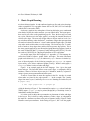
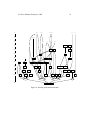
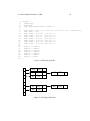
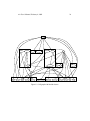
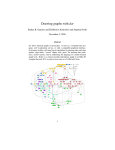
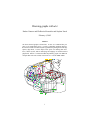
graph tools. Below is a reduced module dependency graph of an SML-NJ
compiler that took 0.98 seconds of user time on a 1.4 Ghz AMD Athlon.
IntNullD
IntShare
UnixPaths
Interact
Importer
NewParse
MLLrValsFun
ApplyFunctor
MLLexFun
Index
PrintDec
Vector
Instantiate
BareAbsyn
AbstractFct
Normalize
LrTable
Fastlib
CG
Assembly
Backpatch
PrimTypes
Interp
Overload
EqTypes
ArrayExt
Overloads
Absyn
Equal
CoreInfo
SparcAC
Unboxed
PrintType
Prim
Unify
Modules
Fixity
SparcMCode
MCprint
Prof
SparcAsCode
IEEEReal
Reorder
ModuleUtil
CInterface
PolyCont
Math
Dummy
Core
TyvarSet
MakeMos
CleanUp
Unsafe
Convert
Opt
Lambda
RealConst
SparcMCEmit
SparcMC
SparcAsEmit
SparcCM
SparcInstr
BaseCoder
Hoist
Bigint
SortedList
CPScomp
CPSopt
Contract
Expand
CPSprint
Eta
Intset
Coder
CPSsize
Closure
Spill
GlobalFix
ClosureCallee
Profile
ContMap
CPSgen
FreeMap
CPS
TypesUtil
Variables
Loader
Initial
InLine
MC
InlineOps
PrintAbsyn
PrintVal
Join
CoreFunc
MCopt
Typecheck
PrintBasics
Stream
Batch
LambdaOpt
CoreLang
Misc
CompSparc
Translate
Nonrec
SigMatch
IntSparcD
BogusDebug
ModuleComp
FreeLvar
LrParser
Strs
Signs
IntSparc
ProcessFile
Linkage
JoinWithArg
IntNull
RealDebug
Sort
Ascii
BasicTypes
ConRep
PrintUtil
List2
Tuples
Types
Dynamic
Stamps
PersStamps
Env
IntStrMap
Access
Symbol
StrgHash
Siblings
Intmap
ErrorMsg
Pathnames
1
Unionfind
dot User’s Manual, February 4, 2002
1
2
Basic Graph Drawing
dot draws directed graphs. It reads attributed graph text files and writes drawings,
either as graph files or in a graphics format such as GIF, PNG, SVG or PostScript
(which can be converted to PDF).
dot draws a graph in four main phases. Knowing this helps you to understand
what kind of layouts dot makes and how you can control them. The layout procedure used by dot relies on the graph being acyclic. Thus, the first step is to break
any cycles which occur in the input graph by reversing the internal direction of
certain cyclic edges. The next step assigns nodes to discrete ranks or levels. In a
top-to-bottom drawing, ranks determine Y coordinates. Edges that span more than
one rank are broken into chains of “virtual” nodes and unit-length edges. The third
step orders nodes within ranks to avoid crossings. The fourth step sets X coordinates of nodes to keep edges short, and the final step routes edge splines. This is
the same general approach as most hierarchical graph drawing programs, based on
the work of Warfield [War77], Carpano [Car80] and Sugiyama [STT81]. We refer
the reader to [GKNV93] for a thorough explanation of dot’s algorithms.
dot accepts input in the DOT language (cf. Appendix A). This language describes three kinds of objects: graphs, nodes, and edges. The main (outermost)
graph can be directed (digraph) or undirected graph. Because dot makes layouts of directed graphs, all the following examples use digraph. (A separate
layout utility, neato, draws undirected graphs [Nor92].) Within a main graph, a
subgraph defines a subset of nodes and edges.
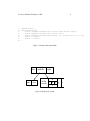
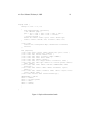
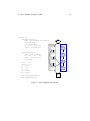
Figure 1 is an example graph in the DOT language. Line 1 gives the graph
name and type. The lines that follow create nodes, edges, or subgraphs, and set
attributes. Names of all these objects may be C identifiers, numbers, or quoted C
strings. Quotes protect punctuation and white space.
A node is created when its name first appears in the file. An edge is created
when nodes are joined by the edge operator ->. In the example, line 2 makes
edges from main to parse, and from parse to execute. Running dot on this file (call
it graph1.dot)
$ dot -Tps graph1.dot -o graph1.ps
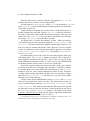
yields the drawing of Figure 2. The command line option -Tps selects PostScript
(EPSF) output. graph1.ps may be printed, displayed by a PostScript viewer, or
embedded in another document.
It is often useful to adjust the representation or placement of nodes and edges
in the layout. This is done by setting attributes of nodes, edges, or subgraphs in
the input file. Attributes are name-value pairs of character strings. Figures 3 and 4
illustrate some layout attributes. In the listing of Figure 3, line 2 sets the graph’s
dot User’s Manual, February 4, 2002
1: digraph G {
2:
main ->
3:
main ->
4:
main ->
5:
execute
6:
execute
7:
init ->
8:
main ->
9:
execute
10: }
3
parse -> execute;
init;
cleanup;
-> make_string;
-> printf
make_string;
printf;
-> compare;
Figure 1: Small graph
main
parse
init
make_string
cleanup
execute
compare
printf
Figure 2: Drawing of small graph
dot User’s Manual, February 4, 2002
4
size to 4,4 (in inches). This attribute controls the size of the drawing; if the
drawing is too large, it is scaled as necessary to fit.
Node or edge attributes are set off in square brackets. In line 3, the node main
is assigned shape box. The edge in line 4 is straightened by increasing its weight
(the default is 1). The edge in line 6 is drawn as a dotted line. Line 8 makes edges
from execute to make string and printf. In line 10 the default edge color
is set to red. This affects any edges created after this point in the file. Line 11
makes a bold edge labeled 100 times. In line 12, node make_string is given
a multi-line label. Line 13 changes the default node to be a box filled with a shade
of blue. The node compare inherits these values.
2
Drawing Attributes
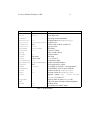
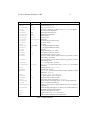
The complete list of attributes that affect graph drawing is summarized in Tables 1,
2 and 3.
2.1
Node Shapes
Nodes are drawn, by default, with shape=ellipse, width=.75, height=.5
and labeled by the node name. Other common shapes include box, circle,
record and plaintext. A complete list of node shapes is given in Appendix E.
The node shape plaintext is of particularly interest in that it draws a node without any outline, an important convention in some kinds of diagrams. In cases where
the graph structure is of main concern, and especially when the graph is moderately
large, the point shape reduces nodes to display minimal content. When drawn, a
node’s actual size is the greater of the requested size and the area needed for its text
label, unless fixedsize=true, in which case the width and height values
are enforced.
Node shapes fall into two broad categories: polygon-based and record-based.1
All node shapes except record and Mrecord are considered polygonal, and
are modeled by the number of sides (ellipses and circles being special cases), and
a few other geometric properties. Some of these properties can be specified in
a graph. If regular=true, the node is forced to be regular. The parameter
peripheries sets the number of boundary curves drawn. For example, a doublecircle has peripheries=2. The orientation attribute specifies a clockwise rotation of the polygon, measured in degrees.
1
There is a way to implement custom node shapes, using shape=epsf and the shapefile
attribute, and relying on PostScript output. The details are beyond the scope of this user’s guide.
Please contact the authors for further information.
dot User’s Manual, February 4, 2002
5
1: digraph G {
2:
size ="4,4";
3:
main [shape=box];
/* this is a comment */
4:
main -> parse [weight=8];
5:
parse -> execute;
6:
main -> init [style=dotted];
7:
main -> cleanup;
8:
execute -> { make_string; printf}
9:
init -> make_string;
10:
edge [color=red];
// so is this
11:
main -> printf [style=bold,label="100 times"];
12:
make_string [label="make a\nstring"];
13:
node [shape=box,style=filled,color=".7 .3 1.0"];
14:
execute -> compare;
15: }
Figure 3: Fancy graph
main
parse
100 times
cleanup
init
execute
printf
compare
make a
string
Figure 4: Drawing of fancy graph
dot User’s Manual, February 4, 2002
6
The shape polygon exposes all the polygonal parameters, and is useful for
creating many shapes that are not predefined. In addition to the parameters regular,
peripheries and orientation, mentioned above, polygons are parameterized by number of sides sides, skew and distortion. skew is a floating
point number (usually between −1.0 and 1.0) that distorts the shape by slanting
it from top-to-bottom, with positive values moving the top of the polygon to the
right. Thus, skew can be used to turn a box into a parallelogram. distortion
shrinks the polygon from top-to-bottom, with negative values causing the bottom
to be larger than the top. distortion turns a box into a trapezoid. A variety of
these polygonal attributes are illustrated in Figures 6 and 5.
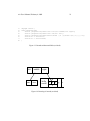
Record-based nodes form the other class of node shapes. These include the
shapes record and Mrecord. The two are identical except that the latter has
rounded corners. These nodes represent recursive lists of fields, which are drawn
as alternating horizontal and vertical rows of boxes. The recursive structure is
determined by the node’s label, which has the following schema:
rlabel
field
boxLabel
→
→
→
field ( ’|’ field )*
boxLabel | ’’ rlabel ’’
[ ’<’ string ’>’ ] [ string ]
Literal braces, vertical bars and angle brackets must be escaped. Spaces are
interpreted as separators between tokens, so they must be escaped if they are to
appear literally in the text. The first string in a boxLabel gives a name to the field,
and serves as a port name for the box (cf. Section 3.1). The second string is used
as a label for the field; it may contain the same escape sequences as multi-line
labels (cf. Section 2.2. The example of Figures 7 and 8 illustrates the use and some
properties of records.
2.2
Labels
As mentioned above, the default node label is its name. Edges are unlabeled by
default. Node and edge labels can be set explicitly using the label attribute as
shown in Figure 4.
Though it may be convenient to label nodes by name, at other times labels
must be set explicitly. For example, in drawing a file directory tree, one might have
several directories named src, but each one must have a unique node identifier.
The inode number or full path name are suitable unique identifiers. Then the label
of each node can be set to the file name within its directory.
dot User’s Manual, February 4, 2002
1:
2:
3:
4:
5:
6:
7:
8:
7
digraph G {
a -> b -> c;
b -> d;
a [shape=polygon,sides=5,peripheries=3,color=blue_light,style=filled];
c [shape=polygon,sides=4,skew=.4,label="hello world"]
d [shape=invtriangle];
e [shape=polygon,sides=4,distortion=.7];
}
Figure 5: Graph with polygonal shapes
a
e
b
hello world
d
Figure 6: Drawing of polygonal node shapes
dot User’s Manual, February 4, 2002
1:
2:
3:
4:
5:
6:
7:
8:
8
digraph structs {
node [shape=record];
struct1 [shape=record,label="<f0> left|<f1> mid\ dle|<f2> right"];
struct2 [shape=record,label="<f0> one|<f1> two"];
struct3 [shape=record,label="hello\nworld |{ b |{c|<here> d|e}| f}| g | h"];
struct1 -> struct2;
struct1 -> struct3;
}
Figure 7: Records with nested fields
left
one
mid dle
two
hello
world
right
c
b
d
f
Figure 8: Drawing of records
e
g
h
dot User’s Manual, February 4, 2002
9
Multi-line labels can be created by using the escape sequences \n, \l, \r to
terminate lines that are centered, or left or right justified.2
The node shape Mdiamond, Msquare and Mcircle use the attributes toplabel
and bottomlabel to specify additional labels appearing near the top and bottom
of the nodes, respectively.
Graphs and cluster subgraphs may also have labels. Graph labels appear, by
default, centered below the graph. Setting labelloc=t centers the label above
the graph. Cluster labels appear within the enclosing rectangle, in the upper left
corner. The value labelloc=b moves the label to the bottom of the rectangle.
The setting labeljust=r moves the label to the right.
The default font is 14-point Times-Roman, in black. Other font families,
sizes and colors may be selected using the attributes fontname, fontsize and
fontcolor. Font names should be compatible with the target interpreter. It is
best to use only the standard font families Times, Helvetica, Courier or Symbol
as these are guaranteed to work with any target graphics language. For example,
Times-Italic, Times-Bold, and Courier are portable; AvanteGardeDemiOblique isn’t.
For bitmap output, such as GIF or JPG, dot relies on having these fonts available during layout. The fontpath attribute can specify a list of directories3
which should be searched for the font files. If this is not set, dot will use the
DOTFONTPATH environment variable or, if this is not set, the GDFONTPATH
environment variable. If none of these is set, dot uses a built-in list.
Edge labels are positioned near the center of the edge. Usually, care is taken to
prevent the edge label from overlapping edges and nodes. It can still be difficult,
in a complex graph, to be certain which edge a label belongs to. If the decorate
attribute is set to true, a line is drawn connecting the label to its edge. Sometimes
avoiding collisions among edge labels and edges forces the drawing to be bigger
than desired. If labelfloat=true, dot does not try to prevent such overlaps,
allowing a more compact drawing.
An edge can also specify additional labels, using headlabel and taillabel,
which are be placed near the ends of the edge. The characteristics of these labels are specified using the attributes labelfontname, labelfontsize and
labelfontcolor. These labels are placed near the intersection of the edge and
the node and, as such, may interfere with them. To tune a drawing, the user can set
the labelangle and labeldistance attributes. The former sets the angle,
in degrees, which the label is rotated from the angle the edge makes incident with
2
The escape sequence \N is an internal symbol for node names.
For Unix-based systems, this is a concatenated list of pathnames, separated by colons. For
Windows-based systems, the pathnames are separated by semi-colons.
3
dot User’s Manual, February 4, 2002
10
the node. The latter sets a multiplicative scaling factor to adjust the distance that
the label is from the node.
2.3
Graphics Styles
Nodes and edges can specify a color attribute, with black the default. This is the
color used to draw the node’s shape or the edge. A color value can be a huesaturation-brightness triple (three floating point numbers between 0 and 1, separated by commas); one of the colors names listed in Appendix G (borrowed from
some version of the X window system); or a red-green-blue (RGB) triple4 (three
hexadecimal number between 00 and FF, preceded by the character ’#’). Thus,
the values "orchid", "0.8396,0.4862,0.8549" and #DA70D6 are three
ways to specify the same color. The numerical forms are convenient for scripts or
tools that automatically generate colors. Color name lookup is case-insensitive and
ignores non-alphanumeric characters, so warmgrey and Warm_Grey are equivalent.
We can offer a few hints regarding use of color in graph drawings. First, avoid
using too many bright colors. A “rainbow effect” is confusing. It is better to
choose a narrower range of colors, or to vary saturation along with hue. Second, when nodes are filled with dark or very saturated colors, labels seem to be
more readable with fontcolor=white and fontname=Helvetica. (We
also have PostScript functions for dot that create outline fonts from plain fonts.)
Third, in certain output formats, you can define your own color space. For example, if using PostScript for output, you can redefine nodecolor, edgecolor,
or graphcolor in a library file. Thus, to use RGB colors, place the following
line in a file lib.ps.
/nodecolor {setrgbcolor} bind def
Use the -l command line option to load this file.
dot -Tps -l lib.ps file.dot -o file.ps
The style attribute controls miscellaneous graphics features of nodes and
edges. This attribute is a comma-separated list of primitives with optional argument lists. The predefined primitives include solid, dashed, dotted, bold
and invis. The first four control line drawing in node boundaries and edges
and have the obvious meaning. The value invis causes the node or edge to be
left undrawn. The style for nodes can also include filled, diagonals and
4
A fourth form, RGBA, is also supported, which has the same format as RGB with an additional
fourth hexadecimal number specifying alpha channel or transparency information.
dot User’s Manual, February 4, 2002
Name
bottomlabel
color
comment
distortion
fillcolor
fixedsize
fontcolor
fontname
fontsize
group
height
label
layer
orientation
peripheries
regular
shape
shapefile
sides
skew
style
toplabel
URL
width
z
Default
black
0.0
lightgrey/black
false
black
Times-Roman
14
.5
node name
overlay range
0.0
shape-dependent
false
ellipse
4
0.0
.75
0.0
11
Values
auxiliary label for nodes of shape M*
node shape color
any string (format-dependent)
node distortion for shape=polygon
node fill color
label text has no affect on node size
type face color
font family
point size of label
name of node’s group
height in inches
any string
all, id or id:id
node rotation angle
number of node boundaries
force polygon to be regular
node shape; see Section 2.1 and Appendix E
external EPSF or SVG custom shape file
number of sides for shape=polygon
skewing of node for shape=polygon
graphics options, e.g.
bold, dotted,
filled; cf. Section 2.3
auxiliary label for nodes of shape M*
URL associated with node (format-dependent)
width in inches
z coordinate for VRML output
Table 1: Node attributes
dot User’s Manual, February 4, 2002
Name
arrowhead
arrowsize
arrowtail
color
comment
constraint
decorate
dir
fontcolor
fontname
fontsize
headlabel
headport
headURL
label
labelangle
labeldistance
labelfloat
labelfontcolor
labelfontname
labelfontsize
layer
lhead
ltail
minlen
samehead
Default
normal
1.0
normal
black
true
forward
black
Times-Roman
14
-25.0
1.0
false
black
Times-Roman
14
overlay range
1
sametail
style
taillabel
tailport
tailURL
weight
1
12
Values
style of arrowhead at head end
scaling factor for arrowheads
style of arrowhead at tail end
edge stroke color
any string (format-dependent)
use edge to affect node ranking
if set, draws a line connecting labels with their edges
forward, back, both, or none
type face color
font family
point size of label
label placed near head of edge
n,ne,e,se,s,sw,w,nw
URL attached to head label if output format is ismap
edge label
angle in degrees which head or tail label is rotated off edge
scaling factor for distance of head or tail label from node
lessen constraints on edge label placement
type face color for head and tail labels
font family for head and tail labels
point size for head and tail labels
all, id or id:id
name of cluster to use as head of edge
name of cluster to use as tail of edge
minimum rank distance between head and tail
tag for head node; edge heads with the same tag are
merged onto the same port
tag for tail node; edge tails with the same tag are merged
onto the same port
graphics options, e.g. bold, dotted, filled; cf.
Section 2.3
label placed near tail of edge
n,ne,e,se,s,sw,w,nw
URL attached to tail label if output format is ismap
integer cost of stretching an edge
Table 2: Edge attributes
dot User’s Manual, February 4, 2002
Name
bgcolor
center
clusterrank
color
comment
compound
concentrate
fillcolor
fontcolor
fontname
fontpath
fontsize
label
labeljust
labelloc
layers
margin
mclimit
nodesep
nslimit
Default
false
local
black
false
false
black
black
Times-Roman
14
left-justified
top
.5
1.0
.25
nslimit1
ordering
orientation
page
pagedir
quantum
rank
rankdir
ranksep
ratio
remincross
rotate
samplepoints
searchsize
size
style
URL
portrait
BL
TB
.75
8
30
13
Values
background color for drawing, plus initial fill color
center drawing on page
may be global or none
for clusters, outline color, and fill color if fillcolor not defined
any string (format-dependent)
allow edges between clusters
enables edge concentrators
cluster fill color
type face color
font family
list of directories to such for fonts
point size of label
any string
”r” for right-justified cluster labels
”r” for right-justified cluster labels
id:id:id...
margin included in page, inches
scale factor for mincross iterations
separation between nodes, in inches.
if set to f, bounds network simplex iterations by (f)(number of nodes)
when setting x-coordinates
if set to f, bounds network simplex iterations by (f)(number of nodes)
when ranking nodes
if out out edge order is preserved
if rotate is not used and the value is landscape, use landscape
orientation
unit of pagination, e.g. "8.5,11"
traversal order of pages
if quantum ¿ 0.0, node label dimensions will be rounded to integral
multiples of quantum
same, min, max, source or sink
LR (left to right) or TB (top to bottom)
separation between ranks, in inches.
approximate aspect ratio desired, fill or auto
if true and there are multiple clusters, re-run crossing minimization
If 90, set orientation to landscape
number of points used to represent ellipses and circles on output (cf.
Appendix C
maximum edges with negative cut values to check when looking for a
minimum one during network simplex
maximum drawing size, in inches
graphics options, e.g. filled for clusters
URL associated with graph (format-dependent)
Table 3: Graph attributes
dot User’s Manual, February 4, 2002
14
rounded. filled shades inside the node using the color fillcolor. If this
is not set, the value of color is used. If this also is unset, light grey5 is used as the
default. The diagonals style causes short diagonal lines to be drawn between
pairs of sides near a vertex. The rounded style rounds polygonal corners.
User-defined style primitives can be implemented as custom PostScript procedures. Such primitives are executed inside the gsave context of a graph, node,
or edge, before any of its marks are drawn. The argument lists are translated to
PostScript notation. For example, a node with style="setlinewidth(8)"
is drawn with a thick outline. Here, setlinewidth is a PostScript built-in, but
user-defined PostScript procedures are called the same way. The definition of these
procedures can be given in a library file loaded using -l as shown above.
Edges have a dir attribute to set arrowheads. dir may be forward (the
default), back, both, or none. This refers only to where arrowheads are drawn,
and does not change the underlying graph. For example, setting dir=back causes
an arrowhead to be drawn at the tail and no arrowhead at the head, but it does not
exchange the endpoints of the edge. The attributes arrowhead and arrowtail
specify the style of arrowhead, if any, which is used at the head and tail ends of
the edge. Allowed values are normal, inv, dot, invdot, odot, invodot
and none (cf. Appendix F). The attribute arrowsize specifies a multiplicative factor affecting the size of any arrowhead drawn on the edge. For example,
arrowsize=2.0 makes the arrow twice as long and twice as wide.
In terms of style and color, clusters act somewhat like large box-shaped nodes,
in that the cluster boundary is drawn using the cluster’s color attribute and, in
general, the appearance of the cluster is affected the style, color and fillcolor
attributes.
If the root graph has a bgcolor attribute specified, this color is used as the
background for the entire drawing, and also serves as the default fill color.
2.4
Drawing Orientation, Size and Spacing
Two attributes that play an important role in determining the size of a dot drawing
are nodesep and ranksep. The first specifies the minimum distance, in inches,
between two adjacent nodes on the same rank. The second deals with rank separation, which is the minimum vertical space between the bottoms of nodes in one
rank and the tops of nodes in the next. The ranksep attribute sets the rank separation, in inches. Alternatively, one can have ranksep=equally. This guarantees
that all of the ranks are equally spaced, as measured from the centers of nodes on
adjacent ranks. In this case, the rank separation between two ranks is at least the
5
The default is black if the output format is MIF, or if the shape is point.
dot User’s Manual, February 4, 2002
15
default rank separation. As the two uses of ranksep are independent, both can
be set at the same time. For example, ranksep="1.0 equally" causes ranks
to be equally spaced, with a minimum rank separation of 1 inch.
Often a drawing made with the default node sizes and separations is too big
for the target printer or for the space allowed for a figure in a document. There
are several ways to try to deal with this problem. First, we will review how dot
computes the final layout size.
A layout is initially made internally at its “natural” size, using default settings
(unless ratio=compress was set, as described below). There is no bound on
the size or aspect ratio of the drawing, so if the graph is large, the layout is also
large. If you don’t specify size or ratio, then the natural size layout is printed.
The easiest way to control the output size of the drawing is to set size="x,y"
in the graph file (or on the command line using -G). This determines the size of the
final layout. For example, size="7.5,10" fits on an 8.5x11 page (assuming
the default page orientation) no matter how big the initial layout.
ratio also affects layout size. There are a number of cases, depending on the
settings of size and ratio.
Case 1. ratio was not set. If the drawing already fits within the given size,
then nothing happens. Otherwise, the drawing is reduced uniformly enough to
make the critical dimension fit.
If ratio was set, there are four subcases.
Case 2a. If ratio=x where x is a floating point number, then the drawing
is scaled up in one dimension to achieve the requested ratio expressed as drawing
height/width. For example, ratio=2.0 makes the drawing twice as high as it
is wide. Then the layout is scaled using size as in Case 1.
Case 2b. If ratio=fill and size=x, y was set, then the drawing is scaled
up in one dimension to achieve the ratio y/x. Then scaling is performed as in Case
1. The effect is that all of the bounding box given by size is filled.
Case 2c. If ratio=compress and size=x, y was set, then the initial layout
is compressed to attempt to fit it in the given bounding box. This trades off layout quality, balance and symmetry in order to pack the layout more tightly. Then
scaling is performed as in Case 1.
Case 2d. If ratio=auto and the page attribute is set and the graph cannot
be drawn on a single page, then size is ignored and dot computes an “ideal” size.
In particular, the size in a given dimension will be the smallest integral multiple
of the page size in that dimension which is at least half the current size. The two
dimensions are then scaled independently to the new size.
If rotate=90 is set, or orientation=landscape, then the drawing is
rotated 90◦ into landscape mode. The X axis of the layout would be along the Y
axis of each page. This does not affect dot’s interpretation of size, ratio or
dot User’s Manual, February 4, 2002
16
page.
At this point, if page is not set, then the final layout is produced as one page.
If page=x, y is set, then the layout is printed as a sequence of pages which
can be tiled or assembled into a mosaic. Common settings are page="8.5,11"
or page="11,17". These values refer to the full size of the physical device; the
actual area used will be reduced by the margin settings. (For printer output, the
default is 0.5 inches; for bitmap-output, the X and Y margins are 10 and 2 points,
respectively.) For tiled layouts, it may be helpful to set smaller margins. This can
be done by using the margin attribute. This can take a single number, used to set
both margins, or two numbers separated by a comma to set the x and y margins
separately. As usual, units are in inches. Although one can set margin=0, unfortunately, many bitmap printers have an internal hardware margin that cannot be
overridden.
The order in which pages are printed can be controlled by the pagedir attribute. Output is always done using a row-based or column-based ordering, and
pagedir is set to a two-letter code specifying the major and minor directions. For
example, the default is BL, specifying a bottom-to-top (B) major order and a leftto-right (L) minor order. Thus, the bottom row of pages is emitted first, from left
to right, then the second row up, from left to right, and finishing with the top row,
from left to right. The top-to-bottom order is represented by T and the right-to-left
order by R.
If center=true and the graph can be output on one page, using the default
page size of 8.5 by 11 inches if page is not set, the graph is repositioned to be
centered on that page.
A common problem is that a large graph drawn at a small size yields unreadable
node labels. To make larger labels, something has to give. There is a limit to the
amount of readable text that can fit on one page. Often you can draw a smaller
graph by extracting an interesting piece of the original graph before running dot.
We have some tools that help with this.
sccmap decompose the graph into strongly connected components
tred compute transitive reduction (remove edges implied by transitivity)
gpr graph processor to select nodes or edges, and contract or remove the rest of
the graph
unflatten improve aspect ratio of trees by staggering the lengths of leaf edges
With this in mind, here are some thing to try on a given graph:
1. Increase the node fontsize.
dot User’s Manual, February 4, 2002
17
2. Use smaller ranksep and nodesep.
3. Use ratio=auto.
4. Use ratio=compress and give a reasonable size.
5. A sans serif font (such as Helvetica) may be more readable than Times when
reduced.
2.5
Node and Edge Placement
Attributes in dot provide many ways to adjust the large-scale layout of nodes and
edges, as well as fine-tune the drawing to meet the user’s needs and tastes. This
section discusses these attributes6 .
Sometimes it is natural to make edges point from left to right instead of from
top to bottom. If rankdir=LR in the top-level graph, the drawing is rotated
in this way. TB (top to bottom) is the default. (BT seems potentially useful for
drawing upward-directed graphs, but hasn’t been implemented. In some graphs,
you could achieve the same effect by reversing the endpoints of edges and setting
their dir=back.) We note that the setting of rankdir is complementary to how
the final drawing may be rotated by orientation or rotate.
In graphs with time-lines, or in drawings that emphasize source and sink nodes,
you may need to constrain rank assignments. The rank of a subgraph may be set
to samerank, minrank, source, maxrank or sink. A value samerank
causes all the nodes in the subgraph to occur on the same rank. If set to minrank,
all the nodes in the subgraph are guaranteed to be on a rank at least as small as
any other node in the layout7 . This can be made strict by setting rank=source,
which forces the nodes in the subgraph to be on some rank strictly smaller than
the rank of any other nodes (except those also specified by minrank or source
subgraphs). The values maxrank or sink play an analogous role for the maximum rank. Note that these constraints induce equivalence classes of nodes. If one
subgraph forces nodes A and B to be on the same rank, and another subgraph forces
nodes C and B to share a rank, then all nodes in both subgraphs must be drawn on
the same rank. Figures 9 and 10 illustrate using subgraphs for controlling rank
assignment.
In some graphs, the left-to-right ordering of nodes is important. If a subgraph
has ordering=out, then out-edges within the subgraph that have the same tail
6
For completeness, we note that dot also provides access to various parameters which play technical roles in the layout algorithms. These include mclimit, nslimit, nslimit1, remincross
and searchsize.
7
Recall that the minimum rank occurs at the top of a drawing.
dot User’s Manual, February 4, 2002
18
digraph asde91 {
ranksep=.75; size = "7.5,7.5";
{
node [shape=plaintext, fontsize=16];
/* the time-line graph */
past -> 1978 -> 1980 -> 1982 -> 1983 -> 1985 -> 1986 ->
1987 -> 1988 -> 1989 -> 1990 -> "future";
/* ancestor programs */
"Bourne sh"; "make"; "SCCS"; "yacc"; "cron"; "Reiser cpp";
"Cshell"; "emacs"; "build"; "vi"; "<curses>"; "RCS"; "C*";
}
{ rank = same;
"Software IS"; "Configuration Mgt"; "Architecture & Libraries";
"Process";
};
node [shape=box];
{ rank = same; "past"; "SCCS"; "make"; "Bourne sh"; "yacc"; "cron"; }
{ rank = same; 1978; "Reiser cpp"; "Cshell"; }
{ rank = same; 1980; "build"; "emacs"; "vi"; }
{ rank = same; 1982; "RCS"; "<curses>"; "IMX"; "SYNED"; }
{ rank = same; 1983; "ksh"; "IFS"; "TTU"; }
{ rank = same; 1985; "nmake"; "Peggy"; }
{ rank = same; 1986; "C*"; "ncpp"; "ksh-i"; "<curses-i>"; "PG2"; }
{ rank = same; 1987; "Ansi cpp"; "nmake 2.0"; "3D File System"; "fdelta";
"DAG"; "CSAS";}
{ rank = same; 1988; "CIA"; "SBCS"; "ksh-88"; "PEGASUS/PML"; "PAX";
"backtalk"; }
{ rank = same; 1989; "CIA++"; "APP"; "SHIP"; "DataShare"; "ryacc";
"Mosaic"; }
{ rank = same; 1990; "libft"; "CoShell"; "DIA"; "IFS-i"; "kyacc"; "sfio";
"yeast"; "ML-X"; "DOT"; }
{ rank = same; "future"; "Adv. Software Technology"; }
"PEGASUS/PML" -> "ML-X";
"SCCS" -> "nmake";
"SCCS" -> "3D File System";
"SCCS" -> "RCS";
"make" -> "nmake";
"make" -> "build";
.
.
.
}
Figure 9: Graph with constrained ranks
dot User’s Manual, February 4, 2002
past
SCCS
19
make
Bourne sh
Reiser cpp
1978
build
vi
RCS
C*
DAG
Ansi cpp
CIA
1989
CIA++
DOT
<curses-i>
fdelta
SBCS
APP
DIA
Software IS
future
TTU
Peggy
ncpp
CSAS
3D File System
IMX
IFS
nmake
1988
1990
SYNED
ksh
1985
1987
emacs
<curses>
1983
1986
cron
Cshell
1980
1982
yacc
ksh-i
PG2
nmake 2.0
PAX
ksh-88
PEGASUS/PML
SHIP
backtalk
DataShare
libft
CoShell
sfio
Configuration Mgt
IFS-i
ML-X
Architecture & Libraries
Adv. Software Technology
Figure 10: Drawing with constrained ranks
ryacc
Mosaic
kyacc
yeast
Process
dot User’s Manual, February 4, 2002
20
node wll fan-out from left to right in their order of creation. (Also note that flat
edges involving the head nodes can potentially interfere with their ordering.)
There are many ways to fine-tune the layout of nodes and edges. For example,
if the nodes of an edge both have the same group attribute, dot tries to keep
the edge straight and avoid having other edges cross it. The weight of an edge
provides another way to keep edges straight. An edge’s weight suggests some
measure of an edge’s importance; thus, the heavier the weight, the closer together
its nodes should be. dot causes edges with heavier weights to be drawn shorter and
straighter.
Edge weights also play a role when nodes are constrained to the same rank.
Edges with non-zero weight between these nodes are aimed across the rank in
the same direction (left-to-right, or top-to-bottom in a rotated drawing) as far as
possible. This fact may be exploited to adjust node ordering by placing invisible
edges (style="invis") where needed.
The end points of edges adjacent to the same node can be constrained using the
samehead and sametail attributes. Specifically, all edges with the same head
and the same value of samehead are constrained to intersect the head node at the
same point. The analogous property holds for tail nodes and sametail.
During rank assignment, the head node of an edge is constrained to be on a
higher rank than the tail node. If the edge has constraint=false, however,
this requirement is not enforced.
In certain circumstances, the user may desire that the end points of an edge
never get too close. This can be obtained by setting the edge’s minlen attribute.
This defines the minimum difference between the ranks of the head and tail. For
example, if minlen=2, there will always be at least one intervening rank between
the head and tail. Note that this is not concerned with the geometric distance between the two nodes.
Fine-tuning should be approached cautiously. dot works best when it can
makes a layout without much “help” or interference in its placement of individual
nodes and edges. Layouts can be adjusted somewhat by increasing the weight of
certain edges, or by creating invisible edges or nodes using style=invis, and
sometimes even by rearranging the order of nodes and edges in the file. But this can
backfire because the layouts are not necessarily stable with respect to changes in
the input graph. One last adjustment can invalidate all previous changes and make
a very bad drawing. A future project we have in mind is to combine the mathematical layout techniques of dot with an interactive front-end that allows user-defined
hints and constraints.
dot User’s Manual, February 4, 2002
3
3.1
21
Advanced Features
Node Ports
A node port is a point where edges can attach to a node. (When an edge is not
attached to a port, it is aimed at the node’s center and the edge is clipped at the
node’s boundary.)
Simple ports can be specified by using the headport and tailport attributes. These can be assigned one of the 8 compass points "n", "ne", "e",
"se", "s", "sw", "w" or "nw". The end of the node will then be aimed at that
position on the node. Thus, if tailport=se, the edge will connect to the tail
node at its southeast “corner”.
Nodes with a record shape use the record structure to define ports. As noted
above, this shape represents a record as recursive lists of boxes. If a box defines
a port name, by using the construct < port name > in the box label, the center of the box can be used a port. (By default, the edge is clipped to the box’s
boundary.) This is done by modifying the node name with the port name, using the
syntax node name:port name, as part of an edge declaration. Figure 11 illustrates
the declaration and use of port names in record nodes, with the resulting drawing
shown in Figure 12.
DISCLAIMER: At present, simple ports don’t work as advertised, even
when they should. There is also the case where we might not want them to
work, e.g., when the tailport=n and the headport=s. Finally, in theory, dot
should be able to allow both types of ports on an edge, since the notions are
orthogonal. There is still the question as to whether the two syntaxes could
be combined, i.e., treat the compass points as reserved port names, and allow
nodename:portname:compassname.
Figures 13 and 14 give another example of the use of record nodes and ports.
This repeats the example of Figures 7 and 8 but now using ports as connectors
for edges. Note that records sometimes look better if their input height is set to a
small value, so the text labels dominate the actual size, as illustrated in Figure 11.
Otherwise the default node size (.75 by .5) is assumed, as in Figure 14. The
example of Figures 15 and 16 uses left-to-right drawing in a layout of a hash table.
3.2
Clusters
A cluster is a subgraph placed in its own distinct rectangle of the layout. A subgraph is recognized as a cluster when its name has the prefix cluster. (If the
top-level graph has clusterrank=none, this special processing is turned off).
dot User’s Manual, February 4, 2002
1:
2:
3:
4:
5:
6:
7:
8:
9:
10:
11:
12:
13:
14:
15:
16:
17:
18:
19:
20:
digraph g {
node [shape =
node0[label =
node1[label =
node2[label =
node3[label =
node4[label =
node5[label =
node6[label =
node7[label =
node8[label =
"node0":f2 ->
"node0":f0 ->
"node1":f0 ->
"node1":f2 ->
"node2":f2 ->
"node2":f0 ->
"node4":f2 ->
"node4":f0 ->
}
22
record,height=.1];
"<f0> |<f1> G|<f2>
"<f0> |<f1> E|<f2>
"<f0> |<f1> B|<f2>
"<f0> |<f1> F|<f2>
"<f0> |<f1> R|<f2>
"<f0> |<f1> H|<f2>
"<f0> |<f1> Y|<f2>
"<f0> |<f1> A|<f2>
"<f0> |<f1> C|<f2>
"node4":f1;
"node1":f1;
"node2":f1;
"node3":f1;
"node8":f1;
"node7":f1;
"node6":f1;
"node5":f1;
"];
"];
"];
"];
"];
"];
"];
"];
"];
Figure 11: Binary search tree using records
G
E
B
A
R
F
H
C
Figure 12: Drawing of binary search tree
Y
dot User’s Manual, February 4, 2002
1:
2:
3:
4:
5:
6:
7:
8:
23
digraph structs {
node [shape=record];
struct1 [shape=record,label="<f0> left|<f1> middle|<f2> right"];
struct2 [shape=record,label="<f0> one|<f1> two"];
struct3 [shape=record,label="hello\nworld |{ b |{c|<here> d|e}| f}| g | h"];
struct1:f1 -> struct2:f0;
struct1:f2 -> struct3:here;
}
Figure 13: Records with nested fields (revisited)
left
one
middle
two
right
hello
world
c
b
d
f
e
Figure 14: Drawing of records (revisited)
g
h
dot User’s Manual, February 4, 2002
1:
2:
3:
4:
5:
6:
7:
8:
9:
10:
11:
12:
13:
14:
15:
16:
17:
18:
19:
20:
21:
22:
23:
24
digraph G {
nodesep=.05;
rankdir=LR;
node [shape=record,width=.1,height=.1];
node0 [label = "<f0>
node [width = 1.5];
node1 [label = "{<n>
node2 [label = "{<n>
node3 [label = "{<n>
node4 [label = "{<n>
node5 [label = "{<n>
node6 [label = "{<n>
node7 [label = "{<n>
|<f1> |<f2> |<f3> |<f4> |<f5> |<f6> | ",height=2.5];
n14
a1
i9
e5
t20
o15
s19
|
|
|
|
|
|
|
719
805
718
989
959
794
659
|<p>
|<p>
|<p>
|<p>
|<p>
|<p>
|<p>
}"];
}"];
}"];
}"];
}"] ;
}"] ;
}"] ;
node0:f0 -> node1:n;
node0:f1 -> node2:n;
node0:f2 -> node3:n;
node0:f5 -> node4:n;
node0:f6 -> node5:n;
node2:p -> node6:n;
node4:p -> node7:n;
}
Figure 15: Hash table graph file
n14
719
a1
805
i9
718
e5
989
t20
959
o15
794
s19
659
Figure 16: Drawing of hash table
dot User’s Manual, February 4, 2002
25
Labels, font characteristics and the labelloc attribute can be set as they would
be for the top-level graph, though cluster labels appear above the graph by default.
For clusters, the label is left-justified by default; if labeljust="r", the label is
right-justified. The color attribute specifies the color of the enclosing rectangle.
In addition, clusters may have style="filled", in which case the rectangle
is filled with the color specified by fillcolor before the cluster is drawn. (If
fillcolor is not specified, the cluster’s color attribute is used.)
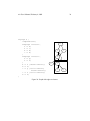
Clusters are drawn by a recursive technique that computes a rank assignment
and internal ordering of nodes within clusters. Figure 17 through 19 are cluster
layouts and the corresponding graph files.
dot User’s Manual, February 4, 2002
26
digraph G {
subgraph cluster0 {
node [style=filled,color=white];
style=filled;
color=lightgrey;
process #1
a0 -> a1 -> a2 -> a3;
label = "process #1";
a0
}
subgraph cluster1 {
node [style=filled];
b0 -> b1 -> b2 -> b3;
label = "process #2";
color=blue
}
start -> a0;
start -> b0;
a1 -> b3;
b2 -> a3;
a3 -> a0;
a3 -> end;
b3 -> end;
start
process #2
b0
a1
b1
a2
b2
a3
b3
end
start [shape=Mdiamond];
end [shape=Msquare];
}
Figure 17: Process diagram with clusters
dot User’s Manual, February 4, 2002
27
If the top-level graph has the compound attribute set to true, dot will allow
edges connecting nodes and clusters. This is accomplished by an edge defining
an lhead or ltail attribute. The value of these attributes must be the name of
a cluster containing the head or tail node, respectively. In this case, the edge is
clipped at the cluster boundary. All other edge attributes, such as arrowhead
or dir, are applied to the truncated edge. For example, Figure 20 shows a graph
using the compound attribute and the resulting diagram.
3.3
Concentrators
Setting concentrate=true on the top-level graph enables an edge merging
technique to reduce clutter in dense layouts. Edges are merged when they run
parallel, have a common endpoint and have length greater than 1. A beneficial
side-effect in fixed-sized layouts is that removal of these edges often permits larger,
more readable labels. While concentrators in dot look somewhat like Newbery’s
[New89], they are found by searching the edges in the layout, not by detecting
complete bipartite graphs in the underlying graph. Thus the dot approach runs
much faster but doesn’t collapse as many edges as Newbery’s algorithm.
4
Command Line Options
By default, dot operates in filter mode, reading a graph from stdin, and writing
the graph on stdout in the DOT format with layout attributes appended. dot
supports a variety of command-line options:
-Tformat sets the format of the output. Allowed values for format are:
canon Prettyprint input; no layout is done.
dot Attributed DOT. Prints input with layout information attached as attributes,
cf. Appendix C.
fig FIG output.
gd GD format. This is the internal format used by the GD Graphics Library. An
alternate format is gd2.
gif GIF output.
hpgl HP-GL/2 vector graphic printer language for HP wide bed plotters.
imap Produces map files for server-side image maps. This can be combined with
a graphical form of the output, e.g., using -Tgif or -Tjpg, in web pages
dot User’s Manual, February 4, 2002
28
1:digraph G {
2: size="8,6"; ratio=fill; node[fontsize=24];
3:
4: ciafan->computefan; fan->increment; computefan->fan; stringdup->fatal;
5: main->exit; main->interp_err; main->ciafan; main->fatal; main->malloc;
6: main->strcpy; main->getopt; main->init_index; main->strlen; fan->fatal;
7: fan->ref; fan->interp_err; ciafan->def; fan->free; computefan->stdprintf;
8: computefan->get_sym_fields; fan->exit; fan->malloc; increment->strcmp;
9: computefan->malloc; fan->stdsprintf; fan->strlen; computefan->strcmp;
10: computefan->realloc; computefan->strlen; debug->sfprintf; debug->strcat;
11: stringdup->malloc; fatal->sfprintf; stringdup->strcpy; stringdup->strlen;
12: fatal->exit;
13:
14: subgraph "cluster_error.h" { label="error.h"; interp_err; }
15:
16: subgraph "cluster_sfio.h" { label="sfio.h"; sfprintf; }
17:
18: subgraph "cluster_ciafan.c" { label="ciafan.c"; ciafan; computefan;
19:
increment; }
20:
21: subgraph "cluster_util.c" { label="util.c"; stringdup; fatal; debug; }
22:
23: subgraph "cluster_query.h" { label="query.h"; ref; def; }
24:
25: subgraph "cluster_field.h" { get_sym_fields; }
26:
27: subgraph "cluster_stdio.h" { label="stdio.h"; stdprintf; stdsprintf; }
28:
29: subgraph "cluster_<libc.a>" { getopt; }
30:
31: subgraph "cluster_stdlib.h" { label="stdlib.h"; exit; malloc; free; realloc; }
32:
33: subgraph "cluster_main.c" { main; }
34:
35: subgraph "cluster_index.h" { init_index; }
36:
37: subgraph "cluster_string.h" { label="string.h"; strcpy; strlen; strcmp; strcat; }
38:}
Figure 18: Call graph file
dot User’s Manual, February 4, 2002
29
main
util.c
ciafan.c
debug
stringdup
getopt
init_index
increment
ciafan
fan
query.h
fatal
string.h
strcat
computefan
sfio.h
strcpy
strlen
strcmp
sfprintf
def
stdio.h
get_sym_fields
stdprintf
error.h
ref
interp_err
stdlib.h
stdsprintf
Figure 19: Call graph with labeled clusters
realloc
malloc
exit
free
dot User’s Manual, February 4, 2002
digraph G {
compound=true;
subgraph cluster0 {
a -> b;
a -> c;
b -> d;
c -> d;
}
subgraph cluster1 {
e -> g;
e -> f;
}
b -> f [lhead=cluster1];
d -> e;
c -> g [ltail=cluster0,
lhead=cluster1];
c -> e [ltail=cluster0];
d -> h;
}
30
a
b
c
d
h
e
f
Figure 20: Graph with edges on clusters
g
dot User’s Manual, February 4, 2002
31
to attach links to nodes and edges. The format ismap is a predecessor of
the imap format.
cmap Produces HTML map files for client-side image maps.
jpg JPEG output. jpeg is a synonym for jpg.
mif FrameMaker MIF format. In this format, graphs can be loaded into FrameMaker
and edited manually. MIF is limited to 8 basic colors.
mp MetaPost output.
pcl PCL-5 output for HP laser writers.
pic PIC output.
plain Simple, line-based ASCII format. Appendix B describes this output. An
alternate format is plain-ext, which provides port names on the head and
tail nodes of edges.
png PNG (Portable Network Graphics) output.
ps PostScript (EPSF) output.
ps2 PostScript (EPSF) output with PDF annotations. It is assumed that this output
will be distilled into PDF.
svg SVG output. The alternate form svgz produces compressed SVG.
vrml VRML output.
vtx VTX format for r Confluents’s Visual Thought.
wbmp Wireless BitMap (WBMP) format.
-Gname=value sets a graph attribute default value. Often it is convenient to set
size, pagination, and related values on the command line rather than in the graph
file. The analogous flags -N or -E set default node or edge attributes. Note that
file contents override command line arguments.
-llibfile specifies a device-dependent graphics library file. Multiple libraries
may be given. These names are passed to the code generator at the beginning of
output.
-ooutfile writes output into file outfile.
-v requests verbose output. In processing large layouts, the verbose messages
may give some estimate of dot’s progress.
-V prints the version number and exits.
dot User’s Manual, February 4, 2002
5
32
Miscellaneous
In the top-level graph heading, a graph may be declared a strict digraph.
This forbids the creation of self-arcs and multi-edges; they are ignored in the input
file.
Nodes, edges and graphs may have a URL attribute. In certain output formats
(ps2, imap, ismap, cmap, or svg), this information is integrated in the output so that nodes, edges and clusters become active links when displayed with
the appropriate tools. Typically, URLs attached to top-level graphs serve as base
URLs, supporting relative URLs on components. When the output format is imap,
or cmap, a similar processing takes place with the headURL and tailURL attributes.
For certain formats (ps, fig, mif, mp, vtx or svg), comment attributes
can be used to embed human-readable notations in the output.
6
Conclusions
dot produces pleasing hierarchical drawings and can be applied in many settings.
Since the basic algorithms of dot work well, we have a good basis for further research into problems such as methods for drawing large graphs and on-line
(animated) graph drawing.
7
Acknowledgments
We thank Emden Gansner and Phong Vo for their advice about graph drawing algorithms and programming. The graph library uses Phong’s splay tree dictionary
library. Also, the users of dag, the predecessor of dot, gave us many good suggestions. Emden Gansner, Guy Jacobson, and Randy Hackbarth reviewed earlier
drafts of this manual, and Emden contributed substantially to the current revision.
John Ellson wrote the generalized polygon shape and spent considerable effort to
make it robust and efficient. He also wrote the GIF and ISMAP generators and
other tools to bring graphviz to the web.
dot User’s Manual, February 4, 2002
33
References
[Car80]
M. Carpano. Automatic display of hierarchized graphs for computer
aided decision analysis. IEEE Transactions on Software Engineering,
SE-12(4):538–546, April 1980.
[GKNV93] Emden R. Gansner, Eleftherios Koutsofios, Stephen C. North, and
Kiem-Phong Vo. A Technique for Drawing Directed Graphs. IEEE
Trans. Sofware Eng., 19(3):214–230, May 1993.
[New89]
Frances J. Newbery. Edge Concentration: A Method for Clustering
Directed Graphs. In 2nd International Workshop on Software Configuration Management, pages 76–85, October 1989. Published as
ACM SIGSOFT Software Engineering Notes, vol. 17, no. 7, November 1989.
[Nor92]
Stephen C. North. Neato User’s Guide. Technical Report 59113921014-14TM, AT&T Bell Laboratories, Murray Hill, NJ, 1992.
[STT81]
K. Sugiyama, S. Tagawa, and M. Toda. Methods for Visual Understanding of Hierarchical System Structures. IEEE Transactions on
Systems, Man, and Cybernetics, SMC-11(2):109–125, February 1981.
[War77]
John Warfield. Crossing Theory and Hierarchy Mapping. IEEE Transactions on Systems, Man, and Cybernetics, SMC-7(7):505–523, July
1977.
dot User’s Manual, February 4, 2002
A
34
Graph File Grammar
The following is an abstract grammar for the DOT language. Terminals are shown
in bold font and nonterminals in italics. Literal characters are given in single
quotes. Parentheses ( and ) indicate grouping when needed. Square brackets [
and ] enclose optional items. Vertical bars | separate alternatives.
graph
→ [strict] (digraph | graph) id ’{’ stmt-list ’}’
stmt-list
→ [stmt [’;’] [stmt-list ] ]
stmt
→ attr-stmt | node-stmt | edge-stmt | subgraph | id ’=’ id
attr-stmt
→ (graph | node | edge) attr-list
attr-list
→ ’[’ [a-list ] ’]’ [attr-list]
a-list
→ id ’=’ id [’,’] [attr-list]
node-stmt
→ node-id [attr-list]
node-id
→ id [port]
port
→ port-location [port-angle] | port-angle [port-location]
port-location → ’:’ id | ’:’ ’(’ id ’,’ id ’)’
port-angle
→ ’@’ id
edge-stmt
→ (node-id | subgraph) edgeRHS [attr-list]
edgeRHS
→ edgeop (node-id | subgraph) [edgeRHS]
subgraph
→ [subgraph id] ’{’ stmt-list ’}’ | subgraph id
An id is any alphanumeric string not beginning with a digit, but possibly including underscores; or a number; or any quoted string possibly containing escaped
quotes.
An edgeop is -> in directed graphs and -- in undirected graphs.
The language supports C++-style comments: /* */ and //.
Semicolons aid readability but are not required except in the rare case that a
named subgraph with no body immediate precedes an anonymous subgraph, because under precedence rules this sequence is parsed as a subgraph with a heading
and a body.
Complex attribute values may contain characters, such as commas and white
space, which are used in parsing the DOT language. To avoid getting a parsing
error, such values need to be enclosed in double quotes.
dot User’s Manual, February 4, 2002
B
35
Plain Output File Format (-Tplain)
The “plain” output format of dot lists node and edge information in a simple, lineoriented style which is easy to parse by front-end components. All coordinates and
lengths are unscaled and in inches.
The first line is:
graph scalefactor width height
The width and height values give the width and the height of the drawing; the
lower-left corner of the drawing is at the origin. The scalefactor indicates how
much to scale all coordinates in the final drawing.
The next group of lines lists the nodes in the format:
node name x y xsize ysize label style shape color fillcolor
The name is a unique identifier. If it contains whitespace or punctuation, it is
quoted. The x and y values give the coordinates of the center of the node; the width
and height give the width and the height. The remaining parameters provide the
node’s label, style, shape, color and fillcolor attributes, respectively.
If the node does not have a style attribute, "solid" is used.
The next group of lines lists edges:
edge tail head n x1 y1 x2 y2 . . . xn yn [ label lx ly ] style color
n is the number of coordinate pairs that follow as B-spline control points. If the
edge is labeled, then the label text and coordinates are listed next. The edge description is completed by the edge’s style and color. As with nodes, if a
style is not defined, "solid" is used.
The last line is always:
stop
dot User’s Manual, February 4, 2002
C
36
Attributed DOT Format (-Tdot)
This is the default output format. It reproduces the input, along with layout information for the graph. Coordinate values increase up and to the right. Positions
are represented by two integers separated by a comma, representing the X and Y
coordinates of the location specified in points (1/72 of an inch). A position refers
to the center of its associated object. Lengths are given in inches.
A bb attribute is attached to the graph, specifying the bounding box of the
drawing. If the graph has a label, its position is specified by the lp attribute.
Each node gets pos, width and height attributes. If the node is a record,
the record rectangles are given in the rects attribute. If the node is polygonal
and the vertices attribute is defined in the input graph, this attribute contains
the vertices of the node. The number of points produced for circles and ellipses is
governed by the samplepoints attribute.
Every edge is assigned a pos attribute, which consists of a list of 3n + 1
locations. These are B-spline control points: points p0 , p1 , p2 , p3 are the first Bezier
spline, p3 , p4 , p5 , p6 are the second, etc. Currently, edge points are listed top-tobottom (or left-to-right) regardless of the orientation of the edge. This may change.
In the pos attribute, the list of control points might be preceded by a start
point ps and/or an end point pe . These have the usual position representation with a
"s," or "e," prefix, respectively. A start point is present if there is an arrow at p0 .
In this case, the arrow is from p0 to ps , where ps is actually on the node’s boundary.
The length and direction of the arrowhead is given by the vector (ps − p0 ). If there
is no arrow, p0 is on the node’s boundary. Similarly, the point pe designates an
arrow at the other end of the edge, connecting to the last spline point.
If the edge has a label, the label position is given in lp.
dot User’s Manual, February 4, 2002
D
37
Layers
dot has a feature for drawing parts of a single diagram on a sequence of overlapping
“layers.” Typically the layers are overhead transparencies. To activate this feature,
one must set the top-level graph’s layers attribute to a list of identifiers. A node
or edge can then be assigned to a layer or range of layers using its layer attribute..
all is a reserved name for all layers (and can be used at either end of a range, e.g
design:all or all:code). For example:
layers
node90
node91
node90
node92
= "spec:design:code:debug:ship";
[layer = "code"];
[layer = "design:debug"];
-> node91 [layer = "all"];
[layer = "all:code"];
In this graph, node91 is in layers design, code and debug, while node92 is
in layers spec, design and code.
In a layered graph, if a node or edge has no layer assignment, but incident
edges or nodes do, then its layer specification is inferred from these. To change the
default so that nodes and edges with no layer appear on all layers, insert near the
beginning of the graph file:
node [layer=all];
edge [layer=all];
There is currently no way to specify a set of layers that are not a continuous
range.
When PostScript output is selected, the color sequence for layers is set in the
array layercolorseq. This array is indexed starting from 1, and every element must be a 3-element array which can interpreted as a color coordinate. The
adventurous may learn further from reading dot’s PostScript output.
dot User’s Manual, February 4, 2002
E
38
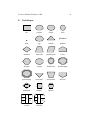
Node Shapes
box
polygon
ellipse
circle
plaintext
point
egg
triangle
plaintext
diamond
trapezium
parallelogram
house
hexagon
octagon
doublecircle
doubleoctagon
tripleoctagon
invtriangle
invtrapezium
invhouse
Mdiamond
Msquare
Mcircle
1
2
3
31
2
32
record
1
2
3
31
2
32
Mrecord
dot User’s Manual, February 4, 2002
39
F Arrowhead Types
normal
dot
odot
inv
invdot
invodot
none
dot User’s Manual, February 4, 2002
40
G Color Names
Whites
antiquewhite[1-4]
azure[1-4]
bisque[1-4]
blanchedalmond
cornsilk[1-4]
floralwhite
gainsboro
ghostwhite
honeydew[1-4]
ivory[1-4]
lavender
lavenderblush[1-4]
lemonchiffon[1-4]
linen
mintcream
mistyrose[1-4]
moccasin
navajowhite[1-4]
oldlace
papayawhip
peachpuff[1-4]
seashell[1-4]
snow[1-4]
thistle[1-4]
wheat[1-4]
white
whitesmoke
Greys
darkslategray[1-4]
dimgray
gray
gray[0-100]
lightgray
lightslategray
slategray[1-4]
Blacks
black
Reds
coral[1-4]
crimson
darksalmon
deeppink[1-4]
firebrick[1-4]
hotpink[1-4]
indianred[1-4]
lightpink[1-4]
lightsalmon[1-4]
maroon[1-4]
mediumvioletred
orangered[1-4]
palevioletred[1-4]
pink[1-4]
red[1-4]
salmon[1-4]
tomato[1-4]
violetred[1-4]
Browns
beige
brown[1-4]
burlywood[1-4]
chocolate[1-4]
darkkhaki
khaki[1-4]
peru
rosybrown[1-4]
saddlebrown
sandybrown
sienna[1-4]
tan[1-4]
Oranges
darkorange[1-4]
orange[1-4]
orangered[1-4]
Yellows
darkgoldenrod[1-4]
gold[1-4]
goldenrod[1-4]
greenyellow
lightgoldenrod[1-4]
lightgoldenrodyellow
lightyellow[1-4]
palegoldenrod
yellow[1-4]
yellowgreen
Greens
chartreuse[1-4]
darkgreen
darkolivegreen[1-4]
darkseagreen[1-4]
forestgreen
green[1-4]
greenyellow
lawngreen
lightseagreen
limegreen
mediumseagreen
mediumspringgreen
mintcream
olivedrab[1-4]
palegreen[1-4]
seagreen[1-4]
springgreen[1-4]
yellowgreen
Cyans
aquamarine[1-4]
cyan[1-4]
darkturquoise
lightcyan[1-4]
mediumaquamarine
mediumturquoise
paleturquoise[1-4]
turquoise[1-4]
Blues
aliceblue
blue[1-4]
blueviolet
cadetblue[1-4]
cornflowerblue
darkslateblue
deepskyblue[1-4]
dodgerblue[1-4]
indigo
lightblue[1-4]
lightskyblue[1-4]
lightslateblue[1-4]
mediumblue
mediumslateblue
midnightblue
navy
navyblue
powderblue
royalblue[1-4]
skyblue[1-4]
slateblue[1-4]
steelblue[1-4]
Magentas
blueviolet
darkorchid[1-4]
darkviolet
magenta[1-4]
mediumorchid[1-4]
mediumpurple[1-4]
mediumvioletred
orchid[1-4]
palevioletred[1-4]
plum[1-4]
purple[1-4]
violet
violetred[1-4]