1
Connecting Serial and MIDI Port Devices
Connecting JL Cooper Fader Controllers
Your Avid system supports the FaderMaster Pro and the MCS-3000X fader
controllers. Both of the fader controllers connect to a USB-to-MIDI converter
that connects to a USB port on the system. See your Avid editing application
Help to initialize your JL Cooper fader controllers.
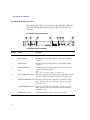
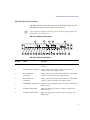
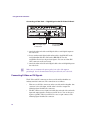
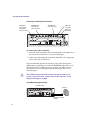
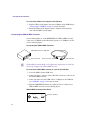
Fader controller connections are shown for both the MCS-3000X and the
FaderMaster Pro (see “JL Cooper MCS-3000X Fader Controller Cabling” on
page 40 and “JL Cooper FaderMaster Pro Fader Controller Cabling” on
page 40). There are two major differences between the two fader controllers:
•
The MCS-3000X has a four-position switchpack that is not on the
FaderMaster Pro.
•
The MIDI IN and MIDI OUT are in opposite positions in the MCS-3000X
and the FaderMaster Pro.
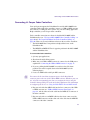
To connect the fader controllers:
1. Quit any open applications.
2. Shut down the Avid editing system.
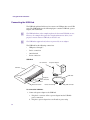
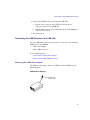
3. Make sure your USB-to-MIDI converter is connected to the USB port as
explained in “Connecting the USB-to-MIDI Converter” on page 38.
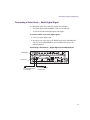
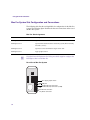
4. If you are cabling the MCS-3000X, set switch 4 to the ON (down)
position. The switch is upside down on the MCS-3000X (see the
following figure).
5. Locate two MIDI cables with 5-pin DIN connectors.
n
You can use the In A and Out A connector pair or the In B and Out B
connector pair on the rear of the USB-to-MIDI converter. Whichever pair you
use, select the corresponding port when you configure the device using the
Controller Settings dialog box in the Avid editing application. For information
on configuring the device, see Using the FaderMaster Pro and MCS-3000X.
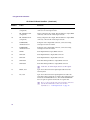
6. Plug one end of the first MIDI cable into the In A connector of the USBto-MIDI converter (see “USB-to-MIDI Converter Front Panel” on
page 41), and the other end of the cable into the MIDI OUT connector of
the fader controller.
7. Plug one end of the second MIDI cable into the Out A connector of the
USB-to-MIDI converter, and the other end of the cable into the MIDI IN
connector of the fader controller.
39