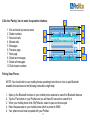
1
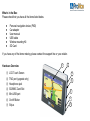
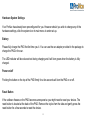
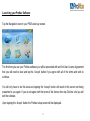
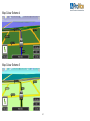
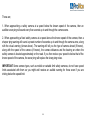
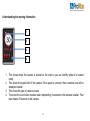
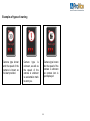
Navigation Software User Manual Model: PNN-200 Contents W HATS IN THE BOX .......................................................... 7 HARDWARE OVERVEIW .................................................... 7 HARDWARE SYSTEM SETTINGS ........................................ 8 Battery Level ............................................................. 8 Power Button ........................................................... 8 Reset Button ............................................................. 8 Volume ...................................................................... 8 Backlight ................................................................... 8 Date, Time& Timezone ............................................. 9 LAUNCHING YOUR PRONAV SOFTWARE .......................... 11 PRONAV SETUP ENTERING VEHICLE DETAILS ................. 12 ProNav Enabled ...................................................... 12 Show Icons on Map ................................................ 13 Preffered HGV Routes ............................................ 14 Gross Weight, Axle Weight, Height ........................ 15 Length, Width, Explosive/Flammable Load ............ 16 LANGUAGE AND COUNTRY OPTIONS ............................... 18 CHOOSE A NAVIGATION MENU ........................................ 19 2 EASY NAVIGATION MENU ............................................... 21 Choose an Address ................................................ 23 Choose a Point of Interest ...................................... 26 POI Library .............................................................. 28 W ARNING AND PENALTY PARKING DATA ......................... 30 FULL NAVIGATION MENU ................................................ 32 Drive To .................................................................. 33 Plan Route .............................................................. 33 Browse Map ............................................................ 34 SELECT PLACE .............................................................. 35 Favourites ............................................................... 36 Town, Street, House ............................................... 37 MULTISTOP ................................................................... 40 PLAN OPTIONS .............................................................. 43 Route Map .............................................................. 43 Route Text .............................................................. 44 Demo Mode ............................................................ 44 3 DRIVE SCREEN AND MAP OPTIONS ................................. 45 Customising Map Display ....................................... 47 Volume .................................................................... 50 Map Key .................................................................. 52 SETUP ........................................................................... 54 SAFETY CAMERA ALERTS ............................................... 63 How the Software Works ........................................ 65 Registering for your Free Six Month Trial ............... 69 FREE 2009 MAP AND TRANSPORT UPDATES ................... 70 BLUETOOTH FUNCTIONS ................................................ 72 Pairing your phone .................................................. 73 MUSIC PLAYER .............................................................. 75 VIDEO PLAYER............................................................... 76 FAQ'S AND SUPPORT INFORMATION ............................... 77 4 IMPORTANT SAFETY NOTICE PLEASE READ CAREFULLY BEFORE COMMENCING USE OF YOUR PRONAV NAVIGATION SOFTWARE Do not place your Personal Navigation Device (“PND”) where it may strike the driver or passengers if the vehicle turns sharply or stops abruptly. Your PND should be installed securely so it will not move and cause a distraction. Cables and hardware should not interfere with driving and use of normal vehicle controls. Try to locate the PND as close to your normal line of sight as possible without obscuring your normal view of the road. Safe control of your vehicle is of paramount importance. Program your destination and configure your chosen drive screen and options before starting your journey. For safety reasons DO NOT interact with your device until you have reached your destination or you have pulled over and it is safe to do so. All routing suggestions are advisory and may not take account of all temporary or permanent traffic control measures or restrictions. Disregard any suggestion that is hazardous, or does not comply with posted road signs or is otherwise illegal. Keep your eyes on the road and comply with all traffic laws at all times. Your personal judgment and common sense should always prevail over any instruction received through the use of this device. Navevo Ltd cannot be held responsible for any loss, damage or harm (direct or otherwise) caused as result of using the software or placing any reliance on the information provided to you while using the software. 5 Prohibited Areas Do not operate your PND in hospitals or near any electrical medical equipment. Do not operate your PND in aircraft. Do not operate while sat in a petrol station forecourt. Battery Your PND uses a Li-ion battery. Do not use it in humid, wet or corrosive environments. Do not operate or store your PND in high temperatures (>60℃) or in direct sun light. Do not pierce or break the battery casing. Failure to follow these cautions will invalidate the warranty and may cause the battery to leak acid, become hot, explode or ignite and cause injury or damage. If you come into contact with leaked battery acid wash the contact area thoroughly and seek medical attention. The Li-ion battery contained in this unit must be recycled or disposed of properly. Do not dispose of in household waste or burn. Please fully charge and discharge the battery 2~3 times while first use to assure longer battery life. 6 What‟s in the Box Please check that you have all the items listed below. Personal navigation device (PND) Car adapter User manual USB cable Window mounting Kit SD Card If you have any of the items missing, please contact the support line or your retailer. 1 Hardware Overview ① ② ③ ④ ⑤ ⑥ ⑦ LCD Touch Screen TMC port (upgrade only) Headphone jack SD/MMC Card Slot Mini USB port On/off Button Stylus 6 2 3 4 5 7 7 Hardware System Settings Your ProNav has already been preconfigured for you. However should you wish to change any of the hardware settings, click the system icon in main menu to enter set-up. Battery Please fully charge the PND the first time you it. You can use the car adapter provided in the package to charge the PND in the car. The LED indicator will be coloured red during charging and it will turn green when the battery is fully charged. Power on/off Pushing the button on the top of the PND firmly for a few seconds will turn the PND on or off. Reset Button If the software freezes or the PND becomes unresponsive you might need to reset your device. The reset button is located at the back of the PND. Remove the stylus from the side and gently press the reset button for a few seconds to reset the device. 8 Volume Click „+‟ or „-„ icon to increase or decrease the speaker volume You can choose to hear sounds for taps by pressing the button Power Status The bar shows current battery power level Click „→‟ or „←‟ icon to set the auto power off time Backlight Click „+‟ or „-„ icon to set brightness level Click „→ „or „← „icon to set the auto light off time 9 Date & Time Tap each icon on the screen to set the date, time and timezone Click „→‟ or „←‟ icon to adjust the up or down Language Click to change the system language Click „→‟ or „←‟ icon to scroll through and select the available languages System Info Click to view information about the system By clicking the calibration button you can also reset the the calibration of the touch screen if it becomes unaligned . 10 Launching your ProNav Software Tap the Navigation icon on your PND‟s start-up screen. The first time you use your ProNav software you will be presented with an End User License Agreement that you will need to read and tap the „Accept‟ button if you agree with all of the terms and wish to continue. You will only have to do this once and tapping the „Accept‟ button will result in this screen not being presented to you again. If you do not agree with the terms of the license then tap „Decline‟ and you will exit the software. Upon tapping the „Accept‟ button the ProNav setup screen will be displayed. 11 ProNav Setup – Entering your Vehicle‟s Details ProNav requires information about your vehicle in order to compare it to the physical and legal road restrictions it holds in its database. This helps the ProNav software determine the most appropriate route for your vehicle to take. The settings are as follows: ProNav Enabled When set to „Yes‟, all of the other settings that you have specified in the ProNav setup screen (height, weight width etc.) will be taken into consideration when determining your route. When set to „No‟, the ProNav software will operate as normal car navigation by ignoring all of the other settings you have specified in ProNav setup. Tapping the button allows you to easily switch between the two modes. 12 Shows Icons on Map When set to „Yes‟, any restriction that relates to your vehicle will be displayed as an icon on the mapping. When set to „No‟, no restriction icons will be shown on the mapping. The icons used are as follows: Height Width Weight Weight Per Axle No Trucks Allowed Flammable/Explosive Goods 13 Length Favour Preferred HGV Routes The ProNav database also includes roads that are preferable for use by Heavy Good Vehicles. When set to „Yes‟, these routes will be used in preference when determining your route. These routes are identified by the following icon: Preferred HGV Routes When set to „No‟, these roads might still be used when determining your route but not necessarily in preference to other roads. Vehicle Class This is the class of vehicle you are driving. Tap the button to select the most appropriate class from the list provided. 14 Gross Weight Tap the button to enter the gross weight of your vehicle. Enter your gross weight by using the keyboard and enter your information just like you would at a cash point. For example, for 32.00 tons enter „3200‟ on the keyboard. Once entered, tap the „GO‟ button with the weight of your vehicle displayed on it. Axle Weight Tap the button to enter the axle weight of your vehicle. Enter your axle weight using the keyboard as you did for Gross Weight and tap the „GO‟ button with the weight of your vehicle displayed on it. Height Tap the button to enter the height of your vehicle. Enter your height using the keyboard. For example for 11‟9” just enter „1190‟ on the keyboard and tap the „GO‟ button with the height of your vehicle displayed on it. Note: You are required to use the down arrow button to see the following menu items. 15 Length Tap the button to enter the length of your vehicle. Enter your length using the keyboard and tap the „GO‟ button with the length of your vehicle displayed on it. Width Tap the button to enter the width of your vehicle. Enter your width using the keyboard and tap the „GO‟ button with the width of your vehicle displayed on it. Explosive / Flammable Load Tap the button and select „Yes‟, if you are carrying explosive or flammable goods to avoid any legal restrictions that apply to this type of hazardous material. Select „No‟, if you are carrying any other type of goods. Once you have completed the ProNav setup, tap the return button in the bottom right hand corner of the screen to complete navigation setup. 16 IMPORTANT: You will be shown the ProNav setup screen each and every time you start the software. Please check carefully that the details displayed in the ProNav setup screen match that of the vehicle you are driving. Any failure to do so could mean that an incorrect route is determined for your vehicle. 17 ProNav Setup – Specifying Language and Country Options Choose your language Your ProNav software comes with a choice of languages. If you require English please select „English’ from the list. If you require another language you can select it by tapping the appropriate button. You will only be required to do this once but you can change your selection later if you wish, please see Setup on page 54 for more details. Read the Safety Notice Please read the safety instructions and if you accept the terms and conditions, tap the „Accept‟ button to go to the Country Selection screen. Selecting „Decline‟ will result in the software exiting. Please note that you will be required to accept the safety notice each and every time that use your ProNav software. Choose your Country Finally select the Country you require by tapping the appropriate button. You will only be required to do this once but you can change your selection later if you wish. You have now completed setup of your ProNav software and the Full Navigation Menu will now be displayed. 18 Choosing a Navigation Menu Your ProNav software has two menu modes available for you to choose from. 1. Full Navigation Menu This is a more advanced menu that provides you with a number of advanced options including route planning, browse map and storing favourite locations. Full details of this menu are provided on page 32. When you first start your software, the Full Navigation Menu is the default setting but you can easily change which navigation menu you require by following the instruction in Setup on page 54. 19 2. Easy Navigation Menu This menu provides you with a simple user interface to help you navigate to a location quickly and easily in a few easy steps. Full details of this menu are provided on the next page. 20 Easy Navigation Menu Where would you like to go… An Address? Select this if you wish to drive to a particular country, town, street, house number or postcode. See „Address‟ in Choosing a Destination in the next section. 21 A Point of Interest? Select this if you wish to drive to a point of interest such as a petrol station or restaurant. See „POI‟ in Choosing a Destination in the next section. Or Just Drive? When the GPS is connected, tapping this button will automatically show a map with the location of the vehicle in the center of the screen. (Note: the GPS may take a couple of minutes to establish your location). Setup Tap this button to enter Setup. Please see page 54 for more details. Exit Tap this button to exit the software. 22 Easy Mode - Choosing a Destination - Address Find your address by starting with… A Postcode? Tapping this button will open the numeric keyboard so that you can start entering a postcode. As you start to type the postcode, it will select the most relevant matches from the ProNav software database. Select your postcode by tapping the „GO‟ button containing the postcode you require. Entering more characters increases the probability of finding the correct postcode. 23 If required use the down button located to the right of the results to view a longer list of matching results. Once you have found your match, tap the relevant „GO‟ button. A Town in - - - ? Tapping this button allows you to open the Town Select page. Start typing the name of the city or town you require by using the keyboard. Once you have found your destination, tap the relevant „GO‟ button and you will then be offered an opportunity to search for a specific street, POI or just navigate to the town centre. Please see page 58 for information on the Help Tips feature 24 Another Country? Tapping this button will open the Select Region page. The countries are listed alphabetically, so use the up and down buttons located to the right of the list to view all the countries available. Once you have found the country you require tap the relevant button and you will then be offered an opportunity to search for a specific town, street and house number within that country. 25 Easy Mode - Choosing a Destination – POI Find your POI by starting with… A Postcode? By tapping this button you can enter a postcode as described in the previous section. Once you have selected your required postcode you will then be able to select a point of interest type from the POI Library (see page 28). 26 Your current location? Tapping this button will automatically obtain your current location. Once your location has been established you will then be able to select a point of interest type from the POI Library (see next page) (Note: the GPS may take a couple of minutes to establish your location). Another Country? Tapping this button will open the Select Region page as described in the previous section. Once you have selected your required Country, you will then need to search for a city or town and once that is selected, you will be able to select a point of interest type from the POI Library (see next page). 27 POI Library A comprehensive point of interest library is provided so you can easily locate POI‟s (Points of Interest) based on the type of business, service or facilities available. When the POI library opens you will see a list of POI types that are available. They are listed with your favourite POI‟s first, with „other POI‟s‟ listed further down. Using the up and down arrow to scroll through the list. 28 Please Note: Only POI‟s that have been designated your „Favourites‟ will be displayed on the mapping. For more information on how to set up your „Favourite‟ POI‟s please go to Setup on page 54. Select from the list the desired POI type. Once the POI type has been selected, a list of relevant POI‟s is provided in order of distance nearest to the location. Use the up and down buttons to the right of the list to find and tap the desired POI. Once selected, you will start navigating. 29 ProNav Warning and Parking Penalty Data Your ProNav software also includes the following types of data that can be displayed on the mapping: Warning Data Crosswinds Steep Hills/Descents Sharp Curves London Parking Penalty Data Parking Pips Penalty Charge Notice Hotspots 30 Risk of Grounding Warning and London Parking Penalty data is provided in the same way as POI data (see previous page) so it will only be displayed on the mapping if it has been selected as one of your „Favourite‟ POI‟s‟. When selected as a Favourite POI, an icon will appear on the mapping located at the approximate point where a risk might be present. For more information on how to set up your „Favourite‟ POI‟s please go to Setup on page 54. Please Note: Route guidance is in no way influenced by the warning and parking penalty data and it is provided to you for guidance only. It is entirely your decision about what actions you decide take, or not, in relation to the information being provided to you. 31 Full Navigation Mode Follow Map Tapping the „Follow Map‟ button will automatically show a map with the location of the vehicle in the center of the screen. (Note: the GPS may take a couple of minutes to establish your location). 32 Drive To Tapping the 'Drive To' button takes you to the Select Place menu. This allows you to set your end point/destination. (See Select Place on page 35) When an end point has been selected and a GPS signal received, your route will be calculated automatically. Plan Route Tapping this button takes you to the Plan Route menu. From this menu you can plan a route with or without the GPS connected. 33 To the right of the „Start‟ button is the <current position>. If you wish to plan the journey from the current position you do not need to change the „Start‟ point. To change your start or end location, tap the 'Start or End' button. This takes you to the Select Place screen, which has several options for selecting a start or end point. If you wish to save a location as a favourite, just tap the star button next to the locations name. Browse Map Tapping the 'Browse Map' button will take you to the map screen. At the side of the screen are four buttons, the first two are for adjustment of the map scale allowing you to, zoom out, and zoom in. It is also possible to pan around the map by dragging the map across the screen using your finger or the stylus. Next there is the magnifying glass button (which takes you to the Locate on Map screen and allows you to zoom to a Town, Street, recent destination, favorite location or POI. The Back button takes you back to the previous screen. You can also press and hold on the map to bring up an options menu. You can then set a start or end point or add a favorite directly from the map. Points of Interest will also appear on the map when you zoom in to a suitable scale. Setup Please see the Setup section on page 54 of this guide. 34 Select Place Screen This screen allows you to define your start and end locations. Recent Tapping this button displays a list of the 20 most recent places that have been selected as start or end points. 35 Favourites Tapping this button displays a list of your selected favourites. You can add to this list from the Plan Route menu, by tapping the „add to favourites‟ button (small star) if available. If you wish to change one of the entries, tap the „Change‟ button, which takes you to a new page Add Favourites. You then have the ability to delete entries by tapping the „Remove‟ button, or adding a new favourite by selecting a place from the 'Recent‟, „Browse Map', 'Town Street', or 'More Places' options. This will then save to your favourites. Browse Map Selecting this option allows the user to explore the map and search for locations, as previously described on page 34. Town, Street Tapping this button will take you to the Town selection page. You can then enter a city or town and as you type the name, the software will start selecting the most relevant matches from the ProNav software 36 database. Entering more characters increases the probability of selecting the correct place. If required, the suggested options can be ignored and the full place name typed in. If there are a number of places with the same name you can use the buttons on the right to scroll up and down the list until you find your required location. When your destination is listed, tap the „GO‟ button containing the destinations name. You are then taken to a second screen titled Street which allows you to select whether you would like to either enter a street name, route to a town center, or a POI. 37 Street – If you know the name of the street use the keyboard to start typing the name of the street in much the same way as described above for the town selection screen. When the street is listed, tap the „GO‟ button containing the street name required. th Note: If you are searching for a street which has a direction as part of the name e.g. North 49 Street, th start you search only with the street name „49 Street and when the results appear you will be giving the option to choose either the North or South version of the street. Long streets may be broken up into several sections and so appear more than once in the list. House Number – Once you have selected your street name you will be given the option to choose a house number or POI near that street. To select a house number just enter the number using the numeric keyboard and when it appears, press the relevant „GO‟ button. If you do not require a house number, just tap the „Space‟ button and then tap the empty „Go‟ button above. For a POI near the street, just tap the POI button to open the POI Library (see page 28). 38 Point of Interest (POI) Tapping this button will bring up the POI Library, which lists all of the Points of Interest available. For more information see page 28. Select from the list the desired POI type, then type the name of your desired POI. Once you have found your desired POI tap the relevant „GO‟ button and the ProNav software will then start navigating. 39 Multistop A feature of your ProNav software is that you can input a number of destinations as part of a journey. This saves you time by allowing you to input up to six via locations between your start and end point. Multistop can only be accessed via the Full Navigation Menu and the Plan Route button. Multistop is dependant on you knowing the sequence of destinations you wish to visit and inputting those in sequence in Plan Route. If your previous route is still being displayed, tap the „Clear‟ button to start a new route. Next enter your start and end destinations first. Then tap the „Add Via‟ button to enter the first location you wish to visit on your journey. 40 You can select your locations using Town, Street, POI, Recent, Favourites or Postcode; however the Browse Map feature will not support a selection of a Multistop location. To keep adding more locations repeat this process. If once you have made your selections you wish to change any of the locations, just tap the relevant „Via‟ button next to the location you wish to change and select a new location. If you wish to delete a location in the list, just tap the „Del Via‟ button and then tap the „Via‟ button next to the location you wish to delete. The location will then be removed from the list. Once you have added three locations, you will need to use the up and down arrows on the right of the screen to access the „Add Via‟ and „Del Via‟ buttons and to see other subsequent via locations you have added. When you have finished entering all your locations tap the „Options‟ button to access the Plan Options screen. You can use any of the options to show the first leg of your journey. The ProNav software will not show your entire journey, just each leg at a time. To start driving your first leg of your journey press the „Drive‟ button and the ProNav software will calculate the route to your first destination and commence navigation. When you have reached your first destination, tap the Drive Screen to open the Drive Options Screen (see page 49 for more information) and tap „Stop Drive‟. You will then be presented with a confirmation if you wish to go to the next leg of your journey. 41 If you select „No‟ you will return to the Plan Route screen If you select „Yes‟, you will then go to the Plan Options screen. At this point your ProNav software has been designed that if you turn off your PND off using the power button (located on the top of the unit), the next leg of your route will be stored. When you are ready to continue to your next location, turn the PND back on and when the Plan Options screen is displayed, tap the „Drive‟ button. The ProNav software will now calculate the route to your next destination and commence navigation. Repeat this process throughout your journey. 42 Plan Options In the Plan Route screen, once a start point has been entered (or a GPS location is acquired) and an end point has been set, tap the „Options‟ button. This will take you to the Plan Options screen. Route Map By tapping „Route Map‟ an overview map appears showing your route, indicating the start and end points. This map can be zoomed and panned around. If you wish to adjust the start or end point, press and hold the stylus on the map at the desired location. This will then bring up a menu allowing you to set a new start or end point. 43 Route Text The „Route Text‟ button will show a simple text list showing an accumulative mileage on the left with direction arrows, a road number and name on the right. Use the „up‟ and „down‟ arrow buttons to read the full route. Demo Mode If the „Demo‟ button is tapped a demonstration of the route starts. Tapping on the map will bring up the Drive Options menu (see Drive Options on page 49 for more information). Clear Route This allows the user to clear an existing route. 44 The Drive Screen 3D map display is the default view. 2D map display is optional 45 Guide mode (no mapping but with text instructions) is optional 46 Customising Map Mode Display In both 2D and 3D map modes, a variety of route information can be displayed in the information boxes. Apart from the box directly below the turn direction indicator (shows roundabout and turn icons), you can choose which information to display in any box, by tapping the centre of a box. When the screen is tapped in any box area, a new screen appears titled Select Info. From this screen you can choose what information to display in each box by selecting it from the list. Centre Box Current Road Next Road 3 Side Boxes Speed & Direction GPS - Satfix Estimated Time of Arrival Estimated Journey Time Distance to go Show no Information 47 Battery Level Indicator This is shown on the Drive Screen so you can monitor the status of the battery External Power 100% Charged 66% Power Remaining 33% Power Remaining Battery Critical When the battery reaches critical, the battery icon with the exclamation mark will be shown on all of ProNav menu screens. You should try and charge the battery as soon as possible. Please Note: stored information such as settings, recent and favorite locations will not be lost if the unit loses total power. These are stored on the memory card and will not be affected by power loss. Sometimes following full power loss the GPS takes slightly longer to acquire a signal, similar to the first time you used your unit. This is normal. 48 Drive Options The Drive Options screen can be accessed by tapping on the top two thirds of the map on the Drive Screen. Night Colors This changes the background colour of the map and guide screen for better visibility at night. It also reduces glare. 49 Route Map By tapping „Route Map‟ an overview map appears showing your route, indicating the start and end points. This map can be zoomed and panned around. If you wish to adjust the start or end point, press and hold the stylus on the map at the desired location. This will then bring up a menu allowing you to set a new start or end point. Route Text The „Route Text‟ button will show a simple text list showing an accumulative mileage on the left with direction arrows, a road number and name on the right. Use the „up‟ and „down‟ arrow buttons to read the full route. Volume: 1/2/3/Mute Tap the „Volume‟ button if you wish to change the volume. By repeatedly tapping the button you will be able to adjust the level from 1 (lowest) to 3 (highest) or mute the sound altogether. Please Note: Even with „Mute‟ selected the safety camera warning will still provide audible warnings. To turn off safety camera audible warnings completely, please see page 68 for details. 50 Stop This stops the Drive Mode and returns the user to the main menu. Additional options can be accessed using the „More Options‟ button. Guide Mode / Map Mode This button allows you to change the navigation screen between Map Mode and the Guide Mode. 2D/3D Display You can select the map view to display in either 2D or 3D map mode, tap on the display button to change. 51 Map key The map key will provide you with detailed information about the icons used for restrictions, warnings and parking. Tap the back arrow button to return to the Drive Options screen. Alternate Tapping this button takes you to a further screen called Avoid/Alternate which displays the following options: 52 1 Mile This button can only be used when a route has been calculated, and when tapped allows the user to avoid the current road within a mile of present GPS position (if possible to do so), for example to avoid congestion or road works. 5 miles This button is as above but the radius for an alternative route is increased to 5 miles of the current point (if possible to do so). Named roads This button when tapped displays all the road numbers on your route. The user then has the option to select a particular road that they wish to avoid and the software will then recalculate the route avoiding the selected road. Original This button allows the user to return to the original route that was calculated if the user has selected any of the alternate options above. 53 Setup Tapping the 'Setup' button takes you to the Setup main menu, which has several options: GPS Selecting this option displays GPS signal status. Current Position Selecting this option will provide you with information relating to you current position including road, heading and coordinates. You can give this information to your breakdown service provider and they might be able locate you more easily as a result. POI Selecting this option allows you to enable which POI types are shown as „Your Favourites‟. Only POI‟s you have selected as Favourites will be displayed on the mapping. You can select any POI as a favorite by simply by tapping it to tick the box and deselect it by tapping it again. When you exit the POI section your changes will be saved. Safety Cameras See page 63 for more details 54 Time Selecting this option will allow you to set the international time zone that you are located in. If the software is set to GPS Time it will acquire its date and time information automatically from the GPS satellite. Switching it to Trust Device Time means that you will need to set the date and time yourself and you should refer to the hardware guide for instructions. ProNav This will allow you to change the ProNav settings and your vehicle details. Please see page 12 for more details. Language This will allow you to change the language of the ProNav software. Upon selecting the language the menu, text and voice instructions will change accordingly. About Provides the software version information 55 Tap the down arrow on the right of the screen to view more options. Route Options Route Type Select required type of routing: Fastest Route Tapping this box provides the fastest route Prefer Main Roads Tapping this box provides a route which prefers use of motorways and main roads. Avoid Motorway Tapping this box provides a route which avoids Motorways Shortest Distance Tapping this box provides the shortest route measured by driving distance Interface Mode Allows you to select either the Easy or Full menu modes (see page 14 for details). 56 Avoid Tolls Tap this box to avoid tolls on your route. Should a start or end point be selected that is on a toll road this will be ignored. Show key roads Tapping this box lists all the classified roads the route will take after your route is calculated. Map/Drive Options 2D/3D Select the preferred view Miles and KM Tap the appropriate box to select whether you would like your distances shown in miles or km. Road Names and Numbers Select whether you prefer to see road names or road numbers on the mapping or in text directions. The default is road names. 57 Hide Help Tips Your ProNav software is equipped with an on-screen help guide to give tips when you in-put an address. When you first use your ProNav software, the help feature is disabled, un-tick the box to enable help tips. To hide the help tips tick the box in the bottom left hand corner. To enable help tips, go to Setup and scroll down to the „Hide Help Tips‟ button and un-tick the button. 58 Favourites Please see page 36 for more information. Colour Scheme There are five colour schemes for you to choose from. Just tap the button and choose from the list to enable the colour scheme you require. The current colour scheme that is being used is displayed on the „Colour Scheme‟ button. Map Colour Scheme 1 59 Map Colour Scheme 2 Map Colour Scheme 3 60 Map Colour Scheme 4 Map Colour Scheme 5 61 Voice Select from the available voices by tapping the box next to your selection. Volume Select the volume level (3 is loudest). Volume can also be adjusted via the „Drive Options‟ screens (see page 49). 62 Safety Cameras Your ProNav software also comes with safety camera warning software. This will provide you with both audible and visual alerts for fixed safety cameras along your route. How the safety camera software works The software will automatically provide intelligent audible alerts based on the speed that you are traveling when you are approaching a safety camera. 63 These are; 1. When approaching a safety camera at a speed below the known speed of the camera, then an audible sonar ping will sound every five seconds up to and through the camera zone. 2. When approaching a fixed safety camera at a speed above the known speed of the camera, then a sharper ping warning will sound a preset number of seconds up to and through the camera zone, along with the visual warning (shown above). The warning will tell you the type of camera ahead (if known), along with the speed of the camera (if known), the camera distances and the bearing on where the safety camera is located approximately on the road. If you then reduce your speed to below that of the known speed of the camera, the sonar ping will replace the sharp ping noise. IMPORTANT Some camera types, such as mobile or variable limit safety cameras, do not have speed limits associated with them so you might well receive an audible warning for those even if you are driving below the speed limit. 64 Understanding the warning information 1 2 3 4 1. This shows where the camera is located on the road so you can identify where it is located easily. 2. This shows the speed limit of the camera. If the speed is unknown then a camera icon will be displayed instead. 3. This shows the type of camera or zone 4. These are the count down markers each representing 5 seconds to the cameras location. Four bars means 20 seconds to the camera. 65 Examples of types of warning Camera type known and the speed of the camera is known so full alert provided. Camera type known but the speed of the camera is unknown so camera icon is just displayed Camera type is unknown, as well as the speed of the camera is unknown so exclamation mark to warn you. 66 Setting the options for safety cameras There are a number of options available when using the safety camera software and these are located under „Setup‟, „Safety Cameras‟ in the Full Navigation mode. The options available are: Enabled / Disabled This will turn the safety camera software on or off. Please note that if this is set to „Disabled‟ you will not receive any visual or audible alerts for any safety cameras on your route. Tap the button to change. Warn At 5 Secs This will allow you to change the time that you receive the first warning before you reach a safety camera. The options are „No Warning‟, „Warn at 5 Seconds‟, „Warn at 10 Seconds‟, „Warn at 15 Seconds‟ and „Warn at 20 Seconds‟. 67 Smart Warnings When this is set to „ON,‟ this will warn you about safety cameras on your side of the road only. When set to „OFF‟ the safety camera software will warn you about cameras on both sides of the road. Show on Map When this is enabled, the safety camera icon depicting the location of a safety camera will be shown on your map while you drive. To disable please tap the button to select „Don‟t Show on Map‟ Warning Sounds This will turn the audible alerts on or off. Tapping the button will change it accordingly. View Info This will tell you when your subscription is due to expire and the date that your safety camera database was created. Click OK to return. 68 Registering for your Free Six Month Safety Camera Trial From when you first use your ProNav software you will have an initial 14 days free trial to use the safety camera alerts. To receive your full six months free trial you will need to go to www.pronav.co.uk to register and download a license to upgrade your software to the full six month free trial version. Please Note: After your six month trial has expired, the safety camera software and database will be disabled until such time you purchase a full license (please see details below). Upgrade to a full license to get monthly camera location updates as well Don‟t get caught out! From as little as £29.95 per year you can get a monthly update of the latest safety camera locations. Please go to www.pronav.co.uk for more information and to purchase an upgrade. 69 Registering for your Free 2009 Map and Transport Data Updates When you register for your free six month safety camera trial you will automatically be registered for your free 2009 map and transport data updates. Updates will be made available approximately at the end of every quarter throughout 2009 and we will notify you automatically when an update is available for you to download. It is important that you provide us with a correct email address when registering, so we can notify you when the updates are available. The updates will be made available to download free of charge via the web from www.pronav.co.uk. If you would prefer to receive the update on a CDROM, one will be available at a cost of £4.99 to cover processing, postage and packing. Details about purchasing the update on CDROM will be provided on the website at the time the update is made available to download. Terms and Conditions Customer name, address, valid email address and serial number are required for registration. Any incomplete, false or incorrect information will void registration. The approximately size of the map and transport data update will be 150MB and download times will vary depending on your connection speed. Any and all costs, of whatever nature, that relate to downloading the updates, including but not limited to broadband connection costs, shall be borne by you, the customer. 70 Free map and transport updates are only available to the original purchaser of the ProNav software and subject to registration. Navevo Ltd reserves the right to request proof of purchase if it deems it necessary to determine a customer as the original purchaser of the ProNav software. The map and transport data updates are exclusively for use with the ProNav software and will only be provided free of charge, up to and including, NAVTEQ‟s Quarter 2 2009 data release. Thereafter all other updates will be chargeable. The map and transport data updates are provided on „as is‟ basis and Navevo Ltd and its suppliers make no guarantees, representations or warranties of any kind, express or implied, arising by law or otherwise or that the updates, or the server from which they are obtained, will be uninterrupted or error-free. 71 Bluetooth 4 1 2 1 Exit and back to the Main Menu 2 Current Status 3 Phone Keyboard 4 Recent call list 5 Last call 6 Pairing with other Bluetooth devices 7 Setting (Attribute) 8 Paired devices 3 5 6 8 7 Click the „Phone Keyboard‟ icon to enter its operation interface 1 Exit and back to previous menu 2 Input display area 3 Keyboard 4 Volume 5 Call 6 Backspace 7 Hangup 1 2 4 5 3 6 7 72 Click the „Pairing‟ icon to enter its operation interface 3 1 1 Exit and back to previous menu 2 Dialed numbers 3 Received calls 4 Missed calls 5 Messages 6 Previous page 7 Next page 8 Delete one message 9 Delete all messages 10 Dial chosen numbers 2 5 6 9 7 8 10 0 Pairing Your Phone NOTE: You should refer to use mobile phones operating instructions on how to pair Bluetooth enabled devices however the following instructions might help. 1. 2. 3. 4. 5. 4 Open up the Bluetooth function on your mobile phone and start a search for Bluetooth devices Tap the „Pair button on your ProNav and you will have 60 seconds to search for it When your mobile phone finds „MyPvDevice‟ select to pair and choose pair Enter the passcode on your mobile phone which is preset to „8888‟ Your phone should now be paired with your ProNav 73 You can change the password is you wish by clicking the „Attribute‟ button 1 1 Exit and back to previous menu 2 Tap the keyboard icon to input a new password 2 Music & Videos You can copy music and videos to your SD card. To do this you will need a memory card reader and you must take care not to delete overwrite any of the ProNav files on the card. 74 Music 1 1 Exit and back to previous menu 2 Previous page 3 Next page 4 Previous folder 2 3 4 Double click one music file to enter its operation interface. 1 1 Exit and back to previous menu 2 Exit and back to file list 3 Previous file 4 Next file 5 Play/Pause 6 Stop 7 Rate of process 8 Volume 2 5 4 3 6 7 8 75 Video 1 2 1 Exit and back to previous menu 2 Previous page 3 Next page 4 Previous folder 3 4 Double click one file to enter its operation interface. 1 1 Exit and back to previous menu 2 Play/Pause 3 Stop 4 Fast Play 5 Previous folder 6 Rate of process 7 Volume 2 3 4 6 1 5 7 76 Frequently Asked Questions I can‟t find an address? Please make sure you have correctly spelt your entry. If you do not know how an ad dress is spelt correctly, simply enter the first few letters of the address, you know of sure (e.g., “Leic” for Leicester). Then browse the results list and look for the address. Also make sure the city in which you are looking for an address is correct. Sometimes the official postal address differs from the address you are looking for. In that case, search for a known address nearby and browse the map. I am experiencing problems getting a GPS fix? If you have problems getting a satellite fix with GPS(you can see how many satellites are being received by going to the main menu and selecting GPS receiver), please make sure you are outside and the GPS antenna has good „visibility‟ to the open sky. Why are some bridge heights and other restrictions not shown? ProNav uses the most comprehensive transport data available however there are still a number of sites that have not yet been surveyed. Please be patient, the free map and transport data updates we are providing with ProNav should, in most cases, fix any issues in time. Where can I get technical support? Please visit www.pronav.co.uk for further support information and more detailed FAQ‟s. 77