1
1.3 Installing the Carousel Autosampler
Before You Begin
If the spectrometer is a UNITYINOVA, the sample detection
circuit on the Magnet/Sample Regulation (MSR) board
(Part No. 01-902030-02) must be adjusted to ensure
correct sample detection when using the Carousel
autosampler. The following steps describe how to adjust
the sample detection circuit.
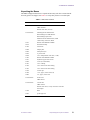
MAGNET/
SAMPLE
REGULATION
READY
AP
FAIL
ABORT
RESET
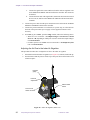
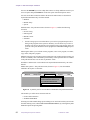
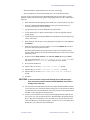
1.
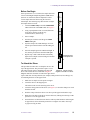
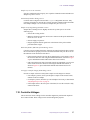
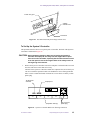
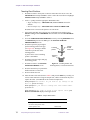
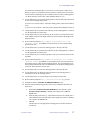
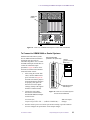
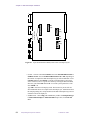
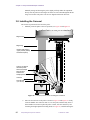
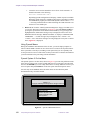
Locate the PRES ADJ pot and the SAMP PRES
LED on the front of the MSR board. See Figure 3.
2.
Using a pot adjustment tool or a small, flat-head
screwdriver, turn the pot all the way
counterclockwise, until it stops.
1
2
3
3.
Insert a sample.
4.
Turn the pot clockwise until the green SAMP
PRES LED lights.
5.
Eject the sample. The LED should go off. If not,
turn the pot counterclockwise until the LED goes
off.
6.
Insert the sample again. The LED should light. If
not, turn the pot clockwise until the LED lights.
7.
Repeat steps 5 and 6 until the LED consistently
lights when a sample is inserted and goes off when
a sample is ejected.
M
C
U
J4
J
1
0
J
3
SP
AR
ME
PS
Sample detection
circuit adjustment
PA
RD
EJ
S
01902030
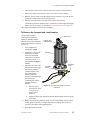
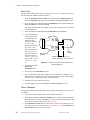
To Attach the Driver
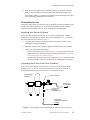
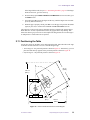
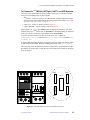
This procedure describes how to clamp the driver to the
top of the upper barrel. The procedure requires a 5/32inch Allen wrench, which is included in the bag with
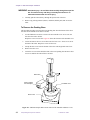
Figure 3. Magnet/Sample
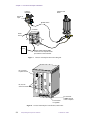
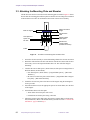
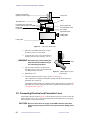
driver. The carousel driver is illustrated in Figure 4.
Regulation Board Front Panel
Magnets must have more than 1/2-inch of the upper barrel
top free and clear from any obstacles (for example, PFG junction box, hose fittings, etc.)
for mounting the driver to the upper barrel.
1.
Make sure no sample is in the probe or magnet.
2.
Locate the driver in the shipping box.
The Allen wrench is in the same bag as the driver.
3.
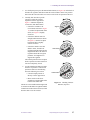
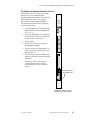
Locate the clamp portion of the driver (see Figure 4). Loosen the clamp screw with
the Allen wrench.
4.
Slide the clamp of the driver down over the top of the upper barrel until it stops.
5.
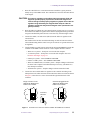
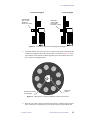
Rotate the white disk on the driver counter-clockwise (looking from the top) so that
position 9 is over the upper barrel.
6.
Orient the driver so that it does not interfere with any other hardware on the magnet
or upper barrel, such as the PFG junction box or magnet vent stacks. Also keep
cryogen servicing in mind.
01-999042-00 D0800
Sample Management Systems Installation
19