1
DIRECTUS GPS Introduction
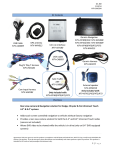
Product Appearance
GPS NAVIGATION
Insert supplied SD memory card with map data content, choose
navigation, then operate according to menu to start navigation.
NAVIGATION FUNCTION
This unit receives signals from satellites with the GPS receiver to
pinpoint and display your location on the map. The system will
calculate the best route automatically after the user sets the
destination. Please refer to the tutorial included in your navigation
software for further instructions.
ABOUT MAP DATA
The device uses the latest map data for navigation. Please be sure to
check your local rules and regulations of the road as they may have
changed without the knowledge of the map data supplier.
1. Handsfree Answer
2. Handsfree End Call
3. Power On/Off
4. Handsfree Shortcut Key
5. Main Menu
Basic Operation
Turn ON car ignition, GPS mirror will automatically power on.
When car ignition is turned OFF GPS mirror will automatically
power off.
NAVIGATION
This GPS device supplies the suggested routing for reference only.
RECEIVING GPS SIGNAL
Receiving a GPS signal can be affected by many variables (examples:
tunnels, tall buildings, underground parking structures and solar flares)
Please allow up to 20 minutes for GPS reception.
GPS ACCURACY
The accuracy of the GPS system is usually within 30 feet.
4
Settings: Navigation, Volume, Languages etc.
Navigation: Start Navigation
Bluetooth: Pair Bluetooth Phone, Hands-free calling
5