1
Page |2
Table of Contents
A. Installing the FFGSM Application
3
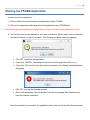
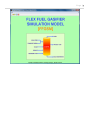
B. Starting the FFGSM Application
4
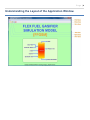
C. Understanding the Layout of the Application Window
6
a. File Menu
7
i. New Case
7
ii. Open Case
7
iii. Run Case
9
iv. Save Case
10
v. Close Case
12
vi. Exit
12
D. Starting a New Project
13
E. Some Common Error Flags
14
F. Understanding the Tabs
16
a. Model Tab
16
b. Gasifier Tab
18
c. Solid Feed Tab
19
i. Feed Input Tab
19
ii. Fines & Solid Discharges Tab
23
d. Transport Media Tab
25
e. Steam Tab
27
f.
28
Oxidant Tab
g. Secondary Gas Tab
30
h. Results Tab
31
G. Loading Data from a file into the FFGSM Application
34
H. Saving Data from the FFGSM Application to an MS-Excel File
37
I. Formal Report Sheet
38