1
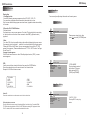
Name and function of each part
Disc Information
DVD features
DVD disc provide high-resolution images with high- quality sound and surround
sound effects. This DVD player can play not only DVD discs of various versions,
but also S-VCD ,VCD , audio CD and MP3 discs.
Each disc only plays the information saved in it, and some functions cannot be
utilized.
UNIT
3 5
2 4 6 7
8
91
12
1
Discs that cannot be played
DVD-RW, DVD- REM, CD-ROM, CD- EXTRA discs cannot be played on this unit. Also,
a CD or a CD-RW which was recorded on special software cannot be played.
Region code
Your DVD player is designed and manufactured to region management information
that is recorded on a DVD disc. The region number of this DVD Player is 1 . This DVD
player plays free code also.
10
11
Copyright protection.
This product incorporates copyright protection technology that is protected by methods
claims of certain U.S. patents and other intellectual property rights owned by the
Macrovision Corporation and other rights.Owner's use of this copyright protection
technology must be authorized by the Macrovision Corporation, and is intended for
home and other limited viewing uses only unless otherwise authorized by the
Macrovision Corportation.
How to handle the disc
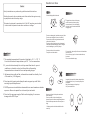
Don't touch the shiny side of the disc ( the side with the embedded information ).
Don't stick a lable or a glue - based note on either side of the disc. Don't use discs
that have glue or a damaged gluey label- it might result in damage to your DVD player,
Don't put discs in the sunshine. Park your car in the shade.
Caution
Wipe softly with a wet cloth and then with a try one.
Before playback, wipe the disc outward from the center with a clean cloth.
Do not use any type of solvent such as thinner, benzene, coommercially - available
cleanners or antistatic spray.
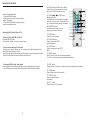
1. IR transmitter/Dome light
2.Up button
3.PLAY/PAUSE button
4.Menu button
5.EJECT button
6.Down button
7.Dome light switch
8.Power led
9.Remote control
10.Power button
11.Monitor release button
12.Disc tray
To avoid damaging your DVD player, don't use a scratched disc.
13
14
15
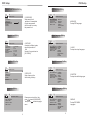
13.Right audio output
14
THE BACK PANEL
14.Left audio output
3
15.video output