1
DNP/SK25 - First Steps
2.2
Connecting USB Cable and Power-up the Starter Kit
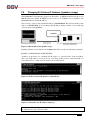
Please setup the Ethernet link first (see chapter 2.1). Then connect the PC and the
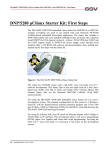
DNP/SK25 with the USB cable. Use the USB device port of the DNP/SK25. This USB connection provides the DNP/SK25 with power.
Figure 2: Power supply for the Evaluation Board
Directly after connecting the PC with the DNP/SK25 via USB, the boot process of the
DNP/9200 Linux begins. If the PC is shut down, the USB-based power supply will be
switched off.
Alternatively it is possible to use a 5 VDC power supply with a 5.5 mm x 2.5 mm jack plug
to provide the DNP/SK25 with power.
CAUTION: Providing the DNP/SK25 with a voltage higher than the regular 5 VDC ±10%
could resolve in damaged board components!
Do not connect both, the USB cable and the power supply, at the same time with the
DNP/SK25! This could resolve in damaged board components!
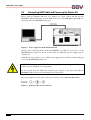
Please pay attention to the polarity of the power connector: the + pole is in the center!
Figure 3: Polarity of the power connector
6
SSV EMBEDDED SYSTEMS