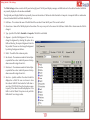
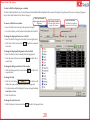
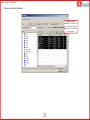
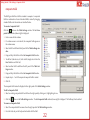
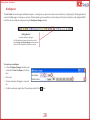
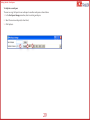
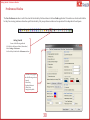
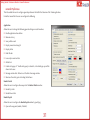
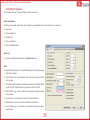
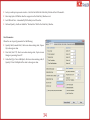
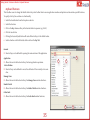
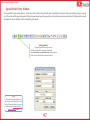
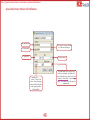
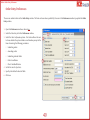
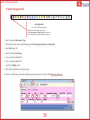
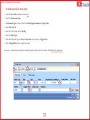
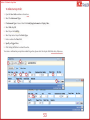
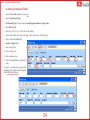
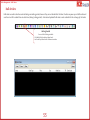
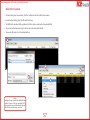
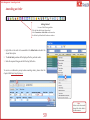
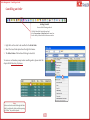
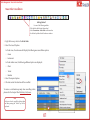
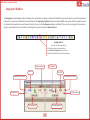
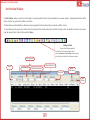
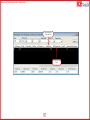
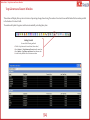
1
Version 1.8.1 (Update for 1.2.3.0) Information contained in this User Manual is proprietary to Millennium IT (Software) Limited and is confidential. It shall not be reproduced or disclosed in whole or in part to any party (other than to any individual who has a need to peruse the content of this document in connection with the purpose for which it is submitted) or used for any purpose other than the purpose for which it is submitted, without the written approval of Millennium IT (Software) Limited. Contents Introduction6 About Millennium Exchange™ Introduction to Ace Trader 7 7 Order Entry Preferences 33 Keyboard Shortcuts 35 Client Codes/Snap Quote Symbols 36 Documentation Updates and Feedback 8 Concepts37 Getting Started 9 Index of Concepts Digital User Manual (PDF) 10 The Login Screen 11 Order Entry Window 38 Orders39 40 Changing the Password 12 Field Descriptions 41 Editing a User Environment 13 Snap Quote 43 Basic Interface Operation Locking the Workstation 14 Bracket Orders Window 44 16 Bracket Order Window Field Definitions 45 Common Right-Click Options 17 Linked Order Window Field Definitions 46 Table Settings 18 Spread Order Entry Window Composite Fields 22 Gradient Color 23 Save as Default 24 Profiles Last Seen Profile To Create a New Portfolio General Preferences Order Entry Preferences 48 49 To Submit a Regular Order 50 To Submit an All Or None Order 51 26 To Submit a Good Till Date Order 52 27 To Submit a Stop Order 53 To Submit a Minimum Fill Order 54 25 Workspaces28 Preferences Window Spread Order Entry Window Field Definitions 47 30 Bulk Orders 31 Submitting and Saving Offline Orders 55 56 Bulk Order Execution Order Management 57 58 Market Watch Window Right-Click Menu 80 Default Fields 82 Amending an Order 59 Cancelling an Order 60 Graph Window 61 Overview of the Graph Window Mass Order Cancellation Contracts62 Contract Selector Window 63 Contract Information Window 65 Default Fields Contract List Window Default Fields Blocked Contract List 66 67 68 69 Market Data 70 Order Book Window 71 Filters and Field Settings 72 Default Fields 73 Alternate Spot Price 88 Net Position Window 89 Default Fields The Ticker Ticker Settings Top Gainers and Losers Window Default Fields Manage Users Window Field Definitions Spread Window Adding New Instruments to the Spread 75 Trader Margins Window Invoking the Spread Order Entry Window Trader Margins window - Field Definitions 77 Client Margins Window 78 86 Snap Quote Window My Trades Window Default Fields 85 87 74 Most Active Contracts window 84 Message Log Window Market Depth Window Filters76 79 Client Margins window - Field Definitions 90 92 93 94 95 96 97 98 99 100 101 102 103 104 Margin Watch Window Margin Watch window - Field Definitions 105 106 Miscellaneous107 Trades/Orders Backup 108 Save to a Text File 109 View the Order History 110 Default Shortcut Keys 111 Appendices113 Document Change Control 114 Introduction This chapter contains a brief overview of the Ace Trader application. Introduction > Introduction to Ace Trader About Millennium Exchange™ Millennium Exchange™ is an automated trading platform developed by MillenniumIT Software. It consists of a software platform built around an evolutionary architecture that enables an organization to quickly evolve its business vision with minimal disruption. Introduction to Ace Trader Ace Trader is a specially designed system for our member fraternity to facilitate easy access to all kinds of information related to the commodity market along with order status and history. Ace Trader provides a user-friendly interface for market participants to submit and manage their order interest, and to view market data such as order books, market statistics and time and sales information. It also contains features to help enhance the efficiency of the user such as the ability to save profiles and to customize the content and format of windows. The front-end functionality differs depending on the type of user that is logged in. The two types of users are identified as a Standard Trader and a Trading Administrator. Trader roles are specified in the Exchange Manager front-end when creating a user. This manual describes functionality applicable to both types of users. 7 Introduction > Documentation Updates and Feedback Documentation Updates and Feedback This User Manual is intended for use with the recommended version of the Ace Trader front-end. Updates to this manual will be made available with each Ace Trader release. For feedback, comments and suggestions please contact Ace customer support at [email protected]. 8 Getting Started This section deals with setting up, basic operation and customization of the Ace Trader Application. Getting Started > Digital User Manual (PDF) Digital User Manual (PDF) This document is set for optimized reading using Adobe® Reader® version 8.0 or newer. Viewing the document using an alternative media reader could be possible. However some of the features used in this document might not be supported. Click to download the latest version of Adobe® Reader®. Navigating the Document using Adobe® Reader® The Page Navigation tool bar opens by default when a document is opened using Adobe® Reader®. To move through the document, do one of the following: Click the Previous Page or Next Page on the tool bar. Choose View Æ Go To Æ [Location]. Location choices are First Page, Previous Page, Next Page, Last Page, Previous View, or Next View. Choose View Æ Go To Æ Page, and then type the page number in the Go To Page dialog box. Press the Page Up and Page Down keys. Using Bookmarks Bookmarks provide a table of contents and represent the chapters and sections in a document. Bookmarks appear in the navigation panel. Click the Bookmarks button, or choose View Æ Navigation Panels Æ Bookmarks. To jump to a topic, click the bookmark. Click the plus (+) or minus (-) sign to expand or collapse the bookmark contents. Current page number Searching this Manual The Find option will allow you to search for a particular word or phrase within the document. To start a search select Ctrl+F or choose Edit > Find. Once the search is completed, the relevant word/phrase will be highlighted within the document. If there is more than one instance of the search criteria within the document, the Find Previous / Find Next buttons will appear on the navigation tool bar and will allow you to browse each instance of the Previous Page/ Next Page Magnification Previous Page View / Next Page View Search for a particular word/phrase Reference Links Certain sections of the document refer to another chapter or section for detailed description of certain fields. These reference links can be identified by an underline like this. 10 Getting Started > The Login Screen The Login Screen Upon running the Ace Trader front-end, the user is first presented with the login screen. A user environment must be selected prior to login. 1. Click the Login Options button to expand the pane and display additional options. (The default view is shown on the left). 2. Click on Select System. 3. Select an environment from the list of available systems. To proceed with login: 4. Enter the User ID. 5. Enter the Password. 6. Click the Login button. The user will then be presented with the main application screen. Load Profile option 7. Checking the Load Profile option will enable the user’s last seen profile to load on login. Current front-end version 2 Current Environment 1 4 3 5 Available Systems list When Qty mode is enabled, the user can enter and view sizes in lots and actual units 11 7 6 Getting Started > The Login Screen > Changing the Password Changing the Password The user’s current password can be changed using the following steps: Before login, 1. Enter your New Password. 2. Type your new password in the Confirm Password field. Login using the user-name and current password as shown here. The new password will be active from the next user login. 1 2 12 Getting Started > The Login Screen > Editing a User Environment Editing a User Environment 1. Select Edit Systems. 2. Select a system from the Select System list. To Enter a new system, select < New Entry > from the Select System list. 3. If configuring a new system, enter a name for the system. 4. If required change the Description. 5. If required edit the SReg Port. 6. If required edit the MDMC SIDs. 7. If required edit the FLB port. 8. If required edit the FLB IP. 9. Click the Edit button to save changes. 1 2 4 6 3 7 5 8 9 13 Getting Started > Basic Interface Operation Basic Interface Operation This chapter deals with basic operation of the Ace Trader Application. Window Manipulation The Ace Trader Application is designed to be similar in operation to a standard Microsoft Windows® user interface and shares many common features, such as: Window Operations 1. The Minimize button - Clicking this button minimizes the selected window. 1 2. The Maximize button - Clicking this button maximizes the window to fill the entire workspace. 6 3. The Close button - This button closes the current window. 4. Window re-sizing - Some windows may be re-sized by “grabbing” the edge of the window with the mouse pointer and dragging to the desired size. Any window that causes the mouse pointer to change to a doubleheaded arrow (as shown here ÙÚ ) can be re-sized. 5. Moving a window - Any window may be moved by clicking on the title bar and moving the window to its new location. Window Controls and Field Behavior 6. Spin buttons - Clicking on a Spin button can increase or decrease the selected control by the default Order Quantity or Price Tick for the symbol. 7. Drop-down list - Clicking on the arrow the selected control. You may then sired value. will display a list of all available values for select from this list by clicking on the de- 14 7 5 2 3 Getting Started > Basic Interface Operation 8. Scroll Bars - A scroll bar allows you to navigate a list which is too large to fit in the display area. The user can scroll through the list by clicking and dragging the scroller or by clicking on the scroll buttons. 9 9. Tabs - Some windows such as the Market Depth window (shown right) uses Tabs to group controls by relevance. Tabs are also used to select symbols on windows with a Symbol Selection bar. 10. Columns - Some windows contain information displayed in tabular form. This information may be sorted in ascending order by clicking on a Column Header. Clicking a second time will sort the column in descending order. The third time reverts the column to its original status. An arrow symbol denotes the sort order as follows: Red arrow - ascending order Blue arrow - descending order The selected Tab 10 8 8 15 Getting Started > Basic Interface Operation > Locking the Workstation Locking the Workstation The user has the option of locking/unlocking the workstation. 1. Select the Lock Workstation option under File on the menu bar. 2. The workstation will now be locked and the user will be presented with the Workstation is Locked prompt. 3. To unlock the workstation, enter the password - this is the same password used at login. 4. Click OK. 1 2 Note: The workstation will automatically lock down if left inactive for a pre-defined period of time. This time period can be changed using the “Minutes of inactivity prior to locking TWS” option found under the General tab in the preferences window. 3 16 4 Getting Started > Common Right-Click Options Common Right-Click Options The following right-click options appear on all windows in the Ace Trader application, apart from the Workspace Manager and Preferences windows. Hide Title Bar Float Window Make Independent of Workspace Attach to Current Workspace The following additional options may be available. Shrink Contract Selector Enable/Disable Auto Scroll Toggles title bar visibility, allowing the window to be locked in place. Selecting this option will open the Contract Selector window, which allows users to add or remove Instruments. Enables/disables the Auto Scroll function. Selecting this option will allow the window to behave independently of the Trader Workstation Allows the window to be visible independent of the selected workspace. Attaches the window to the currently selected workspace 17 Getting Started > Table Settings Table Settings Table Settings allows the user to change the appearance of a window (For example, customize the display fields, text colour and font) by changing the display properties of that window. (This feature is unavailable for the Order Entry, Snap Quote, Contract Information, Preferences, Workspace Manager, Top Gainers and Losers and Most Active Contracts windows.) The user can also select the columns/fields to be displayed, change the appearance of the columns and the information that will be displayed in them. Selecting the Table Settings option from the right-click menu of a window opens the Table Settings window. A sample Table Settings window is shown below. 18 Getting Started > Table Settings The Table Settings window consists of a left panel and a right panel. The left panel displays messages and fields relevant to the selected window. Fields that are presently displayed on the window are in bold. The right-side panel displays fields that are presently shown on the window. A field can be either Standard or Composite. A composite field is a combination of several standard fields. Each field is identified by a: Field Name – This contains the name of the field which the user selects from the left panel. This cannot be edited. Column Name – Name of the field displayed on the window. This may or may not be the same as the Field Name. Double click a column name of a field to change it. Type – Specifies if the field is Standard or Composite. This field is not editable. Alignment – Specifies field alignment. The user can change the alignment by selecting this option for a field and selecting the required alignment from the list provided. The user can also change the alignment by selecting the alignment buttons. Width – The width of the column in pixels. Max Decimal – The maximum number of decimal places permitted for a value. Selected by means of a dropdown menu with integers from 0 to 9. Min Decimal – The minimum number of decimal places permitted for a value. Selected by means of a dropdown menu with integers from 0 to 9. Show Zero – Specifies whether the value 0 should be displayed on a field. The user can choose to have the relevant field left blank when the field value is zero. Select TRUE/FALSE from the drop-down menu to specify if the value 0 should be displayed or if the field is to be left blank. This option is only valid for fields which have integer values. 19 Getting Started > Table Settings To select a field for displaying on a window To select a field, double-click on it in the left panel. Selected fields will be displayed in the panel on the right. Using this panel, the user can change the properties just described. Double-click a field to change it. Allows to choose the style to apply when selecting a row. To remove a field from a window 1. Select the field to be removed in the panel on the right. 2. Press the Delete key on the keyboard or double-click the field. To change the displayed font color of a field 1. Select the field to change the font color from the right panel. 2. Click the Font Color arrow button font color. and select the required To change the displayed background color of a field 1. Select the field you wish to modify from the right panel. 2. Click the Selected Columns arrow button quired color. and select the re- To change the background color of the window 1. Click the Background Color arrow button and select the required color. To change the font 1. Click the Font button . This button will display the name and size of the current font being used. 2. The font window will be displayed. You may change the Font, Font Style and Size. 3. Click the OK button. To change the selection color 1. Click the Selection Color arrow button and select the required color. 20 Show Header Checkbox – Will show/hide the headings of each column. Draw Grid Checkbox – Will show/hide gridlines around each cell in the table. Getting Started > Table Settings The Show Rect Selector Checkbox Show Rect Selector Checkbox – Will show/hide a grey box adjacent to each row (shown below) in the table for easier selection 21 Getting Started > Table Settings > Composite Fields Composite Fields The field type identifies a field as standard or composite. A composite field is a combination of several standard fields, created by dragging standard fields onto the window as described below. To create a Composite Field Click the button on the Table Settings window. The Set Composite Field window (shown right) is displayed. 1. Enter a name for the column. 2. If a column name is not entered, the composite field appears as the column name. 3. Select a field to add from the left panel of the Table Settings window. 4. Drag and drop this field on to the Set Composite Field window. 5. To add text (characters, etc.) after a field, simply enter it into the Free Text box and click Add. 6. Select another field to add from the left panel of the Table Settings window. 7. Drag and drop this field on to the Set Composite Field window. 8. Repeat steps 4 – 7 until the required composite field is created. 9. Click OK. The composite field created is displayed in the right panel of the Table Settings window. To edit a Composite Field 1. Select an existing composite field to edit from the right panel by clicking on it, highlighting its row. 2. Click the button on the Table Settings window. The Set Composite Field window (shown right) is displayed. The field may then be edited. To remove a Composite Field 1. Select the composite field to remove from the right panel of the Table Settings window. 2. Press the Delete key on the keyboard or double-click the field. 22 Getting Started > Table Settings > Gradient Color Gradient Color The user can create a linear gradient color for the table. To set a Gradient Color Example scenario: Set a two color gradient from green to red. 1. Check the Enable Gradient Color box. 1 2. Select TWO COLOR as the Gradient Type. 3. Select the Starting Color. 3 4. Select the Ending Color. 5 6. Set the Amount of Color Change slider according to the number of steps to be shown in the gradient. The Repeat Colors Option 8. Checking the Repeat Colors box will make the gradient repeat itself. 9 4 5. Select the Text Color. 7. Set the No of Different Colors slider according to the number of colors to be shown in the gradient. 10 2 6 7 11 8 The Preview Option The Preview pane will allow the user to preview color options for individual rows and panes. 9. Select a row in the preview pane. 10. Change the row color and the font color. 11. Use the Reset button to revert to the original settings. 23 Getting Started > Table Settings > Save as Default Save as Default Once the user has finalized the table settings for a window, it can be saved as the default setting for that type of window. The layout of any new instances of this window type would follow the default settings. 1. Click on the window icon on the title bar 1 2 2. Select the Save as default option Deleting Default Configurations 1 The user can delete the default configurations for all windows using the following steps. 1. Click on Profile in the menu bar 2. Select the Delete User Default Config option 2 3. Click Yes on the confirmation prompt 3 24 Getting Started > Profiles Profiles The Ace Trader application allows the user to configure the layout of the interface and save layouts for future use as Profiles. Loading, saving and deleting profiles is achieved using Window Profiles which can be accessed through the menu bar. The user is able to have multiple user profiles per user login. These profiles allow the user to create and save specific window layouts for later access. The saved layouts include the instruments selected for each window. Selecting either of the three options; Load Profile, Save Profile, Delete Profile, launches the relevant window for that function as shown here for the Save Profile function Enter a name for the profile to be saved Click ‘Save’ to save current profile 25 The user profile will be changed to the saved profile Getting Started > Profiles > Last Seen Profile Last Seen Profile The user has the option to automatically save the profile on exit. This will save the last seen profile. At the next instance the user logs into the Trader frontend, the last seen profile will load. The user then has the option to load any previously saved profile. To configure the last seen profile: Getting Started To open the Preferences window: Click the Preferences button on the tool bar. Select the Preferences option under Settings on the menu bar. 1 1. Select the General tab. 2 2. Check the Save profile on exit option. 3. Click Save & Close. Note: In order for the last seen profile to load at the next login, the Load Profile option to has to be checked in the Login Screen. Please refer the chapter titled Login for further details. 3 26 Getting Started > Profiles > To Create a New Portfolio To Create a New Portfolio 1. Select the Add New Tab option from the right-click menu 2. Add the required instruments to this tab by: Selecting them from the drop-down boxes Right-clicking and selecting the Contract Selector option from the right-click menu. 3. After all required instruments have been selected, choose the Save As Portfolio option on the right-click menu. 2 3 1 The Order Book, Snap Quote, My Trades, Market Depth and Net Position windows for an underlying instrument can be invoked by selecting the desired window from the right-click menu in the Market Watch window. 27 Getting Started > Workspaces Workspaces The Ace Trader front-end supports multiple workspaces. A workspace is an option to increase screen real-estate, by configuring the Trader application to consist of multiple pages or workspaces, each one of them containing various windows. In each workspace, the layout of windows can be configured differently. The user can configure workspaces using the Workspace Manager window. Getting Started To open the Workspace Manager: Click the Workspace Manager button on the tool bar. Select Settings > Workspace Manager on the menu bar Use the hot key defined in the Preferences window To create a new workspace 1. In the Workspace Manager window, enter a name for the New Workspace (<10 characters). 1 2. Click Create. 3 3. The new workspace will appear as a new button. 4. To delete a workspace, simply select the workspace and click the 2 button 28 4 Getting Started > Workspaces To duplicate a workspace The user can copy the layout in one workspace to another workspace as shown below: 1. In the Workspace Manager window, select an existing workspace. 2. Select the source workspace (to clone from) 3. Click Duplicate. 2 3 1 29 Getting Started > Preferences Window Preferences Window The User Preferences window is used to fine-tune the functionality of other windows in the Ace Trader application. This window can also be used to define hot keys for accessing windows and window-specific functionality. Only one preference window can be opened and it is independent of workspaces. Getting Started Use one of the following methods: Click the User Preferences Button (shown here) Select Settings > Preferences Use the hot key defined in the Preferences window Preferences are grouped into the following sections: General Order Entry Keyboard shortcuts Client Codes Snap Quote Symbols 30 Getting Started > Preferences Window > General Preferences General Preferences This tab enables the user to configure general preferences that affect the behavior of the Trader application. Under the General tab the user can configure the following; Application Allows the user to change the following general settings across all windows: Disable application close button Minimize to tray Save profile on exit Display connection strength Display ticker Hide title bar Icons only in main tool bar Global font Enable risk popup : If ‘Enable risk popup’ is selected , risk related pop ups will be shown to the user. Message window font : Allows to set the font of message window. Minutes of Inactivity prior to locking the Software Market Watch Allows the user to configure these aspects of the Market Watch window: Market Up Color Market Down Color Market Depth Allows the user to configure the Market Depth window by specifying; Open with snap quote (enable / disable) 31 Order Book Allows the user to configure the Order Book window by specifying; New records added to the Top (enable / disable) Auto-scroll (enable / disable) Default Status (All / Cancelled / Filled / Open / Pfilled / Rejected) Colors of Orders (Buy Pending / Sell Pending / Other) Default Instrument Type Default Order Sub Type Snap Quote Allows the user to configure the Snap Quote window by specifying; Number of Rows Number of Columns The user can configure up to twenty (20) windows in the Snap Quote window. My Trades Allows the user to configure the My Trades window by specifying; Auto-scroll (enable / disable) New rows added to the top (enable / disable) Orders/Trades Backup The user will be given the option to define the file Name (.csv) and a save Locations of the Order/Trades backups. Also auto Trades backup function can be enabled using this section of the preference window. Trades Back up interval : At the defined time interval, all trades for the day up to that time will be written to a new file. 32 Note: The Auto Scroll option can also be enabled and disabled by right-clicking on individual windows and selecting the option from the displayed menu. Getting Started > Preferences Window > Order Entry Preferences Order Entry Preferences This tab allows the user to change settings related to order entry Order Confirmation Selecting an option will result in the system asking for a confirmation when one of the actions is carried out. New Order Order Amendment Market Order Order Cancellation Client Code Modification Quick Lots Sets the user defined quantities for each Quick Lots button Other Default Order Quantity : Sets the default order quantity when opening an Order Entry Window. Default Client code : Sets the default client code when opening an Order Entry window. Own/Client orders by default : Depending on selection, this will by default set the “Own/Cli” field in Order Entry window to OWN or CLIENT. Default Order Type : Sets the default order type when opening an order entry window. Buy form color : Sets the color of the buy Order Entry Window. Sell form color : Sets the color of the sell Order Entry Window. Close on Submission : Sets the order entry window to close upon submitting the order. 33 Auto sync order price upon auto creation : Sets the Price field in the Order Entry Window to that of the market. Show Snap Quote : Will either show the snap quote on the Order Entry Window or not. Auto Fill Limit Price : Automatically fills the limit price of the order. Disclosed Quantity : Enable or disable the “Disclosed Size” field in the Order Entry Window. Alert Parameters Allows the user to specify parameters for the following: Quantity Alert (in market lots) : Alerts user when entering order, if quantity is above given value Price Alert (% of LTP) : Alerts user when entering order, if price is more than given percentage from LTP Value Alert (Qty x Price x Multiplier) : Alerts user when entering order, if Quantity X Price X Multiplier of the order is above given value. 34 Getting Started > Preferences Window > Keyboard Shortcuts Keyboard Shortcuts This tab allows users to change the default shortcut keys which allow them to access application windows and perform certain window-specific functions. To specify a hot key for a window or a functionality: 1. Select the classification from the drop-down selector. 2. Select the function. 3. Click in the Key column and key in the desired shortcut sequence. (eg: Ctrl+D). 4. Click the Save button. 5. Clicking the Restore Defaults button will reset all shortcut keys to the default values. 6. Select a function and click the Delete button to clear the Key field. General Shortcut keys can be defined for opening the main windows of the application. 1 6 Application Allows the user to define shortcut keys for basic application operations. Active Window Shortcut keys can be defined to access the attributes of the currently active window. 2 3 Manage Users Allows the user to define shortcut keys for Manage Users window functions. Market Watch Allows the user to define shortcut keys for Market Watch window functions. Order Book Allows the user to define shortcut keys for Order Book window functions. 5 35 4 Getting Started > Preferences Window > Client Codes/Snap Quote Symbols Client Codes/Snap Quote Symbols Client Codes This tab allows users to define frequently used Client Codes and make them appear in the drop-down list on the Order Entry window. Users may also Upload Client Code data saved as CSV files. 4 3 To add a new Client Code: 1. Fill the Client Code field and enter the Client Name. 2. Click the Add button. To delete a Client Code: 3. Select the Client Code to be deleted 4. Click the Delete button. 6 1 2 9 5 7 8 Snap Quote Symbols This adds instruments to be displayed on the Snap Quote window. To add a symbol: 5.Click the Add Symbol button. 6.This will display the Contract Selector window. Select the required instrument from this window. For more information on the Contract Selector window, click here. To delete a symbol: 7.Select the symbol to be deleted by clicking on it. 8.Click the Delete button. 9 36 9.Click the Save button to save all changes. Concepts The Concepts section defines all concepts used within the Ace Trader Application and this manual. Concepts > Index of Concepts Index of Concepts This section lists and describes concepts used in the Ace Trader Application. Concept Description MBP (Market By Price) Displays the following real-time data for each price point: Instrument Price Number of contracts (i.e. – quantity) Number of order (i.e. splits) Side TIF (Time In Force)/Validity The types of validities which can be specified for an order. These are: AON - All or None orders Day - Day orders GTC - Good Till Cancel orders GTD - Good Till Date orders IOC - Immediate or Cancel orders GTT - Good Till Time orders 38 Orders This chapter gives a detailed description of the Order Entry window and order entry functionality. Orders > Order Entry Window Order Entry Window The Order Entry window is the primary order entry window for all users of the Ace Trader workstation. It consists of two main views; i.e. the Summary View (shown below) and the Advanced Options View. All basic order entry options will be available in the Summary View. Before an instrument is selected, the Order Entry window defaults to a grey window with inactive fields. Once an instrument has been selected, the contents of the fields can be edited and the window will change colour based on the Side selected. Getting Started Use one of the following methods: Click the New Order button (shown here) Select Transactions > Order Entry on the menu bar Use the hot key defined in the Preferences window Note: Double-clicking on any of the following in the Market Watch window will populate the window based on the price source clicked: Best bid price Best bid size Best offer price Best offer size Any other column in the window (which will associate the window with the last traded price) Double-clicking on any of the following on the Snap Quotes window will populate the window based on the price source clicked: Best bid price Best offer price Last trade price 40 Orders > Order Entry Window > Field Descriptions Field Descriptions Instrument Type, Underlying Instrument, Order Type, Side, Size, Validity The user may select the required Underlying Instrument from this drop-down list. After selecting the instrument (and Expiry Date, if applicable), press the Enter key to accept and open a new tab. Other fields will be inactive and cannot be edited until an instrument has been selected. The Side selection drop-down contains the values Buy and Sell. Clicking the drop-down at any time will enable the user to switch between modes. Depending on the side selected, the window will change color. The default color is blue for BUY and red for SELL. For more details refer the section on Order Entry Preferences in the chapter on User Preferences. Expiry Date of the instrument The user may select the Instrument type from this drop-down list. The Order Type drop-down list contains the following values: Limit Market Stop Stop limit MIT MIT limit If the value Market or Stop is selected, the price field is disabled. This control allows the user to specify the Order Size by typing the quantity directly into the text box or by using the spin buttons. This drop-down menu allows the user to specify the Validity (TIF) of an order. Use the Price Entry control to enter or modify the price for a new order by typing the price directly into the Price Entry textbox or by using the Price Entry spin buttons. 41 Available Options for Validity 1. Day (Day Orders) - Day orders will expire at the end of trading on the day they are submitted 2. Good Till Cancel (GTC) - GTC orders will be valid until cancelled by you. 3. Good Till Date (GTD) - GTD orders will expire at the end of trading on the day specified by you 4. Immediate or Cancel (IOC) - An order that will be filled as much as possible on receipt with the remainder immediately expiring 5. All Or None (AON) - AON orders will execute completely or wont execute at all. Orders > Order Entry Window > Field Descriptions Sync, Own/Cli, Client Code, Disclosed Size, Expiry Date/Time, Quick Lots Synchronizes the window with a price source. For example, selecting this check box while the Buy side is selected synchronizes the window with the Best Offer price for that symbol. The Client Code can be specified here, either by selecting the pre-defined Client Code from the drop-down list (see User Preferences - Client Codes), or by entering it here. The contents of this field must be alphanumeric. The Disclosed Size indicates the quantity to be visible out of the total order quantity. States minimum quantity to be executed Identifies the ‘Owner’ / ‘Client’ of the order – when submitting orders on behalf of traders within a group (node) or within the firm. Quick Lots are used to facilitate predefined lots selected for order entry. The lots assigned to each button can be configured by the user (see Order Entry Preferences). The row of buttons simply replaces the size/visible size entities for the order. To update the fields, select the field and then click the relevant Quick Lots button. The Expiry Date/Time field will only be enabled when the Validity (TIF) selected is GTD or GTT. The format will be DD:MM:YY for GTD and HH:MM:SS for GTT. 42 This option enables the user to view the recent orders placed that have not reached the Exchange, although they have left the Trader front-end. The orders displayed are not limited to the selected instrument. Orders > Order Entry Window > Snap Quote Snap Quote A snap quote can be invoked within the order entry form by clicking the button. The snap quote displays information relating to the selected instrument. This will include the following information: Best Buy Price Best Buy Movement Best Buy Quantity Net Direction Best Sell Quantity Best Sell Price Best Sell Movement Last Traded Price Last Traded Quantity 43 Orders > Bracket Orders Window Bracket Orders Window The Bracket Orders window will allow users to submit Bracket Orders and Linked Orders. Bracket orders are designed to help limit your loss and lock in a profit by bracketing an order with two opposite-side orders. A BUY order is bracketed by a high-side sell limit order and a low-side sell stop order. A SELL order is bracketed by a high-side buy stop order and a low side buy limit order. Getting Started To open the Bracket Order window: Click the Bracket Order button (shown here) Select Transactions > Bracket Orders on the menu bar Use the hot key defined in the Preferences window Depending on the radio button selected, the user has the option to submit either a bracket order or a linked order 44 Orders > Bracket Order Window > Bracket Order Window Field Definitions Bracket Order Window Field Definitions The user may select the required Underlying from this dropdown list. Expiry Date of the instrument - enabled only when the instrument type is future. This control allows the user to specify the Order Size by typing the quantity directly into the text box or by using the spin buttons. Use the Price Entry control to enter or modify the price for a new order by typing the price directly into the Price Entry textbox or by using the Price Entry spin buttons. The user may select the Instrument type (Future or strategy) from this drop-down list. This is the offset for the limit order of the linked orders The Order Type drop-down list contains the following values: This is the offset for the stop order of the linked orders Limit Market Specifies whether the order should be principal (Own) or agency (client) The Side selection drop down contains the values Buy and Sell. The window will change color for each side depending on the colors specified in the preferences window. This drop-down allows the user to specify the Validity of an order. Only Day orders can be submitted as Bracket Orders The client on whose behalf the order is submitted 45 Orders > Bracket Order Window > Linked Order Window Field Definitions Linked Order Window Field Definitions The user may select the required Underlying from this dropdown list. Expiry Date of the instrument - enabled only when the instrument type is future. The user may select the Instrument type (Future or strategy) from this drop-down list. The details of the 1st leg and 2nd leg of the linked order can be entered here. Specifies whether the order should be principal (Own) or agency (client) The client on whose behalf the order is submitted The Side selection drop down contains the values Buy and Sell. The window will change color for each side depending on the colors specified in the preferences window. 46 Orders > Spread Order Entry Window Spread Order Entry Window The Spread Order Entry window allows a Trader to be able to submit a Buy and a Sell order to two different contracts of the same underlyer at a given spread price. The orders will be generated against the leg instruments based upon the spread price which will seek execution and are linked. The linked orders would be adjusted to the best bid/offer in the individual leg instruments. Getting Started To open the Spread Order Entry window: Click the Spread Order Entry button (shown here) Select Transactions > Spread Order Entry on the menu bar Use the hot key defined in the Preferences window Note: The hot key for the Spread Order Entry Window can be defined by the user in the Preferences Window. For more details refer the Preferences Window Keyboard Shortcuts section. 47 Orders > Spread Order Entry Window > Spread Order Entry Window Field Definitions Spread Order Entry Window Field Definitions Buy Instrument The selected contracts should be of the same Underlyer Sell Instrument Spread Price Spread Quantity The Client Code can be specified here, either by selecting the pre-defined Client Code from the drop-down list (see User Preferences - Client Codes), or by entering it here. The contents of this field must be alphanumeric. Identifies the ‘Owner’ / ‘Client’ of the order – when submitting orders on behalf of traders within a group (node) or within the firm. 48 Orders > Order Entry Preferences Order Entry Preferences The user can submit orders via the Order Entry window. The front-end uses values specified by the user in the Preferences window to populate the Order Entry window. 1. Open the Preferences window as shown here. 2. Select the Order Entry tab in the Preferences window. 3. Select the Order Confirmation options - this feature allows the user to chose whether the system initiates a confirmation prompt at the time of executing the following procedures: 2 3 4 Submitting orders Amending orders Submitting a Market Order Order Cancellation 5 Client Code Modification 4. Set the lot sizes for Quick Lots. 5. Specify other default values for fields. 6. Click Save. 6 49 Orders > To Submit a Regular Order To Submit a Regular Order Getting Started Use one of the following methods: Click the New Order button (shown here) Select Transactions > Order Entry on the menu bar Use the hot key defined in the Preferences window 1. Select the required Instrument Type 2. If Instrument Type is Future: Select the appropriate Underlying Instrument and Expiry Date 3. Select Side: Buy or Sell 4. Select Limit as the Order Type. 5. Enter a value in the Price field. 6. Enter a value in the Size field. 7. Specify the Validity as DAY. 8. Click the Buy/Sell button to submit the order. To receive a confirmation prompt when submitting orders, please refer the chapter titled Order Entry Preferences. 2 1 4 3 6 5 7 8 50 Orders > To Submit an All Or None Order To Submit an All Or None Order 1. Open the New Order window as shown here. 2. Select the Instrument Type 3. If Instrument Type is Future: Select the Underlying Instrument and Expiry Date 4. Select Side: Buy/Sell 5. Select AON (All Or None) as the Validity. 6. Select an Order Type. 7. If the selected order type is a Stop or Stop Limit order, specify a Trigger Price. 8. Click the Buy/Sell button to submit the order. To receive a confirmation prompt when submitting orders, please refer the chapter titled Order Entry Preferences. 3 2 6 5 4 7 8 51 Orders > To Submit a Good Till Date Order To Submit a Good Till Date Order 1. Open the New Order window as shown here. 2. Select the Instrument Type 3. If Instrument Type is Future: Select the Underlying Instrument and Expiry Date 4. Select Side: Buy/Sell 5. Select GTD (Good till Date) as the Validity. 6. Enter the Expiry Date. 7. Select an Order Type. 8. If the selected order type is a Stop or Stop Limit, specify a Trigger Price. 9. Click the Buy/Sell button to submit the order. To receive a confirmation prompt when submitting orders, please refer the chapter titled Order Entry Preferences. 3 2 4 7 5 6 9 8 52 Orders > To Submit a Stop Order To Submit a Stop Order 1. Open the New Order window as shown here. 2. Select the Instrument Type 3. If Instrument Type is Future: Select the Underlying Instrument and Expiry Date. 4. Select Side: Buy/Sell 5. Select Day as the Validity. 6. Select Stop Limit or Stop as the Order Type. 7. Enter a value in the Price field. 8. Specify a Trigger Price. 9. Click the Buy/Sell button to submit the order. To receive a confirmation prompt when submitting orders, please refer the chapter titled Order Entry Preferences. 3 2 6 4 5 7 8 9 6 53 Orders > To Submit a Minimum Fill Order To Submit a Minimum Fill Order 1. Open the New Order window as shown here. 2. Select the Instrument Type 3. If Instrument Type is Future: Select the Underlying Instrument and Expiry Date. 4. Select Side: Buy/Sell 5. Select Day, GTD, GTT, GTC, AON or IOC as the Validity. 6. Select Limit, Market, Stop, Stop Limit, Mit, or Mit Limit order as the Order Type. 7. Enter a value in the Price field. 8. Specify a Trigger Price. 9. Enter a Expiry Date. 3 2 10. Enter a Expiry Time. 11. Enter a minimum size. 12. Click the Buy/Sell button to submit the order. To receive a confirmation prompt when submitting orders, please refer the chapter titled Order Entry Preferences. 6 4 7 5 9 8 10 54 11 Order Management > Bulk Orders Bulk Orders Bulk orders are orders which are entered during non-trading periods, however they are not submitted at that time. Traders can queue up such bulk orders and save them to a file to submit them at a later time (during trading periods) . Entered and uploaded bulk orders can be submitted to the exchange by the trader. Getting Started Use one of the following methods: Click the Bulk Orders button (shown here) Use the hot key defined in the Preferences window 55 Order Management > Bulk Orders > Submitting and Saving Offline Orders Submitting and Saving Offline Orders Offline orders can be submitted through the Order Entry Window. These orders can then be saved through the Bulk Orders window to be loaded and submitted to the exchange later. 1. Open the Order Entry window (as shown here) and select the Offline Orders option. 2. Define values for the order entry fields. For more details, refer the section on submitting a regular order. 3. Click the Buy/Sell button to submit the offline order. 4. The submitted order will now appear in the Bulk Orders window. 5. Click the Save button to save these orders to a .csv file. 6. In the Save As prompt, specify a location and file name and click Save. 1 2 3 6 5 4 Note: Users can create their own Bulk Order file (without having to enter the order through Order Entry) for later uploading. 56 Order Management > Bulk Orders > Bulk Order Execution Bulk Order Execution 1. To load orders prior to execution, click the Load button on the Bulk Orders window. 2. From the Open dialog, select the file and click Open. 3. The Bulk Order window will be populated with the orders contained in the uploaded file. 4. To execute individual orders, right-click on the order and select Submit. 5. To execute all orders, click the Submit button. 1 3 5 2 4 Note: Multiple files can be loaded into the Bulk Order window. Entries of the first uploaded file be shown and the entries of the secondly uploaded file will be shown below that, and so on. 57 Order Management This chapter describes functionality related to Orders including amending and cancelling Orders. Order Management > Amending an Order Amending an Order Getting Started Use one of the following methods: Click the Order Book button (shown here) Select Transactions > Order Book on the menu bar Use the hot key defined in the Preferences window 1. Right-click on the order to be amended in the Order Book and select the Amend Order option. 2. The Order Entry window will be displayed for the particular order. 3. Make the required changes and click the Buy/Sell button. To receive a confirmation prompt when amending orders, please refer the chapter titled Order Entry Preferences. 1 2 3 59 Note: Orders can also be amended through the Order Book in the same manner. Order Management > Cancelling an Order Cancelling an Order Getting Started Use one of the following methods: Click the Order Book button (shown here) Select Transactions > Order Book on the menu bar Use the hot key defined in the Preferences window 1. Right-click on the order to be cancelled in the Order Book. 2. Select the Cancel Order option from the right-click menu. 3. The Order Status of that order will change to Cancelled. To receive a confirmation prompt when cancelling orders, please refer the chapter titled Order Entry Preferences. 1 2 3 Note: Orders can also be cancelled through the Order Book by selection the Order and then pressing the “Delete “ key on the keyboard. 60 Order Management > Mass Order Cancellation Mass Order Cancellation Getting Started Use one of the following methods: Click the Order Book button (shown here) Select Transactions > Order Book on the menu bar Use the hot key defined in the Preferences window 1. Right-click on any order in the Order Book. 2. Select the Cancel All option. In Trader view, the sub-menu will display the following mass cancellation options: Owner Instrument In Trader Admin view, the following additional options are displayed: Client Trader Member 3. Select the required option. 2 3 4. All orders under the selection will be cancelled. To receive a confirmation prompt when cancelling orders, please refer the chapter titled Order Entry Preferences. Note: Orders can also be cancelled selecting them and then pressing the “Delete” key on the keyboard. 1 61 Contracts This chapter describes the windows pertaining to contracts. Contracts > Contract Selector Window Contract Selector Window As the number of tradeable symbols is quite large, the Contract Selector is a quick means of locating required symbols. It can be invoked through the rightclick menus in the Order Entry, Order Book, My Trades, Market Depth and Snap Quote windows. Alternatively, a hotkey for the Contract Selector window can be specified in the User Preferences window. 63 Tabs allow the user to select contracts from either Calendar Spread or Futures Restricts the symbol list based on the criteria given (wild cards such as “?”, and “*” can be used). Clears all filters Filters by Underlying Instrument Filters by Expiry Date Applies filter criteria The following options are available for the selected symbol via the rightclick menu: 1. Open a new Order Entry window 2. Open the Market Depth window 3. Open the My Trades window The windows will be populated based on data for that instrument. 64 Contracts > Contract Information Window Contract Information Window This window provides the means where a trader may view all the information relating to a contract selected by him. Getting Started Use one of the following methods: Click the Contract Information button (shown here) Select Contract > Contract Information from the menu bar Use the hot key defined in the Preferences window 65 Contracts > Contract Information Window > Default Fields Default Fields Symbol field - displays the underlying instruments available in the system when the instrument type is future. Else, displays all available instruments for the selected instrument type. Type of instrument Will be displayed as “Ex” followed by The Delivery Base of the instrument (eg: Ex Mumbai). Displays expiry dates available in the system for the chosen underlying instrument. The trading lot of the instrument, followed by the trading unit of the instrument (eg: 10 KG) The quantity against which prices are quoted, followed by the trading unit of the instrument. The expiry date of the instrument The underlyer of the instrument The tick defined as the first entry in the tick structure of the instrument The initial margin defined for the instrument The additional margin defined for the instrument Daily Price range defined for the instrument Maximum Order Size 66 Contracts > Contract List Window Contract List Window The Contract List window contains the same details found in the Contract Information window, but for all the instruments at the same time. This allows a user to carry out comparisons across instruments with reference to instrument-related details. Getting Started Use one of the following methods: Click the Contract List button (shown here) Select Contract > Contract List from the menu bar Use the hot key defined in the Preferences window 67 Contracts > Contract List Window > Default Fields Default Fields The underlying of the instrument The instrument ID Displays the expiry date of the relevant instrument Buy side (long) margin for the instrument Sell side (short) margin for the instrument The first trading date of the instrument Displays “Ex” followed by the Delivery Base of the instrument (e.g.: Ex Mumbai). Special margin for regulatory purposes The initial margin defined for the instrument The last trading date of the instrument The quantity against which prices are quoted, followed by the trading unit of the instrument The additional margin defined for the instrument Life-time price banding applicable to that instrument The trading lot of the instrument, followed by the trading unit of the instrument Daily Price Range for the instrument – computed based on the previous day’s closing price and the price band values for the instrument. Shown in the format XXX.XX – YYY.YY 68 Blocked Contract List The Blocked Contract List window allows the user to specify which contracts need to be blocked to a specific trader. Selecting a Base Underlying from the list will block all Underlying and all Futures defined under it, for a specific trader. Selecting an Underlying from the list will block all Futures defined under it, for a specific trader. Selecting a Future from the list will block only that Future for a specific trader. 69 Market Data This chapter describes windows and functionality related to Market Data. Market Data > Order Book Window Order Book Window The Order Book window allows the user to track the status of his/her orders and manage orders and executions. Order information related to all orders submitted by the trader are displayed by default. In addition, a user can select a specific instrument in order to view information for that instrument. The filter options available in this window help the user to sort and view only the required information. The display of order information can be configured. Getting Started Use one of the following methods: Click the Order Book button (shown here) Select Transactions > Order Book on the menu bar Use the hot key defined in the Preferences window 71 Market Data > Order Book Window > Filters and Field Settings Filters and Field Settings The user has the option of filtering the orders shown in the Order Book. If an instrument is not selected, filters are applied to all Instruments. Instrument type (defaults to Future) Filters by order sub type (i.e. All/Bracket/Linked/Implied/ Order) Specifying these allows the user to filter orders by symbol. Select the appropriate details and press the Enter key to open a new tab for the selected instrument. Underlying Instrument The Side filter allows the user to view the Order Book for either buy or sell orders. Selecting the All option will show orders for both sides. Instrument Expiry Date Click the Apply button to filter orders by selected criteria. The Clear button removes all filters apart from the Symbol/Instrument filter Cancels the selected order Modifies the order Filters by Order ID Filters by Client Code Fields may be rearranged by dragging and dropping their column headers to a new position. Fields may also be added or removed using the Table Settings window which can be accessed via the rightclick menu. The displayed orders can also be sorted according to any attribute by clicking on the column header. Filters by instrument type (i.e. All/Futures/ Spread) Filters by the ID of the trader who entered the order 72 Using the Status filter, orders can be filtered according to the following criteria: All – Retrieves all orders for the day of the selected instrument Pending - Retrieves the Open (including pending, partially filled and modified) orders of the selected instrument Executed - Retrieves the Filled orders of the selected instrument Canceled - Retrieves the Cancelled and Expired orders of the selected instrument (includes Expired orders) Rejected - Retrieves the Rejected orders of the selected instrument Market Data > Order Book Window > Default Fields Default Fields Shows whether the order is a Buy or Sell order. The current state of the order submitted. The status can be one of the following: Filled, PFill, Open, Rejected, Cancelled and Expired. The portion of the order that has not yet been executed. The total quantity that has met with execution. (Total Qty Pending Qty) 73 The Client Code for which the order was placed Shows the date & time the order was received by the backend system (includes seconds) – Displayed as ‘Time and Date” HH:MM:SS – DD/MM/YY (date format as per user settings). The Order Type will be one of the following: Market, Limit, Stop, Stop Limit, MIT, MIT Limit Any available reason for the current state of the order. Market Data > Market Depth Window Market Depth Window This window enables the user to view the book depth of an instrument. The Trader Configuration Manager will permit any field to be added to the Market Depth definition so it can be selected for the Market Depth window. Market Depth can be either Spatial or Multicast. Using Spatial Market Depth, the user has the option of viewing orders according to MBO (Market By Order) or MBP (Market By Price). Specifying these allows the user to filter orders by symbol. Select the appropriate details and press the Enter key to open a new tab for the selected instrument. Instrument type Underlying Instrument Getting Started Use one of the following methods: Click the Market Depth window button (shown here) Select Market > Market Depth on the menu bar Use the hot key defined in the Preferences window Instrument Expiry Date The dashboard displays a summarized view of the Market Watch window statistics. Note: Multiple Market Depth windows can be opened depending on user requirements. These windows will behave independently of each other. 74 Market Data > My Trades Window My Trades Window This window will enable the user to view trades affected by the orders placed by him and to modify the Client Code if needed. For users with Trading Administrator status, this will show all trades for the member. Getting Started Use one of the following methods: Click the My Trades button (shown here) Select Transactions > My Trades on the menu bar Use the hot key defined in the Preferences window 75 Market Data > My Trades Window > Filters Filters Symbol - The available underlying instruments if the Instrument Type is Future. The available expiry dates for the selected underlying instrument. This field is disabled if the instrument type is not future. Filters by the Client Code assigned to the client for the firm. Filters by Order ID - the reference attached to the order that caused the trade. Filters by the Trade ID assigned to the trade. Instrument Type Filters by Trader ID Filters by Side of the traded order Buy/Sell Clears all filters Filters the trades done between the times defined Applies filters Allows the user to amend Client Codes if required. To filter by status, the following options are available: All - Retrieves all trades for the day of the selected instrument. Modified - Retrieves trades for the selected instrument which have been modified. 76 Contracts >Most Active Contracts Window Most Active Contracts window This window will display the top contracts in terms of Value. The number of contracts will be limited to the number specified in the Preferences window. Getting Started Use one of the following methods: Click the Most Active Contracts button (shown here) Select Contract > Most Active Contracts from the menu bar Select Market > Most Active Contracts from the menu bar Use the hotkey defined in the User Preferences window 77 Contracts >Most Active Contracts Window > Default Fields Default Fields Captures the underlying symbol for futures and the instrument name for instrument types other than futures. Type of Instrument. The user can parameterize this field from trader end Displays the expiry dates of the future contracts for the stated underlying symbol. Will not hold any values if the Instrument type is not future Cumulative executed quantity 78 Value of the last trade The value for the day Market Data > Market Watch Window Market Watch Window The Market Watch window displays market information for selected instruments. It allows the creation of multiple portfolios of instruments. Upon loading a portfolio, the instruments listed will be sorted according to the sequence defined in the portfolio. Getting Started Use one of the following methods: Click the Market Watch button (shown here) Select Market > Market Watch on the menu bar Use the hot key defined in the Preferences window Allows users to jump to the selected instrument in the All tab, or select instruments to be viewed when a new tab is open. Instrument type Underlying Instrument The user can select the portfolio to be loaded from the drop-down selector Instrument Expiry Date 79 Market Data > Market Watch Window > Right-Click Menu Right-Click Menu Hides the title bar, locking the window in place Removes selected symbol from tab Opens Net Position window for selected symbol Opens the Buy/ Sell side of the Order Entry window for the selected instrument. Opens the Buy/Sell Bracket Order window Opens the Contract Selector window for the selected symbol Removes all symbols from the active tab Saves changes to Portfolio Saves instruments in active tab as Portfolio Changes Portfolio name Deletes Portfolio Opens a new tab Opens the Order Book/ Snap Quote/ Market Depth or My Trades window for the selected instrument Opens the Contract Information window for the instrument Saves displayed data in a text file. Re-sizes columns to fit content Opens the Table Settings window for Market Watch 80 Market Data > Market Watch Window > Right-Click Menu To Create a New Portfolio 1. Select the Add New Tab option from the right-click menu 2. Add the required instruments to this tab by: Selecting them from the drop-down boxes Right-clicking and selecting the Contract Selector option from the right-click menu. 3. After all required instruments have been selected, choose the Save As Portfolio option on the right-click menu. 2 3 1 The Order Book, Snap Quote, My Trades, Market Depth and Net Position windows for an underlying instrument can be invoked by selecting the desired window from the right-click menu in the Market Watch window. 81 Market Data > Market Watch Window > Default Fields Value at the best price point on the Buy side. Default Fields Value of the last trade Time of the last trade Value at the best price point on the offer side. Underlying instrument for futures and the symbol name for any other instrument type Expiry date of the relevant instrument Cumulative quantity at the best Sell price Cumulative quantity at the best Buy price Cumulative executed quantity Percentage change of the contract’s Last Traded Price and Previous Day’s Close Highest trade price of the contract since its inception The volume weighted average price The value of the contract for the day. (The sum of traded qty * price of each trade for the instrument for the day * multiplier) Lowest trade price of the contract since its inception The first trade price of the instrument for the day 82 Previous day’s closing price Market Data > Market Watch Window > Default Fields The last traded price of the instrument for the day Number of trades performed The open interest in the market The percentage change in open interest 83 Volume of the last trade The price quote parameter of the instrument Market Date > Market Watch Window > Alternate Spot Price Alternate Spot Price Selecting an Instrument in Market Watch window and double clicking on the Spot Price column will invoke the Alternate Spot Price Window, with all available Spot Prices for the specific Underlying that the Instrument belongs to. 84 Market Data > Graph Window Graph Window The Graph window displays information on the traded prices and sizes in the market in a graphical format Getting Started Use one of the following methods: Click the Graph button (shown here) Select Contract > Graph on the menu bar Use the hot key defined in the Preferences window (CTRL+G is default) 85 Market Data > Graph Window > Overview of the Graph Window Overview of the Graph Window By default, the window will show both the price/time and price/volume graphs as two panes. The user may disable either graph using the Hide option in the right click menu The user may hold down the left mouse button and select an area of the graph by dragging the mouse from the left to the right. This will cause the area to be zoomed into. The user may zoom out back into the normal view by holding down the left mouse button and dragging the mouse from the right to the left. The Time Period drop down will allow the user to select different time periods: Last 30 minutes Last 1 hour Last 2 hours Last 3 hours Full Day The bottom of the screen will show the Previous Close, Opening Price, VWAP and Turnover statistics for the instrument 86 Market Data > Message Log Window Message Log Window Markets require the ability to disseminate information to trading participants. The Message Log window contains all the messages that are communicated to the trader workstation from the exchange. These are: 1. Market messages 2. Order confirmations (including new order, cancel and modify confirmations) 3. Trade confirmations (including trade modifications) 4. System messages 5. Surveillance messages 6. Announcements (News and targeted messages) Getting Started Use one of the following methods: Click the Message Log Button (shown here) Select Market > Message Log on the menu bar Use the hot key defined in the Preferences window The time the message was sent to/from the Trader front-end from/ to the exchange The message containing information on the activity Message subject Displays the message type Number of messages 87 Recipient of message Sender of message Market Data > Snap Quote Window Snap Quote Window The Snap Quote window displays market information for an instrument. It displays a collection of fields that shows market data for a particular instrument. It allows the user to focus on selected instruments defined in the Snap Quote Symbols preferences window. Multiple snap quotes will be arranged in a matrix form based on the number of rows and columns defined by the user in the Preferences window. In addition, if the user wishes to change the instrument assigned to a particular box, this can be done by selecting the instrument using the Contract Selector. Getting Started Use one of the following methods: Click the Snap Quote button (shown here) Select Market > Snap Quote on the menu bar Use the hot key defined in the Preferences window Instrument Name Best Bid Net Direction Best Offer Bid Movement Indicator Offer Movement Indicator Offer Movement Bid Movement Last traded price Last traded quantity 88 Market Data > Net Positions Window Net Position Window The Net Position window is used to view the trader’s net position and his client’s net position details in a common window. Trading Administrators will be able to view the net positions for all clients of the firm. The Net Position window defaults to a blank screen but is populated with the relevant data on selection of filter criteria. To view information for a particular symbol, select the instrument from the drop-down lists and click the Query button. For details on a client’s net position, type the relevant Client Code in the box and click Query. Getting Started Use one of the following methods: Click the Net Position button (shown here) Select Transactions > Net Position on the menu bar Use the hot key defined in the Preferences window Filter by symbol Firm ID Instrument type Filters by Client Code Underlying Instrument Expiry Date Applies filter criteria Clears all filters 89 Market Data > Net Positions Window > Default Fields Default Fields The code which the client is registered under, used by the trader to identify individual clients. Average Price of Total Buy Quantity Quantity bought Average Price of Total Sell Quantity Quantity sold The value of the position Total quantity bought – Total quantity sold As calculated by the risk system Position Value divided by Net Quantity Totals applicable to current filter criteria 90 Market Data > Net Positions Window > Default Fields Last traded price of the contract MTM Position Value 91 Market Data > The Ticker The Ticker The Ticker bar provides real time last sale information of instruments traded on the exchange. The user has to have the Display Ticker option enabled in the Preferences window >General Tab in order for the Ticker bar to be displayed in the workspace. The ticker will display the following information per trade: Name of the instrument that the trade took place for Whether the trade tick direction is up or down (indicated by an arrow) Quantity and Price of the trade Net change between this trade and the previous trade The trade information will scroll from left to right. Instrument filter. By default, the ticker bar will subscribe to all the preferred instruments. The font colour will also reflect the price tick of the trade; Red – Minus or zero minus, Green – Plus or Zero plus The Ticker Speed can be set via the right-click menu. The Ticker Speed menu will contain the following pre-set options: Fast Medium Slow Natural 92 Market Data > The Ticker > Ticker Settings Ticker Settings 1. To view the Ticker Settings, select the Customize Ticker Details option from the right-click menu. This window allows the user to edit the basic display settings for the ticker. 1 Select the fields to be displayed in the ticker Define ticker colours 93 Market Data > Top Gainers and Losers Window Top Gainers and Losers Window This window will display the top contracts in terms of percentage change from closing. The number of contracts shown will be limited to the number specified in the Number of Contracts Field. The window will update the gainers and losers automatically as trading takes place. Getting Started Use one of the following methods: Click the Top Gainers and Losers button (shown here) Select Contract > Top Gainers and Losers from the menu bar Select Market > Top Gainers and Losers from the menu bar Use the hot key defined in the Preferences window 94 Market Data > Top Gainers and Losers Window > Default Fields Default Fields Number of contacts that will be shown. E.g when 5 is entered the top 5 gainers and top 5 losers will be shown The underlying symbol for futures The percentage change from closing Displays the expiry dates of the future contracts of the stated underlying symbol. Will not hold any values if the Instrument type is not future The previous day’s closing price 95 Value of the last trade Market Data > Manage Users Window Manage Users Window The Manage Users section consists of windows for managing users and a section for viewing user information and attaching contract baskets to users. Standard Traders will be restricted to seeing only their entry, and cannot access to the administrative functions. Trading Administrative users will see all traders under their firm and be able to carry out administrative functions Getting Started Use one of the following methods: Click the Manage Users button (shown here) Select Control and Surveillance > Manage Users from the menu bar Use the hotkey defined in the Preferences window For a Standard Trader, the administrative functions will be disabled A Trading Administrator will be able to view all trades under their firm. 96 Field Definitions Allows user to reset password Locks user unlocks user Force Logout user Set the limits for a single order, Set the limits for turnover. this functionality is explained in the “Contracts” section. Allows to define allowed client list for a trader Allows to enable/ disable Client Code Correction Privileges Allows to enable/ disable OWN Trading Privileges. Allows to set MTM Limit for a trader Allows to enable/ disable Intention Submission Privileges 97 Market Data > Spread Window Spread Window This window can be used to determine the current spread between two contracts in the market. This allows a trader to gauge the spread differential even among unrelated contracts. Getting Started Use one of the following methods: Click the Spread Window button (shown here) Use the hot key defined in the Preferences window Users may select Portfolios using this drop down. The first instrument of the spread The second instrument of the spread The type of market data being used for the first leg (eg: LTP, Best Bid, Best Offer, VWAP Previous Close, Open Price) 98 The type of market data being used for second leg The difference in spread (i.e. - applicable Price for Instrument 1 – applicable price for instrument 2) Market Data > Spread Window > Adding New Instruments to the Spread Adding New Instruments to the Spread A new pair of instruments may be added through the “Add Spread” window. 1. Right-Click on the entry and select Add Spread. 2. The Add Spread window will be displayed. Fill in the required fields. 3. Click on the Add button. 1 2 3 99 Invoking the Spread Order Entry Window The user can invoke the Spread Order Entry from the Spread window where it will pick the available spread and quantity. 1. In the Spread window, add a record as illustrated in the Adding New Instruments to the Spread section. 2. Select the record and key in the shortcut defined for the Spread Order window in the Preferences window. 3. This will invoke the Spread Order Entry window for the particular record. 4. Invoking Spread Order Entry Window through the Spread Window will auto populate the Underlyer, Leg 1 and Leg 2 depending on the row selected in the Spread Window. 2 3 100 Market Data > Trade Margins Window Trader Margins Window Trader Margins refer to the various payments required to be made to a clearing house by trading participants in order to cover the risk of losses based on the positions they establish by trading. This window allows the user to view trader margin details Getting Started Use one of the following methods: Click the Trader Margins Window button (shown here) Use the hot key defined in the Preferences window 101 Market Data > Trade Margins Window > Field Definitions Trader Margins window - Field Definitions The amount of deposit required to be placed with the clearinghouse to cover the possible loss (generally within a single day’s time frame) that can be encountered by a client based on his established trading position and values A margin applied in special situations that the regulators feel the trading in an instrument should be damped due to excessive volatility A margin applied in special situations that the exchange feels that they should levy additional safety margins due to excessive volatility in an instrument Two types of margins applied ONLY for positions which are either long or short. These are applied in special situations that the exchange or regulators feel that one side of the market is contributing to excessive volatility, and needs to be damped. 102 Market Data > Client Margins Window Client Margins Window The Client Margins window can only be viewed by a use with trading administrator privileges. This window allows the user to view the margins for the clients of his firm. Getting Started Use one of the following methods: Click the Client Margins Window button (shown here) Use the hot key defined in the Preferences window 103 Market Data > Client Margins Window > Field Definitions Client Margins window - Field Definitions The amount of deposit required to be placed with the clearinghouse to cover the possible loss (generally within a single day’s time frame) that can be encountered by a client based on his established trading position and values A margin applied in special situations that the regulators feel the trading in an instrument should be damped due to excessive volatility A margin applied in special situations that the exchange feels that they should levy additional safety margins due to excessive volatility in an instrument Two types of margins applied ONLY for positions which are either long or short. These are applied in special situations that the exchange or regulators feel that one side of the market is contributing to excessive volatility, and needs to be damped. 104 Market Data > Margin Watch Window Margin Watch Window Margins refer to the various payments required to be made to a clearinghouse by trading participants in order to cover the risk of losses based on the positions they establish by trading. The Margin Watch window is available only to users logging in with trading administrator privileges. Getting Started Use one of the following methods: Click the Margin Watch Window button (shown here) Use the hot key defined in the Preferences window 105 Market Data > Margin Watch Window > Field Definitions Margin Watch window - Field Definitions The amount of deposit required to be placed with the clearinghouse to cover the possible loss (generally within a single day’s time frame) that can be encountered by a client based on his established trading position and values Two types of margins applied ONLY for positions which are either long or short. These are applied in special situations that the exchange or regulators feel that one side of the market is contributing to excessive volatility, and needs to be damped. The Additional Margin is a margin applied in special situations that the exchange feels that they should levy additional safety margins due to excessive volatility in an instrument 106 A margin applied in special situations that the regulators feel the trading in an instrument should be damped due to excessive volatility Miscellaneous Miscellaneous > Trades/Orders Backup Trades/Orders Backup This will give the user the ability to take backups of his Orders and trades during Trading session. Note that it is required for the file names and save locations of the “Order Backup” and “Trade Backup” is set using the “User Preference” Window prior to using this functionality of The Trader. 1. Click either “Orders Backup” or “Trades Backup” accordingly. 1 Trade back-up The user will be given the option through Preference window to select between a Timer Based Trades Backup or a Manual Trades Backup (icon or shortcut key) The user will have a “Trades Backup” button on the front end main toolbar, which will be enabled only if Manual Trades Backup option is selected. All trades for the day up to that time that backup is triggered will be written to a new file at the location defined The user will be able to configure a shortcut key for “Trades Backup”. The default shortcut key is Alt+F7. Order Back-up The user will be able to configure a shortcut key for “Order Backup”. The default shortcut key is Alt+F8. 108 Miscellaneous > Save to a Text File Save to a Text File This option allows the user to save the contents of a window to a text file. This feature is available for the following windows: Order Book My Trades Market Watch Manage Users Spread Window To save to a text file: 1. Right-click on a field and select the Save as a text file option. 2. In the Save As window, specify the File name and location and click Save. 3. The progress bar will indicate the status. Click OK once finalized. 2 1 3 109 View the Order History This option allows the user to view the order history for a trade via a sub-window, which displays the history sorted based on time of the execution report. 1. Right-click on an order and select the Order History option. 2. The Order History window will be displayed for that particular order. 1 2 110 Miscellaneous > Default Shortcut Keys Default Shortcut Keys The following table lists the default shortcut keys for the Trader front-end. Sr No Functionality Shortcut key Additional Shortcut key General Shortcut Keys 1 Buy Order Entry F1 + 2 Sell Order Entry F2 - 3 Bracket Buy ALT+F1 4 Bracket Sell ALT+F2 5 Order Book F3 6 Market Watch F4 7 Market Depth F5 8 My Trades F8 9 Message Log F10 10 Preferences CTRL+R 11 Net Position CRTL+F6 12 Contract List CTRL+L 13 Manage Users CTRL+SHIFT+U 14 Contract Information SHIFT+F8 15 Snap Quote CTRL+F9 16 Top Gainers and Losers CTRL+SHIFT+F8 17 Most Active Contracts CTRL+SHIFT+F7 18 Modified Trades F9 19 Spread CTRL+S 20 Orders Back Up ALT+F8 21 Trades Back UP ALT+F7 22 Bulk Order Entry SHIFT+F9 111 23 Graph Window CTRL+G Manage Users window 24 Client Master CTRL+M Market Watch window 25 Save as Portfolio ALT+F3 26 Close Window CTRL+F4 Order Book window 27 Cancel Order SHIFT+F1 28 Modify Order SHIFT+F2 29 Cancel All Filtered Orders SHIFT+F3 30 ‘All (Spread)’ tab ALT + S 31 ‘All (Normal)’ tab ALT + N 32 ‘All (Implied)’ tab ALT + I 33 Contract Selector CTRL+U 34 On-line Back-up ALT+F7 35 Auto Size Column Width F12 36 Close Selected Tabs CTRL+W 37 Tab Forward CTRL+T 38 Tab Backward CTRL+SHIFT+T 39 Switch Between Workspaces CTRL+SHIFT+W 40 Log off from TWS CTRL+O 41 Ticker CTRL+SHIFT+F4 Active window Application 112 Appendices Appendices > Document Control Document Change Control Date Version Sections Description 19.11.2009 1.0 - First none-draft version of the manual released reflecting functionality for Ace Trader Front End. 22.04.2010 1.1 - Manual was modified to reflect changes found in the front end version 1.0.1.6 11.6.2010 1.2 - User manual updated to reflect changes to front-end functionality for version 1.1.0.3. 17.08.2010 1.3 - Updated user manual to reflect current front-end functionality 26.08.2010 1.4 - Updates to manual based on client comments. 14.10.2010 1.5 - Updates to manual on client request. 22.10.2010 1.6 - Updated manual to reflect front-end changes of 1.1.14 15.12.2011 1.7 - Updated manual to reflect front-end changes of 1.1.17.1. 05.01.2012 1.8.1 - Updated manual to reflect front-end changes of 1.2.3.0 path 114 © MillenniumIT