1
pyrocore Documentation, Release 0.6.1
ones. And ‘all’ is different if you change the view, or use the -Q option – for that reason, you’ll get a warning if
you mix -A with these.
rtxmlrpc
rtxmlrpc allows you to call raw XMLRPC methods on the rTorrent instance that you have specified in your configuration. See the usage information for available options.
The method name and optional arguments are provided using standard shell rules, i.e. where you would use
^X throttle_down=slow,120 in rTorrent you just list the arguments in the usual shell way (rtxmlrpc
throttle_down slow 120). The rTorrent format is also recognized though, but without any escaping rules
(i.e. you cannot have a , in your arguments then).
Remember that almost all commands require a ‘target’ as the first parameter in newer rTorrent versions, and you have
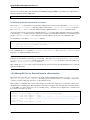
to provide that explicitly. Thus, it must be rtxmlrpc view.size '' main, with an extra empty argument –
otherwise you’ll get a Unsupported target type found fault.
There are some special ways to write arguments of certain types: +‹number› and -‹number› send an integer
value, @‹filename›, @‹URL›, or @- (for stdin) reads the argument’s content into a XMLRPC binary value, and
finally [‹item1›〈,‹item2›,...〉 produces an array of strings. These typed arguments only cover some common
use-cases, at some point you have to write Python code to build up more intricate data structures.
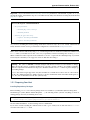
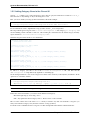
The @‹URL› form supports http, https, and ftp, here is an example call:
$ rtxmlrpc load.raw_verbose '' \
@"https://cdimage.debian.org/debian-cd/current/amd64/bt-cd/debian-9.0.0-amd64˓→netinst.iso.torrent"
0
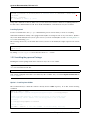
To get a list of available methods, just call rtxmlrpc system.listMethods. The Using ‘rtxmlrpc’ section
shows some typical examples for querying global information and controlling rTorrent behaviour.
rtsweep
NOT IMPLEMENTED YET! https://github.com/pyroscope/pyrocore/issues/7
The rtsweep command provides means to perform automatic disk space management. It does so by deleting items
loaded into rTorrent, including their data, following rules in the configuration that define an order of what to remove
first.
The required space is passed as the first argument, either in bytes or qualified with a unit character (K=KiB, M=MiB,
G=GiB). Alternatively, you can pass a metafile path, with the requirement calculated from its content size.
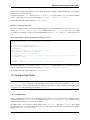
rtsweep has these options:
-n, --dry-run
do not remove anything, just tell what would happen
-p PATH, --path=PATH path into the filesystem to sweep (else the default download
˓→location)
-r RULESET [-r ...], --rules=RULESET [-r ...]
name the ruleset(s) to use, instead of the default ones
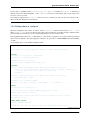
Use rtsweep show to list the active rules, ordered by their priority. To only display built-in rules, call rtsweep
-r builtin show.
1.4. User’s Manual
19