1
INTRODUCTION
Congratulations on your purchase of the DVI Detective Plus. Your complete
satisfaction is very important to us.
Gefen
Gefen delivers innovative, progressive computer and electronics add-on solutions
that harness integration, extension, distribution and conversion technologies.
Gefen’s reliable, plug-and-play products supplement cross-platform computer
systems, professional audio/video environments and HDTV systems of all sizes
with hard-working solutions that are easy to implement and simple to operate.
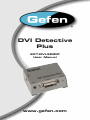
The Gefen DVI Detective Plus
Displays use EDID - Extended Display Identification Data - to communicate to
computers and HDTV sources the array of video resolutions and timings that
they are capable of displaying. In certain situations this data can be lost resulting
in incorrect display settings, or even a complete loss of video. The DVI Detective
Plus solves this problem by ensuring that a correct EDID signal is constantly
available to the DVI source - even if the display is switched to a different
computer. After the simple EDID recording process is completed, the DVI
Detective Plus is placed at the DVI output of the computer’s video card where
it will provide the computer with a constant EDID signal. The Detective Plus is
equipped with DVI ports, but it is also compatible with VGA through the use of
optional adapters.
The DVI Detective Plus provides all the functionality of the DVI Detective N and
adds HDCP pass through and the ability to use one of five pre-programmed
EDID profiles.
How It Works
Connect the DVI Detective Plus connects to the display’s DVI input for initial
programming. Power is applied and the DVI Detective Plus reads and stores
the display’s EDID to the internal memory on the DVI Detective Plus. Connect
the DVI Detective Plus between the source and the display and it will never lose
EDID again.
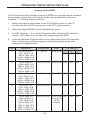
The DVI Detective Plus includes five built-in selectable generic EDIDs that can
be used for meeting standard display setups. They can be selected by moving
the DIP switches between the different settings.
1