1
PANEL DESCRIPTIONS
1
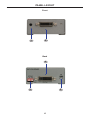
Programming Button
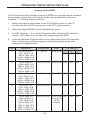
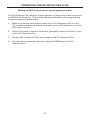
Press and hold this button to program an EDID. See page 8 for more
information on recording an EDID.
2
DVI In
Connect the included DVI cable from this DVI port to the source device.
3
DIP Switches
Used to select pre-programmed EDIDS.
4
DVI Out
Connect an DVI cable from this DVI port to the display (or other sink device).
5
Write (Enable/Disable) Switch
When switch is set to E (write eneabled), the EDID can be recorded. When
switch is set to D (disabled), the recorded EDID is locked and can not be
earased.
5