1
HelvC NugFont
C
2
Operating the Printer
39
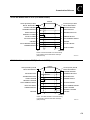
Loading Roll Media for Straight-Through Printing
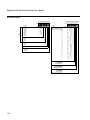
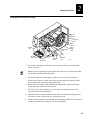
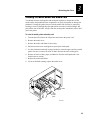
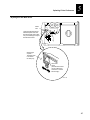
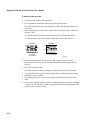
Upper
media guide
Head lift
lever
Media
Media roll
Media
backing
Supply roll
post
Supply roll
retainer
Media
support
Edge
guide
Lower
media guide
3XXXU.026
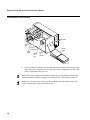
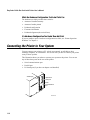
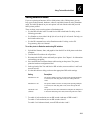
4. Slide the supply roll retainer up to the edge of the media roll and turn the supply
roll retainer clockwise to secure.
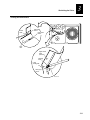
5. Pull down on the lower media guide to allow easy access to the media path. Make
sure that the edge guide slides all the way to the outer edge of the lower media
guide.
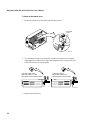
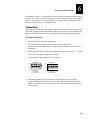
6. Insert the label stock through the printer mechanism as shown. Make sure the label
passes between the upper and lower media guides. The front edge of the media
should pass over the tear bar and out the front of the printer.
7. Release the lower media guide and adjust the edge guide to position the media
firmly against the inside wall of the printer.
Note: If you are using thermal transfer media, refer to “Loading Thermal Transfer
Ribbon” later in this chapter before you finish performing this procedure.
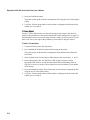
8. Lower the printhead by rotating the head lift lever counterclockwise until it locks.
9. Use PrintSet, your third-party software, or the IPL command set to configure the
printer for the kind of media you are using (continuous or mark label). Refer to the
PrintSet online help, your third-party documentation, or the IPL Programming
Reference Manual for help.
10. Press Feed/Pause to advance several inches of media through the printer and out the
label opening in the front cover. Your printer is now ready to print labels.
2-7