1
[email protected]
Congratulations on your purchase of the Manometer! This instrument is portables battery operated pressure
measuring device.
The Manometer is ideal for HVAC/R technicians measuring pressure level, Medical equipment computer
peripherals, pneumatic Controls.
INTRODUCTION
•
•
•
•
•
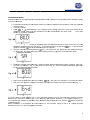
The meter will display all LCD segments when it is first turned on for approx. 3 seconds. Though you
might have seen DATALOGGER, Y/M/D, REL, AVG ... these are not available for the meter. The meter
with data logger features named 8205D/821 5D/8280D/821 OOD. Please contact the store or the place
you purchased.
The LCD is divided into two distinct sections: One large (Primary) top screen and one smaller rightbottom bottom screens (relative Clock), The 2 display areas keep you constantly updated with the)
pressure measurements.
The Meter measures Gauge pressure-a measure of pressure in psi that is referenced to ambient
pressure and Differential pressure - a measure of the difference two pressures.
11 pressure units are selectable for Imperial and Metric in the different area: bar, mmHg, ozin², kgcm²,
psi, inH2, kPa, ftH2O|, inHg, cmH2O, mbar.
Please check the tubing is not leakage or damaged before using
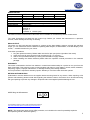
CONVERSION
Manometer
PCE-P05
PCE-P15
PCE-P30
PCE-P50
PSI
5
15
30
100
Inch of
H2O
138
415
830
2768
mbar
kg/cm³
345
1034
2068
6895
0,35
1,05
2,10
7,03
CONROLS AND INDICATORS
1.
2.
3.
4.
5.
6.
7.
8.
9.
10.
11.
12.
13.
14.
15.
Primary Data Screen displays pressure value.
“-“: Minus pressure display.
MAX MIN: pressure recorded.
REC: starts recording mode and displays max./min. pressure recorded,
AVG: Average records (N/A).
DC: power in Jack.
RS232: output port.
H/M/S 88:88:88: displays data for Hour / Minute / Second.
: Pressure unit indication.
BAT: Battery low indicator.
DIF: Differential pressure mode.
“+”: Positive pressure home plug.
“-“: Negative pressure hose plug.
HOLD: Freezes pressure reading.
REL: Establish a relative zero for the primary screen information. (N/A)
3