1
Open Interface Commands
iRobot Create comes with a serial protocol called the Open Interface (OI) which
consists of a set of commands that you can use to control the robot and read its
sensors. The types of commands available include:
• Demo commands
• Driving commands
• Song commands
• Sensor commands
• Cargo Bay Connector commands
• Scripting commands
A description of all the OI commands can be found in the iRobot® Create
Open Interface (OI) Specification found at www.irobot.com/create.
You send these commands to iRobot Create using the included serial cable or
any other serial connection to a PC.
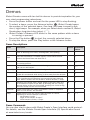
The serial cable plugs into iRobot Create’s Mini-Din connector, which is located
in the rear right side of iRobot Create, beneath a snap-away plastic guard.
Sending OI Commands from a PC
Connect the serial cable between iRobot Create and your PC’s serial
port and start a serial terminal program that is capable of sending data.
iRobot recommends the freeware RealTerm Serial Capture Program, available
at http://realterm.sourceforge.net/.
Configure the serial settings to 57600 baud, 8 data bits, 1 stop bit, and no
flow control. Select the “Send” tab on RealTerm. Enter commands and watch
the robot perform!
Examples:
• To turn on iRobot Create’s Play LED only:
128 132 139 2 0 0
• To read the state of iRobot Create’s left cliff sensor:
128 142 9
See how the robot’s response changes when you lift it up.
www.irobot.com
11