Download ESA Papers - worldcomp

Transcript
Int'l Conf. Embedded Systems and Applications | ESA'12 |
137
events such as click, drag and drop, and so on. There are three
kinds of GUI test technique. Record Play-Back (RPB)
technique is the most famous and is known well among them
because to use it is easier than the others. In the RPB
technique, one event is called the Record and script includes
several records [7]. In testing phase with GUI test technique,
one developer makes an event script which contains sequence
of events, and then feed each event from the script.
program analysis component analyzes software for making an
Analysis Information which contains scope of analysis. The
monitoring code generating component makes a meta file and
generate source code as a test-case using the meta file[3, 9].
The program auto test component compiles the test-case and
execute on emulator[10]. The acquire log and the log analysis
component collect logs and make a report via analyzing the
logs.
For applying the RPB technique to the android software
testing, it firstly needs to consider how to adopt concepts of
android software such as Activity, Intent and so on. It also
adds new method to reduce effort for making test-case
because there is no support to generate a test-case
automatically.
3
2.2
Design of ACSF
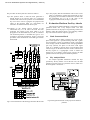
Developers have several tasks for software test, for
example, making a test-case, running the test-case, analyzing a
log. Some logs are generated during running software via
logging instructions. Developers try to detect potential errors
in the logs. A role of ACSF reduces tasks of developer, hence,
architecture of ACSF is considered android platform and
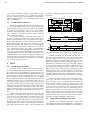
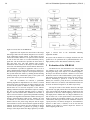
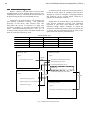
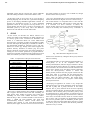
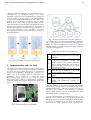
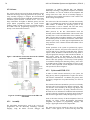
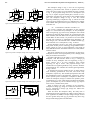
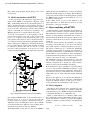
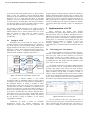
technique about automatic comparison logs like Fig 1.
Program
Analysis
Component
Program
Analyzer
Analysis Info.
Generator
Monitoring
CodeGenerating
Component
Analysis
Info.
Monitoring Sensor
Template
Monitoring
Sensor Gen.
Monitoring
Code Gen.
_____
_____
_____
_____
_____
_____
Log Analysis
Component
_____
_____
_____
_____
_____
_____
Log Analyzer
Report Gen.
Log
Repository
Program Auto
Test Component
Compile
Automation
Acquire log
Component
Report Template
Testcase
Execute
Automation
Communicati
on Module
Log Gen.
Figure 1 Architecture of Portability Analysis Tool
A process of android software is very similar
development phase of embedded software. Testing software
on emulator or real device is vital element in development of
the embedded software. A testing on emulator is rather
important than a testing real device because a testing on real
one takes more time and it is difficult to test whole devices
due to its price. Moreover, it needs more tasks for testing. For
instance, once developer prepares a device and copy software
in the device. And then they tests software using the device.
After testing, they move a log which is made during running
the software to the desktop computer. Finally, they analyze
the log. However, testing on emulator, it just requires
configuration of emulator.
Architecture of ACSF is based on conceptual
development process for android software[8]. The
Architecture is largely divided into five components. The
Implementation of ACSF
Many developers use Eclipse with Android
Development Tool (ADT) plugin which help us to develop
android software easily via emulator, monitoring tool, etc.
Therefore we decide to develop our tool based on Eclipse
plug-in. ACSF consists of five kinds of components like Fig 1.
In this paper, we concentrates on generating test-case, auto
executing android software on emulate or device and
analyzing portability of the software because those
components have to considered android environment and vice
versa.
3.1
Generating test cases process
An Android software is GUI based software, therefore,,
functions of the software are executed by events generated
from users. Also, events can have sequences or not. On the
other hands, test-case may contain sequence of events.
Consequently, we divide manual mode and automatic mode
for making test-case. The manual mode has dependency with
user’s events or data, and vice versa.
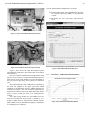
The manual mode is based on improved RPB technique
which record user event as a script and execute the script. If
developer only changes some event in the script, developer
makes a script again although the script exists. Therefore we
support sequence concept which is method to modify or
arrange a script. As making a sequence, user can use records
as well as UI components contained in activity. The manual
mode is used for alerted software error due to malfunctions of
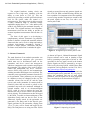
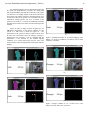
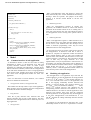
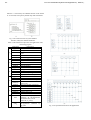
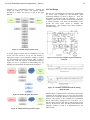
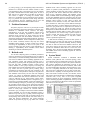
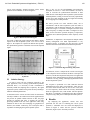
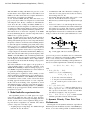
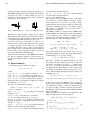
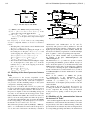
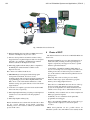
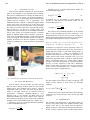
the software. Fig 2 illustrates manual test-case generator.
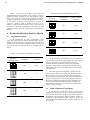
Figure 2 Manual Test-case Generator
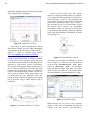
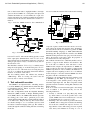
On the automatic mode, user only chooses pair of
activity name and sensor type. It means that selected activity
will be generated logs from selected sensor. The sensor is a
source code for making various logs and is used for various