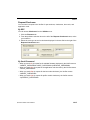
1
Quadrus Verifier
User's Manual
P/N 83-006702 Rev C
Copyright and Disclaimer
Copyright © 2007
by Microscan Systems, Inc.,
1201 S.W. 7th Street, Renton, Washington, U.S.A. 98057
(425) 226-5700 FAX: (425) 226-8682
ISO 9001:2000 Certification No. 06-1080
Issued by TüV USA
All rights reserved. The information contained herein is proprietary and is provided solely for the purpose
of allowing customers to operate and/or service Microscan manufactured equipment and is not to be
released, reproduced, or used for any other purpose without written permission of Microscan.
Throughout this manual, trademarked names might be used. Rather than put a trademark (™) symbol in
every occurrence of a trademarked name, we state herein that we are using the names only in an editorial
fashion, and to the benefit of the trademark owner, with no intention of infringement.
Disclaimer
The information and specifications described in this manual are subject to change without notice.
Latest Manual Version
For the latest version of this manual, see the Download page on our web site at www.microscan.com.
For technical support email [email protected].
Microscan Systems, Inc.
1201 S.W. 7th Street
Renton, WA 98057
U.S.A.
Tel: 425 226 5700
Fax: 425 226 8250
[email protected]
Microscan Europe
Tel: 31 172 423360
Fax: 31 172 423366
Microscan Asia Pacific R.O.
Tel: 65 6846 1214
Fax: 65 6846 4641
ii
Quadrus Verifier User’s Manual
Introduction
Microscan Limited Warranty Statement and Exclusions
What Is Covered?
Microscan Systems Inc. warrants to the original purchaser that products manufactured by it will be free
from defects in material and workmanship under normal use and service for a period of one year from the
date of shipment. This warranty is specifically limited to, at Microscan’s sole option, repair or replacement
with a functionally equivalent unit and return without charge for service or return freight.
What Is Excluded?
This limited warranty specifically excludes the following: (1) Any products or parts that have been subject
to misuse, neglect, accident, unauthorized repair, improper installation, or abnormal conditions or operations; (2) Any products or parts that have been transferred by the original purchaser; (3) Customer misadjustment of settings contrary to the procedure described in the Microscan Systems Inc. owners manual;
(4) Upgrading software versions at customer request unless required to meet specifications in effect at the
time of purchase; (5) Units returned and found to have no failure will be excluded; (6) Claims for damage
in transit are to be directed to the freight carrier upon receipt. Any use of the product is at purchaser’s own
risk. This limited warranty is the only warranty provided by Microscan Systems Inc. regarding the product.
Except for the limited warranty above, the product is provided “as is.” To the maximum extent permitted by
law, this express warranty excludes all other warranties, express or implied, including but not limited to,
implied warranties of merchantability and. Technical support questions may be directed to: [email protected] Register your product with Microscan: www.microscan.com/register fitness for a
particular purpose. Microscan Systems Inc. does not warrant that the functions contained in the product
will meet any requirements or needs purchaser may have, or that the product will operate error free, or in
an uninterrupted fashion, or that any defects or errors in the product will be corrected, or that the product
is compatible with any particular machinery.
Limitation of Liability
In no event shall Microscan Systems Inc. be liable to you or any third party for any special, incidental, or
consequential damages (including, without limitation, indirect, special, punitive, or exemplary damages for
loss of business, loss of profits, business interruption, or loss of business information), whether in contract,
tort, or otherwise, even if Microscan Systems Inc. has been advised of the possibility of such damages.
Microscan Systems Inc.’s aggregate liability with respect to its obligations under this warranty or otherwise
with respect to the product and documentation or otherwise shall not exceed the amount paid by you for
the product and documentation. Some jurisdictions do not allow the exclusion or limitation of incidental or
consequential damages or limitations on an implied warranty, so the above limitation or exclusion may not
apply to you. This warranty gives you specific legal rights, and you may also have other rights which may
vary from state to state.
Tel: 425.226.5700 | Fax: 425.226.8250 | [email protected]
Quadrus Verifier User’s Manual
iii
Table of Contents
Table of Contents
Chapter 1
Quick Start
Step 1 Check Required Hardware........................................................... 1-2
Step 2 Connect the System..................................................................... 1-3
Step 3 Install ESP ................................................................................... 1-4
Step 4 Select Model ................................................................................ 1-5
Step 5 Select Communications Protocol ................................................. 1-6
Step 6 Position Verifier and Symbol ........................................................ 1-7
Step 7 Locate Symbol ............................................................................ 1-8
Step 8 Calibrate Reflectance................................................................... 1-9
Step 9 Set Verification Parameters ..................................................... 1-10
Step 10 Verify Symbol ......................................................................... 1-11
Step 11 Generate and Save Verification Report ................................. 1-14
Chapter 2
Using ESP
Verification............................................................................................... 2-2
Application Mode ..................................................................................... 2-3
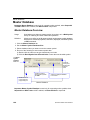
Menu Toolbar .......................................................................................... 2-4
View...................................................................................................... 2-11
Navigating in ESP ................................................................................. 2-12
Send/Receive Options........................................................................... 2-13
Chapter 3
Verification
Verification Serial Commands ................................................................. 3-2
Verification Operational Commands........................................................ 3-2
Overview of Verification........................................................................... 3-3
ISO/IEC 15415 Evaluation Parameters ................................................... 3-5
AS9132 Evaluation Parameters .............................................................. 3-7
AIM DPM Evaluation Parameters.......................................................... 3-10
General Verification Serial Output ......................................................... 3-12
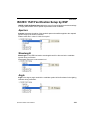
General Verification Output by ESP ...................................................... 3-17
ISO/IEC 15415 Verification Setup ......................................................... 3-19
ISO/IEC 15415 Verification Setup by ESP ............................................ 3-21
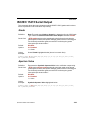
ISO/IEC 15415 Serial Output ................................................................ 3-23
ISO/IEC 15415 Output by ESP ............................................................. 3-33
AIM DPM Verification Setup .................................................................. 3-40
AIM DPM Verification Setup by ESP ..................................................... 3-42
ISO/IEC 15415 Verification by Serial Command ................................... 3-44
AS9132/JES 131 Marking Method ........................................................ 3-49
AS9132/JES 131 Marking Method by ESP ........................................... 3-51
AS9132 Serial Output............................................................................ 3-53
AS9132 Output by ESP ......................................................................... 3-62
AS9132 Verification by Serial Command .............................................. 3-67
AIM DPM Verification by Serial Command............................................ 3-68
Verification by ESP................................................................................ 3-70
iv
Quadrus Verifier User’s Manual
Introduction
Chapter 4
Unique Item Identifiers
Overview of IUID and UII ......................................................................... 4-2
Non-UII Characters.................................................................................. 4-3
UII Mode Features ................................................................................... 4-4
Error Messaging ...................................................................................... 4-6
Valid Data Qualifier Formats ................................................................... 4-8
UII Parsing ............................................................................................... 4-9
Chapter 5
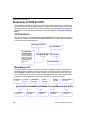
Communications
Communications by ESP......................................................................... 5-2
Communications Serial Commands ........................................................ 5-3
RS-232/422 Host Port ............................................................................. 5-4
RS-232 Auxiliary Port .............................................................................. 5-9
Network ................................................................................................. 5-18
Preamble ............................................................................................... 5-21
Postamble.............................................................................................. 5-22
Response Timeout ................................................................................ 5-23
LRC Status ............................................................................................ 5-24
Aux Port System Data Status ................................................................ 5-25
Chapter 6
Read Cycle
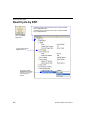
Read Cycle by ESP ................................................................................. 6-2
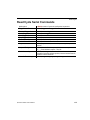
Read Cycle Serial Commands ................................................................ 6-3
Read Cycle Setup.................................................................................... 6-4
Multisymbol.............................................................................................. 6-5
Trigger ..................................................................................................... 6-7
Serial Trigger ......................................................................................... 6-13
End of Read Cycle................................................................................. 6-15
Active Camera ....................................................................................... 6-17
Capture Mode........................................................................................ 6-18
Capture Timing ...................................................................................... 6-23
Dual Camera Switching ......................................................................... 6-25
Store No Read Image ............................................................................ 6-30
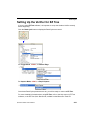
Setting Up the Verifier for EZ Trax ........................................................ 6-31
Chapter 7
Symbologies
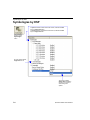
Symbologies by ESP ............................................................................... 7-2
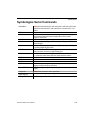
Symbologies Serial Commands .............................................................. 7-3
Data Matrix .............................................................................................. 7-4
QR Code.................................................................................................. 7-6
Code 39 ................................................................................................... 7-7
Code 128 ............................................................................................... 7-10
BC412.................................................................................................... 7-11
Interleaved 2 of 5 ................................................................................... 7-13
UPC/EAN............................................................................................... 7-16
Pharmacode .......................................................................................... 7-19
RSS Expanded ..................................................................................... 7-21
Quadrus Verifier User’s Manual
v
Table of Contents
RSS Limited .......................................................................................... 7-22
RSS-14 .................................................................................................. 7-23
PDF417 ................................................................................................. 7-24
MicroPDF417 ........................................................................................ 7-26
Composite ............................................................................................. 7-27
Narrow Margins ..................................................................................... 7-28
Symbology ID ........................................................................................ 7-29
Background Color.................................................................................. 7-30
Chapter 8
I/O Parameters
I/O Parameters by ESP ........................................................................... 8-2
I/O Parameters Serial Commands .......................................................... 8-3
Symbol Data Output ................................................................................ 8-4
When to Output Symbol Data.................................................................. 8-6
No Read Message................................................................................... 8-7
Bad/No Symbol Qualification................................................................... 8-9
Read Duration Output ........................................................................... 8-16
Output Indicators ................................................................................... 8-17
Serial Verification .................................................................................. 8-20
Video Output ......................................................................................... 8-22
Image Output......................................................................................... 8-24
Image Captioning .................................................................................. 8-26
Synchronous Trigger ............................................................................. 8-28
EZ Button .............................................................................................. 8-30
EZ Button Modes................................................................................... 8-32
Input 1 ................................................................................................... 8-34
Output 1 Parameters ............................................................................. 8-35
Output 2 Parameters ............................................................................. 8-48
Output 3 Parameters ............................................................................. 8-52
Configuring EZ Trax Output .................................................................. 8-56
Chapter 9
Matchcode
Matchcode by ESP .................................................................................. 9-2
Matchcode Serial Commands ................................................................. 9-3
Overview of Matchcode ........................................................................... 9-4
Matchcode Type ...................................................................................... 9-5
Sequential Matching ................................................................................ 9-6
Match Start Position ................................................................................ 9-7
Match Length........................................................................................... 9-8
Wild Card Character ................................................................................ 9-9
Sequence On No Read ......................................................................... 9-10
Sequence On Mismatch ........................................................................ 9-11
Sequence Step ...................................................................................... 9-12
Match Replace ...................................................................................... 9-13
Mismatch Replace ................................................................................. 9-14
New Master Pin ..................................................................................... 9-15
vi
Quadrus Verifier User’s Manual
Introduction
Chapter 10
Diagnostics
Diagnostics by ESP ............................................................................... 10-2
Diagnostics Serial Commands .............................................................. 10-2
Counts (Read Only)............................................................................... 10-3
External Camera Message .................................................................... 10-4
Over Temperature Message.................................................................. 10-6
Service Message ................................................................................... 10-7
Chapter 11
Camera Setup
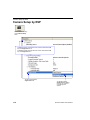
Camera Setup by ESP .......................................................................... 11-2
Camera Setup Serial Commands .......................................................... 11-3
Video ..................................................................................................... 11-4
Evaluation .............................................................................................. 11-6
Region of Interest (ROI) ...................................................................... 11-10
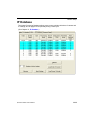
IP Database ......................................................................................... 11-13
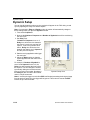
Dynamic Setup .................................................................................... 11-14
Camera ................................................................................................ 11-16
Illumination Source .............................................................................. 11-17
Thresholding ........................................................................................ 11-18
Image Processing Settings.................................................................. 11-19
Hollow Mode ........................................................................................ 11-21
Mirrored Image .................................................................................... 11-22
Chapter 12
IP Database
IP Database by ESP .............................................................................. 12-2
IP Database Serial Commands ............................................................. 12-3
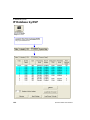
Overview of IP Database ....................................................................... 12-4
IP Database Window in ESP ................................................................. 12-6
Number of Active Database Settings..................................................... 12-7
Image Processing Database ................................................................. 12-8
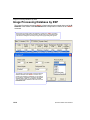
Image Processing Database by ESP. ................................................. 12-10
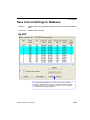
Save Current Settings to Database ..................................................... 12-11
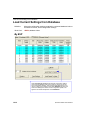
Load Current Settings from Database ................................................. 12-12
Request Selected Database Settings .................................................. 12-13
Request All Database Settings............................................................ 12-13
Chapter 13
Terminal
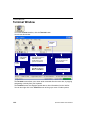
Terminal Window ................................................................................... 13-2
Find ....................................................................................................... 13-3
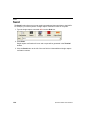
Send ...................................................................................................... 13-4
Macros................................................................................................... 13-5
Terminal Window Menus ....................................................................... 13-6
Chapter 14
Utilities
Serial Utility Commands ........................................................................ 14-2
Read Rate ............................................................................................. 14-3
Counters ................................................................................................ 14-4
Quadrus Verifier User’s Manual
vii
Table of Contents
Device Control ....................................................................................... 14-6
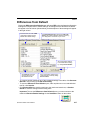
Differences from Default........................................................................ 14-7
Master Database ................................................................................... 14-8
Firmware ............................................................................................. 14-13
Bar Code Configuration ....................................................................... 14-16
Defaulting/Saving/Resetting ................................................................ 14-17
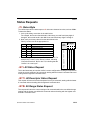
Status Requests .................................................................................. 14-19
Other Operational Serial Commands .................................................. 14-21
Chapter 15
Output Format
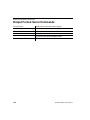
Output Format Serial Commands.......................................................... 15-2
Output Format Status ............................................................................ 15-3
Format Assign ....................................................................................... 15-4
Format Extract ....................................................................................... 15-5
Format Insert ......................................................................................... 15-7
Output Filter Configuration .................................................................... 15-9
Ordered Output Filter .......................................................................... 15-13
Chapter 16
Ethernet
Step 1 Setup.......................................................................................... 16-2
Step 2 Preliminary Steps ....................................................................... 16-3
Step 3 Communicating in Ethernet........................................................ 16-7
Step 4 Ethernet Application ................................................................... 16-8
Appendices
Appendix A General Specifications .........................................................A-2
Appendix B Electrical Specifications .......................................................A-4
Appendix C Connectivity Accessories .....................................................A-8
Appendix D Serial Configuration Commands ........................................A-11
Appendix E ASCII Table........................................................................A-17
Appendix F Data Matrix Symbology ......................................................A-19
Appendix G Object Detector..................................................................A-20
Appendix H Operational Tips ................................................................A-21
Appendix I Embedded Menus ...............................................................A-22
Appendix J Interface Standards ............................................................A-23
Appendix K Glossary of Terms..............................................................A-24
Index
viii
Quadrus Verifier User’s Manual
Introduction
About the Quadrus Verifier
The key features of the Quadrus Verifier are:
• ISO/IEC 15415, AS9132, and AIM DPM verification options
• Self-contained, factory-calibrated optics and lighting for fast, easy integration into a
variety of manufacturing processes
• ISO/IEC 15426 certification for Data Matrix verification
• ESP Software for configuration and testing
About This Manual
This manual provides complete information on setting up, installing, and configuring the
Quadrus Verifier. The sections are presented in the order in which the Verifier might be set
up and made ready for industrial operation.
Note: The terms AS9132 and AS9132 are used interchangeably throughout this documentation.
“AS9132” is the name of a specification, and the suffix “A” denotes the current published
version of the specification.
Highlighting
Serial commands and default settings are highlighted in rust bold. Cross-references
and web links are highlighted in blue bold. References to menu items are highlighted in
Bold Initial Caps.
Host Communications
There are four ways to configure and test the Quadrus Verifier:
1. Several configuration commands can be executed from the EZ Button without connection
to a host.
2. Microscan’s Windows-based ESP, the preferred method, which offers point-and-click
ease of use and visual responses to user adjustments.
3. Serial commands, such as <K100,1>, can be sent from a terminal program. They
can also be sent from a PLC or from ESP’s Terminal.
4. Embedded onboard menus are accessed from a terminal window with a <D> command.
Quadrus Verifier User’s Manual
ix
Statement of Agency Compliance
Statement of Agency Compliance
The Quadrus Verifier has been tested for compliance with CE (Conformité Européenne)
standards and guidelines and has been found to conform to applicable CE standards,
specifically the following requirements:
• ITE Disturbances: IEC 55022:1998 (radiated and conducted) Class A
• General Immunity: IEC 55024:1998 (residential)
• Heavy Industrial Immunity: IEC 61000-6-2:1999
• LED Radiation: IEC 60825-1
x
Quadrus Verifier User’s Manual
Introduction
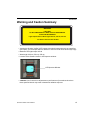
Warning and Caution Summary
WARNING
LED LIGHT
DO NOT VIEW DIRECTLY WITH OPTICAL INSTRUMENTS
CLASS 1M LED PRODUCT
Light Output: 648 cd Wavelength: 464 nm; 518 nm; 635 nm
IEC 60825-1:1993+A1:1997+A2:2001
• Viewing the Quadrus Verifier’s LED output with optical instruments such as magnifiers,
eye loupes, or microscopes within a distance of 100 mm could cause serious eye injury.
• Maximum LED light output: 648 cd
• Wavelength: 464 nm; 518 nm; 635 nm
• Location of the Quadrus Verifier’s LED aperture window:
LED Aperture Window
• CAUTION: Use of controls or adjustments or performance of procedures other than
those specified herein may result in hazardous radiation exposure.
Quadrus Verifier User’s Manual
xi
Warning and Caution Summary
Warning and Caution Summary (cont.)
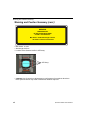
WARNING
LED RADIATION
DO NOT STARE INTO BEAM
CLASS 2 LED PRODUCT
Max Power: 67mW Wavelength: 660 nm
IEC 60825-1:1994+A1:2002+A2:2001
• Max Power: 67 mW
• Wavelength: 660 nm
• Location of the Quadrus Verifier’s LED array:
LED Array
• CAUTION: Use of controls or adjustments or performance of procedures other than
those specified herein may result in hazardous radiation exposure.
xii
Quadrus Verifier User’s Manual
1 Quick Start
Contents
Step 1 Check Required Hardware................................................................................................ 1-2
Step 2 Connect the System.......................................................................................................... 1-3
Step 3 Install ESP......................................................................................................................... 1-4
Step 4 Select Model ..................................................................................................................... 1-5
Step 5 Select Communications Protocol ...................................................................................... 1-6
Step 6 Position Verifier and Symbol ............................................................................................. 1-7
Step 7 Locate Symbol .................................................................................................................. 1-8
Step 8 Calibrate Reflectance....................................................................................................... 1-9
Step 9 Set Verification Parameters ........................................................................................... 1-10
Step 10 Verifiy Symbol .............................................................................................................. 1-11
Step 11 Generate and Save Verification Report ........................................................................ 1-14
This section is designed to get your Verifier up and running quickly so you can get a sense
of its capabilities and test sample symbols.
Detailed setup information for installing the Verifier in your application can be obtained in
the subsequent sections.
Quadrus Verifier User’s Manual
1-1
Check Required Hardware
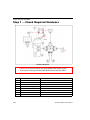
Step 1 — Check Required Hardware
Hardware Required
Caution: Be sure that all cables are connected BEFORE applying power
to the system. Always power down BEFORE disconnecting any cables.
Item
1
2
3
4
5
6
7
8
1-2
Description
Quadrus Verifier
IB-150 Kit
Power Supply
Illumination Power Supply
Light Control Cable
Quadrus EZ Stand (not shown)
Monitor Kit
Object Detector
Part Number
FIS-6700-100XG
Included with Verifier
Included with Verifier
Included with Verifier
Included with Verifier
Included with Verifier
98-000096-01
99-000017-01
Quadrus Verifier User’s Manual
Quick Start
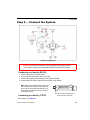
Step 2 — Connect the System
Hardware Configuration
Caution: Be sure that all cables are connected BEFORE applying power
to the system. Always power down BEFORE disconnecting any cables.
Connecting to a Host by RS-232
1.
2.
3.
4.
Connect the Verifier to the IB-150 Kit.
Connect the IB-150 Kit host cable to the host.
Connect the Lighting Power Supply to the lighting chamber.
Connect the main power supply and cycle power to the Verifier.
1
Note: When wiring the IB-150 Kit to a host
with a 25-pin host connector, cross pins 2
and 3. When wiring the interface box to a
host with a 9-pin host connector, do NOT
cross pins 2 and 3.
Connecting to a Host by TCP/IP
25
Side View of IB-150 showing Host
25-pin Socket Connection
See Chapter 16, Ethernet.
Quadrus Verifier User’s Manual
1-3
Install ESP
Step 3 — Install ESP
Easy Setup Program (ESP) is Microscan’s proprietary setup and testing application. The
purpose of ESP is to provide a quick and easy way to set up and configure Microscan
products.
When the Quadrus Verifier is connected to a host computer (Windows Vista, XP, or 2000),
ESP can be used to set up communication with a host, configure various firmware settings,
and control verification processes.
If installing from a Microscan Tools CD:
1. Insert the Microscan Tools CD in your computer’s CD drive.
2. Choose ESP Software from the main menu.
3. Select the Current Version of ESP and follow the file download prompts.
If downloading from the web:
1. Go to http://www.microscan.com/downloadcenter
2. Create a new “myMicroscan” member account or, if you are already a member, enter
your user name and password.
3. Click the Download Software link and extract the latest version of ESP to a directory
of your choice. Note where your ESP.exe file is stored on your hard drive.
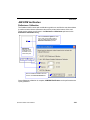
4. At the end of the installation process, the following icon will appear on your desktop:
5. Click the ESP icon to start the program.
System Requirements for ESP
•
•
•
•
•
1-4
166 MHz Pentium processor (recommended)
Windows Vista, XP, or 2000 operating system
Internet Explorer 5.0 or higher
64 MB minimum RAM
40 MB minimum disk space
Quadrus Verifier User’s Manual
Quick Start
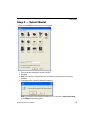
Step 4 — Select Model
When you start ESP, the following menu will appear:
1. Click the button showing the Quadrus Verifier.
2. Click OK.
3. Note: You can also simply double-click the Quadrus Verifier button to make your
selection.
4. Click Yes when the following dialog box appears:
Note: If you need to select another model later, you can find it in Application Mode
under Model on the menu toolbar.
Quadrus Verifier User’s Manual
1-5
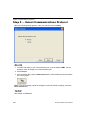
Select Communications Protocol
Step 5 — Select Communications Protocol
When the following dialog appears, make your selection and click Next.
RS-232
1. In the RS-232 dialog, if your communications port is not the default COM1, use the
dropdown menu to change your communications port.
2. Click Connect.
3. If the connection fails, click the Autoconnect button, select a different communications
port, and try again.
Note: If your host settings cannot be changed to match the Verifier’s settings, check the
Force Connect box.
TCP/IP
See Chapter 16, Ethernet.
1-6
Quadrus Verifier User’s Manual
Quick Start
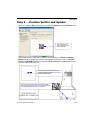
Step 6 — Position Verifier and Symbol
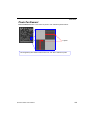
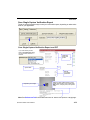
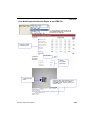
When you connect to ESP, the first thing you will see is the Report tab of the Verification view.
This view allows the
user to center the symbol
before calibrating.
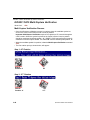
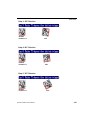
The Quadrus Verifier comes with a reference card that features a Verifier Calibration
Symbol and two numbers--the minimum and maximum reflectance values for ISO/IEC
15415 and AIM DPM Reflectance Calibration. Keep this card in a safe place! It is the
Verifier’s most critical setup tool.
Use the symbol provided at the top of the
Verifier Calibration Symbol card to perform
Reflectance Calibration.
Place the symbol at the center of the field of view. Be
sure the plane of the symbol is as close to perpendicular
as possible relative to the Verifier’s orientation.
Quadrus Verifier User’s Manual
1-7
Locate Symbol
Step 7 — Locate Symbol
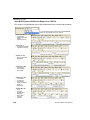
After you place the Verifier Calibration Symbol beneath the Verifier’s lighting chamber,
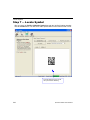
click the Locate button. You will see a video representation of the Verifier’s field of view.
This view allows the user to center
the symbol before calibrating.
1-8
Quadrus Verifier User’s Manual
Quick Start
Step 8 — Calibrate Reflectance
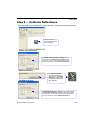
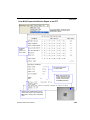
Move the symbol to the approximate center of the field of view before beginning calibration.
This view allows the
user to center the symbol
before calibrating.
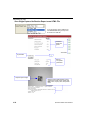
ISO/IEC 15415 Verification
For ISO/IEC 15415 Reflectance Calibration, use
the spin boxes in the Reflectance Calibration dialog
to set a min. and max. value that match those on the
reference card and then click Calibrate Reflectance.
AS9132 Verification
AIM DPM Verification
For AS9132 calibration,
select the corresponding
radio button and click Calibrate
Reflectance. A green border
will appear around the symbol
after calibration.
For AIM DPM Reflectance Calibration, use the spin boxes in
the Reflectance Calibration dialog (as you would for ISO/IEC
15415) to set a min. and max. value that match those on the
reference card and then click Calibrate Reflectance.
Quadrus Verifier User’s Manual
1-9
Set Verification Parameters
Step 9 — Set Verification Parameters
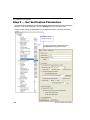
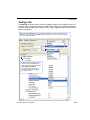
Once the Verifier is calibrated, you will need to set the parameters for your chosen verification
process. To set these parameters, click the Settings tab in the Verification view.
Configure each setting as appropriate for your application before you begin verification.
Data Matrix symbol
verification settings.
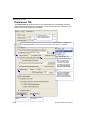
Choose report output characteristics using
the Preferences dialog (shown below).
1-10
Quadrus Verifier User’s Manual
Quick Start
Step 10 — Verify Symbol
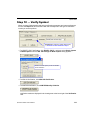
When you have finished setting and saving verification parameters and output preferences,
move to the Report tab and click the button that corresponds to the type of verification
routine you need to perform.
Save Report is explained in greater detail in Step
11, Generate and Save Verification Report.
• For ISO/IEC 15415 Verification, click ISO/IEC 15415... and then select Single Capture
or Multi-Capture when the ISO 15415 Single or Multi-Capture dialog appears.
Select the desired capture process for ISO/IEC
15415 verification.
• For AS9132 Verification, click AS9132A Verification.
• For AIM DPM Verification, click AIM DPM Quality Guideline.
Verification results are displayed in the viewing area at the lower right of the Verification
view.
Quadrus Verifier User’s Manual
1-11
Verify Symbol
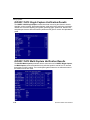
ISO/IEC 15415 Single Capture Verification Results
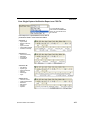
The ISO/IEC 15415 Single Capture results show data concerning the reference decode
algorithm, symbol contrast, fixed pattern damage, axial and grid non-uniformity, modulation,
unused error correction capacity, print growth, symbology type, symbol size, element size,
and pixels per element. All but the last four parameters are given a numeric and alphabetical
grade.
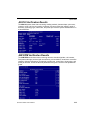
ISO/IEC 15415 Multi-Capture Verification Results
The ISO/IEC Multi-Capture parameters are the same as those for ISO/IEC Single Capture,
but Multi-Capture results are determined only after the symbol is read at five 72° intervals
throughout a full 360° rotation. The overall symbol grade is based on an arithmetic mean of
the results from the five reads.
1-12
Quadrus Verifier User’s Manual
Quick Start
AS9132 Verification Results
The AS9132 results show data concerning marking method, element shape, quiet zone,
contrast, cell fill, cell size, dot ovality, dot shape, dot center offset, dot spacing, angle of
distortion, symbology type, matrix size, and pixels per element. Symbol assessment is on
a pass/fail basis.
AIM DPM Verification Results
The AIM DPM results show data concerning reference decode algorithm, cell contrast,
fixed pattern damage, axial and grid non-uniformity, cell modulation, unused error correction
capacity, minimum reflectance, print growth, symbol type, symbol size, element size, and
pixels per element. All but the last five parameters are given a numeric and alphabetical
grade.
Quadrus Verifier User’s Manual
1-13
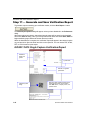
Generate and Save Verification Report
Step 11 — Generate and Save Verification Report
To generate a report containing your verification results, click the Save Report... button.
The Grade Report Options dialog will appear, unless you have disabled it in the Preferences
dialog.
After report options are chosen, determine where the report will be stored on the host hard
drive in the Save As dialog. Once you have specified a file name and clicked Save, ESP will
begin transferring report data to the chosen directory location.
When the data transfer is complete, the verification report will appear in the chosen location
on your hard drive. Open the folder and click on the report file. You can choose PDF, HTML,
RTF, or CSV format for report output.
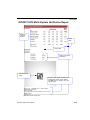
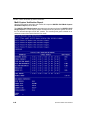
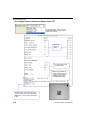
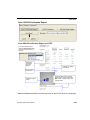
ISO/IEC 15415 Single Capture Verification Report
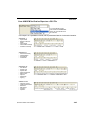
Verification
results and
grades.
Symbol data.
Data for non-graded
parameters.
Reference data: Verifier firmware version,
Verifier serial number, report creation
date, ESP version, company name, and
operator name.
Captured symbol
image.
Note: PDF version shown here.
1-14
Quadrus Verifier User’s Manual
Quick Start
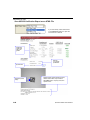
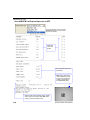
ISO/IEC 15415 Multi-Capture Verification Report
Grades for
individual
captures.
Overall
grade.
Symbol data.
Data for non-graded
parameters.
Captured symbol
image.
Reference data: Verifier firmware version,
Verifier serial number, report creation
date, ESP version, company name, and
operator name.
Note: PDF version shown here.
Quadrus Verifier User’s Manual
1-15
Generate and Save Verification Report
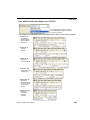
AS9132 Verification Report
Verification
results and
pass / fail
grades.
Data for
non-graded
parameters.
Symbol data.
Parsed UII data. UII Parsing must be
enabled in Preferences for parsed UII
data to appear in verification reports.
Captured symbol
image.
Reference data: Verifier firmware version,
Verifier serial number, report creation
date, ESP version, company name, and
operator name.
Note: PDF version shown here.
1-16
Quadrus Verifier User’s Manual
Quick Start
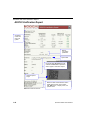
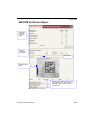
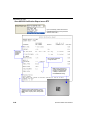
AIM DPM Verification Report
Verification
results and
pass / fail
grades.
Data for
non-graded
parameters.
Symbol data.
Captured symbol
image.
Reference data: Verifier firmware version,
Verifier serial number, report creation
date, ESP version, company name, and
operator name.
Note: PDF version shown here.
Quadrus Verifier User’s Manual
1-17
Generate and Save Verification Report
1-18
Quadrus Verifier User’s Manual
2 Using ESP
Contents
Verification ....................................................................................................................................2-2
Application Mode...........................................................................................................................2-3
Menu Toolbar ................................................................................................................................2-4
View ............................................................................................................................................2-11
Navigating in ESP .......................................................................................................................2-12
Send/Receive Options ................................................................................................................2-13
This section is designed to help you understand the structure, elements, and application of
ESP.
When you open ESP, unless otherwise specified in the ESP Preferences dialog accessible
from the Options heading on the menu toolbar, you will enter EZ Mode for initial setup. From
there, you can enter Application Mode (App Mode) and access several configuration menus
(Verification, Communications, Read Cycle, Symbologies, I/O Parameters, Symbol
Quality, Matchcode, and Diagnostics), a Camera setup interface, a Terminal interface, a
Utilities interface, and an Output Format interface.
ESP can be used to configure the Quadrus Verifier in three different ways:
• Tree Controls: Each configuration menu contains a list of all option settings that pertain to that
specific element of Verifier operation. For example, the Communications menu shows a
Host Port Connections option, and then a list of the sub-options Baud Rate, Parity, Stop
Bits, and Data Bits. Each of these sub-options is configurable by using dropdown menus.
• Graphic User Interfaces: Settings can be configured using such point-and-click tools
as radio buttons, zoom in/zoom out sliders, spin boxes, check boxes, and drag-and-drop
functions.
• Terminal: ESP’s Terminal interface allows you to send serial configuration and utility
commands directly to the Verifier by typing them in the provided text field.
For ESP system requirements, see System Requirements for ESP in Quick Start.
Quadrus Verifier User’s Manual
2-1
Verification
Verification
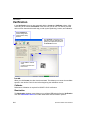
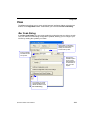
In the Verification view you are presented with the Locate and Calibrate options. After
connecting to the Verifier, Verification is the first view you will see. You will be provided
with on-screen instructions that will help you with symbol positioning, location, and calibration.
Enter App Mode to
access configuration
trees and other setup
features.
Click Calibrate to begin the initial
calibration routine. Calibration and
grading are explained at the left of
the Verification screen.
Click Locate to activate
video.
Center the symbol in the
field of view.
Locate
When you click Locate, the video view be activated. This allows you to center the candidate
symbol in the Verifier’s field of view before beginning the calibration routine.
Calibrate
Reflectance Calibration is required for ISO/IEC 15415 verification.
Illumination
The Illumination dropdown menu allows you to configure LED behavior from the Verification
view. See Illumination Source for further detail about LED illumination options.
2-2
Quadrus Verifier User’s Manual
Using ESP
Application Mode
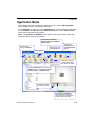
The Quadrus Verifier can be used as a reader as well as a verifier. ESP’s App Mode
offers complete control of configuration parameters.
From Verification, you can click on the App Mode button to access specific configuration
menus, Utilities tools, Camera setup, Output Format options, and a Terminal window
where serial commands can be entered.
Note: The App Mode and EZ Mode buttons appear in the same position to allow easy
switching between these primary modes.
Camera Setup, Evaluation,
Region of Interest, IP Database,
Dynamic Setup.
Click this icon to
return to Verification.
Click here to open
the Terminal view.
Click here for
Ordered Output
and Output Format
features.
Menu toolbar.
Click on icons in this row
to access configuration
trees like the one at left.
Click the Configuration icon to return to full
App Mode view from Verification, Camera,
Terminal, Utilities, or Output Format.
Decoded symbol data
is shown in this table.
Click Capture and Decode to
read the symbol in the field of
view, and to see a high resolution
image capture of the symbol.
Quadrus Verifier User’s Manual
2-3
Menu Toolbar
Menu Toolbar
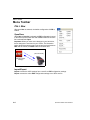
File > New
Whenever New is selected, the default configuration of ESP is
loaded.
Open/Save
When Save or Save As is selected, the ESP configuration is saved
to the host computer’s hard drive and available whenever the same
file is selected under Open.
Important: When you save menu changes to your hard drive,
these changes are not saved to your Verifier. The illustration
below shows how settings can be saved and received between
ESP and the Verifier, and ESP and the host hard drive.
(Save to Verifier)
(Receive Verifier
Settings)
Import/Export
Import converts the ASCII settings from a text file to ESP configuration settings.
Export converts the active ESP configuration settings to an ASCII text file.
2-4
Quadrus Verifier User’s Manual
Using ESP
Model
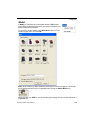
In Model you can select any of the models shown in ESP’s model
menu. When you choose another model, your current connection to your
present model will be terminated.
To connect to another model, select New Model, choose a new
model from the menu, and click OK.
Note: All the models you have enabled by selecting will continue to appear in the Model
menu and that the same menu is repeated when clicking the Switch Model icon.
When you save your ESP file, you will be saving the settings of all the models defined in a
single ESP file.
Quadrus Verifier User’s Manual
2-5
Menu Toolbar
Options
The Options menu allows you to save memos and set up ESP
Preferences.
Note: Preferences will be saved and loaded into ESP when
ESP is opened next, whether or not you save the ESP file.
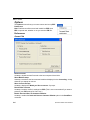
Preferences
General Tab
Reload Last File
At startup, reloads the last file saved to the host computer’s hard drive.
Show Model Prompt
At startup, remembers the last connected model and displays it in the Connecting... dialog
whenever you attempt to connect.
Show Connect Prompt
At startup, displays the Would you like to connect...? prompt.
Receive After Connect
At startup, loads the Verifier’s settings into ESP. (This is not recommended if you want to
preserve your ESP settings for future use.)
Enable ‘Send and Save as Customer Defaults’
At startup, enables the Send and Save as Customer Defaults option in the Send/Recv
command.
2-6
Quadrus Verifier User’s Manual
Using ESP
Terminal Tab
When Show Non-Printable Characters is checked, characters such as “CRLF” will be
displayed in the Terminal window. When Enhanced Format is checked, the characters
are displayed with more detailed formatting.
Change Keyboard Macros
In this dialog you can first select the function key and then enter your macro keystrokes in the
associated key map. For example, to make Ctrl-F5 the keystroke to enable, send a trigger
character, select F5, and then in the Ctrl row, enter <trigger character> and click OK. Then
whenever the Ctrl-F5 keystroke is pressed, the trigger character will start the read cycle.
Change Font
Allows you to modify the font used for decode data received from the Verifier on the Terminal
screen.
Change Echo Font
Allows you to modify the font used for command characters typed into the Terminal view.
Quadrus Verifier User’s Manual
2-7
Menu Toolbar
Bar Code Options Tab
The Bar Code Options dialog allows you to set the size (in mils) of user-created symbols.
Sizing Information
Sets the bar width (in thousands of an inch) of user-created symbols. A bar width of 14 is
0.014 inches.
2-8
Quadrus Verifier User’s Manual
Using ESP
Advanced Tab
The Auto Sync dialog at the top of the Advanced tab allows you to determine whether
Auto Sync will be automatically enabled in sections of ESP where it is used, or if it will ask
you before it enables Auto Sync functions.
Always Ask Before Auto Sync Occurs
If you check this option box, you are then able to determine what specific Auto Sync
functions will be enabled. Receive Settings from the Reader will automatically send
the Verifier’s settings to ESP when Auto Sync is enabled. Send ESP Settings to the
Reader will automatically send all Verifier configuration settings chosen in ESP to the
Verifier. Do Not Send or Receive Settings creates a condition in which Auto Sync will
not send Verifier settings to ESP, or send ESP settings to the Verifier.
Send XON with Autoconnect
Sends an XON (Begin Transmission) command to the Verifier before starting the Autoconnect
routine.
Quadrus Verifier User’s Manual
2-9
Menu Toolbar
Document Memo
The information you type in the Document Memo field will appear in a context-sensitive text
box whenever your cursor hovers over the Document Memo item on the Options menu.
Model Memo
Similar to Document Memo, the information you type in the Model Memo field will appear
in a context-sensitive text box whenever your cursor hovers over the Model Memo item on
the Options menu. Memos created in Model Memo are specific to the model enabled
when the message was created.
Note: Memos must be saved in a .esp file if you want them to available in your next session.
If you do not save your current session, any memos that you have entered during the session
will be discarded, and will be unavailable in your next session.
2-10
Quadrus Verifier User’s Manual
Using ESP
View
The View menu allows you to move quickly between interfaces without using the icon
buttons on the App Mode toolbar. It also allows you to access the Bar Code Dialog.
Bar Code Dialog
In the Bar Code Dialog you can create symbols by typing the text you wish to encode.
This is a useful tool for creating configuration symbols, allowing you to configure your
Verifier by reading the symbols you create.
Drag specific configuration
values from the control tree
directly into this field to
encode new symbols.
Choose a spatial
orientation for the
new symbol.
Set a humanreadable caption
for the symbol
that matches the
encoded data, or
write your own
caption.
The symbol you create
will be displayed in the
field at the bottom of the
Bar Code Dialog.
Quadrus Verifier User’s Manual
2-11
Navigating in ESP
Navigating in ESP
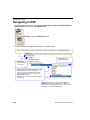
To change Verifier settings, or to access the Configuration, Camera, Terminal, Utilities, or
Output Format views, click the App Mode button.
To return to Verification, click the Verification button.
To make changes to configuration settings in the control trees:
Open or close the full contents of a control tree by holding down the Alt key and single-clicking here.
The x denotes the
default option setting.
• Left click on
the + to expand
menu items.
• Double-click the desired parameter and singleclick in the selection box to view options.
• Place your cursor in the selection box, scroll
down to the setting you want to change, and
single-click the setting.
• Left click again on the open screen to complete
the selection.
• Right click on the open screen and select Save to
Reader to implement the command in the Verifier. You
can send the command without saving it, or you can send
and save the command simultaneously.
2-12
Quadrus Verifier User’s Manual
Using ESP
Send/Receive Options
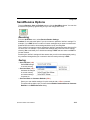
To access Receive, Save and Default options, click the Send/Recv button. You can also
access these options by right-clicking in any of the configuration views.
Receiving
From the Send/Recv menu, select Receive Reader Settings.
Caution: Do not select this option if you do not want to upload the Verifier’s settings. For
example, if your ESP file has a number of custom settings that you want to maintain and
download into the Verifier, these settings would be lost by choosing Yes.
This is useful if you want to receive (upload) the Verifier’s settings and save them as a file
for future use. For example, if your Verifier has settings that you do not want to change,
choosing Yes would allow you to load those settings to ESP and save them in a ESP file
for later retrieval.
Receiving the Verifier’s settings will also assure that you will not be subsequently saving
any unwanted changes that you or someone else has made previously in ESP.
Saving
• Send, No Save (<A>)
Saves ESP settings
to current memory.
• Send and Save (<Z>)
Activates all changes
in current memory
and saves settings
for power-on.
• Send and Save as Customer Defaults (<Zc>)
Saves your own default settings for quick retrieval with a <Zrc> command.
This option will be visible only if you have checked Enable ‘Send and Save as Customer
Defaults’ in the ESP Preferences dialog.
Quadrus Verifier User’s Manual
2-13
Send/Receive Options
Defaulting
When you select Default Current Menu Settings or Default all Settings, you are only
defaulting the ESP settings.
Advanced Options
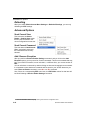
Send Current View
This is the same as Save to
Reader > Send No Save except
that only the commands in the
current configuration tree are sent.
Send Current Command
This is the same as Send Current
View , except that it saves only
the command that is currently
selected.
Add / Remove Exception
After you perform a Receive Reader Settings command1 and you click on the Add
Exception option, you may see a list of serial commands. These are commands that may
be in your Verifier’s firmware, but not included in, or different from, your current version of
ESP.
You can edit these commands by double-clicking on them and changing them as needed.
It is important to note that these commands will be saved to your Verifier whenever you
send a Save to Reader command, or an <A> or a <Z> command.
Also, if there is a corresponding ESP menu item, the ESP Value column for that item will
be blank following a Receive Reader Settings command.
1. From the Send/Recv button or by right-clicking from within the configuration trees.
2-14
Quadrus Verifier User’s Manual
3 Verification
Contents
Verification Serial Commands ...................................................................................................... 3-2
Verification Operational Commands............................................................................................. 3-2
Overview of Verification................................................................................................................ 3-3
ISO/IEC 15415 Evaluation Parameters ........................................................................................ 3-5
AS9132 Evaluation Parameters ................................................................................................... 3-7
AIM DPM Evaluation Parameters............................................................................................... 3-10
General Verification Serial Output .............................................................................................. 3-12
General Verification Output by ESP ........................................................................................... 3-17
ISO/IEC 15415 Verification Setup .............................................................................................. 3-19
ISO/IEC 15415 Verification Setup by ESP ................................................................................. 3-21
ISO/IEC 15415 Serial Output ..................................................................................................... 3-23
ISO/IEC 15415 Output by ESP................................................................................................... 3-33
AIM DPM Verification Setup ....................................................................................................... 3-40
AIM DPM Verification Setup by ESP .......................................................................................... 3-42
ISO/IEC 15415 Verification by Serial Command ........................................................................ 3-44
AS9132/JES 131 Marking Method ............................................................................................. 3-49
AS9132/JES 131 Marking Method by ESP ................................................................................ 3-51
AS9132 Serial Output................................................................................................................. 3-53
AS9132 Output by ESP .............................................................................................................. 3-62
AS9132 Verification by Serial Command ................................................................................... 3-67
AIM DPM Verification by Serial Command................................................................................. 3-68
Verification by ESP..................................................................................................................... 3-70
This section describes the verification process, including specification requirements,
software configuration, step-by-step procedures, and report output.
Quadrus Verifier User’s Manual
3-1
Verification Serial Commands
Verification Serial Commands
ISO/IEC 15415 Verification Setup
AIM DPM Verification Setup
General Verification Serial Output
AS9132/JES 131 Marking Method
AS9132 Serial Output
ISO/IEC 15415 Serial Output
<K531,aperture,wavelength,angle,reflectance
maximum,reflectance minimum>
<K532,minimum element size,maximum element
size,wavelength,lighting>
<K708,separator character,unused (0),ISO grade
type,symbol type,symbol dimension/size>
<K711,element shape,marking method,JES 131>
<K712,dot center offset,percentage failed offset,
cell fill,percentage failed cell fill,dot ovality,percentage
failed ovality,angle of distortion,symbol contrast,quiet
zone grade,pixels per element value>
<K756,grade,aperture value,wavelength value,light
angle value,decode grade,symbol contrast,fixed
pattern damage grade,axial non-uniformity,grid
non-uniformity,modulation grade,unused error
correction,print growth value,pixels per element
value>
Verification Operational Commands
ISO/IEC 15415 Reflectance Calibration
ISO/IEC 15415 Single Capture Verification
ISO/IEC 15415 Multi-Capture Verification
AS9132 Verification
AIM DPM Reflectance Calibration
AIM DPM Verification
3-2
<@VER>
<V1>
<V2>
<V3>
<@AIMDPM,R-max,R-min>
<V4>
Quadrus Verifier User’s Manual
Verification
Overview of Verification
The use of Data Matrix symbols in ID automation applications requires high-quality marks.
The purpose of verification is to ensure reliability and consistency of symbols, based on
the strict criteria outlined in the AS9132 and ISO/IEC 15415 standards and the AIM DPM
quality guideline. The Quadrus Verifier is designed to evaluate marks based on the specific
parameters in AS9132, ISO/IEC 15415, and AIM DPM.
AS9132
The AS9132 standard specifies uniform quality and technical requirements for direct part
marking with Data Matrix symbols. Direct part marking can be achieved by a variety of
means, including ink jet, dot peen, laser etch, and chemical etch.
Note: AS9132 and AS9132A are used interchangeably throughout this documentation.
“AS9132” is the name of the specification, and the suffix “A” denotes the current published
version of the specification.
ISO/IEC 15415
The ISO/IEC 15415 standard specifies the methodologies for measuring, evaluating, and
grading 2D symbol characteristics in order to provide an overall symbol grade.
AIM DPM
The AIM DPM quality guideline assesses direct part mark quality for a number of parameters,
including cell contrast, fixed pattern damage, axial and grid non-uniformity, cell modulation,
unused error correction capacity, and minimum reflectance. Direct part marking can be
achieved by a variety of means, including ink jet, dot peen, laser etch, and chemical etch.
AIM DPM is called out in MIL-STD-130N as the preferred guide for ensuring symbol quality
and reliability.
MIL-STD-130N
MIL-STD-130N is a standard for implementing ID automation processes to track United
States Department of Defense property.
The DoD’s primary means of parts traceability is the IUID initiative. IUID, which stands for
“Item Unique Identification”, is a system of establishing unique item identifiers (UIIs) by
assigning a machine-readable character string or number to an item (a single hardware
component or grouping of subassemblies), thereby distinguishing it from other items.
Tracing items in this way requires the use of reliable symbols, whether in the form of
printed labels or marks applied directly to parts. MIL-STD-130N calls out AIM DPM as
the preferred standard for ensuring symbol quality and reliability.
Quadrus Verifier User’s Manual
3-3
Overview of Verification
ISO/IEC 15426-2 Verifier Certification
ISO/IEC 15426-2 is a verifier conformance standard that is referenced in the introduction
to the ISO/IEC 15415 specification. Conformance to ISO/IEC 15426-2 is required for
certification as a true Data Matrix verifier.
Why is Verifier re-calibration important?
Like any measurement device, the Quadrus Verifier requires regular maintenance and
calibration to ensure reliable and accurate operation over time.
How often does the Verifier need to be re-calibrated / re-certified?
Microscan recommends that the Quadrus Verifier be re-calibrated and re-certified once
every year.
Important: Even if the Verifier has not been used during the first year of ownership, it
should still be sent to Microscan for re-calibration one year from the date of original factory
calibration.
What is the process for Verifier re-calibration / re-certification?
Schedule a return under the SRO (Service Return Order) process. Contact the Microscan
Service Department at 425.226.5700 to initiate the SRO process.
3-4
Quadrus Verifier User’s Manual
Verification
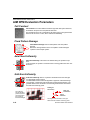
ISO/IEC 15415 Evaluation Parameters
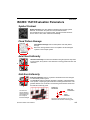
Symbol Contrast
Symbol Contrast is the value difference between light and dark symbol
elements, and between the quiet zone and perimeter elements.
This example shows a low-contrast symbol. The light and dark elements
are too close in value, which undermines readability.
Fixed Pattern Damage
Fixed Pattern Damage refers to finder pattern and clock pattern
damage.
Notice the missing elements in the clock pattern and the damaged
L-pattern in the example symbol.
Axial Non-Uniformity
Axial Non-Uniformity is the amount of deviation along the symbol’s major axes.
In this example, the symbol’s Y-axis dimension is clearly greater than its X-axis
dimension.
X
Y
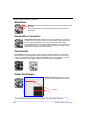
Grid Non-Uniformity
Grid Non-Uniformity refers to a symbol’s cell deviation from the ideal grid
of a theoretical “perfect symbol”.
The Data Matrix reference decode algorithm is applied to a binarized image
of the symbol, comparing its grid intersections to ideal grid intersections. The
greatest distance from an actual to a theoretical grid intersection determines
the Grid Non-Uniformity grade.
X
Y
Actual grid
intersection
The reference
decode algorithm
plots the symbol’s
grid intersections
and compares
them to an ideal grid.
Vector
deviation
Symbol Detail
Quadrus Verifier User’s Manual
Ideal grid
intersection
The largest vector deviation on the grid
determines the Grid Non-Uniformity grade.
3-5
ISO/IEC 15415 Evaluation Parameters
Modulation
Modulation refers to the reflectance uniformity of a symbol’s light and dark
elements.
In this example, notice that the light/dark values of some elements are
inconsistent.
Unused Error Correction
Unused Error Correction indicates the amount of available error correction in
a symbol. Error Correction is a method of reconstructing or replacing data that
is lost through symbol damage. 100% Unused Error Correction is ideal.
The example at left is an ECC 200 Data Matrix symbol in good condition. “ECC
200” indicates the error correction level of the symbology. A higher number
indicates more robust error correction capacity.
Print Growth
Print Growth refers to the deviation (larger or smaller) of actual element size from intended
element size due to printing problems. When a symbol is printed, the ink may “bleed” when it
comes in contact with the substrate, causing an Overprint. If there is not enough ink, or if there
is some other problem with printing equipment, the result may be an Underprint.
Overprint
Underprint
Pixels Per Element
Pixels Per Element refers to the number
of pixels in each individual symbol element.
10 pixels
This magnified symbol detail contains 4 elements, each with a width of 10 pixels.
3-6
Quadrus Verifier User’s Manual
Verification
AS9132 Evaluation Parameters
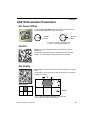
Dot Center Offset
A symbol’s Dot Center Offset value indicates the deviation of actual
dot centers from theoretical or “ideal” dot centers.
x
x x
Ideal dot
center
Actual dot
center
The difference between the ideal and actual
dot centers is the Dot Center Offset value.
Cell Fill
Cell Fill is the percentage of the ideal cell size that the module or
element fills.
The example at left shows dot peen elements that overfill the ideal
cell size. The elements of the dots exceed the cell boundaries.
Dot Ovality
Dot Ovality is the extent to which round elements deviate from a perfect
circle.
The example at left shows a symbol that would receive an unfavorable
Dot Ovality evaluation.
D
d
Ideal dot shape
Module
If D - d > 20% of nominal module size, then dot ovality
is out of spec with AS9132 requirements.
Quadrus Verifier User’s Manual
3-7
AS9132 Evaluation Parameters
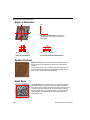
Angle of Distortion
15°
X
The Angle of Distortion is the symbol’s
deviation from a 90° relation between row
and column.
Y
90°
75°
90°
Ideal: 90° Row/Column
105°
15° Deviation from Ideal Row/Column
Symbol Contrast
Symbol Contrast is the value difference between light and dark
symbol elements, and between the quiet zone and perimeter
elements.
This example shows a low-contrast symbol. The dark elements
(etched) and the light elements (the substrate’s surface) are too
close in value, which undermines readability.
Quiet Zone
The Quiet Zone is an unmarked space of at least one element in
width surrounding the symbol, required for symbol readability.
The red box in the example represents the outer perimeter of the
minimum Quiet Zone requirement. The Quiet Zone can be any
amount greater than one element in width, but any Quiet Zone
width less than one element will make the symbol difficult or
impossible to read.
3-8
Quadrus Verifier User’s Manual
Verification
Pixels Per Element
Pixels Per Element refers to the number of pixels in each individual symbol element.
11 pixels
This magnified symbol detail contains 4 elements, each with a width of 11 pixels.
Quadrus Verifier User’s Manual
3-9
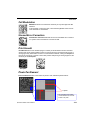
AIM DPM Evaluation Parameters
AIM DPM Evaluation Parameters
Cell Contrast
Cell Contrast is the value difference between light and dark symbol elements,
and between the quiet zone and perimeter elements.
This example shows a low-contrast direct part mark symbol. The light and dark
elements are too close in value, which undermines readability.
Fixed Pattern Damage
Fixed Pattern Damage refers to finder pattern and clock pattern
damage.
Notice the missing elements in the clock pattern and the damaged
L-pattern in the example symbol.
Axial Non-Uniformity
Axial Non-Uniformity is the amount of deviation along the symbol’s major
axes.
In this example, the symbol’s Y-axis dimension is clearly greater than its X-axis
dimension.
X
Y
Grid Non-Uniformity
Grid Non-Uniformity refers to a symbol’s cell deviation from the ideal grid
of a theoretical “perfect symbol”.
The Data Matrix reference decode algorithm is applied to a binarized image
of the symbol, comparing its grid intersections to ideal grid intersections. The
greatest distance from an actual to a theoretical grid intersection determines
the Grid Non-Uniformity grade.
X
Y
Actual grid
intersection
The reference
decode algorithm
plots the symbol’s
grid intersections
and compares
them to an ideal grid.
Vector
deviation
Symbol Detail
3-10
Ideal grid
intersection
The largest vector deviation on the grid
determines the Grid Non-Uniformity grade.
Quadrus Verifier User’s Manual
Verification
Cell Modulation
Modulation refers to the reflectance uniformity of a symbol’s light and dark
elements.
In this example of a dot peen mark, notice that the light/dark values of some
of the elements are inconsistent.
Unused Error Correction
Unused Error Correction indicates the amount of available error correction
in a symbol. 100% Unused Error Correction is ideal.
Print Growth
Print Growth refers to the deviation (larger or smaller) of actual element size from intended
element size due to printing problems. When a symbol is printed or chemical etched, the ink or
etching agent may “bleed” when it comes in contact with the substrate, causing an Overprint. If
there is not enough ink, or if there is some other problem with printing or etching equipment, the
result may be an Underprint.
Overprint
Underprint
Pixels Per Element
Pixels Per Element refers to the number of pixels in each individual symbol element.
11 pixels
This magnified symbol detail
contains 4 elements, each with
a width of 11 pixels.
Quadrus Verifier User’s Manual
3-11
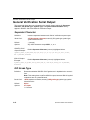
General Verification Serial Output
General Verification Serial Output
This command allows the user to determine the specific output settings for Separator
Character, ISO Grade Type, Symbol Type, and Symbol Dimension/Size as they
appear in ISO/IEC 15415 and AS9132 verification output.
Separator Character
Definition:
Inserts a separator between each field of verification report output.
Serial Cmd:
<K708,separator character,unused (0),ISO grade type,symbol type,
symbol dimension/size>
Default:
, (comma)
Options:
Any ASCII character except NULL, < , or >.
ISO/IEC 15415
Output Example:
Default Separator Character (comma) highlighted below.
symbol_data,2,005,660,45,4,4,075,3,1,0.11,3,0.43,3,2,057,-0.82,
08.7,ECC200,032x032
AS9132 Output
Example:
Default Separator Character (comma) highlighted below.
symbol_data,P,F,045,057,P,002,001,F,-08.20,P,034,P,12.4,ECC200,
018x018
ISO Grade Type
Definition:
Determines whether ISO/IEC 15415 grades are in alphabetical or numeric
form.
Note: This setting does not affect AS9132 output, because AS9132 symbol
evaluations are on a pass/fail basis.
Serial Cmd:
<K708,separator character,unused (0),ISO grade type,symbol type,symbol
dimension/size>
Default:
Alpha
Options:
0 = Alpha
1 = Numeric
3-12
Quadrus Verifier User’s Manual
Verification
Alpha (ISO Grade Type)
If alphabetical grading is chosen, ISO/IEC 15415 grades will be represented by the letters
A (best), B, C, D, or F (fail).
Output
Example:
All Alpha grades highlighted below.
symbol_data,C,005,660,45,A,A,075,B,D,0.11,B,0.43,B,C,057,-0.82,
08.7,ECC200,032x032
Output
Command Field
2/C
005
660
45
4/A
4/A
075
3/B
1/D
0.11
3/B
0.43
3/B
2/C
057
-0.82
08.7
ECC200
032x032
Grade
Aperture Value
Wavelength Value
Light Angle Value
Decode Grade
Symbol Contrast Grade
Symbol Contrast Value
Fixed Pattern Damage Grade
Axial Non-Uniformity Grade
Axial Non-Uniformity Value
Grid Non-Uniformity Grade
Grid Non-Uniformity Value
Modulation Grade
Unused Error Correction Capacity Grade
Unused Error Correction Capacity Value
Print Growth Value
Pixels Per Element Value
Symbol Type
Symbol Dimensions
Quadrus Verifier User’s Manual
3-13
General Verification Serial Output
Numeric (ISO Grade Type)
If numeric grading is chosen, ISO/IEC 15415 grades will be represented by 0 (fail), 1, 2, 3, or
4 (best) for Single-Capture verification, or by the decimal values 0.0 to 4.0 for Multi-Capture
verification.
Output
Example:
All Numeric grades highlighted below.
symbol_data,2,005,660,45,4,4,075,3,1,0.11,3,0.43,3,2,057,-0.82,
08.7,ECC200,032x032
Output
Command Field
2/C
005
660
45
4/A
4/A
075
3/B
1/D
0.11
3/B
0.43
3/B
2/C
057
-0.82
08.7
ECC200
032x032
Grade
Aperture Value
Wavelength Value
Light Angle Value
Decode Grade
Symbol Contrast Grade
Symbol Contrast Value
Fixed Pattern Damage Grade
Axial Non-Uniformity Grade
Axial Non-Uniformity Value
Grid Non-Uniformity Grade
Grid Non-Uniformity Value
Modulation Grade
Unused Error Correction Capacity Grade
Unused Error Correction Capacity Value
Print Growth Value
Pixels Per Element Value
Symbol Type
Symbol Dimensions
3-14
Quadrus Verifier User’s Manual
Verification
Symbol Type
Definition:
When enabled, identifies the symbology of the mark being evaluated in
the verification report output.
Serial Cmd:
<K708,separator character,unused (0),ISO grade type,symbol type,symbol
dimension/size>
Default:
Disabled
Options:
0 = Disabled
ISO/IEC 15415
Output Example:
Symbol Type highlighted below.
1 = Enabled
symbol_data,2,005,660,45,4,4,075,3,1,0.11,3,0.43,3,2,057,-0.82,
08.7,ECC200,032x032
AS9132 Output
Example:
Symbol Type highlighted below.
symbol_data,P,004,003,F,045,057,P,002,001,F,-08.20,P,034,P,12.4,
ECC200,018x018
ISO/IEC
15415 Output
Command Field
2/C
005
660
45
4/A
4/A
075
3/B
1/D
0.11
3/B
0.43
3/B
2/C
057
-0.82
08.7
ECC200
032x032
Grade
Aperture Value
Wavelength Value
Light Angle Value
Decode Grade
Symbol Contrast Grade
Symbol Contrast Value
Fixed Pattern Damage Grade
Axial Non-Uniformity Grade
Axial Non-Uniformity Value
Grid Non-Uniformity Grade
Grid Non-Uniformity Value
Modulation Grade
Unused ECC Grade
Unused ECC Value
Print Growth Value
Pixels Per Element Value
Symbol Type
Symbol Dimensions
Quadrus Verifier User’s Manual
AS9132
Output
Command Field
P
004
003
F
045
057
P
002
001
F
-08.20
P
034
P
12.4
ECC200
018x018
Dot Center Offset Grade
Dot Center Offset Worst Case Value
Dot Center Offset Average Value
Cell Fill Grade
Cell Fill Worst Case Value
Cell Fill Average Value
Dot Ovality Grade
Dot Ovality Worst Case Value
Dot Ovality Average Value
Angle of Distortion Grade
Angle of Distortion Value
Symbol Contrast Grade
Symbol Contrast Value
Quiet Zone Grade
Pixels Per Element Value
Symbol Type
Symbol Dimensions
3-15
General Verification Serial Output
Symbol Dimension/Size
Definition:
When enabled, states the dimensions (row value x column value) of
the mark being evaluated in the verification report output.
Serial Cmd:
<K708,separator character,unused (0),ISO grade type,symbol type,
symbol dimension/size>
Default:
Disabled
Options:
0 = Disabled
1 = Enabled
ISO/IEC 15415
Output Example:
Symbol Dimensions highlighted below.
symbol_data,2,005,660,45,4,4,075,3,1,0.11,3,0.43,3,2,057,-0.82,
08.7,ECC200,032x032
AS9132 Output
Example:
Symbol Dimensions highlighted below.
symbol_data,P,004,003,F,045,057,P,002,001,F,-08.20,P,034,P,12.4,
ECC200,018x018
ISO/IEC
15415 Output
Command Field
2/C
005
660
45
4/A
4/A
075
3/B
1/D
0.11
3/B
0.43
3/B
2/C
057
-0.82
08.7
ECC200
032x032
Grade
Aperture Value
Wavelength Value
Light Angle Value
Decode Grade
Symbol Contrast Grade
Symbol Contrast Value
Fixed Pattern Damage Grade
Axial Non-Uniformity Grade
Axial Non-Uniformity Value
Grid Non-Uniformity Grade
Grid Non-Uniformity Value
Modulation Grade
Unused ECC Grade
Unused ECC Value
Print Growth Value
Pixels Per Element Value
Symbol Type
Symbol Dimensions
3-16
AS9132
Output
Command Field
P
004
003
F
045
057
P
002
001
F
-08.20
P
034
P
12.4
ECC200
018x018
Dot Center Offset Grade
Dot Center Offset Worst Case Value
Dot Center Offset Average Value
Cell Fill Grade
Cell Fill Worst Case Value
Cell Fill Average Value
Dot Ovality Grade
Dot Ovality Worst Case Value
Dot Ovality Average Value
Angle of Distortion Grade
Angle of Distortion Value
Symbol Contrast Grade
Symbol Contrast Value
Quiet Zone Grade
Pixels Per Element Value
Symbol Type
Symbol Dimensions
Quadrus Verifier User’s Manual
Verification
General Verification Output by ESP
General verification output parameters allow the user choose specific output settings for
Separator Character, ISO Grade Type, Symbol Type, and Symbol Dimension/Size as
they appear in ISO/IEC 15415 and AS9132 verification output.
Note: The Alpha or Numeric
parameter only affects ISO/IEC
15415 output.
Separator Character
The separator you choose will appear between each field of data output.
Double-click on the character displayed in the
control tree to bring up the separator character
calculator. You can either type your choice of
character in the text field, or, if you need to use
a non-printable character, click the abbreviation
that corresponds with that character.
ISO Grade Type
This parameter only affects ISO/IEC 15415 verification output.
If you choose Alpha, ISO grades will be in alphabetical format (A, B, C, D, F).
If you choose Numeric, ISO grades will be in numeric format.
Quadrus Verifier User’s Manual
3-17
General Verification Output by ESP
Symbol Type
When enabled, Symbol Type identifies the symbology of the mark being evaluated in the
verification report output.
Symbol Dimension / Size
When enabled, Symbol Dimensions states the dimensions (row value x column value) of
the mark being evaluated in the verification report output.
3-18
Quadrus Verifier User’s Manual
Verification
ISO/IEC 15415 Verification Setup
This command allows the user to fine-tune lighting and camera settings to comply with
ISO/IEC 15415’s optical requirements for 2D verification.
Aperture
Definition:
The physical size of the synthetic aperture that will be applied to the captured
symbol image by the Verifier’s software.
This parameter is in units of 1/10000 of one inch, or 10x the mil size.
Serial Cmd:
<K531,aperture,wavelength,angle,reflectance maximum,reflectance
minimum>
Default:
50
Options:
10 to 160
Wavelength
Definition:
Expresses the wavelength of LED illumination that will be directed at the
candidate symbol during verification.
Wavelength values are in nanometers (nm).
Serial Cmd:
<K531,aperture,wavelength,angle,reflectance maximum,reflectance
minimum>
Default:
660
Options:
400 to 700
Angle
Definition:
The degree angle at which the candidate symbol will be illuminated in the
lighting chamber during verification.
Serial Cmd:
<K531,aperture,wavelength,angle,reflectance maximum,reflectance
minimum>
Default:
45
Options:
30 to 90
Quadrus Verifier User’s Manual
3-19
ISO/IEC 15415 Verification Setup
Reflectance Maximum
Definition:
This setting represents the maximum reflectance value (percent) of the
symbol used to calibrate the Verifier. The calibration symbol is described in
Step 6 of the Quick Start procedure.
Serial Cmd:
<K531,aperture,wavelength,angle,reflectance maximum,reflectance
minimum>
Default:
85
Options:
0 to 100
Reflectance Minimum
Definition:
This setting represents the minimum reflectance value (percent) of the
symbol used to calibrate the Verifier. The calibration symbol is described in
Step 6 of the Quick Start procedure.
Serial Cmd:
<K531,aperture,wavelength,angle,reflectance maximum,reflectance
minimum>
Default:
10
Options:
0 to 100
3-20
Quadrus Verifier User’s Manual
Verification
ISO/IEC 15415 Verification Setup by ESP
ISO/IEC 15415 Verification Setup allows the user to fine-tune lighting and camera settings
to comply with ISO/IEC 15415’s optical requirements for 2D verification.
Aperture
Aperture expresses the radius of the synthetic aperture that will be applied to the captured
symbol image by the Verifier’s software.
Radius values are in units of 1/10th of one pixel.
Wavelength
Wavelength is the LED illumination wavelength that will be directed at the candidate
symbol during verification.
Wavelength values are in nanometers (nm).
Angle
Angle is the degree angle at which the candidate symbol will be illuminated in the lighting
chamber during verification.
Quadrus Verifier User’s Manual
3-21
ISO/IEC 15415 Verification Setup by ESP
Reflectance Max
Reflectance Max represents the maximum reflectance value (percent) of the symbol used
to calibrate the Verifier.
Reflectance Min
This setting represents the minimum reflectance value (percent) of the symbol used to
calibrate the Verifier.
3-22
Quadrus Verifier User’s Manual
Verification
ISO/IEC 15415 Serial Output
This command allows the user to determine which ISO/IEC 15415 grades and/or values
will be represented in the verification output string.
Grade
Definition:
Note: The grade type (Alpha or Numeric) is determined by the “ISO Grade
Type” field in the General Verification Serial Output command <K708>.
Serial Cmd:
<K756,grade,aperture value,wavelength value,light angle value,decode
grade,symbol contrast,fixed pattern damage grade,axial non-uniformity,grid
non-uniformity,modulation grade,unused error correction,print growth
value,pixels per element value>
Default:
Disabled
Options:
0 = Disabled
1 = Grade
Output
Example:
Overall Grade highlighted below (shown in numeric form).
symbol_data,2,005,660,45,4,4,075,3,1,0.11,3,0.43,3,2,057,-0.82,
08.7,ECC200,032x032
Aperture Value
Definition:
Expresses the Synthetic Aperture Value in the verification output string.
Serial Cmd:
<K756,grade,aperture value,wavelength value,light angle value,decode
grade,symbol contrast,fixed pattern damage grade,axial non-uniformity,grid
non-uniformity,modulation grade,unused error correction,print growth
value,pixels per element value>
Default:
Disabled
Options:
0 = Disabled
1 = Value
Output
Example:
Synthetic Aperture Value highlighted below.
symbol_data,2,005,660,45,4,4,075,3,1,0.11,3,0.43,3,2,057,-0.82,
08.7,ECC200,032x032
Quadrus Verifier User’s Manual
3-23
ISO/IEC 15415 Serial Output
Wavelength Value
Definition:
When enabled, appends the LED illumination Wavelength Value to the
verification output string.
Wavelength Value expresses the peak wavelength of LED light output,
measured in nanometers (nm).
Serial Cmd:
<K756,grade,aperture value,wavelength value,light angle value,decode
grade,symbol contrast,fixed pattern damage grade,axial non-uniformity,grid
non-uniformity,modulation grade,unused error correction,print growth
value,pixels per element value>
Default:
Disabled
Options:
0 = Disabled
1 = Value
Output
Example:
Wavelength Value highlighted below.
symbol_data,2,005,660,45,4,4,075,3,1,0.11,3,0.43,3,2,057,-0.82,
08.7,ECC200,032x032
Light Angle Value
Definition:
Defines the angle of incidence of LED illumination.
When enabled, appends the LED Light Angle Value (in degrees) to the
verification output string.
Serial Cmd:
<K756,grade,aperture value,wavelength value,light angle value,decode
grade,symbol contrast,fixed pattern damage grade,axial non-uniformity,grid
non-uniformity,modulation grade,unused error correction,print growth
value,pixels per element value>
Default:
Disabled
Options:
0 = Disabled
1 = Value
Output
Example:
Light Angle Value highlighted below.
symbol_data,2,005,660,45,4,4,075,3,1,0.11,3,0.43,3,2,057,-0.82,
08.7,ECC200,032x032
3-24
Quadrus Verifier User’s Manual
Verification
Decode Grade
Definition:
To receive a passing Decode Grade, a symbol must be successfully
decoded using the Verifier’s reference decode algorithm.
When enabled, appends the symbol’s Decode Grade to the verification
output string.
A symbol will receive a 0 (F) if it cannot be decoded using the specified
reference decode algorithm. It will receive a 4 (A) if it can be decoded
using the specified reference decode algorithm.
Serial Cmd:
<K756,grade,aperture value,wavelength value,light angle value,decode
grade,symbol contrast,fixed pattern damage grade,axial non-uniformity,grid
non-uniformity,modulation grade,unused error correction,print growth
value,pixels per element value>
Default:
Disabled
Options:
0 = Disabled
1 = Grade
Output
Example:
Decode Grade highlighted below (shown in numeric form).
symbol_data,2,005,660,45,4,4,075,3,1,0.11,3,0.43,3,2,057,-0.82,
08.7,ECC200,032x032
Symbol Contrast
Definition:
Measures the difference between light and dark symbol elements. This
measurement also includes the symbol’s Quiet Zone.
When enabled, appends the Symbol Contrast grade and/or value to the
verification output string.
Grading Scale:
4 (A) if > 70%
3 (B) if > 55%
2 (C) if > 40%
1 (D) if > 20%
0 (F) if < 20%
Serial Cmd:
<K756,grade,aperture value,wavelength value,light angle value,decode
grade,symbol contrast,fixed pattern damage grade,axial non-uniformity,grid
non-uniformity,modulation grade,unused error correction,print growth
value,pixels per element value>
Default:
Disabled
Options:
0 = Disabled
1 = Grade
2 = Value
3 = Grade and Value
Quadrus Verifier User’s Manual
3-25
ISO/IEC 15415 Serial Output
Grade (Symbol Contrast)
Output
Example:
Symbol Contrast Grade highlighted below (shown in numeric form).
symbol_data,2,005,660,45,4,4,3,1,0.11,3,0.43,3,2,057,-0.82,
08.7,ECC200,032x032
Value (Symbol Contrast)
Output
Example:
Symbol Contrast Value is a percentage, and is shown in the output string
as a three-digit value from 000 to 100. For example, “075” = 75%.
symbol_data,2,005,660,45,4,075,3,1,0.11,3,0.43,3,2,057,-0.82,
08.7,ECC200,032x032
Grade and Value (Symbol Contrast)
Output
Example:
Symbol Contrast Grade and Value highlighted below (grade shown in
numeric form).
symbol_data,2,005,660,45,4,4,075,3,1,0.11,3,0.43,3,2,057,-0.82,
08.7,ECC200,032x032
3-26
Quadrus Verifier User’s Manual
Verification
Fixed Pattern Damage Grade
Definition:
Assesses damage to the symbol’s finder pattern and clock pattern.
When enabled, appends the symbol’s Fixed Pattern Damage Grade to the
verification output string.
Serial Cmd:
<K756,grade,aperture value,wavelength value,light angle value,decode
grade,symbol contrast,fixed pattern damage grade,axial non-uniformity,
grid non-uniformity,modulation grade,unused error correction,print growth
value,pixels per element value>
Default:
Disabled
Options:
0 = Disabled
1 = Grade
Output
Example:
Fixed Pattern Damage Grade highlighted below (shown in numeric form).
symbol_data,2,005,660,45,4,4,075,3,1,0.11,3,0.43,3,2,057,-0.82,
08.7,ECC200,032x032
Axial Non-Uniformity
Definition:
Measures deviation along the symbol’s major axes.
When enabled, appends the symbol’s Axial Non-Uniformity grade and/or
value to the verification output string.
Grading Scale:
4 (A) if < 0.06
3 (B) if < 0.08
2 (C) if < 0.10
1 (D) if < 0.12
0 (F) if > 0.12
Serial Cmd:
<K756,grade,aperture value,wavelength value,light angle value,decode
grade,symbol contrast,fixed pattern damage grade,axial non-uniformity,
grid non-uniformity,modulation grade,unused error correction,print growth
value,pixels per element value>
Default:
Disabled
Options:
0 = Disabled
1 = Grade
2 = Value
3 = Grade and Value
Quadrus Verifier User’s Manual
3-27
ISO/IEC 15415 Serial Output
Grade (Axial Non-Uniformity)
Output
Example:
Axial Non-Uniformity Grade highlighted below (shown in numeric form).
symbol_data,2,005,660,45,4,4,075,3,1,3,0.43,3,2,057,-0.82,
08.7,ECC200,032x032
Value (Axial Non-Uniformity)
Output
Example:
Axial Non-Uniformity Value highlighted below.
symbol_data,2,005,660,45,4,4,075,1,0.11,3,0.43,3,2,057,-0.82,
08.7,ECC200,032x032
Grade and Value (Axial Non-Uniformity)
Output
Example:
Axial Non-Uniformity Grade and Value highlighted below (grade shown in
numeric form).
symbol_data,2,005,660,45,4,4,075,3,1,0.11,3,0.43,3,2,057,-0.82,
08.7,ECC200,032x032
3-28
Quadrus Verifier User’s Manual
Verification
Grid Non-Uniformity
Definition:
Measures cell deviation from the theoretical or “ideal” grid intersections as
determined by the reference decode algorithm.
When enabled, appends the symbol’s Grid Non-Uniformity grade and/or
value to the verification output string.
Grading Scale:
4 (A) if < 0.38
3 (B) if < 0.50
2 (C) if < 0.63
1 (D) if < 0.75
0 (F) if > 0.75
Serial Cmd:
<K756,grade,aperture value,wavelength value,light angle value,decode
grade,symbol contrast,fixed pattern damage grade,axial non-uniformity,grid
non-uniformity,modulation grade,unused error correction,print growth
value,pixels per element value>
Default:
Disabled
Options:
0 = Disabled
1 = Grade
2 = Value
3 = Grade and Value
Grade (Grid Non-Uniformity)
Output
Example:
Grid Non-Uniformity Grade highlighted below (shown in numeric form).
symbol_data,2,005,660,45,4,4,075,3,1,0.11,3,3,2,057,-0.82,
08.7,ECC200,032x032
Value (Grid Non-Uniformity)
Output
Example:
Grid Non-Uniformity Value highlighted below.
symbol_data,2,005,660,45,4,4,075,3,1,0.11,0.43,3,2,057,-0.82,
08.7,ECC200,032x032
Grade and Value (Grid Non-Uniformity)
Output
Example:
Grid Non-Uniformity Grade and Value highlighted below (grade shown in
numeric form).
symbol_data,2,005,660,45,4,4,075,3,1,0.11,3,0.43,3,2,057,-0.82,
08.7,ECC200,032x032
Quadrus Verifier User’s Manual
3-29
ISO/IEC 15415 Serial Output
Modulation Grade
Definition:
Assesses the reflectance uniformity of the symbol’s light and dark elements.
When enabled, appends the symbol’s Modulation Grade to the verification
output string.
Grading Scale:
4 (A) if > 0.50
3 (B) if > 0.40
2 (C) if > 0.30
1 (D) if > 0.20
0 (F) if < 0.20
Serial Cmd:
<K756,grade,aperture value,wavelength value,light angle value,decode
grade,symbol contrast,fixed pattern damage grade,axial non-uniformity,grid
non-uniformity,modulation grade,unused error correction,print growth
value,pixels per element value>
Default:
Disabled
Options:
0 = Disabled
1 = Grade
Output
Example:
Modulation Grade highlighted below (shown in numeric form).
symbol_data,2,005,660,45,4,4,075,3,1,0.11,3,0.43,3,2,057,-0.82,
08.7,ECC200,032x032
3-30
Quadrus Verifier User’s Manual
Verification
Unused Error Correction
Definition:
Determines the amount of error correction capacity that was used to
decode the symbol, and indicates the remaining amount of available error
correction.
When enabled, appends the symbol’s Unused Error Correction grade
and/or value to the verification output string.
Grading Scale:
4 (A) if > 0.62
3 (B) if > 0.50
2 (C) if > 0.37
1 (D) if > 0.25
0 (F) if < 0.25
Serial Cmd:
<K756,grade,aperture value,wavelength value,light angle value,decode
grade,symbol contrast,fixed pattern damage grade,axial non-uniformity,grid
non-uniformity,modulation grade,unused error correction,print growth
value,pixels per element value>
Default:
Disabled
Options:
0 = Disabled
1 = Grade
2 = Value
3 = Grade and Value
Grade
Output
Example:
Unused Error Correction Grade highlighted below (shown in numeric
form).
symbol_data,2,005,660,45,4,4,075,3,1,0.11,3,0.43,3,2,-0.82,
08.7,ECC200,032x032
Value
Output
Example:
Unused Error Correction Value highlighted below.
symbol_data,2,005,660,45,4,4,075,3,1,0.11,3,0.43,3,057,-0.82,
08.7,ECC200,032x032
Grade and Value
Output
Example:
Unused Error Correction Grade and Value highlighted below (grade
shown in numeric form).
symbol_data,2,005,660,45,4,4,075,3,1,0.11,3,0.43,3,2,057,-0.82,
08.7,ECC200,032x032
Quadrus Verifier User’s Manual
3-31
ISO/IEC 15415 Serial Output
Print Growth Value
Definition:
Determines the degree to which a symbol is overprinted or underprinted.
When enabled, appends the symbol’s Print Growth Value to the verification
output string.
Serial Cmd:
<K756,grade,aperture value,wavelength value,light angle value,decode
grade,symbol contrast,fixed pattern damage grade,axial non-uniformity,grid
non-uniformity,modulation grade,unused error correction,print growth
value,pixels per element value>
Default:
Disabled
Options:
0 = Disabled
1 = Value
Output
Example:
Print Growth Value highlighted below.
symbol_data,2,005,660,45,4,4,075,3,1,0.11,3,0.43,3,2,057,-0.82,
08.7,ECC200,032x032
Pixels Per Element Value
Definition:
Counts the number of pixels in each symbol element. The higher the Pixels
Per Element count, the more readable the symbol.
When enabled, appends the symbol’s Pixels Per Element Value to the
verification output string.
Serial Cmd:
<K756,grade,aperture value,wavelength value,light angle value,decode
grade,symbol contrast,fixed pattern damage grade,axial non-uniformity,grid
non-uniformity,modulation grade,unused error correction,print growth
value,pixels per element value>
Default:
Disabled
Options:
0 = Disabled
1 = Value
Output
Example:
Pixels Per Element Value highlighted below.
symbol_data,2,005,660,45,4,4,075,3,1,0.11,3,0.43,3,2,057,-0.82,
08.7,ECC200,032x032
3-32
Quadrus Verifier User’s Manual
Verification
ISO/IEC 15415 Output by ESP
Grade Output
Note: Grade type (Alpha or Numeric) is determined by the “ISO Grade Type” parameter.
Aperture
Expresses the Synthetic Aperture Value in the verification report.
Quadrus Verifier User’s Manual
3-33
ISO/IEC 15415 Output by ESP
Wavelength
Wavelength Value expresses the peak wavelength of LED light output, measured in
nanometers (nm).
Light Angle
Defines the angle of incidence of LED illumination.
3-34
Quadrus Verifier User’s Manual
Verification
Decode
To receive a passing Decode Grade, a symbol must be successfully decoded using the
Verifier’s reference decode algorithm.
When enabled, includes the symbol’s Decode Grade in the verification report.
A symbol will receive a 0 (F) if it cannot be decoded using the specified reference decode
algorithm. It will receive a 4 (A) if it can be decoded using the specified reference decode
algorithm.
Symbol Contrast
Measures the difference between light and dark symbol elements. This measurement also
includes the symbol’s Quiet Zone.
When enabled, includes the Symbol Contrast grade and/or value in the verification report.
Quadrus Verifier User’s Manual
3-35
ISO/IEC 15415 Output by ESP
Fixed Pattern Damage
Assesses damage to the symbol’s finder pattern and clock pattern.
When enabled, includes the symbol’s Fixed Pattern Damage Grade in the verification
report.
Axial Non-Uniformity
Measures deviation along the symbol’s major axes.
When enabled, includes the symbol’s Axial Non-Uniformity grade and/or value in the
verification report.
3-36
Quadrus Verifier User’s Manual
Verification
Grid Non-Uniformity
Measures cell deviation from the theoretical or “ideal” grid intersections as determined by
the reference decode algorithm.
When enabled, includes the symbol’s Grid Non-Uniformity grade and/or value in the
verification report.
Modulation
Assesses the reflectance uniformity of the symbol’s light and dark elements.
When enabled, includes the symbol’s Modulation Grade in the verification report.
Quadrus Verifier User’s Manual
3-37
ISO/IEC 15415 Output by ESP
Unused ECC
Determines the amount of error correction capacity that was used to decode the symbol,
and indicates the remaining amount of available error correction.
When enabled, includes the symbol’s Unused Error Correction grade and/or value in the
verification report.
Print Growth
Determines the degree to which a symbol is overprinted or underprinted.
When enabled, includes the symbol’s Print Growth Value in the verification report.
3-38
Quadrus Verifier User’s Manual
Verification
Pixels Per Element
Counts the number of pixels in each symbol element. The higher the Pixels Per Element
count, the more readable the symbol.
When enabled, includes the symbol’s Pixels Per Element Value in the verification report.
Quadrus Verifier User’s Manual
3-39
AIM DPM Verification Setup
AIM DPM Verification Setup
This command allows the user to fine-tune lighting and camera settings to comply with
AIM DPM’s optical requirements for 2D verification.
Minimum Element Size
Definition:
The minimum expected element size of the candidate symbol in 1/1000 of
an inch, or the symbol’s mil size. The minimum and maximum element size
values define the range for calibration.
Note: A larger minimum-to-maximum range of element size may slow
down the calibration phase of the symbol grading process.
Once the candidate symbol is identified, the AIM DPM procedure will use
and report the actual aperture size used for verification.
Serial Cmd:
<K532,minimum element size,maximum element size,wavelength,lighting>
Default:
10
Options:
7 to 50
Maximum Element Size
Definition:
The maximum expected element size of the candidate symbol in 1/1000 of
an inch, or the symbol’s mil size. The minimum and maximum element size
values define the range for calibration.
Note: A larger minimum-to-maximum range of element size may slow
down the calibration phase of the symbol grading process.
Once the candidate symbol is identified, the AIM DPM procedure will use
and report the actual aperture size used for verification.
Serial Cmd:
<K532,minimum element size,maximum element size,wavelength,lighting>
Default:
15
Options:
7 to 50
Wavelength
Definition:
The wavelength of illumination in the lighting environment used for verification.
Important: The operator must ensure that this setting matches that of the
illumination source being used.
Serial Cmd:
<K532,minimum element size,maximum element size,wavelength,lighting>
Default:
660
Options:
400 to 700
3-40
Quadrus Verifier User’s Manual
Verification
Lighting
Definition:
A string of ASCII characters that represents the angle and configuration of
illumination used in the verification environment.
Important: For reliable Direct Part Mark verification results, Microscan
recommends setting the Lighting parameter to 90. This is because diffuse
perpendicular (or “on axis/bright field”) illumination—in which the symbol
plane is parallel to the plane of the Verifier’s sensor and the symbol is uniformly
illuminated at a 90° angle of incidence—is most effective for reading Direct
Part Marks.
Note: Details about other lighting configurations and their corresponding
ASCII representations can be found in AIM Global’s “Direct Part Mark
(DPM) Quality Guideline”, available at www.aimglobal.org.
Serial Cmd:
<K532,minimum element size,maximum element size,wavelength,lighting>
Default:
45Q
Options:
Any ASCII string up to 15 characters
Quadrus Verifier User’s Manual
3-41
AIM DPM Verification Setup by ESP
AIM DPM Verification Setup by ESP
AIM DPM Verification Setup allows the user to fine-tune lighting and camera settings to
comply with AIM DPM’s optical requirements for 2D verification.
Minimum Element Size
Minimum Element Size is the minimum expected element size of the candidate symbol in
1/1000 of an inch, or the symbol’s mil size. The minimum and maximum element size
values define the range for calibration.
Note: A larger minimum-to-maximum range of element size may slow down the calibration
phase of the symbol grading process.
Once the candidate symbol is identified, the AIM DPM procedure will use and report the
actual aperture size used for verification.
Maximum Element Size
Maximum Element Size is the maximum expected element size of the candidate symbol
in 1/1000 of an inch, or the symbol’s mil size. The minimum and maximum element size
values define the range for calibration.
Note: A larger minimum-to-maximum range of element size may slow down the calibration
phase of the symbol grading process.
Once the candidate symbol is identified, the AIM DPM procedure will use and report the
actual aperture size used for verification.
3-42
Quadrus Verifier User’s Manual
Verification
Wavelength
Wavelength represents the wavelength of illumination in the lighting environment used for
verification.
Important: The operator must ensure that this setting matches that of the illumination
source being used.
Lighting
Lighting is represented by a combination of ASCII characters (up to 15) signifying the
angle and configuration of illumination used in the verification environment.
Important: For reliable Direct Part Mark verification results, Microscan recommends setting
the Lighting parameter to 90. This is because diffuse perpendicular (or “on axis/bright
field”) illumination—in which the symbol plane is parallel to the plane of the Verifier’s sensor
and the symbol is uniformly illuminated at a 90° angle of incidence—is most effective for
reading Direct Part Marks.
Note: Details about other lighting configurations and their corresponding ASCII representations
can be found in AIM Global’s “Direct Part Mark (DPM) Quality Guideline”, available at
www.aimglobal.org.
Quadrus Verifier User’s Manual
3-43
ISO/IEC 15415 Verification by Serial Command
ISO/IEC 15415 Verification by Serial Command
Reflectance Calibration
Definition:
The Reflectance Calibration command initiates a calibration process with
the minimum and maximum reflectance values that are already configured in
the Verifier (default minimum: <K531,,,,10> default maximum: <K531,,,85>).
Note: If the minimum and maximum reflectance values configured in the Verifier
correspond with a different calibration symbol, the results after calibration may
be incorrect.
Serial Cmd:
<@VER>
• Place the calibration symbol provided in the approximate center of the Verifier’s field of
view before entering the Reflectance Calibration command.
Place the Calibration Symbol as
close to the center of the Verifier’s field
of view as possible before initiating the
Reflectance Calibration process.
IMPORTANT: Keep this card in a safe place! It must be saved and
kept in good condition, as it is the Verifier’s most critical setup tool.
You can use the Terminal in
ESP to send serial commands.
Commands can either be
entered in the Send text field,
or directly in the terminal.
Important: After the Verifier is calibrated, you must allow 15 minutes of warmup time in
Live Video Mode, <K760,2>, before starting a verification process. The LEDs must
reach a steady output state for verification results to be valid.
3-44
Quadrus Verifier User’s Manual
Verification
ISO/IEC 15415 Single Capture Verification
Serial Cmd:
<V1>
Single Capture Verification Process
• Once the reflectance calibration process is complete, place the candidate symbol as
close to the center of the Verifier’s field of view as possible.
• When the candidate symbol is in position, initiate the Single Capture Verification
command <V1>.
• The Single Capture Verification Report will then appear, detailing the symbol’s
adherence to ISO/IEC 15415 requirements.
Single Capture Verification Report
The ISO/IEC 15415 Single Capture results show data concerning the reference decode
algorithm, symbol contrast, fixed pattern damage, axial and grid non-uniformity, modulation,
unused error correction, print growth, symbol type, symbol size, element size, and pixels per
element. All but the last five parameters are given a numeric and alphabetical grade.
Quadrus Verifier User’s Manual
3-45
ISO/IEC 15415 Verification by Serial Command
ISO/IEC 15415 Multi-Capture Verification
Serial Cmd:
<V2>
Multi-Capture Verification Process
• Once the reflectance calibration process is complete, place the candidate symbol as
close to the center of the Verifier’s field of view as possible.
Important: Multi-Capture Verification requires five captures at 72° intervals throughout
a 360° rotation. When the symbol is placed in the Verifier’s field of view, its position
should be considered its default position -- 0°. ISO/IEC 15415 requires that the symbol’s
orientation for the first capture be 45°. This means 45° from the default symbol position, 0°.
• When the candidate symbol is in position, initiate the Multi-Capture Verification command
<V2>.
• The first rotation prompt, shown below, will appear.
Step 1: 45° Rotation
Default
Position: 0°
45°
Step 2: 117° Rotation
Default
Position: 0°
3-46
117°
Quadrus Verifier User’s Manual
Verification
Step 3: 189° Rotation
Default
Position: 0°
189°
Step 4: 261° Rotation
Default
Position: 0°
261°
Step 5: 333° Rotation
Default
Position: 0°
Quadrus Verifier User’s Manual
333°
3-47
ISO/IEC 15415 Verification by Serial Command
Multi-Capture Verification Report
After the final rotation and trigger, the Verifier will output the ISO/IEC 15415 Multi-Capture
Verification Report, shown below.
The ISO/IEC 15415 Multi-Capture parameters are the same as those for ISO/IEC 15415
Single Capture, but multi-capture results are determined only after the symbol is read at
five 72° intervals throughout a full 360° rotation. The overall symbol grade is based on an
arithmetic mean of the results from the five reads.
3-48
Quadrus Verifier User’s Manual
Verification
AS9132 /JES 131 Marking Method
Element Shape
Definition:
The shape of the symbol’s printed, dot peen, or Etch markings.
Each symbol element represents one bit (‘0’ or ‘1’) of binary data. Symbol
elements can be either round or square, provided that they are consistent
in size and spacing throughout the symbol.
Choice of Element Shape setting should be based on the actual element
shape used in the symbol being verified.
Serial Cmd:
<K711,element shape,marking method,JES 131>
Default:
Round
Options:
0 = Round
1 = Square
Marking Method
Definition:
The marking method used to create the symbol.
Choice of Marking Method setting should be based on the method used
to create the symbol being verified.
Serial Cmd:
<K711,element shape,marking method,JES 131>
Default:
Dot Peen
Options:
0 = Dot Peen
1 = Laser or Chemical Etch
Dot Peen
Dot peen is a percussive marking method that uses changes in depth to create the contrast
between light and dark elements. Dot peen marks are imprinted directly on parts. This
method is recommended for applications in which marks must last the entire life cycle of the
part.
Laser or Chemical Etch
Laser etch marks are applied directly to parts using a YAG, CO2, or YVO4 laser. Laser
etch marks are ideal for high-volume automated environments, and they can be used on a
wide variety of substrates.
Chemical etch marks are created using an electro-chemical process by which a low voltage
electrical current passes through a stencil and onto a part’s surface. This process only works
with conductive metal substrates. Chemical etch marks are best suited to low-volume product
runs because of the complexity and time-intensive nature of the marking process.
Quadrus Verifier User’s Manual
3-49
AS9132 /JES 131 Marking Method
JES 131
Definition:
When enabled, sets verification parameters to the JES 131 specification
rather than the AS9132 specification.
JES 131 specifies a Cell Fill upper threshold of 110% instead of AS9132’s
105%.
JES 131 verification reports will display the heading “JES 131 Verification
Report”, as shown in the example below.
Serial Cmd:
<K711,element shape,marking method,JES 131>
Default:
Disable
Options:
0 = Disabled
1 = Enabled
3-50
Quadrus Verifier User’s Manual
Verification
AS9132 /JES 131 Marking Method by ESP
Element Shape
The shape of the symbol’s printed, dot peen, or etch markings.
Each symbol element represents one bit (‘0’ or ‘1’) of binary data. Symbol elements can be
either round or square, provided that they are consistent in size and spacing throughout
the symbol.
Choice of Element Shape setting should be based on the actual element shape used in
the symbol being verified.
Marking Method
The marking method used to create the symbol (inkjet, dot peen, laser or electro-chemical
etch, etc.).
Choice of Marking Method setting should be based on the method used to create the
symbol being verified.
Quadrus Verifier User’s Manual
3-51
AS9132 /JES 131 Marking Method by ESP
JES 131
When enabled, sets verification parameters to the JES 131 specification rather than the
AS9132 specification.
JES 131 specifies a Cell Fill upper threshold of 110% instead of AS9132’s 105%.
JES 131 verification reports will display the heading “JES 131 Verification Report”.
3-52
Quadrus Verifier User’s Manual
Verification
AS9132 Serial Output
Dot Center Offset
Definition:
Measures the deviation of actual dot centers from theoretical or “ideal” dot
centers.
Worst Case Value output shows the quality of the worst dot, expressed as a
percentage of that particular dot center’s deviation from the ideal. Average
Value output shows the average quality of all dots, expressed as a percentage
of average dot center deviation from the ideal.
Important: Dot Center Offset is available only if Element Shape is set to
Round <K711,0>. It cannot evaluate square elements.
Serial Cmd:
<K712,dot center offset,percentage failed offset,cell fill,percentage failed cell
fill,dot ovality,percentage failed ovality,angle of distortion,symbol contrast,quiet
zone grade,pixels per element value>
Default:
Disabled
Options:
0 = Disabled
1 = Worst Case Value
2 = Average Value
3 = Worst Case and Average Values
4 = Grade
5 = Grade and Worst Case Value
6 = Grade and Average Value 7 = Grade, Worst Case and Average Values
Worst Case Value (Dot Center Offset)
Definition:
Output
Example:
Worst Case Value is a percentage, and is shown in the output string as a
three-digit value from 000 to 100. For example, “004” = 4%.
Dot Center Offset Worst Case Value highlighted below.
symbol_data,004,F,045,057,P,002,001,F,-08.20,P,034,P,12.4,ECC200,
018x018
Quadrus Verifier User’s Manual
3-53
AS9132 Serial Output
Average Value (Dot Center Offset)
Definition:
Output
Example:
Average Value is a percentage, and is shown in the output string as a
three-digit value from 000 to 100. For example, “003” = 3%.
Dot Center Offset Average Value highlighted below.
symbol_data,003,F,045,057,P,002,001,F,-08.20,P,034,P,12.4,ECC200,
018x018
Worst Case and Average Values (Dot Center Offset)
Output
Example:
Dot Center Offset Worst Case Value and Average Value highlighted
below.
symbol_data,004,003,F,045,057,P,002,001,F,-08.20,P,034,P,12.4,
ECC200,018x018
Grade (Dot Center Offset)
Definition:
Output
Example:
Grades take into account both the worst case and average values.A passing
grade is represented by ‘P’, and a failing grade is represented by ‘F’.
Dot Center Offset Grade highlighted below.
symbol_data,P,F,045,057,P,002,001,F,-08.20,P,034,P,12.4,ECC200,
018x018
Grade and Worst Case Value (Dot Center Offset)
Output
Example:
Dot Center Offset Grade and Worst Case Value highlighted below.
symbol_data,P,004,F,045,057,P,002,001,F,-08.20,P,034,P,12.4,
ECC200,018x018
Grade and Average Value (Dot Center Offset)
Output
Example:
Dot Center Offset Grade and Average Value highlighted below.
symbol_data,P,003,F,045,057,P,002,001,F,-08.20,P,034,P,12.4,
ECC200,018x018
Grade, Worst Case, and Average Values (Dot Center Offset)
Output
Example:
Dot Center Offset Grade, Worst Case Value, and Average Value highlighted
below.
symbol_data,P,004,003,F,045,057,P,002,001,F,-08.20,P,034,P,12.4,
ECC200,018x018
3-54
Quadrus Verifier User’s Manual
Verification
Percentage Failed Offset
Definition:
When enabled, reports the percentage of dots that failed Dot Center Offset
evaluation.
Serial Cmd:
<K712,dot center offset,percentage failed offset,cell fill,percentage failed cell
fill,dot ovality,percentage failed ovality,angle of distortion,symbol contrast, quiet
zone grade,pixels per element value>
Default:
Disabled
Options:
0 = Disabled
1 = Enabled
Cell Fill
Definition:
Measures the percentage of the ideal cell size that the module or element fills.
Worst Case Value output shows the quality of the worst element, expressed
as a percentage of the ideal cell size filled by that particular element. Average
Value output shows the average quality of all elements, expressed as a
percentage of the ideal cell size filled by the average element.
Serial Cmd:
<K712,dot center offset,percentage failed offset,cell fill,percentage failed cell
fill,dot ovality,percentage failed ovality,angle of distortion,symbol contrast, quiet
zone grade,pixels per element value>
Default:
Disabled
Options:
0 = Disabled
1 = Worst Case Value
2 = Average Value
3 = Worst Case and Average Values
4 = Grade
5 = Grade and Worst Case Value
6 = Grade and Average Value 7 = Grade, Worst Case and Average Values
Worst Case Value (Cell Fill)
Definition:
Worst Case Value is a percentage, and is shown in the output string as a
three-digit value from 000 to 100. For example, “045” = 45%.
Output
Example:
Cell Fill Worst Case Value highlighted below.
symbol_data,P,004,003,045,P,002,001,F,-08.20,P,034,P,12.4,ECC200,
018x018
Average Value (Cell Fill)
Definition:
Output
Example:
Average Value is a percentage, and is shown in the output string as a
three-digit value from 000 to 100. For example, “057” = 57%.
Cell Fill Average Value highlighted below.
symbol_data,P,004,003,057,P,002,001,F,-08.20,P,034,P,12.4,ECC200,
018x018
Quadrus Verifier User’s Manual
3-55
AS9132 Serial Output
Worst Case and Average Values (Cell Fill)
Output
Example:
Cell Fill Worst Case Value and Average Value highlighted below.
symbol_data,P,004,003,045,057,P,002,001,F,-08.20,P,034,P,12.4,
ECC200,018x018
Grade (Cell Fill)
Definition:
Output
Example:
Grades take into account both the worst case and average values. A passing
grade is represented by ‘P’, and a failing grade is represented by ‘F’.
Cell Fill Grade highlighted below.
symbol_data,P,004,003,F,P,002,001,F,-08.20,P,034,P,12.4,ECC200,
018x018
Grade and Worst Case Value (Cell Fill)
Output
Example:
Cell Fill Grade and Worst Case Value highlighted below.
symbol_data,P,004,003,F,045,P,002,001,F,-08.20,P,034,P,12.4,
ECC200,018x018
Grade and Average Value (Cell Fill)
Output
Example:
Cell Fill Grade and Average Value highlighted below.
symbol_data,P,004,003,F,057,P,002,001,F,-08.20,P,034,P,12.4,
ECC200,018x018
Grade, Worst Case, and Average Values (Cell Fill)
Output
Example:
Cell Fill Grade, Worst Case Value, and Average Value highlighted below.
symbol_data,P,004,003,F,045,057,P,002,001,F,-08.20,P,034,P,12.4,
ECC200,018x018
3-56
Quadrus Verifier User’s Manual
Verification
Percentage Failed Cell Fill
Definition:
When enabled, reports the percentage of elements that failed Cell Fill
evaluation.
Serial Cmd:
<K712,dot center offset,percentage failed offset,cell fill,percentage failed cell
fill,dot ovality,percentage failed ovality,angle of distortion,symbol contrast, quiet
zone grade,pixels per element value>
Default:
Disabled
Options:
0 = Disabled
1 = Enabled
Dot Ovality
Definition:
Measures the extent to which round elements deviate from a perfect circle.
Worst Case Value output shows the quality of the worst element,
expressed as a percentage of the deviation of the actual dot from the ideal.
Average Value output shows the average quality of all elements,
expressed as a percentage of the deviation of the average dot from the
ideal.
For a symbol to achieve a passing grade, Dot Ovality must not exceed
20%, and no more than 2% of the symbol’s dots can exceed 20% ovality.
Important: Dot Ovality is available only if Element Shape is set to Round
<K711,0>. It cannot evaluate square elements.
Serial Cmd:
<K712,dot center offset,percentage failed offset,cell fill,percentage failed cell
fill,dot ovality,percentage failed ovality,angle of distortion,symbol contrast, quiet
zone grade,pixels per element value>
Default:
Disabled
Options:
0 = Disabled
1 = Worst Case Value
2 = Average Value
3 = Worst Case and Average Values
4 = Grade
5 = Grade and Worst Case Value
6 = Grade and Average Value 7 = Grade, Worst Case and Average Values
Worst Case Value (Dot Ovality)
Definition:
Output
Example:
Worst Case Value is a percentage, and is shown in the output string as a
three-digit value from 000 to 100. For example, “002” = 2%.
Dot Ovality Worst Case Value highlighted below.
symbol_data,P,004,003,F,045,057,002,-08.20,P,034,P,12.4,ECC200,
018x018
Quadrus Verifier User’s Manual
3-57
AS9132 Serial Output
Average Value (Dot Ovality)
Definition:
Output
Example:
Average Value is a percentage, and is shown in the output string as a
three-digit value from 000 to 100. For example, “001” = 1%.
Dot Ovality Average Value highlighted below.
symbol_data,P,004,003,F,045,057,001,F,-08.20,P,034,P,12.4,ECC200,
018x018
Worst Case and Average Values (Dot Ovality)
Output
Example:
Dot Ovality Worst Case Value and Average Value highlighted below.
symbol_data,P,004,003,F,045,057,002,001,F,-08.20,P,034,P,12.4,
ECC200,018x018
Grade (Dot Ovality)
Definition:
Output
Example:
Grades take into account both the worst case and average values. A passing
grade is represented by ‘P’, and a failing grade is represented by ‘F’.
Dot Ovality Grade highlighted below.
symbol_data,P,004,003,F,045,057,P,F,-08.20,P,034,P,12.4,ECC200,
018x018
Grade and Worst Case Value (Dot Ovality)
Output
Example:
Dot Ovality Grade and Worst Case Value highlighted below.
symbol_data,P,004,003,F,045,057,P,002,F,-08.20,P,034,P,12.4,
ECC200,018x018
Grade and Average Value (Dot Ovality)
Output
Example:
Dot Ovality Grade and Average Value highlighted below.
symbol_data,P,004,003,F,045,057,P,001,F,-08.20,P,034,P,12.4,
ECC200,018x018
Grade, Worst Case, and Average Values (Dot Ovality)
Output
Example:
Dot Ovality Grade, Worst Case Value, and Average Value highlighted
below.
symbol_data,P,004,003,F,045,057,P,002,001,F,-08.20,P,034,P,12.4,
ECC200,018x018
3-58
Quadrus Verifier User’s Manual
Verification
Percentage Failed Ovality
Definition:
When enabled, reports the percentage of dots that failed for Dot Ovality.
Serial Cmd:
<K712,dot center offset,percentage failed offset,cell fill,percentage failed cell
fill,dot ovality,percentage failed ovality,angle of distortion,symbol contrast,
quiet zone grade,pixels per element value>
Default:
Disabled
Options:
0 = Disabled
1 = Enabled
Angle of Distortion
Definition:
Measures the symbol’s deviation from a 90° relation between row and
column.
To receive a passing grade, the symbol’s Angle of Distortion must not
exceed ± 7°.
Serial Cmd:
<K712,dot center offset,percentage failed offset,cell fill,percentage failed cell
fill,dot ovality,percentage failed ovality,angle of distortion,symbol contrast,
quiet zone grade,pixels per element value>
Default:
Disabled
Options:
0 = Disabled
1 = Grade
2 = Value
3 = Grade and Value
Grade
Definition:
A passing grade is represented by ‘P’, and a failing grade is represented by ‘F’.
Output
Example:
Angle of Distortion Grade highlighted below.
symbol_data,P,004,003,F,045,057,P,002,001,F,P,034,P,12.4,ECC200,
018x018
Value
Definition:
Angle of Distortion shows the row/column angle deviation from 90°.
Output
Example:
Angle of Distortion Value highlighted below.
symbol_data,P,004,003,F,045,057,P,002,001,-08.20,P,034,P,12.4,
ECC200,018x018
Grade and Value
Output
Example:
Angle of Distortion Grade and Value highlighted below.
symbol_data,P,004,003,F,045,057,P,002,001,F,-08.20,P,034,P,12.4,
ECC200,018x018
Quadrus Verifier User’s Manual
3-59
AS9132 Serial Output
Symbol Contrast
Definition:
Measures the difference in the light and dark values of the symbol’s elements.
To receive a passing grade, the difference in value between the mark (dark
value) and the substrate (light value) must be 20% or greater.
Important: Symbol Contrast output is only available when Marking
Method is set to Laser or Chemical Etch <K711,,1>.
Serial Cmd:
<K712,dot center offset,percentage failed offset,cell fill,percentage failed cell
fill,dot ovality,percentage failed ovality,angle of distortion,symbol contrast,
quiet zone grade,pixels per element value>
Default:
Disabled
Options:
0 = Disabled
1 = Grade (Laser/Chemical Etch Only)
2 = Value
3 = Grade and Value (Laser/Chemical Etch Only)
Grade
Definition:
A passing grade is represented by ‘P’, and a failing grade is represented by ‘F’.
Output
Example:
Symbol Contrast Grade highlighted below.
symbol_data,P,004,003,F,045,057,P,002,001,F,-08.20,P,P,12.4,
ECC200,018x018
Value
Definition:
Output
Example:
Symbol Contrast Value is a percentage, and is shown in the output string
as a three-digit value from 000 to 100. For example, “034” = 34%.
Symbol Contrast Value highlighted below.
symbol_data,P,004,003,F,045,057,P,002,001,F,-08.20,034,P,12.4,
ECC200,018x018
Grade and Value
Output
Example:
Symbol Contrast Grade and Value highlighted below.
symbol_data,P,004,003,F,045,057,P,002,001,F,-08.20,P,034,P,12.4,
ECC200,018x018
3-60
Quadrus Verifier User’s Manual
Verification
Quiet Zone Grade
Definition:
The Quiet Zone is a clear space of at least one module/element surrounding
the symbol, required for symbol readability.
When enabled, this feature outputs a pass (‘P’) or fail (‘F’) grade for Quiet
Zone.
Serial Cmd:
<K712,dot center offset,percentage failed offset,cell fill,percentage failed cell
fill,dot ovality,percentage failed ovality,angle of distortion,symbol contrast,
quiet zone grade,pixels per element value>
Default:
Disabled
Options:
0 = Disabled
Output
Example:
Quiet Zone Grade highlighted below.
1 = Grade
symbol_data,P,004,003,F,045,057,P,002,001,F,-08.20,P,034,P,12.4,
ECC200,018x018
Pixels Per Element Value
Definition:
The number of pixels in each symbol element. The higher the Pixels Per
Element count, the more readable the symbol.
When enabled, this feature outputs the pixels per element value.
Serial Cmd:
<K712,dot center offset,percentage failed offset,cell fill,percentage failed cell
fill,dot ovality,percentage failed ovality,angle of distortion,symbol contrast, quiet
zone grade,pixels per element value>
Default:
Disabled
Options:
0 = Disabled
Output
Example:
Pixels Per Element Value highlighted below.
1 = Value
symbol_data,P,004,003,F,045,057,P,002,001,F,-08.20,P,034,P,12.4,
ECC200,018x018
Quadrus Verifier User’s Manual
3-61
AS9132 Output by ESP
AS9132 Output by ESP
Dot Center Offset
Measures the deviation of actual dot centers from theoretical or “ideal” dot centers.
Ideal dot centers are based upon a prior grid-mapping calculation. It is not assumed that
the cells are evenly placed, and they are adjusted if they are skewed.
Important: Dot Center Offset is available only if Element Shape is set to Round.
Percentage Failed Offset
When enabled, reports the percentage of dots that failed Dot Center Offset evaluation.
3-62
Quadrus Verifier User’s Manual
Verification
Cell Fill
Measures the percentage of the ideal cell size that the module or element fills.
Worst Case Value output shows the quality of the worst element, expressed as a percentage
of the ideal cell size filled by that particular element. Average Value output shows the average
quality of all elements, expressed as a percentage of the ideal cell size filled by the average
element.
Percentage Failed Cell Fill
When enabled, reports the percentage of elements that failed Cell Fill evaluation.
Quadrus Verifier User’s Manual
3-63
AS9132 Output by ESP
Dot Ovality
Measures the extent to which round elements deviate from a perfect circle.
For a symbol to achieve a passing grade, Dot Ovality must not exceed 20%, and no more
than 2% of the symbol’s dots can exceed 20% ovality.
Percentage Failed Ovality
When enabled, reports the percentage of dots that failed Dot Ovality evaluation.
3-64
Quadrus Verifier User’s Manual
Verification
Angle of Distortion
Measures the symbol’s deviation from a 90° relation between row and column.
To receive a passing grade, the symbol’s Angle of Distortion must not exceed ± 7°.
Symbol Contrast
Measures the difference in the light and dark values of the symbol’s elements.
To receive a passing grade, the difference in value between the mark (dark value) and the
substrate (light value) must be 20% or greater.
Important: Symbol Contrast output is only available when Marking Method is set to
Laser or Chemical Etch.
Quadrus Verifier User’s Manual
3-65
AS9132 Output by ESP
Quiet Zone Grade
The Quiet Zone is an unmarked space surrounding a symbol, required for symbol readability.
To receive a passing grade, the Quiet Zone must be at least one element in width.
Pixels Per Element
The number of pixels in each symbol element. The higher the Pixels Per Element count,
the more readable the symbol.
When enabled, this feature outputs the Pixels Per Element value.
3-66
Quadrus Verifier User’s Manual
Verification
AS9132 Verification by Serial Command
Serial Cmd:
<V3>
AS9132 Verification Process
• Place the candidate symbol as close to the center of the Verifier’s field of view as possible.
• When the candidate symbol is in position, initiate the AS9132 Verification command
<V3>.
• The AS9132 Verification Report will appear, detailing the symbol’s adherence to
AS9132 requirements.
AS9132 Verification Report
The AS9132 results show data concerning marking method, element shape, quiet zone,
contrast, cell fill, cell size, dot ovality, dot shape, dot center offset, dot spacing, angle of
distortion, symbol type, matrix size, element size, and pixels per element. Symbol assessment
is on a pass/fail basis.
Quadrus Verifier User’s Manual
3-67
AIM DPM Verification by Serial Command
AIM DPM Verification by Serial Command
Reflectance Calibration
Definition:
The Reflectance Calibration command initiates a calibration process with
the minimum and maximum reflectance values that are already configured in
the Verifier.
Note: If the minimum and maximum reflectance values configured in the Verifier
correspond with a different calibration symbol, the results after calibration may
be incorrect.
Serial Cmd:
<@AIMDPM,R-min,R-min>
• Place the calibration symbol provided in the approximate center of the Verifier’s field of
view before entering the Reflectance Calibration command.
Place the Calibration Symbol as
close to the center of the Verifier’s field
of view as possible before initiating the
Reflectance Calibration process.
IMPORTANT: Keep this card in a safe place! It must be saved and
kept in good condition, as it is the Verifier’s most critical setup tool.
You can use the Terminal in
ESP to send serial commands.
Commands can either be
entered in the Send text field,
or directly in the terminal.
Important: After the Verifier is calibrated, you must allow 15 minutes of warmup time in
Live Video Mode, <K760,2>, before starting a verification process. The LEDs must
reach a steady output state for verification results to be valid.
3-68
Quadrus Verifier User’s Manual
Verification
AIM DPM Verification Process
Serial Cmd: <V4>
• Once the reflectance calibration process is complete, place the candidate symbol as
close to the center of the Verifier’s field of view as possible.
• When the candidate symbol is in position, initiate the AIM DPM Verification command
<V4>.
• The AIM DPM Verification Report will then appear, detailing the symbol’s adherence
to AIM DPM guidelines.
AIM DPM Verification Report
The AIM DPM results show data concerning the reference decode algorithm, cell contrast,
fixed pattern damage, axial and grid non-uniformity, cell modulation, unused error correction,
reflectance, print growth, symbol type, symbol size, element size, and pixels per element. All
but the last five parameters are given a numeric and alphabetical grade.
Quadrus Verifier User’s Manual
3-69
Verification by ESP
Verification by ESP
The Quadrus Verifier’s verification functionality can be controlled using ESP’s graphic
interfaces and tree controls.
Report Tab
The Report tab allows the user to initiate ISO/IEC 15415 Verification, AS9132 Verification,
and AIM DPM Verification.
Verification reports appear in the viewing area underneath the verification buttons. To save
the report as a PDF file, an HTML file, a CSV file, or an RTF file, click the Save Report
button.
The Verification user interface is
divided into three sections: Report,
Settings, and Preferences.
Locate and Calibrate
buttons.
Use this dropdown menu to set
LED illumination characteristics.
See Illumination Source for
more details.
The Verifier’s field of view is shown here.
When a verification routine is completed,
the initial report is also shown in this
viewing area.
3-70
Quadrus Verifier User’s Manual
Verification
Settings Tab
The Settings tab allows users to view the candidate symbol in the Verifier’s field of view
using live video; to calibrate the Verifier for ISO/IEC 15415, AS9132, and AIM DPM verification;
to set the desired image capture number; and, if using a Triggered mode, to determine the
method of triggering.
Note: The Live (real time) setting is intended for applications in which an external video
monitor is used. The video view in ESP is frame-by-frame, and is not “real-time” in the same
sense as an external monitor.
To open the entire contents of the tree
control, hold down the Alt key and
single-click the + next to the first-level
heading Symbol Verification.
To close the entire contents of the
tree control, hold down the Alt key
and single-click the - .
Quadrus Verifier User’s Manual
3-71
Verification by ESP
Preferences Tab
The Preferences tab allows the user to set defaults that are automatically activated
when verification processes are completed. For this reason, the user is advised to set
preferences before performing verification.
This information is
appended at the bottom
of the verification report.
Choose the default report type to be generated when you click Save Report on the Report tab.
Check Autofit Content to ensure that saved PDF report content will fit on a single page.
Typically you will be asked
where you wish to store
your verification report.
If you do not want to be
prompted to choose a file
path, click Store Report
without file path prompt.
Click the Include Image
check box to output the
captured symbol image
with your saved report as a
Bitmap or JPEG image file.
Returns all settings to
default.
3-72
Returns all settings to
most recent.
Quadrus Verifier User’s Manual
Verification
ISO/IEC 15415 Single Capture Verification
Single Capture Verification Process
Reflectance Calibration
The Quadrus Verifier comes with a calibration symbol on a card like the one shown below.
A maximum and minimum reflectance value will be printed at the bottom of the card.
These are the values you will enter in the Minimum and Maximum spin boxes in the
Reflectance Calibration dialog.
Place the Calibration Symbol as close
to the center of the Verifier’s field of
view as possible before initiating the
Reflectance Calibration process.
IMPORTANT:
Keep this card in
a safe place! It is
the Verifier’s most
critical setup tool.
When the R-min and R-min values are
entered, click Calibrate Reflectance.
Once reflectance calibration is complete, Single Capture Verification can be performed
and a report generated.
Quadrus Verifier User’s Manual
3-73
Verification by ESP
Single Capture Verification Report
The ISO/IEC 15415 Single Capture results show data concerning the reference decode
algorithm, symbol contrast, fixed pattern damage, axial and grid non-uniformity, modulation,
unused error correction, print growth, symbol type, symbol size, element size, and pixels
per element. All but the last five parameters are given a numeric and alphabetical grade.
3-74
Quadrus Verifier User’s Manual
Verification
Save Single Capture Verification Report
There are several possible ways to save your verification report, depending on what works
best for your application.
Save Single Capture Verification Report as a PDF
If you have already chosen
PDF in the Preferences dialog,
the report will be saved as a
PDF file.
Verification
results and
grades.
Symbol data.
Data for
non-graded
parameters.
Captured symbol image.
Reference data: Verifier firmware version,
Verifier serial number, report creation date,
ESP version, company name, and operator
name.
Note: See Preferences Tab for information about how to “autofit” PDF reports to a single page.
Quadrus Verifier User’s Manual
3-75
Verification by ESP
Save Single Capture Verification Report as an HTML File
If you have already chosen HTML format
in the Preferences dialog, the report will
be saved as an HTML file.
Verification
results and
grades.
Symbol data.
Data for
non-graded
parameters.
Captured symbol image.
Reference data: Verifier firmware version,
Verifier serial number, report creation date,
ESP version, company name, and operator
name.
3-76
Quadrus Verifier User’s Manual
Verification
Save Single Capture Verification Report as a CSV File
If you have already chosen
CSV format in the Preferences
dialog, the report will be saved
as a CSV file.
CSV output is in a spreadsheet format, with all
parameters listed in a horizontal orientation.
Columns A - I:
• Symbol Data
• Reference Decode
Grade
• Symbol Contrast
• Fixed Pattern Damage
• Axial Non-Uniformity
Columns J- P:
• Grid Non-Uniformity
• Modulation
• Unused ECC
• Final Grade
Columns Q - W:
• Print Growth
• Symbol Type
• Pixels Per Element
• Aperture
• Wavelength
• Angle
Columns X - AC:
• Firmware Version
• Verifier Serial Number
• Date/Time
• ESP Version
• Company
• Operator
Quadrus Verifier User’s Manual
3-77
Verification by ESP
Save Single Capture Verification Report as an RTF
If you have already chosen RTF in the
Preferences dialog, the report will be
saved as an RTF file.
Verification
results and
grades.
Non-graded parameters
and symbol data.
Note: Image captures are
output simultaneously with
the RTF. The format (JPG
or BMP) is determined in
the Preferences dialog.
Reference data: Verifier firmware version,
Verifier serial number, report creation date,
ESP version, company name, and operator
name.
3-78
Quadrus Verifier User’s Manual
Verification
ISO/IEC 15415 Multi-Capture Verification
Multi-Capture Verification Process
Reflectance Calibration
The Quadrus Verifier comes with a calibration symbol on a card like the one shown below.
A maximum and minimum reflectance value will be printed at the bottom of the card.
These are the values you will enter in the Minimum and Maximum spin boxes in the
Reflectance Calibration dialog.
Place the Calibration Symbol as close
to the center of the Verifier’s field of
view as possible before initiating the
Reflectance Calibration process.
IMPORTANT:
Keep this card in
a safe place! It is
the Verifier’s most
critical setup tool.
When the R-min and R-min values are
entered, click Calibrate Reflectance.
Once reflectance calibration is complete, Multi-Capture Verification can be performed
and a report generated.
Quadrus Verifier User’s Manual
3-79
Verification by ESP
Multi-Capture Sequence
• Once the reflectance calibration process is complete, place the candidate symbol as
close to the center of the verifier’s field of view as possible.
Important: Multi-Capture Verification requires five captures at 72° intervals throughout
a 360° rotation. When the symbol is placed in the Verifier’s field of view, its position
should be considered its default position -- 0°. ISO/IEC 15415 requires that the symbol’s
orientation for the first capture be 45°. This means 45° from the default symbol position, 0°.
• When you see the first rotation prompt, trigger the first capture. The prompts that follow
will guide you through the sequence.
Step 1: 45°
Rotation
Default
Position: 0°
45°
Default
Position: 0°
117°
Default
Position: 0°
189°
Default
Position: 0°
261°
Default
Position: 0°
333°
Step 2: 117°
Rotation
Step 3: 189°
Rotation
Step 4: 261°
Rotation
Step 1: 333°
Rotation
3-80
Quadrus Verifier User’s Manual
Verification
Multi-Capture Verification Report
After the final rotation and trigger, the Verifier will output the ISO/IEC 15415 Multi-Capture
Verification Report, shown below.
The ISO/IEC Multi-Capture parameters are the same as those for ISO/IEC Single Capture,
but Multi-Capture results are determined only after the symbol is read at five 72° intervals
throughout a full 360° rotation. The overall symbol grade is based on an arithmetic mean of
the results from the five reads.
Quadrus Verifier User’s Manual
3-81
Verification by ESP
Save Multi-Capture Verification Report
Save Multi-Capture Verification Report as a PDF
If you have already chosen
PDF in the Preferences dialog,
the report will be saved as a
PDF file.
Verification results and
mean values.
Symbol data.
Data for
non-graded
parameters.
Captured symbol
image.
Reference data: Verifier firmware version,
Verifier serial number, report creation
date, ESP version, company name, and
operator name.
Note: See Preferences Tab for information about how to “autofit” PDF reports to a single page.
3-82
Quadrus Verifier User’s Manual
Verification
Save Multi-Capture Verification Report as an HTML File
If you have already chosen HTML format
in the Preferences dialog, the report will
be saved as an HTML file.
Verification results
and mean values.
Symbol data.
Data for
non-graded
parameters.
Captured symbol
image.
Quadrus Verifier User’s Manual
Reference data: Verifier firmware version,
Verifier serial number, report creation
date, ESP version, company name, and
operator name.
3-83
Verification by ESP
Save Multi-Capture Verification Report as a CSV File
CSV output is in a spreadsheet format, with all parameters listed in a horizontal orientation.
If you have already chosen CSV format in the Preferences
dialog, the report will be saved as a CSV file.
Columns A - M:
• Symbol Data
• Reference Decode
Grade
• Symbol Contrast
Columns N - Y:
• Fixed Pattern Damage
• Axial Non-Uniformity
Columns Z - AK:
• Grid Non-Uniformity
• Modulation
Columns AL - AW:
• Unused ECC
• Overall Grade
• Final Grade
Columns AX - BC:
• Print Growth
• Symbol Type
• Symbol Size
• Pixels Per Element
• Aperture
• Wavelength
Columns BD - BJ:
• Angle
• Firmware
• Serial Number
• Date/Time
• ESP Version
• Company
• Operator
3-84
Quadrus Verifier User’s Manual
Verification
Save Multi-Capture Verification Report as an RTF
If you have already chosen RTF in the
Preferences dialog, the report will be
saved as an RTF file.
Verification
results,
grades, and
mean values.
Non-graded parameters
and symbol data.
Note: Image captures are
output simultaneously with
the RTF. The format (JPG
or BMP) is determined in
the Preferences dialog.
Reference data: Verifier firmware version,
Verifier serial number, report creation date,
ESP version, company name, and operator
name.
Quadrus Verifier User’s Manual
3-85
Verification by ESP
AS9132 Verification
AS9132 Calibration
Select AS9132A Calibration on the Reflectance Calibration dialog and click Calibrate
AS9132A.
Once calibration is complete, AS9132 Verification can be performed and a report generated.
AS9132 Verification Process
• Be sure that the candidate symbol as close to the center of the verifier's field of view as
possible.
• When the symbol is in position, click the AS9132A Verification button.
• The AS9132A Verification Report will appear, detailing the symbol’s adherence to
AS9132 requirements.
3-86
Quadrus Verifier User’s Manual
Verification
Save AS9132 Verification Report
Save AS9132 Verification Report as a PDF
If you have already chosen
PDF in the Preferences dialog,
the report will be saved as a
PDF file.
Verification
results and
pass / fail
grades.
Data for non-graded
parameters.
Symbol data.
Captured symbol
image.
Verifier firmware version, Verifier
serial number, report creation date,
ESP version, company name, and
operator name.
Note: See Preferences Tab for information about how to “autofit” PDF reports to a single page.
Quadrus Verifier User’s Manual
3-87
Verification by ESP
Save AS9132 Verification Report as an HTML File
If you have already chosen HTML format
in the Preferences dialog, the report will
be saved as an HTML file.
Verification
results and
pass / fail
grades.
Data for
non-graded
parameters.
Symbol data.
Captured symbol
image.
3-88
Reference data: Verifier firmware version,
Verifier serial number, report creation
date, ESP version, company name, and
operator name.
Quadrus Verifier User’s Manual
Verification
Save AS9132 Verification Report as a CSV File
If you have already chosen CSV format
in the Preferences dialog, the report will
be saved as a CSV file.
CSV output is in a spreadsheet format, with all parameters listed in a horizontal orientation.
Columns A - G:
• Symbol Data
• Marking Method
• Element Shape
• Quiet Zone
Columns H - O:
• Contrast
• Cell Fill
Columns P - W:
• Dot Ovality
• Dot Center Offset
Columns X - AE:
• Angle of Distortion
• Symbol Type
Columns AF - AI:
• Matrix Size
• Pixels Per Element
• Firmware Version
• Verifier Serial
Number
Columns AJ - AM:
• Date/Time
• ESP Version
• Company
• Operator
Quadrus Verifier User’s Manual
3-89
Verification by ESP
Save AS9132 Verification Report as an RTF
If you have already chosen RTF format in
the Preferences dialog, the report will be
saved as an RTF file.
Verification
results and
pass/fail
grades.
Non-graded parameters
and symbol data.
Note: Image captures are
output simultaneously with
the RTF. The format (JPG
or BMP) is determined in
the Preferences dialog.
Reference data: Verifier firmware version,
Verifier serial number, report creation date,
ESP version, company name, and operator
name.
3-90
Quadrus Verifier User’s Manual
Verification
AIM DPM Verification
Reflectance Calibration
The Quadrus Verifier comes with a calibration symbol on a card like the one shown below.
A maximum and minimum reflectance value will be printed at the bottom of the card.
These are the values you will enter in the Minimum and Maximum spin boxes in the
Reflectance Calibration dialog.
Place the Calibration Symbol as close
to the center of the Verifier’s field of
view as possible before initiating the
Reflectance Calibration process.
IMPORTANT:
Keep this card in
a safe place! It is
the Verifier’s most
critical setup tool.
When the R-min and R-min values are
entered, click Calibrate Reflectance.
Once reflectance calibration is complete, AIM DPM Verification can be performed and a
report generated.
Quadrus Verifier User’s Manual
3-91
Verification by ESP
AIM DPM Verification Report
The AIM DPM results show data concerning the reference decode algorithm, cell contrast,
fixed pattern damage, axial and grid non-uniformity, cell modulation, unused error correction,
minimum reflectance, print growth, symbol type, symbol size, element size, and pixels per
element. All but the last five parameters are given a numeric and alphabetical grade.
3-92
Quadrus Verifier User’s Manual
Verification
Save AIM DPM Verification Report
There are several possible ways to save your verification report, depending on what works
best for your application.
Save AIM DPM Verification Report as a PDF
If you have already chosen
PDF in the Preferences
dialog, the report will be
saved as a PDF file.
Verification
results and
grades.
Data for
non-graded
parameters.
Symbol data.
Captured symbol image.
Reference data: Verifier
firmware version, Verifier
serial number, report creation
date, ESP version, company
name, and operator name.
Note: See Preferences Tab for information about how to “autofit” PDF reports to a single page.
Quadrus Verifier User’s Manual
3-93
Verification by ESP
Save AIM DPM Verification Report as an HTML File
If you have already chosen HTML format
in the Preferences dialog, the report will
be saved as an HTML file.
Verification
results and
grades.
Data for
non-graded
parameters.
Symbol data.
Reference data: Verifier firmware version,
Verifier serial number, report creation date,
ESP version, company name, and operator
name.
3-94
Quadrus Verifier User’s Manual
Verification
Save AIM DPM Verification Report as a CSV File
If you have already chosen
CSV format in the Preferences
dialog, the report will be saved
as a CSV file.
CSV output is in a spreadsheet format, with all parameters listed in a horizontal orientation.
Columns A - I:
• Symbol Data
• Reference Decode
Grade
• Cell Contrast
• Fixed Pattern Damage
• Axial Non-Uniformity
Columns J- P:
• Grid Non-Uniformity
• Cell Modulation
• Unused ECC
• Final Grade
Columns Q - X:
• Print Growth
• Symbol Type
• Symbol Size
• Pixels Per Element
• Element Size
• Aperture
• Wavelength
• Lighting
Columns Y - AG:
• Firmware Version
• Verifier Serial Number
• Date/Time
• ESP Version
• Company
• Operator
Quadrus Verifier User’s Manual
3-95
Verification by ESP
Save AIM DPM Verification Report as an RTF
If you have already chosen RTF in the
Preferences dialog, the report will be
saved as an RTF file.
Verification
results and
grades.
Non-graded parameters and
symbol data.
Note: Image captures are
output simultaneously with
the RTF. The format (JPG
or BMP) is determined in
the Preferences dialog.
Reference data: Verifier firmware version, Verifier
serial number, report creation date, ESP version,
company name, and operator name.
3-96
Quadrus Verifier User’s Manual
4 Unique Item Identifiers
Contents
Overview of IUID and UII...............................................................................................................4-2
Non-UII Characters .......................................................................................................................4-3
UII Mode Features.........................................................................................................................4-4
Error Messaging ............................................................................................................................4-6
Valid Data Qualifier Formats .........................................................................................................4-8
UII Parsing.....................................................................................................................................4-9
This section explains the structure and purpose of Item Unique Identification (IUID) and
Unique Item Identifiers (UIIs), and how to configure the Quadrus Verifier to read UIIs.
Quadrus Verifier User’s Manual
4-1
Overview of IUID and UII
Overview of IUID and UII
The Department of Defense (DoD) now requires “Item Unique Identification” (IUID) for all
products sold to the DoD by private vendors. A Unique Item Identifier (UII) is like a Social
Security number for each part. The UII must be encoded in a Data Matrix ECC 200 symbol
that conforms to the data structure defined in the DoD’s Guide for Uniquely Identifying
Items.
UII Constructs
UIIs come in two forms, called Construct 1 and Construct 2. The following is an example of
Construct 2. Construct 1 is identical, except that it doesn’t include a part number. Construct 2
is composed of three basic elements:
Issuing Agency Code
(2.) Part Number
(1.) Enterprise
Identifier (EID):
A code assigned
and controlled by
a specific issuing
agency (e.g. Dun
and Bradstreet,
GS1, etc.)
UN ABCD 98 / 76 123-AC
(3.) Serial Number
Encoding a UII
The information encoded in a UII mark includes a compliance indicator, data qualifiers,
and data element separators. These elements are not part of the final concatenated UII.
When UII-Only is enabled in the Quadrus Verifier, the characters that are not part of the
final concatenated UII are removed from the decoded symbol data. Only characters that
comprise the UII are passed on to the host. Otherwise, the symbol is rejected.
Compliance
Indicator
Format
Header
Enterprise
Identifier
Part
Number
Serial
Number
Message Trailer
Character
[)> {RS} DD {GS} DUNABCD {GS} PN098 / 76 {GS} SEQ123-AC {RS} {EOT}
Format Trailer
Character
4-2
Data Element
Separator
Data Element
Separator
Data Element
Separator
Format Trailer
Character
Quadrus Verifier User’s Manual
Unique Item Identifiers
Non-UII Characters
The table below identifies and describes all characters in a UII data string that are not part
of the final concatenated UII sent to the host.
Non-UII Characters in a Data String
Compliance
Indicator
Format
Header
Trailer Character
Data Element
Separator
Identifies to the Verifier that the data string contains a UII.
Describes the type of data qualifier used. These qualifiers
include AI (format 05), DI (format 06), and TEI (format DD).
An ASCII character that separates the compliance indicator from
the format header information, and also appears at the end of
the data string.
An ASCII character used to separate data fields.
Message Trailer
Character
Identifies the end of the message within the data string.
Data Qualifier
Defines each data element placed in the UII data string.
When a data string in any of the three available formats is read by the Verifier, non-UII
characters are removed and the UII is sent to the host.
(form
AI
(format 05)
DI
(format 06)
TEI
(format DD)
Verifier
UII
Host
Quadrus Verifier User’s Manual
4-3
UII Mode Features
UII Mode Features
UII-Only Enabled
Allows the Quadrus Verifier to read only UII data strings
encoded in ECC 200 Data Matrix symbols and to send the UII
output to the host computer. The Verifier will not read any
other symbol data when UII-Only is enabled.
UII-Only Enabled with
Error Messaging
Allows the Quadrus Verifier to read only UII data strings
encoded in ECC 200 Data Matrix symbols and to send the UII
output to the host computer. In addition, the Verifier will send
an error message to the host if the UII data string is invalid.
UII Enabled with Pass
Through
Allows both UII-encoded symbols and non-UII symbols to be
decoded and sent to the host.
UII Enabled with Error
Messaging and Pass
Through
Allows the Quadrus Verifier to decode UII symbols and non-UII
symbols, and to provide error messages if the UII data string is
invalid.
UII Mode by ESP
Click this button to
bring up the I/O
Parameters menu.
To change settings, double-click the setting and use your cursor
to scroll through the options.
Open the nested Unique
Item Identifier option in
the I/O Parameters tree
control.
Note: The setting Enabled in ESP’s UII tree controls is functionally identical to UII Enabled with Pass Through
in the table at the top of this page. Therefore, the combination of UII Enabled and Error Message Enabled is
functionally identical to the UII Enabled with Error Messaging and Pass Through condition in the table at the
top of the page.
4-4
Quadrus Verifier User’s Manual
Unique Item Identifiers
UII Mode by Serial Command
Serial Cmd:
<K455,status,errstatus>
Default:
Disabled
Options:
0 = Disabled
1 = UII Enabled with Pass Through
2 = UII-Only Enabled
UII Disabled
No UII is constructed when symbol data is read.
UII Enabled with Pass Through
Usage:
Use when symbols may contain either non-UII data or UII data.
Definition:
Data strings with valid UII compliance indicators will be evaluated as
UIIs. All other data will be processed in the normal manner.
UII-Only Enabled
Usage:
Use when symbols will contain only UII data, or when symbols with
non-UII data are to be rejected.
Definition:
All data will be treated as potential UII data and symbols that do not
comply with DoD UII guidelines will be rejected.
UII Mode Error Messaging
Serial Cmd:
<K455,status,errstatus>
Default:
Disabled
Options:
0 = Disabled
1 = Enabled
Usage:
Identifies problems with data in UII format.
Definition:
Evaluates the UII elements and returns an error message if invalid UII
elements are found.
Important: When Error Messaging is disabled, any symbol with data that does not conform
to UII format will be treated as a No Read.
Quadrus Verifier User’s Manual
4-5
Error Messaging
Error Messaging
This feature is used to determine if UII data strings are in the correct format. When Error
Messaging is enabled, the Quadrus Verifier sends a message to the host indicating an
error every time a bad symbol is read. The table below shows examples of error messages.
Examples of Error Messages
Invalid Format [)>{RS}15{GS}800406141411A0B9C3D6{RS}{EOT}
Header Error message: “Invalid UII Format Header”
(01 + 21)
Invalid AI [)>{RS}05{GS}0100061414199999{GS}311A0B9C3D6{RS}{EOT}
Error message: “Invalid AI”
(UN + 12V + 1P + S)
Invalid DI [)>{RS}06{GS}12X077991289{GS}1P4202435{GS}S10936{RS}{EOT}
Error message: “Invalid DI”
Invalid TEI
Space in Data
Qualifier
(D + CAG + SER)
[)>{RS}DD{GS}CAX987654{GS}SERMKLJHUIYD{RS}{EOT}
Error message: “Invalid TEI”
[)>{RS}05{GS}8 0040614 1411 A0 B9 C3D6{RS}{EOT}
Error message: “Invalid AI (or DI or TEI, depending on format in use)”
Lower Case [)>{RS}05{GS}800406141411a0B9C3d6{RS}{EOT}
Characters Error message: “Invalid Characters in Data”
4-6
Quadrus Verifier User’s Manual
Unique Item Identifiers
Examples of Error Messages (cont.)
Invalid Characters
UII Too Long
[)>{RS}05{GS}800406141411#0B9C3D6{RS}{EOT}
Error message: “Invalid Characters in Data”
(Character limit:78)
[)>{RS}05{GS}80021234567891123456789212345678931234567
894123456789512345678961234567897123456789{RS}{EOT}
Error message: “UII Too Long”
(Character limit: 32)
Part Number Too [)>{RS}DD{GS}DUNABCD{GS}PNO1234567891123456789212
Long 345678931234{GS}SEQ123-AC{RS}{EOT}
Error message: “UII Part Number Too Long”
(Character limit: 30)
Serial Number Too [)>{RS}DD{GS}DUNLong ABCD{GS}PNO09876{GS}SEQ123456789112345678921234567
8931{RS}{EOT}
Error message: “UII Serial Number Too Long”
(Character limit: 13)
EID Too Long [)>{RS}DD{GS}DUN12345678911234211{GS}PNO98/76{GS}
SEQ123-AC{RS}{EOT}
Error message: “UII EID Too Long”
Invalid Compliance
Indicator
[))>{RS}05{GS}800406141411A0B9C3D6{RS}{EOT}
Error message: “Invalid UII Compliance Indicator”
The following symbol will read in UII with Pass Through mode,
because the invalid compliance indicator suggests that the
encoded characters form a non-UII data string.
Quadrus Verifier User’s Manual
4-7
Valid Data Qualifier Formats
Valid Data Qualifier Formats
The table below shows examples of correctly applied data qualifiers and the decoded UII
output.
Examples of Valid Data Qualifiers and Concatenated UIIs
Encoded data string:
Application Identifier [)>{RS}05{GS}0100061414199999{GS}211A0B9C3D6{RS}{EOT}
AI (Format 05) Concatenated UII:
000614141999991A0B9C3D6
Encoded data string:
Data Identifier [)>{RS}06{GS}18SOCVA5674A36458{RS}{EOT}
DI (Format 06) Concatenated UII:
DOCVA5674A36458
Encoded data string:
Text Element Identifier [)>{RS}DD{GS}CAG987654{GS}SERMKJHUIYD{RS}{EOT}
TEI (Format DD) Concatenated UII:
D987654MKLJHUIYD
4-8
Quadrus Verifier User’s Manual
Unique Item Identifiers
UII Parsing
When UII Parsing is enabled and a UII mark is verified, the verification report shows the
concatenated UII as well as the elements of the raw decoded symbol data.
If the symbol does not contain a valid UII, an error message will appear.
To enable UII Parsing, click the Enable UII Parsing box at the bottom of the Preferences view.
UII Elements
The raw data string, concatenated UII, and the parsed UII elements are shown at the
bottom half of the verification report.
Raw data string
Concatenated UII
Data Qualifier Format
Part number
Serial number
Issuing Agency Code
Enterprise Identifier
Quadrus Verifier User’s Manual
4-9
UII Parsing
4-10
Quadrus Verifier User’s Manual
R eader Setup
The Quadrus Verifier is equipped with a full feature set that enables it to be used as a
reader in a wide variety of applications. The following sections describe how to set up and
operate the Quadrus Verifier as a reader.
Quadrus Verifier User’s Manual
Quadrus Verifier User’s Manual
5 Communications
Contents
Communications by ESP .............................................................................................................. 5-2
Communications Serial Commands.............................................................................................. 5-3
RS-232/422 Host Port................................................................................................................... 5-4
RS-232 Auxiliary Port.................................................................................................................... 5-9
Network....................................................................................................................................... 5-18
Preamble..................................................................................................................................... 5-21
Postamble ................................................................................................................................... 5-22
Response Timeout...................................................................................................................... 5-23
LRC Status.................................................................................................................................. 5-24
Aux Port System Data Status ..................................................................................................... 5-25
This section tells how to set up communications parameters with the host and an auxiliary
terminal.
With Microscan’s ESP, configuration changes can be made in the ESP menus, then sent
and saved to your reader. You can also send serial commands to the reader via ESP’s
Terminal window.
Quadrus Verifier User’s Manual
5-1
Communications by ESP
Communications by ESP
Click this button to
enter Application
Mode.
To open the entire contents of the tree control, hold down the Alt
key and single-click the +.
To close the entire contents of the tree control, hold down the
Alt key and single-click the - .
Click this button
to bring up the
Communications
tree control.
To open nested options,
single-click the +.
To change a setting,
double-click the setting
and use your cursor to
scroll through the
options.
5-2
Quadrus Verifier User’s Manual
Communications
Communications Serial Commands
Host Port Connections
Host Port Protocol
Host 232/422 Status
Auxiliary Port
Daisy Chain Autoconfigure.
Daisy Chain ID
Ethernet Configuration
Preamble
Postamble
Response Timeout
LRC
Aux Port System Data Status
Quadrus Verifier User’s Manual
<K100,baud rate,parity,stop bits,data bits>
<K140,protocol>
<K102,host 422>
<K101,aux port mode,baud rate,parity,stop bits,data
bits,daisy chain ID status,daisy chain ID>
<K150DAISY>
<K151,daisy chain reader #,daisy chain reader ID>
<K125,IP address,subnet address,gatewayaddress,IP
address mode,primary TCP port,video TCP port>
<K141,status,preamble characters>
<K142,status,postamble characters>
<K143,response timeout>
<K145,status>
<K146,aux port system data>
5-3
RS-232/422 Host Port
RS-232/422 Host Port
The host port can be configured with RS-232 and RS-422 connections.
Host Port Connections
These settings define the basic transmission speeds and digital standards that ensure
common formatting.
Baud Rate, Host Port
Usage:
Can be used to transfer data faster or to match host port settings.
Definition:
The rate at which the reader and host transfer data back and forth.
Serial Cmd:
<K100,baud rate,parity,stop bits,data bits>
Default:
115.2K
Options:
0 = 600
3 = 4800
6 = 38.4K
1 = 1200
4 = 9600
7 = 57.6K
2 = 2400
5 = 19.2K
8 = 115.2K
Parity, Host Port
Definition:
An error detection routine in which one data bit in each character is set to 1 or
0 so that the total number of 1 bits in the data field is even or odd.
Serial Cmd:
<K100,baud rate,parity,stop bits,data bits>
Default:
None
Options:
0 = None
1 = Even
2 = Odd
Stop Bits, Host Port
Definition:
One or two bits added to the end of each character to indicate the end of
the character.
Serial Cmd:
<K100,baud rate,parity,stop bits,data bits>
Default:
One
Options:
0 = One
1 = Two
Data Bits, Host Port
Definition:
One or two bits added to the end of each character to indicate the end of
the character.
Serial Cmd:
<K100,baud rate,parity,stop bits,data bits>
Default:
8
Options:
0 = Seven
5-4
1 = Eight
Quadrus Verifier User’s Manual
Communications
Host Port Protocol
Usage:
In general, the point-to-point protocols will work well in most applications.
They require no address and must use RS-232 or RS-422 communications
standards.
Definition:
Protocols define the sequence and format in which information is transferred
between the reader and the host, or in the case of Multidrop, between multiple
readers and a concentrator.
Serial Cmd:
<K140,protocol>
Default:
Point-to-Point
Options:
0 = Point-to-Point
1 = Point-to-Point with RTS/CTS
2 = Point-to-Point with XON/XOFF
3 = Point-to-Point with RTS/CTS and XON/XOFF
4 = Polling Mode D
6 = User Defined
Point-to-Point (Standard)
Usage:
Used only with RS-232 or RS-422.
Definition:
Standard Point-to-Point requires no address and sends data to the host
whenever it is available, without a request or handshake from the host.
Serial Cmd:
<K140,0>
Point-to-Point with XON/XOFF
Usage:
If an XOFF has been received from the host, data will not be sent to the
host until the host sends an XON. During the XOFF phase, the host is free
to carry on other chores and accept data from other devices.
Used only with RS-232.
Definition:
This option enables the host to send the XON and XOFF command as a
single byte transmission command of start (^Q) or stop (^S).
Serial Cmd:
<K140,1>
Quadrus Verifier User’s Manual
5-5
RS-232/422 Host Port
Point-to-Point with RTS/CTS
Usage:
A reader initiates a data transfer with an RTS (request-to-send) transmission.
The host, when ready, responds with a CTS (clear-to-send) and the data is
transmitted. CTS and RTS signals are transmitted over two dedicated wires
as defined in the RS-232 standard.
Used only with RS-232.
Definition:
Point-to-Point with RTS/CTS (request-to-send/clear-to-send) is a simple
hardware handshaking protocol that allows a reader to initiate data transfers
to the host.
Serial Cmd:
<K140,2>
Point-to-Point with RTS/CTS and XON/XOFF
Usage:
Used only with RS-232.
Definition:
This option is a combination of Point-to-Point with RTS/CTS and Pointto-Point with XON/XOFF.
Serial Cmd:
<K140,3>
Polling Mode D
Usage:
When in Polling Mode D, an address of 1 is automatically displayed on the
configuration menu. However, during transmission, a 1C hex poll address
(FS) and a 1D hex select address (GS) are substituted for the 1.
Definition:
Like Point-to-Point, Polling Mode D requires a dedicated connection to
the host; but unlike Point-to-Point, it requires an address and must wait for
a poll from the host before sending data.
Serial Cmd:
<K140,4>
User-Defined Point-to-Point
Usage:
Useful for developing custom protocols in polled or unpolled mode.
Definition:
Allows the user to customize the point-to-point protocol.
Serial Cmd:
<K140,6,RES,address,REQ,EOT,STX,ETX,ACK,NAK,from host>
User-Defined Address
Definition:
User Defined is considered to be in a polled mode only if an address has
been assigned.
Serial Cmd:
<K140,6RES,address,REQ,EOT,STX,ETX,ACK,NAK,from host>
Default:
No address
Options:
Any ASCII character except NULL, < , or >.
5-6
Quadrus Verifier User’s Manual
Communications
User-Defined Example
Definition:
Example: ACK/NAK protocol can be configured using User Defined. The
reader will transmit data to the host, when an ACK is received, it will carry
on with its business. If a NAK or response timeout occurs, the reader will
re-send the data to the host up to 3 more times before aborting.
Tip: To use User Defined Point-to-Point, first select Point-to-Point
<K140,0> and then User Defined <K140,6>.
Example: To select an unpolled ACK/NAK User Defined protocol with LRC
disabled, send <K140,0><K140,6,,,,,,,^F,^U><K145,0>. ACK and NAK will
be displayed in the menu.
Serial Cmd:
<K140,6,RES,address,REQ,EOT,STX,ETX,ACK,NAK,from host>
Default:
No assignment
Options:
Any ASCII character except NULL. Control characters can be used to
define RES through NAK in serial commands.
From Host
Definition:
This option allows the handshaking protocol to be initiated from the host, if not
configured in an unpolled mode. Messages sent to the host will include the
reader’s defined protocol. The status of From Host determines if messages
sent from the host to the reader must include the defined protocol. If From
Host is disabled, the defined protocol is not included. If From Host is enabled,
the defined protocol must be included.
Serial Cmd:
<K140,6,RES,address,REQ,EOT,STX,ETX,ACK,NAK,from host>
Default:
Disabled
Options:
0 = Disabled
1 = Enabled
Multidrop
Usage:
A concentrator can be used to connect up to 50 devices to a single host
port connection.
Definition:
Multidrop allows up to 50 devices to be connected to a single RS-485 host,
with the reader assigned an unique address (from 01 to 50).
Multidrop
Addresses:
Each address has its own separate poll and select address (from 1C to 7F
hex).
Options:
01 through 50
Serial Cmd:
If selecting Multidrop (K140,5) an address must be defined and appended
to the command string.
Format: <K140,5,address>
When Multidrop is selected, the protocol characters for RES, REQ, etc. are assigned
automatically.
Quadrus Verifier User’s Manual
5-7
RS-232/422 Host Port
User-Defined Multidrop
Usage:
This option is used when connecting to a concentrator or other device that
does not match standard multidrop protocol.
If selecting User Defined Multidrop (7), complete the format by either
choosing new parameters or place commas where unchanged data fields
occur.
Definition:
User Defined Multidrop allows the user to customize the polling protocol.
Serial Cmd:
<K140,7,RES,address,REQ,EOT,STX,ETX,ACK,NAK>
For User Defined Multidrop, first select Multidrop <K140,5>, then User
Defined Multidrop <K140,7...>.
Address:
Any single character (02 to 7E in hex) in the ASCII table can be assigned as
the address character. The character chosen is used as the poll character
and the subsequent ASCII character becomes the select character. For
example, if a ^B (02) is selected as the address, ^C (03) becomes the select
address that the host will use in sending host select commands.
Note: Any ASCII character except NULL (00) and a ^A (01) can be assigned as an
address. Control characters can be used to define RES through NAK in serial commands.
Note: Definitions of commands in User Defined and User Defined Multidrop must be
duplicated in host applications to enable poll and select sequences to execute correctly
during transmission.
Note: Typically, parameters in User Defined Multidrop are defined by first enabling
Multidrop, then enabling User Defined Multidrop. This pre-loads multidrop characters
into the parameters. Then changes are made to individual characters to match the host
or other requirements.
Host 422 Status
Usage:
RS-232 is an industry standard. RS-422 is used where greater cable
lengths are required and/or where noise interference is an issue.
Definition:
Host 422 if enabled allows communication through the 422 I/O lines.
When Host 422 is enabled, RS-232 is disabled.
When Host 422 is disabled, RS-232 is enabled.
Serial Cmd:
<K102,host 422>
Default:
Disabled
Options:
0 = Disabled
5-8
1 = Enabled
Quadrus Verifier User’s Manual
Communications
RS-232 Auxiliary Port
The auxiliary port offers an alternative port that can be configured to communicate in
RS-232 in several modes including Daisy Chain.
Auxiliary Port Connections
As with the host port parameters, the auxiliary port settings (baud rate, parity, stop bits,
and data bits) must be identical with those of the auxiliary device.
Note: Aux port connections are not available when Ethernet is enabled.
Usage:
An auxiliary port connects the reader to a remote display or to other readers
that can display or transfer data.
Definition:
These commands set the communication parameters with the auxiliary port
which can be used to configure menus, send data to the host, display data
transmissions originating from the host, and relay data from other readers
set in tandem (daisy chained).
Baud Rate, Aux Port
Usage:
Can be used to transfer data faster or match an auxiliary device.
Definition:
The rate at which the reader and host transfer data back and forth.
Serial Cmd:
<K101,aux port mode,baud rate,parity,stop bits,data bits,daisy chain ID
status,daisy chain ID>
Default:
115.2K
Options:
0 = 600
3 = 4800
6 = 38.4K
1 = 1200
4 = 9600
7 = 57.6K
2 = 2400
5 = 19.2K
8 = 115.2K
Parity, Aux Port
Usage:
Only changed if necessary to match host setting.
Definition:
An error detection routine in which one data bit in each character is set
to 1 or 0 so that the total number of 1 bits in the data field is even or odd.
Serial Cmd:
<K101,aux port mode,baud rate,parity,stop bits,data bits,daisy chain ID
status,daisy chain ID>
Default:
None
Options:
0 = None
Quadrus Verifier User’s Manual
1 = Even
2 = Odd
5-9
RS-232 Auxiliary Port
Stop Bits, Aux Port
Usage:
Only changed if necessary to match host setting.
Definition:
Allows the user to select the last one or two bits in each character to indicate
the end of the character.
Serial Cmd:
<K101,aux port mode,baud rate,parity,stop bits,data bits,daisy chain ID
status,daisy chain ID>
Default:
One
Options:
0 = One
1 = Two
Data Bits, Aux Port
Usage:
Only changed if necessary to match host setting.
Definition:
Number of bits in each character.
Serial Cmd:
<K101,aux port mode,baud rate,parity,stop bits,data bits,daisy chain ID
status,daisy chain ID>
Default:
Eight
Options:
0 = Seven
1 = Eight
Auxiliary Port Mode
Definition:
Determines the flow of data between the auxiliary port device(s), the reader,
and the host.
Serial Cmd:
<K101,aux port mode,baud rate,parity,stop bits,data bits,daisy chain ID
status,daisy chain ID>
Default:
Disabled
Options:
0 = Disabled
3 = Full duplex
1 = Transparent
4 = Daisy chain
2 = Half duplex
5 = Command Processing
Note: RS-232 host and aux port are available with full functionality.
5-10
Quadrus Verifier User’s Manual
Communications
Transparent (Auxiliary Port Mode)
Usage:
A common application, in conjunction with handheld readers, is one that
employs an auxiliary readout to detect mis-applied symbols.
Definition:
In Transparent mode data is passed between the auxiliary port and the
host. The reader buffers data from the auxiliary port and echoes the keyed
data on the auxiliary port.
• Auxiliary port data is passed through to the host
Aux
whenever a return key is pressed at the auxiliary
Host
Port
port or whenever symbol data is sent. If sent with
symbol data, it is processed on a first-in/first-out
basis.
• Auxiliary port data to the host is always sent with
Verifier
a preamble and a postamble.
• If the reader is in a polled mode to the host, auxiliary
port data will still pass through.
• <D> is the only command accepted by the reader from the auxiliary port.
All other commands will pass through to the host.
Data initiated from the Verifier
• Transmission to the auxiliary port occurs immediately
upon a good read.
• Data sent to the auxiliary port does not include a
preamble or a postamble.
• Communications with the auxiliary port is always
in Point-to-Point protocol, even if the host is in a
polled protocol mode.
Data initiated from the Host
• All host data is echoed to the auxiliary port in
unpolled mode.
Host
Aux
Port
Verifier
Host
Aux
Port
Verifier
Serial Cmd:
<K101,aux port mode,baud rate,parity,stop bits,data bits,daisy chain ID
status,daisy chain ID>
1 = Transparent
Quadrus Verifier User’s Manual
5-11
RS-232 Auxiliary Port
Half Duplex (Auxiliary Port Mode)
Usage:
Useful when the user wants symbol data displayed on an auxiliary menu
close to the reader.
Definition:
In Half Duplex mode all auxiliary port data and symbol data is sent directly
to the host. Symbol data is displayed on the auxiliary port menu at the same
time the data is sent to the host.
Data initiated from the Auxiliary Port
• Auxiliary port data to the host is ignored if the reader
Aux
is in a polled mode.
Host
Port
• Auxiliary port data or read data is sent to the host
whenever it is received.
• Auxiliary port data is not echoed.
Verifier
• Auxiliary port data to the host is always sent
without a preamble or a postamble.
• <D> is the only command that is accepted by the reader from the auxiliary
port. All other commands are passed through to the host.
Data initiated from the Verifier
• Data is transmitted to the auxiliary port at the
same time it is transmitted to the host.
• Data transmission conforms with all parameters
specified in the configuration menu (e.g., Preamble,
Postamble, End of Read Cycle).
Aux
Port
Host
Verifier
Data initiated from the Host
• All host data is echoed to the auxiliary port in
unpolled mode.
Host
Aux
Port
Verifier
Serial Cmd:
5-12
<K101,aux port mode,baud rate,parity,stop bits,data bits>
2 = Half Duplex
Quadrus Verifier User’s Manual
Communications
Full Duplex (Auxiliary Port Mode)
Usage:
When communication to and from the auxiliary port is required.
Definition:
In Full Duplex mode all auxiliary port data and symbol data is sent directly
to the host. Symbol data is not displayed on the auxiliary port menu.
Data initiated from the Auxiliary Port
Aux
• Auxiliary port data to the host is ignored if the
Host
Port
reader is in a polled mode.
• Auxiliary port data or read data is sent to the host
whenever it is received.
Verifier
• Auxiliary port data is not echoed.
• Auxiliary port data to the host is always sent
without a preamble or a postamble.
• <D> is the only command that is accepted by the reader from the auxiliary
port. All other commands are passed through to the host.
Data initiated from the Verifier
• Data is not sent to the auxiliary port.
Host
Aux
Port
Verifier
Data initiated from the Host
• All host data is echoed to the auxiliary port in
unpolled mode.
Host
Aux
Port
Verifier
Serial Cmd:
<K101,aux port mode,baud rate,parity,stop bits,data bits,daisy chain ID
status,daisy chain ID>
3 = Full duplex
Quadrus Verifier User’s Manual
5-13
RS-232 Auxiliary Port
Daisy Chain (Auxiliary Port Mode)
Usage:
Useful in applications where:
• More than one symbol type is present.
• A symbol may be present on multiple sides of a package.
• Symbols are presented at different depths.
Definition:
In a daisy chain application, readers are connected in tandem or “daisy
chain” and decoded data is relayed from one reader to another on up to the
host.
A master reader has its host port linked to the host computer and its auxiliary port
linked to the host port of the first secondary reader in the chain. Thereafter, each
secondary reader’s auxiliary port is linked to the host port of the secondary
reader that is further from the host in the daisy chain.
Each reader in the daisy chain can be assigned an ID that accompanies
any data that it sends.
Serial Cmd:
<K101,aux port mode,baud rate,parity,stop bits,data bits,daisy chain ID
status,daisy chain ID>
Options:
4 = Daisy chain
Function:
Before the master reader times out, it checks its auxiliary port for data. It
should be set to wait at least 30 mS for each secondary reader in the daisy
chain. If no data is received within the read cycle timeout, the master sends
a No Read message to the host. Otherwise the complete data is sent.
If for example the master reader is set to timeout in 120 mS, the first secondary
reader downstream might be set to 90 mS, the next to 30 mS, and so on, thus
assuring that at least 30 ms elapses between transmissions.a
Daisy-chained readers can send a series of symbols by enabling Multisymbol
and a common multisymbol separator. If the master reader does not receive
the expected number of symbols, No Read messages are appended to the
data string to make up the difference between the number of symbols enabled
in Multisymbol and the number of symbols read.
For example, a master and two secondary readers have Number of Symbols
set to 3 and Multisymbol Separator defined as %. If the master and the first
secondary reader do not find symbols, but the next secondary reader registers
a good read, the transmitted results would be:
symbol data % No Read % No Read
a. The above example is based on the best case. Other factors such as baud rate, dynamic focus timing,
number of characters in a given symbol, and the number of secondary readers in the daisy chain can
affect timing and may need to be included in your calculations for complete accuracy.
5-14
Quadrus Verifier User’s Manual
Communications
Command Processing Mode (Auxiliary Port Mode)
Usage:
Allows user to send configuration from the Host port or the auxiliary port.
Definition:
When enabled, Command Processing allows commands to be entered
via the aux port and direct externally triggered read cycle data in one of two
ways:
1. Bar code data, including the serial trigger if used, will be transmitted to
the last port from which a command was sent.
2. If the last command came from the host port, then externally triggered
read cycle data will only be output to the host port.
Serial Cmd:
<K101,aux port mode,baud rate,parity,stop bits,data bits,daisy chain ID
status,daisy chain ID>
Options:
5 = Command Processing
Daisy Chain ID Status
Usage:
Used in a daisy chain setup in cases where the host needs to know which
reader in a daisy chain setup sent the data.
Definition:
Each reader in a daisy chain can be assigned a one or two character ID that
will appear in front of decoded data and identify its source.
Serial Cmd:
<K101,aux port mode,baud rate,parity,stop bits,data bits,daisy chain ID
status,daisy chain ID>
Default:
Disabled
Options:
0 = Disabled
1 = Enabled
Note: Enable/disable and length must be the same in all readers.
Daisy Chain ID
Usage:
Used in a daisy chain setup in cases where the host needs to know which
reader sent the data.
Definition:
A one or two character prefix which identifies the particular daisy chain
reader from which the data is being sent.
Serial Cmd:
<K101,aux port mode,baud rate,parity,stop bits,data bits,daisy chain ID status,daisy chain ID>
Default:
1/
Options:
Any one or two ASCII characters.
Quadrus Verifier User’s Manual
5-15
RS-232 Auxiliary Port
Daisy Chain Autoconfigure
Usage:
For quick setup and configuration of the daisy chain network.
Definition:
Daisy Chain Autoconfigure is issued to the master reader in the daisy
chain and the software responds as follows:
• Counts the number of secondary readers in the daisy chain.
• Assigns an internal ID number (1...n) to each secondary reader, where
the first secondary reader is number 1 (and its own ID being a 0).
• Propagates the communications settings and the relevant operating modes of
the master reader to the host and auxiliary ports of each secondary reader.
• Resets each secondary reader.
• Ensures that each secondary reader has acquired the new settings.
Serial Cmd:
<K150DAISY>
Note: All secondary readers must be set to Serial for Daisy Chain to function.
When setting up a daisy chain operation, perform the following steps:
1. Set the master reader (the reader connected to the host) to Serial.
This sets all the readers in the daisy chain to Serial when the command is carried
out.
Before Autoconfigure you must set the master reader to Serial (S):
Host
S
Primary
Reader
S
Secondary
Reader
S
Secondary
Reader
2. Send <K150DAISY> command.
3. If necessary, set the master reader to Edge.
After Autoconfigure you may set the master reader to Edge (E)
but the other readers must remain in Serial (S):
Host
E
5-16
Primary
Reader
S
Secondary
Reader
S
Secondary
Reader
Quadrus Verifier User’s Manual
Communications
Daisy Chain Remote Secondary Reader ID
Usage:
This command provides a handy way to assign custom daisy chain IDs to
specific readers that were assigned during the daisy chain autoconfigure
process.
Definition:
Assigns a new daisy chain ID to a daisy chain secondary reader. The
command is sent to the master reader to configure the other secondary
readers.
Daisy Chain Reader Number
Definition:
Specifies the target reader (by sequential number) which will be receiving the
new Daisy Chain ID. The master reader is always 0 (zero). All secondary
readers are numbered 1...n in the order that they are connected.
Note: These numbers are for assigning IDs only and are not
changeable.
Serial Cmd:
<K151,daisy chain reader #,daisy chain reader ID>
Options:
1....n (0 for the master)
Daisy Chain Reader ID
Definition:
A two-character user-defined ASCII message identifying a reader in the
daisy chain.
Serial Cmd:
<K151,daisy chain reader #,daisy chain reader ID>
Default:
Sequential numbering of reader units resulting from the Daisy Chain Autoconfigure <K150> command; for example: ID Master = 1/;
ID reader 1 = 2/; ID reader 2 = 3/; etc.
Options:
Any two characters except NULL, < , or >.
Note: After a secondary reader accepts a new ID, it automatically invokes a reset-with-save
command.
Quadrus Verifier User’s Manual
5-17
Network
Network
These port options are mutually exclusive and predetermined according to the FIS type
associated with the unit. For example, if you have an Ethernet enabled unit, you will not
be able to use USB or RS-485 Multidrop commands.
Network connections are made through the Ethernet/USB connector, but setup is done
through RS-232 connections.
Ethernet
See Chapter 16, Ethernet, for a more detailed discussion of Ethernet connections.
IP Address
Definition:
The 32-bit address defined by the Internet Protocol in RFC 791 (version
4). The Internet Protocol is the network layer for the TCP/IP Protocol
Suite. It is a connectionless, best-effort packet switching protocol.
Usage:
Use this to configure the reader with an IP address compatible with the
host network. Note that this only takes effect when IP Address mode is
configured for Static mode.
Serial Cmd:
<K125, IP address,subnet address,gatewayaddress,IP address mode,
primary TCP port,video TCP port>
Default:
192.168.0.100
Options:
0.0.0.0 to 255.255.255.255
Subnet
Definition:
The subnet portion of an IP address. In a subnetted network, the IP
address is split into a subnet portion and a host portion using an address
(subnet) mask. A bit mask is used to identify which bits in an IP address
correspond to the network and subnet portions of the address.
Usage:
Use this to configure a subnet mask that is compatible with the host network
and the reader's IP address.
Serial Cmd:
<K125,IP address,subnet address,gateway address,IP address mode,
primary TCP port,video TCP port>
Default:
255.255.255.0
Options:
0.0.0.0 to 255.255.255.255
5-18
Quadrus Verifier User’s Manual
Communications
Gateway Address
Definition:
AA gateway is a communications device/program which passes data
between networks having similar functions but dissimilar implementations.
This should not be confused with a protocol converter.
Usage:
This parameter is currently unused by the reader.
Serial Cmd:
<K125, IP address,subnet address,gateway address,IP address
mode,primary TCP port,video TCP port>
Default:
0.0.0.0
Options:
0.0.0.0 to 255.255.255.255
IP Address Mode
Definition:
Configures the method the reader will use to acquire its IP address.
Usage:
If host network has a DHCP server, then DHCP mode can be used to
assign the reader an IP address from a central location. Typically, the
DHCP server can be configured with the reader's MACID so a known IP
can be assigned. If the host network does not have a DHCP server, then
the reader must be programmed with a “Static” IP address.
Serial Cmd:
<K125, IP address,subnet address,gateway address,IP address
mode,primary TCP port,video TCP port>
Default:
Static
Options:
0 = Static (The reader uses IP address configured via K command, ESP,
or embedded menu.)
1 = DHCP (The reader acquires an IP address from a DHCP/BOOTP)
Primary TCP Port
Definition:
TCP port in which the reader receives commands and sends symbol data.
Usage:
The port number is configured for the convenience/preference of the host
system.
Note: The primary TCP port and the video TCP must be different.
Serial Cmd:
<K125, IP address,subnet address,gateway address,IP address
mode,primary TCP port,video TCP port>
Default:
2001
Options:
1024 to 65535
Quadrus Verifier User’s Manual
5-19
Network
Video TCP Port
Definition:
TCP port in which the reader sends responses to ESP-related commands
(video, symbol information, histogram) from the Primary TCP port. Note
that if the Video TCP port is unconnected, the reader will respond to the
Primary TCP port instead.
Note: The primary TCP port and the video TCP must be different.
Usage:
The port number is configured for the convenience/preference of the host
system.
Serial Cmd:
<K125, IP address,subnet address,gateway address,IP address mode,
primary TCP port,video TCP port>
Default:
2002
Options:
1024 to 65535
5-20
Quadrus Verifier User’s Manual
Communications
Preamble
Preamble Status
Usage:
Useful for identifying and controlling incoming data. For example, defining
the preamble as a carriage return and a line feed causes each decoded
message to be displayed of on its own line.
Definition:
Define a one-to-four character data string that can be added to the front of
the decoded data.
Serial Cmd:
<K141,status,preamble character(s)>
Default:
Disabled
Options:
0 = Disabled
1 = Enabled (within any protocol)
Preamble Character(s)
Serial Cmd:
<K141,status,preamble character(s)>
Default:
^M corresponding to: carriage return/NULL/NULL/NULL.
Options:
Within a Serial Command
To enter control characters within a serial command, hold down the control
key while typing the desired character.
Example: <K141,1,CNTL-m> to enter ^M
Within an Embedded Menu
Control characters entered on the command line are displayed in the menu
as mnemonic characters, such as: <CR><NULL><NULL><NULL>.
To enter a control character from within an embedded menu, first type in a
space (with the space key). This has the effect of allowing the control key to
be recognized as a part of the control character. Next hold down the control
key while typing the desired character.
Example: Space CNTL-m to enter ^M
Quadrus Verifier User’s Manual
5-21
Postamble
Postamble
Postamble Status
Usage:
Useful for identifying and controlling incoming data. For example, defining
the postamble as a carriage return and a line feed causes each decoded
message to be displayed of on its own line.
Definition:
Allows the user to enable or disable up to four postamble character(s) that
can be added to the end of the decoded data.
Serial Cmd:
<K142,status,postamble character(s)>
Default:
Enabled
Options:
0 = Disabled
1 = Enabled (within any protocol)
Postamble Character(s)
Serial Cmd:
<K142,status,postamble character(s)>
Default:
^M^J. Corresponds to carriage return/line feed/NULL/NULL, as displayed
in the menu.
Options:
Up to four user-defined ASCII character, including control characters.
Within a Serial Command
To enter control characters within a serial command, hold down the control
key while typing the desired character.
Example: <K142,1,CNTL-m CNTL-j> to enter ^M^J
Within an Embedded Menu
Control characters entered on the command line are displayed in the menu
as mnemonic characters, such as: <CR><LF><NULL><NULL>
To enter a control character from within an embedded menu, first type in a
space (with the space key). This has the effect of allowing the control key to
be recognized as a part of the control character. Next hold down the control
key while typing the desired character.
Example: Space CNTL-m Space CNTL-j to enter ^M^J
5-22
Quadrus Verifier User’s Manual
Communications
Response Timeout
Usage:
Only used when a response is required from the host. While in Multidrop, if
the reader does not receive an ACK or NAK from the host after sending
polled data, it will act on a fault. The reader can be set to wait indefinitely by
setting Response Timeout to zero.
Definition:
Time the reader will wait before timing out if ACK, NAK, and ETX are
enabled, and a host response is expected.
Serial Cmd:
<K143,response timeout>
Default:
2 (in 10mS increments = 20mS)
Options:
0 to 255 (A zero (0) setting causes an indefinite wait.)
Quadrus Verifier User’s Manual
5-23
LRC Status
LRC Status
(Longitudinal Redundancy Check)
Usage:
Used when extra data integrity is required.
Definition:
An error-checking routine that verifies the accuracy of transmissions. It is
the exclusive OR of all characters following the STX (start of text) up to
and including the ETX (end of text). What this means is that the binary
representation of all the characters in a transmissions are cumulatively
added in a column and each resulting odd integer is assigned a 1 and
each even integer a 0 (two 1s = 0, two 0s = 0, a 1 and a 0 = 1). The extra
LRC character is then appended to the transmission and the receiver
(usually the host) performs the same addition and compares the results.
Serial Cmd:
<K145,status>
Default:
Disabled
Options:
0 = Disabled
5-24
1 = Enabled
Quadrus Verifier User’s Manual
Communications
Aux Port System Data Status
Definition:
When enabled, directs data from the reader to the auxiliary port.
Serial Cmd:
<K146,aux port system data>
Default:
Disabled
Options:
0 = Disabled
Quadrus Verifier User’s Manual
1 = Enabled
5-25
Aux Port System Data Status
5-26
Quadrus Verifier User’s Manual
6 Read Cycle
Contents
Read Cycle by ESP ...................................................................................................................... 6-2
Read Cycle Serial Commands ..................................................................................................... 6-3
Read Cycle Setup......................................................................................................................... 6-4
Multisymbol................................................................................................................................... 6-5
Trigger .......................................................................................................................................... 6-7
Serial Trigger .............................................................................................................................. 6-13
End of Read Cycle...................................................................................................................... 6-15
Active Camera ............................................................................................................................ 6-17
Capture Mode............................................................................................................................. 6-18
Capture Timing ........................................................................................................................... 6-23
Dual Camera Switching .............................................................................................................. 6-25
Store No Read Image................................................................................................................. 6-30
Setting Up the Verifier for EZ Trax ............................................................................................. 6-31
After you’ve established communications and completed basic read rate testing, you will
need to address the spatial and timing parameters associated with your application.
Quadrus Verifier User’s Manual
6-1
Read Cycle by ESP
Read Cycle by ESP
To open the entire contents of the tree control, hold down the Alt
key and single-click the +.
To close the entire contents of the tree control, hold down the Alt
key and single-click the - .
Click this button to
bring up the Read
Cycle menu.
To open nested options,
single-click the +.
To change a setting,
double-click the setting
and use your cursor to
scroll through the
options.
6-2
Quadrus Verifier User’s Manual
Read Cycle
Read Cycle Serial Commands
Multisymbol
Trigger Mode/Duration
External Trigger State
Serial Trigger Character
Start Trigger Character
Stop Trigger Character
End of Read Cycle
Active Camera
Captures
Capture Timing
Dual Camera Operations
Store No Read Image
Quadrus Verifier User’s Manual
<K222,number of symbols,multisymbol separator>
<K200,trigger mode,trigger filter duration>
<K202,external trigger state>
<K201,serial trigger character>
<K229,start character>
<K230,stop character>
<K220,end of read cycle,read cycle timeout>
<K240,active camera>
<K241,capture mode,number of captures,rapid capture
mode>
<K242,time before 1st capture,time between capture 1 and
2,,,,,,,,time between capture 7 and 8>
<K243,switching mode,number of internal camera captures,
number of external camera captures,internal camera timeout,
external camera timeout>
<K244,image storage type,image storage mode>
6-3
Read Cycle Setup
Read Cycle Setup
Based on your application, setting up read cycle and triggering parameters will involve a
series of decisions, as follows:
1. Select the number of symbols to be read in a read cycle (must not exceed Number Of
Captures).
2. Decide the trigger type to be used: if serial, the serial character; if external, Level or
Edge.
3. Designate how the read cycle should end (Timeout, New Trigger, Last Frame).
4. Calculate the maximum and minimum field of view (FOV).
5. Consider the speed of the transport in inches per second.
6. Select Capture mode, Continuous or Rapid.
7. Select Number Of Captures.
8. Set the Time Before First Capture and Time Between Captures, if any.
9. If using an external camera, select the active camera(s).
10. Decide if you need to alternate between cameras, with Switching Mode.
11. Save settings to the IP Database.
Note: Images can be captured at a rate of 60/second.
Note: If you need to set up your Quadrus Verifier for use with EZ Trax software, see Setting Up
the Verifier for EZ Trax.
6-4
Quadrus Verifier User’s Manual
Read Cycle
Multisymbol
Usage:
Multisymbol is commonly used in shipping applications where a shipping
symbol contains individual symbols for part number, quantity, etc. This
feature allows one trigger to pick up all the symbols.
Definition:
Multisymbol allows the user to define up to 6 symbols that can be read in a
single read cycle.
Conditions:
The following conditions apply:
1. Each symbol must be different to be read.
2. The maximum number of characters in a read cycle is 32,520 for all
symbols.
3. The maximum number of characters the reader can transmit is calculated
by: Preamble + maximum number of symbols * (aux id + symbology id +
maximum symbol length + ((number of insertion cells x cell length)+
separator) + postamble + LRC = 37,425.
4. All No Read messages are posted at the end of the data string.
5. If more than one symbol is within the field of view at the same time,
symbol data may not be displayed in the order of appearance.
6. If Matchcode Type is set to Sequential or if Trigger is set to Continuous
Read 1 Output, Number of Symbols will default to 1 (if set to any number
greater than 1).
Number of Symbols
Definition:
Number of Symbols is the number of different symbols that can be read in
a single read cycle.
Serial Cmd:
<K222,number of symbols,multisymbol separator>
Default:
1
Options:
1 to 6
Quadrus Verifier User’s Manual
6-5
Multisymbol
Multisymbol Separator
Usage:
Used to delimit or separate data fields with a user defined character.
Definition:
Any valid ASCII character, inserted between each symbol read when Multisymbol
is set to any number greater than 1.
Serial Cmd:
<K222,number of symbols,multisymbol separator>
Note: If Multisymbol Separator has been changed to any other character
than the default comma and you wish to re-define the separator as a
comma, use ESP or the embedded menus.
Default:
, (comma)
Options:
Any available ASCII character, except < or > (if used as delimiters).
Note: If a NULL is entered for the multisymbol separator, the multisymbol separator output
will be disabled.
Note: If No Read messages are disabled and there are No Reads occurring, separators
will only be inserted between symbol data outputs.
6-6
Quadrus Verifier User’s Manual
Read Cycle
Trigger
Definition:
The type of trigger event that will initiate the read cycle.
Note: When perofming calibration or read rate testing, the current trigger setting will be
disregarded.
Trigger Mode
Serial Cmd:
<K200,trigger mode,trigger filter duration>
Default:
External Edge
Options:
0 = Continuous Read
2 = External Level
4 = Serial Data
1 = Continuous Read 1 Output
3 = External Edge
5 = Serial Data and External Edge
Continuous Read
Usage:
Continuous Read is useful in testing symbol readability or reader functions.
It is not recommended for normal operations.
Definition:
In Continuous Read, trigger input options are disabled, the reader is
always in the read cycle, and it will attempt to decode and transmit every
capture.
When To Output and No Read options have no affect on Continuous
Read.
Serial Cmd:
<K200,0>
Quadrus Verifier User’s Manual
6-7
Trigger
Continuous Read 1 Output
Usage:
Continuous Read 1 Output can be useful in applications where it is not feasible
to use a trigger and all succeeding symbols contain different information. It is also
effective in applications where the objects are presented by hand.
Definition:
In Continuous Read 1 Output the reader self-triggers whenever it
decodes a new symbol or a timeout occurs.
If End Of Read Cycle is set to Timeout and the symbol doesn't change, the output
is repeated at the end of each timeout period. For example, if Timeout is set to one
second, the reader sends the symbol data immediately and repeats the output at
intervals of one second for as long as the symbol continues to be captured.
If End Of Read Cycle is set to New Trigger, the reader will send the current
symbol data immediately, but send it only once. A new symbol appearing in the
reader’s range will be read and sent immediately provided it is not identical to
the previous symbol read.
Serial Cmd:
<K200,1>
Caution: In automated environments, Continuous Read 1 Output is not recommended
because there is no one to verify that a symbol was missed.
Note: If Trigger Mode is set to Continuous Read 1 Output, Number of Symbols will
default to 1 (if set to any number greater than 1).
6-8
Quadrus Verifier User’s Manual
Read Cycle
External Level
Usage:
This mode is effective in an application where the speeds of the conveying
apparatus are variable and the time the reader spends reading each object
is not predictable. It also allows the user to determine if a No Read has
occurred.
Definition:
External Trigger Level allows the read cycle (active state) to begin when a
trigger (change of state) from an external sensing device is received. The
read cycle endures until the object moves out of the sensor range and the
active trigger state changes again.
Serial Cmd:
<K200,2>
Important: Level and Edge apply to the active logic state (Active Off (IOFF) or Active On
(ION)) that exists while the object is in a read cycle, between the rising edge and falling
edge. Rising edge is the trigger signal associated with the appearance of an object. Falling
edge is the trigger signal associated with the subsequent disappearance of the object.
Initiate Read Cycle:
Object # 1, moving in front of the detector
beam, causes a change in the trigger state,
initiating the read cycle.
Associated waveforms assume
External Trigger State is set to
Active On.
End Read Cycle:
The same object, moving out of the detector
beam, causes another change in the trigger
state, ending the read cycle.
Trigger Level
Quadrus Verifier User’s Manual
6-9
Trigger
External Edge
Usage:
This mode is highly recommended in any application where conveying
speed is constant or if spacing, object size, or timeouts are consistent.
Definition:
External Trigger Edge, as with Level, allows the read cycle (active state) to
begin when a trigger (change of state) from an external sensing device is
received. However, the passing of an object out of sensor range does not end
the read cycle. The read cycle ends with a good read output or, depending on
End of Read Cycle setting, a timeout or new trigger occurs.
Serial Cmd:
<K200,3>
Important: Level and Edge apply to the active logic state (Active Off (IOFF) or Active On
(ION)) that exists while the object is in a read cycle, between the rising edge and falling
edge. Rising edge is the trigger signal associated with the appearance of an object. Falling
edge is the trigger signal associated with the subsequent disappearance of the object.
Initiate Read Cycle:
Object # 1, moving in front of the detector
beam, causes a change in the trigger state,
initiating the read cycle.
Initiate Second Read Cycle:
Object # 2, moving in front of the detector
beam, causes another change in the trigger state. This signal initiates a new read
cycle and ends the previous read cycle
unless Timeout is enabled and a good
read or timeout has not occurred.
Associated waveforms assume
External Trigger State is set to
Active On.
Trigger Edge
6-10
Quadrus Verifier User’s Manual
Read Cycle
Serial Data
Usage:
Serial Data is effective in a highly controlled environment where the host
knows precisely when the object is in the field of view. It is also useful in
determining if a No Read has occurred.
Definition:
In Serial Data, the reader accepts an ASCII character from the host or
controlling device as a trigger to start a read cycle. A Serial Data trigger
behaves the same as an External Edge trigger.
Serial commands are entered inside corner brackets, such as <t>.
Serial Cmd:
<K200,4>
Note: In Serial Data, sending a non-delimited start serial character will start a read cycle;
however a non-delimited stop serial character has no effect.
Serial Data or External Edge
Usage:
Serial Data or External Edge is seldom used but can be useful in an
application that primarily uses an external sensing device but occasionally
needs to be manually triggered.
An auxiliary terminal can be connected to the aux port so the user can send
the serial trigger character through the reader to the host.
Definition:
In this mode the reader accepts either a serial ASCII character or an external
trigger pulse to start the read cycle.
Serial Cmd:
<K200,5>
Note: In Serial Data or External Edge, sending a non-delimited start serial character will
start a read cycle; however a non-delimited stop serial character has no effect.
Quadrus Verifier User’s Manual
6-11
Trigger
Trigger Filter Duration
Usage:
Trigger Filter Duration can be used to help the unit trigger more consistently
with an unstable external trigger.
Definition:
Trigger Filter Duration can prevent trigger bounce from falsely triggering
the reader by limiting the time during which trigger pulses can be received.
Serial Cmd:
<K200,trigger mode,trigger filter duration>
Default:
313 (x 32µs = 10.24mS)
Options:
0 to 65535 (corresponding to 0 to 2.097seconds in 32µs steps)
If the unit is in External Edge trigger mode, then Trigger Filter Duration specifies the
time following an edge that the reader will not consider another edge as a valid trigger.
If the unit is in External Level mode, then Trigger Filter Duration specifies the time following
the active edge that the trigger must be sampled once again as active before considering it a
valid level trigger.
External Trigger State
Usage:
Allows users to select the trigger state that will operate with their systems.
(If using an object detector, use Active Off.)
Definition:
When enabled for Active On (ION) the triggering device imposes a current
on the optoisolator to activate the read cycle. When enabled for Active
Off (IOFF) the triggering device interrupts the current to the optoisolator to
activate the read cycle.
Serial Cmd:
<K202,external trigger state>
Default:
Active On
Options:
0 = Active Off
1 = Active On
Note: External Level, External Edge, or Serial Data or Edge triggering mode must be
enabled for External Trigger to take effect.
6-12
Quadrus Verifier User’s Manual
Read Cycle
Serial Trigger
Usage:
Allows the user to define the trigger character and delimiters that start and
stop the read cycle.
Definition:
A serial trigger is considered an online host command and requires the
same command format as all host commands: that is, to be entered within
angle brackets delimiters < and > or in the case of non-delimited triggers,
define individual start and stop characters.
Serial Trigger Character (Delimited)
Usage:
Allows the user to define the trigger character that initiates the read cycle.
Definition:
A single ASCII host serial trigger character that initiates the read cycle.
A delimited trigger character is one that either starts or ends the read cycle
and is enclosed by delimiters such as < and >.
Serial Cmd:
<K201,serial trigger character>
Default:
Spacebar (corresponds to <SP> displayed in the embedded menu)
Options:
Any single ASCII character, including control characters, except NULL (00),
an existing host command character, or an on-line protocol character. Control characters entered on the command line are displayed in the menu as
mnemonic characters.
Note: Serial Data or Serial Data or Edge triggering mode must be enabled for Serial
Trigger Character to take effect.
Start and Stop Trigger Characters (Non-Delimited)
Usage:
It is useful in applications where different characters are required to start
and end a read cycle.
Definition:
A non-delimited trigger character is one that either starts or ends the read
cycle and is NOT enclosed by delimiters such as < and >.
Both Start and Stop non-delimited characters can be defined and will
function according to the trigger event, as follows:
When defining Start and Stop trigger characters, the following rules apply:
• In External Edge the reader looks only for the start trigger character and
ignores any end trigger character that may be defined.
• In External Level, the start trigger character begins the read cycle and
end trigger character ends it. Note that even after a symbol has been
decoded and the symbol data transmitted, the reader remains in External
Level trigger read cycle until a Stop character is received.
• In Serial Data and Edge trigger mode, command, either a start trigger
character or a hardware trigger can start an edge trigger read cycle.
Quadrus Verifier User’s Manual
6-13
Serial Trigger
Start Character (Non-Delimited)
Definition:
A single ASCII host serial trigger character that starts the read cycle and is
not enclosed by delimiters such as < and >.
Serial Cmd:
<K229,start character>
Default:
NULL (00) (disabled)
Options:
Two hex digits representing an ASCII character except <, >, XON, and XOFF.
Stop Character (Non-Delimited)
Usage:
It is useful in applications where different characters are required to start
and end a read cycle.
Definition:
A single ASCII host serial trigger character that ends the read cycle and is
not enclosed by delimiters such as < and >.
Serial Cmd:
<K230,stop character>
Default:
NULL (00) (disabled)
Options:
Two hex digits representing an ASCII character except <, >, XON, and XOFF.
6-14
Quadrus Verifier User’s Manual
Read Cycle
End of Read Cycle
Definition:
The read cycle is the time during which the reader will attempt to capture and
decode a symbol. A read cycle can be ended by a timeout, a new trigger, or
by the last frame in a capture sequence or a combination of the above.
End of Read Cycle Mode
Note: When operating in Continuous Read or Continuous Read 1 Output, the reader is
always in the read cycle.
Serial Cmd:
<K220,end of read cycle,read cycle timeout>
Default:
Last Frame
Options:
0 = Timeout
2 = Timeout or New Trigger
4 = Last Frame or New Trigger
1 = New Trigger
3 = Last Frame
Timeout
Usage:
Typically used with Serial Data or Edge Trigger and Continuous One
Output.
Effective in highly controlled applications when the maximum length of time
between objects can be predicted. It assures that a read cycle ends before
the next bar-coded object appears, giving the system extra time to decode
and transmit the data to the host.
Definition:
Timeout ends the read cycle, causing the reader to stop reading symbols
and send the symbol data or No Read message when the time set in Timeout
elapses (times out), if When to Output is set to End of Read Cycle.
If in Continuous Read 1 Output, a timeout initiates a new read cycle and
allows the same symbol to be read again.
With either External Edge, Serial Data, or Serial Data and Edge enabled,
a timeout ends the read cycle and symbol data or a No Read message is
sent to the host.
With External Level enabled, the read cycle does not end until the falling
edge trigger or a timeout occurs. The next read cycle does not begin until
the next rising edge trigger.
Quadrus Verifier User’s Manual
6-15
End of Read Cycle
New Trigger
Usage:
New Trigger is an effective way to end a read cycle when objects move
past the reader at irregular intervals (not timing dependent).
Definition:
New Trigger ends the current read cycle and initiates a new one when a
new trigger occurs. New Trigger refers only to a “rising edge” trigger.
With either External Edge, Serial, or Serial or Edge enabled, an edge or
serial trigger ends a read cycle and initiates the next read cycle.
In the case of External Level, a falling edge trigger ends the read cycle but
the next read cycle does not begin until the occurrence of the next rising
edge trigger.
Timeout or New Trigger
Usage:
Useful in applications that require an alternative way to end the read cycle.
For example, if an assembly line should stop completely or the intervals
between objects are highly irregular.
Definition:
Timeout or New Trigger is identical to Timeout except that a timeout or a
new trigger (whichever occurs first) ends the read cycle.
Last Frame
Usage:
Useful in applications in which the number of captures needed can be
defined but the timeout duration varies.
Definition:
Last Frame only applies to Rapid Capture mode.
Last Frame or New Trigger
Usage:
Useful in applications in which line speeds are irregular and a new labeled
object could appear before the last frame in a Rapid Capture sequence.
Definition:
New Trigger or Last Frame is identical to New Trigger except that a new
trigger or last frame (whichever occurs first) ends the read cycle.
Read Cycle Timeout
Definition:
Read Cycle Timeout is the duration of the read cycle.
Serial Cmd:
<K220, end of read cycle,read cycle timeout>
Default:
100 (x 10mS)
Options:
0 to 65535
6-16
Quadrus Verifier User’s Manual
Read Cycle
Active Camera
Usage:
External and Dual options are useful where in applications where the reader
cannot be located near the symbol or where both the internal and external
cameras are required for products such as circuit boards that might have two
symbols in different locations.
Definition:
The Quadrus Verifier has its own internal camera complete with illumination
and led sensor circuitry for capturing static or moving symbols at various
camera settings including shutter, contrast, etc.
The Quadrus Verifier can also accept images from a remote (external)
camera using the RS-170 communications protocol.
Serial Cmd:
<K240,active camera>
Default:
Internal
Options:
0 = Internal Camera
1 = External Camera
2 = Dual Camera
Important: The Quadrus Verifier does not control the timing of external cameras. Captures from
external cameras are streamed into the Quadrus Verifier. To be sure to receive a complete first
capture, allow an extra 33mS delay before the first external capture.
Quadrus Verifier User’s Manual
6-17
Capture Mode
Capture Mode
Definition:
Capture Mode relates to the way that multiple captures are processed by
the Quadrus Verifier.
Serial Cmd:
<K241,capture mode,number of captures,rapid capture mode>
Default:
Rapid Capture
Options:
0 = Rapid Capture
1 = Continuous Capture
Number of Captures
Usage:
Used to increase the opportunities for good reads and to “extend” the field
of view in dynamic applications.
Definition:
Sets the total number of captures that are processed during a read cycle
in the Rapid Capture mode when Switching Mode is set to Number of
Captures.
Serial Cmd:
<K241,capture mode,number of captures,rapid capture mode>
Default:
1
Options:
0 to 5
Note: When processing in Rapid Capture mode and Dual Capture mode, the number of
captures set for each camera will be limited by the number of captures set here. For example,
if Number Of Captures is set to 4, and the individual camera captures are set for 2 and 3
respectively, the last capture will be omitted.
Rapid Capture Mode
Usage:
Rapid Capture is useful in fast moving applications in which symbols are
only in the field of view a short time or precise timing between captures is
relevant or when dual camera mode is enabled. A single capture with
Last Frame ending the read cycle is the same as “single shot”.
Definition:
In Rapid Capture, decoding occurs independent of and simultaneous with
capturing, thus allowing precise timing or no delay at all between captures.
The downside is that the number of captures is limited to 8 so that processing
buffers are not overloaded.
Serial Cmd:
<K241,capture mode,number of captures,rapid capture mode>
Default:
Timed Capture
Options:
0 = Timed Capture
6-18
1 = Triggered Capture
Quadrus Verifier User’s Manual
Read Cycle
Timed Capture
Usage:
Timed Rapid Capture is useful in fast moving applications in which symbols
are only in the field of view a short time and precise timing is required.
Definition:
In Timed Rapid Capture, decoding occurs independent of and simultaneous
with capturing, thus allowing precise timing (Diagram B) or no delay (Diagram A)
at all between captures.
Also, consecutive captures are regarded as the same symbol if the output
data is the same.
Start of Read Cycle
Diagram A
No Time Delay Between Captures
n
End of
read cycle
Time Before First Capture
Time Delay Between Captures
End of
read cycle
Diagram B
Processing
Rapid Capture Mode, Single Camera
Quadrus Verifier User’s Manual
6-19
Capture Mode
Calculating Number of Captures in a Rapid Capture Application
1. First calculate the distance between multiple captures.
For multiple captures in Rapid Capture
mode, you can calculate the distance
between successive symbols by multiplying
the line speed by the capture time.
Distance traveled between
captures
TRAVEL DISTANCE = Line Speed X 15mS
Note: For Dual Camera operations, add 33mS
to the overhead time for the first external capture.
Example:
A symbol moving at 10 ips (inches per second)
past a CCD reader travels 0.010”/mS * 15mS
= 0.15 inches between captures.
2. Next calculate number of captures.
0.78 inches FOV
Once the travel time is known, you can
easily calculate the number of captures
you can expect to occur inside a FOV by
subtracting the symbol size from the FOV
and dividing the result by the travel time.
NUMBER OF CAPTURES =
(FOV–Symbol Size)/Travel Distance
0.4 inches
Symbol Size
Following up on the example from Step 1:
0.78" – 0.4"/0.15" = 2.5 captures
If a required number of captures has been determined, you can also work the formula
backwards and determine the minimum FOV by:
FOV = (Number Of Captures * Travel Time) + Symbol Size
6-20
Quadrus Verifier User’s Manual
Read Cycle
Triggered Capture
Usage:
Useful in applications where delays between captures can be controlled by
triggers rather than preset time delays.
Definition:
When enabled the reader will stay in the read cycle until either the userdefined number of captures has been met or, if configured, a timeout occurs.
Notes on Triggered Capture Mode
1. Trigger Mode <K200> must be set to Edge, Serial, or Serial and Edge. If set to
Level, Triggered Capture Mode will operate the same as Timed Rapid Capture
mode.
2. For End of Read Cycle settings <K220>:
a) If set to Timeout or New Trigger and Timeout and a timeout occurs before number
of capture have been met, it will abort the read cycle and disregard the remaining
number of triggers.
b) If set to New Trigger, the reader remains in the read cycle until the number of
captures is satisfied and an additional trigger is received indicating both the end
of the read cycle and the start and first capture of the next read cycle.
First trigger
starts the read
cycle
Captures on every trigger
Capture
Processing
Read cycle
ends on New
Trigger or
Timeout, as
configured.
Triggered Captures, Typical
Quadrus Verifier User’s Manual
6-21
Capture Mode
Continuous Capture
Usage:
Continuous Capture is useful in applications with slower line speeds or
where symbol spacing may be random or not time-dependent.
Definition:
In Continuous Capture a capture is followed sequentially by processing,
as shown below. Since processing is completed before another capture can
occur (this usually takes about 30mS), a large number of captures can take
place throughout a read cycle.
Capture
Start of
Read Cycle
End of
read cycle
Processing time
Continuous Capture
6-22
Quadrus Verifier User’s Manual
Read Cycle
Capture Timing
Note: Capture Timing applies only to Rapid Capture mode.
Time Before First Capture
Usage:
In almost any moving line application, a time delay is needed to ensure that
a symbol will be in the reader’s field of view at the beginning of the capture
sequence.
Definition:
Time Before 1st Capture in a moving line application is the time between
an external trigger event and the occurrence of the first capture.
Serial Cmd:
<K242,time before 1st capture,time between capture 1 and 2,,,,,,,,time
between capture 7 and 8>
Default:
0
Options:
0 to 65535 (2.097seconds, in 32µS increments)
Start of read
cycle
Time Before First Capture
Processing
Time Before First Capture
Quadrus Verifier User’s Manual
6-23
Capture Timing
Time Between Captures
Usage:
This is useful in applications where more than one symbol can appear
during a single read cycle (multisymbol), or where line speeds are slow
enough that captured frames might overlap or miss a symbol.
Definition:
A time delay can be inserted between individual frame captures in the
Rapid Capture mode.
Serial Cmd:
<K242,time before 1st capture,time between captures
[time1,time2,...time7]>
Entering 0’s will result in no time between captures (Diagram A).
Entering a different value in each field will vary the time delays accordingly
(Diagram B).
Note: You must enter time values along with comma separators for each
field you want to change. If you omit fields, or enter only commas, the fields
will remain as previously set.
Default:
0
Options:
0 to 65535 (2.097seconds, in 32µS increments)
Note: Number of Captures and number of delays (Time Between Captures) must be
the same.
Start of Read Cycle
Diagram A
Time Delay Between Captures = 0
End of
read cycle
1 2 3 4 5
Time Delay Between Captures varies.
Diagram B
Time Delay Between Captures
6-24
Quadrus Verifier User’s Manual
Read Cycle
Dual Camera Switching
Note: The following options are only available when Active Camera is set to Dual.
Usage:
Useful where different symbols can appear within a single read cycle.
Definition:
When Active Camera is set to Dual, captures will alternate between the
internal and external cameras, starting with the internal camera.
Important: The Quadrus Verifier does not control the timing of external cameras. Captures from
external cameras are streamed into the Quadrus Verifier. To be sure to receive a complete first
capture, allow up to 33 mS delay before the first external capture.
Switching Mode
When Switching Mode is set to Number of Captures, the combined internal and external
camera captures can not exceed the total number set in Number of Captures; however if the
combined total is less than the total, then the capture pattern will be repeated until the total
number of captures has been met.
Definition:
Captures can be set to alternate between the internal and external cameras
by the number of captures or by camera timeouts.
Serial Cmd:
<K243,switching mode,number of internal captures,number of external
captures,internal camera timeout,external camera timeout>
Default:
Number of Captures
Options:
0 = Number Of Captures
1 = Timeout
Switching by Number of Captures
Number of Internal Camera Captures
Definition:
The number of captures taken by the internal camera before switching to
the external camera.
Serial Cmd:
<K243,switching mode,number of internal captures,number of external
captures,internal camera timeout,external camera timeout>
Default:
1
Options:
1 to 8
Quadrus Verifier User’s Manual
6-25
Dual Camera Switching
Number of External Camera Captures
Usage:
Useful where two cameras can expect different symbols within a given read
cycle.
Definition:
The number of captures taken by the external camera before switching to
the external camera.
Serial Cmd:
<K243,switching mode,number of internal captures,number of external
captures,internal camera timeout,external camera timeout>
Default:
1
Options:
1 to 8
Rapid Capture Mode Examples
Since examples 1 and 2 are in Rapid Capture mode, the cameras will continue to switch
until the Number Of Captures setting has been met.
Example # 1
Time Between Captures = 0, Active camera: Dual
Capture mode: Rapid, Number of captures = 7
Number of internal camera captures = 5
Number of external camera captures = 3
Internal
1
2
3
4
Up to 33mS time delay before
1st external capture.
5
6
External
7
Processing
Note: The third capture for the external camera does not occur because the total number of captures (7)
has been met.
Note: In this mode, the first capture from an external camera (#6 is the above example) could be delayed
for up to 33mS until the external camera synchronizes with the reader.
Example # 2
Time Between Captures = 0, Active Camera: Dual
Capture Mode: Rapid, Number of captures = 8
Number of internal camera captures = 2
Number of external camera captures = 3
Extra 33mS time delay
before 1st external capture.
Internal
External
1
2
6
3
4
5
7
8
Processing
Note: Since the total number of captures is greater than the combined number of captures of both cameras,
capture source will oscillate between the two cameras until the total number (8) has been met.
6-26
Quadrus Verifier User’s Manual
Read Cycle
Continuous Capture Mode Examples
Continuous Capture mode is more involved due to the double buffering. The cameras
will continue to switch for the duration of the read cycle in a double-buffered format, so that
we start processing the first image while we are capturing the second. The third image will
then start when both the first one is completely processed and the second is completely
transferred.1
Example # 3
Time Between Captures = 0, Capture Mode: Dual Camera
Number of internal camera captures = 5
Number of external camera captures = 3
Extra 33mS time delay
before 1st external capture.
Internal
1
2
3
4
5
6
External
1
Processing
2
3
4
7
5
8
6
7
8
Example # 4
Time Between Captures = 0, Capture Mode: Dual Camera
Number of internal camera captures = 1
Number of external camera captures = 1
Extra 33mS time delay
before 1st external capture.
Internal
External
1
3
5
2
Processing
7
4
1
2
9
6
3
4
5
8
6
10
7
8
9
1. Because of space limitations, a limited number of captures are shown in the Continuous examples.
Quadrus Verifier User’s Manual
6-27
Dual Camera Switching
Switching by Timeout
The timeout mode specifies the time each camera is active before switching to the other
camera. The read cycle will start with the internal camera and switch to the external camera
after the specified time period has expired.
Internal Camera Timeout
Usage:
It is useful in many tightly controlled applications which require a read cycle
to end before the next object appears and therefore need the flexibility of a
timeout adjustment.
Definition:
Internal Camera Switching Time is the time span of the read cycle and is
represented in 10mS increments. It is used in conjunction with External
Edge or Serial Trigger.
Serial Cmd:
<K243,switching mode,number of internal captures,number of external captures,internal camera timeout,external camera timeout>
Default:
100 (x 10mS = 1 second)
Options:
0 to 65535 (Divide any positive number entered by 100 to determine the
time in seconds.)
External Camera Timeout
Usage:
It is useful in many tightly controlled applications which require a read cycle
to end before the next object appears and therefore need the flexibility of a
timeout adjustment.
Definition:
External Camera Timeout is the time allotted to the external camera and is
represented in 10mS increments.
Serial Cmd:
<K243,switching mode,number of internal captures,number of external captures,internal camera timeout,external camera timeout>
Default:
100 (x 10mS = 1 second)
Options:
0 to 65535 (Divide any positive number entered by 100 to determine the
time in seconds.)
Note: A minimum setting of 2 is recommended.
Note: Timeout or Timeout or New Trigger under End of Read Cycle must be enabled
for Timeout Duration to take effect.
6-28
Quadrus Verifier User’s Manual
Read Cycle
Example of Timeout in Rapid Capture Mode
Since examples 5 is in Rapid Capture mode, the cameras will continue to switch until the
Number Of Captures setting has been met.
Example # 5
Time Between Captures = 0
Capture Mode: Dual Camera
Number of captures = 6
Internal camera timeout = 170mS
External camera timeout = 160mS
Internal
1
2
3
5
External
3
4
5
170ms
Timeout (Int)
170ms
160ms
Timeout (Ext)
Processing
Note: The third and fifth captures were never completed since the active camera’s timeout occurred
during the capture. When this occurs the capture is aborted and the active camera is switched.
Example of Timeout in Continuous Capture Mode
Continuous Capture mode is a little more involved due to the double buffering. The
cameras will continue to switch for the duration of the read cycle in a double-buffered
format, so that we start processing the first image while we are capturing the second.
The third image will then start when both the first one is completely processed and the
second is completely transferred.
Example # 6
Time Between Captures = 0
Capture Mode: Dual Camera
Internal camera timeout = 100mS
External camera timeout = 160mS
Internal
1
2
5
3
External
Timeout (Int)
100mS
100mS
160ms
Timeout (Ext)
Processing
Quadrus Verifier User’s Manual
6
4
1
2
3
4
5
6
6-29
Store No Read Image
Store No Read Image
Note: Stored images will be lost whenever RAM is reset by re-powering or reset/save
sequences, the capture mode is changed, or a read rate mode is initiated.
Usage:
Useful for evaluating symbols and visually comparing images captured at
various settings and conditions.
Definition:
Images that are captured and processed but are not decoded may be
stored for subsequent evaluation.
Image Storage Type
Usage:
Useful for evaluating symbols and visually comparing images captured at
various settings.
Definition:
When Disabled is selected, all saved images will be cleared and no further
images will be stored unless Store on No Read is selected.
Serial Cmd:
<K244,image storage type,image storage mode>
Default:
Disabled/Clear
Options:
0 = Disabled/Clear
1 = Store on No Read
Image Storage Mode
Definition:
Outputs the first or last No Read images, as selected.
In First mode, images will be stored until the available image memory has
been filled. At this point the unit will stop storing additional images and the
first images stored will be available.
In Last mode, the last images stored will be available. After the available
memory has been filled, images will continue to be stored by purging the
oldest image in the storage memory.
Serial Cmd:
<K244,image storage type,image storage mode>
Default:
First Images
Options:
0 = First Images
6-30
1 = Last Images
Quadrus Verifier User’s Manual
Read Cycle
Setting Up the Verifier for EZ Trax
If you are using EZ Trax software, it is important to set up the Quadrus Verifier correctly
before beginning.
Click the Read Cycle button to display the Read Cycle tree control.
Set Trigger Mode, <K200>, to External Edge.
Set Capture Mode, <K241>, to Rapid Capture.
Once these Read Cycle parameters are set, you will be ready to connect to EZ Trax.
For more detailed information about using EZ Trax, refer to the Help menu in EZ Trax
software, or the EZ Trax Quick Start Guide, available on the Microscan Tools CD.
Quadrus Verifier User’s Manual
6-31
Setting Up the Verifier for EZ Trax
6-32
Quadrus Verifier User’s Manual
7 Symbologies
Contents
Symbologies by ESP .................................................................................................................... 7-2
Symbologies Serial Commands ................................................................................................... 7-3
Data Matrix ................................................................................................................................... 7-4
QR Code....................................................................................................................................... 7-6
Code 39 ........................................................................................................................................ 7-7
Code 128 .................................................................................................................................... 7-10
BC412......................................................................................................................................... 7-11
Interleaved 2 of 5........................................................................................................................ 7-13
UPC/EAN.................................................................................................................................... 7-16
Pharmacode ............................................................................................................................... 7-19
RSS Expanded ........................................................................................................................... 7-21
RSS Limited................................................................................................................................ 7-22
RSS-14 ....................................................................................................................................... 7-23
PDF417 ...................................................................................................................................... 7-24
MicroPDF417.............................................................................................................................. 7-26
Composite .................................................................................................................................. 7-27
Narrow Margins .......................................................................................................................... 7-28
Symbology ID ............................................................................................................................. 7-29
Background Color....................................................................................................................... 7-30
The Quadrus Verifier conforms to ISO/IEC 15415 2D verification requirements (Data
Matrix), AS9132 verification requirements (dot peen and laser-etch / chemical etch Data
Matrix), and the AIM DPM Quality Guideline.
This section describes the Data Matrix symbology, and also the other symbologies that
can be read by the Quadrus Verifier when it is being used as a reader.
See http://www.aimglobal.org/standards/aimpubs.asp for additional information about
symbologies.
Quadrus Verifier User’s Manual
7-1
Symbologies by ESP
Symbologies by ESP
To open the entire contents of the tree control, hold down the Alt
key and single-click the +.
To close the entire contents of the tree control, hold down the Alt
key and single-click the - .
Click this button
to bring up the
Symbologies
menu.
To open nested options,
single-click the +.
To change a setting,
double-click the setting
and use your cursor to
scroll through the
options.
7-2
Quadrus Verifier User’s Manual
Symbologies
Symbologies Serial Commands
Data Matrix
QR Code
Code 39
Code 128
BC412
Interleaved 2 of 5
UPC/EAN
Pharmacode
RSS Expanded
RSS Limited
RSS-14
PDF417
Micro PDF417
Composite
Narrow Margins/
Symbology ID
Background Color
<K479,ECC 200 status,ECC 000 status,ECC 050 status,ECC 080
status,ECC100 status,ECC140 status,ECC 120 status,ECC 130
status>
<K480,status>
<K470, status,check digit status,check digit output status,large
intercharacter gap,fixed symbol length status,fixed symbol
length,full ASCII set>
<K474,status,fixed symbol length status,fixed symbol length>
<K481, status,check digit output,fixed symbol length status,fixed
symbol length>
<K472,status,check digit status,check digit output,symbol length
#1,symbol length #2,guard bar>
<K473,UPC status,EAN status,supplementals status,separator
status,separator character,supplemental type>
<K477,status,fixed symbol length status,fixed symbol length,min.
no. of bars,bar width status,direction,fixed threshold value>
<K484,status,fixed symbol length status,fixed symbol length>
<K483,status>
<K482,status>
<K476,status,[unused],fixed symbol length status,fixed symbol
length,[unused],codeword collection>
<K485,status,[usused],fixed symbol length status,fixed symbol
length>
<K453,mode,separator status,separator>
<K450,narrow margins,symbology identifier status>
<K451, background color>
Quadrus Verifier User’s Manual
7-3
Data Matrix
Data Matrix
The Quadrus Verifier is certified for verification of Data Matrix ECC 200 symbols, per the
ISO/IEC 15415 and AS9132 standards.
Usage:
Useful when information needs to be packed into a small area and/or when
symbols need to be applied directly to the substrate with etching, dot peen,
or other methods.
Definition:
Data Matrix is a type of Matrix symbology and has subsets ECC 000 — 200.
ECC 200 symbols have an even number of rows and an even number of
columns. Most of the symbols are square with sizes from 10 x 10 to 144 x
144. Some symbols however are rectangular with sizes from 8 x 18 to 16
x 48. All ECC 200 symbols can be recognized by the upper right corner
module being light (binary 0).
ECC 200
Definition:
When enabled, will decode ECC 200 symbols.
Serial Cmd:
<K479,ECC 200 status,ECC 000 status,ECC 050 status,ECC 080 status,
ECC 100 status,ECC 140 status,ECC 120 status,ECC 130 status>
Default:
Enabled
Note: This is the only symbol type enabled by default.
Options:
0 = Disabled
1 = Enabled
ECC 000
Definition:
When enabled, will decode ECC 000 symbols
Serial Cmd:
<K479,ECC 200 status,ECC 000 status,ECC 050 status,ECC 080 status,
ECC 100 status,ECC 140 status,ECC 120 status,ECC 130 status>
Default:
Disabled
Options:
0 = Disabled
1 = Enabled
ECC 050
Definition:
When enabled, will decode ECC 050 symbols.
Serial Cmd:
<K479,ECC 200 status,ECC 000 status,ECC 050 status,ECC 080 status,
ECC 100 status,ECC 140 status,ECC 120 status,ECC 130 status>
Default:
Disabled
Options:
0 = Disabled
7-4
1 = Enabled
Quadrus Verifier User’s Manual
Symbologies
ECC 080
Definition:
When enabled, will decode ECC 080 symbols.
Serial Cmd:
<K479,ECC 200 status,ECC 000 status,ECC 050 status,ECC 080 status,
ECC 100 status,ECC 140 status,ECC 120 status,ECC 130 status>
Default:
Disabled
Options:
0 = Disabled
1 = Enabled
ECC 100
Definition:
When enabled, will decode ECC 100 symbols.
Serial Cmd:
<K479,ECC 200 status,ECC 000 status,ECC 050 status,ECC 080 status,
ECC 100 status,ECC 140 status,ECC 120 status,ECC 130 status>
Default:
Disabled
Options:
0 = Disabled
1 = Enabled
ECC 140
Definition:
When enabled, will decode ECC 140 symbols.
Serial Cmd:
<K479,ECC 200 status,ECC 000 status,ECC 050 status,ECC 080 status,
ECC 100 status,ECC 140 status,ECC 120 status,ECC 130 status>
Default:
Disabled
Options:
0 = Disabled
1 = Enabled
ECC 120
Definition:
ECC 120 is a legacy symbol and NOT part of the ISO/IEC 15415 standard.
Serial Cmd:
<K479,ECC 200 status,ECC 000 status,ECC 050 status,ECC 080 status,
ECC 100 status,ECC 140 status,ECC 120 status,ECC 130 status>
Default:
Disabled
Options:
0 = Disabled
1 = Enabled
ECC 130
Definition:
ECC 130 is a legacy symbol and NOT part of the ISO/IEC 15415 standard.
Serial Cmd:
<K479,ECC 200 status,ECC 000 status,ECC 050 status,ECC 080 status,
ECC 100 status,ECC 140 status,ECC 120 status,ECC 130 status>
Default:
Disabled
Options:
0 = Disabled
Quadrus Verifier User’s Manual
1 = Enabled
7-5
QR Code
QR Code
Usage:
Widely implemented in the automotive industry in Japan and throughout
their worldwide supply chain.
Definition:
The QR Code is capable of handling numeric, alphanumeric, byte data as
well as Japanese kanji and kana characters. Up to 7,366 characters
(numeric data) can be encoded using this symbol. Therefore, less space
is required to encode the same amount of data in the QR Code than in a
conventional symbol, helping to reduce the size of a symbol and lower the
paper costs.
Three position detection patterns in the symbol make omnidirectional,
ultra-fast reading possible.
QR Code has error correction capability. Data can be frequently be restored
even if a part of the symbol has become dirty or been damaged.
Serial Cmd:
<K480,status>
Default:
Disabled
Options:
0 = Disabled
7-6
1 = Enabled
Quadrus Verifier User’s Manual
Symbologies
Code 39
Usage:
Code 39 is considered the standard for non-retail symbology.
Definition:
An alphanumeric symbology with unique start/stop code patterns, composed
of 9 black and white elements per character, of which 3 are wide.
Serial Cmd:
<K470,status,check digit status,check digit output status,large intercharacter gap,fixed symbol length status,fixed symbol length,full ASCII set>
Default:
Disabled
Options:
0 = Disabled
1 = Enabled
Check Digit Status (Code 39)
Serial Cmd:
<K470,status,check digit status,check digit output,large intercharacter
gap,fixed symbol length status,fixed symbol length,full ASCII set>
Default:
Disabled
Options:
0 = Disabled
1 = Enabled
Check Digit Output Status (Code 39)
Usage:
Check digit Output, added to the symbol, provides additional security.
Definition:
When enabled, the check digit character is read and compared along with
the symbol data. When disabled, symbol data is sent without the check
digit.
Note: With Check Digit Output and an External or Serial trigger option
enabled, an invalid check digit calculation will cause a No Read message to
be transmitted at the end of the read cycle.
Serial Cmd:
<K470,status,check digit status,check digit output,large intercharacter
gap,fixed symbol length status,fixed symbol length,full ASCII set>
Default:
Disabled
Options:
0 = Disabled
Quadrus Verifier User’s Manual
1 = Enabled
7-7
Code 39
Large Intercharacter Gap (Code 39)
Usage:
Large Intercharacter Gap is helpful for reading symbols that are printed
out of specification.
Caution: Do not use Large Intercharacter Gap with Narrow Margins
enabled since a large intercharacter gap (over 3x) could cause a narrow
margins (5x) to be interpreted as an intercharacter gap.
Definition:
When enabled, the reader can read symbols with gaps between symbol
characters that exceed three times (3x) the narrow element width.
Serial Cmd:
<K470,status,check digit status,check digit output,large intercharacter
gap,fixed symbol length status,fixed symbol length,full ASCII set>
Default:
Disabled
Options:
0 = Disabled
1 = Enabled
Fixed Symbol Length Status (Code 39)
Definition:
When enabled the reader will check the symbol length against the symbol
length field. If disabled any length would be considered a valid symbol.
Serial Cmd:
<K470, status,check digit status,check digit output,large intercharacter
gap,fixed symbol length status,fixed symbol length,full ASCII set>
Default:
Disabled
Options:
0 = Disabled
1 = Enabled
Fixed Symbol Length (Code 39)
Usage:
Fixed Symbol Length helps prevent truncations and increases data integrity
by ensuring that only one symbol length will be accepted.
Definition:
Specifies the exact number of characters that the reader will recognize (this
does not include start and stop and check digit characters). The reader
ignores any symbology not having the specified length.
Serial Cmd:
<K470,status,check digit status,check digit output,large intercharacter
gap,fixed symbol length status,fixed symbol length,full ASCII set>
Default:
10
Options:
1 to 128
7-8
Quadrus Verifier User’s Manual
Symbologies
Full ASCII Set (Code 39)
Usage:
Must be enabled when reading characters outside the standard character
set (0-9, A-Z, etc.)
User must know in advance whether or not to use Full ASCII Set option.
Since Full ASCII Set requires two code words to encode one character, it is
less efficient.
Definition:
Standard Code 39 encodes 43 characters; zero through nine, capital “A”
through capital “Z”, minus symbol, plus symbol, forward slash, space, decimal
point, dollar sign and percent symbol. When Full ASCII Set is enabled, the
reader can read the full ASCII character set, from 0 to 255.
Serial Cmd:
<K470,status,check digit status,check digit output,large intercharacter
gap,fixed symbol length status,fixed symbol length,full ASCII set>
Default:
Disabled
Options:
0 = Disabled
Quadrus Verifier User’s Manual
1 = Enabled
7-9
Code 128
Code 128
Usage:
Code 128 is a smaller symbology useful in applications with tight spots and
high security needs.
Definition:
A very dense alphanumeric symbology. It encodes all 128 ASCII characters, it
is continuous, has variable length, and uses multiple element widths measured
edge to edge.
Serial Cmd:
<K474,status,fixed symbol length status,fixed symbol length>
Default:
Disabled
Options:
0 = Disabled
1 = Enabled
Fixed Symbol Length Status (Code 128)
Definition:
When enabled the reader will check the symbol length against the symbol
length field. If disabled any length would be considered a valid symbol.
Serial Cmd:
<K474, status,fixed symbol length status,fixed symbol length>
Default:
Disabled
Options:
0 = Disabled
1 = Enabled
Fixed Symbol Length (Code 128)
Usage:
Fixed Symbol Length helps prevent truncations and increases data integrity
by ensuring that only one symbol length will be accepted.
Definition:
It specifies the exact number of characters that the reader will recognize (this
does not include start and stop and check digit characters). The reader
ignores any symbol not having the specified length.
Serial Cmd:
<K474, status,fixed symbol length status,fixed symbol length>
Default:
10
Options:
1 to 128
Note: Fixed Symbol Length Status must be enabled for Fixed Symbol Length to take
effect.
7-10
Quadrus Verifier User’s Manual
Symbologies
BC412
Usage:
It is widely used in the semi-conductor manufacturing and is particularly
useful where speed, accuracy, and ease of printing are required.
Definition:
BC412 (Binary Code 412), a proprietary IBM symbology since 1988, is an
alphanumeric symbol with a set of 35 characters, each encoded by a set
of 4 bars in 12 module positions. All bars have a single width and it is the
presence or absence of bars in each of the 12 module positions that
make’s it a binary code (hence the prefix “BC”).
The symbology is bi-directional and self-clocking with a start and stop character.
Serial Cmd:
<K481,status,check digit output,fixed symbol length status,fixed symbol
length>
Default:
Disabled
Options:
0 = Disabled
1 = Enabled
Check Digit Output (BC412)
Usage:
Check digit Output, added to the symbol, provides additional security.
Definition:
When enabled, the check digit character is read and compared along with
the symbol data. When disabled, symbol data is sent without the check
digit.
Note: With Check Digit Output and an External or Serial trigger option
enabled, an invalid check digit calculation will cause a No Read message to
be transmitted at the end of the read cycle.
Serial Cmd:
<K481,status,check digit output,fixed symbol length status,fixed symbol
length>
Default:
Disabled
Options:
0 = Disabled
1 = Enabled
Fixed Symbol Length Status (BC412)
Definition:
When enabled the reader will check the symbol length against the symbol
length field. If disabled any length would be considered a valid symbol.
Serial Cmd:
<K481,status,check digit output,fixed symbol length status,fixed symbol
length>
Default:
Disabled
Options:
0 = Disabled
Quadrus Verifier User’s Manual
1 = Enabled
7-11
BC412
Fixed Symbol Length (BC412)
Usage:
Fixed Symbol Length helps prevent truncations and increases data integrity
by ensuring that only one symbol length will be accepted.
Definition:
Specifies the exact number of characters that the reader will recognize (this
does not include start and stop and check digit characters). The reader
ignores any symbology not having the specified length.
Serial Cmd:
<K481,status,check digit output,fixed symbol length status,fixed symbol
length>
Default:
10
Options:
1 to 64
7-12
Quadrus Verifier User’s Manual
Symbologies
Interleaved 2 of 5
Usage:
Definition:
Serial Cmd:
Default:
Options:
It is has been popular because it is the most dense symbology for printing
numeric characters less than 10 characters in length; however, Microscan
does not recommend this symbology for any new applications because of
inherent problems such as truncation.
A dense, continuous, self-checking, numeric symbology. Characters are
paired together so that each character has five elements, two wide and three
narrow, representing numbers 0 through 9, with the bars representing the first
character and the interleaved spaces representing the second character. (A
check digit is highly recommended.)
Important: You must set Symbol Length in order to decode I 2/5 symbols.
<K472,status,check digit status,check digit output,symbol length #1,symbol length #2>
Disabled
0 = Disabled
1 = Enabled
Check Digit Status (Interleaved 2 of 5)
Usage:
Definition:
Serial Cmd:
Default:
Options:
It is typically not used but can be enabled for additional security in applications
where the host requires redundant check digit verification.
An error correcting routine in which the check digit character is added.
<K472,status,check digit status,check digit output,symbol length #1,symbol length #2>
Disabled
0 = Disabled
1 = Enabled
Check Digit Output Status (Interleaved 2 of 5)
Definition:
Serial Cmd:
Default:
Options:
When enabled, a check digit character is sent along with the bar symbol
data for added data security.
<K472,status,check digit status,check digit output,symbol length #1,symbol length #2>
Disabled
0 = Disabled
1 = Enabled
Quadrus Verifier User’s Manual
7-13
Interleaved 2 of 5
Symbol Length #1 (Interleaved 2 of 5)
Usage:
Definition:
Serial Cmd:
Default:
Options:
With I 2/5, two symbol lengths can be defined. When using only one symbol
length in an application, setting Symbol Length # 2 to 0 (zero) to ensure
data integrity is recommended.
Allows user to define the symbol length. Because I 2/5 is a continuous
symbology, it is prone to substitution errors. Hence, a symbol length must
be defined and a bar code symbol must contain an even number of digits.
Note: If a start, stop or check digits are used, they are not included in the
symbol length count.
<K472, status,check digit status,check digit output,symbol length #1,symbol length #2>
10
2 to 128, even only
Since I 2/5 characters are paired, symbol length must be set to an even number.
If Check Digit is enabled, add 2 to your symbol length. For example, if your
symbol is 10 characters plus a check digit, then enable Symbol Length # 1 for
12.
Note: Typically, when printing an I 2/5 symbol with an odd number of digits,
a 0 will be added as the first character.
Note: If both Symbol Length #1 and Symbol Length #2 are set to 0, then
I–2/5 will be variable.
Symbol Length #2 (Interleaved 2 of 5)
Usage:
Definition:
Serial Cmd:
Default:
Options:
If using a second symbol, a zero or any even symbol length from 2 to 64
may be specified. If not using a second symbol, set Symbol Length #2 to 0
to ensure data integrity.
Allows user to define a second symbol length for I–2 of 5.
<K472, status,check digit status,check digit output,symbol length #1,symbol length # 2>
6
2 to 128, even only
Since I 2/5 characters are paired, symbol length must be set to an even number.
If Check Digit is enabled, add 2 to your symbol length. For example, if your
symbol is 10 characters plus a check digit, then enable Symbol Length for 12.
Note: Typically, when printing an I 2/5 symbol with an odd number of digits,
a 0 will be added as the first character.
Note: If both Symbol Length #1 and Symbol Length # 2 are set to 0, then
I 2/5 will be variable.
7-14
Quadrus Verifier User’s Manual
Symbologies
Guard Bar (Interleaved 2 of 5)
Note: Whenever Guard Bar is enabled, the presence of guard bars is required for decoding
to take place.
Usage:
It is useful when I 2 of 5 multisymbols are enabled to prevent false data
output. This typically occurs with highly tilted or skewed symbols.
Definition:
A guard bar is a heavy bar, at least 2 times the width of the wide bar, surrounding
the printed I 2 of 5 symbol and helping to prevent false reads.
Serial Cmd:
<K472, status,check digit status,check digit output status,symbol length
#1,symbol length #2,guard bar>
Default:
Disabled
Options:
0 = Disabled
Quadrus Verifier User’s Manual
1 = Enabled
7-15
UPC/EAN
UPC/EAN
Usage:
Definition:
Serial Cmd:
Default:
Options:
Used primarily in POS application in the retail industry. It is commonly used
with Microscan readers in applications in combination with Matchcode
when there is a need to verify that the right product is being placed in the
right packaging.
UPC (Universal Product Code) is a fixed length numeric, continuous symbology. UPC
can have two- or five-digit supplemental bar code data following the normal code. The
U.P.C., Version A (U.P.C., A) symbol is used to encode a 12 digit number. The first
digit is the number system character, the next five are the manufacturer number, the
next five are the product number, and the last digit is the checksum character.
When enabled, the Verifier will read UPC version A and UPC version E
only.
<K473,UPC status,EAN status,supplementals status,separator status,separator character,supplemental type>
Disabled
0 = Disabled
1 = Enabled
EAN Status (UPC/EAN)
Usage:
Definition:
Serial Cmd:
Default:
Options:
7-16
EAN is the European version of the UPC symbology and is used in European
market applications.
Note: UPC must be enabled for EAN to take effect.
EAN is a subset of UPC. When enabled, the Verifier will read UPC version
A, UPC version E, EAN 13, and EAN 8. It also appends a leading zero to
UPC version A symbol information and transmits 13 digits. If transmitting 13
digits when reading UPC version A symbols is not desired, disable EAN.
Note: The extra character identifies the country of origin.
<K473,UPC status,EAN status,supplementals status,separator status,
separator character,supplemental type>
Disabled
0 = Disabled
1 = Enabled
Quadrus Verifier User’s Manual
Symbologies
Supplementals Status (UPC/EAN)
Usage:
Definition:
Serial Cmd:
Default:
Options:
Reads Supplementals typically used in publications and documentation.
A supplemental is a 2 or 5 digit symbol appended to the main symbol.
When set to Enabled or Required, the Verifier reads supplemental bar
code data that has been appended to the standard UPC or EAN codes.
<K473,UPC status,EAN status,supplementals status,separator status,
separator character,supplemental type>
Disabled
0 = Disabled
1 = Enabled
2 = Required
Disabled
UPC Supplementals will not be decoded.
Enabled
When enabled, the Verifier will try to decode a main and a supplemental. However, if a
supplemental is not decoded, at the end of the read cycle, the main will be sent by itself.
Required
When set to Required, both the main and the supplemental symbols must be read or a
single No Read condition results.
For example, if Supplementals is set to Required, Separator is enabled, and an asterisk
is defined as the UPC separator character, then the data will be displayed as: MAIN *
SUPPLEMENTAL.
Note: Under no circumstances will the supplemental symbol data be sent without a main
symbol.
Note: If additional symbols—other than the main or supplemental—will be read in the
same read cycle, Number of Symbols should be set accordingly.
Separator Status (UPC/EAN)
Usage:
Definition:
Serial Cmd:
Default:
Options:
Allows user to distinguish between the main and Supplemental symbols.
Allows the user to insert a character between the standard UPC or EAN
symbology and the supplemental symbology when Supplementals is set to
Enabled or Required.
<K473,UPC status,EAN status,supplementals status,separator status,
separator character,supplemental type>
Disabled
0 = Disabled
1 = Enabled
Quadrus Verifier User’s Manual
7-17
UPC/EAN
Separator Character (UPC/EAN)
Note: If Separator Character has been changed to any other character and you wish to
re-define the separator as a comma, you will need to use ESP or the embedded menu.
Usage:
Definition:
As required by the application.
Allows the user to change the separator character from a comma to a new
character.
Serial Cmd: <K473,UPC status,EAN status,supplementals status,separator status,separator character,supplemental type>
Default:
, (comma)
Options:
Any ASCII character
Note: Whenever Separator Character is defined as a comma (,) sending a <K473,s?>
command will return the current settings including the separator character comma which
appears after the separator status comma.
Supplemental Type (UPC/EAN)
Usage:
Definition:
Serial Cmd:
Default:
Options:
As required by symbology used in application.
Allows the user to select 2 character or 5 character supplements, or both.
<K473,UPC status,EAN status,supplementals status,separator status,separator character,supplemental type>
Both
0 = Both
1 = 2 char only
2 = 5 char only
Both
Either 2 character or 5 character supplementals will be considered valid.
2 Characters Only
Only two character supplementals will be considered valid.
5 Characters Only
Only five character supplementals will be considered valid.
7-18
Quadrus Verifier User’s Manual
Symbologies
Pharmacode
Usage:
Definition:
Serial Cmd:
Default:
Options:
Used mostly with packaging for the pharmaceuticals industry.
Encodes up to five different numbers, each with its own color which may be
entered in decimal or “binary” format with a 1 represented by a thick bar and
a 0 represented by a thin bar. Bar width is independent of height.
In decimal format, each part can be up to 999999.
In binary format, each input have up to 19 ones and zeros.
<K477,status,fixed symbol length status,fixed symbol length,min. no. of
bars,bar width status,direction,fixed threshold value>
Disabled
0 = Disabled
1 = Enabled
Fixed Symbol Length Status (Pharmacode)
Definition:
Serial Cmd:
Default:
Options:
When enabled, the reader will check the symbol length against the symbol
length field. If disabled, any length would be considered a valid symbol.
<K477,status,fixed symbol length status,fixed symbol length,min. no. of
bars,bar width status,direction,fixed threshold value>
Disabled
0 = Disabled
1 = Enabled
Fixed Symbol Length (Pharmacode)
Definition:
Serial Cmd:
Default:
Options:
This specifies the exact number of characters that the reader will recognize
(this does not include start and stop and check digit characters). The reader
ignores any symbology not having the specified length.
<K477,status,fixed symbol length status,fixed symbol length,min. no. of
bars,bar width status,direction,fixed threshold value>
10
4 to 16
Minimum Number of Bars (Pharmacode)
Definition:
Serial Cmd:
Default:
Options:
Sets the minimum number of bars that a pharmacode symbol must have to
be considered as a valid symbol.
<K477,status,fixed symbol length status,fixed symbol length,min. no. of
bars,bar width status,direction,fixed threshold value>
4
4 to 16
Quadrus Verifier User’s Manual
7-19
Pharmacode
Bar Width Status (Pharmacode)
Definition:
Serial Cmd:
Default:
Options:
If set to Mixed, it will autodiscriminate between narrow bars and wide bars. If
set to All Narrow, all bars will be considered as narrow bars. If set to All
Wide, all bars will be considered as wide bars. If set to Fixed Threshold, it
will use the Fixed Threshold value to determine whether the bars are narrow
or wide. The Bar Width Status setting will be ignored when the reader is able
to tell the difference between the narrow and the wide bars.
<K477,status,fixed symbol length status,fixed symbol length,min. no. of
bars,
bar width status,direction,fixed threshold value>
Mixed
0 = Mixed
1 = All Narrow
2 = All Wide
3 = Fixed Threshold
Decode Direction (Pharmacode)
Definition:
Serial Cmd:
Default:
Options:
Specifies the direction that a symbol can be read.
<K477,status,fixed symbol length status,fixed symbol length,min. no. of
bars,
bar width status,direction,fixed threshold value>
Forward
0 = Forward
1 = Reverse
Fixed Threshold Value (Pharmacode)
Definition:
Serial Cmd:
Default:
Options:
7-20
Used when Bar Width Status is set to Fixed Threshold. Defines the minimum
difference in pixels that will distinguish a narrow bar from a wide bar.
<K477,status,fixed symbol length status,fixed symbol length,min. no. of
bars,bar width status,direction,fixed threshold value>
10
1 to 65535
Quadrus Verifier User’s Manual
Symbologies
RSS Expanded
Usage:
Used to encode primary and supplementary data in retail point-of-sale and
other applications.
Definition:
RSS Expanded is a variable length symbology that can encode supplementary
information in addition to the 14-digit EAN.UCC item identification number and
is capable of encoding up to 74 numeric or 41 alphabetic characters.
Serial Cmd:
<K484,status,fixed symbol length status,fixed symbol length>
Default:
Disabled
Options:
0 = Disabled
1 = Enabled (non-stacked)
2 = Enabled (stacked and non-stacked)
Where appropriate, use 1 (non-stacked) instead of 2 (stacked and non-stacked).
Fixed Symbol Length Status (RSS Expanded)
Definition:
When enabled, the reader will check the symbol length against the symbol
length field, minus the embedded check digit. If disabled, any length would
be considered a valid symbol.
Serial Cmd:
<K484,status,fixed symbol length status,fixed symbol length>
Default:
Disabled
Options:
0 = Disabled
1 = Enabled
Fixed Symbol Length (RSS Expanded)
Usage:
Fixed Symbol Length helps prevent truncations and increases data integrity
by ensuring that only one symbol length will be accepted.
Definition:
Specifies the exact number of characters that the reader will recognize (this
does not include start and stop and check digit characters). The reader
ignores any symbol not having the specified length.
Serial Cmd:
<K484,status,fixed symbol length status,fixed symbol length>
Default:
10
Options:
1 to 74
Quadrus Verifier User’s Manual
7-21
RSS Limited
RSS Limited
Usage:
RSS Limited is designed to be read by laser and CCD readers. It is not
recommended for omnidirectional slot readers.
Definition:
Encodes a smaller 14-digit symbol (74 modules wide) that is not omnidirectional.
Serial Cmd:
<K483,status>
Default:
Disabled
Options:
0 = Disabled
1 = Enabled
7-22
Quadrus Verifier User’s Manual
Symbologies
RSS-14
Usage:
Used in the grocery retail and prescription drug industries where full 14-digit
EAN.UCC item identification may be needed.
Definition:
RSS-14 (Reduced Space Symbology) is a fixed length symbology that
encodes 14-digits, including a 1 digit indicator digit and is 96 modules wide.
It can be stacked into two rows, read omnidirectional if printed in full height,
or not if height-truncated for small marking.
Serial Cmd:
<K482,status>
Default:
Disabled
Options:
0 = Disabled
1 = Enabled (non-stacked)
2 = Enabled (stacked and non-stacked)
Where appropriate, use 1 (non-stacked) instead of 2 (stacked and non-stacked).
Quadrus Verifier User’s Manual
7-23
PDF417
PDF417
Usage:
Used in applications where a large amount of information (over 32 characters)
needs to be encoded within a symbol, typically where the symbol is transported
from one facility to another. For example, an automobile assembly line might use a
single symbol with multiple fields of information that will be read at several stations
along the way, without reference to a database.
Definition:
A two-dimensional, multi-row (3 to 90), continuous, variable length symbology
that has high data capacity for storing up to 2700 numeric characters, 1800
printable ASCII characters, or 1100 binary character per symbol. Each symbol
character consists of 4 bars and 4 spaces in a 17-module structure.
Serial Cmd:
<K476,status,[unused],fixed symbol length status,fixed symbol
length,[unused],codeword collection>
Default:
Disabled
Options:
0 = Disabled
1 = Enabled
Note: Sending <a1> will cause PDF417 data to be prefaced with information consisting of
error correction level (ECC Level n), number of rows (n Rows), number of columns
(n Columns), number of informative code words (n Info Code Words) and the number of
data characters (n Data Bytes). This feature can be disabled by re-sending <a1>.
Fixed Symbol Length Status (PDF417)
Serial Cmd:
<K476,status,[unused],fixed symbol length status,fixed symbol
length,[unused],codeword collection>
Default:
Disabled
Options:
0 = Disabled
1 = Enabled
Fixed Symbol Length (PDF417)
Usage:
Used to increase data integrity by ensuring that only one symbol length will
be accepted.
Definition:
When enabled, the PDF symbol must contain the same number of characters
as the symbol length setting before it can be considered a good read. The
reader will ignore any symbol not having the specified length.
Serial Cmd:
<K476,status,[unused],fixed symbol length status,fixed symbol length,
[unused],codeword collection>
Default:
10
Options:
1 to 2710
Note: Fixed Symbol Length Status must be enabled for Fixed Symbol Length to take
effect.
7-24
Quadrus Verifier User’s Manual
Symbologies
Codeword Collection (PDF417)
Usage:
Multiple Codeword Collection is useful in applications where portions of
subsequent images can be read and pieced together so that no opportunity
or time is lost to assemble codewords for decoding.
Definition:
When set to Multiple, PDF codewords is collected from multiple images
and assembled throughout the read cycle until the read cycle ends or the
symbol is fully decoded. It is important to note that when this feature is
enabled, only one PDF symbol should be presented to the reader per read
cycle.
Serial Cmd:
<K476,status,[unused],fixed symbol length status,fixed symbol
length,[unused],codeword collection>
Default:
Single Image
Options:
0 = Single Image 1 = Multiple Image
Note: Fixed Symbol Length Status must be enabled for Fixed Symbol Length to take
effect.
Quadrus Verifier User’s Manual
7-25
MicroPDF417
MicroPDF417
Usage:
Used for labeling small items that need large capacity.
Definition:
A variant of PDF417, a very efficient and compact stacked symbology that
can encode up to 250 alphanumeric characters or 366 numeric characters
per symbol.
Serial Cmd:
<K485,status,[usused],fixed symbol length status,fixed symbol length>
Default:
Disabled
Options:
0 = Disabled
1 = Enabled
Fixed Symbol Length Status (MicroPDF417)
Serial Cmd:
<K485,status,[unused],fixed symbol length status,fixed symbol length>
Default:
Disabled
Options:
0 = Disabled
1 = Enabled
Fixed Symbol Length (MicroPDF417)
Usage:
Used to increase data integrity by ensuring that only one symbol length will
be accepted.
Definition:
When enabled, the Micro PDF symbol must contain the same number of
characters as the symbol length setting before it can be considered a good
read. The reader will ignore any symbol not having the specified length.
Serial Cmd:
<K485,status,[unused],fixed symbol length status,fixed symbol length>
Default:
10
Options:
1 to 2710
Note: Fixed Symbol Length Status must be enabled for Fixed Symbol Length to take
effect.
7-26
Quadrus Verifier User’s Manual
Symbologies
Composite
When set to Enabled or Required, will attempt to decode the composite component of a
linear symbol. The linear symbol can be RSS14, RSS Expanded, RSS Limited, UCC/EAN128, UPC-A, EAN-13, EAN-8, and UPC-E.
Usage:
Allows reading by both linear and 2D readers.
Definition:
Combines 2D and linear width modulated symbology on the same symbol
where different messages can be read by each reader type.
Serial Cmd:
<K453,mode,separator status,separator>
Default:
Disabled
Options:
0 = Disabled
1 = Enabled
Required
Enabled
If set to Enabled it only decodes the linear component, it will output only the linear component.
Required
If set to Required, it must decode both the linear and the composite components; otherwise
it outputs a No Read.
Separator Status (Composite)
Usage:
Definition:
Serial Cmd:
Default:
Options:
Allows user to distinguish between the main and Supplemental symbols.
This separator separates the linear symbol and the composite component.
<K453,mode,separator status,separator>
Disabled
0 = Disabled
1 = Enabled
Separator Character (Composite)
Note: If Separator Character has been changed to any other character and you wish to
re-define the separator as a comma, you will need to use ESP or the embedded menu.
Usage:
Definition:
Serial Cmd:
Default:
Options:
As required by the application.
Allows the user to change the separator character from a comma to a new
character.
<K453,mode,separator status,separator>
, (comma)
Any ASCII character
Quadrus Verifier User’s Manual
7-27
Narrow Margins
Narrow Margins
Note: Narrow Margins is only used for linear symbology types. Do not use with PDF.
Usage:
Used when the leading and trailing edges of the symbols are smaller
than the standard margin or other objects encroach into the margins.
Definition:
Allows the reader to read symbols with quiet zones less than 8 times the
width of the narrow bar element. “Quiet zone” is the space at the leading
and trailing ends of a symbol. Each quiet zone can be as narrow as only
five times the width of the narrow bar element when Narrow Margins is
enabled.
Serial Cmd:
<K450,narrow margins,symbology identifier status>
Default:
Disabled
Options:
0 = Disabled
1 = Enabled
Note: Do not use Narrow Margins with Large Intercharacter Gap enabled in Code 39.
7-28
Quadrus Verifier User’s Manual
Symbologies
Symbology ID
Usage:
Used when the symbology type and how it’s decoded needs to be known.
Definition:
Symbology ID is an ISO/IEC 15415 standard prefix set of characters that
identifies the symbol type.
When enabled, the reader analyzes and identifies the symbology and adds
a three character identifying prefix to the data:
3. ] (closed bracket character) indicating the presence of a symbology ID.
4. A, C, E, I, L, Q, b, d, p
A = Code 39; C = Code 128; E = UPC/EAN; I = I–2/5; L = PDF417; Q =
QR Code; b = BC412; d = Data Matrix; p = Pharmacode
5. Modifier
Serial Cmd:
<K450, narrow margins,symbology identifier status>
Default:
Disabled
Options:
0 = Disabled
1 = Enabled
Explanation of Modifiers for Code 39, Codabar, and Interleaved 2 of 5
• For Code 39, Codabar and I 2/5, the modifier indicates Check Digit and Check Digit
Output status.
• For Code 39 only, Full ASCII needs to be enabled to see modifiers 4, 5, and 7.
Modifier
Check Digit
0
1
3
4
5
7
Disabled
Enabled
Enabled
Disabled
Enabled
Enabled
Check Digit
Output
N/A
Enabled
Disabled
N/A
Enabled
Disabled
Full ASCII conversion performed
(Code 39 only)
No
No
No
Yes
Yes
Yes
Example: ]A5 indicates a Code 39 symbol with Check Digit and Check Digit Output
enabled and Full ASCII conversion performed.
Explanation of Modifiers for Other Symbologies
• For Code 128, a 1 indicates ECC/EAN-128; otherwise the modifier is a 0.
• For QR Code, a 0 indicates Model 1; a 1 indicates Model 2.
• For all other codes, the modifier is 0.
Quadrus Verifier User’s Manual
7-29
Background Color
Background Color
Usage:
If the background is darker than the symbol, then enable black background.
Typically the background is white; but on PCBs for example, they can be
black.
Definition:
Allows the user to choose which symbol background (white or black) the
reader can read.
Serial Cmd:
<K451, background color>
Default:
White
Options:
0 = White
7-30
1 = Black
Quadrus Verifier User’s Manual
8 I/0 Parameters
Contents
I/O Parameters by ESP.................................................................................................................8-2
I/O Parameters Serial Commands ................................................................................................8-3
Symbol Data Output......................................................................................................................8-4
When to Output Symbol Data .......................................................................................................8-6
No Read Message ........................................................................................................................8-7
Bad/No Symbol Qualification ........................................................................................................8-9
Read Duration Output .................................................................................................................8-16
Output Indicators.........................................................................................................................8-17
Serial Verification ........................................................................................................................8-20
Video Output ...............................................................................................................................8-22
Image Output ..............................................................................................................................8-24
Image Captioning ........................................................................................................................8-26
Synchronous Trigger...................................................................................................................8-28
EZ Button ....................................................................................................................................8-30
EZ Button Modes ........................................................................................................................8-32
Input 1 .........................................................................................................................................8-34
Output 1 Parameters...................................................................................................................8-35
Output 2 Parameters...................................................................................................................8-48
Output 3 Parameters...................................................................................................................8-52
Configuring EZ Trax Output ........................................................................................................8-56
This section includes instructions on setting up conditions for changing input/output
electrical transitions for control of internal and external devices. A discrete I/O (in/out)
signal is an electrical transition from one voltage level to another so that digital switching
can occur.
Quadrus Verifier User’s Manual
8-1
I/O Parameters by ESP
I/O Parameters by ESP
To open the entire contents of the tree control, hold down the Alt
key and single-click the +.
To close the entire contents of the tree control, hold down the Alt
key and single-click the - .
Click this button to
bring up the I/O
Parameters menu.
To open nested options,
single-click the +.
8-2
To change a setting,
double-click the
setting and use your
cursor to scroll
through the options.
Quadrus Verifier User’s Manual
I/O Parameters
I/O Parameters Serial Commands
Symbol Data Output
<K705,symbol data output status,when to output>
No Read Message
<K714,no read message status,no read message>
Bad Symbol Message
<K715,[unused],message>
No Symbol Message
<K716,[unused],message>
1D/Stacked Symbology
Qualification
<K717,minimum number of bars,minimum number of qualified scans,start/
stop status>
2D Symbology
Qualification
<K718,finder pattern status,symbol size mode,symbol size 1,symbol size
2,symbol size tolerance,dimension mode,dimension 1,dimension 2,dimension
tolerance,orientation mode,orientation value>
Read Duration Output
<K706,status,separator>
LED Indicators
<K750,green flash mode,target pattern status,green flash duration>
Beeper
<K702,beeper status>
LED Configuration
<K737,LED mode,ISO/IEC 15415 grade,DPM grade>
Serial Verification
<K701,serial command echo status,serial command beep status,control/hex
output>
Video Output
<K760,video output status,trigger image mode,image frame>
Image Output
<K739,image output status,com port,file format,JPEG quality>
EZ Trax Output
<K757,comm port,image mode,image format,jpeg quality,object info output>
Image Captioning
<K762,mode>
Synchronous Trigger
<K761,synchronous trigger mode>
EZ Button
<K770,global status,default on power-on,load IP database,save for power-on >
EZ Button Modes
<K771,position 1 mode,position 2 mode,position 3 mode,position 4 mode>
Input 1
<K730,input mode,active state>
Output 1 Parameters
<K810,output on,active state,pulse width,output mode>
Trend Analysis Output 1
<K780,trend analysis mode,number of triggers,number to output on>
Diagnostic Warnings Output 1
ISO/IEC 15415 Verification
Output 1
<K790,over temp,service unit,external camera disconnect>
<K830,grade,decode,symbol contrast,fixed pattern damage,axial non-uniformity,grid non-uniformity,modulation,unused error correction,print growth value>
AS9132 Verification Output 1
<K840,dot center offset,cell fill, dot ovality,angle of distortion,symbol contrast,
quiet zone>
Output 2 Parameters
<K811,output on,active state,pulse width,output mode>
Trend Analysis Output 2
<K781,trend analysis mode,trigger evaluation period,number to output on>
Diagnostic Warnings Output 2
<K791,over temp,service unit,external camera disconnect>
ISO/IEC 15415 Verification
Output 2
<K831,grade,decode,symbol contrast,fixed pattern damage,axial non-uniformity,grid non-uniformity,modulation,unused error correction,print growth value>
AS9132 Verification Output 2
<K841,dot center offset,cell fill, dot ovality,angle of distortion,symbol contrast,
quiet zone>
Note: The Quadrus Verifier does not have an Output 3 option by default. If your application
requires an Output 3, contact your Microscan sales representative for more information.
Quadrus Verifier User’s Manual
8-3
Symbol Data Output
Symbol Data Output
Note: Symbol Data Output relates to data and should not to be confused with
Outputs 1, 2, and 3 listed in the Outputs Parameters which describe output states and
functions.
Usage:
Useful when the host needs symbol data only under certain conditions.
Definition:
Defines the conditions under which decoded symbol data is transmitted to
the host.
Serial Cmd:
<K705,symbol data output status,when to output>
Default:
Good Read
Options:
0 = Disabled
2 = Mismatch
1 = Match
3 = Good Read
Note: Symbol Data Output Status if set to Match or Mismatch will not take effect unless
Matchcode Type is enabled and a master symbol is loaded into memory.
Disabled
Usage:
It is useful when an application only needs to use the discrete outputs and
can allow the reader to do the decision-making. When Disabled, the host
does not need the symbol data and the communication lines are used only
for setup and status checks.
Definition:
When set to Disabled, the reader will not transmit any data that is generated
during a read cycle (symbols, No Reads, etc.).
Match
Usage:
Match is used in an application that requires specific symbol information
and needs to sort, route or verify based on matching the specific symbol
data.
Definition:
When set to Match, the reader transmits symbol data whenever a symbol
matches a master symbol. However, if Matchcode Type is Disabled, it
transmits on any good read.
Note: A No Read can still be transmitted if Enabled.
Mismatch
Usage:
Mismatch is typically used as a flag within the host system to prevent an
item from being routed in the wrong container.
Definition:
With Mismatch enabled, the reader transmits symbol data whenever the
symbol data information does NOT match the master symbol.
Note: A No Read can still be transmitted if enabled.
8-4
Quadrus Verifier User’s Manual
I/O Parameters
Good Read
Usage:
Good Read is used when an application requires all symbol data to be
transmitted. It’s typically used in tracking applications in which each
object is uniquely identified.
Definition:
With Good Read enabled, the reader transmits symbol data on any good
read regardless of Matchcode Type setting.
Note: A No Read can still be transmitted if enabled.
Quadrus Verifier User’s Manual
8-5
When to Output Symbol Data
When to Output Symbol Data
Definition:
This command allows the user to choose when symbol data can be sent to
the host.
Serial Cmd:
<K705,symbol data output status,when to output>
Default:
As Soon As Possible
Options:
0 = As Soon As Possible
1 = End of Read Cycle
As Soon As Possible
Usage:
As Soon As Possible is useful in applications in which symbol data needs
to be moved quickly to the host, typically when the host is making decisions
based on symbol data.
Definition:
Enabling As Soon As Possible causes symbol data to be sent to the host
immediately after a symbol has been successfully decoded.
Note: More than one decode might in fact be required to qualify as a good
read, depending on how Decodes Before Output is set.
End of Read Cycle
Usage:
End of Read Cycle is useful in timing-based systems in which the host is
not ready to accept data at the time it is decoded.
Definition:
Enabling End of Read Cycle means that symbol data does not get sent to
the host until the read cycle ends with a timeout or new trigger.
End of read cycle
Start of read cycle
Read cycle duration
Host activates trigger
This is when host
expects output
Read Cycle
8-6
Quadrus Verifier User’s Manual
I/O Parameters
No Read Message
Usage:
Used in applications where the host needs serial verification that a symbol
has not been read and especially useful in new print verification.
Definition:
When enabled, and if no symbol has been decoded before timeout or the
end of the read cycle, the No Read message will be transmitted to the host.
No Read Message Mode
Serial Cmd:
<K714,no read message status,no read message>
Default:
Enabled
Options:
0 = Disabled
1 = Enabled
2 = Detailed No Read Message
Disabled
No message is output when a No Read condition occurs.
Enabled
The user-defined No Read message is output whenever a No Read condition occurs.
Detailed No Read Message
Important: In the case where the conditions set in Bad/No Symbol Qualification are
met, then the Bad Symbol or No Symbol message output will override the No Read
Message or the Detailed No Read Message, if either is enabled.
Usage:
Use this option to cover more detailed reasons for decode failures.
Definition:
Outputs a No Read message followed by an additional message (an
Image Processing Results Code) indicating the reason a symbol failed to
decode.
For example, in the following output: “No Read d_1, E_2” d and E are symbology ids for
Datamatrix and UPC respectively. The message means that Datamatrix and UPC are
enabled (and other symbologies are not), and that both failed to decode. The reason for
the failing Datamatrix is 1 and the reason for the failing UPC is 2. The first part of these
numbers (preceding the dot) is the relevant number and interpreted here:
2D Symbologies:
1.
2.
3.
4.
Failed to locate symbol (no finder pattern).
Failed to locate four corners or failed to qualify user-defined dimension (in pixels).
Failed to locate clocks or failed to qualify user-defined orientation (0-359 degree).
Failed to validate clocks or failed to qualify user-defined symbol size (clock element
count).
5. Failed to decode symbol.
Quadrus Verifier User’s Manual
8-7
No Read Message
Linear Symbologies:
1. Failed user-defined minimum number of bars.
2. Failed to decode start/stop character (doesn’t apply to UPC, RSS, MicropPDF417 and
Pharmacode).
3. Failed user-defined minimum number of scan lines that qualify for the minimum number
of bars.
4. Failed to decode.
5. Failed to decode UPC supplemental.
No Read Message
Definition:
Any combination of ASCII characters can be defined as the No Read
message.
Serial Cmd:
<K714,no read message status,no read message>
Default:
No Read
Options:
0 to 128 ASCII characters.
Note: No Read Message will only be transmitted if Symbol Data Output is set to Match,
Mismatch or Good Read.
No Read Message can be set to any ASCII characters except NULL, < , or >.
8-8
Quadrus Verifier User’s Manual
I/O Parameters
Bad Symbol/No Symbol Qualification
Usage:
Useful in determining if a symbol is present and if user-defined requirements
for that symbol are met.
Definition:
Sets the requirements that will qualify an object or a symbol before outputting
a decode or message.
Bad Symbol Message
Usage:
Can tell the user if a qualified symbol is present but not decodable.
Definition:
When enabled, send a message to the host whenever an object meets the
qualifications setup in 1D/Stacked Symbology Qualification or 2D Symbology
Qualificationbut is not decoded.
Serial Cmd:
<K715,[unused],message>
Default:
BAD_SYMBOL
Options:
Up to 128 ASCII characters (except NULL)
No Symbol Message
Usage:
Can tell the user if a object does not qualify as a symbol.
Definition:
When enabled, send a message to the host whenever an object meets the
qualifications setup in 1D/Stacked Symbology Qualification or 2D Symbology
Qualificationbut is not decoded.
Serial Cmd:
<K716,[unused],message>
Default:
NO_SYMBOL
Options:
Up to 128 ASCII characters (except NULL)
1D/Stacked Symbology Qualification
Minimum Number of Bars
Definition:
Sets the minimum number of bars to qualify linear symbols.
Serial Cmd:
<K717,minimum number of bars,minimum number of qualified
scans,start/stop status>
Default:
0
Options:
0 to 255 (0 is disabled)
Quadrus Verifier User’s Manual
8-9
Bad Symbol/No Symbol Qualification
Minimum Number of Qualified Scan Lines
Definition:
Sets the minimum number of scans that have the required number of bars
set in Minimum Number of Bars.
Serial Cmd:
<K717,minimum number of bars,minimum number of qualified
scans,start and stop status>
Default:
0
Options:
0 to 11 (0 is disabled)
Start/Stop Status
Definition:
When enabled, both Start and Stop characters need to be present to qualify
as a decodable symbol. In the case of PDF417, only a Stop or Stop needs to
be present.
Note: This parameter does not apply to UPC, Pharmacode, RSS and
Micro-PDF417.
Serial Cmd:
<K717,minimum number of bars,minimum number of qualified scans,start
and stop status>
Default:
Disabled
Options:
0 = Disabled
1 = Enabled
2D Symbology Qualification
Note: in the cases where Symbol Size Status, Dimension Status, or Orientation Status
is enabled, the reader will always check the finder pattern regardless of Finder Pattern
Status setting.
Finder Pattern Status
Definition:
Checks for the presence of finder pattern.
Serial Cmd:
<K718,finder pattern status,symbol size mode,symbol size 1,symbol size
2,symbol size tolerance,dimension mode,dimension 1,dimension 2,dimension tolerance,orientation mode,orientation value>
Default:
Disabled
Options:
0 = Disabled
8-10
1 = Enabled
Quadrus Verifier User’s Manual
I/O Parameters
Symbol Size Mode (2D Symbology Qualification)
Note: if Symbol Size 1 is larger than Symbol Size 2, it will be automatically reversed in
the algorithm.
Definition:
Specifies the outputs resulting from the results of searches for Symbol Size
1 and Symbol Size 2.
Serial Cmd:
<K718,finder pattern status,symbol size mode,symbol size 1,symbol size
2,symbol size tolerance,dimension mode,dimension 1,dimension 2,dimension tolerance,orientation mode,orientation value>
Default:
Disabled
Options:
0 = Disabled
1 = Bad/No Symbol Output
2 = Object Qualification
3 = Enable Both
Disabled
Decoded messages are output, but no attempt to qualify symbols or output Bad or No
Symbol messages is undertaken.
Bad Symbol/No Symbol Output
Checks first for decodes. If no symbol is decoded, checks for symbol size. If both Symbol
Size 1 and Symbol Size 2 requirement are met, a Bad Symbol message is output. If both
are not met, outputs a No Symbol message.
Object Qualification
Checks first for matches to symbol size. If qualified, attempts to decode. If no decodes are
found within the specified read cycle parameters, outputs a No Read message.
Enable Both
Same as Object Qualification, except that if no objects qualify, then a No Symbol message
is output; if at least one object qualifies, then a Bad Symbol message is output.
Symbol Size 1 (2D Symbology Qualification)
Definition:
Checks for symbol sizes for a specified number of elements. In the case of
rectangular symbols, checks the longer side.
Serial Cmd:
<K718,finder pattern status,symbol size status,symbol size 1,symbol size
2,symbol size tolerance,dimension mode,dimension 1,dimension 2,dimension tolerance,orientation mode,orientation value>
Default:
10
Options:
8 to 88 elements
Quadrus Verifier User’s Manual
8-11
Bad Symbol/No Symbol Qualification
Symbol Size 2 (2D Symbology Qualification)
Definition:
Checks for symbol sizes for a specified number of elements. In the case of
rectangular symbols, checks the shorter side.
Serial Cmd:
<K718,finder pattern status,symbol size status,symbol size 1,symbol size
2,symbol size tolerance,dimension mode,dimension 1,dimension 2,dimension tolerance,orientation mode,orientation value>
Default:
10
Options:
8 to 88 elements
Symbol Size Tolerance (2D Symbology Qualification)
Definition:
Sets the allowable deviation, up or down, for symbol sizes specified in
Symbol Size 1 and Symbol Size 2.
Serial Cmd:
<K718,finder pattern status,symbol size status,symbol size 1,symbol size
2,symbol size tolerance,dimension mode,dimension 1,dimension
2,dimension tolerance,orientation mode,orientation value>
Default:
2
Options:
0 to 10
Dimension Mode (2D Symbology Qualification)
Definition:
Enables the searches for symbol Dimension 1 and Dimension 2.
Serial Cmd:
<K718,finder pattern status,symbol size status,symbol size 1,symbol size
2,symbol size tolerance,dimension mode,dimension 1,dimension 2,dimension tolerance,orientation mode,orientation value>
Default:
Disabled
Options:
0 = Disabled
1 = Bad/no symbol output
2 = Object qualification
3 = Enable both
Disabled
Decoded messages are output, but no attempt to qualify symbols or output Bad or No
Symbol messages is undertaken.
Bad/No Symbol Output
Checks first for decodes. If no symbol is decoded, checks for symbol dimension. If both
Dimension 1 and Dimension 2 requirements are met, a Bad Symbol message is output. If
both are not met, outputs a No Symbol message.
8-12
Quadrus Verifier User’s Manual
I/O Parameters
Object Qualification
Checks first for matches to symbol dimension. If qualified, attempts to decode. If no decodes
are found within the specified read cycle parameters, outputs a No Read message.
Enable Both
Same as Object Qualification, except that if neither Dimension 1 nor Dimension 2 qualifies,
then a No Symbol message is output; if either Dimension 1 or Dimension 2 qualifies, then a
Bad Symbol message is output.
Dimension 1 (2D Symbology Qualification)
Definition:
Checks symbol dimension for a specified number of pixels. In the case of
rectangular symbols, checks the longer side.
Serial Cmd:
<K718,finder pattern status,symbol size status,symbol size 1,symbol size
2,symbol size tolerance,dimension mode,dimension 1,dimension 2,dimension tolerance,orientation mode,orientation value>
Default:
0
Options:
0 to 656 pixels
Quadrus Verifier User’s Manual
8-13
Bad Symbol/No Symbol Qualification
Dimension 2 (2D Symbology Qualification)
Definition:
Checks symbol dimension for a specified number of pixels. In the case of
rectangular symbols, checks the shorter side.
Serial Cmd:
<K718,finder pattern status,symbol size status,symbol size 1,symbol size
2,symbol size tolerance,dimension mode,dimension 1,dimension 2,dimension tolerance,orientation mode,orientation value>
Default:
0
Options:
0 to 656 pixels
Dimension Tolerance (2D Symbology Qualification)
Definition:
Sets the allowable deviation, in percentage, for symbol sizes specified in
Dimension 1 or Dimension 1.
Serial Cmd:
<K718,finder pattern status,symbol size status,symbol size 1,symbol size
2,symbol size tolerance,dimension mode,dimension 1,dimension 2,dimension tolerance,orientation mode,orientation value>
Default:
10
Options:
0 to 100
Orientation Mode (2D Symbology Qualification)
Definition:
Sets the orientation value.
Serial Cmd:
<K718,finder pattern status,symbol size status,symbol size 1,symbol size
2,symbol size tolerance,dimension mode,dimension 1,dimension 2,dimension tolerance,orientation mode,orientation value>
Default:
Disabled
Options:
0 = Disabled
1 = Bad/no symbol output
2 = Object qualification
3 = Enable both
Disabled
Decoded messages are output, but no attempt to qualify symbols or output Bad or No
Symbol messages is undertaken.
Bad/No Symbol Output
Checks first for decodes. If no symbol is decoded, checks for symbol orientation. If Orientation Value
is satisfied, a Bad Symbol message is output. If not satisfied, outputs a No Symbol message.
8-14
Quadrus Verifier User’s Manual
I/O Parameters
Object Qualification
Checks first for matches to symbol Orientation Value. If qualified, attempts to decode. If no
decodes are found within the specified read cycle parameters, outputs a No Read message.
Enable Both
Same as Object Qualification, except that if Orientation Value is satisfied but the symbol
is not decoded, then a Bad Symbol message is output; if not satisfied, outputs a Bad
Symbol message.
Orientation Value
Usage:
Instructs the reader to ignore symbols not in the specified orientation.
Definition:
Sets the orientation of the symbol, in degrees clockwise from the default 0
orientation.
For Data Matrix symbols, sets the
finder “L” pattern, with the adjacent
being and example of the default 0
“L” finder pattern
orientation.
(Data Matrix)
For QR Code, sets the locator pattern
(three squares), with the adjacent being
an example of the default 0 orientation.
The other position settings will
rotate clockwise from the defaults
shown above.
Three-square
finder pattern
(QR Code)
Serial Cmd:
<K718,finder pattern status,symbol size status,symbol size 1,symbol size
2,symbol size tolerance,dimension mode,dimension 1,dimension 2,dimension tolerance,orientation mode,orientation value>
Default:
0
Options:
0 to 359
Note: A symbol’s orientation can miss the precise Orientation Value by several degrees
and still be qualified. To be certain of the extent of the allowable tolerance, you should
experiment with symbols in various orientations. In no case can they be more than 45°
from the assigned orientation value and still be qualified.
Quadrus Verifier User’s Manual
8-15
Read Duration Output
Read Duration Output
Usage:
Useful in evaluating actual read cycle timing results, especially when initially
setting up an application to determine maximum line speed that can be
obtained based on the spacing between symbols.
Definition:
When enabled, the duration of the read cycle (in milliseconds) is appended
to the symbol data.
The read duration is the time from the beginning of the read cycle until data
is output.
Read Duration Output Mode
Serial Cmd:
<K706,status,separator>
Default:
Disabled
Options:
0 = Disabled
1 = Enabled
Important: To measure the entire read cycle when in External Level trigger mode, set
When to Output Symbol Data to End of Read Cycle.
This output can measure over 49 days worth of duration; if exceeded, the OVERFLOW
message will be output in place of the duration.
Options:
0 = Disabled
1 = Enabled
Read Duration Output Separator
Definition:
User-defined character that separates the symbol information from the
Read Duration Output.
Serial Cmd:
<K706,status,separator>
Default:
[space character]
Options:
Any ASCII character
8-16
Quadrus Verifier User’s Manual
I/O Parameters
Output Indicators
The Quadrus Verifier has a beeper and LED arrays, arranged as follows.
Target Pattern
Usage:
Assists users in positioning and locating symbols in the center of the reader’s
FOV.
Definition:
The user can control when the targeting system is ON or OFF and save this
condition for power-on.
Serial Cmd:
<K750,green flash mode,target pattern status,green flash duration>
Default:
Always OFF
Options:
0 = Always OFF
1 = ON when NOT in the read cycle
2 = ON when in the read cycle
3 = Always ON
Important: The targeting system actuated by the EZ button or operational command
overrides this setting.
Always OFF
The target pattern will remain OFF at all times unless overridden by the EZ button or
operational command.
On When NOT In Read Cycle
The target pattern is always ON except during the read cycle. If the EZ button or operational
command overrides this setting, the target pattern will remain on at all times.
On When in the Read Cycle
The target pattern will remain OFF except during the read cycle. If the EZ button or operational
command overrides this setting, the target pattern will remain on at all times.
Always ON
The target pattern is always ON.
Quadrus Verifier User’s Manual
8-17
Output Indicators
Green Flash Mode
Usage:
Used as a visual verification that a good read has occurred.
Definition:
An array of green LEDs in the front of the Quadrus Verifier can be programmed
to flash briefly in response to user-defined conditions, or if in Static Presentation
mode, illuminate for a set period of time.
Serial Cmd:
<K750,green flash mode,target pattern status,green flash duration>
Default:
Good Read
Options:
0 = Disabled
2 = Static Presentation
4 = Mismatch
1 = Good Read
3 = Match
Disabled
Green flash LEDs are disabled.
Good Read (Green Flash)
Green flash LEDs will flash for less than one second when a good read condition is meet
or when matchcode is enabled and a match occurs.
Static Presentation (Green Flash)
Static Presentation is used in conjunction with Continuous Read mode.
When operating in Static Presentation mode, the red LEDs will illuminate while the Quadrus
Verifier is searching for a symbol in Continuous Read mode. When a symbol is placed in the
FOV and a good read occurs, the green LEDs will illuminate and stay on for the duration of
time set in Green Flash Duration. Only one read will occur during that time unless more than
one symbol is enabled in Number of Symbols.
Note: If Static Presentation mode is selected but the reader is not in Continuous Read,
the Green Flash will revert to Good Read mode.
To use Static Presentation:
1. Enable Continuous Read.
2. Select the number of symbols.
3. Enable Static Presentation in Green Flash Mode.
4. Select the read time in Green Flash Duration.
Note: Green Flash Duration values only take effect in Static Presentation Mode.
Match (Green Flash)
Green flash LEDs will flash for less than 1 second when a match condition is met. If multisymbol is
enabled, then green flash LEDs will illuminate only if all symbols qualify as a match. If matchcode
is disabled, then this mode will activate the LED's on a good read.
Mismatch (Green Flash)
Same as On Match except it illuminates on a mismatch.
8-18
Quadrus Verifier User’s Manual
I/O Parameters
Green Flash Duration
Usage:
A visual verification that a good read has occurred.
Definition:
When a good read occurs, the Green flash LED's will illuminate and stay on
for the time set for the Green Flash Duration value.
Serial Cmd:
<K750,green flash mode,target pattern status,green flash duration>
Default:
100 (1 second)
Options:
0 to 65535 (in 10mS increments)
Note: Green Flash Duration values only take effect in Static Presentation Mode.
Beeper
Usage:
An audible verification that either a good read or a No Read has occurred.
Definition:
A beep is emitted either after each good read or No Read.
Serial Cmd:
<K702,beeper status>
Default:
Good Read
Options:
0 = Disabled
1 = Good Read
2 = No Read
Note: Beeper will also sound if any of the following occur:
• The reader is defaulted.
• A send/save command from ESP or an Exit command from any embedded menu.
• A calibration routine is completed.
• A <Z>, <Zp>, <Zd>, or <K701,1> command is sent.
Quadrus Verifier User’s Manual
8-19
Serial Verification
Serial Verification
Allows the user to verify configuration command status.
Serial Command Echo Status
Usage:
This command is useful in removing any doubt about the reader’s interpretation
of any configuration command.
For example, if the current preamble is “SOM” and <K701,1,START> is
entered, the reader will echo back <K701, SOM> since the attempted entry
“START” exceeds the four character limit for that command. Therefore it is
rejected and the existing “SOM” message is echoed back and remains the
preamble message.
Definition:
When enabled, a configuration command
received from the host is echoed back to
the host with the resultant settings.
Host
Verifier
Function:
If a command with multiple fields is processed, some of the fields may have
been processed properly while others were not. The changes will appear in
the string echoed back so that the user will know which fields did or did not
change.
Serial Cmd:
<K701,serial command echo status,serial command beep status,control/
hex output>
Default:
Disabled
Options:
0 = Disabled
1 = Enabled
Serial Command Beep Status
Usage:
Used to audibly verify the acceptance and validity of a command.
Definition:
Causes the reader to beep once whenever a K command is entered to
indicate that the command was accepted and processed.
Function:
If an invalid command is entered, the reader beeps 5 times to indicate an
invalid entry. However, this does not necessarily mean that all data fields
have been entered incorrectly. Only one bad field needs to be found in
order to activate the 5 beep response.
Serial Cmd:
<K701,serial command echo status,serial command beep status,control/
hex output>
Default:
Disabled
Options:
0 = Disabled
8-20
1 = Enabled
Quadrus Verifier User’s Manual
I/O Parameters
Control/Hex Output
Usage:
Useful for viewing settings with binary characters when using serial command
on a terminal.
Definition:
Determines the response to an Serial Command Echo or status request
command.
When set to Control, two characters are transmitted to represent a nondisplayable character. For example, a carriage return will be shown as the
two characters: ^M.
When set to Hex, the output is the hex character.
Serial Cmd:
<K701,serial command echo status,serial command beep status,control/
hex output>
Default:
Control
Options:
0 = Control
Quadrus Verifier User’s Manual
1 = Hex
8-21
Video Output
Video Output
Usage:
Useful for remote visual confirmation and review of images.
Definition:
Configures the operation of video
output of RS170 standard video
monitors. Video source is configured
via the Active Camera command
<K240>.
The video output can be confined to
a single event such as a good read
or can be fed as continuous live
video.
Video
Output
Video Output Status
Serial Cmd:
<K760,video output status,trigger image mode,image frame>
Default:
Live (Real Time)
Options:
0 = Disabled
1 = Triggered
2 = Live (Real Time)
Disabled
When selected the video output is disabled.
Triggered
Usage:
Ideal for dynamic applications.
Definition:
Outputs specific capture to the video output port as per the setting in
Trigger Image Mode.
Live (Real Time)
Note: Whenever the Locate mode (target pattern) is activated by the EZ button, Live
video will automatically be enabled.
Usage:
Live output is useful during initial setup in locating symbols in the field of
view in real time.
Definition:
The video output is configured for a real-time operating mode and is
refreshed with every video frame. If used in conjunction with Dual Camera
mode, video will only output from the internal camera.
Note: When Live video mode is active, in order to synchronize with the video format, a
shutter time of 1/1000 is the slowest shutter speed setting that can be applied to the
camera settings. Slower shutter speeds will disable the video output.
8-22
Quadrus Verifier User’s Manual
I/O Parameters
Trigger Image Mode (Video Output)
Definition:
Event which triggers a video output.
Serial Cmd:
<K760,video output status,trigger image mode,image frame>
Default:
Last Capture
Options:
0 = Last Capture
1 = Good Read
2 = No Read
3 = Slide Show
4 = Selected Capture
Last Capture
At the end of a triggered read cycle, the video output will be the last capture.
Good Read
At the end of a triggered read cycle, the video output will be the last good read capture.
Note: If a good read does not occur, there is no video output.
No Read
At the end of a triggered read cycle, the video output will be the last No Read capture.
Slide Show
At the end of a triggered read cycle, all of the captures taken in the read cycle will be
output at a rate of 350 mS between captures. The last capture will be held for 700 mS
and then the cycle will be repeated.
Note: This only functions in a triggered mode.
Selected Capture
At the end of a triggered read cycle, the video output will be the capture specified in the
Capture Number field.
Image Frame (Video Output)
Definition:
Specifies the image frame that will be output at the end of the read cycle.
Serial Cmd:
<K760,video output status,trigger image mode,image frame>
Default:
1
Options:
1 to 5
Quadrus Verifier User’s Manual
8-23
Image Output
Image Output
Usage:
Useful for remote visual examination and review of images.
Definition:
Outputs an image file when a specified condition (good read or No Read) is
met. The video output can be confined to a single event such as a good
read or can be fed as continuous live video.
Serial Cmd:
<K739,image output status,com port,file format,JPEG quality>
Default:
Disabled
Options:
0 = Disabled
1 = Good Read
2 = No Read
3 = Good Read and No Read
Disabled
No image file will be output at the end of the read cycle.
Good Read (Image Output)
Usage:
Provides a visual record for comparison.
Definition:
If a Good Read condition is met, the image file of the first good read image
will be output, immediately following the read cycle output + postamble. In
order for a good read condition to occur all symbols must qualify in the read
cycle.
No Read (Image Output)
Usage:
Provides visual representation to identify quality issues with No Read
images.
Definition:
If a No Read occurs, the image file of the first No Read image will be output,
immediately following the read cycle output + postamble.
Conditions where an image will not be output:
• The Verifier was expecting two symbols in the same image capture but only one was
read.
• The image had a good read present and therefore would not be considered a No Read
image.
Good Read and No Read (Image Output)
Usage:
Provides a visual record for comparison and allows the user to identify
quality issues with No Read images.
Definition:
The image file of the first Good Read image and the first No Read image
will be output immediately following the read cycle output + postamble.
8-24
Quadrus Verifier User’s Manual
I/O Parameters
Communications Port (Image Output)
Definition:
The communications port to which the image will be sent.
Serial Cmd:
<K739,image output mode,com port,file format,JPEG quality>
Default:
Host
Options:
0 = Host
1 = Aux
2 = Network
File Format (Image Output)
Definition:
File format of the output image.
Serial Cmd:
<K739,image output mode,com port,file format,JPEG quality>
Default:
JPEG
Options:
0 = Bitmap
1 = JPEG
2 = Binary
Bitmap
Outputs the image in a bitmap format.
JPEG
Outputs the image in a JPEG format.
Binary
Outputs the image in a raw binary format.
JPEG Quality (Image Output)
Definition:
Determines the relative quality of the JPEG image sent, with 100 being the
highest quality.
Serial Cmd:
<K739,image output mode,com port,file format,JPEG quality>
Default:
90
Options:
1 to 100 (where 100 is the highest quality)
Quadrus Verifier User’s Manual
8-25
Image Captioning
Image Captioning
Usage:
Useful in verifying data output visually in real time.
Definition:
Overlays text onto the specified image. The text displayed is dependent on
the captioning mode that is enabled. The text captioning is overlaid onto
the image frame that is output to the video port, and will be displayed on
the uploaded image for that image frame as well. If more than one image
frame is available in a read cycle, the image frame selected by the triggered
video mode will be displayed. When the Slide Show video mode is enabled
the text is overlaid onto every image frame prior to being output to the
video port, so every image will have overlay text when uploaded.
Serial Cmd:
<K762,mode>
Default:
Disabled
Options:
0 = Disabled
1 = Read Cycle Results
2 = Statistic Mode 1 (counts)
3 = Statistic Mode (timing)
Important Notes:
• If triggered video is not enabled this feature is disabled regardless of the mode setting.
• Only 26 characters can be displayed per line, and only 2 lines of data will be
displaye33d. If the data string is longer than this, it will be truncated.
• 1 line of captioning takes approximately 125ms to complete overlay. Therefore, for 2
lines of overlay an additionally 250ms of overhead will have to be added to the read
cycle duration.
Disabled
Image captioning is disabled.
Read Cycle Results (Image Captioning)
When enabled the results of the read cycle will be overlaid onto the triggered video image in
the upper left hand corner. This will include Symbol data, No Read message(s) (if enabled),
and any displayable formatting such as pre-amble, postamble, and Symbol ID.
8-26
Quadrus Verifier User’s Manual
I/O Parameters
Statistic Mode 1 (counts) (Image Captioning)
Outputs trigger count, image frame number, decode status, running read rate, good read/
match count, No Read count, and mismatch count. Count values are total number since
reset.
Format:
DECODE
XXX%
F/X
T/XXXXX V/XXXXX
N/XXXXX
Where:
DECODE = Decode status: “DECODE” or “NOREAD”
T/ = Trigger count
0 - 65535
(5 digits)
0 - 65535
(5 digits)
% = Read rate
0 - 100
(3 digits)
F/ = Image frame number
0-7
(1 digit)
N/ = No Read count
0 - 65535
(5 digits)
X/ = Mismatch count
0 - 65535
(5 digits)
V/ =
Good read / Match
count
Important:
• If Match Code is disabled, the Mismatch count will not be displayed.
• Read rate is calculated as a running average.
Statistic Mode 2 (timing) (Image Captioning)
Indicates timing information including processing time required for displayed image and
total read cycle time. Also included is Decode status and image frame number.
Format:
TOTAL READ TIME = XXXXX ms (if decoded) or STATUS (if a No Read)
F/X READ CYCLE = XXXXX ms
Where:
Total Read Time = Processing time required for displayed image (1ms
resolution).
1 to 65535ms (up to 5 digits)
Status = Decode status is a No Read
F/ = Image frame number
0-7
(1 digit)
Read Cycle = Total read cycle time (1ms resolution).
1 to 65535ms (5 digits)
Quadrus Verifier User’s Manual
8-27
Synchronous Trigger
Synchronous Trigger
Usage:
Helps center the image on the video display.
Definition:
Configures the image capture trigger to be synchronous with the video
frame to allow for stable video during image capture events.
Serial Cmd:
<K761,synchronous trigger mode>
Default:
Disabled
Options:
0 = Disabled
1 = Enabled
Disabled
When disabled, the trigger event for an image capture is asynchronous with the video
frame. This means that when a trigger occurs, the video timing is reset and an image
capture occurs immediately. This causes flickering in an output monitor during image
captures because video timing needs to resync every time the video signal is reset.
Enabled (Synchronous Trigger)
When enabled, the trigger event for an image capture is synchronous with the video
frame. This means that when a trigger occurs the image captured is not released until the
start of the next video frame, which occurs every 16.68ms. The video timing never
changes and no effect is seen during image captures on the video monitor.
Restrictions
When the Synchronous Trigger mode is enabled, it will not take effect unless the following
conditions are met:
1. Shutter selection is 1/1200 or faster.
2. Live Video Mode is in effect.
8-28
Quadrus Verifier User’s Manual
I/O Parameters
Application Notes
1. If a Rapid Capture trigger mode is enabled, the timing on the trigger will change
when Synchronous Trigger mode is enabled, and will probably not be sufficient for
most applications. This is because the trigger can have up to a 16ms delta from the
time the trigger is issued until the image capture occurs. Thus the trigger timing will
not be stable and should not be used in a dynamic applications.
2. If the IP database is being used in a Continuous Capture mode, the capture sequence is
sequential and no longer double buffered. Thus a capture cannot occur until the previous
frame has been processed and up to a 16ms delay can be introduced between image
captures.
3. In a Continuous trigger, Continuous Capture, or read rate mode, the decode
speed should not be affected (while using the synchronous trigger mode) since a
double buffer format is used for image capturing. The only time a slow down should
be noticed in these modes is when the decode time is less than the capture time.
Capture time = 16ms.
Quadrus Verifier User’s Manual
8-29
EZ Button
EZ Button
The EZ button has four positions, selectable by the length of time that the button is held
down and indicated by one, two, three, and four beeps in succession. Each position can
be programmed for any of eight options.
Definition:
Serves as a master switch to enable/disable the EZ button status.
Serial Cmd:
<K770,global status,default on power-on,load IP database,save for
power-on>
Default:
Enabled
Options:
0 = Disabled
1 = Enabled
2 = Trigger
Disabled
When set to Disabled, the EZ button is disabled.
Enabled
When selected, the EZ button is enabled and the function of each button position is
selected by the EZ Button Mode command.
Trigger Mode (EZ Button)
When selected, the EZ button acts as a trigger for the reader to start and end read cycles.
All other button operations are inactive.
In External
Level:
The read cycle endures for as long as the EZ button is pressed, unless a
timeout occurs and Timeout is enabled for End Of Read Cycle.
In External
Edge:
As with Level, Edge allows a read cycle to be initiated by pressing the button,
but unlike level mode, the read cycle ends with a good read output, a timeout,
or a new trigger.
Default on Power-On (EZ Button)
Definition:
When enabled, if the EZ button is held down on power-on the reader will
default to customer defaults and saved for power-on. This is the same as
sending a <Zrc> command.
Serial Cmd:
<K770,global status,default on power-on,load IP database,save for
power-on>
Default:
Enabled
Options:
0 = Disabled
8-30
1 = Enabled
Quadrus Verifier User’s Manual
I/O Parameters
Load IP Database (EZ Button)
Definition:
Allows the user to load the IP database with calibration results. When the
user performs a calibration using the EZ button, all the database entries
are moved down one index and the results of the calibration are saved to
index 0. Note the results will saved as current settings as well.
Serial Cmd:
<K770,global status,default on power-on,load IP database,save for poweron>
Default:
Enabled
Options:
0 = Disabled
1 = Enabled
Save for Power-On (EZ Button)
Definition:
If enabled, after calibration is complete, all parameters will saved for
power-on.
Serial Cmd:
<K770,global status,default on power-on,load ip database,save for poweron>
Default:
Disabled
Options:
0 = Disabled
Quadrus Verifier User’s Manual
1 = Enabled
8-31
EZ Button Modes
EZ Button Modes
Usage:
Useful for performing multiple, repetitive tasks at the work site.
Definition:
Allows user to program each of EZ button’s 4 positions from a selection of 8
modes.
Serial Cmd:
<K771,position 1 mode,position 2 mode,position 3 mode,position 4 mode>
Options:
Single Beep
0 = Disabled
1 = Read rate
2 = Calibrate
3 = Save for power on
4 = Unused
5 = Load new master
6 = Unused
7 = Target system
8 = Live Video
9 = Bar Code Config.
Two Beeps
0 = Disabled
1 = Read rate
2 = Calibrate
3 = Save for power on
4 = Unused
5 = Load new master
6 = Unused
7 = Target system
8 = Live Video
9 = Bar Code Config.
Three Beeps
0 = Disabled
1 = Read rate
2 = Calibrate
3 = Save for power on
4 = Unused
5 = Load new master
6 = Unused
7 = Target system
8 = Live Video
9 = Bar Code Config.
Four Beeps
0 = Disabled
1 = Read rate
2 = Calibrate
3 = Save for power on
4 = Unused
5 = Load new master
6 = Unused
7 = Target system
8 = Live Video
9 = Bar Code Config.
Disabled
When set to disabled, the associated button position will have no function associated with
it, and the position will be skipped over.
Read Rate
Read rate will be initiated when the associated button position is selected. Read rate will
perform decodes/second and is the same as sending a <C> from the terminal. To exit read
rate mode quickly press and release the EZ button.
Calibrate
Calibration will be initiated when the associated button position is selected. To abort calibration,
quickly press and release the EZ button.
Save for Power On
All reader settings will be saved to non-volatile memory to be recalled on power-on
whenever the associated button position is selected. This is the same as sending the
<Z> in the terminal.
8-32
Quadrus Verifier User’s Manual
I/O Parameters
Load New Master
Functions the same as new master pin input whenever the associated button position is selected.
The new master pin’s Consecutive Decode requirement holds true for this function.
Target System
Turns on the targeting system (target pattern) whenever the associated button position is
selected. To disable, quickly press and release the EZ button.
Note: This mode is the only one that does not require that the button be released before
taking effect. Thus, as soon as the Verifier beeps the appropriate number of times for the
position, it will take effect. If it is necessary to have the target system on before another
operation such as calibration or read rate is performed, ensure that the target system
mode is assigned a lower position so that it will be activated first.
Live Video
Enables live video mode when the associated button position is selected. To disable,
quickly press and release the EZ button.
Important: If the user has a non-video unit and this mode is selected, it will behave the
same as if the mode was disabled.
Bar Code Configuration
Enables bar code configuration mode whenever the associated button position is selected.
When enabled, the reader can accept configuration commands from symbols. To disable,
quickly press and release the EZ button.
EZ Button Operation
To execute EZ button commands,
Single Beep (Position #1)
Hold down button until a singe beep is heard (and the 20% LED illuminates).
Two Beeps (Position #2)
Hold down button until two quick beeps are heard (and the 20% and 40% LEDs illuminate).
Three Beeps (Position #3)
Hold down button until three quick beeps are heard (and the 20%, 40% and 60% LEDs
illuminate).
Four Beeps (Position #4)
Hold down button until four quick beeps are heard (and the 20%, 40%, 60% and 80%
LEDs illuminate).
Quadrus Verifier User’s Manual
8-33
Input 1
Input 1
Usage:
For example, an application is set up so that a mismatch stops the production
line by using outputs in a latch mode. A push button switch can be connected
to the input pin so that when pressed, it unlatches the output, allowing the
line to resume operations.
Definition:
A programmable, discrete input used to reset counters, outputs or control
optoelectrical settings.
Serial Cmd:
<K730,input
Default:
Disabled
Options:
0 = Disabled
mode,active state>
1 = Reset Counts
2 = Unlatch Output
Disabled
Definition:
When set to Disabled there is no effect on operation.
Reset Counts
Usage:
Primarily used in test mode. Can also be used to reset counters daily.
Definition:
When set to Reset Counts, a transition to the active state of the input will
cause the reader to reset the internal counters.
Unlatch Output
Definition:
This setting is used in combination with any of the three discrete outputs
that are in Unlatch Mode 1. A transition to the active state will clear any
of the three outputs that were previously latched.
Active State (Input)
Definition:
Sets the active level of the input pin.
Serial Cmd:
<K730,input
Default:
Active Off
Options:
0 = Active On (same as active closed)
1 = Active Off (same as active open)
8-34
mode,active state>
Quadrus Verifier User’s Manual
I/O Parameters
Output 1 Parameters
Usage:
This option provides switching to host software to control external devices
such as PLCs and relays. It is useful for routing and sorting and to prevent
mis-packaging and mis-routing.
Definition:
Sets the discrete output functions for specific user-selected conditions.
Output On (Output 1)
Definition:
Allows the user to set the conditions under which an output (or outputs) will
be activated.
Serial Cmd:
<K810,output on,output state,pulse width,output mode>
Default:
Mismatch or No Read
Options:
0 = Mismatch Or No Read
2 = Mismatch
4 = Trend Analysis
6 = Diagnostic Warning
1 = Good Read/Match
3 = No Read
5 = Symbol Quality
7 = In Read Cycle
Note: If Output On is set to Mismatch Or No Read, Match, or Mismatch, a transition
(switching) will not occur unless Matchcode Type is enabled and a master symbol is
loaded into memory.
Quadrus Verifier User’s Manual
8-35
Output 1 Parameters
Mismatch or No Read (Output On)
Activates discrete output when the data does not match that of the master symbol or the
symbol has not been decoded before the end of the read cycle.
Good Read/Match (Output On)
Activates a discrete output when the symbol data matches the master symbol.
Note: If you want to output for a good read and Matchcode is not enabled, you can
enable any output for Match.
Mismatch (Output On)
Activates a discrete output when the symbol data does not match that of the master symbol.
No Read (Output On)
Activates a discrete output whenever the symbol data is not decoded before the end of the
read cycle.
Trend Analysis (Output On)
Activates discrete output when a trend analysis condition is met, depending on the trend
analysis option enabled.
Symbol Quality (Output On)
Activates discrete output when a symbol quality condition is met, depending on the symbol
quality option enabled.
Diagnostic Warning (Output On)
Activates discrete output when a trend analysis condition is met, depending on the trend
analysis option enabled.
In Read Cycle (Output On)
Output is active while reader is operating in the read cycle.
8-36
Quadrus Verifier User’s Manual
I/O Parameters
Output State (Output 1)
Definition:
Sets the active electrical state of the discrete output.
Serial Cmd:
<K810,output on,output state,pulse width,output mode>
Default:
Normally Open
Options:
0 = Normally Open
1 = Normally Closed
Pulse Width (Output 1)
Definition:
Sets the time in 10 ms increments that the discrete output remains active.
Serial Cmd:
<K810,output on,output state,pulse width,output mode>
Default:
5 (Corresponds to .05 seconds)
Options:
0 to 255 (0 to 2.55 seconds). Divide the number entered on the command
line by 100 for time in seconds.
Quadrus Verifier User’s Manual
8-37
Output 1 Parameters
Output Mode (Output 1)
Definition:
Sets the condition in which the discrete output is de-activated.
Serial Cmd:
<K810,output on,output state,pulse width,output mode>
Default:
Pulse
Options:
0 = Pulse
1 = Latch Mode 1 (Unlatch Input # 1 Pin)
2 = Latch Mode 2 (Unlatch Opposite Condition)
3 = Latch Mode 3 (Unlatch Re-Enter Read Cycle)
Pulse
This is the default mode of operation in which the programmable output is activated when
the Output On condition has been met and held active for the duration of the selected
pulse width.
Latch Mode 1 (Unlatch Input # 1 Pin)
The programmable output is active when the Output On condition has been met and held
active until the discrete Input 1 has been activated.
Latch Mode 2 (Unlatch Opposite Condition)
The programmable output is activated when the Output On condition has been met and
held active until the opposite condition selected under Output On has been met.
For example, if No Read is enabled under Output On, the programmable output will go
active upon a No Read and remain active until the opposite condition, a good read,
occurs.
Latch Mode 3 (Unlatch Re-Enter Read Cycle)
The programmable output is active when the Output On condition has been met and is
held active until a new read cycle begins.
8-38
Quadrus Verifier User’s Manual
I/O Parameters
Trend Analysis (Output 1)
Note: Output On under Output 1 Parameters must be set to Trend Analysis for this
output to function.
Usage:
Useful in cases in which the user doesn’t want to shut down for one condition
but wants to monitor quality and read conditions.
Definition:
Applies Trend Analysis settings to Output 1.
With Trend Analysis, the user can track the occurrences and frequency of
mismatches, No Reads, and the number of reads per trigger and output the
results to any of three outputs.
Example:
Trend analysis mode = No Read
Number of Triggers = 25
Number to Output On = 4
In this example, the reader would activate an output when 4 No Reads
occured within a period of 25 triggers (read cycles).
Quadrus Verifier User’s Manual
8-39
Output 1 Parameters
Trend Analysis Mode (Trend Analysis)
Definition:
Sets the trend condition (Mismatch, No Read, or Reads/Trigger) that will
activate the output.
Serial Cmd:
<K780,trend analysis mode,number of triggers,number to output on>
Default:
No Read
Options:
0 = Mismatch
3 = Bad Symbol
1 = No Read
4 = No Symbol
2 = Unused
Mismatch
Output will be activated when the number of Mismatches equals the value entered for
Number to Output On within the trigger window selected in Number of Triggers.
No Read
Output will be activated when the number of No Reads equals the value entered for Number
to Output On within the trigger window selected in Number of Triggers.
Bad Symbol
Output will be activated when the number of Bad Symbol occurrences equals the value
entered for Number to Output On within the trigger window selected in Number of Triggers.
No Symbol
Output will be activated when the number of No Symbol occurrences equals the value
entered for Number to Output On within the trigger window selected in Number of Triggers.
8-40
Quadrus Verifier User’s Manual
I/O Parameters
Number of Triggers (Trend Analysis)
Definition:
The number of triggers to examine for the trend analysis condition.
Serial Cmd:
<K780,trend analysis mode,number of triggers,number to output on>
Default:
0
Options:
0 to 255
Number to Output On (Trend Analysis)
Definition:
Sets the number of Trend Analysis Mode events (mismatches, No Reads
or reads/trigger as configured by Trend Analysis Mode) to occur within the
trigger evaluation time period before activating the associated output.
For example, if Number to Output On is set to 3 and Trend Analysis Mode
is set to No Read, then the output will not be activated until 3 No Reads have
occurred.
Serial Cmd:
<K780,trend analysis mode,number of triggers,number to output on>
Default:
0
Options:
0 to 255
Quadrus Verifier User’s Manual
8-41
Output 1 Parameters
ISO/IEC 15415 Symbol Quality (Output 1)
Note: Output On under Output 1 Parameters must be set to Symbol Quality for this
output to function.
All ISO/IEC 15415 Symbol Quality
parameters except Print Growth
feature the alphanumeric grade
options shown below.
If the decoded symbol’s grade falls
below the selected threshold grade,
the output will activate.
Grade (ISO/IEC 15415 Symbol Quality)
Serial Cmd:
<K830,grade,decode,symbol contrast,fixed pattern damage,axial non-uniformity,
grid non-uniformity,modulation,unused error correction capacity,print growth>
Default:
Disabled
Options:
0 = Disabled
1 = Grade 1 (D)
2 = Grade 2 (C)
3 = Grade 3 (B)
4 = Grade 4 (A)
Decode (ISO/IEC 15415 Symbol Quality)
Serial Cmd:
<K830,grade,decode,symbol contrast,fixed pattern damage,axial non-uniformity,
grid non-uniformity,modulation,unused error correction capacity,print growth>
Default:
Disabled
Options:
0 = Disabled
1 = Grade 1 (D)
2 = Grade 2 (C)
3 = Grade 3 (B)
4 = Grade 4 (A)
8-42
Quadrus Verifier User’s Manual
I/O Parameters
Symbol Contrast (ISO/IEC 15415 Symbol Quality)
Serial Cmd:
<K830,grade,decode,symbol contrast,fixed pattern damage,axial non-uniformity,
grid non-uniformity,modulation,unused error correction capacity,print growth>
Default:
Disabled
Options:
0 = Disabled
1 = Grade 1 (D)
2 = Grade 2 (C)
3 = Grade 3 (B)
4 = Grade 4 (A)
Fixed Pattern Damage (ISO/IEC 15415 Symbol Quality)
Serial Cmd:
<K830,grade,decode,symbol contrast,fixed pattern damage,axial non-uniformity,
grid non-uniformity,modulation,unused error correction capacity,print growth>
Default:
Disabled
Options:
0 = Disabled
1 = Grade 1 (D)
2 = Grade 2 (C)
3 = Grade 3 (B)
4 = Grade 4 (A)
Axial Non-Uniformity (ISO/IEC 15415 Symbol Quality)
Serial Cmd:
<K830,grade,decode,symbol contrast,fixed pattern damage,axial non-uniformity,
grid non-uniformity,modulation,unused error correction capacity,print growth>
Default:
Disabled
Options:
0 = Disabled
1 = Grade 1 (D)
2 = Grade 2 (C)
3 = Grade 3 (B)
4 = Grade 4 (A)
Grid Non-Uniformity (ISO/IEC 15415 Symbol Quality)
Serial Cmd:
<K830,grade,decode,symbol contrast,fixed pattern damage,axial non-uniformity,
grid non-uniformity,modulation,unused error correction capacity,print growth>
Default:
Disabled
Options:
0 = Disabled
1 = Grade 1 (D)
2 = Grade 2 (C)
3 = Grade 3 (B)
4 = Grade 4 (A)
Quadrus Verifier User’s Manual
8-43
Output 1 Parameters
Modulation (ISO/IEC 15415 Symbol Quality)
Serial Cmd:
<K830,grade,decode,symbol contrast,fixed pattern damage,axial non-uniformity,
grid non-uniformity,modulation,unused error correction capacity,print growth>
Default:
Disabled
Options:
0 = Disabled
1 = Grade 1 (D)
2 = Grade 2 (C)
3 = Grade 3 (B)
4 = Grade 4 (A)
Unused Error Correction Capacity (ISO/IEC 15415 Symbol Quality)
Serial Cmd:
<K830,grade,decode,symbol contrast,fixed pattern damage,axial non-uniformity,
grid non-uniformity,modulation,unused error correction capacity,print growth>
Default:
Disabled
Options:
0 = Disabled
1 = Grade 1 (D)
2 = Grade 2 (C)
3 = Grade 3 (B)
4 = Grade 4 (A)
Print Growth (ISO/IEC 15415 Symbol Quality)
The Print Growth dropdown menu shows percentage
values of 1% - 9%. The output will activate if the absolute
value calculated by the verification algorithm exceeds the
selected percentage value parameter.
Serial Cmd:
<K830,grade,decode,symbol contrast,fixed pattern damage,axial non-uniformity,
grid non-uniformity,modulation,unused error correction capacity,print growth>
Default:
0 (Disabled)
Options:
0 to 9 (0 = Disabled; 1% - 9%)
8-44
Quadrus Verifier User’s Manual
I/O Parameters
AS9132 Symbol Quality (Output 1)
Note: Output On under Output 1 Parameters must be set to Symbol Quality for this
output to function.
All AS9132 Symbol Quality parameters
feature the dropdown menu shown below.
When set to Enabled, a failing grade will
activate output.
Note: The Symbol Contrast parameter
only takes effect when Marking Method is
set to Laser or Chemical Etch <K711,,1>.
Dot Center Offset (AS9132 Symbol Quality)
Serial Cmd:
<K840,dot center offset,cell fill,dot ovality,angle of distortion,symbol contrast,
quiet zone>
Default:
Disabled
Options:
0 = Disabled
1 = Enabled
Cell Fill (AS9132 Symbol Quality)
Serial Cmd:
<K840,dot center offset,cell fill,dot ovality,angle of distortion,symbol contrast,
quiet zone>
Default:
Disabled
Options:
0 = Disabled
1 = Enabled
Dot Ovality (AS9132 Symbol Quality)
Serial Cmd:
<K840,dot center offset,cell fill,dot ovality,angle of distortion,symbol contrast,
quiet zone>
Default:
Disabled
Options:
0 = Disabled
Quadrus Verifier User’s Manual
1 = Enabled
8-45
Output 1 Parameters
Angle of Distortion (AS9132 Symbol Quality)
Serial Cmd:
<K840,dot center offset,cell fill,dot ovality,angle of distortion,symbol contrast,
quiet zone>
Default:
Disabled
Options:
0 = Disabled
1 = Enabled
Symbol Contrast (AS9132 Symbol Quality)
Serial Cmd:
<K840,dot center offset,cell fill,dot ovality,angle of distortion,symbol contrast,
quiet zone>
Default:
Disabled
Options:
0 = Disabled
1 = Enabled
Quiet Zone (AS9132 Symbol Quality)
Serial Cmd:
<K840,dot center offset,cell fill,dot ovality,angle of distortion,symbol contrast,
quiet zone>
Default:
Disabled
Options:
0 = Disabled
8-46
1 = Enabled
Quadrus Verifier User’s Manual
I/O Parameters
Diagnostics (Output 1)
Note: When Diagnostic Warning is enabled under Output 1 Parameters, Output Mode
configuration has no effect.
Note: Output On under Output 1 Parameters must be set to Diagnostic Warning for
this output to function.
Usage:
Alerts user to critical conditions.
Definition:
Sets up specific warnings that will cause activation on output 1.
The output will remain active as long as one of the diagnostic conditions is
met. The output will go inactive as soon as it detects no active diagnostic
warning.
Over Temperature
Definition:
Sets the output to toggle to active when an over-temperature condition is
detected.
Serial Cmd:
<K790,over temp,service unit,external camera disconnect>
Default:
Disabled
Options:
0 = Disabled
1 = Enabled
Service Unit
Definition:
Sets the output to toggle to active when the service timer has expired. This
condition will only be held for one service timer tick.
Serial Cmd:
<K790,over temp,service unit,external camera disconnect>
Default:
Disabled
Options:
0 = Disabled
1 = Enabled
External Camera Disconnect
Note: This feature cannot be used if in a Continuous Read mode.
Definition:
Sets the output to toggle to active if the external camera goes off-line.
Serial Cmd:
<K790,over temp,service unit,external camera disconnect>
Default:
Disabled
Options:
0 = Disabled
Quadrus Verifier User’s Manual
1 = Enabled
8-47
Output 2 Parameters
Output 2 Parameters
Note: Output 2 has the same parameters and default settings as Output 1.
Output On (Output 2)
Serial Cmd:
<K811,output on,output state,pulse width,output mode>
See Output On (Output 1) for command structure and options.
Output State (Output 2)
Serial Cmd:
<K811,output on,output state,pulse width,output mode>
See Output State (Output 1) for command structure and options.
8-48
Quadrus Verifier User’s Manual
I/O Parameters
Pulse Width (Output 2)
Serial Cmd:
<K811,output on,output state,pulse width,output mode>
See Pulse Width (Output 1) for command structure and options.
Output Mode (Output 2)
Serial Cmd:
<K811,output on,output state,pulse width,output mode>
See Output Mode (Output 1) for command structure and options.
Trend Analysis (Output 2)
Note: Output On under Output 2 Parameters must be set to Trend Analysis for this
output to function.
Serial Cmd:
<K781,trend analysis mode,number of triggers,number to output on>
See Trend Analysis (Output 1) for command structure and options.
Quadrus Verifier User’s Manual
8-49
Output 2 Parameters
ISO/IEC 15415 Symbol Quality (Output 2)
Note: Output On under Output 2 Parameters must be set to Symbol Quality for this
output to function.
All ISO/IEC 15415 Symbol Quality
parameters except Print Growth
feature the alphanumeric grade
options shown below.
If the decoded symbol’s grade falls
below the selected threshold grade,
the output will activate.
Serial Cmd:
<K831,grade,decode,symbol contrast,fixed pattern damage,axial non-uniformity,
grid non-uniformity,modulation,unused error correction capacity,print growth value>
See ISO/IEC 15415 Symbol Quality (Output 1) for command structure and options.
AS9132 Symbol Quality (Output 2)
Note: Output On under Output 2 Parameters must be set to Symbol Quality for this
output to function.
All AS9132 Symbol Quality parameters
feature the dropdown menu shown below.
When set to Enabled, a failing grade will
activate output.
Note: The Symbol Contrast parameter
only takes effect when Marking Method is
set to Laser or Chemical Etch <K711,,1>.
Serial Cmd:
<K841,dot center offset,cell fill, dot ovality,angle of distortion,symbol contrast,
quiet zone>
See AS9132 Symbol Quality (Output 1) for command structure and options.
8-50
Quadrus Verifier User’s Manual
I/O Parameters
Diagnostics (Output 2)
Note: Output On under Output 2 Parameters must be set to Diagnostic Warning for
this output to function.
Serial Cmd:
<K791,over temp,service unit,external camera disconnect>
See Diagnostics (Output 1) for command structure and options.
Quadrus Verifier User’s Manual
8-51
Output 3 Parameters
Output 3 Parameters
Note: The Quadrus Verifier does not have an Output 3 option by default. If your application
requires an Output 3, contact your Microscan sales representative for more information.
Output 3 has the same parameters and default settings as Output 1 and Output 2.
Serial Cmd:
<K812,output on,active state,pulse width,output mode>
Output On (Output 3)
Serial Cmd:
<K812,output on,output state,pulse width,output mode>
See Output On (Output 1) for command structure and options.
Output State (Output 3)
Serial Cmd:
<K812,output on,output state,pulse width,output mode>
See Output State (Output 1) for command structure and options.
8-52
Quadrus Verifier User’s Manual
I/O Parameters
Pulse Width (Output 3)
Serial Cmd:
<K812,output on,output state,pulse width,output mode>
See Pulse Width (Output 1) for command structure and options.
Output Mode (Output 3)
Serial Cmd:
<K812,output on,output state,pulse width,output mode>
See Output Mode (Output 1) for command structure and options.
Trend Analysis (Output 3)
Note: Output On under Output 3 Parameters must be set to Trend Analysis for this
output to function.
Serial Cmd:
<K782,trend analysis mode,number of triggers,number to output on>
See Trend Analysis (Output 1) for command structure and options.
Quadrus Verifier User’s Manual
8-53
Output 3 Parameters
ISO/IEC 15415 Symbol Quality (Output 3)
Note: Output On under Output 3 Parameters must be set to Symbol Quality for this
output to function.
All ISO/IEC 15415 Symbol Quality
parameters except Print Growth
feature the alphanumeric grade
options shown below.
If the decoded symbol’s grade falls
below the selected threshold grade,
the output will activate.
Serial Cmd:
<K832,grade,decode,symbol contrast,fixed pattern damage,axial non-uniformity,
grid non-uniformity,modulation,unused error correction capacity,print growth value>
See ISO/IEC 15415 Symbol Quality (Output 1) for command structure and options.
AS9132 Symbol Quality (Output 3)
Note: Output On under Output 3 Parameters must be set to Symbol Quality for this
output to function.
All AS9132 Symbol Quality parameters
feature the dropdown menu shown below.
When set to Enabled, a failing grade will
activate output.
Note: The Symbol Contrast parameter
only takes effect when Marking Method is
set to Laser or Chemical Etch <K711,,1>.
Serial Cmd:
<K842,dot center offset,cell fill, dot ovality,angle of distortion,symbol contrast,
quiet zone>
See AS9132 Symbol Quality (Output 1) for command structure and options.
8-54
Quadrus Verifier User’s Manual
I/O Parameters
Diagnostics (Output 3)
Note: Output On under Output 3 Parameters must be set to Diagnostic Warning for
this output to function.
Serial Cmd:
<K792,over temp,service unit,external camera disconnect>
See Diagnostics (Output 1) for command structure and options.
Quadrus Verifier User’s Manual
8-55
Configuring EZ Trax Output
Configuring EZ Trax Output
If you intend to use the Quadrus Verifier with EZ Trax Software, you can configure the
software in three different ways: using the EZ Trax interface, using the tree controls in
ESP, and using serial commands.
For detailed information about how to use the EZ Trax user interface for configuration,
refer to the Help menu in EZ Trax software, or the EZ Trax Quick Start Guide, available on the
Microscan Tools CD.
Configuring EZ Trax Output by ESP
To configure EZ Trax using ESP, first click the I/O button in App Mode to display the I/O
Parameters tree control.
8-56
Quadrus Verifier User’s Manual
I/O Parameters
EZ Trax Output
When EZ Trax output is
enabled, the Imager will attempt
to output all enabled EZ Trax
options. EZ Trax will not function
unless enabled.
Comm Port
Selects the communication port
that will be used to transfer
image files.
Image Mode
Determines which
read cycle condition
triggers image file
output.
Image Format
Selects the format of the image
output file.
JPEG Quality
Sets the amount of JPEG image
compression. A value of 1 represents
the highest compression and lowest
image quality, and 100 represents
the lowest compression and highest
image quality.
Quadrus Verifier User’s Manual
8-57
Configuring EZ Trax Output
Object Info Output
If a symbol is decoded during
an image capture, the symbol
type and other supplementary
symbol information is also
included.
8-58
Quadrus Verifier User’s Manual
I/O Parameters
Configuring EZ Trax Output by Serial Command
Usage:
Definition:
Serial Cmd:
Default:
Options:
Useful for when you want to configure EZ Trax output using serial commands
instead of the EZ Trax graphic interface.
When EZ Trax output is enabled, the Imager will attempt to output all
enabled EZ Trax options. EZ Trax will not function unless enabled.
<K757,status,comm port,image mode,image format,jpeg quality,object info
output>
Disabled
0 = Disabled
1 = Enabled
Comm Port
Definition:
Serial Cmd:
Default:
Options:
Selects the communication port that will be used to transfer image files.
<K757,status,comm port,image mode,image format,jpeg quality,object info
output>
Host
0 = Host
1 = Aux
2 = USB
Host Port
Sends output using the current Host Port.
Aux Port
Sends output using the Auxiliary Port.
USB
Sends output using a USB connection.
Image Mode
Definition:
Serial Cmd:
Default:
Options:
Determines which read cycle condition triggers image file output.
<K757,status,comm port,image mode,image format,jpeg quality,object info
output>
Disabled
0 = Disabled
1 = Good Read
2 = No Read
3 = No Read and Good Read
4 = Mismatch
Good Read
Outputs the first Good Read image in the read cycle. The image file will immediately follow
the symbol data.
Quadrus Verifier User’s Manual
8-59
Configuring EZ Trax Output
No Read
Outputs the first No Read image in the read cycle. The image file will immediately follow
the symbol data.
Note: If two symbols are present in the same image capture and one of them is successfully
decoded, no image will be output.
No Read and Good Read
Outputs the first No Read or Good Read image in the read cycle.
Mismatch
Outputs the image of the first mismatch condition.
Image Format
Definition:
Serial Cmd:
Default:
Options:
Selects the format of the image output file.
<K757,status,comm port,image mode,image format,jpeg quality,object info
output>
Compressed
0 = Lossless
1 = Compressed
Lossless
A “lossless” image is one that is in a high resolution format, and that will not lose resolution
even when manipulated and saved multiple times. When Lossless is enabled, the JPEG
Quality setting has no effect.
Compressed
Outputs the image in JPEG format. Image quality is determined by the JPEG Quality
setting.
JPEG Quality
Definition:
Serial Cmd:
Default:
Options:
8-60
Sets the amount of JPEG image compression. A value of 1 represents the
highest compression and lowest image quality, and 100 represents the
lowest compression and highest image quality.
<K757,status,comm port,image mode,image format,jpeg quality,object info
output>
90
1 to 100 (percent)
Quadrus Verifier User’s Manual
I/O Parameters
Object Info Output
Definition:
Serial Cmd:
Default:
Options:
If a symbol is decoded during an image capture, the symbol type and other
supplementary symbol information is also included.
<K757,comm port,image mode,image format,jpeg quality,object info output>
Disabled
0 = Disabled
1 = Enabled
Quadrus Verifier User’s Manual
8-61
Configuring EZ Trax Output
8-62
Quadrus Verifier User’s Manual
9 Matchcode
Contents
Matchcode by ESP ....................................................................................................................... 9-2
Matchcode Serial Commands ...................................................................................................... 9-3
Overview of Matchcode ................................................................................................................ 9-4
Matchcode Type ........................................................................................................................... 9-5
Sequential Matching ..................................................................................................................... 9-6
Match Start Position ..................................................................................................................... 9-7
Match Length................................................................................................................................ 9-8
Wild Card Character ..................................................................................................................... 9-9
Sequence On No Read .............................................................................................................. 9-10
Sequence On Mismatch ............................................................................................................. 9-11
Sequence Step .......................................................................................................................... 9-12
Match Replace............................................................................................................................ 9-13
Mismatch Replace ...................................................................................................................... 9-14
New Master Pin .......................................................................................................................... 9-15
This section explains the matchcode output functions and the master symbol database
setup.
Quadrus Verifier User’s Manual
9-1
Matchcode by ESP
Matchcode by ESP
To open the entire contents of the tree control, hold down the Alt
key and single-click the +.
To close the entire contents of the tree control, hold down the Alt
key and single-click the - .
Click this button to
bring up the
Matchcode menu.
To open nested options,
single-click the +.
To change a setting,
double-click the setting
and use your cursor to
scroll through the
options.
9-2
Quadrus Verifier User’s Manual
Matchcode
Matchcode Serial Commands
Matchcode Type
Sequence Step
Match Replace
Mismatch Replace
New Master Pin
Number of Master Symbols
Enter Master Symbol Data
Read Next Symbol as Master Symbol
Request Master Symbol Data
Delete Master Symbol Data
Quadrus Verifier User’s Manual
<K223,type,sequential matching,match start
position,match length,wild card character,
sequence on no read,sequence on mismatch>
<K228,sequence step>
<K735,status,replacement string>
<K736,status,replacement string>
<K225,status>
<K224,number of master symbols>
<K231,master symbol number,data>
<Gmaster symbol number>
<K231?,>[for all] or <K231?,master symbol number>
<K231,master symbol number,>
9-3
Overview of Matchcode
Overview of Matchcode
Definition:
With Matchcode you can store master symbol data in the reader’s memory,
compare this data against the read symbols, and define how symbol data
and/or discrete signal output will be directed.
A master symbol database can be set up for up to 10 master symbols.
Note: Matchcode will function with multiple symbols. However, if Matchcode
Type is set to Sequential, or if Triggering Mode is set to Continuous Read
1 Output, Number of Symbols will default back to 1 (if set to any number
greater than 1).
Usage:
Matchcode is used in applications to sort, route, or verify data based on
matching the specific symbol in a variety of ways as defined in this section.
For example, a manufacturer might sort a product based on dates that are
embedded in the symbol.
Steps for Entering and Using Master Symbols
1. Set Triggering Mode to External or Serial.
2. Chose the method of symbol comparison that fits your application.
3. Define the output you want to achieve with your matchcode setup:
a) Symbol data output.
b) Discrete output.
4. Select the number of master symbols you want to create.
5. Decide which of 4 ways you want enter your master symbol(s):
a) Use ESP to send master symbol data directly.
b) Send a serial command with symbol data in the form of <M231,master symbol#,
data>.
c) Send a <G> (Read Next Symbol as Master Symbol) command.
d) Enable the New Master Pin command and activate a discrete input to store the in the
next symbol read as master symbol.
6. Enter master symbol data using the method determined in step 4.
9-4
Quadrus Verifier User’s Manual
Matchcode
Matchcode Type
Definition:
Allows the user to choose the way that master symbols will be compared
with subsequently read symbols.
Note: First set Triggering Mode to External or Serial.
ESP:
Serial Cmd:
<K223,matchcode type,sequential matching,match start position,
match length,wild card character,sequence on no read,sequence on mismatch>
Default:
Disabled
Options:
0 = Disabled
2 = Sequential
Disabled:
Has no effect on operations.
Enabled:
Instructs the reader to compare symbols or portions of symbols with the
master symbol.
Sequential:
Instructs the reader to sequence after each match (numeric only) and
compare symbols or portions of symbols for sequential numbers.
Note: If Matchcode Type is set to Sequential, Number of Symbols will
default back to 1 (if set to any number greater than 1).
Wild Card:
Allows the user to enter user defined wild card characters in the master
symbol.
Quadrus Verifier User’s Manual
1 = Enabled
3 = Wild Card
9-5
Sequential Matching
Sequential Matching
Usage:
Useful in tracking product serial numbers that increment or decrement
sequentially.
Definition:
With Sequential enabled, Sequential Matching determines if a count is in
ascending (incremental) or descending (decremental) order.
Serial Cmd:
<K223,matchcode type,sequential matching,match start position,match
length,wild card character,sequence on no read,sequence on mismatch>
Default:
Increment
Options:
0 = Increment
9-6
1 = Decrement
Quadrus Verifier User’s Manual
Matchcode
Match Start Position
Usage:
Match Start Position is useful in defining specific portions of a symbol for
comparisons. For example, if a symbol contains a part number, manufacturing
date, and lot code info but the user is only interested in the part number
information. With Match Start Position the reader can be set to only sort on
the part number and ignore the rest of the characters.
Definition:
Match Start Position determines the portions of symbols that will be
matched by defining the first character in the symbol (from left to right) that
will be compared with those of the master symbol, when Matchcode Type is
set to Enabled or Sequential.
Function:
For example, if Match Start Position is set to 3, the first 2 characters read
in the symbol will be ignored and only the 3rd and subsequent characters to
the right will be compared, up to the number of characters specified by
Match Length.
Serial Cmd:
<K223,matchcode type,sequential matching,match start position,match
length,wild card character,sequence on no read,sequence on mismatch>
Default:
0
Options:
0 to 2710
Note: Match Start Position must be set to 1 or greater to enable this feature. A 0 setting
will disable this feature.
Quadrus Verifier User’s Manual
9-7
Match Length
Match Length
Usage:
For example, if Match Length is set to 6 in a 10 character symbol, and
Match Start Position is set for 2, only the 2nd through 7th characters (from
left to right) will be compared.
Definition:
Defines the length of the character string that will be compared with that of
the master symbol when Match Start Position is set to 1 or greater. when
Match Start Position is set to 0, no comparison will occur.
Serial Cmd:
<K223,matchcode type,sequential matching,match start position,match
length,wild card character,sequence on no read,sequence on mismatch>
Default:
1
Options:
1 to 2710
9-8
Quadrus Verifier User’s Manual
Matchcode
Wild Card Character
Usage:
For example, with Wild Card Character defined as the default asterisk,
defining CR*34 as the master symbol will result in matches for CR134,
CR234, but not CR2345. Entering the wild card at the end of the master
symbol as in CR* will result in matches for variable symbol lengths such as
CR1, CR23, CR358, etc.
Definition:
Wild Card Character allows a user to define a wild card character as part
of the master symbol.
Serial Cmd:
<K223,matchcode type,sequential matching,match start position,match
length,wild card character,sequence on no read,sequence on mismatch>
Default:
* (asterisk)
Options:
Any valid ASCII character.
Quadrus Verifier User’s Manual
9-9
Sequence On No Read
Sequence On No Read
Usage:
Sequence On No Read is useful when the reader needs to stay in
sequence even if no decode occurs.
Definition:
When Sequence On No Read is Enabled and Matchcode is set to
Sequential, the reader sequences the master symbol on every match or
No Read. When disabled, it does not sequence on a No Read.
Serial Cmd:
<K223,matchcode type,sequential matching,match start position,match
length,wild card character,sequence on no read,sequence on mismatch>
Default:
Enabled
Options:
0 = Disabled
1 = Enabled
An example of Sequence on No Read Enabled:
Master symbol
001
002
003
004
005
006
007
Decoded symbol
001
002
No Read
004
No Read
No Read
007
Master symbol after decode
002
003
004 (sequenced on No Read)
005
006 (sequenced on No Read)
007 (sequenced on No Read)
008
An example of Sequence on No Read Disabled:
Master symbol
001
002
003
003
004
004
004
9-10
Decoded symbol
001
002
No Read
003
No Read
No Read
004
Master symbol after decode
002
003
003 (not sequenced)
004
004 (not sequenced)
004 (not sequenced)
005
Quadrus Verifier User’s Manual
Matchcode
Sequence On Mismatch
Note: Matchcode must be set to Sequential for this command to function.
Usage:
Enable this parameter if every trigger event should have a decode and
more than one consecutive mismatch may occur.
Disable this parameter if every trigger event should have a decode but no
more than one consecutive mismatch may occur.
Definition:
When set to Enabled, the master symbol sequences on every decode,
match or mismatch.
When set to Disabled, the master symbol will not sequence whenever
consecutive mismatches occur.
Serial Cmd:
<K223,matchcode type,sequential matching,match start position,match
length,wild card character,sequence on no read,sequence on mismatch>
Default:
Disabled
Options:
0 = Disabled
1 = Enabled
The reader will sequence the master to one more/less than the decoded symbol.
An example of Sequence On Mismatch Enabled:
Master symbol
001
002
003
004
005
006
007
Decoded symbol
001
002
abc
004
def
ghi
007
Master symbol after decode
002
003
004 (sequenced on mismatch)
005
006 (sequenced on mismatch)
007 (sequenced on mismatch)
008
An example of Sequence On Mismatch Disabled:
Master symbol
001
002
003
004
005
006
006
Decoded symbol
001
002
abc
004
def
ghi
006
Quadrus Verifier User’s Manual
Master symbol after decode
002
003
004 (sequenced because of previous match)
005
006 (sequenced because of previous match)
006 (not sequenced because of previous mismatch)
007
9-11
Sequence Step
Sequence Step
Usage:
Useful in applications in which it is desirable to count by intervals other
than 1.
Definition:
Sequencing in Matchcode operations can occur in steps from 1 to 32,768.
Sequencing performs like a mechanical counter by displaying positive
integers and a specific number of digits after roll-overs. For example, 000
– 3 = 997 (not –3) and 999 + 3 = 002 (not 1002).
Serial Cmd:
<K228,sequence step>
Default:
1
Options:
1 to 32768
Note: See <K223> command for more information.
An example of Sequence Step, if Sequence Step is set to 3 and Sequential Matching is
set to Increment:
Master symbol
003
003
003
006
006
006
9-12
Decoded symbol
001
002
003
004
005
006
Master symbol after decode
003
003
006
006
006
009
Quadrus Verifier User’s Manual
Matchcode
Match Replace
Usage:
Provides a convenient shortcut for applications that need to output a pre-defined
text string whenever a symbol matches a master symbol.
Definition:
Outputs a user-defined data string whenever a match occurs and Matchcode
is enabled.
Serial Cmd:
<K735,status,replacement string>
Default:
Disabled
Options:
0 = Disabled
1 = Enabled
Replacement String
Definition:
User-defined string that when enabled will replace the matchcode data.
Serial Cmd:
<K735,status,replacement string>
Default:
MATCH
Options:
Any ASCII string up to 128 characters.
Quadrus Verifier User’s Manual
9-13
Mismatch Replace
Mismatch Replace
Usage:
Provides a convenient shortcut for applications that need to output a pre-defined
text string whenever a symbol does not match a master symbol.
Definition:
Outputs a user-defined data string whenever a mismatch occurs and
Matchcode is enabled.
Serial Cmd:
<K736,status,replacement string>
Default:
Disabled
Options:
0 = Disabled
1 = Enabled
Replacement String
Definition:
User-defined string that when enabled will be output whenever a mismatch
occurs.
Serial Cmd:
<K736,status,replacement string>
Default:
MISMATCH
Options:
Any ASCII string up to 128 characters.
9-14
Quadrus Verifier User’s Manual
Matchcode
New Master Pin
Usage:
Some applications require the line worker to change the master symbol.
This can be done by installing a switch at the location of the reader. It is
very common to have a keyed switch so that accidental switching does not
occur.
Definition:
After New Master Pin is enabled, a pulse can be received on the new master
pin that will cause the reader to record the next decoded symbol(s) as the
new master symbol(s).
It is important to note that the enabling New Master Pin does not in itself
cause a master symbol to be recorded. The master pin must then be activated
momentarily (for a minimum of 10 ms) before a master symbol can be read
into memory.
Serial Cmd:
<K225,status>
Default:
Disabled
Options:
0 = Disabled
1 = Enabled
After New Master Pin has been enabled and the pin activated, decodes will be saved in
the master database beginning with master symbol #1. If the reader is configured for a
multisymbol read cycle (Number of Symbols is greater than 1), the remaining decodes
will be saved in each consecutive master symbol location. For example, if Number of
Symbols is set to 3 and New Master Pin is then activated, at the end of the next read
cycle, the decoded symbols will be saved as master symbols 1, 2, and 3.
Quadrus Verifier User’s Manual
9-15
New Master Pin
9-16
Quadrus Verifier User’s Manual
10 Diagnostics
Contents
Diagnostics by ESP.....................................................................................................................10-2
Diagnostics Serial Commands ....................................................................................................10-2
Counts (Read Only).....................................................................................................................10-3
External Camera Message..........................................................................................................10-4
Over Temperature Message .......................................................................................................10-6
Service Message.........................................................................................................................10-7
This section describes warning and operating messages and their settings.
Quadrus Verifier User’s Manual
10-1
Diagnostics by ESP
Diagnostics by ESP
To open the entire contents of the tree control, hold down the Alt
key and single-click the +.
To close the entire contents of the tree control, hold down the Alt
key and single-click the - .
Click this button to bring
up the Diagnostics menu.
To open nested options,
single-click the +.
To change a setting,
double-click the setting
and use your cursor to
scroll through the options.
Diagnostics Serial Commands
Power-on/Reset Counts
External Camera Message
Over Temperature Message
Service Message
10-2
<K406,power-on,resets,power-on saves,customer
default saves>
<K410,disconnect msg status,disconnect message,
connect msg status,control message>
<K402,over temperature status,warning message>
<K409,status,service message,threshold,resolution>
Quadrus Verifier User’s Manual
Diagnostics
Counts (Read Only)
Counts for Power-on/Reset/Saves are stored in the reader and can be displayed at any time
in response to serial commands listed here, in the embedded Diagnostic menu, or in ESP by
requesting reader settings. If you did not choose to receive reader settings upon connection
in ESP, you can right-click anywhere in the Diagnostic window and select Receive Reader
Settings.
Power-On
Definition:
Displays a count of the number of times power to the reader is recycled.
Serial Cmd:
<K406,power-on,resets,power-on saves,customer default saves>
Resets
Definition:
Displays a count of the number of times the reader is reset.
Serial Cmd:
<K406,power-on,resets,power-on saves,customer default saves>
Power-On Saves
Definition:
Displays a count of the number of power-on saves <Z> command.
Serial Cmd:
<K406,power-on,resets,power-on saves,customer default saves>
Custom Default Saves
Definition:
Displays a count of the number of power-on saves (customer defaults) to
flash memory (<Zc> command)
Serial Cmd:
<K406,power-on,resets,power-on saves,customer default saves>
Quadrus Verifier User’s Manual
10-3
External Camera Message
External Camera Message
Note: This feature cannot be used if in a Continuous Read mode.
Disconnect Status
Definition:
When enabled, a message is sent when the system detects that the external
camera is not connected.
Conditions:
On power-on, if enabled and the external camera is not connected, the
“disconnect message” will be output. The message will not be output
again unless power is cycled or a “disconnect” condition occurs after a
“connect” condition with connect message enabled.
Note: If the external camera is configured in “Interlaced” mode instead of
“Progressive,” this will be detected as a Disconnect condition.
Serial Cmd:
<K410,disconnect msg status,disconnect message,connect msg status,
connect message>
Default:
Disabled
Options:
0 = Disabled
1 = Enabled
Disconnect Message
Serial Cmd:
<K410,disconnect msg status,disconnect message,connect msg status,
connect message>
Default:
EX_CAM_OFF
Options:
Any 1 to 10 ASCII characters except NULL, < , or >.
Connect Status
Definition:
When enabled, a message is sent when the system detects that the external
camera is connected.
Conditions:
On power-on, if enabled and the external camera is connected, the “connect
message” will be output. The message will not be output again unless power
is cycled or a “connect” condition occurs after a “disconnect” condition with
connect message enabled.
Note: If the external camera is configured in “Interlaced” mode instead of
“Progressive,” this will not be detected as a connect condition.
Serial Cmd:
<K410,disconnect msg status,disconnect message,connect msg status,
connect message>
Default:
Disabled
Options:
0 = Disabled
10-4
1 = Enabled
Quadrus Verifier User’s Manual
Diagnostics
Connect Message
Serial Cmd:
<K410,disconnect msg status,disconnect message,connect msg status,
connect message>
Default:
EX_CAM_ON
Options:
Any 1 to 10 ASCII characters except NULL, < or >.
Quadrus Verifier User’s Manual
10-5
Over Temperature Message
Over Temperature Message
Over Temperature Status
Usage:
Helps ensure that the reader is being used within its temperature specification.
Definition:
When enabled, a message is sent whenever the system detects that the
internal temperature has exceeded it's specified operating temperature.
Serial Cmd:
<K402,over temperaturestatus,warning message>
Default:
Disabled
Options:
0 = Disabled
1 = Enabled
Warning Message
Serial Cmd:
<K402,over temperature status,warning message>
Default:
OVER_TEMP
Options:
Any 1 to 10 ASCII characters except NULL, < , or >.
10-6
Quadrus Verifier User’s Manual
Diagnostics
Service Message
Service Message Status
Definition:
When enabled, a message is sent whenever the system detects that a
user-set service time has expired.
The service timer is reset on power-on, thus the timer only records the time
that has elapsed since the last reset.
The message is sent every time the timer expires.
Serial Cmd:
<K409,status,service message,threshold,resolution>
Default:
Disabled
Options:
0 = Disabled
1 = Enabled
Service Message
Serial Cmd:
<K409,status,service message,threshold,resolution>
Default:
SERVICE
Options:
Any 1 to 10 ASCII characters except NULL, < , or >.
Threshold
Definition:
Sets the number of hours or minutes that will transpire before the service
message is output.
Serial Cmd:
<K409,status,service message,threshold,resolution>
Default:
300 (5 minutes)
Options:
1 to 65535
Resolution
Definition:
Records time in seconds or minutes.
Serial Cmd:
<K409,status,service message,threshold,resolution>
Default:
Seconds
Options:
0 = Seconds
Quadrus Verifier User’s Manual
1 = Minutes
10-7
Service Message
10-8
Quadrus Verifier User’s Manual
11 Camera Setup
Contents
Camera Setup by ESP ............................................................................................................... 11-2
Camera Setup Serial Commands............................................................................................... 11-3
Video .......................................................................................................................................... 11-4
Evaluation................................................................................................................................... 11-6
Region of Interest (ROI) ........................................................................................................... 11-10
IP Database.............................................................................................................................. 11-13
Dynamic Setup ......................................................................................................................... 11-14
Camera..................................................................................................................................... 11-16
Illumination Source ................................................................................................................... 11-17
Thresholding............................................................................................................................. 11-18
Image Processing Settings....................................................................................................... 11-19
Hollow Mode............................................................................................................................. 11-21
Mirrored Image ......................................................................................................................... 11-22
This section explains the physical controls of the internal camera, image acquisition,
database settings, and image diagnostics.
Note: Camera Setup only applies to the Quadrus Verifier internal camera. If using an
external camera, images are received on an as-ready basis. Allow a 33mS delay for the
first image to appear from an external camera.
Quadrus Verifier User’s Manual
11-1
Camera Setup by ESP
Camera Setup by ESP
Click this button to bring
up the Camera Setup
menu.
To open the entire contents of the tree control, hold down the Alt
key and single-click the +.
To close the entire contents of the tree control, hold down the Alt
key and single-click the - .
To open nested options,
single-click the +.
11-2
To change a setting,
double-click the setting
and use your cursor to
scroll through the
options.
Quadrus Verifier User’s Manual
Camera Setup
Camera Setup Serial Commands
Region of Interest
Camera
Illumination Source
Thresholding
Processing Mode
Multiple Symbols in Fast Linear Mode
Image Processing Timeout
Hollow Mode
Mirrored Image
Quadrus Verifier User’s Manual
<K516,top,left,height,width>
<K540,shutter speed,gain>
<K535,illumination source>
<K512,threshold mode,threshold value>
<K513,processing mode>
<K518,number of symbols>
<K245,image processing timeout>
<K517,hollow status>
<K514,mirrored image>
11-3
Video
Video
In the Camera menu you can locate and capture images just as in EZ Mode when first
starting ESP.
Locate
Activates the target pattern and the video view in ESP to help you center the symbol in the
field of view.
Calibrate
If you haven’t already calibrated the symbol,
1. Click the Locate button and center the target pattern over the symbol.
2. Click the Calibrate button to optimize read rate.
The Verifier will search through various IP (image processing) settings to determine
the best configuration for verifying symbols.
A successful calibration will display the calibrated symbol image a message, “Calibrated
successfully”.
3. Click Close on the Calibration dialog.
The symbol’s data and related features will be presented below the image display
window.
Calibrate by Serial Command
Send <@CAL> to begin calibration.
11-4
Quadrus Verifier User’s Manual
Camera Setup
Capture and Decode
After calibration, click the Capture and Decode button.
Capture and
Decode button
Symbol data appears here
Capture and Decode View
Notice that following a capture and successful decode:
• 1D symbols have a green line through them.
• 2D symbols are surrounded by green boxes.
The new settings are uploaded to ESP and displayed in the Symbol Information box below
the Video screen.
Test (Video Capture)
1. With your calibrated symbol in the recommended position, click the Test button.
Notice that the Number Of Symbols decoded is posted and Percent/Decode is
dynamically updated. You can also click the Decodes per Second checkbox which
shifts the output from Percent Decode to Decodes/Second. Un-clicking it returns
the output to Percent Decode.
2. Click Stop to end the read rate test.
Quadrus Verifier User’s Manual
11-5
Evaluation
Evaluation
In Evaluation, you can view images
currently in the Verifier, capture and
decode a symbol, save it as a digital file,
and perform histogram and line scan
evaluations.
When you click on the Evaluation tab,
you will see the images that are currently
stored in the Verifier.
Click Receive to refresh this view.
Click Capture/Decode to display the
current stored image. Only one capture/
decode event will occur, regardless of
read cycle settings.
Click Read to trigger a read cycle. If
there is enough time in the read cycle, up
to 32 good reads (or 6 full-scale images)
can be captured and displayed, depending
on the size of the images, and depending
on the number enabled in Number of
Captures under Capture Mode in the
Camera Setup menu tree to the left of
the tabs.
If you click Save, the current image will
be saved to the location of your choice.
Note: An image can only be saved in
the format in which it was uploaded to
ESP. JPEG images will be saved as
.jpg, and bitmaps will be saved as .bmp.
When you click the JPEG Image box,
notice that the Line Scan button is grayed out.
The JPEG option allows faster captures and transfers, but since the JPEG standard compresses
image data, it is not suitable for the more rigorous demands of line scan evaluation.
JPEG also allows you to adjust the image quality (resolution) by adjusting the sliding tab
between 1 and 100, 1 being the lowest quality and 100 being the highest.
When possible, use the highest quality; when image transfer speed must be increased,
use a lower image quality setting. Adjustments for this setting will depend on your specific
hardware and software limitations.
11-6
Quadrus Verifier User’s Manual
Camera Setup
Histogram
Usage:
Useful in determining quality and contrast of symbols.
Definition:
A histogram is a graphical presentation of the numeric count of the occurrence
of each intensity (gray level) in an image. The horizontal axis is the values of
gray levels and the vertical axis is the number of pixels for each gray level.
Note: Since histograms are performed in the Verifier, the results will be save regardless of
whether the image was captured as a BMP or JPEG.
1. From the Evaluation window, click the Histogram button.
The current image is transferred into the histogram operation. This may take a
moment since all relevant pixels are being evaluated intensively.
2. When the Histogram window opens, you might need to expand the window and/or
adjust the scroll bars in order to bring the image into view.
3. To generate a histogram, click and drag your mouse pointer diagonally across the
symbol or a portion of it.
An area of interest box is a dashed blue line that can be selected and moved by
placing a cursor inside the box, or resized by clicking and dragging the handles.
Histogram
Quadrus Verifier User’s Manual
11-7
Evaluation
Threshold (Histogram)
Enable Autothreshold is checked by default.
To manually adjust the threshold,
1. Uncheck the Enable Autothreshold checkbox.
2. Move the threshold marker (vertical green dashed line) in the Histogram chart.
Hint: This should be midway between the maximum and minimum curves.
3. Click on the Send Threshold button to adopt the new threshold position.
Histogram Evaluation
In the histogram shown below, the first peak (from the left) is the “Low Peak”. Its highest
point occurs at the 20 in the dark to light range. The next peak is the “High Peak”, which
occurs at 141.
The minimum (dark) and maximum (light) represent the entire range of pixels that are
derived from the capture.
Threshold is the mean setting (81 on this graph) and represented by the vertical dashed
green line. In practical terms, the threshold represents the point at which all pixels on the
left are regarded as dark and all pixels on the right are regarded as light.
You can adjust the threshold by unchecking the Enable Autothreshold checkbox, moving
the threshold, and clicking Send Threshold to save the new setting.
11-8
Quadrus Verifier User’s Manual
Camera Setup
Line Scan
1. From the Evaluation tab, click the Line Scan button.
The window shown in the figure below appears.
Hint: When the Histogram window opens, you might need to expand the window and/
or adjust the scroll bars in order to bring the image into view.
2. Drag your mouse pointer across the image, horizontally.
It will create a dashed horizontal line. Pixel information and a visual representation of
the dark and light pixels will be displayed below the image.
When you center your cursor over the dashed line, it becomes a double arrow cross.
This will allow you to move this line anywhere in the window. You can also use your
keyboard arrows to move this line incrementally in any direction.
As with the histogram, the line scan compares light and dark pixels, but in a spacial distribution.
On the Y axis of the graph, 0 is black and 255 is white; the X axis represents the horizontal axis
of the symbol as described by the line scan.
When you click anywhere on the graph, a vertical red line appears at that point and its
position and value (in terms of black to white) are updated in the Pixel Info table to the
left of the graph, in this case 237. In addition, a horizontal, dashed red line is displayed
that indicates the average value.
Line Scan
Quadrus Verifier User’s Manual
11-9
Region of Interest (ROI)
Region of Interest (ROI)
You can narrow the active image area (field of view) by defining a specific area or region of
interest.
This is especially useful for increasing decode speed, improving threshold, and selecting
the desired symbol from multiple symbols the FOV.
Notes:
1. When using video output, the Region of Interest image will only be shown in triggered
video mode. When in live video mode, the entire image from the image sensor will be
shown.
2. If external camera is in use, the command will range check for the camera and will
allow a larger row and column size then the sensor has. The overall operation of the
Window of Interest will not be effected if a larger row or column size is selected.
3. The Region of Interest can be disabled by setting all values to 0 or setting the
Region of Interest area to equal the image sensor area.
Caution: Region of Interest will shrink the field of view and therefore could cause symbols
to be missed in dynamic applications.
11-10
Quadrus Verifier User’s Manual
Camera Setup
Region of Interest by ESP
1. From the Camera menu, click the ROI tab to bring up Region of Interest.
If you haven’t already captured an image, click the Capture and Decode button to
decode the present image. If successful, the Good Read indicator on the ROI tab will
be green and the symbol will appear in the pane below.
Note: You can resize the image by clicking and dragging the ESP window from the
lower right corner. This is useful where very small symbols are being read.
2. Click and drag your cursor over the symbol that you want to isolate for reading.
Notice that the surrounding area goes black.
You can use the handles on the image area that you have just drawn to resize the
region of interest. You can also click on the center of the region of interest and move it
about.
3. Test the new settings in Read Rate Mode.
Note: to remove the region of interest, click the Reset button or just click anywhere in
the ROI pane.
Notice that all pixels not in the ROI are defined as black.
Because the Quadrus Verifier has much less processing to do in a smaller window,
read rates typically increase dramatically. One possible downside is that the chance of
missing a symbol increases with the smaller window. Always verify that your ROI will
be large enough to allow for any random movement of symbols in your FOV.
Region of Interest View
Quadrus Verifier User’s Manual
11-11
Region of Interest (ROI)
Region of Interest by Serial Command
The exact size and position of the ROI within the image area can be defined numerically in
terms of pixels.
Region of Interest Parameters shows where to locate the start position of the row and
column pointers and how to measure the column depth and row width dimensions.
Top (Row Pointer)
Definition:
Defines the row position of the upper-left starting point of the window.
Serial Cmd:
<K516,top,left,height,width>
Default:
0
Options:
0 to 496
Left (Column Pointer)
Definition:
Defines the column position of the upper-left starting point of the window.
Serial Cmd:
<K516,top,left,height,width>
Default:
0
Options:
0 to 656
Height (Row Depth)
Definition:
Defines the size, in rows, of the window. Maximum value is defined as the
maximum row size of image sensor minus the Top value.
Serial Cmd:
<K516,top,left,height,width>
Default:
0
Options:
0 to 496
Width (Column Width)
Definition:
Defines the size, in columns, of the window. Maximum value is defined as
the maximum column size of Image sensor minus the Left value.
Serial Cmd:
<K516,top,left,height,width>
Default:
0
Options:
0 to 656
11-12
Quadrus Verifier User’s Manual
Camera Setup
IP Database
The Image Processing Database allows users to save multiple collections of camera and
IP settings, and to apply them sequentially during a read cycle.
(See Chapter 12, IP Database.)
Quadrus Verifier User’s Manual
11-13
Dynamic Setup
Dynamic Setup
You can visually determine where moving symbols will appear in the FOV during a read
cycle by adjusting the delay time before capture.
Note: If not already in Edge and Rapid modes, the reader will automatically change to
those settings when you open the Dynamic window.
1. First set the Capture #.
2. Next set the Number of Captures and Number of Symbols that will be read during
the read cycle.
3. Set Delay time.
If Number of Captures is set to 1,
Delay time will be the time between
the start of a read cycle and the first
capture. If set to any number other
than 1, Delay time will be the time
between the capture set in Capture #
and the previous capture.
4. Start the moving application and trigger
the read cycle.
5. Adjust the Delay setting so that the
symbol appears near the center of the
window.
For example, if Number of Symbols is
set to 3 and Capture # is set to 1, the
Delay time will represent the time before
the capture. You can change the number
by manually sliding the bar tab back and
forth or by typing in a number. Numbers in
Dynamic Setup View
the Delay box are rounded to the nearest
value in ±32µS increments.
Note: If a read cycle trigger occurs before ESP has finished processing/receiving an image
from the previous read cycle, the trigger will be ignored. This is done to ensure that ESP
remains in sync with the reader.
11-14
Quadrus Verifier User’s Manual
Camera Setup
Calculator
The Calculator is a convenient tool to help visualize and control the spacing of rapid captures.
To use the calculator:
1. From the Dynamic window, click Show Calculator.
The Calculator window will appear with the number of captures shown.
2. Enter the line speed under Transport Speed.
3. Select Lens Type and Focal Distance.
4. You can now enter in delays individually before each capture. (Delay 1 is the same
at the Delay (Sec) entered in the Dynamic window.)
You can change the delay before the first capture by moving the sliding horizon bar
in the Dynamic window and clicking Show Calculator.
You can also click on any of the delays (including the first) and directly type in the
delay time into any of the delays.
The spacing of the captures (C1 through Cn) represents the number of captures that will
fall within the reader’s FOV during the captures taken in the rapid capture burst.
Quadrus Verifier User’s Manual
11-15
Camera
Camera
Configures the operation of the CCD image sensor. Typically most of these parameters
will be adjusted during the calibration process and do not need to be modified directly by
the user.
Gain
Usage:
Can be used to adjust pixel gray scale values for readability.
Definition:
The CCD has a programmable gain amplifier that controls the amount of
gain applied to the pixel gray scale value, prior to output. This value can
vary depending on lighting conditions and shutter speed.
Serial Cmd:
<K540,shutter speed,gain>
Default:
550
Options:
0 to 1023
Shutter Speed
Usage:
Faster shutter speeds reduce blurring in faster applications.
Slower shutter speeds are useful in slower and lower contrast applications.
Definition:
Shutter speed is the time, in fractions of a second, that the CCD sensor is
exposed to light.
Serial Cmd:
<K540,shutter speed,gain>
Default:
1000 (1/1000 second)
Options:
50 to 50,000
Note: When Live video mode is active, in order to synchronize with the video format, a shutter
time of 1/1000 is the lowest shutter speed setting that can be applied to the camera settings.
Slower shutter speeds will disable the video output.
11-16
Quadrus Verifier User’s Manual
Camera Setup
Illumination Source
Usage:
Allows different intensities of light or external lighting to be applied to a
variety of symbols in various environments.
Definition:
Configures the illumination source. When external lighting is configured,
then the on-board illumination LEDs are disabled. Internal illumination is
provided by two sets of LEDs. This allows for three levels of illumination
intensity and three different illumination patterns.
Serial Cmd:
<K535,illumination source>
Default:
External, internal lighting disabled
Options:
0 = External, internal lighting disabled
1 = Internal, both inner and outer LED rings
2 = Internal, inner LED ring only
3 = Internal, outer LED ring only
Quadrus Verifier User’s Manual
11-17
Thresholding
Thresholding
Threshold Mode
Usage:
Fixed works better when decode time must be as short as possible and the
reflectance and illumination of the symbol area is uniform and unchanging.
Otherwise Adaptive is the preferred mode.
Definition:
This value switches the image processing threshold mode between the
Adaptive and Fixed modes.
An adaptive routine sets the light/dark threshold from data acquired from
the current read. A fixed mode applies the same gray scale threshold value
to each and every symbol.
Generally, Adaptive gives better results than Fixed.
Unlike Adaptive, Fixed applies the same value consistently to each and
every symbol.
Serial Cmd:
<K512,threshold mode,threshold value>
Default:
Adaptive
Options:
0 = Adaptive
1 = Fixed
Threshold Value
Usage:
A higher value will increase the threshold for distinguishing between light
and dark elements.
Definition:
Determines how the Verifier will distinguish light from dark pixels.
This value is used for the Fixed Mode only. When Adaptive Mode is set,
this value is ignored.
Serial Cmd:
<K512,threshold mode,threshold value>
Default:
128
Options:
0 to 255
11-18
Quadrus Verifier User’s Manual
Camera Setup
Image Processing Settings
Image Processing Settings control the amount of processing that occurs before an
image is displayed.
Processing Mode
Usage:
Standard mode should decode over 90% of symbologies.
Mode 1 is useful for QR code and narrow-margined symbols.
Mode 2 and Mode 3 are intended for multiple symbols in the same FOV.
Mode 3 can also be used for narrow-margined symbols and large QR code
with large position detection patterns.
Mode 4 applies to Data Matrix only and is used in rare cases to improve
readability.
Mode 5 is used to increase decode rates of linear symbols that are presented
in the picket fence direction.
Reference Decode Algorithm is used for symbol verification.
Definition:
Processing modes can affect processing time and image quality.
Typically Standard mode should perform quickly and adequately in most
cases where the Verifier is being used as a reader.
Serial Cmd:
<K513,processing mode>
Default:
Reference Decode Algorithm
Options:
0 = Standard
1 = Mode 1
3 = Mode 3
4 = Mode 4
6 = Reference Decode Algorithm
2 = Mode 2
5 = Fast Linear Mode
Multiple Symbols in Fast Linear Mode
Applies to For Fast Linear processing mode only.
Usage:
Used to process more than one symbol appearing in the FOV
Definition:
Searches for one or two symbols in the FOV, as defined.
Serial Cmd:
<K518,number of symbols>
Default:
0
Options:
0 to 2
Quadrus Verifier User’s Manual
11-19
Image Processing Settings
Image Processing Timeout
Caution: Image Processing Timeout, if not properly set, can have a negative impact on good
reads. If you do not see improvements after experimenting with various timeouts, re-apply the
default 0 value.
Usage:
Useful in higher speed applications where image processing time is long
enough that not all captures have an opportunity to be processed.
Definition:
Specifies the maximum amount of time to process a captured image. When
the timeout expires, the image processing is aborted. This timeout works in
both Rapid Capture and Continuous Capture modes, as well as with the
IP database.
Serial Cmd:
<K245,image processing timeout>
Default:
0
Options:
0 to 65535 (in 1mS increments)
Notes:
1. If set to 0, then there is no timeout.
2. The timeout period does not include capture time.
3. If a timeout occurs during processing, the image will be recorded as a No Read. For
this reason a longer timeout might be tried to remove uncertainty.
11-20
Quadrus Verifier User’s Manual
Camera Setup
Hollow Mode
Usage:
Definition:
Serial Cmd:
Default:
Options:
Used to determine which kind of data matrix elements will be processed.
When set to Regular Elements, the reader will decode data matrix
symbols with solid elements but will not decode data matrix symbols
with hollow elements. When set to Hollow Elements, the reader will
decode data matrix symbols with outlined, hollow elements but will not
decode data matrix symbols with solid elements.
<K517,hollow mode status>
Regular Elements
0 = Regular Elements
1 = Hollow Elements
The image below is an example of a Data Matrix symbol with hollow elements.
Quadrus Verifier User’s Manual
11-21
Mirrored Image
Mirrored Image
Usage:
When the reader is getting a mirrored image, for example with an attached
right-angled mirror, enable this setting.
Definition:
When enabled, outputs a mirrored image of the symbol.
Serial Cmd:
<K514,mirrored image>
Default:
Regular Image
Options:
0 = Regular Image
1 = Mirrored Image
Regular Image
When Regular Image is enabled, images will be processed as they appear upon capture.
Mirrored Image
When Mirrored Image is enabled, images will be processed as a reverse of the captured
image.
11-22
Quadrus Verifier User’s Manual
12 IP Database
Contents
IP Database by ESP................................................................................................................... 12-2
IP Database Serial Commands .................................................................................................. 12-3
Overview of IP Database............................................................................................................ 12-4
IP Database Window in ESP ...................................................................................................... 12-6
Number of Active Database Settings.......................................................................................... 12-7
Image Processing Database ...................................................................................................... 12-8
Image Processing Database by ESP ....................................................................................... 12-10
Save Current Settings to Database .......................................................................................... 12-11
Load Current Settings from Database ...................................................................................... 12-12
Request Selected Database Settings....................................................................................... 12-13
Request All Database Settings................................................................................................. 12-13
ESP’s Image Processing Database allows the user to save up to 10 sets of multiple
image processing settings.
Quadrus Verifier User’s Manual
12-1
IP Database by ESP
IP Database by ESP
Click this button to
bring up the Camera
Setup tree control.
You will see these tabs to the left of the Camera
Setup tree control. Click the IP Database tab to
bring up the database view.
12-2
Quadrus Verifier User’s Manual
IP Database
IP Database Serial Commands
Database Size
Database Index
Save Current Settings to Database
Load Current Settings to Database
Request Database Settings
Request all Database Settings
Quadrus Verifier User’s Manual
<K252,number of active database settings>
<K250,database index,shutter
speed,gain,threshold mode, fixed threshold
value,processing mode,background color,narrow
margins>
<K250+,database index>
<K250-,database index>
<K250?,database index >
<K250?>
12-3
Overview of IP Database
Overview of IP Database
Usage:
Useful in applications in which a variety of symbol conditions require different
settings that can be applied in real time.
Definition:
Up to 10 multiple camera/image processing settings can be saved to a
database and be applied sequentially during operations.
IP Database Operation
Once IP Database is enabled, the reader’s current settings for Shutter Speed, Gain,
Threshold Mode, Fixed Threshold Value, Processing Mode, Background Color, and
Narrow Margins will no longer impact reader operation. For those parameters, only settings
that are in the database will be used for image capture and processing.
When in IP Database mode and at the end of a read cycle or a calibration routine, if a
decode has occurred, the settings that were applied to that decode will move to the top of
the database. For example if a decode occurred using the 4th configuration index, it would
be moved to index # 1 and the configurations preceding index 4 would be moved down
one slot as illustrated below:
Index
1
2
3
4
5
Moved to
2
3
4
1
5
When changing database settings, it is not always necessary to re-capture an image. If
the new configuration changes a camera parameter, then it is necessary to re-capture an
image. The capture mode selected (Rapid or Continuous) also has an impact on whether
a new image needs to be captured. The following summarizes the operation of the reader
for the two different capture modes when IP Database is enabled.
12-4
Quadrus Verifier User’s Manual
IP Database
Rapid Capture Mode
In Rapid Capture mode, a capture can occur during image processing. For this reason it
is not possible to modify any image processing or decode parameters in this mode and
only camera configuration settings in the database will take effect. The following database
settings are not applied while in Rapid Capture mode: Threshold mode, Fixed Threshold
Value, Processing Mode, Background Color and Narrow Margins.
In Rapid Capture mode, when the reader enters the read cycle, it uses index 0 settings of
the IP Database for the first image capture. For each successive capture the database
index is incremented and the new settings are applied to the new capture. A new capture
is acquired for each database configuration. When the last active database index is filled
and there are more captures to take, the index will start back at 0.
Continuous Capture Mode
When IP Database is enabled (whenever Database Size is not equal to 0), Continuous
Capture no longer works in a double-buffered format. When the read cycle begins, the
reader enters the IP Database at index 0 for the first image capture. The reader will capture
and decode the image, increment the database index, and apply the new configuration. If
the new configuration does not change camera settings, then a new image is not acquired
and the reader will try to decode the current captured image with the new image processing
settings. If the camera settings have changed from the previous settings, then a new
capture is required. When the end of the active database configuration has been
reached, the index will start back at 0.
Quadrus Verifier User’s Manual
12-5
IP Database Window in ESP
IP Database Window in ESP
When you click on the IP Database tab you will see the following view:
Number of Active Indexes determines how many
database indexes will be configured and applied to
the reader. The corresponding number of index rows
in the database view will be highlighted as shown.
Uploads the reader’s
image processing
settings to the IP
Database.
12-6
Sends IP
Database
settings to
the reader.
To make changes to index
settings, double-click the
desired index row and use
the popup dialog.
Begins calibration
routine.
Load Index to Current loads configuration settings
contained in the selected database index to current,
active settings. Load Current to Index loads current,
active settings to the selected database index.
Quadrus Verifier User’s Manual
IP Database
Number of Active Database Settings
Usage:
It is important to remember that IP Database Size must be set for the number
of indexes you are planning to define for your database.
Definition:
This determines the number of active database indexes. Whenever the
number of active database indexes is something other than 0, IP Database
is enabled.
Serial Cmd:
<K252,number of active database settings>
Default:
0
Options:
1 to 10
By ESP
Use this spin box to set the number of database
indexes you intend to configure and apply to the
reader. Notice that the first five index rows in the
table are highlighted, because Number of Active
Indexes is set to 5 in the spin box.
Quadrus Verifier User’s Manual
12-7
Image Processing Database
Image Processing Database
The Image Processing Database is the sequentially-applied collection of camera settings
that are sent to the reader during operation, but only when one or more database indexes
are made active.
Database Index
Definition:
Defines the specific database index (1 to 10) of settings that will be applied
during operations. Each index (1 to 10) will have its own settings, for example
<K250,1...>, <K250,2...>, etc.
Serial Cmd:
<K250,database index,shutter speed,gain,threshold mode,threshold
value,processing mode,background color,narrow margins>
Default:
0
Options:
1 to 10
Gain
Serial Cmd:
<K250,database index,shutter speed,gain,threshold mode,threshold
value,processing mode,background color,narrow margins>
Default:
0
Options:
0 to 1023
Shutter Speed
Serial Cmd:
<K250,database index,shutter speed,gain,threshold mode,threshold
value,processing mode,background color,narrow margins>
Default:
0
Options:
50 to 50000
Threshold Mode
Serial Cmd:
<K250,database index,shutter speed,gain,threshold mode,threshold
value,processing mode,background color,narrow margins>
Default:
Adaptive
Options:
0 = Adaptive
12-8
1 = Fixed
Quadrus Verifier User’s Manual
IP Database
Threshold Value
Serial Cmd:
<K250,database index,shutter speed,gain,threshold mode,threshold
value,processing mode,background color,narrow margins>
Default:
0
Options:
0 to 255
Processing Mode
Serial Cmd:
<K250,database index,shutter speed,gain,threshold mode,threshold
value,processing mode,background color,narrow margins>
Default:
Standard
Options:
0 = Standard
1 = Mode 1
2 = Mode 2
3 = Mode 3
4 = Mode 4
5 = Fast Linear Mode
6 = Reference Decode Algorithm
Background Color
Serial Cmd:
<K250,database index,shutter speed,gain,threshold mode,threshold
value,processing mode,background color,narrow margins>
Default:
White
Options:
0 = White
1 = Black
Narrow Margin Status
Serial Cmd:
<K250,database index,shutter speed,gain,threshold mode,threshold
value,processing mode,background color,narrow margins>
Default:
Disabled
Options:
0 = Disabled
Quadrus Verifier User’s Manual
1 = Enabled
12-9
Image Processing Database by ESP
Image Processing Database by ESP
The Image Processing command <K250> is functionally the most central element of the IP
Database. Each column of the IP Database table corresponds to a feature of the <K250>
command.
Each image processing setting corresponds to a field in the <K250> command.
Changes to these settings can be made by double-clicking on the desired index
row and then making the necessary changes in the popup dialog that appears.
The settings in this popup dialog correspond with the
different elements of the <K250> command. This
intuitive user interface format allows you to make all
the necessary configuration changes to the selected
database index. When you are finished, click OK.
Your changes will be reflected in the index row on the
IP Database table.
12-10
Quadrus Verifier User’s Manual
IP Database
Save Current Settings to Database
Definition:
Allows current, active configuration settings to be saved to a selected database
index.
Serial Cmd:
<K250+,database index>
By ESP
Click Load Current to Index to save current, active reader configuration
settings to a database index of your choice. When these settings are saved
to a specific index, they can be applied to the reader as part of a sequence
of configuration profiles during operation.
Quadrus Verifier User’s Manual
12-11
Load Current Settings from Database
Load Current Settings from Database
Definition:
Allows the configuration settings contained in a selected database index to
be loaded to current, active configuration settings.
Serial Cmd:
<K250-,database index>
By ESP
Click Load Index to Current to download the configuration settings
from a selected database index to the reader for use as the current,
active configuration settings. This command essentially allows you to
remove a single group of settings from the IP Database sequence and
make those settings the reader’s current configuration profile, to be
applied to the reader independent of the IP Database.
12-12
Quadrus Verifier User’s Manual
IP Database
Request Selected Database Settings
Definition:
Returns configuration settings for the selected database index.
Serial Cmd:
<K250?,database index>
Example:
<K250?,5>
This command phrase returns the configuration settings for database index 5.
Request All Database Settings
Definition:
Returns configuration settings for all indexes in the database.
Serial Cmd:
<K250?>
Example:
<K250?>
This command phrase returns the configuration settings for all database indexes.
Quadrus Verifier User’s Manual
12-13
Request All Database Settings
12-14
Quadrus Verifier User’s Manual
13 Terminal
Contents
Terminal Window ........................................................................................................................13-2
Find ............................................................................................................................................13-3
Send............................................................................................................................................13-4
Macros ........................................................................................................................................13-5
Terminal Window Menus.............................................................................................................13-6
This section describes the Terminal window and macro functions.
Note: You can learn the current setting of any parameter by inserting a question mark after
the number, as in <K100?>. To see all K commands, send <K?>.
Quadrus Verifier User’s Manual
13-1
Terminal Window
Terminal Window
To use the Terminal interface, click the Terminal button.
You will see this window:
Terminal
screen.
Copy, Paste,
and Save.
Type text here to find in
Terminal window.
Scroll down to recall
previous commands.
Type serial commands
here, or directly in the
terminal below.
Clear
screen.
Macro list
on this bar.
Click on Macro arrow to
Add Macro, Remove
Macro, or Edit Macro.
Click on Macro to run.
The Terminal screen allows you to enter serial commands from the macro box, by copying
and pasting, or directly from your keyboard.
The Terminal screen also displays symbol data or other information from the Verifier.
You can also right click in the Terminal screen to bring up a menu of further options.
13-2
Quadrus Verifier User’s Manual
Terminal
Find
The Find function allows you to enter text strings to be searched for in the Terminal window.
For example, a series of symbols have been scanned into the Terminal view and you
want to determine if a particular symbol whose data begins with “ABC” has been read.
1. Type “ABC” into the Find box.
2. Press Enter.
The first instance of “ABC” will be highlighted in the Terminal window.
3. Click the Find button to the right of the text field to locate additional instances of
“ABC”.
Quadrus Verifier User’s Manual
13-3
Send
Send
The Send function allows you to enter serial commands and then send them to the Verifier.
For example, you need to perform a single capture verification routine on a symbol.
1. Type the single capture command <V1> into the Send box.
2. Press Enter.
Single capture verification will occur and a report will be generated in the Terminal
window.
3. Click the Send button to the left of the text field to initiate additional single capture
verification routines.
13-4
Quadrus Verifier User’s Manual
Terminal
Macros
Macros can be stored in a macro selection bar, edited in a separate window, and executed
by clicking on the macro name.
Click on subsequent
arrows to Edit macros.
Click on Next
Row to see
the next row of
macros.
Click on the first arrow here to see
Add Macro or Default Macros.
When you default macros, the entire
macros set is restored to original
commands.
When you click on the macro name, the macro is executed in the Terminal window.
If this is a command, the command is also sent to the Verifier at the same time it is displayed.
Editing a Macro
When you click the arrow next to a any macro and select Edit, the following appears:
You can edit an existing macro or type in the Macro Name text box and define it in the
Macro Value text box. Click OK.
Quadrus Verifier User’s Manual
13-5
Terminal Window Menus
Terminal Window Menus
Right click on the Terminal window to display the following menu:
•
•
•
•
•
•
•
Copy selected text to clipboard.
Paste from Terminal or computer text.
Clear all text in Terminal window.
Select All text in the Terminal window.
Save... brings up a save as dialog box.
Change Font... of data text, brings up a text dialog.
Change Echo Font... to change typed in text or
commands.
• Change Background Color of Terminal window.
• Default Settings changes all the above back to
default settings.
Terminal Dropdown Menu
The dropdown Terminal menu has Capture Text and Save Current Text functions, as
well as the functions defined above.
• Capture lets you append data in real
time to a text file of your choice. While
in operation, the text file cannot be
opened. You can select Pause to
interrupt the capture flow or Stop to
end the flow and open the file.
• Save Current Text... saves all text in
the Terminal window to a text file of
your choice.
13-6
Quadrus Verifier User’s Manual
14 Utilities
Contents
Serial Utility Commands ............................................................................................................. 14-2
Read Rate .................................................................................................................................. 14-3
Counters ..................................................................................................................................... 14-4
Device Control ............................................................................................................................ 14-6
Differences from Default............................................................................................................. 14-7
Master Database ........................................................................................................................ 14-8
Firmware................................................................................................................................... 14-13
Bar Code Configuration. ........................................................................................................... 14-16
Defaulting/Saving/Resetting ..................................................................................................... 14-17
Status Requests ....................................................................................................................... 14-19
Other Operational Commands.................................................................................................. 14-20
Utility commands are generally commands that are performed during reader operations to
check read rates, determine read rates or perform miscellaneous operations on reader
hardware. Serial utility commands are not prefaced with a ‘K’ and a numeric code. Nor do
they require an initialization command (<A> and <Z>). They can be entered from within
any terminal program or from within ESP in the Terminal window or the window adjacent
to the Utilities menu.
Quadrus Verifier User’s Manual
14-1
Serial Utility Commands
Serial Utility Commands
Read Rate
Counter Request
and Clear
Master Database
Part Number and
Checksum
Device Control
Default/Reset/Save
Status Commands
Operational Commands
14-2
<C>
<Cp>
<J>
<N>
<O>
<T>
<U>
<V>
<W>
<X>
<Y>
<E>
<F>
<G>
<M?>
<#>
<#a>
<#b>
<#d>
<#f>
<!>
<!a>
<!b>
<!d>
<!f>
<L1>
<L2>
<L3>
<A>
<Ard>
<Arp>
<Arc>
<Z>
<Zc>
<Zrd>
<Zrc>
<K?>
<->
<?>
<?1>
<@VER>
<V1>
<V2>
<V3>
<@AIMDPM,R-max,R-min>
<V4>
Enter Decode Rate Test
Enter Percent Rate Test
Exit Decode Rate and Percent Rate Test
No Read Counter
No Read Counter Reset
Trigger Counter
Trigger Counter Reset
Good Read/Match Counter
Good Read/Match Counter Reset
Mismatch Counter
Mismatch Counter Reset
Enable Master Symbol *
Disable Master Symbol*
Store next Symbol read to Database.
Request Master Symbol Information
Display Software Code Part Numbers
Display Application Code Part Number
Display Boot Code Part Number
Display DSP Part Number
Display FPGA Part Number
Display all 3 Checksums of Flash memory
Display Application Code Checksum
Display Boot Code Checksum
Display DSP Code Checksum
Display FPGA Code Checksum
Programmable Output 1
Programmable Output 2
Programmable Output 3
Reset (does not save for power-on)
Reset and recall Microscan defaults
Reset and recall power-on parameters
Reset and recall customer default parameters
Save current settings for power-on
Save current settings as customer default parameters
Recall Microscan default parameters and save
Recall customer default parameters and save
All Configuration Commands Status
Input Status
Reader Status
Extended Reader Status
ISO/IEC 15415 Reflectance Calibration
ISO/IEC 15415 Single Capture Verification
ISO/IEC 15415 Multi-Capture Verification
AS9132 Verification
AIM DPM Reflectance Calibration
AIM DPM Verification
Quadrus Verifier User’s Manual
Utilities
Read Rate
Read Rate by ESP
You can access Read Rate from the Utilities menu.
To see the number of decodes per second, click the Decodes/sec radio button and click
the Start button.
To see the percentage of decodes, click the Percent radio button and Start button.
To end a read rate routine, click the Stop button (in the same position as the Start button).
Read Rate by Serial Command
Enter Decodes/Second Test
Sending <C> instructs the reader to transmit the decodes per second and symbol data (if
any). The decode rate can vary dramatically due to the angle and location of the symbol in
relation to the field of view. This test is very useful in aligning and positioning the reader
during setup.
Enter Percent Test
Sending <Cp> instructs the reader to transmit the percentage of decodes and any read
symbol data.
Enable PDF Information
Sending <a1> will cause PDF417 data to be prefaced with information consisting of error
correction level (ECC Level n), number of rows (n Rows), number of columns
(n Columns), number of informative code words (n Info Code Words) and the number of
data characters (n Data Bytes).
This feature can be disabled by re-sending <a1>.
End Read Rate Test
Sending <J> ends both the Percent test and the Decodes/Second test.
Quadrus Verifier User’s Manual
14-3
Counters
Counters
Counter commands can be a numeric value from 00000 to 65,535. After reaching the
maximum numeric limit of 65,535, an error message will be displayed and the counter will
automatically roll-over and start counting again at 00000. To obtain the cumulative total of
counts after the roll-over has occurred, add 65,536 per each roll-over (the reader does not
keep track of the number of roll-overs) to the current count.
Note: All counter values will be lost if power is recycled to the reader or the reader
receives a reset or save command.
Counters by ESP
You can access Counters from the Utilities menu.
Click the Request button to display the appropriate count or Clear to set counter to zero.
14-4
Quadrus Verifier User’s Manual
Utilities
Counters by Serial Command
No Read Counter
Sending <N> displays the total number of No Reads that have occurred since the last
reset.
No Read Counter Reset
Sending <O> sets No Read Counter to 00000.
Trigger Counter
Sending <T> displays the total number of triggers since the last reset.
Trigger Counter Reset
Sending <U> sets the trigger counter to 00000.
Good Read/Match Counter (or Good Read Counter)
Sending <V> displays the total number of good reads matching the master symbol or, if
Master Symbol is not enabled, the number of good reads since the last reset. This counter
is always enabled, but will only work as a match count when Master Symbol is enabled. If
Master Symbol is not enabled, this counter records the number of good reads. This count
can be requested at any time.
Good Read/Match Counter Reset
Sending <W> sets the Match Counter to 00000.
Mismatch Counter
Sending <X> displays the number of decoded symbols since the last reset that do not
match the master symbol.
Mismatch Counter Reset
Sending <Y> sets the Mismatch Counter to zero.
Quadrus Verifier User’s Manual
14-5
Device Control
Device Control
Device Control by ESP
LED Light Control.
May be configured in the same way as
Output 1 and Output 2 if the Verifier is
being used as a reader, and if the LED
Light Control hardware is not connected.
Device Control By Serial Command
Output 1 Pulse
Sending <L1> pulses activates the link between Output 1(+) and Output 1(–) of the host
connector (regardless of Master Symbol or Output 1 status).
Output 2 Pulse
Sending <L2> pulses activates the link between Output 2(+) and Output 2(–) of the host
connector (regardless of Master Symbol or Output 2 status).
Output 3 Pulse
Important: Output 3 is used for the LED Light Control in the Verifier’s default hardware
configuration. However, if the Verifier is being used as a reader and the LED Light Control
is not connected, Output 3 can be configured in the same way as Output 1 and Output 2.
Sending <L3> activates the link between Output 3(+) and Output 3(–) of the host connector
(regardless of Master Symbol or Output 3 status).
Disable Reader
Sending <I> will turn the reader OFF, end the current read cycle and not allow the reader
to enter a read cycle until turned ON. This feature is useful during extended periods of
time when no symbols are being scanned or the reader is being configured. Disabling the
reader will not affect any downloaded commands to the reader.
Enable Reader
Sending <H> will turn the reader ON and allow it to enter read cycles.
14-6
Quadrus Verifier User’s Manual
Utilities
Differences from Default
Clicking the Differences from Default button will cause ESP to check all stored configuration
settings and compare them to default settings. All settings that are different than default
will appear in the left column (shown below), and descriptions of those settings will appear
in the right column.
Click this button for a list of ESP
configuration settings that are
different than default settings.
Click Generate Barcode to bring up the Bar Code
Dialog. Then create configuration symbols containing
the configuration commands of your choice.
Send configuration settings
to the reader without saving
by clicking Send to Reader.
Click Save As to save the
report as plain text or a
tab-delimited text file.
Send configuration settings to the
reader and save in ESP by clicking
Send and Save.
• To create a symbol containing any of the command settings in the table, click Generate
Barcode. This will bring up the Bar Code Dialog.
• To save the Differences from Default report, either as plain text or as a tab-delimited
text file, click Save As.
• Click Send and Save to send the settings to the reader and save them, or Send to
Reader to send the settings without saving them.
Important: The use the Differences from Default feature, you must connect to the
reader and Receive Reader Settings via the Send/Recv button on the toolbar.
Quadrus Verifier User’s Manual
14-7
Master Database
Master Database
Important: Master Database is used only for comparing entire symbols, when Sequential
and Wild Card are NOT enabled, and Start Position is equal to 0.
Master Database Overview
Usage:
Used where more than one master symbol is required, as in a Multisymbol
setup, for matching and other matchcode operations.
Definition:
Allows you to define up to 10 master symbols as the master symbol database,
which can be entered by keyboard, scanned in, displayed, or deleted by serial
or ESP commands.
1. Click the Master Database tab.
2. Set the Master Symbol Database Size.
3. Select database index you want to enter the master symbol.
4. Do one of the following to enter master symbol data.
a) Double-click the index row to type data directly into index.
b) Click the Read Symbol into Selected Index to enter the next decoded symbol.
Set Master
Symbol
Database
Size here.
Loads the
next symbol
decoded into
selected
index.
Loads the reader’s
saved master symbols
into ESP.
Saves the displayed database
to the reader.
Double-click row
to enter data into
popup dialog box.
Master Database
Important: Master Symbol Database is used only for comparing entire symbols, when
Sequential and Wild Card are NOT enabled, and Start Position is equal to 0.
14-8
Quadrus Verifier User’s Manual
Utilities
Master Symbol Database Size
Definition:
Number of Master Symbols allows you to select 1 to 10 master symbols
for the master symbol database.
Serial Cmd:
<K231,master symbol database size>
Note: You must follow this command with a save command <A> or <Z>.
Default:
1
Options:
1 to 10
Use arrows to set
Master Symbol
Database Size.
Caution: Since the total number of characters available for the master symbol data base
is 2710, changes to the Master Symbol Data Base Size will re-allocate the number of
characters available for each master symbol and could cause existing master symbols to
be deleted (except master symbol # 1 unless it also exceeds the size limitation).
The table below specifies the maximum number of characters available to each symbol
according to the number of master symbols defined, from 1 through 10.
Maximum Characters for Master Symbol
Master Symbol
Number
#1
#2
#3
#4
#5
Quadrus Verifier User’s Manual
Maximum
Characters
2710
1355
903
677
542
Master Symbol
Number
#6
#7
#8
#9
#10
Maximum
Characters
451
387
338
301
271
14-9
Master Database
Enter Master Symbol Data
Definition:
Allows you to enter master symbol data for a any enabled master symbol
index number (1 to 10), provided the total number of characters does not
exceed the maximum indicated in the Maximum Characters for Master
Symbol table.
Serial Cmd:
<K231,master symbol number,master symbol data>
Options:
Enter data for 1 to 10 symbols (any combination of ASCII text up to the
maximum indicated in Maximum Characters for Master Symbol).
For example, to enter data for master symbol 5, after making certain that
Master Symbol Database Size is enabled for 5 or more symbols (see
Master Symbol Database Size table), send <K231,9,data>.
Caution: If no data is entered, the existing data will be deleted.
ESP:
1. Open the Utilities menu.
2. Set the number of master symbols you want to create in Master Symbol
Database Size.
3. Double-click on each symbol number you want to set up and copy or
type your data in the popup dialog and click OK.
4. When all your data has been entered, click Send Database to the
Reader.
14-10
Quadrus Verifier User’s Manual
Utilities
Request Master Symbol Data
Definition:
Returns master symbol data for any enabled master symbols from 1 to 10.
For example, to request master symbol # 5, enter <K231?,5>. The reader
transmits master symbol # 5 data in brackets in the following format: <5/
data>.
If no master symbol data is available, the output will be: <5/>.
Serial Cmd:
<K231?,master symbol number>
Caution: Be sure to add the ? or you will delete the master symbol.
Returns the number of master symbols if no number is included.
ESP:
1. Click the Utilities button and the Master Database tab.
2. Click on the Receive Reader’s Database button.
Request All Master Symbol Data
Serial Cmd:
<K231?>
This command will return master symbol data for all symbols enabled
(up to 10).
Read Next Symbol as Master Symbol
Definition:
After you’ve set the size in the database, you can set the reader to read the
next symbol as the master symbol for any given master symbol number.
Serial Cmd:
<G master symbol number>
To store the next symbol read as master symbol #1, send:
<G> or <G1>.
To store next symbol read as the master symbol for any other master symbol
database number, send:
<Gmaster symbol number [1-10]>.
For example, <G5> will cause the next symbol read to be entered as master
symbol # 5.
ESP:
In the Master Database tab:
1. Select the master symbol index number in which you want to store the
symbol data.
2. Click on Read Symbol into Selected Index.
Caution: If you’ve selected an index which has existing data, that data will
be copied over by scanned data when you use this command.
Quadrus Verifier User’s Manual
14-11
Master Database
Request New Master Status
Usage:
Informs the user when a new master symbol is pending and which position
it is in.
Definition:
Returns the position in the master symbol database that will be loaded on
the next read.
Serial Cmd:
<NEWM>
The reader returns: <NEWM/next master to load>
Once a symbol has been read and loaded, the status will be cleared and
the response will be <NEWM/0>.
Delete Master Symbol Data
Definition:
ESP:
Serial Cmd:
14-12
You can directly delete the master symbol data by serial command or ESP.
1. Click the Utilities button to access the master symbol:
2. Click the Master Database tab and double-click the symbol number
you want to delete.
3. Delete text and click OK.
<K231,master symbol number,>
To delete a master symbol, enter the database number and a comma,
but leave the data field empty. For example, to delete master symbol #
5, send the following <K231,5,>. The command is entered with a blank
master symbol data field which tells the reader to delete the selected
master symbol from the database.
Quadrus Verifier User’s Manual
Utilities
Firmware
Firmware by ESP
Firmware Update
Application code versions are specific to your Verifier. Consult with your sales representative
before downloading application code. If needed, an application code will be sent to you in
the form of a *.mot file.
To download application code:
1. First, be sure that your Verifier is connected to the host.
2. Apply power to the Verifier.
3. Before updating, you should verify the current firmware.
4. Click in the Firmware Update text box and select the file type you want to download.
This will open a file locator box.
5. Navigate to the appropriate file (it will be a *.mot file) and open the file.
Caution: Do not interrupt power or disconnect the host cable while download is in
progress. Be sure that each download is complete before moving on to the next.
Important: When updating firmware, be sure that the application code and boot code
versions are mutually compatible.
Quadrus Verifier User’s Manual
14-13
Firmware
Firmware Verification
Request Part Number
You can send a request to the Verifier for part numbers, checksums, boot code, and
application code.
By ESP
You can access Part Numbers from the Utilities menu.
1. Click the Firmware tab.
2. From the pulldown selection box to the left of the Request Part No. button, make
your selection.
3. Select the code type to see its part number displayed in the text field to the right of
the Request Part No. button.
By Serial Command
• When you send <#> (a request for all product part numbers), the Verifier returns:
<#b/BOOT_P/N><#a/APP_P/N><#p/PROFILE_P/N>.
• When you send <#a> (a request for the application code part number), the Verifier returns:
<#a/APP_P/N>.
• When you send <#b> (a request for the boot code part number), the Verifier returns:
<#b/BOOT_P/N>.
• When you send <#p> (a request for profile module part numbers), the Verifier returns:
<#p/PROFILE_P/N>.
14-14
Quadrus Verifier User’s Manual
Utilities
Request Checksum
You can send a request to the Verifier for part numbers, checksums, boot code, and
application code.
By ESP
You can access Checksum from the Utilities menu.
1. Click the Firmware tab.
2. From the pulldown selection box to the left of the Request Checksum button, make
your selection.
3. Select the code type to see its checksum displayed in the text field to the right of the
Request Checksum button.
By Serial Command
• When you send <!> (a request for all available firmware checksums), the Verifier returns:
<!b/BOOT_CHECKSUM><!a/APP_CHECKSUM><!p/PROFILE_CHECKSUM>
• When you send <!a> (a request for the application code checksum), the Verifier returns:
<!a/APP_CHECKSUM>
• When you send <!b> (a request for the boot code checksum), the Verifier returns:
<!b/BOOT_CHECKSUM>
• When you send <!p> (a request for profile module checksum), the Verifier returns:
<!p/PROFILE_CHECKSUM>
Quadrus Verifier User’s Manual
14-15
Bar Code Configuration
Bar Code Configuration
Definition:
Bar code configuration is a way of programming the reader by using Data
Matrix ECC 200 symbols.
Serial Cmd:
<BCCFG>
Bar code configuration can be entered three different ways:
1. By forcing the reader into bar code configuration mode by serial command <BCCFG>.
2. By configuring one of the 4 EZ button positions to Bar Code Configuration Mode.
3. By reading a Data Matrix symbol with a special codeword used by ISO/IEC 15415 to
signify reader programming. This can be either in a regular read cycle or in read rate
routine. Reading this symbol in the calibration routine will have no effect.
Once Bar Code Configuration mode has been entered, the Data Matrix symbols can be
thought of as serial data. You can configure the reader by printing labels in Microscan’s
serial command format. Commands are processed as if the data were streamed in
through the serial port. The reader will acknowledge the symbol with a beep, green flash,
and echo the serial data to the host. If the command causes the reader to produce more
serial output such as serial verification or counter requests, the data will be routed to the
host port.
The Bar Code Configuration mode can be exited by any reset <A> or <Z> command, as
well as a <J> or a quick press and release of the EZ button.
The command to exit bar code configuration can be included as part of the bar code, for
example, encoding <K200,4><K220,1><J> into a Data Matrix symbol. This would configure
the reader to serial trigger mode, program a new trigger to end the read cycle, and exit the
bar code configuration mode with the <J>.
To end all EZ button functions, press the EZ button and quickly release.
14-16
Quadrus Verifier User’s Manual
Utilities
Defaulting/Saving/Resetting
Understanding and controlling your reader’s active, saved, and default settings is critical to
the operation of your reader.
Software Reset/Save/Recall Commands
EZ Button
<A>
ESP (first, right click in
any menu tree)a
Save to Reader,
Send No Save
Reset and recall Microscan
defaults
Reset and recall power-on
parameters
Reset and recall customer
default parameters
Save current settings for
power-on
<Ard>
No
No
<Arp>
No
No
<Arc>
No
No
<Z>
No
Save current settings as
customer default parameters
<Zc>
Save to Reader,
Send and Save
Save to Reader,
Send and Save Customer
Defaultsb
<Zrd>
No
No
<Zrc>
No
Press and hold
while powering on
Reader
Saved for Power-on
Resets
(not saved
for power-on)
Function
Reset
Recall Microscan default
parameters and save for
power-on
Recall customer default
parameters and save for
power-on
Serial
Cmd
No
No
a. When you right click in a menu tree and select Default Current Menu Settings or Default All ESP
Settings, it is important to note that only ESP settings are defaulted. To save these defaults to the
reader itself, you need to follow up with a <Z> or Save to Reader, Send and Save command.
b. Only available in ESP if enabled under the Options pulldown menu.
Resets
Resets (<A> commands) affect only the current settings (active memory) and are not
saved for power-on.
Saved for Power-On
Power-on parameters (<Z> commands) are saved to NOVRAM and recalled and loaded
into current parameters when power is cycled or the <Arp> command is issued.
Defaults
Defaults are Microscan firmware settings or saved customer settings that can be recalled,
either by software or hardware reset.
Quadrus Verifier User’s Manual
14-17
Defaulting/Saving/Resetting
Customer Default Parameters
Customer default parameters (saved by <Zc>) are the same set of parameters as power-on
parameters but are saved in a different, isolated section of NOVRAM. This allows a user to
essentially create a backup set of parameters that can be recalled in the event that the current
parameters or power-on parameters have been accidentally changed or no longer desired.
It is important to note that a hardware default does not affect customer default parameters.
For example, a user that has inadvertently changed communication settings and saved them
with a <Z> command, may not know the correct settings or doesn't have the capability to
communicate at those settings. By first doing an EZ button or hardware default to restore the
known Microscan defaults, the user can then recall the previously customer saved settings
with an <Arc> or <Zrc> command.
Microscan Default Parameters
Microscan default parameters are contained in the firmware and cannot be changed.
Software Defaults
Microscan default parameters can be recalled (loaded into current settings) with <Ard>
command or recalled and saved for power-on with the <Zrd> command.
Hardware Default
If a software default reset is not possible, it may be necessary to reset the reader by shorting
(connecting) specific pins. This procedure has the same effect as the <Zrd> software command.
Important: For this reset to occur, this command must be executed within 60 seconds
after a power-on or a reset.
1. Apply power to the reader.
2. If using an IB-150 Interface Kit, locate pins 7 and 11 on the host connector.
Caution: Be certain that the correct pins are located. Connecting the wrong pins could
cause serious damage to the unit.
3. Momentarily connect these wires (or pins) and listen for a series of short beeps.
4. Within 3 seconds, connect them again. A longer beep should be heard. If not, repeat
the process.
Default on Power-On
You can also use the EZ button to default the reader by holding down the EZ button while
applying power to the reader, provided that this feature is enabled in Default on Power-On
(EZ Button).
14-18
Quadrus Verifier User’s Manual
Utilities
Status Requests
<?> Status Byte
The Verifier responds to a status request <?> with a two character hex value, such as <?/22>.
To determine status:
1. Look up the binary conversion in the table below.
For example, the first hex 2 would be 0 0 1 0 in binary, as read from binary digits 3
through 0; the second hex 2 is also 0 0 1 0 as read from binary digits 7 through 4.
2. Next, enter your binary values from the table below in the
“Binary” column next to the appropriate bit.
Binary
Bit
0
1
2
3
4
5
Binary
0
1
0
0
0
1
Verifier Status
Command error detected
Command received
Communication error detected
Flash sector unprotect failure
Host/Aux port buffer overflow
Verifier is in a read cycle
3. Under “Binary,” interpret 1s as true and 0s as not true. For
example, bit 1 has a 1 in the “Binary” column, indicating
“Command Received”. Bit 5 is also a 1, indicating that the
“Verifier is in a read cycle”.
<K?> All Status Request
Hex
Value
0
1
2
3
4
5
6
7
8
9
A
B
C
D
E
F
Bit Digits
7
6
5
4
3
2
1
0
0
0
0
0
0
0
0
0
1
1
1
1
1
1
1
1
0
0
0
0
1
1
1
1
0
0
0
0
1
1
1
1
0
0
1
1
0
0
1
1
0
0
1
1
0
0
1
1
0
1
0
1
0
1
0
1
0
1
0
1
0
1
0
1
This is the fastest way to learn the Verifier’s current configuration. Sending this request will
return the current settings of all commands, starting with the lowest K command value and
ending with the highest K command value.
<K??> All Descriptor Status Request
This request will return all current descriptors for every K command, starting with the lowest
K command value and ending with the highest K command value.
<K?#> All Range Status Request
This request will return the current settings of all commands within the user-defined range,
starting with the lowest user-defined K command value and ending with the highest userdefined K command value.
Quadrus Verifier User’s Manual
14-19
Status Requests
<Knnn?> Single Status Request
This request will return the value of the variables associated with the requested K command.
The request of a single entry of a database command cannot exceed the number of database
slots for the specific command.
<Knnn??> Single Descriptor Status Request
This request returns the basic functional description of all fields in the requested K command.
<Knnn?#> Single Range Status Request
This request will return the value range and storage type description of all fields in the
requested K command.
14-20
Quadrus Verifier User’s Manual
Utilities
Other Operational Serial Commands
The following serial utility commands can be entered from ESP’s Terminal window or a
PLC:
Y-Modem Upload Transfer Options
<uy,path,filename>
Y-Modem Download Transfer Options
<dy,path,filename>
Image Library Request
<op,9> Manages files in a selected directory.
File Source
(Nothing)
/
/saved
*.*
/del
/saved/del
del*.*
Explanation
All files in “root” directory
All files in “root” directory
All files in “saved” directory
All files in all directories
Deletes all files in the root director
Deletes all files in the saved directory
Deletes files in all directories
Quadrus Verifier User’s Manual
14-21
Status Requests
14-22
Quadrus Verifier User’s Manual
15 Output Format
Contents
Output Format Serial Commands............................................................................................... 15-2
Output Format Status ................................................................................................................. 15-3
Format Assign ............................................................................................................................ 15-4
Format Extract............................................................................................................................ 15-5
Format Insert .............................................................................................................................. 15-7
Output Filter Configuration ......................................................................................................... 15-9
Ordered Output Filter .............................................................................................................. 15-13
This section explains how to control the formatting and filtering of decoded symbol data for
output.
Quadrus Verifier User’s Manual
15-1
Output Format Serial Commands
Output Format Serial Commands
Format Extract
Format Insert
Format Assign
Format Status
Output Filter Configuration
Ordered Output Filter
15-2
<K740,output index,start location,length>
<K741,output index,length,hex string>
<K742,symbol number,status>
<K743,output format status>
<K744,filter number,symbology,length,wildcard character,
placeholder,data,unused,database index>
<K745,number of filters>
Quadrus Verifier User’s Manual
Output Format
Output Format Status
Definition:
This is a global enable/disable parameter. In order to use formatting you
must set up the format using the insert and extract commands, and you
must also assign a symbol to format using the Format Assign command.
Serial Cmd:
<K743,output format status>
Default:
Disabled
Options:
0 = Disabled
1 = Enabled
Output Format Status Disabled
When Format Status is set to Disabled, output formatting is globally disabled.
Output Format Status Enabled
When Format Status is set to Enabled, output formatting is enabled. However, Format
Assign, Format Insert, and Format Extract must be properly set up as well.
Output Format Status by ESP
On the Output Format tab, check the Enable Output Format box.
Quadrus Verifier User’s Manual
15-3
Format Assign
Format Assign
Symbol Number
Definition:
Symbol Number refers to the number of the symbol to which output formatting
will apply. For example, if you wish to enable user-defined formatting to symbol
# 2 in a multisymbol read cycle, you would send the command <K742,2,1>.
Note that the number of symbols may exceed the format capabilities
Serial Cmd:
<K742,symbol number,status>
Options:
1 to 10
1 = Formatted output status for symbol # 1.
2 = Formatted output status for symbol # 2.
...
10 = Formatted output status for symbol # 10.
Status
Definition:
Status refers to the user-defined formatting of a selected symbol position in
the read cycle result. Note that there is also a global formatting “enable”
command that must be set for the formatting to be applied.
Serial Cmd:
<K742,symbol number,status>
Default:
Disabled
Options:
0 = Disabled
1 = Enabled (Assign parameters to specified symbol.)
Format Assign by ESP
Use the Set Number of Symbols spin box to
determine the number of symbols to be included in
the output phrase.
Then check the Parse boxes beneath
the symbols that you wish to format
for user-defined output.
15-4
Quadrus Verifier User’s Manual
Output Format
Format Extract
Output Index
Definition:
Output Index refers to the database entry you wish to modify with this
command. A formatted output is built by extracting data from a symbol’s
original data output and/or inserting user-defined characters.
It may be helpful to think of individual indexes as positions in the final formatted
output you wish to build. Starting with index # 1, enter either an extract or insert
command to begin building your desired output string. Then, with the next
index number, enter either an extract or insert command to continue building
the output string. Continue this process until you are finished building the
string.
Serial Cmd:
<K740,output index,start location,length>
Options:
1 to 100
Start Location
Definition:
Defines the location within the symbol data where the character extraction
will begin. The first character extracted will also be the first character in the
sequence displayed in user-defined output.
Serial Cmd:
<K740,output index,start location,length>
Default:
0
Options:
1 to n (maximum number of characters in the symbol data).
Length
Definition:
Defines the length (in consecutive characters) that will be extracted and
placed in user-defined output.
Serial Cmd:
<K740,output index,start location,length>
Default:
0 (disabled; end of format cell array)
Options:
1 to n (maximum number of characters in the symbol data).
Quadrus Verifier User’s Manual
15-5
Format Assign
Format Extract by ESP
The Extract Range
function corresponds to
the Start Location and
Length parameters in
the Format Extract
serial command.
You can extract and insert several character sequences using ESP’s Symbol Parse feature.
In this example, the selected extraction range is characters 2-4. The “Sample Symbol” example
on the Symbol Parse dialog shows the selected character positions extracted and output as
desired. Simultaneously, the data string from the actual selected symbol is displayed at the
bottom left of the Parse Table, followed by the user-defined extracted output.
15-6
Quadrus Verifier User’s Manual
Output Format
Format Insert
Output Index
Definition:
Output Index refers to the database entry you wish to modify with this
command. A formatted output is built by extracting data from a symbol’s
original data output and/or inserting user-defined characters.
It may be helpful to think of individual indexes as positions in the final formatted
output you wish to build. Starting with index # 1, enter either an extract or insert
command to begin building your desired output string. Then, with the next
index number, enter either an extract or insert command to continue building
the output string. Continue this process until you are finished building the
string.
Serial Cmd:
<K741,output index,length,hex string>
Options:
1 to 100
Length
Definition:
Specifies the length of the user-defined character string that will be inserted.
This function is limited to 4 characters per output index, so multiple indexes
must be entered in order to insert longer character sequences.
For example, if you wish to insert a 10 character sequence in user-defined
output, you would need three commands with consecutive index numbers,
where the first two character sequence lengths were 4 and the third was 2.
Serial Cmd:
<K741,output index,length,hex string>
Default:
0 (disabled; end of format cell array)
Options:
1 to 4
Hex String
Definition:
Specifies a character string that represents ASCII characters to be
inserted in the database entry. Two hex characters are required for every
ASCII character to be inserted in the user-defined output string. These
two characters comprise the hex (base 16) value of the ASCII character.
For example, if you wanted to enter the three-character sequence “Hi!” you
would enter 3 for the length of the string, and a hex sequence of 486921 for
the ASCII sequence to be inserted. (48 = H; 69 = i; 21 = !)
Important: Each pair of hex characters represents one ASCII character.
Hex character pairs range from 00 to FF. Since you are limited to 4 ASCII
characters per insertion per database entry, you are likewise limited to 8
hex characters per insertion per database entry.
Serial Cmd:
<K741,output index,length,hex string>
Default:
NULL (00)
Options:
00 to FF (As many as 4 bytes, or hex pairs.)
Quadrus Verifier User’s Manual
15-7
Format Insert
Format Insert by ESP
The Format Insert process is very similar
to the Format Extract process, except that
Insert allows you to enter characters using
the Insertion Calculator (shown above).
Notice that Extract and
Insert share the same
Parse Table.
15-8
Quadrus Verifier User’s Manual
Output Format
Output Filter Configuration
Definition:
Output filtering is a method of providing a set of good read qualifiers and also
providing ordered output. There is a filter for up to the first 10 positions in a
multisymbol output. The first filter corresponds to the first symbol output at
the end of the read cycle. Each filter has has settings for the following four
parameters: Symbology Type, Symbol Length, Data, and Configuration
Database Number.
Serial Cmd:
<K744,filter number,symbology type,length,wildcard,placeholder,data,
unused,database index>
Rules for Output Filter Configuration
Output Configuration Rule # 1
Each symbol that is decoded must match one of the filters before it can be saved to a read
cycle record. There is an exception to this rule, however, when the number of symbols
required for a read cycle exceeds the number of active filters. In such a case, unfiltered
symbols can be placed into unfiltered output positions.
For example, if the number of symbols required is 6 but there are only 4 active filters, the
last 2 positions can be filled by any (unfiltered) qualified symbol.
Output Configuration Rule # 2
The same filter setup can be used multiple times.
For example, filters 1, 2, and 3 can be set up to filter Data Matrix symbols, and the output
will occur in the order the symbols are decoded.
Output Configuration Rule # 3
All qualified symbols will be sorted and output in the matching filter position. If a symbol
matches filter 3, it will be output as the third symbol. If a filter does not have a matching
qualified symbol, a No Read message will be output in place of the symbol (assuming the
No Read message is enabled).
For example, if there is not a symbol that meets filter 3’s requirements, then a No Read
message will be output in the third output position.
Quadrus Verifier User’s Manual
15-9
Output Filter Configuration
Filter Number
Definition:
This is the filter index number that represents the position of the symbol in
the data output at the end of the read cycle. This index number should be
entered along with the following filter settings for the predetermined symbol
position.
Serial Cmd:
<K744,filter number,symbology type,length,wildcard,placeholder,data,
unused,database index>
Options:
1 to 10
Symbology Type
Definition:
Specifies the symbology type allowed to occupy this location in multi-symbol
output.
Note: To filter or order a symbol, the symbol must meet all the requirements
of the selected filter index.
Serial Cmd:
<K744,filter number,symbology type,length,wildcard,placeholder,data,
unused,database index>
Default:
Any type
Options:
0 = Any type
1 = Interleaved 2 of 5
2 = Code 39
3 = Code 128
4 = Codabar
5 = UPC
6 = PDF417
7 = EAN 128
8 = Code 93
9 = PharmaCode
10 = RSS
11 = MicroPDF417
12 = Composite
13 = BC412
14 = Data Matrix
15 = QR Code
15-10
Quadrus Verifier User’s Manual
Output Format
Length
Definition:
Specifies the length of the decoded symbol allowed to occupy this location
in multi-symbol output.
Note: To filter or order a symbol, the symbol must meet all requirements of
the selected filter index.
Serial Cmd:
<K744,filter number,symbology type,length,wildcard,placeholder,data,
unused,database index>
Default:
0
Options:
0 to 64
Wildcard
Definition:
This is the character to be used in the data output field when performing a
data filter comparison. The wildcard character represents the end of
matching, and allows for variable lengths of symbol output.
Serial Cmd:
<K744,filter number,symbology type,length,wildcard,placeholder,data,
unused,database index>
Default:
“ * “ = 2A (hex)
Options:
Any ASCII input in the form of a pair of hex characters.
Example:
2A = *
00 = disabled
Placeholder
Definition:
The placeholder character requires a character to be present, but does not
compare the data value.
Serial Cmd:
<K744,filter number,symbology type,length,wildcard,placeholder,data,
unused,database index>
Default:
“ ? ” = 3F (hex)
Options:
Any ASCII input in the form of a pair of hex characters.
Example:
3F = ?
00 = disabled
Quadrus Verifier User’s Manual
15-11
Output Filter Configuration
Data
Definition:
This is the data string to be used when comparing symbol data for output
filtering and ordering. This data string may also contain wildcard and
placeholder characters to facilitate matching. Remember that in order to
filter or order symbol data, it must meet all the requirements of the
selected filter index.
Examples:
• Filter data = “123*”. This will match data strings of “123”, “123456”, and
“123ABC”, but not “12”.
• Filter data = “123*AB?C”. This will be interpreted as “123*”.
• Filter data = “123?”. This will match “1234” and “123A”, but not “123”,
“12345”, or “1234C”.
• Filter data = “123?A”. This will match “1234A” and “123BA”, but not
“123”, “1234C”, or “1234ABCD”.
• Filter data = “123?A?”. This will match “1234AB” and “123BAT”, but not
“1234A” or “123BATS”.
• Filter data = “12??*”. This will match “1234”, “123456”, and “123ABC”,
but not “12” or “123”.
• Filter data = “123?A*”. This will match “1234A”, “123BA”, and
“123BATS”, but not “1234” or “1234C”.
Serial Cmd:
<K744,filter number,symbology type,length,wildcard,placeholder,data,
unused,database index>
Default:
(00)
Options:
Any ASCII input in the form of a pair of hex characters.
Examples:
41422A = AB*
Data (00) = NULL represents string matching disabled.
Database Index
Definition:
The index of the database entry that decodes a given symbol must equal
this setting for filtering to occur. A setting of 0 allows any database index for
this filter entry.
Serial Cmd:
<K744,filter number,symbology type,length,wildcard,placeholder,data,
unused,database index>
Default:
0 (any index)
Options:
0 to 10
15-12
Quadrus Verifier User’s Manual
Output Format
Ordered Output Filter
Definition:
Number of Filters refers to the number of active output filters. 0 disables
all output filters. Any non-zero numeral will enable filtering to be performed
using the filter indexes covered by this value.
For example, if the number of filters is 1, then only filter index # 1 will be
applied. If the number of filters is 2, then only filter index # 1 and filter index
# 2 will be applied, etc.
Serial Cmd:
<K745,number of filters>
Default:
0
Options:
0 to 10
Quadrus Verifier User’s Manual
15-13
Ordered Output Filter
15-14
Quadrus Verifier User’s Manual
16 Ethernet
Contents
Step 1 Setup............................................................................................................................... 16-2
Step 2 Preliminary Steps............................................................................................................ 16-3
Step 3 Communicating in Ethernet............................................................................................. 16-7
Step 4 Ethernet Application........................................................................................................ 16-8
While it is possible to connect the Quadrus Verifier directly to your host computer by
Ethernet TCP/IP, typical usage is in a networked environment with either a switch or
router.
Quadrus Verifier User’s Manual
16-1
Setup
Step 1 — Setup
For Ethernet setup, you will need:
1. A Quadrus Verifier.
2. An Ethernet/USB interface.
3. An IB-150 Kit (interface and cable).
4. An Ethernet switch or router.
RJ45 Ethernet cables (use a crossover cable if connecting directly to the host computer).
5. A laptop or desktop host computer with Ethernet connectivity to a network, Windows
Vista, XP, or 2000, and Microscan’s ESP.
16-2
Quadrus Verifier User’s Manual
Ethernet
Step 2 — Preliminary Steps
1. Plug the Ethernet/USB interface into the Quadrus Verifier.
2. Plug the IB-150 Interface Kit cable into the Ethernet/USB interface and make the
connection to the host computer and power supply.
3. Connect the Ethernet cables from the Ethernet/USB interface to the switch or router
and from the switch or router to the host computer.
The green NETWORK STATUS LED should illuminate when the Ethernet cable is
connected.
4. Start ESP and establish communication with the host computer through the RS-232
host port.
There are three ways the Quadrus Verifier can connect to a host by Ethernet:
1. Assigning a network address.
2. Using the Verifier’s default IP Address.
3. Using DHCP (Dynamic Host Configuration Protocol) assignment.
Quadrus Verifier User’s Manual
16-3
Preliminary Steps
Assigning a Network Address
This procedure will configure the Verifier to work with the host computer’s TCP/IP configuration.
Note: This is only a temporary solution. The preferred method is to receive IP Address,
Subnet, and Gateway (if necessary) from your IT department.
If an IP Address has been assigned to the Verifier by your IT department (the preferred
method), skip steps 1-3 below.
1. Determine the host computer's IP Address on the host's network.
Go to the Windows Start menu, select Run, type “command”, and press Enter.
a) On computers running a Windows2000 operating system, type “ipconfig” at the
command prompt.
2. Add 1 to the last decimal value of the host computer’s IP Address. This will be the
address that you assign to the Verifier.
For example, if the host computer's address is 123.234.1.25, the Verifier's address will
be 123.234.1.26.
3. To be sure that the new IP Address is available, go back to the command prompt
and type: “ping [Verifier IP Address]”.
For example: ping 123.234.1.26.
If the ping program responds with a Request timed out message, then the IP
Address can probably be used temporarily. If you receive a Reply message, then
that address has already been assigned to another device and you need to contact
your IT department for an available IP Address.
4. Send a Receive Reader Settings command.
5. From ESP’s Communications menu, enter your Verifier's new IP Address.
For example, 123.234.1.26. Save this to the Verifier.
The Verifier now has an IP Address
that will allow communication with the
host computer. In ESP’s Communications
menu, you will see the view shown at
right.
6. Go to Step 3, Communicating in
Ethernet.
16-4
Quadrus Verifier User’s Manual
Ethernet
Using the Verifier’s Default IP Address
Note: This procedure is only used when the Verifier is directly connected to the computer.
Also, this is only a temporary solution since the preferred method is to receive IP
Address, Subnet, and Gateway (if necessary) from your IT department.
1. Determine the host computer's IP Address on the host's network.
Go to the start menu, select Run, type “command”, and press Enter.
a) On computers running a Windows 2000 operating system, type “ipconfig” at the
command prompt.
2. Note the IP Address of the host computer.
3. At the Windows command prompt, type “route add 192.168.0.100 [host computer IP
Address]” and press Enter. This adds the Verifier’s IP address to the computer’s routing
table.
4. At the Windows command prompt, type “route print” and press Enter.
5. Look for 192.168.0.100 in the Network Destination column. If it does not appear in
the Network Destination column, contact your IT department.
6. Go to Step 3, Communicating in Ethernet.
Quadrus Verifier User’s Manual
16-5
Preliminary Steps
Using DHCP to Configure the Verifier
This option assumes that the Quadrus Verifier is connected to a network with a DHCP
server. RS-232 configuration is required to enable the Verifier's DHCP client (default IP
Address Mode setting is Static, which disables DHCP).
1. Send a Receive Reader Settings command.
2. Under Network in ESP’s Communications menu, double-click on IP Address Mode
and change Static to DHCP.
3. Right-click on the Communications menu and send Save to Reader > Send no
Save.
4. Send a Receive Reader Settings command.
5. Notice that the network will have assigned new numbers to the IP Address, Subnet,
and Gateway. (If the numbers have not changed, contact your IT department.)
6. Go to Step 3, Communicating in Ethernet.
16-6
Quadrus Verifier User’s Manual
Ethernet
Step 3 — Communicating in Ethernet
By now either the Verifier should be configured with an IP Address, or the host computer
should be configured to use the Verifier's default IP Address. Now ESP needs to be configured.
1. Select Settings… from ESP’s Connect dropdown menu.
2. Click the TCP/IP tab.
3. Type the Verifier's IP Address as it is shown on the Communications menu.
4. Click Connect.
5. After a few seconds, ESP should display CONNECTED at the bottom of the window.
Quadrus Verifier User’s Manual
16-7
Ethernet Application
Step 4 — Ethernet Application
The Quadrus Verifier supports the Microscan communication protocol for Verifiers over two
TCP/IP ports. This is the same protocol that is supported through the Verifier's RS-232 Host
serial port. Note that on Ethernet, the Quadrus Verifier is a server device, which requires the
host to establish the connection. Once the connection is established, however, the Verifier
will send symbol data and diagnostic message data whenever it is generated.
Network Protocols Supported
The Quadrus Verifier supports the following RFC-compliant protocols:
IP
ICMP, PING
TCP
Sockets
ARP
DHCP client
TFTP server
RFC0791, RFC950
RFC0792
RFC0793
BSD v4.3
RFC0826
RFC0951, RFC1541, RFC2131, RFC2563 partial support
Revision 2, RFC1350
Communication with the Quadrus Verifier can be established via a Telnet client (raw data
only, no IAC command processing), or through a custom “sockets” application. The Quadrus
Verifier becomes a “server” device. It listens for connection requests from the Host before
communication can begin. All Quadrus Verifiers have a unique 48-bit hardware (MACID)
address. This address is printed on the Verifier's product label.
16-8
Quadrus Verifier User’s Manual
Ethernet
Microscan Protocol/Host RS-232 Supported
•
•
•
•
Configuration Commands (K commands)
ESP interface commands (<op> commands)
Utility commands <A> - <Z>
Host preamble <K141> and postamble <K142> strings are added to command
responses and symbol data.
• All data formatting is supported (<K740>, <K741>).
Differences from Other Protocols
• Y-Modem is not supported. This includes the Firmware Download command <dy> and
the Image Send command <uy>.
• An immediate response to the Verifier’s Status command <?> is not sent. The response
is queued for output between read cycles. Also, the response is formatted with host port
preamble and postamble characters.
• Aux port (RS-232) interaction is not supported for transferring data between Ethernet and
the aux port (Transparent, Half Duplex, and Full Duplex). These modes only function
with the Host RS-232 port, and are not affected by Ethernet.
• Responses to “binary frame” commands from the Video TCP Port are sent, when
connected. If not connected, the response will be sent to the Primary TCP Port.
Primary (Command) TCP Port
This port is used for all command processing and data outputs (except “binary frame”
command responses). The application protocol used is the same as the Host RS-232 port.
Quadrus Verifier User’s Manual
16-9
Ethernet Application
Video TCP Port
The Video TCP Port is transmit-only (output from the Verifier, read-only by the host), and
is used for “binary frame” data outputs as follows:
1. Response to Image Send command <op,4>.
2. Response to Capture and Decode and Save command <op,5>.
3. Response to Symbol Information command <op,8>.
4. Response to Histogram command <op,14>.
The primary purpose of this port is for access to a dedicated video stream, for ESP functions
in particular. Because the format of the “binary frame” data is quite different from the Verifier's
other command responses and outputs, sending this data on a dedicated, independent TCP
port facilitates easier ESP implementation. Also, end users who wish to implement their own
applications may find this useful since it has a consistent data type and provides access to a
port whose only traffic is that which the host application has initiated.
The Video TCP Port is read-only from the host's perspective. The Verifier does not receive
any data or commands on this port. The Verifier only processes commands from the primary
(Command) TCP port. Also, the Verifier only responds to the video port if the video port has
a connection to the host and a command is received that requires a “binary frame”
response. If the video port is unconnected, the Verifier will respond to the primary port.
This allows hosts the option to operate via a single port.
Image File Transfers
The Verifier's image files can be accessed with either “binary frame” commands <op,4>
and <op,5>, or TFTP (Trivial File Transfer Protocol).
Binary Frames
These are primarily intended for ESP's “near-real-time video” purposes. Although it is
possible to get a full-size image from the Verifier using an <op,4> or <op,5> command,
for quicker response, it is recommended that TFTP be used.
TFTP Server
A TFTP client can access the Verifier's image files (the Verifier is a TFTP server). Since
TFTP does not support a directory structure, the host application must know the Verifier's file
naming convention, or request an image list from the Verifier through the primary TCP/IP
port (or RS-232 port) with the <op,9> command.
Limitations
The largest data size per packet (TCP MSS/MTU) the Verifier can receive and transmit is
approximately 550 bytes. Since TCP/IP is used, this will not prevent larger data transmissions,
but it will limit throughput.
An MTU of 550 may be somewhat limiting for some networks, but this should not prevent
successful operation.
16-10
Quadrus Verifier User’s Manual
Appendices
Appendix A General Specifications...............................................................................................A-2
Appendix B Electrical Specifications.............................................................................................A-4
Appendix C Connectivity Accessories ..........................................................................................A-8
Appendix D Serial Configuration Commands .............................................................................A-11
Appendix E ASCII Table .............................................................................................................A-17
Appendix F Data Matrix Symbology............................................................................................A-19
Appendix G Object Detector .......................................................................................................A-20
Appendix H Operational Tips ......................................................................................................A-21
Appendix I Embedded Menus.....................................................................................................A-22
Appendix J Interface Standards..................................................................................................A-23
Appendix K Glossary of Terms ...................................................................................................A-24
Quadrus Verifier User’s Manual
A-1
General Specifications
Appendix A — General Specifications
Mechanical
Height: 9.88” (251mm)
Width: 5.05” (128 mm)
Depth: 4.75” (121 mm)
Weight: ~60 oz. (~1,700 g)
Environmental
Operating Temperature: 0° to 43°C (32° to 109°F)
If mounted on non-metal surface, maximum operating
temperature is 40°C (104°F)
Storage Temperature: -50° to 75°C (-58° to 167°F)
Humidity: Up to 90% (non-condensing)
Emissions/Immunity
ITE Disturbances: IEC 55022:1998 (radiated and conducted)
Class A
General Immunity: IEC 55024:1998 (residential)
Heavy Industrial Immunity: IEC 61000-6-2:1999
LED Radiation: IEC 60825-1
Light Source
Type: High output LEDs
External (45°, 30°): 660 nM
Light Collection
CCD array: 656 x 496 pixels
Video Output
Signal System: EIA (RS-170)
Number of Scanning Lines: 525 lines/2:1 interlaced
Output: Analog 1Vp-p/75 ohm
Communications Protocols
Interface: RS-232, Ethernet
Symbology
Data Matrix (ECC 0-200)
Symbol Verification Parameters
Maximum Characters: 78 characters plus overhead
characters at a 45° angle.
Verification Standards
For Data Matrix: AIM DPM, ISO/IEC 15415, AS9132
Verifier Certification: ISO/IEC 15426-2
A-2
Verifier Dimensions
Quadrus Verifier User’s Manual
Appendices
Indicators
LEDs: Read Performance, Power, Read Status, Network Status
Beeper: Read Performance, Power, Read Status, Network Status
Safety Certifications
Designed for: FCC, CE
ISO Certification
ISO 9001:2000
Issued by TUV USA Inc., Member of TUV NORD Group, Cert. No. 06-1080
Product specifications are given for typical performance at 25°C (77°F) using grade A symbols. Some
performance characteristics may vary at high temperatures or other environmental extremes.
©2007 Microscan Systems, Inc.
Specifications subject to change.
Quadrus Verifier User’s Manual
A-3
Electrical Specifications
Appendix B — Electrical Specifications
Power Requirements: Input, 10 to 28 VDC, 200 mV p-p max ripple,
333 mA at 24 VDC
Trigger, New Master, Input 1: (Optoisolated) 5 to 28 VDC rated (12
mA at 24 VDC)
Outputs 1/2: (Optoisolated) 1 to 28 VDC rated (ICE < 100 mA at 24
VDC, current limited by user)
Output 3: Light control (Optoisolated) 1 to 28 VDC rated (ICE < 100
mA at 24 VDC, current limited by user)
25-Pin Connector
Quadrus Verifier Host 25-Pin Connector
Pin
1
2
3
4
5
6
7
8
9
10
11
12
13
14
15
16
17
18
19
20
21
22
23
24
25
Host
RS-232
Host and Aux RS-232
Chassis Ground
Ethernet
TxD
RxD
RTS
CTS
Out
In
Out
In
Out
TxD
RxD
Output 1 (+)
Signal Groundb
Output 2 (+)
Trigger (-)
Trigger (+)
Default Configurationc
Input 1 (+)
RxD (+)
RxD (-)
Light Control (+)
TxD (-)
Power Groundd
Power + 10 to 28 VDC
TxD (+)
Output 1 (-)
Output 2 (-)
Light Control (-)
Input 1 (-)
New Master (-)
New Master (+)
I/O
a
Out
In
In
In
In
In
In
Out
Out
In
Out
Out
Out
Out
In
In
In
a. Chassis Ground: Used to connect chassis body to earth ground only. Not to be used as power or
signal return.
b. Signal Ground: Used for communication and signal line grounds only. Not to be used as power or
chassis return.
c. The default is activated by connecting pin 11 to ground pin 7.
d. Power Ground: Used for power return only.
CAUTION: If using your own power supply, verify correct connection of power and ground lines.
Incorrect connections or use of Chassis Ground, Power Ground, and Signal Ground lines could
equipment failure or software failure.
A-4
Quadrus Verifier User’s Manual
Appendices
Optoisolator Outputs
Optoisolator circuits can transfer pulses between the Verifier and peripherals with no
direct connection with the Verifier’s internal circuitry. However, not every optoisolator
configuration provides complete isolation. The following diagrams show both fully
optoisolated and non-optoisolated circuits. They are only examples and do not represent
all the possible wiring configurations.
Iload=5mA
Iload=50mA
VOut-On
0.5V
0.5V
1.0V
tOn-Typ
5mS
0.7mS
0.8mS
tOff-Typ
5µS
5µS
5µS
Scanner
Output
Iload=100mA
Outputs (+)
ILoad
Outputs (–)
Output Circuit Examples
Fully Optoisolated
This circuit is fully optoisolated and the
recommended configuration. It allows the
user to apply 1 to 28 VDC to the circuit.
Caution: The maximum current that can
pass through the optoisolator is 100mA.
Host
Isolated Verifier
Power (+)
1 to 28 V
Scanner
Outputs (+)
Output
Input
Outputs (–)
Power ground
Not Optoisolated, Verifier Grounded
In this diagram, power is applied externally,
but the Verifier’s power ground is used to
complete the circuit. This setup involves
some risk to the optoisolator if excessive
voltages are applied.
Caution: The maximum current that can
pass through the optoisolator is 100mA.
Non-Isolated Verifier
Host
Power (+)
1 to 28 V
Scanner
Outputs (+)
Output
Input
Outputs (–)
Power ground
Quadrus Verifier User’s Manual
A-5
Electrical Specifications
Additional Isolated Output Circuit Examples
Secondary Relay
1 to 28 V
Isolated Verifier
Power +
RELAY
Isolated Verifier
Power +
Scanner
Scanner
Output
Outputs (+)
V
PLC
Input
Outputs (+)
Outputs (–)
Output
PLC
PLC
GND
Power ground
Outputs (–)
Power ground
A-6
Quadrus Verifier User’s Manual
Appendices
Optoisolator Inputs
All discrete inputs can be fully isolated pulses as PNP or NPN circuits.
Inputs include Trigger, New Master, and Input 1.
Generic Waveform Characteristics
Minimum
Maximum
VIN-HIGH/IINHIGH
4.5V/4mA
28V/12mA
VIN-LOW/IINLOW
0 V/0mA
Pulse Width min.
48 µS
Input (+)
I load
Input (–)
2 V/2mA
Input Examples
Fully Optoisolated
PNP Source
+V
Isolated Verifier
V
CC
NPN Source
Isolated Verifier
V
CC
+V
Input (+)
Signal
Input (+)
Input (–)
Input (–)
Signal
Not Optoisolated
Non-Isolated Verifier
V
CC
PNP Source
Power (+)
Input (+)
+V
Non-Isolated Verifier
V
CC
Signal
NPN Source
Power (+)
+V
Input (+)
Input (–)
Input (–)
Power ground
Quadrus Verifier User’s Manual
Power
ground
Signal
A-7
Connectivity Accessories
Appendix C — Connectivity Accessories
Three interface options are available for Verifier connectivity.
IB-150 Kit
The IB-150 Interface Kit links the Verifier to the host, power supply, trigger, and aux port
connections. In addition to multidrop and daisy chain hookups, the aux port can plug into
the terminal strip interface.
IB-150 Interface Kit
T RIGGER
POWER
HOST
IB-150
Interface
READER
AUX PORT
Port Connectors
Pin
1
2
3
4
5
6
7
8
9
10
11
12
13
14
15
16
17
18
19
20
21
22
23
24
25
A-8
Verifier
Host
Aux Port
Chassis ground Chassis ground Chassis ground
TxD
TxD
RxD
RxD
RxD
TxD
RTS/Aux TxD
RTS/Aux TxD
NC
CTS/Aux RxD
CTS/Aux RxD
NC
Output 1 (+)
Output 1 (+)
Output 1 (+)
Signal GND
Signal GND
Signal GND
Output 2 (+)
Output 2 (+)
Output 2 (+)
Trigger (–)
Trigger (–)
Trigger (–)
Trigger (+)
Trigger (+)
Trigger (+)
Default
Default
Default
Input 1 (+)
Input 1 (+)
Input 1 (+)
RxD (+)
RxD (+)
RxD (+)
TxD (–)
TxD (–)
TxD (–)
Light Control
Light Control
Light Control
RxD (–)
RxD (–)
RxD (–)
Power ground
NC
Power ground
+10 to 28 VDC
NC
+10 to 28VDC
TxD (+)
TxD (+)
TxD (+)
Output 1 (–)
Output 1 (–)
Output 1 (–)
Output 2 (–)
Output 2 (–)
Output 2 (–)
Light Control
Light Control
Light Control
Input 1 (–)
Input 1 (–)
Input 1 (–)
New master (–) New master (–) New master (–)
New master (+) New master (+) New master (+)
Trigger 4-pin Connector
Pin
Function
1 Power + 10 to 28VDC (out)a
2
Trigger (–) (in)b
3
Power Ground
4
Trigger (+) (in)a
a. For NPN type, connect pins 1 and 4.
b. For PNP type, connect pins 2 and 3.
Power 3-pin Connector
Pin
1
2
3
Function
Power Ground
Chassis Ground
Power + 10 to 28VDC (in)
Quadrus Verifier User’s Manual
Appendices
Ethernet/USB Interface
USB and standard Ethernet (RJ45) connections can be made through the Ethernet/USB
Interface, which plugs directly into the host port of the Quadrus Verifier. The Ethernet/USB
Interface has a second 25-pin port to pass through all but the RS-422/485 connections.
QU ADRU S E Z ™
USB Connector
(socket)
To Quadrus Verifier
3 2
1
Ethernet
(socket)
4
8
1
Category 5 cabling less
than 50 m in length is
recommended
1
25
Host Connector
(plug)
USB
Ethernet
Pin
1
2
3
4
5
6
7
8
Ethernet Port
Ethernet TX (+)
Ethernet TX (–)
Ethernet RX (+)
NC
NC
Ethernet RX (–)
NC
NC
Pin
1
2
3
4
USB Port
+5VDC
Data (–)
Data (+)
GND
Host
Pin
13
14
16
19
Host Porta
NC
NC
NC
NC
a. All other pins are as
shown on the Verifier
port.
Ethernet/USB Notes
• Protection components are installed within the interface to address Ethernet susceptibility to line transients
and electrostatic discharge (ESD) that can cause communication dropouts and connection termination.
• The matching cable does not provide the proper matched impedance that the standard CAT 5 cable
provides, thus allowing higher emission levels which exceed Class A CE limits and possible further
signal degradation.
Quadrus Verifier User’s Manual
A-9
Connectivity Accessories
Terminal Strip Interface Kit
Custom terminal strip wiring can be done through this interface, which can either connect
directly to the Verifier or indirectly by way of the aux port.
Note: This kit includes a gender changer. The gender changer is only used for direct
connection between the interface and the Verifier.
QUAD RUS E Z ™
TRIGGER
POWER
HOST
IB-150
Interface
READER
AUX PORT
To Quadrus Verifier
Gender
Changer
Note: Inside terminal assembly
can be flipped over as required by
application.
25
Steps for wiring:
(plug)
1
1. Remove two screws from
top case at these locations.
2. Pry at this point to separate
cases.
3. Connect external wires to
terminal connections as
marked.
12 11 10 9
8
7
6
5
4
25
22
A-10
2
1
13
24
23
3
14
21 20 19 18 17
15
16
Quadrus Verifier User’s Manual
Appendices
Appendix D — Serial Configuration Commands
Communications
Host Port Connections
Host Port Protocol
Host 232/422 Status
Auxiliary Port
Daisy Chain Autoconfigure
Daisy Chain ID
Ethernet Configuration
Preamble
Postamble
Response Timeout
LRC
Aux Port System Data Status
Read Cycle
Multisymbol
Trigger Mode/Duration
External Trigger State
Serial Trigger Character
Start Trigger Character
Stop Trigger Character
End of Read Cycle
Active Camera
Captures
Capture Timing
Dual Camera Operations
Store No Read Image
Symbologies
Data Matrix
QR Code
Code 39
Code 128
BC412
Interleaved 2 of 5
UPC/EAN
Quadrus Verifier User’s Manual
<K100,baud rate,parity,stop bits,data bits>
<K140,protocol>
<K102,host 422>
<K101,aux port mode,baud rate,parity,stop bits,data bits,daisy chain ID
status,daisy chain ID>
<K150DAISY>
<K151,daisy chain reader #,daisy chain reader ID>
<K125,IP address,subnet address,gatewayaddress,IP address mode,
primary TCP port,video TCP port>
<K141,status,preamble characters>
<K142,status,postamble characters>
<K143,response timeout>
<K145,status>
<K146,aux port system data>
<K222,number of symbols,multisymbol separator>
<K200,trigger mode,trigger filter duration>
<K202,extermal trigger state>
<K201,serial trigger character>
<K229,start character>
<K230,stop character>
<K220,end of read cycle,read cycle timeout>
<K240,active camera>
<K241,capture mode,number of captures,rapid capture mode>
<K242,time before 1st capture,time between capture 1 and 2
,,,,,,,,time between capture 7 and 8>
<K243,switching mode,number of internal camera captures,number of
external camera captures,internal camera timeout,external camera timeout>
<K244,image storage type,image storage mode>
<K479,ECC 200 status,ECC 000 status,ECC 050 status,ECC 080 status,
ECC100 status,ECC140 status,ECC 120 status,ECC 130 status>
<K480,status>
<K470, status,check digit status,check digit output status,large intercharacter
gap,fixed symbol length status,fixed symbol length,full ASCII set>
<K474,status,fixed symbol length status,fixed symbol length>
<K481, status,check digit output,fixed symbol length status,fixed symbol
length>
<K472,status,check digit status,check digit output,symbol length
#1,symbol length #2,guard bar>
<K473,UPC status,EAN status,supplementals status,separator status,
separator character,supplemental type>
A-11
Serial Configuration Commands
Pharmacode
RSS Expanded
RSS Limited
RSS-14
PDF417
Micro PDF417
Composite
Narrow Margins/Symbology ID
Background Color
Unique Item Identifiers (UII)
I/O Parameters
Symbol Data Output
No Read Message
Bad Symbol Message
No Symbol Message
1D/Stacked Symbology Qualification
2D Symbology Qualification
Read Duration Output
LED Indicators
Beeper
LED Configuration
Serial Verification
Video Output
Image Output
Image Captioning
Synchronous Trigger
EZ Button
EZ Button Modes
Input 1
Output 1 Parameters
Trend Analysis Output 1
Diagnostic Warnings to Output 1
ISO/IEC 15415 Verification Output 1
AS9132 Verification Output 1
Output 2 Parameters
Trend Analysis Output 2
A-12
<K477,status,fixed symbol length status,fixed symbol length,min. no. of
bars,bar width status,direction,fixed threshold value>
<K484,status,fixed symbol length status,fixed symbol length>
<K483,status>
<K482,status>
<K476,status,[unused],fixed symbol length status,fixed symbol
length,[unused],codeword collection>
<K485,status,[unused],fixed symbol length status,fixed symbol length>
<K453,mode,separator status,separator>
<K450,narrow margins,symbology identifier status>
<K451, background color>
<K455,status,errstatus>
<K705,symbol data output status,when to output>
<K714,no read message status,no read message>
<K715,[unused],message>
<K716,[unused],message>
<K717,minimum number of bars,minimum number of qualified
scans,start/stop status>
<K718,finder pattern status,symbol size mode,symbol size 1,symbol
size 2,symbol size tolerance,dimension mode,dimension 1,dimension
2,dimension tolerance,orientation mode,orientation value>
<K706,status,separator>
<K750,green flash mode,target pattern status,green flash duration>
<K702,beeper status>
<K737,LED mode,ISO/IEC 15415 grade,DPM grade>
<K701,serial command echo status,serial command beep status,control/hex
output>
<K760,video output status,triggered mode,capture number>
<K739,image output mode,comm port,file format,JPEG quality>
<K762,mode>
<K761,synchronous trigger mode>
<K770,global status,default on power-on,load IP database,save for power-on>
<K771,position 1 mode,position 2 mode,position 3 mode,position 4 mode>
<K730,input mode,active state>
<K810,output on,active state,pulse width,output mode>
<K780,trend analysis mode,number of triggers,number to output on>
<K790,over temp,service unit,external camera disconnect>
<K830,grade,decode,symbol contrast,fixed pattern damage,axial non-uniformity,
grid non-uniformity,modulation,unused error correction,print growth value>
<K840,dot center offset,cell fill, dot ovality,angle of distortion,symbol
contrast,quiet zone>
<K811,output on,active state,pulse width,output mode>
<K781,trend analysis mode,trigger evaluation period,number to output on>
Quadrus Verifier User’s Manual
Appendices
Diagnostic Warnings
to Output 2
ISO/IEC 15415 Verification Output 2
AS9132 Verification Output 2
Output 3 Parameters
Trend Analysis Output 3
Diagnostic Warnings to Output 3
ISO/IEC 15415 Verification Output 3
AS9132 Verification Output 3
Verification
ISO/IEC 15415 Verification Setup
AIM DPM Verification Setup
General Verification Serial Output
AS9132 Element Shape and
Marking Method
AS9132 Serial Output
ISO/IEC 15415 Serial Output
Matchcode
Matchcode Type
Sequence Step
New Master Pin
Number of Master Symbols
Enter Master Symbol Data
Read Next Symbol as Master
Symbol
Request Master Symbol Data
Delete Master Symbol Data
Diagnostics
Power-on / Reset Counts
External Camera Message
Over Temperature Message
Service Message
Quadrus Verifier User’s Manual
<K791,over temp,service unit,external camera disconnect>
<K831,grade,decode,symbol contrast,fixed pattern damage,axial non-uniformity,
grid non-uniformity,modulation,unused error correction,print growth
value>
<K841,dot center offset,cell fill,dot ovality,angle of distortion,symbol
contrast,quiet zone>
<K812,output on,active state,pulse width,output mode>
<K782,trend analysis mode,trigger evaluation period,number to output on>
<K792,over temp,service unit,external camera disconnect>
<K832,grade,decode,symbol contrast,fixed pattern damage,axial non-uniformity,
grid non-uniformity,modulation,unused error correction,print growth value>
<K842,dot center offset,cell fill, dot ovality,angle of distortion,symbol
contrast,quiet zone>
<K531,aperture,wavelength,angle,reflectance maximum,reflectance minimum>
<K532,minimum element size,maximum element size,wavelength,lighting>
<K708,separator character,unused (0),ISO grade type,symbol type,
symbol dimensions>
<K711,element shape,marking method,JES 131>
<K712,dot center offset,percentage failed offset, cell fill,percentage
failed cell fill,dot ovality,percentage failed ovality,angle of distortion,
symbol contrast,quiet zone grade,pixels per element value>
<K756,grade,aperture,wavelength,light angle value,decode grade,symbol
contrast,fixed pattern damage grade,axial non-uniformity,grid non-uniformity,
modulation grade,unused error correction,print growth value,pixels per
element value>
<K223,type,sequential matching,match start position,match length,
wildcard character,sequence on no read,sequence on mismatch>
<K228,sequence step>
<K225,status>
<K224,number of master symbols>
<K231,master symbol number,data>
<Gmaster symbol number>
<K231?,>[for all] or <K231?,master symbol number>
<K231,master symbol number,>
<K406,power-on,resets,power-on saves,customer default saves>
<K410,disconnect msg status,disconnect message,connect message
status, control message>
<K402,over temperature status,warning message>
<K409,status,service message,threshold,resolution>
A-13
Serial Configuration Commands
Camera
Region of Interest
Camera
Illumination Source
Thresholding
Image Processing Mode
Multiple Symbols in Fast Linear
Mode
Image Processing Timeout
Hollow Mode
Output Format
Symbol Output Format Status
Multisymbol Format Assignment
Extraction Mode
Insertion Mode
Ordered Output
Number of Filters
Output Object Information
Operational Commands
ISO/IEC 15415 Reflectance
Calibration
ISO/IEC 15415 Single Capture
Verification
ISO/IEC 15415 Multi-Capture
Verification
AS9132 Verification
AIM DPM Reflectance
Calibration
AIM DPM Verification
A-14
<K516,top,left,height,width>
<K540,shutter speed,gain>
<K535,illumination source>
<K512,threshold mode,threshold value>
<K513,processing mode>
<K518,number of symbols>
<K245,image processing timeout>
<K517,hollow status>
<K743,symbol output format status>
<K742, symbol number,multisymbol status>
<K740, output #,start position,length>
<K741,output #,length,hex string>
<K744,filter number,symbology,length,wildcard character,placeholder
character,data,>
<K745, number of filters>
<K734,output frame #,output coordinates>
<@VER>
<V1>
<V2>
<V3>
<@AIMDPM,Rmax,Rmin>
<V4>
Quadrus Verifier User’s Manual
Appendices
Serial Command Format
Serial commands are of two types: utility and configuration.
Rules that apply to both utility and configuration commands
• A less than < and greater than > characters enclose the commands.
• Commands and data are “case sensitive.” That is, characters must be entered as upper
or lower case, as specified.
Serial Utility Commands
These are sent during operations and are not followed by a <A> or <Z>.
Serial Configuration K Commands
These begin with a single ‘K’ character followed by a 3-digit numeric character, data fields,
and an initializing command, as follows:
<Knumeric parameter,data,data,...etc.><initializing command>
An initializing command <A> or <Z> may follow the command. A <Z> initializes the Verifier’s
memory and saves for power-on; an <A> initializes the Verifier’s memory but does not save
for power-on.
For example, to enable UPC and save the change for power-on, send <K473,1><Z>.
To change Baud Rate and reset without saving changes for power-on, send
<K100,3><A>.
Serial Configuration Command Conventions
•
•
•
•
All data fields (except the last) must be followed by a comma (without a space).
The following characters cannot be used: NULL, < , or >.
All fields preceding a modified field must be included.
If there is no change in preceding fields, then commas alone can be entered in these
fields. For example, if only the last field in the following command is changing,
<K100,4,1,0,0> can be entered as <K100,,,,0>.
• All fields following a modified field can be omitted. For example, to change Baud Rate
only, send <K100,3>.
Concatenating Configuration Commands
Commands can be concatenated (added together) in a single string or data block. For
example, <K145,1><K220,1><K450,1><A> enables LRC, sets End of Read Cycle mode
to New Trigger, enables Narrow Margins, and resets the data buffers (without saving the
changes for power-on).
Quadrus Verifier User’s Manual
A-15
Serial Configuration Commands
Serial Command Status Request
To ensure that any command was received and accepted, you can send the Show Verifier
Status command: <?>.
The status of a specific serial command can be requested by entering the command followed
by a question mark. For example, send <K142?> to request the status of Postamble.
Entering Special Characters in Serial Commands
To enter control characters within a serial command, hold down the control key while typing
the desired character.
Example: To enter a carriage return and line feed (^M^J), enter <K141,1,CNTL-m CNTL-j>.
Entering Special Characters in Embedded Menus
Control Characters
Control characters entered on the command line are displayed in the menu as mnemonic
characters, such as: <CR><LF><NULL><NULL>.
Press SP (the space bar) once, then enter the control character by holding down the control
key and simultaneously pressing the desired character. For example to define a line feed,
press SP, then Control and J simultaneously. It is displayed as ^J on the command line and
as <LF> in the menu when the screen is refreshed.
To Define a Carriage Return as a Character
Press SP, then CR. It is displayed as ^M on the command line and as <CR> in the menu
when the screen is refreshed.
To Define a Space as a Character
Press SP twice. It is displayed as a blank space in the menu when the screen is refreshed.
While it appears that nothing has been assigned, the hex value 20 will be sent during data
transmission.
To Select NUL as the Character
Press SP, then a 0 (zero). It is displayed as NUL in the menu when the screen is
refreshed.
A-16
Quadrus Verifier User’s Manual
Appendices
Appendix E — ASCII Table
ASCII Table with Control Characters
Dec
Hex
Mne
Ctrl
Dec
00
01
02
03
04
05
06
07
08
09
10
11
12
13
14
15
16
17
18
19
20
21
22
23
24
25
26
27
28
29
30
31
00
01
02
03
04
05
06
07
08
09
0A
0B
0C
0D
0E
0F
10
11
12
13
14
15
16
17
18
19
1A
1B
1C
1D
1E
1F
NUL
SOH
STX
ETX
EOT
ENQ
ACK
BEL
BS
HT
LF
VT
FF
CR
SO
SI
DLE
DC1
DC2
DC3
DC4
NAK
SYN
ETB
CAN
EM
SUB
ESC
FS
GS
RS
US
^@
^A
^B
^C
^D
^E
^F
^G
^H
^I
^J
^K
^L
^M
^N
^O
^P
^Q
^R
^S
^T
^U
^V
^W
^X
^Y
^Z
^[
^\
^]
^^
^_
32
33
34
35
36
37
38
39
40
41
42
43
44
45
46
47
48
49
50
51
52
53
54
55
56
57
58
59
60
61
62
63
Quadrus Verifier User’s Manual
Hex
20
21
22
23
24
25
26
27
28
29
2A
2B
2C
2D
2E
2F
30
31
32
33
34
35
36
37
38
39
3A
3B
3C
3D
3E
3F
Ch
SP
!
“
#
$
%
&
'
(
)
*
+
,
.
/
0
1
2
3
4
5
6
7
8
9
:
;
<
=
>
?
Dec
64
65
66
67
68
69
70
71
72
73
74
75
76
77
78
79
80
81
82
83
84
85
86
87
88
89
90
91
92
93
94
95
Hex
40
41
42
43
44
45
46
47
48
49
4A
4B
4C
4D
4E
4F
50
51
52
53
54
55
56
57
58
59
5A
5B
5C
5D
5E
5F
Ch
@
A
B
C
D
E
F
G
H
I
J
K
L
M
N
O
P
Q
R
S
T
U
V
W
X
Y
Z
[
\
]
^
_
Dec
96
97
98
99
100
101
102
103
104
105
106
107
108
109
110
111
112
113
114
115
116
117
118
119
120
121
122
123
124
125
126
127
Hex
60
61
62
63
64
65
66
67
68
69
6A
6B
6C
6D
6E
6F
70
71
72
73
74
75
76
77
78
79
7A
7B
7C
7D
7E
7F
Ch
`
a
b
c
d
e
f
g
h
i
j
k
l
m
n
o
p
q
r
s
t
u
v
w
x
y
z
{
|
}
~
D
A-17
ASCII Table
Communication Protocol Commands
Protocol Command
(Mnemonic displayed on
Microscan menu)
Control Characters
(Entered in menu or
serial command)
Hex
Value
Effect of Command
RES
^D
04
Reset
REQ
^E
05
Request
EOT
^D
04
Reset
STX
^B
02
Start of Text
ETX
^C
03
End of Text
ACK
^F
06
Acknowledge
NAK
^U
15
Negative Acknowledge
XON
^Q
11
Begin Transmission
XOFF
^S
13
Stop Transmission
A-18
Quadrus Verifier User’s Manual
Appendices
Appendix F — Data Matrix Symbology
Individual element (or module)
A white corner on a white background symbol
indicates an even number of elements per side, a
black corner indicates an odd number.
Even number of elements per side indicates an
ECC 200; an odd number indicates 000 to 140
(in most cases)
Alternating finder pattern
on two sides used to define cell structure
Solid finder pattern on two sides define physical size, orientation
and symbol distortion
Data Matrix Symbol Comparison
Symbol Features
Number of rows and columns
(including finder pattern)
Element in upper right hand corner
Error correction routine
Symbol sizes
(not including quiet zones)
Append in structured format
Subdivide code word stream into
blocks for error detection
Extended channel interpretation for
other character sets
Data encoded in:
Quadrus Verifier User’s Manual
ECC 000 - 140
Odd (except for some
closed applications)
Dark (for light background
symbols)
Convolution
17 to 21 sizes
(squares only)
No
ECC 200
Even
No
Light (for light background
symbols)
Reed-Solomon
24 squares
6 rectangular
Yes, up to 16 symbols
Yes, for symbols with more
than 255 code words
No
Yes, optional
Base 11, 27, 41, 37, ASCII,
8-bit Byte
ASCII, C40, text, X12, EDIFACT,
and Base 256
A-19
Object Detector
Appendix G — Object Detector
The Quadrus Verifier can be used as a fully functional reader in a wide variety of applications.
In a typical operation, a reader will wait for symbol data only during a triggered read cycle.
A read cycle is initiated by a “trigger” and can be in the form of a serial command from the
host (internal trigger) or a signal from an object detector (external trigger).
When an object detector (also called a sensor, package detector, etc.) is used, it is set up
so that its beam will be interrupted by the approaching object and the resulting pulse will
be sent to the reader to begin the read cycle. Typically, a detector is positioned so that it
will detect the presence of an object before its symbol can be read.
An object detector is mounted in almost any position relative to the object as long as (1)
the object passes within range of the detector and (2) direct or reflected light from the
detector does not interfere with the reader’s reception.
As the item continues to move down the line, its symbol moves into the reader’s field of
view and is decoded.
Object and Symbol
Object and Symbol
Object
Detector
Quadrus Verifier
Power
Supply
IB-150 Interface Kit
To Host
Example of Object Detector Operation
A-20
Quadrus Verifier User’s Manual
Appendices
Appendix H — Operational Tips
Cleaning
The Quadrus Verifier has a hard-coated window that should only be cleaned with 100%
isopropyl alcohol.
Mounting
If you use the Quadrus Verifier as a fixed-mount reader, do not insulate the stand mount.
The bottom of the Verifier is the hottest part of the unit, and metal-to-metal contact is
needed for heat dissipation.
Quadrus Verifier User’s Manual
A-21
Embedded Menus
Appendix I — Embedded Menus
In addition to ESP, you can also use a communications menu such as HyperTerminal to
establish communication with Microscan’s embedded menus. 1
1. With your host connected to the Quadrus Verifier, set your host communications settings
as follows: 115.2K baud, 8 Data Bits, 1 Stop Bits, and None Parity.
2. Set Flow Control to None.
3. Make the communications port selection. (Usually COM 1 for Windows Operating
Systems.)
Upon connection, send a <D> command to bring up the main menu.
Menu navigation commands are case sensitive. Use the space bar or N to advance to the
next item, CR (return key) to select a highlighted item, B to return to the previous item, M
to return to the previous menu, and ESC to return to the Main menu or to exit the program.
When exiting the program, you will be prompted to save your active settings for power up
(Y or N). Typing Y will be equivalent to saving with a <Z> command.
1. If you are using HyperTerminal, you may find that the initial screen is not visible when you call up the program
with the <D> command. If this occurs, exit the embedded menu with the sequence ESC, E, and N, and repeat
the <D> command.
A-22
Quadrus Verifier User’s Manual
Appendices
Appendix J — Interface Standards
Interface Standards, established by the Electronic Industries Association (EIA), specify such
things as the signaling voltage levels, maximum cable lengths, and number of drivers. With
Microscan devices, selection of interface is made by pin assignment.
RS-232
RS-232 defines an interface between two devices such as, for example, the Verifier and
host. It differs from other interfaces by dedicating individual pins to specific functions
and by requiring both devices to share a common ground line. Since both device chassis
are connected to a common ground, a ground loop potential and the possibility of noise
interference exists. Therefore cable lengths are limited to a maximum of 50 feet (19.7m).
Despite being the most limited, this interface is used frequently because of the large
installed base of RS-232 equipment.
Ethernet
Ethernet is supported for 10 Mbps per second with packets between 64 and roughly
1,500 bytes in length. A 6-byte address is used, which is divided into a 3-byte vendor ID
and a 3-byte vendor-defined field. Ethernet manufacturers are assigned a unique vendor
ID, and are then responsible for insuring that all of their devices have unique addresses
in the last 3 bytes.
Quadrus Verifier User’s Manual
A-23
Glossary of Terms
Appendix K — Glossary of Terms
Aberration—The failure of an optical lens to produce an exact point-to-point correspondence
between the object and its resulting image. Various types are chromatic, spherical, coma,
astigmatism and distortion.
Absorption—The loss of light of certain wavelengths as it passes through a material and
is converted to heat or other forms of energy.
Active Illumination—The process of lighting an area coordinated with the simultaneous
acquisition of an image. Strobed flash tubes and pulsed lasers are examples.
Ambient Light—Light that is present in the environment of a vision system and that is
generated from outside sources. This light, unless used for actual field of view illumination,
will be treated as background noise by the vision system.
Analog—A smooth, continuous voltage or current signal. From the word “analogous,”
meaning “similar to.”
Analog Gain Adjustment (AGC)—Adjustment of signal strength that seeks to maintain a
constant level regardless of the range of the candidate symbol.
Analog-to-Digital Converter (ADC)—A device that converts an analog voltage or current
signal to a discrete series of digitally encoded numbers (signal) for processing.
Angle of Distortion—The deviation from a 90 degree relation between a 2D symbol’s
rows and columns.
Architecture—For a vision system, the hardware organization designed for high speed
image analysis.
AS9132—The Aerospace Standard for direct part marking (DPM) using Data Matrix
symbols.
ASIC—Application Specific Integrated Circuit. All vision system elements including firmware
can be integrated onto one ASIC.
Aspect Ratio—The ratio between the height and width of a sensor or display. It is found
by dividing the vertical number of pixels (height) by the horizontal number of pixels (width).
Auxiliary Port—An alternate port that can be configured to communicate in RS-232 in
several modes including Daisy Chain.
Axial Non-Uniformity—Uneven scaling of a 2D symbol’s grid.
Baud Rate—Bits per second, or the number of discrete signal events per second.
Binarized Image—A black and white image created by applying the Global Threshold to
the pixel values in the reference grey scale image.
Blooming—A condition in which too many photons are being produced to be received by
a pixel. The pixel overflows and causes the photons to move to adjacent pixels. Blooming
is similar to overexposure in film photography, except that in digital imaging, the result is a
number of vertical and/or horizontal streaks appearing from the light source in the picture.
Capture—The act of acquiring and storing video images in a reader or host computer.
Also, the image captured.
CCD—Charge-Coupled Device. CCDs capture light with an array of light-sensitive diodes,
each diode representing one pixel.
A-24
Quadrus Verifier User’s Manual
Appendices
Cell Fill—The percentage of the ideal cell size filled by a directly marked “dot” element.
Check Digit—A Modulus 43 or Modulus 10 digit that is added to the symbol message for
additional data integrity.
CMOS—Complementary Metal Oxide Semiconductor. Like CCDs, CMOS readers include
an array of photo-sensitive diodes, one diode within each pixel. Unlike CCDs, however,
each pixel in a CMOS reader has its own individual amplifier integrated inside.
Connector—A plug or socket on a device or cable to provide in/out connectivity for various
circuits and pins.
Concentrator—Intermediary device that relays data from multiple readers to a host and
that relays commands from the host to the readers or other devices.
Counter—Memory space provided to keep track of reader events.
Daisy Chain—Linkage of master and secondary readers to allow data to be relayed up to
the host via auxiliary port connections.
Data Matrix—A 2D matrix symbology consisting of dark and light square modules, or
elements, within an L-shaped finder pattern.
Decode—A good read. The successful scanning and decoding of the information
encoded in a symbol.
Default—Restores ROM or flash settings, initializes serial commands, and resets all
counters.
Delimited—Bracketed by pre-defined characters.
Decode Rate—The number of good reads per second achieved by the reader.
Dark Field Illumination—Lighting of objects, surfaces, or particles at very shallow or low
angles, so that light does not directly enter the reader’s optics.
Depth of Field—The range of an imaging system as measured by the nearest distance to
the farthest distance that an object in the field of view remains in focus.
Diffused Lighting—Scattered soft lighting from a wide variety of angles used to eliminate
shadows and specular interference from highly reflective surfaces.
Digital-to-Analog Converter (DAC)—A VLSI circuit used to convert digitally-processed
images to analog for display on a monitor.
Digital Imaging—Conversion of a video image to pixels by means of an analog-to-digital
converter, where the level of each pixel can be stored in a host computer.
Digital Signal Processor (DSP)—A VLSI chip designed for ultra-high-speed arithmetic
processing. Often embedded in a vision engine.
Direct Part Mark (DPM)—A machine-readable symbol applied to an individual part using
such techniques as dot peen, laser etch, and chemical etch.
Discrete I/O—Inputs and outputs characterized by discrete signal transitions from one
voltage level to another so that digital switching can occur.
DMA—Direct Memory Access. A capability provided by some computer bus architectures
that allows data to be sent directly to memory from an attached device.
Dot Center Offset—The deviation of the center of a directly marked “dot” element from
the ideal dot center.
Quadrus Verifier User’s Manual
A-25
Glossary of Terms
Dot Ovality—The extent of oval distortion of directly marked 2D symbol elements.
DSP—Digital Signal Processing. See also Digital Signal Processor.
Dynamic Range—The difference between the minimum and maximum thresholds of
discernible images; the amount of usable signal.
Edge Enhancement—Image processing method to strengthen high spatial frequencies in
an image.
Element—The fundamental unit of data encodation in a linear or 2D symbol. A single bar,
space, square, dot, etc.
Embedded Memory—Onboard memory device such as EPROM or flash.
End of Read Cycle—The time or condition at which the reader stops expecting to receive
symbol information.
EPROM—Erasable, programmable read-only memory.
External Edge—Allows a read cycle to be initiated by a trigger signal from an object
detector when it detects the appearance of an object (rising edge). The read cycle ends
with a good read, a timeout, or a new trigger.
External Level—Allows a read cycle to be initiated by a trigger signal from an object
detector. The read cycle ends when the object moves out of the detector’s range.
Fill Factor—Percentage of pixel area used for light collection.
Firmware—Software that is hard-coded in non-volatile memory (ROM).
Fixed Pattern Damage—A measurement of the damage to a symbol’s finder pattern,
clock pattern, quiet zone, and any other fixed pattern in or adjacent to a symbol.
Fixed Symbol Length—Increases data integrity by ensuring that only one symbol length
will be accepted.
Focal Distance—In camera-based vision, the distance from the front of the camera to the
object being viewed. (In optics, the distance from the lens to the focal plane.)
Focal Plane—Usually found at the image sensor, it is a plane perpendicular to the lens
axis at the point of focus.
Focus—The point at which rays of light converge for any given point on the object in the
image. Also called the focal point.
Frame—The total area captured by an image sensor.
Frame Grabber—A device that interfaces with a camera and, on command, samples the
video, converts the sample to a digital value, and stores it in a computer's memory.
Front End System—The object, illumination, optics, and reader blocks of a vision system.
Includes all components useful to acquire a good image for subsequent processing.
FPGA—Field-Programmable Gate Array. A semiconductor device containing programmable
logic components and programmable interconnects.
Gain—The amount of energy applied to pixel gray scale values prior to output, expressed
in dB. Also, optimal signal strength.
Global Threshold—The reflectance level at which dark and light elements in a symbol
can be discriminated in a scan reflectance profile.
Good Read—The successful decoding of the information encoded in a symbol.
A-26
Quadrus Verifier User’s Manual
Appendices
Gradient—The rate of change of pixel intensity (first derivative).
Gray Scale—Variations of values from white, through shades of gray, to black in a digitized
image with black assigned the value of zero and white the value of one.
Grid Non-Uniformity—A measurement of the largest vector deviation of a 2D symbol’s
grid intersections.
Half Duplex—A configuration in which auxiliary port data is sent directly to the host and
displayed on the auxiliary port screen.
Histogram—A graphical representation of the frequency of occurrence of each intensity or
range of intensities (gray levels) of pixels in an image. The height represents the number of
observations occurring in each interval.
Host—A computer, PLC, or other device that is used to execute commands and process
data.
IEC (International Electrotechnical Commission)—A global organization that publishes
international standards for electrical, electronic, and other technologies.
Image—Projection of an object or captured area onto a plane (i.e. screen or image sensor).
Image Processing—Transformation of captured image data into an output image with
desired properties.
Image Resolution—The number of rows and columns of pixels in an image. An image
sensor’s total number of pixels.
Image Sensor—Array of pixels on a CCD or CMOS sensor.
Initialize—To implement serial configuration commands into the Verifier’s active memory.
Input—A channel or communications line. Data or a discrete signal received by a device.
See also Output.
Integration—Exposure of pixels on a CCD or CMOS sensor.
ISO (International Organization for Standardization)—A network of the national standards
institutes of more than 155 countries, with a central headquarters in Geneva, Switzerland.
IUID (Item Unique Identification)—A United States Department of Defense initiative to
implement a globally accepted identification system based on globally unique and
unambiguous identifiers.
Ladder Orientation—A linear symbol in which the bars are parallel to the symbol’s
direction of travel (assuming horizontal movement).
LED—Light emitting diode. Often used as a strobe for objects traveling at medium speed.
Lens—A transparent piece of material with curved surfaces which cause light rays to
converge or to diverge.
Machine Vision—The automatic acquisition and analysis of images to obtain desired data
for the control of a specific application.
Modulation—A measurement of the uniformity of light and dark elements within a symbol.
Multidrop—A communications protocol for networking two or more readers or other
devices with a concentrator (or controller), and characterized by the use of individual
device addresses and the RS-485 standard.
Quadrus Verifier User’s Manual
A-27
Glossary of Terms
Noise—The same as static in a telephone line or “snow” in a television picture, noise is
any unwanted electrical signal that interferes with the image being read and transferred by
the reader.
Normally Closed—A discrete output state that is only active when open.
Normally Open—A discrete output state that is only active when closed.
Output—A channel or communications line. Data or discrete signals that are transmitted
or displayed by a device.
Parity—An error detection routine in which one data bit in each character is set to 1 or 0
so that the total number of bits in the data field is even or odd.
Picket Fence Symbol Orientation—A linear symbol orientation in which the bars are
perpendicular to the symbol’s direction of travel.
Pixel—The basic unit of image composition in a digitized image array.
Pixels Per Element—The number of pixels making up each symbol element.
Port—Logical circuit for data entry and exit. (One or more ports may be included within a
single connector.)
Print Growth—The extent to which dark or light symbol. elements fill their module
boundaries.
Processing Time—The time used by a vision system to receive, analyze and interpret
image information. Often expressed as parts per minute.
Progressive Scan—A non-interlaced scan that doubles the number of visible picture lines
per field by displaying all picture lines at once.
Protocol—The rules for communication between devices, providing a means to control
the orderly flow of information between linked devices.
Quiet Zone—A clear space surrounding a symbol, required for symbol readability.
RAM—Random Access Memory for storage and retrieval of data.
Read Cycle—A pre-defined period of time during which the Verifier will accept symbol
input.
Reference Decode Algorithm—A decoding algorithm that can be found in a specific
symbology specification.
Reference Gray Scale Image—A plot of the reflectance values in x and y coordinates
across a two-dimensional image.
Reflectance Calibration—The process of determining the optimal conditions for symbol
verification in terms of reflected light from the substrate.
Region—An area of an image. Also called a Region of Interest for image processing
operations.
RS-170—The Electronic Industries Association (EIA) standard governing monochrome
television studio electrical signals. The broadcast standard of 30 complete images per
second.
Saturation—The degree to which a color is free of white. One of the three properties of
color perception along with hue and intensity.
Scattering—Redirection of light reflecting off a surface or through an object.
A-28
Quadrus Verifier User’s Manual
Appendices
Symbol Contrast—A measurement of the difference in the light and dark values of a
symbol’s elements.
Symbology—A symbol type, such as Code 39 or Code 128, with special rules to define
the widths and positions of bars (or elements) and spaces to represent specific numeric or
alphanumeric information.
Symbol Transitions—The transition of bars and spaces on a symbol, used to detect the
presence of a symbol on an object.
Trigger—A signal, transition, or character string that initiates a read cycle.
UII (Unique Item Identifier)—A globally unique data signature applied to items using direct
part marking. UIIs provide business intelligence for the life of a part. See also IUID.
Unused Error Correction Capacity—A measurement of the extent to which regional
damage or spot damage in a 2D symbol has eroded the reading safety margin provided
by error correction capacity.
Verification—The process of testing a symbol to determine whether or not it meets specific
requirements.
Verifier—A precisely calibrated device that tests symbols for conformance to specific
requirements.
Watchdog Timer—A security device that detects system crashes and attempts to reset
the reader.
Quadrus Verifier User’s Manual
A-29
Glossary of Terms
A-30
Quadrus Verifier User’s Manual
Hyperlink Index
A
Absorption
Active Camera
Active Illumination
Active State (Input)
Add / Remove Exception
Additional Isolated Output Circuit Examples
Advanced Options
Advanced Tab
AI (Format 05)
AIM DPM
AIM DPM Evaluation Parameters
AIM DPM Quality Guideline
AIM DPM Reflectance Calibration
AIM DPM Reflectance Calibration by ESP
AIM DPM Verification by ESP
AIM DPM Verification by Serial Command
AIM DPM Verification Process
AIM DPM Verification Report
AIM DPM Verification Results
AIM DPM Verification Setup
AIM DPM Verification Setup by ESP
All Descriptor Status Request
All Range Status Request
All Status Request
Alpha (ISO Grade Type)
Always Ask Before Auto Sync Occurs
Ambient Light
Analog
Analog Gain Adjustment
Analog-to-Digital Converter
Angle
Angle of Distortion
Angle of Distortion (AS9132 Symbol Quality)
Aperture
Aperture Value
Appendices
Application Mode
Architecture
ARP
AS9132
Quadrus Verifier User’s Manual
1
B
AS9132 Calibration
AS9132 Evaluation Parameters
AS9132 Output by ESP
AS9132 Serial Output
AS9132 Symbol Quality (Output 1)
AS9132 Symbol Quality (Output 2)
AS9132 Symbol Quality (Output 3)
AS9132 Verification
AS9132 Verification by Serial Command
AS9132 Verification Process
AS9132 Verification Report
AS9132 Verification Results
AS9132/JES 131 Marking Method
AS9132/JES 131 Marking Method by ESP
ASCII Table
ASCII Table with Control Characters
ASIC
Aspect Ratio
Assigning a Network Address
Auto Sync
Aux Port System Data Status
Auxiliary Port
Auxiliary Port Connections
Auxiliary Port Mode
Average Value (Cell Fill)
Average Value (Dot Center Offset)
Average Value (Dot Ovality)
Axial Non-Uniformity
Axial Non-Uniformity (AIM DPM)
Axial Non-Uniformity (ISO/IEC 15415 Symbol Quality)
Axial Non-Uniformity (ISO/IEC 15415)
B
Background Color
Bad Symbol Message
Bad Symbol/No Symbol Qualification
Bar Code Configuration
Bar Code Dialog
Bar Code Options Tab
Bar Width Status (Pharmacode)
Baud Rate
Baud Rate (Aux Port)
Baud Rate (Host Port)
BC412
2
Quadrus Verifier User’s Manual
C
Index
Beeper
Begin Transmission
Binarized Image
Binary Frames
Blooming
C
Calculating Number of Captures in a Rapid Capture Application
Calibrate
Calibrate by Serial Command
Calibrate Reflectance
Camera
Camera Setup
Camera Setup by ESP
Camera Setup Serial Commands
Capture
Capture and Decode
Capture Mode
Capture Timing
CCD
Cell Contrast (AIM DPM)
Cell Fill
Cell Fill (AS9132 Symbol Quality)
Cell Fill (AS9132)
Cell Modulation (AIM DPM)
Change Background Color
Change Echo Font
Change Font
Change Keyboard Macros
Check Digit
Check Digit Output (BC412)
Check Digit Output Status (Code 39)
Check Digit Output Status (Interleaved 2 of 5)
Check Digit Status (Code 39)
Check Digit Status (Interleaved 2 of 5)
Check Required Hardware
Cleaning the Quadrus Verifier
Clear
CMOS
Code 128
Code 39
Codeword Collection (PDF417)
Comm Port (EZ Trax Output by ESP)
Comm Port (EZ Trax Output by Serial Command)
Quadrus Verifier User’s Manual
3
D
Command Processing Mode (Aux Port Mode)
Communicating in Ethernet
Communication Protocol Commands
Communications
Communications by ESP
Communications Port (Image Output)
Communications Protocols
Communications Serial Commands
Compliance Indicator
Composite
Concatenating Configuration Commands
Concentrator
Configuring EZ Trax Output
Configuring EZ Trax Output by ESP
Connect Message
Connect Status
Connect the System
Connecting to a Host by TCP/IP
Connectivity Accessories
Connector
Construct 1
Construct 2
Continuous Capture
Continuous Capture Mode
Continuous Capture Mode Examples
Continuous Read
Continuous Read 1 Output
Control Characters
Control/Hex Output
Copy
Counter
Counters
Counters by ESP
Counters by Serial Command
Counts (Read Only)
Custom Default Saves
Customer Default Parameters
D
Daisy Chain
Daisy Chain (Aux Port Mode)
Daisy Chain Autoconfigure
Daisy Chain ID
Daisy Chain ID Status
4
Quadrus Verifier User’s Manual
D
Index
Daisy Chain Reader ID
Daisy Chain Reader Number
Daisy Chain Remote Secondary Reader ID
Dark Field Illumination
Data
Data Bits (Aux Port)
Data Bits (Host Port)
Data Element Separator
Data Initiated from the Aux Port
Data Initiated from the Host
Data Initiated from the Verifier
Data Matrix
Data Matrix Symbol Comparison
Data Matrix Symbology
Data Qualifier
Database Index
Decode
Decode (ISO/IEC 15415 Symbol Quality)
Decode Direction (Pharmacode)
Decode Grade
Decode Rate
Default
Default all Settings
Default Current Menu Settings
Default Macros
Default on Power-On
Default on Power-On (EZ Button)
Default Settings
Defaulting
Defaulting/Saving/Resetting
Defining a Carriage Return as a Character
Defining a Space as a Character
Delete Master Symbol Data
Delimited
Depth of Field
Detailed No Read Message
Device Control
Device Control by ESP
Device Control By Serial Command
DHCP Client
DI (Format 06)
Diagnostics
Diagnostics (Output 1)
Diagnostics (Output 2)
Diagnostics (Output 3)
Quadrus Verifier User’s Manual
5
E
Diagnostics by ESP
Diagnostics Serial Commands
Differences from Default
Differences from Other Protocols
Diffused Lighting
Digital Imaging
Digital Signal Processor
Digital-to-Analog Converter
Dimension 1 (2D Symbology Qualification)
Dimension 2 (2D Symbology Qualification)
Dimension Mode (2D Symbology Qualification)
Dimension Tolerance (2D Symbology Qualification)
Direct Part Mark
Disable Reader
Disclaimer
Disconnect Message
Disconnect Status
Discrete I/O
DMA
Do Not Send or Receive Settings
Document Memo
Dot Center Offset
Dot Center Offset (AS9132 Symbol Quality)
Dot Center Offset (AS9132)
Dot Ovality
Dot Ovality (AS9132 Symbol Quality)
Dot Ovality (AS9132)
Dot Peen
Downloading ESP from the Web
DSP
Dual Camera Switching
Dynamic Range
Dynamic Setup
Dynamic Setup Calculator
E
EAN Status
ECC 000
ECC 000 - 140
ECC 050
ECC 080
ECC 100
ECC 120
ECC 130
6
Quadrus Verifier User’s Manual
E
Index
ECC 140
ECC 200
Edge Enhancement
Editing a Macro
Effect
Effect of Command
EID Too Long
Electrical Specifications
Element
Element Shape
Embedded Memory
Embedded Menus
Emissions/Immunity
Enable Output Format
Enable PDF Information
Enable Reader
Enable Send and Save as Customer Defaults
Encoding a UII
End of Read Cycle
End of Read Cycle Mode
End Read Rate Test
Enhanced Format
Enter Decodes/Second Test
Enter Master Symbol Data
Enter Percent Test
Entering Special Characters in Embedded Menus
Entering Special Characters in Serial Commands
Enterprise Identifier (EID)
Environmental
EPROM
Error Message Examples
Error Messaging
ESP Preferences
ESP System Requirements
Ethernet
Ethernet Application
Ethernet Interface Standard
Ethernet Setup
Ethernet/USB Interface
Ethernet/USB Notes
Evaluation
Example of Object Detector Operation
Example of Timeout in Continuous Capture Mode
Example of Timeout in Rapid Capture Mode
Explanation of Modifiers for Code 39, Codabar, and Interleaved 2 of 5
Quadrus Verifier User’s Manual
7
F
Explanation of Modifiers for Other Symbologies
Export
External Camera Disconnect
External Camera Message
External Camera Timeout
External Edge
External Level
External Trigger State
Extract Range
EZ Button
EZ Button Modes
EZ Button Operation
EZ Button Trigger Mode
EZ Trax Output by ESP
EZ Trax Output by Serial Command
F
Features of UII Mode
File > New
File Format (Image Output)
Fill Factor
Filter Number
Find
Finder Pattern Status
Firmware
Firmware by ESP
Firmware Update
Firmware Verification
Fixed Pattern Damage
Fixed Pattern Damage (AIM DPM)
Fixed Pattern Damage (ISO/IEC 15415 Symbol Quality)
Fixed Pattern Damage (ISO/IEC 15415)
Fixed Pattern Damage Grade
Fixed Symbol Length
Fixed Symbol Length (BC412)
Fixed Symbol Length (Code 128)
Fixed Symbol Length (Code 39)
Fixed Symbol Length (MicroPDF417)
Fixed Symbol Length (PDF417)
Fixed Symbol Length (Pharmacode)
Fixed Symbol Length (RSS Expanded)
Fixed Symbol Length Status (BC412)
Fixed Symbol Length Status (Code 128)
Fixed Symbol Length Status (Code 39)
8
Quadrus Verifier User’s Manual
G
Index
Fixed Symbol Length Status (MicroPDF417)
Fixed Symbol Length Status (PDF417)
Fixed Symbol Length Status (Pharmacode)
Fixed Symbol Length Status (RSS Expanded)
Fixed Threshold Value (Pharmacode)
Focal Distance
Focal Plane
Focus
Force Connect
Format Assign
Format Assign by ESP
Format Assign Status
Format Extract
Format Extract by ESP
Format Extract Length
Format Header
Format Insert
Format Insert by ESP
Format Insert Length
Four Beeps (Position #4)
FPGA
Frame
Frame Grabber
From Host
Front End System
Full ASCII Set (Code 39)
Full Duplex (Aux Port Mode)
Fully Optoisolated (Input)
Fully Optoisolated (Output)
G
Gain
Gateway Address
General Specifications
General Tab
General Verification Output by ESP
General Verification Serial Output
Generate
Generate and Save Verification Report
Generic Waveform Characteristics
Global Threshold
Glossary of Terms
Good Read
Good Read (Green Flash)
Quadrus Verifier User’s Manual
9
H
Good Read/Match Counter (or Good Read Counter)
Good Read/Match Counter Reset
Grade
Grade (Angle of Distortion)
Grade (Axial Non-Uniformity)
Grade (Cell Fill)
Grade (Dot Center Offset)
Grade (Dot Ovality)
Grade (Grid Non-Uniformity)
Grade (ISO/IEC 15415 Symbol Quality)
Grade (Symbol Contrast)
Grade and Average Value (Cell Fill)
Grade and Average Value (Dot Center Offset)
Grade and Average Value (Dot Ovality)
Grade and Value (Angle of Distortion)
Grade and Value (Axial Non-Uniformity)
Grade and Value (Grid Non-Uniformity)
Grade and Value (Symbol Contrast)
Grade and Worst Case Value (Cell Fill)
Grade and Worst Case Value (Dot Center Offset)
Grade and Worst Case Value (Dot Ovality)
Grade Output
Grade Report Options
Grade, Worst Case, and Average Values (Cell Fill)
Grade, Worst Case, and Average Values (Dot Center Offset)
Grade, Worst Case, and Average Values (Dot Ovality)
Gradient
Gray Scale
Green Flash Duration
Green Flash Mode
Grid Non-Uniformity
Grid Non-Uniformity (AIM DPM)
Grid Non-Uniformity (ISO/IEC 15415 Symbol Quality)
Grid Non-Uniformity (ISO/IEC 15415)
Guard Bar (Interleaved 2 of 5)
H
Half Duplex
Half Duplex (Aux Port Mode)
Hardware Configuration
Hardware Default
Hardware Required
Height (Row Depth)
Hex String
10
Quadrus Verifier User’s Manual
I
Index
Hex Value
Highlighting
Histogram
Histogram Evaluation
Hollow Mode
Host
Host 422 Status
Host Communications
Host Port Connection
Host Port Protocol
I
I/0 Parameters
I/O Parameters by ESP
I/O Parameters Serial Commands
IB-150 Kit Accessories
ICMP
IEC
Illumination
Illumination Source
Image
Image Captioning
Image File Transfers
Image Format (EZ Trax Output by ESP)
Image Format (EZ Trax Output by Serial Command)
Image Frame (Video Output)
Image Library Request
Image Mode
Image Mode (EZ Trax Output by Serial Command)
Image Output
Image Processing
Image Processing Database
Image Processing Database by ESP
Image Processing Settings
Image Processing Timeout
Image Resolution
Image Sensor
Image Storage Mode
Image Storage Type
Import
Import/Export
Indicators
Initialize
Input
Quadrus Verifier User’s Manual
11
I
Input 1
Input Examples
Install ESP
Installing ESP from a CD
Integration
Interface Standards
Interleaved 2 of 5
Internal Camera Timeout
International Electrotechnical Commission
International Organization for Standardization
Invalid AI
Invalid Characters
Invalid Compliance Indicator
Invalid DI
Invalid Format Header
Invalid TEI
IP
IP Address
IP Address Mode
IP Database
IP Database by ESP
IP Database Operation
IP Database Serial Commands
IP Database Window in ESP
ISO
ISO 15415 Single or Multi-Capture
ISO Certification
ISO Grade Type
ISO/IEC 15415
ISO/IEC 15415 Evaluation Parameters
ISO/IEC 15415 Multi-Capture Verification
ISO/IEC 15415 Multi-Capture Verification Report
ISO/IEC 15415 Multi-Capture Verification Results
ISO/IEC 15415 Output by ESP
ISO/IEC 15415 Reflectance Calibration
ISO/IEC 15415 Serial Output
ISO/IEC 15415 Single Capture Reflectance Calibration by ESP
ISO/IEC 15415 Single Capture Verification
ISO/IEC 15415 Single Capture Verification Report
ISO/IEC 15415 Single Capture Verification Results
ISO/IEC 15415 Symbol Quality (Output 1)
ISO/IEC 15415 Symbol Quality (Output 2)
ISO/IEC 15415 Symbol Quality (Output 3)
ISO/IEC 15415 Verification by Serial Command
ISO/IEC 15415 Verification Setup
12
Quadrus Verifier User’s Manual
J
Index
ISO/IEC 15426-2 Verifier Certification
ISO/IEC Multi-Capture Reflectance Calibration by ESP
ISO/IEC Verification Setup by ESP
Item Unique Identification
IUID
J
JES 131
JPEG Quality
JPEG Quality (EZ Trax Output by Serial Command)
JPEG Quality (Image Output)
L
Ladder Orientation
Large Intercharacter Gap (Code 39)
Laser or Chemical Etch
Last Frame
Last Frame or New Trigger
Latch Mode 1 (Unlatch Input # 1 Pin)
Latch Mode 2 (Unlatch Opposite Condition)
Latch Mode 3 (Unlatch Re-Enter Read Cycle)
LED
Left (Column Pointer)
Lens
Light Angle
Light Angle Value
Light Collection
Light Source
Lighting
Limitation of Liability Statement
Limitations
Line Scan
Linear Symbologies
Linear/Stacked Symbology Qualification
Live (Real Time) Video Output
Load Current Settings from Database
Load Current Settings from Database by ESP
Load IP Database (EZ Button)
Locate
Locate Symbol
Longitudinal Redundancy Check
Lower Case Characters
LRC Status
Quadrus Verifier User’s Manual
13
M
M
Machine Vision
Macro Name
Macro Value
Macros
Marking Method
Master Database
Master Database Overview
Master Symbol Database Size
Match
Match (Green Flash)
Match Length
Match Replace
Match Start Position
Matchcode
Matchcode by ESP
Matchcode Serial Commands
Matchcode Type
Maximum Characters for Master Symbol
Maximum Element Size
Mechanical
Menu Toolbar
Message Trailer Character
MicroPDF417
Microscan Default Parameters
Microscan Protocol/Host RS-232 Supported
MIL-STD-130M, Change 1
Minimum Element Size
Minimum Number of Bars
Minimum Number of Bars (Pharmacode)
Minimum Number of Qualified Scan Lines
Mirrored Image
Mismatch
Mismatch (Green Flash)
Mismatch Counter
Mismatch Counter Reset
Mismatch Replace
Model
Model Memo
Modulation
Modulation (ISO/IEC 15415 Symbol Quality)
Modulation (ISO/IEC 15415)
Modulation Grade
Mounting the Quadrus Verifier in an Application Environment
14
Quadrus Verifier User’s Manual
N
Index
Multi-Capture
Multi-Capture Sequence
Multi-Capture Verification Process
Multi-Capture Verification Report
Multidrop
Multiple Symbols in Fast Linear Mode
Multisymbol
Multisymbol Separator
N
Narrow Margin Status
Narrow Margins
Navigating in ESP
Network
Network Destination
Network Protocols Supported
New Master Pin
New Model
New Trigger
No Read Counter
No Read Counter Reset
No Read Message
No Read Message Mode
No Symbol Message
Noise
Non-UII Characters
Non-UII Characters in a Data String
Normally Closed
Normally Open
Not Optoisolated (Input)
Not Optoisolated, Verifier Grounded (Output)
Notes on Triggered Capture Mode
Number of Active Database Settings
Number of Active Database Settings by ESP
Number of Captures
Number of External Camera Captures
Number of Internal Camera Captures
Number of Symbols
Number of Triggers (Trend Analysis)
Number to Output On (Trend Analysis)
Numeric (ISO Grade Type)
O
Object Detector
Quadrus Verifier User’s Manual
15
O
Object Info Output
Object Info Output (EZ Trax Output by Serial Command)
Open/Save
Operational Tips
Options
Optoisolator Inputs
Optoisolator Outputs
Ordered Output Filter
Orientation Mode (2D Symbology Qualification)
Orientation Value
Other Operational Serial Commands
Output
Output 1 Parameters
Output 1 Pulse
Output 2 Parameters
Output 2 Pulse
Output 3 Parameters
Output 3 Pulse
Output Circuit Examples
Output Filter Configuration
Output Filter Configuration Rule # 1
Output Filter Configuration Rule # 2
Output Filter Configuration Rule # 3
Output Filter Length
Output Format
Output Format Serial Commands
Output Format Status
Output Format Status by ESP
Output Format Status Disabled
Output Format Status Enabled
Output Index
Output Indicators
Output Mode (Output 1)
Output Mode (Output 2)
Output Mode (Output 3)
Output On (Output 1)
Output On (Output 2)
Output On (Output 3)
Output On Diagnostic Warning
Output On Good Read/Match
Output On Mismatch
Output On Mismatch or No Read
Output On No Read
Output On Read Cycle
Output On Symbol Quality
16
Quadrus Verifier User’s Manual
P
Index
Output On Trend Analysis
Output State (Output 1)
Output State (Output 2)
Output State (Output 3)
Output Symbol Data as Soon as Possible
Output Symbol Data at End of Read Cycle
Over Temperature
Over Temperature Message
Over Temperature Status
Overview of IP Database
Overview of IUID and UII
Overview of Matchcode
Overview of Verification
P
Parity
Parity (Aux Port)
Parity (Host Port)
Parse
Parse Table (Format Extract)
Parse Table (Format Insert)
Part Number Too Long
Paste
Pause
PDF417
Percentage Failed Cell Fill
Percentage Failed Offset
Percentage Failed Ovality
Pharmacode
Picket Fence Symbol Orientation
PING
Pixel
Pixels Per Element
Pixels Per Element (AIM DPM)
Pixels Per Element (AS9132)
Pixels Per Element (ISO/IEC 15415)
Pixels Per Element Value
Placeholder
Point-to-Point (Standard)
Point-to-Point with RTS/CTS
Point-to-Point with RTS/CTS and XON/XOFF
Point-to-Point with XON/XOFF
Polling Mode D
Port
Quadrus Verifier User’s Manual
17
Q
Port Connectors
Position Verifier and Symbol
Postamble
Postamble Character(s)
Postamble Status
Power 3-pin Connector
Power-On
Power-On Saves
Preamble
Preamble Character(s)
Preamble Status
Preferences
Preferences Dialog
Preferences Tab
Preliminary Steps
Primary (Command) TCP Port
Primary TCP Port
Print Growth
Print Growth (AIM DPM)
Print Growth (ISO/IEC 15415 Symbol Quality)
Print Growth (ISO/IEC 15415)
Print Growth Value
Processing Mode
Processing Time
Progressive Scan
Protocol
Protocol Command
Pulse
Pulse Width (Output 1)
Pulse Width (Output 2)
Pulse Width (Output 3)
Q
QR Code
Quadrus Verifier Host 25-Pin Connector
Quick Start
Quiet Zone
Quiet Zone (AS9132 Symbol Quality)
Quiet Zone (AS9132)
Quiet Zone Grade
R
RAM
18
Quadrus Verifier User’s Manual
R
Index
Rapid Capture Mode
Rapid Capture Mode Examples
Rapid Capture Mode, Single Camera
Read Cycle
Read Cycle by ESP
Read Cycle Results (Image Captioning)
Read Cycle Serial Commands
Read Cycle Setup
Read Cycle Timeout
Read Duration Output
Read Duration Output Mode
Read Duration Output Separator
Read Next Symbol as Master Symbol
Read Rate
Read Rate by ESP
Read Rate by Serial Command
Reader Setup
Receive After Connect
Receive Settings from the Reader
Receiving
Reference Decode Algorithm
Reference Gray Scale Image
Reflectance Calibration
Reflectance Max
Reflectance Maximum
Reflectance Min
Reflectance Minimum
Region
Region of Interest (ROI)
Region of Interest by ESP
Region of Interest by Serial Command
Regular Image
Reload Last File
Replacement String
Request All Database Settings
Request All Master Symbol Data
Request Checksum
Request Checksum by ESP
Request Checksum by Serial Command
Request Master Symbol Data
Request New Master Status
Request Part Number
Request Part Number by ESP
Request Part Number by Serial Command
Request Selected Database Settings
Quadrus Verifier User’s Manual
19
S
Reset Counts
Resets
Resolution
Response Timeout
RS-170
RS-232 Interface Standard
RS-232 Protocol
RSS Expanded
RSS Limited
RSS-14
Rules for Output Filter Configuration
S
Safety Certifications
Saturation
Save
Save AIM DPM Verification Report
Save AIM DPM Verification Report as a CSV File
Save AIM DPM Verification Report as a PDF
Save AIM DPM Verification Report as an HTML File
Save AIM DPM Verification Report as an RTF
Save AS9132 Verification Report
Save AS9132 Verification Report as a CSV File
Save AS9132 Verification Report as a PDF
Save AS9132 Verification Report as an HTML File
Save AS9132 Verification Report as an RTF
Save Current Settings to Database
Save Current Settings to Database by ESP
Save Current Text
Save for Power-On (EZ Button)
Save Multi-Capture Verification Report
Save Multi-Capture Verification Report as a CSV File
Save Multi-Capture Verification Report as a PDF
Save Multi-Capture Verification Report as an HTML File
Save Multi-Capture Verification Report as an RTF
Save Single Capture Verification Report
Save Single Capture Verification Report as a CSV File
Save Single Capture Verification Report as a PDF
Save Single Capture Verification Report as an HTML File
Save Single Capture Verification Report as an RTF
Saved for Power-On
Saving
Scattering
Select All
20
Quadrus Verifier User’s Manual
S
Index
Select Communications Protocol
Select Model
Selecting NUL as the Character
Send
Send and Save
Send and Save as Customer Defaults
Send Current Command
Send Current View
Send ESP Settings to the Reader
Send XON with Autoconnect
Send, No Save
Send/Receive Options
Separator Character
Separator Character (Composite)
Separator Character (UPC/EAN)
Separator Status (Composite)
Separator Status (UPC/EAN)
Sequence On Mismatch
Sequence On No Read
Sequence Step
Sequential Matching
Serial Command Beep Status
Serial Command Echo Status
Serial Command Format
Serial Command Status Request
Serial Configuration Command Conventions
Serial Configuration Commands
Serial Configuration K Commands
Serial Data
Serial Data or External Edge
Serial Number Too Long
Serial Trigger
Serial Trigger Character (Delimited)
Serial Utility Commands
Serial Verification
Service Message
Service Message Status
Service Unit
Set Number of Symbols
Set Verification Parameters
Setting Up the Verifier for EZ Trax
Show Connect Prompt
Show Model Prompt
Show Non-Printable Characters
Shutter Speed
Quadrus Verifier User’s Manual
21
S
Side View of IB-150
Single Beep (Position #1)
Single Capture
Single Capture Verification Process
Single Capture Verification Report
Single Descriptor Status Request
Single Range Status Request
Single Status Request
Sizing Information
Sockets
Software Defaults
Space in Data Qualifier
Start and Stop Trigger Characters (Non-Delimited)
Start Character (Non-Delimited)
Start Location
Start/Stop Status
Statement of Agency Compliance
Static Presentation (Green Flash)
Statistic Mode 1 (Image Captioning)
Statistic Mode 2 (Image Captioning)
Status Byte
Status Requests
Steps for Entering and Using Master Symbols
Stop
Stop Bits (Aux Port)
Stop Bits (Host Port)
Stop Character (Non-Delimited)
Store No Read Image
Store Report without file path prompt
Subnet
Summary of Utility Serial Commands
Supplemental Type (UPC/EAN)
Supplementals Status (UPC/EAN)
Switch Model
Switching by Number of Captures
Switching by Timeout
Switching Mode
Symbol Contrast
Symbol Contrast (AS9132 Symbol Quality)
Symbol Contrast (AS9132)
Symbol Contrast (ISO/IEC 15415 Symbol Quality)
Symbol Contrast (ISO/IEC 15415)
Symbol Data Output
Symbol Dimension
Symbol Features
22
Quadrus Verifier User’s Manual
T
Index
Symbol Length #1 (Interleaved 2 of 5)
Symbol Length #2 (Interleaved 2 of 5)
Symbol Number
Symbol Parse
Symbol Size 1 (2D Symbology Qualification)
Symbol Size 2 (2D Symbology Qualification)
Symbol Size Mode (2D Symbology Qualification)
Symbol Size Tolerance (2D Symbology Qualification)
Symbol Transitions
Symbol Type
Symbol Verification Parameters
Symbologies
Symbologies by ESP
Symbologies Serial Commands
Symbology
Symbology ID
Symbology Type
Synchronous Trigger
Synchronous Trigger Enabled
Synchronous Trigger Restrictions
T
Table of Contents
Target Pattern
Target Pattern Always OFF
Target Pattern Always ON
Target Pattern On When in Read Cycle
Target Pattern On When NOT In Read Cycle
TCP
TCP/IP
TEI (Format DD)
Terminal
Terminal Dropdown Menu
Terminal Strip Interface Kit
Terminal Tab
Terminal Window
Terminal Window Menus
Test (Video Capture)
TFTP Server
Three Beeps (Position #3)
Threshold
Threshold (Histogram)
Threshold Mode
Threshold Value
Quadrus Verifier User’s Manual
23
U
Thresholding
Time Before First Capture
Time Between Captures
Time Delay Between Captures
Timed Capture
Timeout
Timeout or New Trigger
Top (Row Pointer)
Trailer Character
Transparent (Aux Port Mode)
Trend Analysis (Output 1)
Trend Analysis (Output 2)
Trend Analysis (Output 3)
Trend Analysis Mode (Trend Analysis)
Trend Analysis to Output 3
Trigger
Trigger 4-pin Connector
Trigger Counter
Trigger Counter Reset
Trigger Edge
Trigger Filter Duration
Trigger Image Mode (Video Output)
Trigger Level
Trigger Mode
Triggered Capture
Triggered Captures, Typical
Triggered Video Output
Two Beeps (Position #2)
Two-Dimensional Symbologies
Two-Dimensional Symbology Qualification
U
UII
UII Constructs
UII Disabled (by Serial Command)
UII Elements
UII Enabled with Error Messaging and Pass Through
UII Enabled with Pass Through
UII Enabled with Pass Through (by Serial Command)
UII Mode by ESP
UII Mode by Serial Command
UII Mode Error Messaging (by Serial Command)
UII Mode Features
UII Parsing
24
Quadrus Verifier User’s Manual
V
Index
UII Too Long
UII-Only Enabled
UII-Only Enabled (by Serial Command)
UII-Only Enabled with Error Messaging
Unique Item Identifier
Unique Item Identifiers
Unlatch Output
Unused ECC
Unused Error Correction
Unused Error Correction (AIM DPM)
Unused Error Correction (ISO/IEC 15415)
Unused Error Correction Capacity
Unused Error Correction Capacity (ISO/IEC 15415 Symbol Quality)
Unused Error Correction Grade
Unused Error Correction Grade and Value
Unused Error Correction Value
UPC/EAN
User-Defined Address
User-Defined Example
User-Defined Multidrop
User-Defined Point-to-Point
Using DHCP to Configure the Verifier
Using ESP
Using Static Presentation
Using the Verifier’s Default IP Address
Utilities
Utility and Configuration Command Rules
V
Valid Data Qualifier Formats
Valid Data Qualifiers and Concatenated UIIs
Value (Angle of Distortion)
Value (Axial Non-Uniformity)
Value (Grid Non-Uniformity)
Value (Symbol Contrast)
Verification
Verification by ESP
Verification Operational Commands
Verification Report Tab
Verification Serial Commands
Verification Settings Tab
Verification Standards
Verifier
Verifier Calibration Symbol
Quadrus Verifier User’s Manual
25
W
Verifier Dimensions
Verify Symbol
Video
Video Output
Video Output Status
Video TCP Port
View
W
Warning and Caution Summary
Warning Message
Warranty Statement
Watchdog Timer
Wavelength
Wavelength Value
When to Output Symbol Data
Width (Column Width)
Wild Card Character
Wildcard
Worst Case and Average Values (Cell Fill)
Worst Case and Average Values (Dot Center Offset)
Worst Case and Average Values (Dot Ovality)
Worst Case Value (Cell Fill)
Worst Case Value (Dot Center Offset)
Worst Case Value (Dot Ovality)
Y
Y-Modem Download Transfer Options
Y-Modem Upload Transfer Options
26
Quadrus Verifier User’s Manual