1
Sigenae
February 2006 Edition
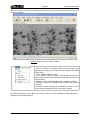
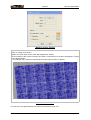
A selection window appears. Choose your type of
experiment (one channel: radio or multi-channels:
fluo) and load the image(s) thanks to the Browse
button.
Notice that only the images files extensions that
AGScan supports are visible in the file chooser,
(By default “.tif” and “.inf”).
The “Properties” button allows you to give some
initial parameters of the image (produced by the
scanner). These parameters are stored into the
general parameters of the application.
-Pixel width : width of a pixel, micrometers
-Pixel height : height of a pixel, micrometers
-Unit: image unit (QL or PSL)
-IP type: Image Plate size ,centimeters
-Latitude: dynamic range of “above number”
power of 10
If you don't know where to find these parameters,
ignore them (default values will be apply).
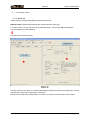
Click “OK” to load the experiment!
AGScan User Manual
page 13/46