1
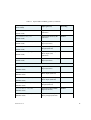
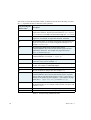
Unable to confirm printer status/model
Either the connection method does not support bidirectional communications, or the initial attempt to determine the printer status and model name did not produce a reply within
15 seconds. The plugin will assume that the printer is in the correct state and is the correct
model and it will send the job to the printer.
Warning - printer status is unreliable
This messages indicates that the status information being returned by the printer may be
corrupted.
Command error on printer or wrong ink type
If this message occurs, you will need to restart the printer. You should also check that the
ink type selected in your page setup is correct for the printer, before resubmitting the job.
The selected ink type is incorrect for this printer
This message can occur when the job or associated profiles are for a different ink type to
that installed in the printer. You should ensure that the Calibration and Color profiles used
™
in your page setup are for the ink type installed in your printer (Photographic Dye versus
™
Archival ), or that you are using the correct UltraChrome Black (Photo Black versus
Matte Black). You should also check that the Ink type, as chosen in the Configure Device
dialog, is correct.
%%[Error - Inking regime <name> is not a dictionary ]%%
Each inking regime name should be associated with a value comprising a PostScript language dictionary.
%%[Error - Inking regime <name> has not been defined ]%%
This message appears when the inking regime information necessary for the particular
ink, screening, inking regime and resolution combination is missing. Check that you are
using a supported combination.
Warning - ink type not recognized and will not be verified
This message appears when the ink type information associated with a job has not been
recognized. In such cases, the plugin cannot verify whether the printer is using the ink
type required by the job.
Printer communication failed (error details )
Unable to connect to printer (error details )
The text and numbers in parentheses varies, depending on the reason why the RIP cannot
connect to the printer. The final number is the error code generated by the operating
system and can be used by GGS to determine the exact cause of the connection failure.
Unknown output method selected
Cannot open selected output method (error details )
AG45121 Rev. 8
65