1
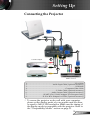
Setting Up Connecting the Projector 1 2 3 1 8 S-Video Output 6 5 4 Video Output 7 DVD Player, Settop Box, HDTV receiver 1................................................................................................................ VGA Cable 2.............................................................Audio Input Cable (Optional Accessory) 3................................................................................................................. USB Cable 4.......................................................................................... Composite Video Cable 5.....................................................................S-Video Cable (Optional Accessory) 6......................................................... Audio Output Cable (Optional Accessory) 7.......................................SCART VGA/S-Video Adaptor (For European Only) 8..................................... D-15 to RCA Adapter for YPbPr (Optional Accessory) To ensure the projector works well with your computer, please set the display mode of your graphic card less than or equal to 1600 x 1200 resolution. Make sure the timing of the display mode is compatible with the projector. Refer to the “Compatibility Modes” section on page 33. English