1
EMX-DVI
Extender & EDID Mgr
4.0 Default EMULATION resolutions
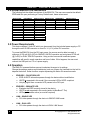
The following lists the default resolutions of the EMX-DVI. The user can overwrite the default
EDID table but upon performing a Factory Default reset, these values reset.
RESOLUTION
640x480
800x600
1024x768
1280x720
1280x800
1280x1024
1400x1050
1440x900
1600x1200
1680x1050
1920x1080
1920x1200
FREQUENCY
60, 67, 72, 75
56, 60, 72, 75
60, 70, 75
60
60
60, 75, 85
60
60
60
60
60
60
ASPECT RATIO RESOLUTION
(Aspect 4:3)
720x480i
(Aspect 4:3)
720x480p
(Aspect 4:3)
1280x720p
(Aspect 16:9)
1920x1080i
(Aspect 16:10)
1920x1080p
(Aspect 5:4)
(Aspect 4:3)
(Aspect 16:10)
(Aspect 4:3)
(Aspect 16:10)
(Aspect 16:9)
(Aspect 16:10)
FREQUENCY
59.94/60
59.94/60
59.94/60
59.94/60
50, 59.94/60
ASPECT RATIO
(Aspect 4:3, 8:9)
(Aspect 4:3, 8:9)
(Aspect 16:9, 1:1)
(Aspect 16:9, 1:1)
(Aspect 16:9, 1:1)
5.0 Power Requirements
This device requires 5 Volts DC which can be sourced from the included power supply or PC
through the mini-B USB connector or from Pin 14 (+5 V) of the DVI connector.
To power the EMX-DVI from the DVI input power, the source must be able to supply a
minimum of 120 mA (@ 5 vDC) for SINGLE LINK DVI operation and a minimum of 220 mA
(@ 5 vDC) for DUAL LINK DVI operation. Using a video source with insufficient power
capabilities will result in erratic operation and loss of video. If this happens, the user must
connect the USB port to a PC or a power supply.
6.0 Operation
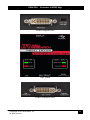
The EMX-DVI recessed buttons prevent inadvertent changes to its settings.
Change the settings requires a pointed device (such as a paper clip) inserted into the hold to
depress the button. Some functions require depressing the button for several seconds.
4
•
EDID/DDC – PASS-THRU LED
o EDID & HDCP information passes through the device without modification.
o HDCP is supported in this mode if the connected LCD is HDCP compliant.
o Hot-plug signal from connected LCD passes to the DVI input.
•
EDID/DDC – EMULATE LED
o Emulates the EDID currently stored in the device.
o HDCP is not supported in this mode (perfect to MacBook™ Pro)
o HPD signal remains active (no monitor required)
•
LINK – SINGLE LED
o DVI video passes through the device in SINGLE LINK format.
•
LINK – DUAL LED
o DVI video passes through the device in DUAL LINK format.
© Copyright 2012. Hall Research, Inc.
All rights reserved.