1
USER MANUAL
020-100329-12
USER MANUAL
020-100329-12
COPYRIGHT
© 2009-2014 Christie Digital Systems USA, Inc. - All rights reserved.
This document contains proprietary information of Christie Digital Systems Canada, Inc. and Christie Digital Systems USA, Inc., and may
not be reproduced, stored in a retrieval system, transferred to other documents, disclosed to other manufacturers, or used for manufacturing or for any other purpose, in whole or in part, without prior written permission of Christie Digital Systems, Inc. Every effort has been
made to ensure accuracy, however in some cases changes in the products or availability could occur which may not be reflected in this document. Christie Digital Systems USA, Inc., reserves the right to make changes to specifications at any time without notice. The information
furnished in this publication was believed to be accurate and reliable. Christie Digital Systems USA, Inc. makes no warranty of any kind with
regard to this material, including, but not limited to, implied warranties of fitness for a particular purpose. Christie Digital Systems USA,
Inc. shall not be liable for errors contained herein or for incidental or consequential damages in connection with the performance or use of
this material.
TRADEMARKS
All brand names and product names are trademarks, registered trademarks or trade names of their respective holders.
FCC
This equipment has been tested and found to comply with the limits for a Class A digital device, pursuant to Part 15 of the FCC Rules.
These limits are designed to provide reasonable protection against harmful interference when the equipment is operated in a commercial
environment. This equipment generates, uses, and can radiate radio frequency energy and, if not installed and used in accordance with the
instruction manual, may cause harmful interference to radio communications. Operation of this equipment in a residential area is likely to
cause harmful interference in which case the user will be required to correct the interference at his own expense.
FCC/IC RF Radiation Exposure Statement:
This equipment complies with FCC/IC radiation exposure limits set forth for an uncontrolled environment. End users must follow the specific operating instructions for satisfying RF exposure compliance. This transmitter must not be co-located or operating in conjunction with
any other antenna or transmitter.
This Class A digital apparatus complies with Canadian ICES-003.
Cet appareil numérique de la classe A est conforme à la norme NMB-003 du Canada
이 기기는 업무용 (A 급 ) 으로 전자파적합등록을 한 기기이오니 판매자 또는 사용자는 이점을 주의하시기 바라며 , 가정 외의 지역에서 사용하는 것을 목적
으로 합니다
당해 무선설비기기는 운용 중 전파혼신가능성이 있음 .
Contains FCC ID: XU6-CRMX100
Contains IC: 8691A-CRMX100
NOTICES
Manufacturing facility is ISO 9001 and 14001 certified. Performance specifications are typical, but may vary depending on conditions
beyond Christie's control such as maintenance of the product in proper working conditions. Performance specifications are based on information available at the time of printing. The equipment is designed and manufactured with high-quality materials and components that can
be recycled and reused. This symbol
means that electrical and electronic equipment, at their end-of-life, should be disposed of separately from regular waste. Please dispose of this equipment appropriately and according to local regulations. In the European Union, there
are separate collection systems for used electrical and electronic products. Please help us to conserve the environment we live in.
WARRANTY
MicroTiles are a versatile product and can be used in a wide variety of creative customer applications. However, MicroTiles have some limitations which need to be considered to avoid inappropriate uses of the product. The MicroTiles warranty does not cover inappropriate
uses of the product. For complete information about Christie’s limited warranty, please contact your Christie Dealer. In addition to the
other limitations that may be specified in Christie’s limited warranty, the warranty does not cover:
(a) Damage occurring during shipment, in either direction.
(b) MicroTiles are lightweight and relatively easy to move and install. However, wear and tear may occur if the product is repeatedly assembled and disassembled, especially if excessive force is used with the removal of screens and installation of vertical screws.
(c) Problems caused by combination of the equipment with non-Christie equipment, such as distribution systems, cameras, video tape
recorders, etc., or use of the equipment with any non-Christie interface device.
(d) Damage caused by misuse, improper power source, accident, fire, flood, lightning, earthquake or other natural disaster.
(e) Damage caused by improper installation/alignment, or by equipment modification, if by other than Christie service personnel or a Christie authorized service provider.
(f) Failure due to normal wear and tear.
(g) Damage due to operating beyond the products specified environment. This product is designed to operate in an environment of 5°C to
40°C (41°F to 104°F) and a relative humidity between 35% to 85% non-condensing.
(h) MicroTiles are ideal for indoor, high ambient light environments. Avoid setting up the arrays in environments where the module temperature exceeds 50°C (122°F). This is especially true when exposing the screens to direct sunlight. Layers of the screen assembly will delaminate if exposed to environments where this temperature is exceeded. Prolonged exposure to UV radiation, including direct sunlight, may
result in degradation of screen performance over time.
(i) MicroTiles are not weatherproof, and should only be used outdoors if contained in an environmentally controlled enclosure that meets
the operating requirements of the product.
PREVENTATIVE MAINTENANCE
Preventative maintenance is an important part of the continued and proper operation of your Christie® MicroTiles™. Please see the Maintenance section of the User Manual for specific maintenance items. Failure to perform maintenance as required, and in accordance with the
maintenance schedule specified by Christie, will void the warranty.
Addendum
Translated copies of this document are provided on the CD in the back of this document. The CD may also
contain additional product documentation. Read all instructions before using or servicing this product.
本 文 档 的 翻译副本在本文档背面 的 C D 上提供。该 CD 中还可能包含其他产品 文
档 。 使 用 或维修本产品之前请务 必阅读所有说明。
文 件 背 面 的光碟提供了本文件的 翻譯副本。這張光碟可能另外包含其他產品 文 件 。
請 先 閱 讀 所有指示再使用或送修 本產品。
Le CD au dos de ce document contient des traductions de celui-ci dans différentes langues. Ce CD peut également
contenir de la documentation supplémentaire sur le produit. Lisez toutes les instructions avant d'utiliser ou
d'entretenir ce produit.
Übersetzte Versionen dieses Dokuments werden auf der CD auf dem Vorsatzblatt dieses Dokuments
bereitgestellt. Die CD kann auch zusätzliche Produktdokumentation enthalten. Bitte lesen Sie diese
Anweisungen vor der Verwendung dieses Produkts oder vor der Ausführung von Wartungsarbeiten am
Produkt.
Le copie tradotte di questo documento sono fornite sul CD, sul retro di questo documento. Il CD
potrebbe anche contenere altra documentazione sul prodotto. Si prega di leggere tutte le istruzioni
prima di utilizzare questo prodotto o sottoporlo a manutenzione.
このドキュメントの翻訳版がこのドキュメントの裏面の CD で提供されています。CD に
は追加の製品マニュアルも収められています。この製品を使用したり、機能させたりする
前に、すべての指示をお読みください。
이 문서의 번역된 사본이 이 문서 후면의 CD 에서 제공됩니다 . 이 CD 에는 추가 제품 설명서
가 포함되어 있을 수 있습니다 . 이 제품을 사용하거나 수리하기 전에 모든 지침을 확인하
십시오 .
Copias traduzidas deste documento são fornecida no CD contido na parte de trás deste documento. O
CD pode conter documentação adicional do produto. Leia todas as instruções antes de usar ou prestar
serviço com este produto.
Перевод данного документа представлен на компакт-диске на оборотной стороне
документа. Компакт-диск может также содержать дополнительную документацию по
продукту. Перед использованием или обслуживанием продукта ознакомьтесь со всеми
инструкциями.
Las copias traducidas de este documento se proporcionan en el CD que se encuentra en la parte trasera.
En el CD también puede encontrar documentación adicional del producto. Lea todas las instrucciones
antes de utilizar o realizar el mantenimiento de este producto.
Перекладені екземпляри цього документа містяться на компакт-диску, який додано до
цього документа. На компакт-диску може також бути додаткова документація до
виробу. Перш ніж користуватися виробом або його обслуговувати, прочитайте всі
інструкції.
Table of Contents
Product Overview . . . . . . . . . . . . . . . . . . . . . . . . . . . . . . . . . . . . . . . . . . . . . . . . 1
Terminology . . . . . . . . . . . . . . . . . . . . . . . . . . . . . . . . . . . . . . . . . . . . . . . . . . . . 1
Safety Warnings and Guidelines . . . . . . . . . . . . . . . . . . . . . . . . . . . . . . . . . . . . . . 2
How MicroTiles Work . . . . . . . . . . . . . . . . . . . . . . . . . . . . . . . . . . . . . . . . . . . . . . 2
System Overview . . . . . . . . . . . . . . . . . . . . . . . . . . . . . . . . . . . . . . . . . . . . . . . . 2
Mechanical Housing . . . . . . . . . . . . . . . . . . . . . . . . . . . . . . . . . . . . . . . . . . . . . . . 2
Rear Projection Screen
............................................ 4
External Control Unit (ECU) . . . . . . . . . . . . . . . . . . . . . . . . . . . . . . . . . . . . . . . . . 4
User Interface Overview
........................................... 5
Purchase Record and Service Contacts . . . . . . . . . . . . . . . . . . . . . . . . . . . . . . . . . . 5
Order Guide . . . . . . . . . . . . . . . . . . . . . . . . . . . . . . . . . . . . . . . . . . . . . . . . . . . . 5
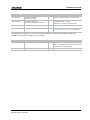
Standard Components . . . . . . . . . . . . . . . . . . . . . . . . . . . . . . . . . . . . . . . . . . . 6
Regional Acceptance for Y-cords . . . . . . . . . . . . . . . . . . . . . . . . . . . . . . . . . . . . 6
Line Cords for D100 and E100 . . . . . . . . . . . . . . . . . . . . . . . . . . . . . . . . . . . . . 7
Optional Accessories . . . . . . . . . . . . . . . . . . . . . . . . . . . . . . . . . . . . . . . . . . . . 8
Discontinued Parts . . . . . . . . . . . . . . . . . . . . . . . . . . . . . . . . . . . . . . . . . . . . . 8
Installation and Setup . . . . . . . . . . . . . . . . . . . . . . . . . . . . . . . . . . . . . . . . . . . . 11
Safety Guidelines . . . . . . . . . . . . . . . . . . . . . . . . . . . . . . . . . . . . . . . . . . . . . . . .11
Before Beginning an Installation . . . . . . . . . . . . . . . . . . . . . . . . . . . . . . . . . . . . . .11
Installation Guidelines . . . . . . . . . . . . . . . . . . . . . . . . . . . . . . . . . . . . . . . . . . .11
Cabling and ECU Layout and Design
. . . . . . . . . . . . . . . . . . . . . . . . . . . . . . . . .11
Required Tools and Hardware . . . . . . . . . . . . . . . . . . . . . . . . . . . . . . . . . . . . . . . .12
MicroTiles Installation . . . . . . . . . . . . . . . . . . . . . . . . . . . . . . . . . . . . . . . . . . . . .13
Light Seal Trim Application
. . . . . . . . . . . . . . . . . . . . . . . . . . . . . . . . . . . . . . .13
Mount to Leveling Feet (Optional) . . . . . . . . . . . . . . . . . . . . . . . . . . . . . . . . . . .13
Assemble First Row . . . . . . . . . . . . . . . . . . . . . . . . . . . . . . . . . . . . . . . . . . . . .14
Assemble Second Row
. . . . . . . . . . . . . . . . . . . . . . . . . . . . . . . . . . . . . . . . . .17
Assemble Additional Rows . . . . . . . . . . . . . . . . . . . . . . . . . . . . . . . . . . . . . . . .18
Unpack Screens . . . . . . . . . . . . . . . . . . . . . . . . . . . . . . . . . . . . . . . . . . . . . . .19
Install Screens . . . . . . . . . . . . . . . . . . . . . . . . . . . . . . . . . . . . . . . . . . . . . . . .20
Remove Screens . . . . . . . . . . . . . . . . . . . . . . . . . . . . . . . . . . . . . . . . . . . . . . .21
Cable Routing
. . . . . . . . . . . . . . . . . . . . . . . . . . . . . . . . . . . . . . . . . . . . . . . .21
Cooling . . . . . . . . . . . . . . . . . . . . . . . . . . . . . . . . . . . . . . . . . . . . . . . . . . . . . . .21
Connecting Sources . . . . . . . . . . . . . . . . . . . . . . . . . . . . . . . . . . . . . . . . . . . . . . .22
Displaying Content . . . . . . . . . . . . . . . . . . . . . . . . . . . . . . . . . . . . . . . . . . . . .23
Christie MicroTiles User Manual
020-100329-12 Rev. 1 (04-2014)
i
Power Distribution . . . . . . . . . . . . . . . . . . . . . . . . . . . . . . . . . . . . . . . . . . . . . . . 24
Connect to Power . . . . . . . . . . . . . . . . . . . . . . . . . . . . . . . . . . . . . . . . . . . . . . . . 24
Install Power Connection Security Clip
Install Y-power Cord Retention Clip
. . . . . . . . . . . . . . . . . . . . . . . . . . . . . . . . . 25
. . . . . . . . . . . . . . . . . . . . . . . . . . . . . . . . . . . 26
Power ON . . . . . . . . . . . . . . . . . . . . . . . . . . . . . . . . . . . . . . . . . . . . . . . . . . . . . 26
Power Down
. . . . . . . . . . . . . . . . . . . . . . . . . . . . . . . . . . . . . . . . . . . . . . . . . . . 26
Disassembling a MicroTiles Array . . . . . . . . . . . . . . . . . . . . . . . . . . . . . . . . . . . . . 26
Operation. . . . . . . . . . . . . . . . . . . . . . . . . . . . . . . . . . . . . . . . . . . . . . . . . . . . . . . 29
Powering Up the MicroTiles Array . . . . . . . . . . . . . . . . . . . . . . . . . . . . . . . . . . . . . 29
If a Display Unit Fails to Power Up . . . . . . . . . . . . . . . . . . . . . . . . . . . . . . . . . . 29
Powering Down the MicroTiles Array . . . . . . . . . . . . . . . . . . . . . . . . . . . . . . . . . 30
Status Indicators . . . . . . . . . . . . . . . . . . . . . . . . . . . . . . . . . . . . . . . . . . . . . . . . 30
R100 Remote Control . . . . . . . . . . . . . . . . . . . . . . . . . . . . . . . . . . . . . . . . . . . . . 31
Guide to Keypads . . . . . . . . . . . . . . . . . . . . . . . . . . . . . . . . . . . . . . . . . . . . . . 31
Keypad Commands
. . . . . . . . . . . . . . . . . . . . . . . . . . . . . . . . . . . . . . . . . . . . 32
Pairing the Remote to the ECU via the OSD . . . . . . . . . . . . . . . . . . . . . . . . . . . . 33
Using the On Screen Display (OSD)
OSD Functionality
. . . . . . . . . . . . . . . . . . . . . . . . . . . . . . . . . . . 35
. . . . . . . . . . . . . . . . . . . . . . . . . . . . . . . . . . . . . . . . . . . . . 35
OSD Guidelines . . . . . . . . . . . . . . . . . . . . . . . . . . . . . . . . . . . . . . . . . . . . . . . 35
Navigating the OSD Menus . . . . . . . . . . . . . . . . . . . . . . . . . . . . . . . . . . . . . . . 36
OSD Source Management Menu . . . . . . . . . . . . . . . . . . . . . . . . . . . . . . . . . . . . 36
OSD Canvas Management Menu . . . . . . . . . . . . . . . . . . . . . . . . . . . . . . . . . . . . 37
OSD Configuration Menu . . . . . . . . . . . . . . . . . . . . . . . . . . . . . . . . . . . . . . . . . 38
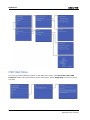
OSD Status Menu . . . . . . . . . . . . . . . . . . . . . . . . . . . . . . . . . . . . . . . . . . . . . . 39
OSD Help Menu . . . . . . . . . . . . . . . . . . . . . . . . . . . . . . . . . . . . . . . . . . . . . . . 40
Using the Web User Interface (WebUI) . . . . . . . . . . . . . . . . . . . . . . . . . . . . . . . . . 41
Recommended System Requirements . . . . . . . . . . . . . . . . . . . . . . . . . . . . . . . . 41
WebUI Menu Tree
. . . . . . . . . . . . . . . . . . . . . . . . . . . . . . . . . . . . . . . . . . . . . 42
Navigating the WebUI . . . . . . . . . . . . . . . . . . . . . . . . . . . . . . . . . . . . . . . . . . . . . 42
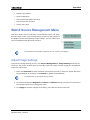
WebUI Source Management Menu
Adjust Image Settings
. . . . . . . . . . . . . . . . . . . . . . . . . . . . . . . . . . . . 43
. . . . . . . . . . . . . . . . . . . . . . . . . . . . . . . . . . . . . . . . . . 43
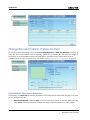
Change Size and Position of Video Content . . . . . . . . . . . . . . . . . . . . . . . . . . . . 44
Customize Extended Display Identification Data (EDID) . . . . . . . . . . . . . . . . . . . . 45
WebUI Canvas Management Menu . . . . . . . . . . . . . . . . . . . . . . . . . . . . . . . . . . . . 46
Select a Display Mode . . . . . . . . . . . . . . . . . . . . . . . . . . . . . . . . . . . . . . . . . . . 47
Layout . . . . . . . . . . . . . . . . . . . . . . . . . . . . . . . . . . . . . . . . . . . . . . . . . . . . . 47
Canvas Settings . . . . . . . . . . . . . . . . . . . . . . . . . . . . . . . . . . . . . . . . . . . . . . . 52
Advanced Canvas Settings
ii
. . . . . . . . . . . . . . . . . . . . . . . . . . . . . . . . . . . . . . . 55
Christie MicroTiles User Manual
020-100329-12 Rev. 1 (04-2014)
Display a Test Pattern
. . . . . . . . . . . . . . . . . . . . . . . . . . . . . . . . . . . . . . . . . .57
Wire Map . . . . . . . . . . . . . . . . . . . . . . . . . . . . . . . . . . . . . . . . . . . . . . . . . . . .58
HSSL Info . . . . . . . . . . . . . . . . . . . . . . . . . . . . . . . . . . . . . . . . . . . . . . . . . . .58
Configuration Menu . . . . . . . . . . . . . . . . . . . . . . . . . . . . . . . . . . . . . . . . . . . . . . .59
Power ON/OFF All Tiles . . . . . . . . . . . . . . . . . . . . . . . . . . . . . . . . . . . . . . . . . .59
Resetting Selected Tile(s) and ECU(s) . . . . . . . . . . . . . . . . . . . . . . . . . . . . . . . .59
Set Date and Time . . . . . . . . . . . . . . . . . . . . . . . . . . . . . . . . . . . . . . . . . . . . .59
Configuring Ethernet . . . . . . . . . . . . . . . . . . . . . . . . . . . . . . . . . . . . . . . . . . . .60
Upgrading Main Firmware
Upgrade Firmware
. . . . . . . . . . . . . . . . . . . . . . . . . . . . . . . . . . . . . . . .60
. . . . . . . . . . . . . . . . . . . . . . . . . . . . . . . . . . . . . . . . . . . . .62
Correcting a Failed Firmware Upgrade . . . . . . . . . . . . . . . . . . . . . . . . . . . . . . . .64
Hardware Upgrades
Remote Control
. . . . . . . . . . . . . . . . . . . . . . . . . . . . . . . . . . . . . . . . . . . .64
. . . . . . . . . . . . . . . . . . . . . . . . . . . . . . . . . . . . . . . . . . . . . . .65
Restore Factory Defaults . . . . . . . . . . . . . . . . . . . . . . . . . . . . . . . . . . . . . . . . .66
Save & Restore Settings
. . . . . . . . . . . . . . . . . . . . . . . . . . . . . . . . . . . . . . . . .67
Simple Network Management Protocol (SNMP) . . . . . . . . . . . . . . . . . . . . . . . . . .68
Status Menu . . . . . . . . . . . . . . . . . . . . . . . . . . . . . . . . . . . . . . . . . . . . . . . . . . . .70
System Information - ECU . . . . . . . . . . . . . . . . . . . . . . . . . . . . . . . . . . . . . . . .70
System Information - Tiles . . . . . . . . . . . . . . . . . . . . . . . . . . . . . . . . . . . . . . . .71
Help Menu . . . . . . . . . . . . . . . . . . . . . . . . . . . . . . . . . . . . . . . . . . . . . . . . . . .73
Maintenance . . . . . . . . . . . . . . . . . . . . . . . . . . . . . . . . . . . . . . . . . . . . . . . . . . . 75
Cleaning Procedures . . . . . . . . . . . . . . . . . . . . . . . . . . . . . . . . . . . . . . . . . . . . . .75
Cleaning Inside Screen Surface
Cleaning Outside Screen Surface
. . . . . . . . . . . . . . . . . . . . . . . . . . . . . . . . . . . .75
. . . . . . . . . . . . . . . . . . . . . . . . . . . . . . . . . . .75
Lens . . . . . . . . . . . . . . . . . . . . . . . . . . . . . . . . . . . . . . . . . . . . . . . . . . . . . . .76
Light Engine Heat Sinks . . . . . . . . . . . . . . . . . . . . . . . . . . . . . . . . . . . . . . . . . .76
Air Filter . . . . . . . . . . . . . . . . . . . . . . . . . . . . . . . . . . . . . . . . . . . . . . . . . . . .76
Troubleshooting . . . . . . . . . . . . . . . . . . . . . . . . . . . . . . . . . . . . . . . . . . . . . . . . 77
Image problems . . . . . . . . . . . . . . . . . . . . . . . . . . . . . . . . . . . . . . . . . . . . . . . . .77
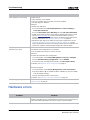
Hardware errors . . . . . . . . . . . . . . . . . . . . . . . . . . . . . . . . . . . . . . . . . . . . . . . . .78
WebUI Errors . . . . . . . . . . . . . . . . . . . . . . . . . . . . . . . . . . . . . . . . . . . . . . . . . . .79
Specifications . . . . . . . . . . . . . . . . . . . . . . . . . . . . . . . . . . . . . . . . . . . . . . . . . . 81
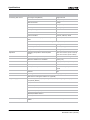
General Specifications . . . . . . . . . . . . . . . . . . . . . . . . . . . . . . . . . . . . . . . . . . . . .81
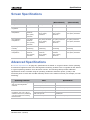
Screen Specifications
. . . . . . . . . . . . . . . . . . . . . . . . . . . . . . . . . . . . . . . . . . . . .83
Advanced Specifications . . . . . . . . . . . . . . . . . . . . . . . . . . . . . . . . . . . . . . . . . . . .83
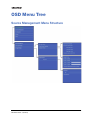
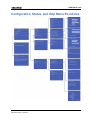
OSD Menu Tree . . . . . . . . . . . . . . . . . . . . . . . . . . . . . . . . . . . . . . . . . . . . . . . . . 85
Christie MicroTiles User Manual
020-100329-12 Rev. 1 (04-2014)
iii
Source Management Menu Structure . . . . . . . . . . . . . . . . . . . . . . . . . . . . . . . . . . . 85
Canvas Management Menu Structure
. . . . . . . . . . . . . . . . . . . . . . . . . . . . . . . . . . 86
Configuration, Status, and Help Menu Structures . . . . . . . . . . . . . . . . . . . . . . . . . . 87
iv
Christie MicroTiles User Manual
020-100329-12 Rev. 1 (04-2014)
Product Overview
Christie MicroTiles (MicroTiles) are modular, high-quality image
display units with related accessories which, when combined,
form large arrays of virtually any size and shape. The modular
design uses rear projection, based on a single TI Digital
Micromirror Device™ (DMD) and chipset. High-brightness LEDs
provide the illumination source. MicroTiles can be quickly and
easily deployed into small display configurations, while
providing the additional features required for larger and more
complex installations.
Terminology
•
MicroTiles: Refers to some tiles.
•
Tile(s): Consists of a display unit and a screen.
•
External Control Unit (ECU): Controls MicroTiles arrays, video input source.
•
Master ECU: Only one master ECU can be assigned to a canvas. This master supplies the global
video source.
•
Slave ECU: Supplies local video sources in multiple ECU configurations.
•
Canvas: A group of tiles and ECUs that are connected together electronically. To constitute a
canvas, tiles do not need to be physically adjacent to one another. The maximum number of tiles
in a canvas is 200, and the maximum number of ECUs is 16.
•
Array: A group of tiles that are physically connected to each other. A canvas may include
multiple arrays. Video sources are mapped to arrays of tiles. Each array represents a new source
mapping.
•
Sub-array: A group of tiles within an array that are configured to display either the local or
global video source. A single array may contain multiple subarrays.
•
Media Source: Provides the source for the input signal.
•
Global Source: The media source connected to the master ECU also functions as a “global
source”. The global source can be displayed on any group of tiles connected to the local source
input (HSSL-1) side of the master ECU. In a closed loop canvas, all tiles can display the global
source.
•
Local Source: The media source connected to an ECU as a “local source”, feeding the local set of
tiles connected to its local source output (HSSL-2).
•
Open/Closed Loop: An open loop canvas terminates with the last tile in the canvas, which is
not connected back to the first ECU. In a closed loop canvas, the last tile in the canvas is
connected back to the first ECU. There are no unused Display Port connections in a closed loop
canvas.
Christie MicroTiles User Manual
020-100329-12 Rev. 1 (04-2014)
1
Product Overview
Safety Warnings and Guidelines
When the screen is removed, directly viewing the beam
with an optical instrument (for example, an eye loop,
magnifier or microscope) from a distance of less than
100mm may pose an eye hazard. MicroTiles is a class 1M
source of visible and invisible LED radiation with a
maximum power rating of 3.61mW @ 400-700nM.
Electrical Shock Hazard! Always power down and disconnect/disengage all power sources to
the tiles before servicing or cleaning. Read and understand all product safety labels before
installing/operating this product.
The volume air directly behind each tile must not exceed the maximum operating
temperature of the tile, which is 40°C (104°F). A minimum 2” (50mm) gap must be left at
the back of each tile to ensure proper air flow and cooling. Each tile has a maximum cooling
load of 110W (375 BTUs/hr) per tile, when operating with brightness and color matching
disabled (each LED operating at maximum drive level). For detailed information on airflow
requirements, see Christie® MicroTiles™ Specification and Application Guide (P/N: 020100334-xx).
How MicroTiles Work
The self-contained mechanical and optical design allows multiple tiles to be stacked together into an
array of any size or configuration. Custom electronics allow the array to be completely selfconfiguring without any external hardware. The video signal to be displayed is fed into the array via
an External Control Unit (ECU). This signal is buffered and converted into a high speed (five Gbps)
serial stream and relayed to every tile in the array. Each tile captures a portion of the image and
applies scaling, as required, which results in a single picture. The ECU also acts as the main system
controller and coordinates with all connected tiles to form a canvas.
System Overview
MicroTiles consist of several subsystems, which includes the mechanical housing, screen and Fresnel
lens, light engine, Front End Formatter Board (FEFB), IR sensor, internal Low Voltage Power Supply
(LVPS) and cooling system. An array of MicroTiles requires at least one ECU (master ECU), acting as
a main control unit and input interface for image content distribution through the array.
Mechanical Housing
The mechanical housing comes equipped with internal supports, which are designed to support small
arrays. For larger arrays, external supports are required. MicroTiles are optimized to operate in an
upright, landscape orientation; however, they can be operated in many other orientations, as long as
the cooling and support requirements are met. Product cooling and mechanical support is the
2
Christie MicroTiles User Manual
020-100329-12 Rev. 1 (04-2014)
Product Overview
responsibility of the end user. For information, see Christie® MicroTiles™ Specification and
Application Guide (P/N: 020-100334-xx).
Christie MicroTiles User Manual
020-100329-12 Rev. 1 (04-2014)
3
Product Overview
Rear Projection Screen
Do not touch inside of the screen. Always handle the screen from the sides. Remove all
jewelry from your hands before handling.
The screen is designed to display high-quality images under a
wide range of viewing angles and high ambient lighting
conditions. The screen has a matte non-glare front surface that
reduces specular reflections from adjacent light sources and
maintains the contrast and luminance uniformity of the
displayed image. The screen is designed to display a sharp
image formed close to the screen edge to allow for image
blending from screen to screen when tiled in an array. The
screen material has expansion characteristics that are low and
closely matched for the screen elements. This allows the screen
to retain its dimensions in various operational environments and
prevent separation between the screen elements that would
induce unwanted image artifacts. The screen is attached
magnetically to the housing. The screen can be easily removed by applying suction with a screen
removal tool (supplied). In the event that the magnets fail to retain the screen – for instance due to
extreme vibration of the housing – an integral tether ensures the screen remains attached to the
housing. For proper cleaning instructions, see Cleaning Outside Screen Surface on page 75.
External Control Unit (ECU)
The Web User Interface (WebUI) is only functional on a master ECU. It does not
communicate with slave ECUs.
A MicroTiles array requires an ECU in order to display an
image across the entire array. End users connect a PC or
media player to the array using a DVI-D cable. The ECU
then ensures the supplied video signal is properly
displayed across the entire array. For more complex
arrays, multiple ECUs can be used.
The ECU is able to communicate with all tiles in the array
and with any other ECU using Christie’s proprietary HSSL
interface. Each tile and ECU has a unique IP address,
allowing full communication between tiles and ECUs
across the network. The address of each tile is assigned
using DHCP. For more information, see Connecting Sources on page 22.
In a multiple ECU array, one ECU acts as the master ECU, while all remaining ECUs act as slave ECUs.
Multiple master ECUs can occur when an array is powered up with more than one ECU attached. On
start-up, all ECUs assume they are the master ECU and begin the self-organization process.When two
ECUs encounter each other, one of the ECUs is chosen to be the master ECU. If immediately prior to
4
Christie MicroTiles User Manual
020-100329-12 Rev. 1 (04-2014)
Product Overview
the last power down, one of the two ECUs had been acting as the master ECU and the other as slave
ECU, then the unit last identified as the master ECU remains identified as such. If both ECUs (or
neither) had been the master ECU, then the next level of priority is based on firmware revision,
where the ECU with the newest firmware takes precedence.
A sophisticated external software application is also available to clients, which provides a graphical
method of viewing the installation where the on screen layout of the MicroTiles matches the physical
installation. Users are able to arrange/change the configuration and view the results via the on
screen layout of the software. For more information, go to www.microtiles.com and click on
MicroTiles Designer.
User Interface Overview
MicroTiles incorporate two basic user interface systems; the On Screen Display (OSD) and the Web
User Interface (WebUI), which both come standard with the ECU. For the most part, the OSD and
WebUI contain the same features and functionality. However, the WebUI is faster to operate, but
requires an Ethernet connection, a PC with web browser and an Adobe® Flash Player™ Plug-in.
Additionally, the WebUI enables you to update the firmware (firmware/FPGA) and select individual
tiles, where the OSD does not. The OSD is accessed via the R100 Remote Control. For more
information about the OSD, see R100 Remote Control on page 31 and Using the On Screen Display
(OSD) on page 35. For more information about the WebUI, see Using the Web User Interface
(WebUI) on page 41. Each interface provides access to MicroTiles configuration, control and
diagnostics tools.
Purchase Record and Service Contacts
Whether the MicroTiles are under warranty or the warranty has expired, Christie’s highly trained and
extensive factory and dealer service network is always available to quickly diagnose and correct tile
malfunctions. Complete service manuals and updates are available for the MicroTiles. Should a
problem be encountered with any part of the MicroTiles, contact your dealer. In most cases, servicing
is performed on site. If you have purchased MicroTiles, keep a copy of the packing slip shipped with
your purchase for your records. The packing slip contains the serial numbers for each tile. The serial
number can also be found on the license label located on the back of the tiles, as well as on the front
chassis.
Order Guide
For a detailed overview of the kits and accessories visit www.microtiles.com.
Christie MicroTiles User Manual
020-100329-12 Rev. 1 (04-2014)
5
Product Overview
Standard Components
The items listed in this table will be ordered with every system.
Item
Part Number
Part Description
Details
Display Unit
123-001102-xx
MicroTiles
Display Unit D100
Each display unit includes a one meter
display port cable, three vertical screws,
one power connection security clip (comes
installed), light seal trim and two
horizontal adjustment screws for fine
optimization of screen gaps.
Screen
123-124108-xx
MicroTiles Screen S300
Ordered separately from display unit.
or
123-128102-xx
MicroTiles Screen S310
External Control Unit
123-101103-xx
MicroTiles ECU E100
Includes a three meter display port cable.
User Kit
123-103105-xx
MicroTiles User Kit
Includes: R100 Remote Control, screen
removal tool, cleaning cloth, screen tape
for sealing the corners of the array,
Christie MicroTiles Quick Setup Guide
and User Manual (with CD containing
additional technical documentation).
Y-cord Kit
123-122106-xx
MicroTiles Y-cord Kit
One kit supports up to nine MicroTiles.
This kit includes nine Y-cords with
retention clips. This kit does not include
regional line cords for connecting a group
of tiles to a power outlet. Some regions do
not accept Y-cords, see Regional
Acceptance for Y-cords on page 6.
Regional line cords will be shipped
separately. See Line Cords for D100 and
E100 on page 7.
Regional Acceptance for Y-cords
Local or national regulations may not allow the use of Y-cords and may require an
alternative method of power distribution, such as standard individual line cords for each tile,
or power bars. This may include Japan, China, Korea and others.
For details about power bars, see Power Distribution on page 24 and the Christie MicroTiles
Specification and Application Guide (P/N: 020-100334-xx).
For a list of individual line cords available from Christie, see Line Cords for D100 and E100
on page 7.
The Y-cord Kit (P/N: 123-122106-xx) can be used in the USA, Canada, Mexico, the European Union
and Russia. It does not include line cords. Suitable regional line cords will be shipped separately by
Christie. For a list of line cords available from Christie, see Line Cords for D100 and E100 on page 7.
6
Christie MicroTiles User Manual
020-100329-12 Rev. 1 (04-2014)
Product Overview
Line Cords for D100 and E100
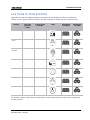
Regional line cords are shipped separately by Christie for the display unit (D100) and the ECU
(E100), for the regions listed in the table. This list is subject to change and is for reference only.
Country
C13 Line
Cords for
D100
C5 Line Cords
for E100
North America
108-383105-xx
108-384106-xx
European
Union
108-390103-xx
108-391104-xx
United
Kingdom
108-388100-xx
108-389101-xx
Japan
108-371102-xx
108-376107-xx
China
108-373104-xx
108-375106-xx
Korea
108-390103-xx
108-391104-xx
Australia
108-392105-xx
108-393106-xx
Inlet
Receptacle
for D100
Receptacle
for E100
For all other regions consult with local authorities. Locally approved line cords must be supplied for
the tile and ECU.
Christie MicroTiles User Manual
020-100329-12 Rev. 1 (04-2014)
7
Product Overview
Optional Accessories
The items listed in this table are optional, but in many cases may be required or recommended. To
order additional kits and hardware, go to www.microtiles.com.
Item
Part Number
Part Description
Details
End Foot Kit
123-105107-xx
MicroTiles Foot/Ends (includes left/right
end feet and one grille)
Leveling feet are recommended to
help level the bottom row when
building on a supporting structure.
Order one end foot kit per array.
Center Feet
123-106108-xx
MicroTiles Foot/Center (three-pack
includes three grilles)
Order one center foot to place
between each column.
Mounting Bracket
123-107109-xx
MicroTiles Mounting Bracket (two-pack)
One required for every tile that is
added to rows six and above in an
array.
Discontinued Parts
Part Number
Part Description
Date
Notes
Discontinued
123-102104-xx
MicroTiles Screen S100*
Sept. 30 2011
five year support policy
123-124108-xx
MicroTiles Screen S200*
Sept. 30 2011
five year support policy
123-104106-xx
Setup Kit
Dec. 1 2011
Replaced by Y-Cord Kit (P/N: 123-122106-xx)
i
It is possible to install S100, S200 and S300/S310 screens in the same array
since the physical dimensions and attachment features are identical; however,
in most applications the optical difference between the screens will be
apparent, especially when viewed at a wide angle. It is strongly recommended
that only one screen type is used in a single array.
The items in this table list a sample bill of materials for a floor mounted 9x9 Christie MicroTiles array,
which in this example consists of 81 tiles and three ECUs.
Part Number
Part Description
Qty.
Calculation Notes
123-001102-xx
MicroTiles Display Unit D100
81
123-124108-xx
MicroTiles Screen S300
81
One per display unit.
123-101103-xx
MicroTiles ECU E100
3
The number of ECUs is a design choice and
affects the maximum content resolution of the
display. For help in determining the number of
ECUs, access the online calculator at
www.microtiles.com.
123-103105-xx
MicroTiles User Kit
1
One per system.
8
Christie MicroTiles User Manual
020-100329-12 Rev. 1 (04-2014)
Product Overview
Part Number
Part Description
Qty.
Calculation Notes
123-105107-xx
MicroTiles Foot/Ends
(includes one grille)
1
One kit (includes left/right) per bottom row
123-106108-xx
MicroTiles Foot/Center
(three-pack/includes three grilles)
3
123-107109-xx
MicroTiles Mount Bracket (two-pack)
18
Count above five high = 9 x 4 = 36 tiles
123-122106-xx
MicroTiles Y-Cord Kit
9
Some regions do not accept Y-cords. See
Regional Acceptance for Y-cords on page 6
Count bottom row = 9 tiles
Subtract 1 = 8 joints = 8 feet required
The appropriate regional line cords are shipped separately. The items listed below contain an
example of a USA order, utilizing the Y-cord kits.
Part Number
Part Description
Qty.
Calculation Notes
108-383105-xx
C13 Line Cord for tiles
9
One per Y-cord kit. For regions where the Ycord is not accepted, the quantity of line cords
required is one per display unit.
108-384106-xx
C5 Line Cord for ECUs
3
One per ECU
Christie MicroTiles User Manual
020-100329-12 Rev. 1 (04-2014)
9
Installation and Setup
Safety Guidelines
When the screen is removed, directly viewing the beam with
an optical instrument (for example, an eye loupe, magnifier or
microscope) from a distance of less than 100mm may pose an
eye hazard. MicroTiles are a class 1M source of visible and
invisible LED radiation with a maximum power rating of
3.61mW @ 400-700nM.
Electrical Hazard! Up to nine tiles may be connected per daisy chain when hooking up the
power supply. This is the maximum power carrying capability of the line cord. Always power
down and disconnect/disengage all power sources to the MicroTiles before servicing or
cleaning. Read and understand all product safety labels before installing/operating this
product.
Before Beginning an Installation
The configuration of an array will vary on the installation; therefore, the following instructions are to
be used as a guideline only. Before installing, it is important to fully understand all site requirements
and characteristics. This document outlines installations which are no higher than five rows and no
wider than 10 columns. For installations exceeding these specifications, see Christie® MicroTiles™
Specification and Application Guide (P/N: 020-100334-xx).
Installation Guidelines
•
When constructing any size array always complete the first row and ensure it is flat before
continuing with the next row. Do not attempt to construct the array column by column.
•
Power up each tile to ensure it is functioning. Check the LED on the back of the tile. A green light
indicates power is enabled. Should the tile fail to power up, see Troubleshooting on page 77 for
more information.
•
Do not remove the lens guard from the MicroTiles or dust cap from the lens until the array is
constructed
Cabling and ECU Layout and Design
Before an array is constructed, it is important to plan the design layout of the canvas to make sure
that ECU placement and the cabling layout supports the overall canvas design objectives. MicroTiles
offers considerable flexibility in terms of the number of media sources that can be displayed and the
overall resolution. For more information, see the Christie® MicroTiles™ Specification and Application
Guide (P/N:020-100334-xx). Color and brightness matching, as well as certain other functions, may
be performed across an entire canvas. For details, see Adjust Image Settings on page 43.
Christie MicroTiles User Manual
020-100329-12 Rev. 1 (04-2014)
11
Installation and Setup
Required Tools and Hardware
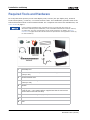
For every MicroTiles system you will need display units, screens (one per display unit), External
Control Units (ECUs), a User Kit, a Y-cord Kit and line cords. This combination provides some of the
tools and hardware shown in the illustration below. For a complete overview of the available kits, see
Order Guide on page 5.
Local or national regulations may not allow the use of Y-cords and may require an
alternative method of power distribution, such as standard individual line cords for each tile,
or power bars. This may include Japan, China, Korea and others. For details, see Power
Distribution on page 24 and the Christie MicroTiles Specification and Application Guide (P/
N: 020-100334-xx).
12
1
Assembly Tool
2
18mm-M6 Socket Head Cap Screw for Horizontal Alignment
(two per tile)
3
Screen Removal Tool
4
321mm-M8 Vertical Alignment Rods
(three per tile)
5
Screen
6
Display Port Cable
(One per tile - a one meter cable is supplied with the tile and a three
meter cable comes with the ECU)
7
End and Center Leveling Feet (optional)
8
Y-Power Cord
9
ECU
Christie MicroTiles User Manual
020-100329-12 Rev. 1 (04-2014)
Installation and Setup
10
Grille with Hardware (optional - used in conjunction with End and
Center Leveling Feet)
11
Security Clip for Power Cord Connection to Tile
12
Retention Clip for Y-Power Cord Connections
Not Shown:
•
Display Unit (tile without screen)
•
Straight edge (not provided)
•
5mm hex key (not provided)
•
Light seal trim
•
Line cords for Display Units
•
Line cords for ECU
MicroTiles Installation
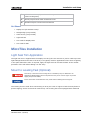
Light Seal Trim Application
The light seal trim is supplied with the Display Unit kit (P/N: 123-001102-xx) and is used to prevent
light leakage between the tiles in the array. It is typically used for applications where there is lighting
in the space behind the tiles. If required, apply the light seal trim around the back of the outside
perimeter of the tile before adding it to the array.
Mount to Leveling Feet (Optional)
If the array is mounted to the leveling feet it is mandatory they are fastened to an
adequately ballasted base structure anytime the array is two rows or higher to prevent
tipping and provide stability.
Ensure the surface underneath the array is flat before installing the leveling feet.
The leveling feet are used when constructing an array two rows or higher to bolt the array down to
prevent tipping, and to level and tilt small arrays. The leveling feet come equipped with machined
Christie MicroTiles User Manual
020-100329-12 Rev. 1 (04-2014)
13
Installation and Setup
points for bolting the array down; however, fastening hardware is not supplied. Use either M6 or 1/4”
hardware. Follow all local safety standard and regulations when bolting the array.
Assemble First Row
i
• When installing an array without leveling feet ensure the surface is flat. Do not install
vertical screws in the bottom row of installations without leveling feet.
• It is advised that when an array is set up near a wall to connect the cables row by row.
When setting up an array where the back is exposed, first setup the entire array and then
connect the wires. For details, see Cable Routing on page 21.
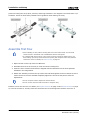
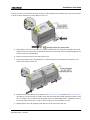
1. Open the latch on the top of the first MicroTile.
2. Assemble the first tile in the array to a left and center leveling foot.
3. Insert the three vertical screws that are shipped with the MicroTiles into the three positions
indicated in the image below.
4. Detach the assembly tool from the top of the tiles and hand-tighten the three vertical screws to
mount the tile to the feet. DO NOT completely tighten the screws at this point to allow for
adjustments.
i
• Do not use power tools to tighten the vertical screws.
• Do not use the vertical screws as anchors to hang the array
Install a screen onto the tile. For details, see Unpack Screens on page 19 and Install Screens on page
20. Use the screens to visually check the horizontal and vertical alignment between each tile. If
14
Christie MicroTiles User Manual
020-100329-12 Rev. 1 (04-2014)
Installation and Setup
needed, use the vertical and horizontal screws to make adjustments. Temporarily remove the screen
in order to allow another tile to be added to the row.
5. Assemble the next tile in the array to a center leveling foot only. Using the assembly tool, handtighten the two vertical screws to attach the tile to the center foot. Do not completely tighten the
screws to allow for adjustments.
6. Place the second tile inline with the previous tile.
7. Using the assembly tool, hand tighten the vertical screw on the second tile to attach it to the
center foot of the previous tile.
8. Install a screen onto both tiles. For details, see Unpack Screens on page 19 and Install Screens
on page 20. Use the screens to visually check the horizontal and vertical alignment between each
tile. If needed, use the vertical and horizontal screws to make adjustments. Temporarily remove
the screen from the last tile in order to allow another tile to be added to the row.
9. Repeat steps 6-9 for all remaining tiles that are to be used in the first row.
Christie MicroTiles User Manual
020-100329-12 Rev. 1 (04-2014)
15
Installation and Setup
10. Assembly only a right leveling foot to the last tile in the row and secure it to the previous tile.
11. (Optional) Hand thread a horizontal adjustment screw into the mounting points between the
first two tiles. To allow for adjustments, do not completely tighten until the entire row is
complete.
i
It is recommended that horizontal adjustment screws be installed on additional rows when
assembling an array higher than three rows to ensure fine optimization of seams. For arrays
that are three rows or less it is not necessary to install the horizontal adjustment screws.
12. Repeat step 12 for every tile added to the first row.
13. Once the first row is assembled, place a straight edge onto the interface pads, along the top of
each tile to ensure the row is flat. If needed, adjust the vertical screws (if mounted to leveling
feet) and the horizontal adjustment screws.
16
Christie MicroTiles User Manual
020-100329-12 Rev. 1 (04-2014)
Installation and Setup
Poor alignment of the first row limits the size of the array that can be built.
14. Lock the latch from one MicroTile onto the adjacent MircoTile. Repeat for every tile in the row.
15. If the array is mounted to leveling feet, use the assembly tool to completely tighten all vertical
screws.
16. Use a 5mm hex key to completely tighten all horizontal adjustment screws.
17. For instructions on how to add additional rows, see Assemble Second Row on page 17.
18. If the array is mounted to the leveling feet, insert shims into either the front or the back (or
both) of each leveling foot to tilt the array or provide additional security. If necessary, fasten the
leveling feet to the base structure.
19. (Optional) Fasten the grilles to the leveling feet. See Required Tools and Hardware on page 12.
Assemble Second Row
If the array is mounted to the leveling feet, they must be fastened to an adequately
ballasted base structure anytime the array is two rows or higher to prevent tipping and
provide stability. The leveling feet come equipped with machined points for bolting the array
down to a base; however, the hardware is not supplied. Use M6 or 1/4” hardware and follow
all local safety standards and regulations when bolting the array.
1. Open the latch on top of the MicroTile.
2. Place the MicroTile on top of the first tile in the bottom row. Never build from the center out.
3. Push the tile back until the front edge aligns with the front edge of the tile below it.
4. Tighten the three vertical alignment rods with the assembly tool. Do not completely tighten at
this point to allow for adjustments.
5. Continue to add the remaining tiles to the second row and repeat step 4 for every tile added to
the second row.
6. Once the second row is in place, use the assembly tool to completely tighten the vertical screws.
Failure to properly tighten the vertical screws and horizontal adjustment screws causes the tiles
to be misaligned.
To avoid damaging the vertical screws do not overtighten them. Do not use power tools to
install the vertical screws.
7. It is recommended that horizontal adjustment screws be installed on all other rows when
assembling an array higher than three rows. For arrays that are three rows or less it is not
Christie MicroTiles User Manual
020-100329-12 Rev. 1 (04-2014)
17
Installation and Setup
necessary; however, if you require fine seam optimization, horizontal adjustment screws are
recommended on all rows.
8. Place a straight edge along the four interface pads on the side of the column to ensure the top
and bottom tiles are straight. If needed, readjust the top tile or the first row.
9. Lock the latch from one MicroTile onto the adjacent MicroTile.
10. It is recommended that screens are installed during the installation in order to check seam gaps,
rather than waiting till the array is completely constructed.
See steps 5 and 9 in Assemble First Row on page 14.
Assemble Additional Rows
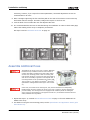
TIP LOAD! If the array is two rows or higher, additional
hardware for tip resistance must be used in order to
comply with safety regulations and local codes. Either
use the rear mounting points or bolt the leveling feet
into the base structure in such a way that the weight of
each tile is individually supported. To accomplish this, a
mounting bracket can be purchased from Christie (P/N:
123-107109-xx). For details, see Christie® MicroTiles™
Specification and Application Guide (P/N: 020-100334xx).
If the array is mounted to the leveling feet, they must be fastened to an adequately
ballasted base structure anytime the array is two rows or higher to prevent tipping and
provide stability. The leveling feet come equipped with machined points for bolting the
array; however, the hardware is not supplied. Use M6 or 1/4” hardware and follow all local
safety standards and regulations.
1. Repeat the steps 1-9, outlined in Assemble Second Row on page 17 for each additional row
added to the array.
2. For details on using the rear mounting points, see the Specification and Application Guide (P/N:
020-100334-xx).
18
Christie MicroTiles User Manual
020-100329-12 Rev. 1 (04-2014)
Installation and Setup
Unpack Screens
• Do not touch inside of the screen.
• Always handle the screen from the sides.
• Remove all jewelry and watches from your hands and wrists before handling.
• Never use gloves that are dirty or have a rough texture as they can leave marks on the
screen.
• Never handle the screen without gloves once it has been removed from the plastic bag.
• Avoid placing the screen on a hard surface.
• Never set the screen on its corner or edge as they are fragile and can be easily damaged.
1. Open the box and, without removing it, examine the screen to ensure it has not been damaged
during shipping.
2. Place one hand under the screen’s frame, between the front two foam corners.
3. Carefully lift the frame and screen until the front two foam corners are clear of the box.
4. Remove the front two foam corners.
5. Carefully lower the frame and screen back into the box.
6. With two hands, grasp the sides of the frame and lift the frame and screen together out of the
box.
7. If the work surface is hard (for example, a table top), have another person close the lid of the
box and place the screen on the lid. Otherwise, place the screen on the work surface.
8. Remove the remaining two foam corners.
9. Put on clean gloves.
10. Place one hand lightly on the screen and pull open the plastic bag.
11. Grip the bottom of the bag with one hand and the frame with the other and pull the screen out of
the bag.
12. If you have lifted the screen and bag up while performing step 11, place the screen back on the
work surface or box.
Christie MicroTiles User Manual
020-100329-12 Rev. 1 (04-2014)
19
Installation and Setup
Install Screens
• Do not touch inside of the screen. Always handle from the sides. Remove all jewelry and
watches from your hands and wrists before handling.
• Ensure the surface of the screen removal tool is clean and free of debris to avoid
damaging the screen.
• In an array, the physical size of the gap between two adjacent screens is affected by
temperature and humidity. Improper installation of the tiles also affects both the size and
consistency of screen gaps. With proper installation, the average physical screen gap is
typically 1.3mm at 25°C (77°F) ambient and 50% non condensing relative humidity, with
a variance of ± 0.3mm. Feeler gauges should be used to measure screen gaps accurately.
i
It is recommended that the screens be installed starting from the bottom of the array.
1. Before installing the screens, remove the lens guard from the tiles and the dust cap from the
lens. Replace the lens guard and the dust cap anytime the array is disassembled and shipped.
2. Open the handle on the screen removal tool and gently place it in the
center of the screen.
3. Carefully, push the screen removal tool towards the screen using
moderate pressure (no more than five lbs / 2.27 kg).
4. Close the handle on the screen removal tool to apply suction.
5. Carefully lift the screen from the work surface.
6. Pull the screen tether out from the top of the tile housing and hook it into
the locking latch on the screen. The tether ensures the screen does not
fall if subjected to excessive force/vibrations.
7. Line up the two mounting holes on the screen with the two pins on the tile and carefully press
onto the tile. Magnets on the housing secure the screen to the tile.
20
Christie MicroTiles User Manual
020-100329-12 Rev. 1 (04-2014)
Installation and Setup
Remove Screens
• Excessive force and/or repeated screen removal may damage the screen.
• Ensure the surface of the screen removal tool is clean and free of debris to avoid
damaging the screen.
1. Open the handle on the screen removal tool and gently place it in the center of the screen.
2. Carefully, push the screen removal tool towards the screen using moderate pressure (no more
than 5 lbs / 2.27 kg).
3. Close the handle on the screen removal tool to apply suction.
4. To remove the screen, carefully pull on the screen removal tool.
Cable Routing
• It is advised to connect the cables row by row when an array is set up near a wall. When
setting up an array where the back is exposed, first set up the entire array and then
connect the cables.
• Ensure there is sufficient slack in the cable to allow servicing of the tile from the front.
• Do not tie wrap or secure the cabling if the array is set up near a wall.
1. Plug the display port cables into either of the
two ports on the back of the tiles. Either port
is acceptable on both the ECU and the tile
unless connecting multiple ECUs. When using
multiple ECUs, HSSL-1 is the local source
input and HSSL-2 is the local source output.
For details, see Cabling and ECU Layout and
Design on page 11.
2. Daisy chain the cable from one tile to the
next and plug the last one back into the ECU.
It is not necessary to make a complete loop;
however, communication to the entire array
will not be lost if one tile fails.
Cooling
The volume of air directly behind each tile must not exceed the maximum operating
temperature of the tile, which is 40°C (104°F). A minimum 2” (50mm) gap must be left at
the back of each tile to ensure proper air flow and cooling. Each tile has a maximum cooling
load of 110W (375 BTUs/hr) per tile, when operating with brightness and color matching
disabled (each LED operating at maximum drive level). For details on airflow requirements,
see the Christie® MicroTiles™ Specification and Application Guide (P/N: 020-100334-xx).
Christie MicroTiles User Manual
020-100329-12 Rev. 1 (04-2014)
21
Installation and Setup
99% of the heat generated is exhausted out the back and should be accounted for at the
rear of the array. The surrounding air supply MUST be clean and free of excessive dirt, dust
and particles in order to ensure proper functionality of the tiles. Failure to ensure a clean air
supply may void the warranty.
Tiles are cooled only from the back. If the array
is installed in an enclosed area, additional cooling
may be required in order to comply with safety
regulations and local codes. The inlet air cannot
exceed the maximum operating temperature of
the tile. For details, see General Specifications on
page 81.
If proper air flow is not provided the tiles
continue to operate for a limited time. If the tiles
exceed the preset temperature, they will dim. If
it operates at or above that temperature for too
long, the tile will power down. For details, see
System Information - Tiles on page 71.
Connecting Sources
• The WebUI is only functional on the master ECU. It does not communicate with slave
ECUs.
• Up to 7m (20 ft.) of long distance communication between the ECU and the tiles is
supported at this time.
A MicroTiles array requires an ECU in order to allow the user to display an image using a source,
connected via a DVI-D cable. It acts as the controller and ensures the supplied video signal is
properly displayed across the entire array.
Once the ECU is connected and powered up, the video content is enabled by default as long as the
video source is connected to the DVI-D connection. It also monitors the health of the array.
In a complex setup, multiple ECUs can be utilized. For details on controlling an array with multiple
ECUs, see Power Distribution on page 24. When multiple ECUs are connected into a single array, an
arbitration scheme is used to ensure only one ECU acts as the main system controller (master ECU)
and the video source connected to this ECU is always capable of playback on all tiles. Each slave ECU
will playback its video source to the connected tiles; it cannot playback the local video from another
ECU to its connected tiles.
22
Christie MicroTiles User Manual
020-100329-12 Rev. 1 (04-2014)
Installation and Setup
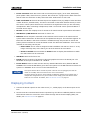
•
Power Connector: Each ECU comes with a universal power supply (110V-240V, 50Hz/60Hz)
power splitter cable, which forms a T-junction. One end of the ‘T’ plugs into the back of the ECU
and the other two ends form a daisy chain with either another ECU or with a tile.
•
HSSL-1 and HSSL-2: These bi-directional ports are capable of carrying 5Gbps of video and data
in both directions, simultaneously. The ECU is connected via the HSSL interface directly to a tile.
The order in which system elements are connected is not significant unless you are connecting
multiple ECUs. When connecting multiple ECUs, HSSL-1 is the local source input and HSSL-2 is
the local source output.
•
RS-232: Connect with a laptop or PC for access to all controls and all system status information.
•
USB Device 1/USB Device 2: Reserved for future use.
•
Ethernet: A host computer connected to this interface has full access to all controls and all
system status information. All firmware can be updated via this port. This interface supports 10BaseT and 100-BaseT. A web client interface is available through this port and is used as the
primary human interface for remote PC based control of a MicroTiles installation. There are two
methods of connecting via this port:
•
Direct Cable: The PC must be assigned a static IP Address 192.168.0.x where ‘x’ is any
integer 2 through 254; at the factory, the IP of the ECU will be 192.168.0.1
•
Router or Switch: Press and hold the Power button to display the IP Address to which
the web browser will be connected.
•
USB Host: Reserved for future use.
•
DVI-D: Connect a variety of progressive video and graphics sources to the DVI-D port. The
bandwidth of the input is limited to 25 -165 MHz.
•
Power Button: Press to switch the ECU and any attached MicroTiles array between ON and
STANDBY. The bi-colored LED flashes green when the system is in the ON state and red when the
system is in STANDBY. If an error occurs the LED flashes red.
If the power button LED is red and the power connector cord is unplugged, the ECU will
remain in a standby state even when the line cord is reconnected.
The Power button can also be used to display the WebUI IP address on the master ECU in
multiple ECU configurations or to pair a remote control. Simply press and hold the Power
button for five seconds. For details, see R100 Remote Control on page 31.
Displaying Content
1. Connect the DVI-D output from the video source (i.e., media player) to the DVI-D input on the
ECU.
2. Once the DVI-D is connected and the ECU is powered up, the video is enabled by default. Use the
R100 Remote Control to control the video content through the On Screen Display (OSD). For
details, see Remote Control on page 65.
Christie MicroTiles User Manual
020-100329-12 Rev. 1 (04-2014)
23
Installation and Setup
Power Distribution
For each MicroTiles array Christie provides the necessary line cords required for proper power
distribution in your country of origin. For regions that accept Y-power cords, a Y-Cord Kit can be
ordered. For details, see Order Guide on page 5.
For regions that do not accept Y-power cords an alternate solution is required. For details, see the
Specification and Application Guide (P/N: 020-100334-xx).
Connect to Power
Always check the firmware version installed on the tile(s) and ECU on initial power up against the
version available at www.microtiles.com. Failure to install the latest firmware version can affect
system performance. For details, see Upgrading Main Firmware on page 60.
Y-power Cords
Electrical Hazard! A maximum of nine tiles can be connected per daisy chain. This is the
maximum power rating of the Y-power cord. In an array of 12 tiles, two outlets and two
power bars should be used.
Local or national regulations may not allow the use of Y-power cords and may require an
alternative method of power distribution, such as standard individual line cords for each tile, or
power bars. This may include Japan, China, Korea and others. The Y-cord Kit (P/N: 123-122106-xx)
can be used in the USA, Canada, Mexico, the European Union and Russia.
•
24
The Y-cord Kit does not include line cords (i.e., the cords that connect the array to the wall
outlet). Suitable regional line cords must be used. See Line Cords for D100 and E100 on page 7.
Christie MicroTiles User Manual
020-100329-12 Rev. 1 (04-2014)
Installation and Setup
•
A quantity of nine Y-cords are shipped with each kit. Multiple tiles are daisy chained to a single
power feed. Up to nine tiles per chain can be supported.
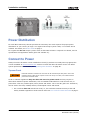
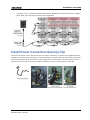
Install Power Connection Security Clip
To ensure the power cord is secured to the tile’s power connection, a security clip supplied with the
Display Unit Kit (P/N: 123-001102-xx) must be installed. To install, insert the end of the clip into the
two machined holes on the two posts. If connecting the 90° connection to the tile ensure the clip
locks from the left side, if using the standard connector, ensure it locks from the right side.
Christie MicroTiles User Manual
020-100329-12 Rev. 1 (04-2014)
25
Installation and Setup
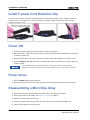
Install Y-power Cord Retention Clip
To ensure the Y-power cords are secured between connections a retention clip, supplied with the YCord Kit (P/N: 123-122106-xx), must be installed. To install simply snap the clip onto the two
adjoining Y-power cords.
Power ON
1. Connect the power plug from the ECU into an outlet or power bar.
2. Daisy chain the Y-power cords to each tile in the array and connect the standard power plug into
an outlet or power bar.
3. Apply electrical tape or tie wraps to secure the inline connection between the Y-power cords.
4. Push the Power button ON at the ECU. The LED status light on the button turns green when the
system is ready.
It is recommended that a power bar with an in-line power switch be used to simplify
switching the array ON and OFF. If any of the tiles fail to power up, check each connection.
Power Down
1. Push the Power button OFF at the ECU.
2. Move the power bar switch to the OFF position or disconnect the power plug from the outlet.
Disassembling a MicroTiles Array
1. Power down the array and disconnect all power cables and display port cables.
2. Remove the screens. For details, see Remove Screens on page 21.
3. Replace the lens guard and dust cap.
4. Loosen the three vertical screws from each tile in the top row using the assembly tool.
5. Unlock all the latches from the top row.
26
Christie MicroTiles User Manual
020-100329-12 Rev. 1 (04-2014)
Installation and Setup
6. Remove each of the tiles from the top row.
7. Repeat steps 2-6 for all remaining rows.
8. If the horizontal adjustment screws were used in building the array, make sure they are
removed.
9. If necessary, remove the bottom row of tiles from the leveling feet.
Christie MicroTiles User Manual
020-100329-12 Rev. 1 (04-2014)
27
Operation
Powering Up the MicroTiles Array
Make sure that you are using a power cable, power plug and socket that meet the
appropriate rating standards. Connect the power cable to the AC receptacle at the lower-left
corner on the rear of the tiles and to a proper AC power source (outlet). The outlet must be
near the equipment and easily accessible. Use the power cable provided with the MicroTiles
or an appropriately rated power cable that complies with regional standards. For details, see
Line Cords for D100 and E100 on page 7. Do not attempt operation if the AC power source
is not within the rated voltage range as specified on the license label (found on the back of
the tile).
A maximum of nine tiles may be connected per daisy chain. In an array of 12 tiles, two
outlets and two power bars should be used.
1. Connect the power plug from the ECU into an outlet or power bar.
2. Daisy chain the Y-power cords into each tile in the array and connect the standard power plug
into an outlet or power bar. For more information on how to connect the power cords, see Power
Distribution on page 24.
3. Apply electrical tape or tie wraps to secure the inline connection between the Y-power cables. The
LED status light on the ECU Power button is red during the power-up sequence, which takes
approximately one minute.
i
We recommend that a power bar with an in-line power switch is used to simplify switching
the array ON and OFF. If any of the tiles fail to power up, check each connection.
4. Once the array (ECU and tiles) is powered up, the LED status light on the ECU Power button
flashes green.
5. For information on how to display content onto the MicroTiles array, see Connecting Sources on
page 22.
If a Display Unit Fails to Power Up
•
Check to ensure each cable is properly connected.
•
Cycle power to the failed tile(s) or the entire array using the switch on the power bar.
•
Check the LED on the back of each tile. A flashing green light indicates power is enabled.
Christie MicroTiles User Manual
020-100329-12 Rev. 1 (04-2014)
29
Operation
Powering Down the MicroTiles Array
1. Push the Power button OFF at the ECU.
2. Move the power bar switch to the OFF position or disconnect the power plug from the outlet.
Status Indicators
The ECU is equipped with a status LED built into the Power button.
ECU LED Indicators
LED Mode
Description
OFF
No Power
Green
Slave ECU (NOTE: only one ECU can be the Master ECU)
Green: Flashing
Master ECU
Red: Solid
ECU in
STANDBY mode or booting on power up
Each tile is equipped with a tri-color LED, located on the back of the tile, which indicates power
status.
ECU LED Indicators
LED Mode
Description
OFF
No Power
Amber
Power ON, Hardware is Good, No Firmware
Green
Power ON, Hardware is Good, Firmware is Good
Green: Flashing
Power ON, Hardware is Good, Firmware is Good, Communicating with ECU
Red: Solid
Power ON, No Hardware
30
Christie MicroTiles User Manual
020-100329-12 Rev. 1 (04-2014)
Operation
R100 Remote Control
This radio frequency remote control is used to navigate the menu commands on the OSD from up to
100m (328ft) away.
Guide to Keypads
The remote keypad controls the tiles via communication from a battery-powered RF transmitter.
Press the arrow keys down once for each continuous adjustment/movement in one direction. If a key
is pressed while the tiles are still responding to a previous action, such as during power up, the
second key press may not take effect. These are toggle keys, which require you to press once or
press twice or use the up/down arrow keys.
• There are no simultaneous key combinations; press keys one-at-a-time.
• Two AAA batteries are required.
• The keypad on the remote remains lit when the batteries are running low.
Christie MicroTiles User Manual
020-100329-12 Rev. 1 (04-2014)
31
Operation
Keypad Commands
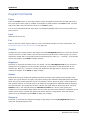
Power
Press the Power button on the R100 Remote Control to toggle the array ON. The LED light on the
ECU turns green when power is enabled. Press again to place the ECU in STANDBY mode. The LED
light on the ECU turns red when the array is in STANDBY mode.
This is not a complete powered down state. To completely disable power turn the array OFF at the
power source.
Input
Reserved for future use.
Pair
Press to pair the remote with the ECU for secure information transfer. For more information, see
Pairing the Remote to the ECU via the OSD on page 33.
Contrast
Changes the level of peak white in the image. Use the Left/Right Arrow keys to reach the desired
level of contrast. For best results, start low and increase so that whites remain bright, but are not
distorted or tinted and to avoid light areas from becoming fully white (i.e., “crushed”). Low contrast
causes dim images. Press Enter to apply changes.
Brightness
Increases or decreases the black level in the image. Use the Left/Right Arrow keys to reach the
desired level of brightness. For best results, start high and decrease so that dark areas do not
become fully black (i.e.,“crushed”). Overly high brightness changes black to dark gray, causing
washed-out images. Press Enter to apply changes.
Gamma
Determines how gray shades are displayed between minimum input (black) and maximum input
(white) for a given amount of signal. The proper setting helps maintain optimized blacks and whites
while ensuring a smooth transition for the “in-between” values utilized in grays. Unlike brightness
and contrast controls, the overall tone of an image can be lightened or darkened without changing
the two extremes. The images will be more vibrant with good detail in dark areas when using the
Gamma control. The nominal setting for Gamma Correction is 2.22 for most signals and
conditions. If excess ambient light washes out the image and it becomes difficult or impossible to see
details in dark areas, increase the gamma correction setting to compensate. Once the desired
gamma level is established, press Enter to apply the changes.
Sharpness
Increases or decreases the sharpness settings of the image. Use the Left/Right Arrow keys to
reach the desired sharpness level.
32
Christie MicroTiles User Manual
020-100329-12 Rev. 1 (04-2014)
Operation
Arrow Keys
Use the Left/Right arrow keys to change a slide bar value.
Enter
Press to apply any changes made through the OSD to the array.
Menu
Press to access the OSD. Once you are working within the OSD you can press Menu at any time to
return to the main menu.
Exit
Press to return to the previous level or menu.
Economy
Press for a shortcut to the Canvas Management > Canvas Settings menu, which is used to control
the LED power settings. For details, see OSD Canvas Management Menu on page 37.
Info
Press once to display the tiles’ properties on each tile. Press again to display the tiles’ firmware
version on each tile. Press again to exit to video. Once pressed there is a maximum delay of 30
seconds to populate the information onto each tile in the array.
Preset
Reserved for future use.
Number Keys
Use the number keys for quick access to the OSD menus.
Function
Reserved for future use.
Help
Press to access the Help menu.
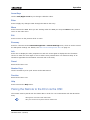
Pairing the Remote to the ECU via the OSD
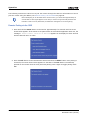
The remote must be paired with the master ECU in order for it to communicate with the MicroTiles
array.
i
• Pairing does not function with slave ECUs.
• Only one remote can be paired with the master ECU
Christie MicroTiles User Manual
020-100329-12 Rev. 1 (04-2014)
33
Operation
The following instructions outline how to pair the remote through the OSD. For information on how to
pair the remote using the WebUI, see Remote Pairing via the WebUI on page 65.
i
Before attempting to use the OSD via the remote control, you should wait approximately 30
seconds after a video signal appears on the array to ensure enough time has passed for the
firmware to start correctly. Otherwise, the OSD menu will appear on the wrong tile(s).
Remote Pairing via the OSD
1. Press and hold the Power button on the ECU for approximately five seconds until the screen
shown below appears. If the remote is not paired within 30 seconds the application times out, the
message A remote control could not be detected appears on the display for three seconds
and the OSD will return to video.
2. Press the Pair button on the R100 Remote Control and then the Enter button. Once pairing is
successful, the screen shown below appears on the OSD. If the Pair button is accidentally
pressed on the remote when the array has been paired, press it again to toggle pairing mode
OFF.
34
Christie MicroTiles User Manual
020-100329-12 Rev. 1 (04-2014)
Operation
Using the On Screen Display (OSD)
OSD Functionality
•
Adjust display window offsets
•
Specify Video or OSD display mode
•
Disable and enable automatic array configuration
•
View input properties, which includes:
•
DVI clock
•
Input
•
Pixel width
•
Pixel height
•
Frames per second
•
Display a test pattern
•
Select all tiles in an array
•
Calibrate all tiles in an array
•
Turn the tiles array ON and OFF
•
Reset the ECU
•
Set date and time
•
View the status of the tiles and ECU (i.e., properties, firmware versions, IP address, etc.)
•
Help menu
OSD Guidelines
i
If the OSD and WebUI are used simultaneously, the OSD menus may not display correctly. If
a menu button is pressed, but does not appear on the display after a few seconds, press the
Exit key several times and re-enter your selection(s).
•
There are no simultaneous key combinations; press keys one at a time.
•
Pause briefly between key presses to allow the tiles to respond to the previous action.
•
Press Exit once to cancel a selection or go back one level in the menu.
•
If the back light turns OFF, push any key to turn it ON again.
Christie MicroTiles User Manual
020-100329-12 Rev. 1 (04-2014)
35
Operation
Navigating the OSD Menus
To access the OSD, press Menu from the R100 Remote Control.
Basic controls of the tiles are accessed from within the OSD menu
system. When the OSD is activated, it appears on the top-left tile in
a mapped array and anywhere if the array is unmapped. All other
tiles in the array remain on video. With the Main menu displayed,
either use the arrow keys on the remote to highlight the desired
option and press Enter, or use the number keypad on the remote
to make the corresponding selection. The corresponding menu will
appear. To scroll through a list of items, use the up/down arrow
keys. Press Exit once to return to the previous level of options.
Press Menu at any time to return to the Main menu. For a detailed overview, see OSD Menu Tree on
page 85.
OSD Source Management Menu
This menu allows users to enable and disable the active input source, view and edit the properties of
the active input source and display window, and adjust image brightness, color temperature,
contrast, gamma and sharpness. Press Menu from the remote and use the arrow keys to highlight
Source Management from the Main menu. Press Enter to access the menu selections. For quick
access to this menu press Menu and then 1. For a detailed description of the same controls
accessible from the WebUI, see WebUI Source Management Menu on page 43.
36
Christie MicroTiles User Manual
020-100329-12 Rev. 1 (04-2014)
Operation
OSD Canvas Management Menu
This menu enables users to select the video signal for displaying content onto the tiles. It also allows
users to enable/disable array configuration or to adjust display settings; such as intensity, color
matching, mullion reduction and uniformity correction. Use the Canvas Settings menu to adjust
color settings. Use the Diagnostics and Calibration menu selection to select from a list of test
patterns used for troubleshooting and setup purposes. Press Menu from the remote and use the
arrow keys to highlight Canvas Management from the Main menu. Press Enter to access the
selections. For quick access to this menu, press Menu and then 2 from the remote. For a detailed
description of the same controls accessible from the WebUI, see WebUI Canvas Management Menu
on page 46.
Christie MicroTiles User Manual
020-100329-12 Rev. 1 (04-2014)
37
Operation
OSD Configuration Menu
The Configuration menu allows users to control power and reset the ECU and tiles. Typically, the
ECU and tiles need to be reset after a firmware upgrade.
i
38
Slave ECUs cannot be reset, powered ON or OFF from the firmware or the remote.
Christie MicroTiles User Manual
020-100329-12 Rev. 1 (04-2014)
Operation
Use the Left/Right arrow keys on the remote to adjust the date/time fields via this menu. For a
detailed description of the same controls accessible from the WebUI, see Configuration Menu on page
59.
i
If the ECU was disconnected, the message: Waiting for system master. Going to standby in
five minutes, appears on the OSD. To avoid going into STANDBY mode re-connect the ECU.
OSD Status Menu
This menu allows users to view the properties and firmware versions of the ECU and tiles. In all
applications, the OSD appears only on one tile in an array of multiple tiles; however, when Tile
Properties and Tile Firmware Versions are selected from the Status menu, the information is
displayed on each of the tiles. For a description of the same controls accessible from the WebUI, see
Status Menu on page 70.
Christie MicroTiles User Manual
020-100329-12 Rev. 1 (04-2014)
39
Operation
OSD Help Menu
This menu provides additional support for the OSD menu system. The About MicroTiles OSD
Firmware selection provides firmware license information. Select Using Help to access the online
help files.
40
Christie MicroTiles User Manual
020-100329-12 Rev. 1 (04-2014)
Operation
Using the Web User Interface (WebUI)
In addition to using the OSD, MicroTiles can also be controlled remotely, typically at a controller such
as a PC, via a WebUI on an Ethernet network. If there are concerns about network security, run the
WebUI on a local area network only and install a firewall.
Recommended System Requirements
•
1.6 GHz Intel Atom CPU
•
1 GB RAM
•
Graphics adapter with 1024 x 768 resolution (must support application window size of 800 x 600)
•
Ethernet connection (minimum recommended speed of 1.5 Mbps)
Supported operating system, such as:
•
Microsoft Windows® XP or Vista
•
MAC OS X Leopard
•
Linux
Supported web browser, such as:
•
Microsoft® Internet Explorer version 7 or higher
•
Apple Safari version 3 or higher
•
Mozilla Firefox version 3 or higher
•
Adobe™ Flash Player Plug-In 9 or higher
Christie MicroTiles User Manual
020-100329-12 Rev. 1 (04-2014)
41
Operation
WebUI Menu Tree
Navigating the WebUI
Users are prompted to log in upon start-up. Use admin for both the user name and password. Each
screen available through the WebUI has the same top toolbar from which the following can be done:
42
•
Select and setup an active input source
•
Manipulate the appearance of video content (i.e., size, position, color, sharpness)
•
Select between video and OSD display modes
•
Perform firmware upgrades
Christie MicroTiles User Manual
020-100329-12 Rev. 1 (04-2014)
Operation
•
Display a test pattern
•
Array configuration
•
View system information and alerts
•
View current time and date
•
Access online help
WebUI Source Management Menu
This menu allows users to manually or automatically select and setup
an active input source. This includes setting up the size and position of
the display window and adjusting image settings. The only video input
source compatible with MicroTiles is DVI-D.
i
The maximum input resolution supported per ECU is 1920 x 1200 @60Hz.
Adjust Image Settings
To access the Image Settings screen, click Source Management > Image Settings from the top
menu bar. This screen enables users to manually adjust the image contrast, brightness and gamma
of the ECU video input.
1. Either click Select All to select each ECU connected to the array or click on a specific ECU from
the spreadsheet. If necessary, click Refresh to update the spreadsheet.
i
The master ECU has the highest priority number.
2. To manually change the Brightness, Contrast and Gamma settings, use either the scroll bar or
the up/down arrow keys to change the value.
3. Click Apply to send the changes to the ECU(s) and view the results on the tiles.
Christie MicroTiles User Manual
020-100329-12 Rev. 1 (04-2014)
43
Operation
Change Size and Position of Video Content
To access the Size and Position screen click Source Management > Size and Position from the top
menu bar. This screen enables users to manually adjust the X/Y offsets, and the width and height of
the display to accommodate the particular application. Automatic array configuration must be
enabled in order for this function to work. For details, see Automatic Array Configuration on page 51.
System Master Input Source Properties
If necessary, click Refresh to scan the properties of the input source detected by the ECU. The input
source properties include:
•
44
DVI Clock Detected must state true in order to view video content on the tiles.When this input
reads false, check the connection between the ECU(s) and the video source, and try again.
Christie MicroTiles User Manual
020-100329-12 Rev. 1 (04-2014)
Operation
•
Input Stable indicates the stability of the input source. If this field states false, ensure the
video source is operating and ensure the video file is not corrupt.
•
Active Resolution displays the width and height of the array in pixels.
•
Frame Rate displays the frames per second of the incoming video.
Display Window
These settings are only applied to the global video source of the master ECU.
Adjusting the display window settings changes the capture size of the active input window. The XOffset, Y-Offset, Width and Height values are expressed as a percentage of the active input,
where the top left of the array represents 0,0. The sum of X-Offset and Width must be ≥ to 0 and
less than 100%. The sum of Y-Offset and Height must be ≥ to 0 and less than 100%. Once the
changes you require have been made, click Apply to set the current configuration.
Customize Extended Display Identification Data (EDID)
To access the editor from the WebUI click Source Management > Customize EDID from the top
menu bar. Customize EDID allows you to create a custom video resolution to send to the graphics
card. The default settings are 1920 horizontal pixels x 1200 vertical lines at a vertical frame rate of
59.94 Hz. If you want to restore the default values, click Restore. This feature can be used for one
or more ECUs. You can select one and adjust the settings or click Select All to change the settings
for more than one ECU.
1. Click Load File beside the Update Using ASCII File field if using an ASCII file provided by
Christie.
2. Click Restore beside the Restore Default EDID Values if the ECU cannot detect or display a
good video source. This can occur when connecting different types of input sources to the ECU,
which can cause the EDID information to be incorrect.
The EDID editor consists of three customizable elements:
•
Horizontal Size: Use the scroll bar or the up/down arrow keys to adjust the horizontal size of
the display. The minimum value is 720 and the maximum value is 4088. The default is 1920. The
minimum increment is .001.
•
Vertical Size: Use the scroll bar or the up/down arrow keys to adjust the vertical size of the
display. The minimum value is 540 and the maximum value is 4095. The default is 1200.The
minimum increment is .001.
•
Frame Rate: Use the scroll bar or the up/down arrow keys to adjust the frame rate of the
display. The minimum value is one and the maximum value is 75. The default is 59.94. The
minimum increment is .001.
Christie MicroTiles User Manual
020-100329-12 Rev. 1 (04-2014)
45
Operation
WebUI Canvas Management Menu
Through the Canvas Management menu, the tiles can be automatically or manually mapped, the
subarray can be configured, array settings can be adjusted and a test pattern can be displayed. Users
can also switch the display between Video, OSD and OSD (Unscaled with Overscan) modes. For
most applications Video is used.
46
Christie MicroTiles User Manual
020-100329-12 Rev. 1 (04-2014)
Operation
Select a Display Mode
On the Canvas Management menu, click Display Mode. Select from Video (All Tiles), OSD (All
Tiles) and OSD (Unscaled with Overscan) (All Tiles) to display the content on the tiles.
Display Mode Options
•
Video (All Tiles): Select to display video from the ECU input source (HSSL-1 or HSSL-2). One or
both ports must be enabled. For details, see Connecting Sources on page 22.
•
OSD (All Tiles): Select to display a 800 x 600 image, scaled to approximately 720 x 540, which
is the viewable area of the screen.
•
OSD (Unscaled with Overscan) (All Tiles): Typically, overscan resolution (800 x 600) is used
to display test patterns.
Layout
Physical Mapping
Physical mapping is a useful tool when configuring a canvas that includes a group of tiles not
physically connected.
1. Ensure Automatic Array Configuration is enabled. For information, see Automatic Array
Configuration on page 51.
2. From the Canvas Management menu, select Layout > Physical Mapping.
Christie MicroTiles User Manual
020-100329-12 Rev. 1 (04-2014)
47
Operation
3. Click on a tile in the Tile Schematic section. Drag and drop it into the main grid to manually map
it. Use the rows (y-coordinates) and columns (x-coordinates) of the grid to manually map tiles;
the input image automatically stretches spanning across all manually mapped tiles. The top left is
0,0. Each array index corresponds to a unique mapping of the input image.
4. The image on the array is automatically configured and mapped once the tile is dropped into the
main grid. All blue colored tiles indicate they have been manually mapped and non-mapped tiles
are gray. All manually mapped tiles are displayed in the Manually Mapped Tiles table.
5. Click Center Tile to center the main grid on the currently selected manually mapped tile. This is
a useful tool when working with a large array. For example, if you wanted to manually map a tile
to location x=20 and y=20, select a manual mapping from the table and click Center Tile to
make the main grid reposition the tile to the center of the main grid.
48
Christie MicroTiles User Manual
020-100329-12 Rev. 1 (04-2014)
Operation
6. Click the Info button to bring up the properties of each tile. This is similar to the Info button
function on the R100 Remote Control. For details, refer to R100 Remote Control on page 31. Use
the Tile Properties screen to see the number of each tile. For details, see System Information Tiles on page 71.
Subarray Configuration
Subarray Configuration enables users to display two images on an array or increase the input
resolution by combining multiple inputs. In order for this to function multiple ECUs must be
connected to the array and automatic array configuration must be enabled. For information on how to
connect multiple ECUS, see Cable Routing on page 21. To access the Subarray Configuration screen
click the Canvas Management > Layout > Subarray Configuration.
i
Subarray configuration is not available via the OSD.
Adding a Subarray Manually
1. If necessary, click Refresh to get a reading of any subarray regions that have already been
created. This information is then populated in the subarray spreadsheet.
2. Ensure you are in Add Mode. You can switch between ADD and EDIT Modes. Edit Mode is grayed
out if no subarray is selected in the table. See Edit a Subarray on page 50.
3. Click on the top-left tile within the subarray (displayed in Tile Schematic). Hold down the Shift
key and click on the bottom-right tile in the subarray. You must select tiles in a diagonal
configuration (opposite corners) in order to configure a subarray.
4. Click Add once the subarray region has been selected. All the subarrays saved on the master
ECU are shown in the spreadsheet.
Christie MicroTiles User Manual
020-100329-12 Rev. 1 (04-2014)
49
Operation
Adding a Subarray Automatically
1. Click Auto Subarray to put all tiles between ECUS into
separate subarrays. In order for this to succeed wiring
must be correct. For details, see Cabling and ECU
Layout and Design on page 11.
2. Once selected you will be prompted with an Automatic
Subarray Warning message. Click Ok to continue.
Edit a Subarray
1. All the subarrays saved to the master ECU are shown in the spreadsheet.
2. To edit an existing subarray, select it from the spreadsheet and click Edit Mode. Once selected,
the bottom portion of the window changes to display the editing properties.
i
Automatic array configuration must be enabled for changes to take affect. For details, see
Automatic Array Configuration on page 51.
3. Use the scroll bars to adjust the X/Y Offsets and to change the width and height of the
subarray. The display window will change as you make the adjustments. Click Set once you are
satisfied with the changes.
4. From the Enabled list you can choose to enable or disable the subarray.
5. The Video Source for the subarray can be defined from the Video Source list. Select No
Video, Global or Local. The default setting is Local.
ECU Priority
This screen allows users to assign the correct priority to the ECUs, meaning assigning them as a
slave or a master. For details, see External Control Unit (ECU) on page 4. It is a useful tool to set the
master ECU when using multiple ECU configurations. All ECUs are shipped as slaves from the factory.
50
Christie MicroTiles User Manual
020-100329-12 Rev. 1 (04-2014)
Operation
When switching out ECUs in the field it is important to ensure that at least one of them is a master. If
you have two masters you must set one of them back to a slave.
1. If necessary, click Refresh to load the information from the ECUs connected to the array.
2. Click a row in the spreadsheet to select a single ECU.
i
The master ECU has the highest priority number.
3. Once an ECU is selected from the spreadsheet use the Priority scroll bar or the up/down arrow
keys to manually set a priority to the ECU. For example, the ECU with the highest number is the
designated master and all others are slaves. Once the value is entered click Apply.
Click Select All to select all ECUs and set them to 0 and then select one ECU to set as the master
(slaves = 0, master = 1).
Automatic Array Configuration
MicroTiles are equipped with neighbor detection circuitry. Once power is applied to the array, the ECU
uses the neighbor detection circuitry to determine the configuration of the array. It then relays the
total dimensions of the array and the exact physical location of the array back to each tile. Array
configuration is required to organize the display and to ensure each tile knows its physical
arrangement within the array. Configuration is checked approximately every 10 seconds. By default,
Automatic Array Configuration is enabled. Each tile, knowing its own position within the array and
the video source characteristics, is required to crop the active input source, select its own sub-image
portion and scale the sub-image to display in full screen.
1. From the Canvas Management menu, select Layout > Configure.
2. Select Enabled from the Automatic Array Configuration list. With this feature enabled it
allows the software to detect changes in the array’s setup and configure the array accordingly.
For example, it will detect any time a tile is added or removed, tiles are moved, subarrays are
changed or manually mapped tiles are changed and configure the array to those settings.
Christie MicroTiles User Manual
020-100329-12 Rev. 1 (04-2014)
51
Operation
3. If necessary, click Refresh to update the array and ensure the most current information is
displayed.
4. Click the Reconfigure Array to force an array reconfiguration manually.
Canvas Settings
Color and Luminance
The type of screen must first be specified from the Screen Selection drop-down before
adjusting any of the color and luminance features.
The ECU periodically polls all attached tiles to determine the optimal colorimetry and brightness
setting for the array as a whole. This optimal operating point is transmitted to all attached tiles. It is
the responsibility of the individual tiles to ensure they actually meet the requested colorimetry. The
Color and Luminance screen allows users to manually adjust the nits of the entire array and to enable
or disable color matching of the array. To access this screen, select Canvas Management from the
top menu bar and then select Canvas Settings > Color and Luminance.
52
Christie MicroTiles User Manual
020-100329-12 Rev. 1 (04-2014)
Operation
Color and Luminance Options
•
Calibration Model: This selection allows you to select between the two available color correction
models – Version 1 and Version 2 (Recommended).
•
Automatic Color Matching: This selection allows you to select the color matching setting. You
can choose from ON (Recommended) and Tiles Only. When ON (Recommended) is selected
the ECU reads the settings of each tile, calculates the average and applies that reading to each
tile in the array. When Tiles ONLY is selected color matching is done at the tile level, meaning
the tiles will make their best attempt to meet user commanded color/brightness points. In this
mode the ECU is not actively maintaining color points across the array.
•
Mode: The selections of this field change according to the Calibration Model selected. For Version
1 the options include, Fixed Brightness and Off. For Version 2 the options include, Economy
Brightness, Fixed Brightness and Maximum Brightness. In order to change the brightness
settings you must specify the intensity mode through the Mode field.
•
Luminance Levels: Use the scroll bar or the up/down arrows to manually set the luminance
level, in nits, for the array. When Mode is set to Fixed Brightness clicking the Read button will
query the array for the last set value. When Economy or Maximum Brightness mode is
selected clicking Read displays the brightness level achieved by the array. The Set button is only
available when Mode is set to Fixed Brightness. In Economy and Maximum Brightness
modes the Set button is grayed out because the luminance levels are managed by the ECU.
•
Color Temperature: This selection allows users to manually adjust the color temperature of the
array. Color temperature dictates how warm or cool the video output on the array appears. The
higher the color temperature, the cooler and bluer the image. The lower the color temperature,
the warmer and redder the image. Color temperature settings for Version 2 (Recommended)
range from 3200-9600K and the settings for Version 1 range from 5500-8500K. A mode of color
correction must be selected from the Mode list in order to adjust color temperature.
•
Color Space: The selections of this field change according to the Calibration Model selected. For
Version 1 the selections include sRGB and Custom Gamut. For Version 2 (Recommended) the
selections include Maximum Gamut, sRGB and Custom Gamut. This enables the selection of the
type of color decoding. The setting defaults to maximum.
Christie MicroTiles User Manual
020-100329-12 Rev. 1 (04-2014)
53
Operation
•
•
Maximum Gamut: Select this option to apply the maximum available RGB color
spectrum. Not an available option when Tiles ONLY is selected from Automatic Color
Matching.
•
sRGB: Select this option to apply standard RGB color space to the array.
•
Custom Gamut: Select this option to manually adjust the XY coordinates of the RGB color
spectrum.
Screen Selection: From Screen Selection select the type of screen being used in the array.
Selections include the S100, S200 and S300/S310.
This setting must be specified before adjusting any of the color and luminance features to
ensure the settings applied to the array are accurate.
Canvas Image Settings
This screen allows users to configure mullion reduction, uniformity correction and sharpness. To
access this screen select Canvas Settings > Canvas Image Settings.
54
•
Mullion Reduction: Use mullion reduction to adjust the brightness level to the edges of the tiles
until they appear smaller. It is recommended to have video playing on the array when adjusting
mullion to see the changes take effect. Select between OFF, 0 to 12 Feet, 12 to 24 Feet and
More than 24 Feet. When a selection is made, you will see the effect on the video content
showing on the array. Feet refers to the recommended viewing distance.
•
Tile Uniformity: Uniformity correction is enabled by default and ensures the light source in the
center of the tile (known as the hot spot) is dimmed to ensure brightness is uniform.
•
Sharpness: Use the Sharpness scroll bar or the up/down arrows to adjust sharpness levels.
Christie MicroTiles User Manual
020-100329-12 Rev. 1 (04-2014)
Operation
Advanced Canvas Settings
Advanced: Tile Color and Luminance
MicroTiles are designed for automatic image alignment and color matching. Overriding
individual settings is not recommended and should only be performed following proper
training.
The advanced features of tile color and luminance enables advanced users to manually adjust color
uniformity.
1. To access the Tile Color and Luminance screen, select the Canvas Management menu and then
Canvas Settings > Advanced > Tile Color and Luminance.
2. Ensure tiles are selected. To do this either click Select All, or select the tiles manually from the
Tile Schematic section of the screen. Hold the Shift key down to make multiple selections.
3. Click Clear to turn the display white.
4. Ensure the tiles are in OSD mode. For details, refer to Select a Display Mode on page 47.
5. Click Identify. A black dot will appear on each of the selected tiles.
6. Adjust the RGB and luminance settings as needed, using the scroll bars or the arrow keys.
7. Click Apply to see the changes take
effect. The first time you attempt to
apply values to multiple tiles a
confirmation alert message appears
requiring you to enter text to confirm
this action. This text confirmation is only
required once - otherwise just an
acknowledgment is required.
8. If necessary, click Reset to return the values to the default settings.
Christie MicroTiles User Manual
020-100329-12 Rev. 1 (04-2014)
55
Operation
Advanced: Tile Image Alignment
This screen enables advanced users to manually correct image alignment.
Applying extreme tile image alignment values may corrupt the video display in some
MicroTiles. To resolve this issue, reduce the image alignment adjustment values.
1. To access the Tile Image Alignment screen select Canvas Management > Canvas Settings >
Advanced > Tile Image Alignment.
2. Select the specific tiles. Either click Select All or use your mouse to click individual tiles within
the Tile Schematic section of the screen. Hold the Shift key down to make multiple selections.
3. Click Grid to display the test pattern. The array will display the selected tiles and unselected tiles
in the colors specified.
4. Click the arrow buttons or use keyboard controls to adjust the XY offsets of the top-left, topright, bottom-left and bottom-right values. Note that the Step Increments scroll bar allows you to
customize how much the XY offsets will adjust. XY adjustment values are limited to -10 and +10.
5. Use the Instant Update feature to immediately send value changes to the ECU, otherwise you
will need to click Apply each time you make changes. Note that if you have selected multiple
tiles the warning message illustrated below appears. You will only need to enter the text
confirmation the first time you attempt to apply values to multiple tiles. Any other changes
applied still bring up the warning message; however, you will only need to click OK.
6. Click Reset at any time to return to the default settings.
56
Christie MicroTiles User Manual
020-100329-12 Rev. 1 (04-2014)
Operation
Display a Test Pattern
The Test Pattern screen allows users to select from a list of test patterns used for troubleshooting and
setup purposes.
1. From the Canvas Management menu select Diagnostics and Calibration > Test Pattern to
access the Test Pattern screen.
2. Click on a particular tile in the Tile Schematic section to apply the change to a specific tile only
or click Select All.
3. From the Set Display Mode list, select from Video, OSD or OSD (Unscaled with Overscan).
In order to display internal test patterns, Display Mode must be set to OSD or OSD (Unscaled
with Overscan).
OSD is the preferred mode if checking mechanical alignment (or electronic geometry alignment).
4. From the Set Test Pattern list, select which type of test pattern to display. Choices include:
Solid Color, Color Bars, Grayscale, Checkerboard, Checkerboard Inverted, Grid, 13
Point Optical.
When using the Solid Color test pattern, select a specific color to use from the Color fly-out
menu.
5. If necessary, adjust the width and height of the test pattern by clicking on the up/down arrow
keys or enter a specific value in the designated fields.
i
Width and height values are only valid for the Checkerboard, Checkerboard Inverted and
Grid test patterns.
6. To return to displaying video content, ensure Video is selected from the Set Display Mode list.
Christie MicroTiles User Manual
020-100329-12 Rev. 1 (04-2014)
57
Operation
Wire Map
This screen displays a wire map of the array in textual form.
HSSL Info
This screen displays the link quality for ECU HSSL1 and HSSL2. HSSL information can be used as a
diagnostic tool for advanced users.
i
58
The Serial number field now displays the light engine serial number instead of the MicroTile
display unit serial number.
Christie MicroTiles User Manual
020-100329-12 Rev. 1 (04-2014)
Operation
Configuration Menu
This menu allows users to enable/disable power to the canvas, reset the tiles and ECU, upgrade the
firmware, and update the date and time.
Power ON/OFF All Tiles
Selecting Power ON Canvas and Power OFF Canvas affects the entire array, regardless of how
many tiles have been selected through the firmware application.
Wait approximately 10 seconds between powering the canvas OFF and ON.
Resetting Selected Tile(s) and ECU(s)
The tiles and ECU(s) must be reset after a firmware upgrade in order for changes to take effect. This
function affects the tiles that have been selected through the WebUI. It is highly recommended that
you reset all tiles and the ECU. For more information, see Upgrading Main Firmware on page 60.
Set Date and Time
To access this screen select Configuration from the top menu bar and Date and Time. This screen
allows users to set the current system date and time. The date displayed in the MicroTiles System
Date and Time field is processed from the ECU, while the date in the New Time field is updated to
the time on the computer. If needed, click Refresh to see changes take effect and click Apply to
store the changes.
Christie MicroTiles User Manual
020-100329-12 Rev. 1 (04-2014)
59
Operation
Configuring Ethernet
This screen displays the network settings for each of the ECUs. To manually enter an IP address
disable the DHCP feature.
Upgrading Main Firmware
Read the following points before upgrading the main firmware:
60
•
Before updating the firmware, check online at www.christiedigital.com to ensure the latest
firmware version is installed. Failure to install the latest version can affect system performance.
•
Ensure the ECU and MicroTile(s) firmware versions match.
Christie MicroTiles User Manual
020-100329-12 Rev. 1 (04-2014)
Operation
•
During a firmware upgrade, the web server becomes unresponsive for several minutes and video
may be interrupted or temporarily disabled.
•
During a firmware upgrade do not attempt to use the OSD, the WebUI or open another web
browser.
•
Firmware upgrades take approximately 35 minutes to complete. If you are using Windows®,
Adobe® Flash Player™ Plug-In version 9.0, must be installed in order to initiate the upgrades.
Adobe® Flash Player Plug-In™ version 10.0 or higher is required if you are using Mac® or Linux®.
•
It is recommended that the FPGA hardware upgrade be performed at the same time as a
firmware upgrade. For more information, see Correcting a Failed Firmware Upgrade on page 64.
Check Current Firmware Version from OSD
1. Press Menu on the R100 Remote Control to access the OSD.
2. From the OSD Main Menu, select Status.
3. From the Status menu, select either External Control Unit or Tiles to view the current
firmware versions installed. Ensure the firmware versions match. For details, see OSD Status
Menu on page 39.
4. Go to www.christiedigital.com to check for the latest available firmware version. If the version
found on the web does not match the version on the product ensure the web browser cache is
cleared and complete the steps in Upgrade Firmware on page 62.
Check Current Firmware Version from WebUI
1. Select Status from the top menu bar and then System Information.
2. From the System Information screen, select either External Control Unit or Tiles to view the
current firmware version installed. The current version is displayed in the spreadsheet under
Application Version.
3. Go to www.christiedigital.com to check for the latest available firmware version. If the version
found on the web does not match the version on the product, complete the steps in Upgrade
Firmware on page 62.
Christie MicroTiles User Manual
020-100329-12 Rev. 1 (04-2014)
61
Operation
Upgrade Firmware
If an error message about duplicate tile addresses is displayed, reset the array before
attempting a firmware upgrade.
1.
Download the latest firmware from www.christiedigital.com and save it to a computer that will
be connected to the array for the upgrade.
2. Open the WebUI.
3. Click Configuration > Firmware Upgrade and select either Tiles or ECUs.
i
62
Users can choose to upgrade the firmware or hardware for a group of selected tiles or an
ECU. For information on hardware upgrades, see Correcting a Failed Firmware Upgrade on
page 64.
Christie MicroTiles User Manual
020-100329-12 Rev. 1 (04-2014)
Operation
4. Upgrade the MicroTiles firmware:
Begin with the firmware upgrade and then perform the FPGA upgrade. For details on the
FPGA upgrade, see Correcting a Failed Firmware Upgrade on page 64.
i
a. In the Tile Schematic area, select the tiles to upgrade or click Select All.
b. Click Firmware and browse to the location of the firmware upgrade file on the computer.
c.
Once the upgrade has been completed, reset the tiles to make sure the new upgrades are
active. To reset the tiles select Configuration > Power > Reset > Tiles.
5. Upgrade the Light Engine:
Do not initiate a light engine upgrade unless an upgrade is posted at
www.christiedigital.com. Light engine upgrades take approximately 35 minutes for 100
connected tiles.
a. From the Configuration > Firmware Upgrade > Tiles screen, to upgrade the firmware
for the light engine in all of the selected tiles, select Light Engine.
b. Reset all tiles to complete the upgrade and make sure the light engine firmware is active.
To reset the tiles select Configuration > Power > Reset > Tiles.
6. Upgrade the ECU firmware:
i
• The ECU firmware upgrade takes approximately one hour for every 10 connected ECUs.
• Begin with the firmware upgrade and then the FPGA upgrade. For details on the FPGA
upgrade, see Correcting a Failed Firmware Upgrade on page 64.
a. Select the desired ECU from the spreadsheet or click Select All.
b. Click Firmware and then locate the firmware upgrade file on the computer.
c. When the upgrade is complete, select Configuration > Power > Reset > ECUs.
Christie MicroTiles User Manual
020-100329-12 Rev. 1 (04-2014)
63
Operation
If the web browser does not recognize the new WebUI application from the ECU, clear the
web browser cache.
Correcting a Failed Firmware Upgrade
On ECUs using firmware version 1.0.10 or older, when attempting to simultaneously upgrade the
firmware for a MicroTiles canvas with a large number of ECUs, the upgrade may fail. Complete the
following steps to correct this issue.
1. Update the master ECU to the latest firmware version.
2. Reset all ECUs.
3. Upgrade the firmware on all other ECUs.
4. Upgrade the firmware on all MicroTiles.
5. Reset all ECUs.
6. Reset all MicroTiles.
7. Click Status > System Information and verify the Application Version field reflects the
upgrade.
The Reset All Tiles and ECUs selection is not available until all MicroTiles and ECU(s) are
upgraded to the latest firmware version. During the initial upgrade, use Configuration >
Power > Reset > ECUs.
Hardware Upgrades
Upgrading the Field Programmable Gate Array (FPGA)
It is recommended that the FPGA hardware upgrade be performed at the same time as a firmware
upgrade.
64
Christie MicroTiles User Manual
020-100329-12 Rev. 1 (04-2014)
Operation
1. Upgrade the MicroTiles FPGA:
a. From the WebUI, select Configuration from the top menu bar and then Firmware
Upgrade > Tiles.
b. Select FPGA and then locate the firmware upgrade file on your PC. Click Open to initiate
the upgrade.
c. FPGA hardware upgrades take approximately three minutes to complete for a single tile or
35 minutes for 100 connected tiles. Adobe™ Flash Player Plug-In version 9.0, must be
installed in order to initiate upgrades if you are using Windows. Adobe™ Flash Player PlugIn version 10.0 or higher is required if using Mac or Linux.
d. To complete the upgrade reset the ECU. To reset the ECU select Configuration from the
top menu bar and then Power > Reset > ECUs.
2. Upgrade the ECU FPGA:
a. From the WebUI, select Configuration from the top menu bar and then Firmware
Upgrade > ECUs.
b. Select FPGA and then locate the firmware upgrade file on your PC. Click Open to initiate
the upgrade.
Remote Control
Remote Pairing via the WebUI
Remote pairing is useful when you are unable to physically access the ECU.
• Only one remote can be paired to the master ECU.
• Pairing does not function with slave ECUs.
1. From the Configuration menu, click Remote Control.
Christie MicroTiles User Manual
020-100329-12 Rev. 1 (04-2014)
65
Operation
2. Select Enabled from the Remote Control list before you pair or unpair the remote. Click Pair.
These settings are disabled by default.
3. The Pair Remote Control screen appears on the OSD.
4. Press the Pair button from the R100 Remote Control and then press Enter.
5. The message The remote control is now paired appears on each tile in the array once the
process is complete. To return to video, press Exit on the remote.
6. To unpair the remote, click the Set button beside the Unpair setting from the Remote Control
screen.
Restore Factory Defaults
This screen is used to reset the ECU(s) and tile(s) back to their default settings. This is typically done
when setting up a new configuration or when swapping master ECUs from one configuration to
another. To restore factory defaults, select one or multiple ECU(s) and/or tile(s) from the spreadsheet
and click Restore.
66
Christie MicroTiles User Manual
020-100329-12 Rev. 1 (04-2014)
Operation
Save & Restore Settings
This screen enables you to save specific settings files for both the tiles and ECUs. Click Save to
download and save the specific settings file. Click Restore to upload a saved settings file to the ECU.
For the tile settings the Save and Restore functions are applied to all settings all the time. For the
ECU settings the Save function saves all settings all the time; however, the Restore function only
restores the options that are selected.
Christie MicroTiles User Manual
020-100329-12 Rev. 1 (04-2014)
67
Operation
Simple Network Management Protocol (SNMP)
SNMP enables network administrators to monitor their network devices from a single location. The
MicroTiles SNMP application enables you to monitor one or more MicroTiles installations. The
following section outlines the SNMP WebUI configuration options. For information on the MicroTiles
Object Identifiers (OIDs), refer to the MIB files.
SNMP System Information
The System Information screen contains the system information settings; which includes Contact
Information, System Name and System Location. If necessary, click Refresh to query the
system for the current settings. When making any changes always click Apply to save the settings.
Note that the Contact Information field can accommodate a maximum of 128 characters, and the
System Name/System Location fields can accommodate 32 characters.
SNMP Communication Setup
Setting up SNMP communication includes specifying the SNMP community strings and trap IP
addresses that the MicroTiles installation will send traps to. For details, see Communities and Trap
IPs on page 68.
It also enables users to define up to three Email addresses where notification Emails for the events
that are setup through the Notification Configuration screen are sent to. For details, see Emails on
page 69 and Notification Configuration on page 69.
Communities and Trap IPs
The default setting for SNMP Read Community and SNMP Trap Community is private. Both
fields accommodate a maximum of 32 characters. Up to three trap IP addresses can be configured.
Traps are SNMP specific notifications about an event that has occurred in the system. Traps sent by
the SNMP daemon to the SNMP network administrator(s) indicate that specific events occurred. For
information about the events that can be selected to trigger SNMP traps, see Notification
68
Christie MicroTiles User Manual
020-100329-12 Rev. 1 (04-2014)
Operation
Configuration on page 69.
Emails
This screen enables users to define the IP address of the SMTP Email server and specify up to three
Email addresses to deliver notifications if specific events occur. For information on the events that
can be selected to trigger Email notifications, see Notification Configuration on page 69.
Notification Configuration
The Notification Configuration screen contains the seven events, which users can select from in order
to receive Email notifications, trap notifications, or both trap and Email notifications. For information
on how to troubleshoot your system should any of these events occur, see Troubleshooting on page
77.
Christie MicroTiles User Manual
020-100329-12 Rev. 1 (04-2014)
69
Operation
Status Menu
The Status menu allows users to view the system information for the
web application, ECU and the tiles. It also provides a breakdown of
the current system alerts. For information on the most common
alerts and how to troubleshoot, see Troubleshooting on page 77.
System Information - ECU
This screen provides firmware version information for the ECU. The
ECU spreadsheet lists information on all the ECUs connected to the master ECU. For information on
how to upgrade the firmware, see Upgrading Main Firmware on page 60.
1. Click Status > System Information from the top menu bar.
2. Select External Control Unit from the available screen selections. Each of the master and slave
ECUs connected to the array are listed in the spreadsheet. The master ECU will always state true
in the System Master column. Whichever ECU you are currently logged into will appear
highlighted in the spreadsheet.
3. Select the ECU from the spreadsheet and click Generate Log(s).
70
Christie MicroTiles User Manual
020-100329-12 Rev. 1 (04-2014)
Operation
4. To view the ECU logs click, Log Viewer. This will populate a new window in Windows® Explorer
containing the master ECU error logs, which are used for technical support to troubleshoot any
problems occurring with the master ECU.
System Information - Tiles
1. Select Status > System Information from the top menu bar.
2. Select Tiles from the available screen selections. The spreadsheet that appears provides users
with system status information for each of the tiles used in the array. Users are able to gain
information on either the brightness values of the LED sensors, runtime values and CRC values of
the selected tile by selecting a Tile # from the spreadsheet section and by clicking the Read
buttons above the spreadsheet.
Click Read All to import each of the features simultaneously.
3. The Tile Spreadsheet displays the specific operating information for each tile used in the array.
Tile Spreadsheet Features
•
Tile #: Number of the tile in the array.
•
Array: Array number, where multiple arrays are controlled from one ECU.
•
XY: XY coordinates of the tile in the array. Arrays are counted in the XY-axis, starting from the
top-left corner of the array.
•
Temperatures: Current temperature settings for the LEDs, the FEB and formatter. If any of the
three LEDs reaches its maximum temperature tolerance, the LED drive levels will dim the tiles
gradually, until the minimum LED drive level is reached. If the temperature remains hot, upon
reaching the minimum drive level, the light engine shuts down. The tiles remain ON and continue
to communicate with the ECU.
•
Red/Green/Blue DAC: Indicate the drive levels of the LEDs.
Christie MicroTiles User Manual
020-100329-12 Rev. 1 (04-2014)
71
Operation
•
Fan 0/Fan 1: Current speed for both fans. The lower the speed and quieter the fans are
running.
•
Err: Displays the
number of errors
associated with the
particular tile.
•
Serial: Internal
light engine serial
number for the tile.
•
Tile RunTime:
Displays the
number of runtime
hours for the
particular tile.
•
LED RunTime:
Displays the
number of LED
runtime hours.
•
Application Version: Displays the current version of firmware installed.
•
FPGA/LE: Internal serial number for FPGA and light engine.
•
Dropped Status: Displays whether or not the tile has been ignored when determining overall
canvas brightness.
•
Tile#: Displays the numbering sequence of each tile.
4. Select the tile(s) from the spreadsheet and click Generate Log(s).
72
Christie MicroTiles User Manual
020-100329-12 Rev. 1 (04-2014)
Operation
5. To view the tile logs click, Log Viewer. This will populate a new window in Windows® Explorer
containing the master tile error logs, which are used for technical support to troubleshoot any
problems occurring with the tile(s).
Help Menu
When Tool Tips is disabled, the rollover menu tips throughout the
firmware application are disabled. Select About MicroTiles Web
GUI to view firmware information.
Christie MicroTiles User Manual
020-100329-12 Rev. 1 (04-2014)
73
Maintenance
Installers and all other users must maintain a safe operating environment at all times. Read through
this section in its entirety and understand all warnings and precautions before attempting to operate
the Christie MicroTiles. For additional information, see the Christie® MicroTiles™ Service Manual (P/
N: 020-100332-xx) and the Christie® MicroTiles™ Specification and Application Guide (P/N: 020100334-xx).
Cleaning Procedures
It is critical the array be powered OFF and disconnected from AC power before the lens or
any of the covers are loosened or removed. Maintaining the cleanliness of all internal
components during any service procedure is critical. A MINIMUM amount of cleaning, if any,
is required during and after servicing.
Cleaning Inside Screen Surface
Applies to S100, S200, and S300/S310
Use a dry, clean, soft cloth with a low lint count to remove any specks from the back of the Fresnel.
If absolutely necessary, use clean, filtered compressed air to remove any loose particles.
i
Typically, dirt on the back of the Fresnel appears as a defect on the screen.
Cleaning Outside Screen Surface
Specific to S100 and S300/S310
To clean the front surface of the S100, S300, or S310 screen, spray Windex™ or an equivalent
window cleaner onto a clean cloth and gently wipe the screen surface. Use a dry, clean, soft cloth to
remove any streaks. DO NOT spray cleaner directly onto the screen surface. If absolutely necessary,
use clean, filtered compressed air to remove any loose particles.
Specific to S200
Avoid using window cleaning sprays, kitchen scouring compounds, solvents such as
acetone, gasoline, benzene, alcohol, carbon tetrachloride or lacquer thinner. These can
scratch and deteriorate the screen surface.
To remove light dust from the front surface of the S200 screen use a feather duster or similar. For
heavier dirt –stains from fingers etc – wash the surface with a mild soap solution in lukewarm water,
using a clean, soft cloth with a low lint count. Use a dry, clean, soft cloth to remove any streaks.
Christie MicroTiles User Manual
020-100329-12 Rev. 1 (04-2014)
75
Maintenance
Lens
The projection lens should never be handled. DO NOT attempt to clean with
commercial cleaners, such as Windex™ or equivalent cleaners.
The projection lens should never need to be cleaned; however, if it is absolutely necessary, use
compressed air to remove any loose particles.
Light Engine Heat Sinks
If airflow to the heat sinks is restricted they will begin to overheat. Firmware is designed to
reduce the brightness of the tiles when this occurs to ensure the temperature remains level.
If they continue to overheat the firmware eventually turns the LEDs OFF to prevent damage.
In dusty environments check the heat sinks regularly to ensure airflow is not restricted. If needed,
blow off dust using filtered, compressed air. The light engine must be removed to access the heat
sinks. For more information, see the Christie® MicroTiles™ Service Manual (P/N: 020-100332-xx).
Air Filter
In dusty environments check the filters monthly, otherwise check them every three to four months. If
needed, blow off dust using filtered, compressed air. For information on how to remove the air filter,
see the Christie® MicroTiles™ Service Manual (P/N: 020-100332-xx).
76
Christie MicroTiles User Manual
020-100329-12 Rev. 1 (04-2014)
Troubleshooting
If the firmware or the tiles themselves do not appear to be operating properly, note the symptoms
and use the following section for assistance. If the problem cannot be resolved, contact your dealer/
service representative.
Image problems
Problem
Video signal is lost
Solution
Check the DVI connections for the following:
• The DVI connection has been removed or is loose.
• The ECU is defective.
• The DIV source is powered off (no DVI sync).
If the lost signal is due to a failed ECU, call technical support at 1-800-2218025.
Tiles are flickering
Ensure the latest firmware is installed. For details see Upgrading Main
Firmware on page 60.
Video is not displaying
Possible causes:
• The array is operating in OSD mode.
• The firmware version installed on the ECU and the tiles may not be the same.
• The pixel limitations have been exceed.
• There is a problem with the source.
Solutions:
• Ensure all tiles are selected
• Ensure the array is operating in Video mode. To turn on Video mode, access
the WebUI and select Canvas Management > Display Mode > Video
(All Tiles).
• Ensure the firmware on both the ECU and tiles match. For details, see xxxx
• Change the resolution. For details, see
• Check to see if the ECU is registering a DVI source:
1. From the WebUI, select Source Management > Size and Position.
2. Under the System Master Input Source Properties section, the DVI
Clock Detected input should state True. If the input is reading false,
check the connection between the ECU and the video source and try again.
Christie MicroTiles User Manual
020-100329-12 Rev. 1 (04-2014)
77
Troubleshooting
Problem
Color matching is not working
Solution
Possible causes:
• Color matching is not enabled.
• There is a problem with the version of firmware installed.
• The light engine is defective.
Solutions:
• Enable color matching:
1. From the WebUI click Canvas Management > Canvas Settings >
Color and Luminance.
2. From the Automatic Color Matching list select ON (Recommended).
• Update to the latest firmware version. Before updating the firmware, check
online at www.microtiles.com to ensure the latest firmware version is
installed. Failure to install the latest version can affect system performance.
For more information, see Upgrading Main Firmware on page 60.
• Replace the light engine. For details on light engine replacement, see the
Christie® MicroTiles™ Service Manual (P/N: 020-100332-xx). If light
engine replacement still does not correct the problem the tile is defective and
needs to be repaired. Contact technical support at 1-800-221-8025.
Image Replicated on each
MicroTile in the Array
Possible causes:
• Automatic array configuration is not enabled.
• The XY offsets of the array are not set correctly.
Solutions:
To enable the automatic array configuration
1. From the WebUI, select Canvas Management > Layout > Configure.
2. Ensure Automatic Array Configuration is set to Enabled.
3. To force an array reconfiguration manually, click Reconfigure Array.
For details, see Automatic Array Configuration on page 51.
To set the XY offsets
1. From the WebUI, select Source Management > Size and Position.
2. Set the X-Offset to 0, the Y-Offset to 0, the X-Width to 1, and the Y-Width
to 1 (the default settings).
3. Ensure the display window is set correctly.
For details, see Advanced: Tile Image Alignment on page 56.
Extra pixels/ghosting
Sharpness setting is too high. Set sharpness to ~.50. For details, see Canvas
Image Settings on page 54
Hardware errors
Problem
Solution
One or more tiles do not power up
Power cycle the entire array using the switch on the power bar. If the power
cabling is accessible, power cycle the failing tile (and any tiles downstream from
it) by disconnecting the daisy train and try to power up the tile again.
78
Christie MicroTiles User Manual
020-100329-12 Rev. 1 (04-2014)
Troubleshooting
Problem
Solution
Fan failure
A fan failure likely occurs if the fan is defective or degraded, or if the fan
connector is loose. If the fan is defective or has degraded over time please
contact technical support at 1-800-221-8025.
LED over-temperature shutdown
Caused by either insufficient cooling or a fan failure. Collect logs of the failed
tiles and contact technical support at 1-800-221-8025.
For more information on the LEDs, see Status Indicators on page 30.
LED temperature warning
If any of the three LEDs reaches its maximum temperature tolerance, the LED
drive levels will dim the tiles gradually, until the minimum LED drive level is
reached. If the temperature remains hot, upon reaching the minimum drive
level, the light engine shuts down. The tiles remain ON and continue to
communicate with the ECU.
Tile/ECU added or removed
Possible causes:
• HSSL removed
• Defective tile
• Power loss or power regained
Solution:
Check to ensure the ECU display port cable is properly connected to the HSSL-1
and HSSL-2 ports on the back of the tile. If the tile is defective, contact
technical support at 1-800-221-8025.
WebUI Errors
Problem
Cannot assign IP address using
DHCP static IP assignment
Cannot connect to WebUI
Solution
The IP address range 192.168.1.xxx is reserved and used internally by the
ECU. Assign another IP address outside of this range; for example,
192.168.3.xxx.
• Ensure the network configuration on your computer is set up correctly. If it is
and you still cannot connect, try a different computer.
• Reset the ECU. If the problem still persists, the ECU is defective and needs to
be repaired. Contact technical support at 1-800-221-8025.
System not responding
If the alert, “Web GUI timed out waiting for response. Please try again.”
appears, it indicates the ECU is busy either handling input detection, handling
active image inputs, or monitoring tiles, etc. Wait a few seconds and try again.
Unmapped tiles found
If the alert, “Warning, unmapped tiles were found” appears along the top of the
window it indicates the ECUs detected unmapped tiles on initial start-up.
Waiting a minute after seeing video should clear this error; however, if it
remains, complete the following steps:
1. Select Canvas Management from the top menu bar and then Layout >
Configure.
2. Ensure Automatic Array Configuration is Enabled.
3. Click Reconfigure Array.
Christie MicroTiles User Manual
020-100329-12 Rev. 1 (04-2014)
79
Specifications
Due to continuing research, specifications are subject to change without notice.
General Specifications
Specification
Model numbers
Display unit dimensions
ECU dimensions
Display
Christie MicroTiles User Manual
020-100329-12 Rev. 1 (04-2014)
Value
Display unit
D100
Screen
S300/S310
External Control Unit (ECU)
E100
Remote Control
R100
Height
306 mm (12.05 in.)
Width
408 mm (16.06 in.)
Depth
260 mm (10.24 in.)
Weight with S300/S310 screen
9.2 kg (20.3 lbs)
Weight without S300/S310 screen
8.0 kg (18.7 lbs)
Height
50 mm (1.97 in.)
Width:
259 mm (10.20 in.)
Depth
191 mm (7.52 in.)
Weight
1.6 kg (3.5 lbs)
Screen size (diagonal)
510 mm (20 in.)
Native resolution per tile
720 x 540
Pixel pitch
0.567 mm x 0.567 mm
Maximum calibrated brightness:
600 Nits (cd/m2)
LED lifespan (50% brightness):
65,000 hours
Peak white color temperature:
6500K
Adjustable gamma
Yes
Color space (CIE 1931)
115%
Optical system
DLP® 0.55” SVGA
81
Specifications
Specification
Processing and control
Power
Value
Input signal compatibility
Single-link DVI
Processor bit rate
165M pixels per second
Data link bit rate
5 Gbps
Maximum video bandwidth
165M pixels per second
Color depth
24 bits per pixel
Color processing
13 bits
Refresh rate
47-63Hz frame-locked
Control interface:
Ethernet, USB 2.0, Serial
Christie MicroTiles Display Unit D100 input
rated
100-220V, 50/60Hz
Maximum nine Christie MicroTiles on a single circuit (10A total)
Operation
Accessories
Power consumption per tile
70W typical
Heat load per tile
239 BTUs/hr typical
ECU power consumption
8.5W typical/11.5W maximum
Operating temperature with S300/S310
screen:
S300: 5°C to 40°C (41°F to 104°F)
Relative humidity with S300/S310 screen
35-85% non-condensing
Minimum clearance for ventilation
50mm (2 in.)
Altitude
0ft (0m) to 10,000ft (4000m)
Vibration/motion limit
0.5G
Sound pressure per tile:
35 dB at 25°C (77°F) ambient
typical
Runtime
24/7
S310: 5°C to 35°C (41°F to 95°F)
Mounting brackets with each tile above five rows high (optional)
Base feet for leveling the bottom row (optional)
Regulatory approvals
Directives (EC) 2002/95/EC (RoHS); 2002/96/EC (WEEE); Regulation (EC) No.
1907/2006 (REACH)
CAN/CSA C22.2 No. 60950-1-03 2nd Edition
UL 60950-1, 2nd Edition
IEC 60950-1:2001, 2nd Edition
FCC, Part 15, Subpart B, Class A
EN55022/CISPR22 Class A
EN55024/CISPR24
Limited Warranty
82
Two years parts and labor. Contact an authorized Christie representative for full
details.
Christie MicroTiles User Manual
020-100329-12 Rev. 1 (04-2014)
Specifications
Screen Specifications
Specification
S310
S300
S100
S200
(Discontinued)
(Discontinued)
Weight
1.2 kg
1.2 kg
1.2 kg
1.2 kg
Maximum calibrated
brightness
600 Nits
600 Nits
800 Nits
400 Nits
Operating
temperature
5°C (41°F)
minimum
5°C (41°F) minimum 5°C (41°F) minimum
17°C (63°F) minimum
40°C (104°F)
maximum
31°C (89°F) maximum
35°C (95°F)
maximum
Non-operating
temperature
2°C (36°F)
minimum
50°C (122°F)
maximum
40°C (104°F)
maximum
2°C (36°F) minimum 2°C (36°F) minimum
2°C (36°F) minimum
50°C (122°F)
maximum
50°C (122°F)
maximum
31°C (89°F) maximum
Operating relative
humidity
35 – 80% noncondensing
35 – 80% noncondensing
35 – 80% noncondensing
40 – 60% noncondensing
Shipping (boxed)
temperature
-20°C (-4°F)
minimum
-20°C (-4°F)
minimum
-20°C (-4°F)
minimum
-20°C (-4°F) minimum
50°C (122°F)
maximum
50°C (122°F)
maximum
50°C (122°F)
maximum
31°C (89°F) maximum
Advanced Specifications
In General Specifications on page 81, specifications are based on a typical canvas of tiles operating
at maximum brightness with color and brightness matching enabled. This is regarded as the default
or typical operating condition for a MicroTiles canvas. The following table provides additional
specifications under a broader range of operating conditions. Maximum power (110W) is the
maximum power of a tile with all LEDs manually driven to the maximum levels (for example, no color
matching).
Operating Condition
Typical: At maximum brightness
with color and brightness
matched.
Maximum: At maximum
brightness, with every LED at
maximum drive level, sacrificing
color and brightness matching
between tiles.*
Christie MicroTiles User Manual
020-100329-12 Rev. 1 (04-2014)
Item
Specification
Power Consumption per Tile
70W
Heat Load per Tile
239 BTUs/hr
Sound Pressure per Tile
35 dB at 25°C (77°F) ambient
Power Consumption per Tile
110W
Heat Load per Tile
375 BTUs/hr
Sound Pressure per Tile
45 dB at 25°C (77°F) ambient
83
Specifications
*A MicroTiles canvas is designed to achieve color and brightness matching between tiles by adjusting the drive levels of each
LED in the canvas. Through this continuous process, the maximum brightness and color space of a complete canvas is lower
than that of an individual tile. Operating a MicroTiles canvas without color and brightness matching enabled is not
recommended.
84
Christie MicroTiles User Manual
020-100329-12 Rev. 1 (04-2014)
OSD Menu Tree
Source Management Menu Structure
Christie MicroTiles User Manual
020-100329-12 Rev. 1 (04-2014)
85
OSD Menu Tree
Canvas Management Menu Structure
86
Christie MicroTiles User Manual
020-100329-12 Rev. 1 (04-2014)
OSD Menu Tree
Configuration, Status, and Help Menu Structures
Christie MicroTiles User Manual
020-100329-12 Rev. 1 (04-2014)
87
*000-101825-12*
ASSY TECH DOCS MicroTiles
Corporate offices
Worldwide offices
USA – Cypress
ph: 714-236-8610
Australia
ph: +61 (0) 7 3624 4888
Canada – Kitchener
ph: 519-744-8005
Brazil
ph: +55 (11) 2548 4753
Consultant offices
China (Beijing)
ph: +86 10 6561 0240
Italy
ph: +39 (0) 2 9902 1161
China (Shanghai)
ph: +86 21 6278 7708
Eastern Europe and
Russian Federation
ph: +36 (0) 1 47 48 100
France
ph: +33 (0) 1 41 21 44 04
Germany
ph: +49 2161 664540
India
ph: +91 (080) 6708 9999
Singapore
ph: +65 6877-8737
Japan (Tokyo)
ph: 81 3 3599 7481
Spain
ph: + 34 91 633 9990
Korea (Seoul)
ph: +82 2 702 1601
United Arab Emirates
ph: +971 4 3206688
Republic of South Africa
ph: +27 (0)11 510 0094
United Kingdom
ph: +44 (0) 118 977 8000