1
Navigating DAISI – Instructor Guide (Page 2/8)
DAISI Instructor Homepage Screen – Accessible Tabs
None of the navigational tabs marked with the lock icon are accessible with an instructor level
access.
The checkmark icon represents navigational tabs that are accessible with instructor level access.
The “Home” tab will always, regardless of the page being viewed, return you to the Instructor
Homepage Screen.
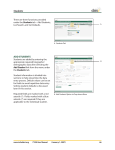
The “Administration” tab
provides another menu.
Instructors can access the
following sub-menus.
1) Allows you to view
Given/Unscheduled
days.
2) Allows you to change
the fiscal year to view
class information from
other fiscal years.